USB LINCOLN MKS 2014 User Guide
[x] Cancel search | Manufacturer: LINCOLN, Model Year: 2014, Model line: MKS, Model: LINCOLN MKS 2014Pages: 461, PDF Size: 5.98 MB
Page 370 of 461
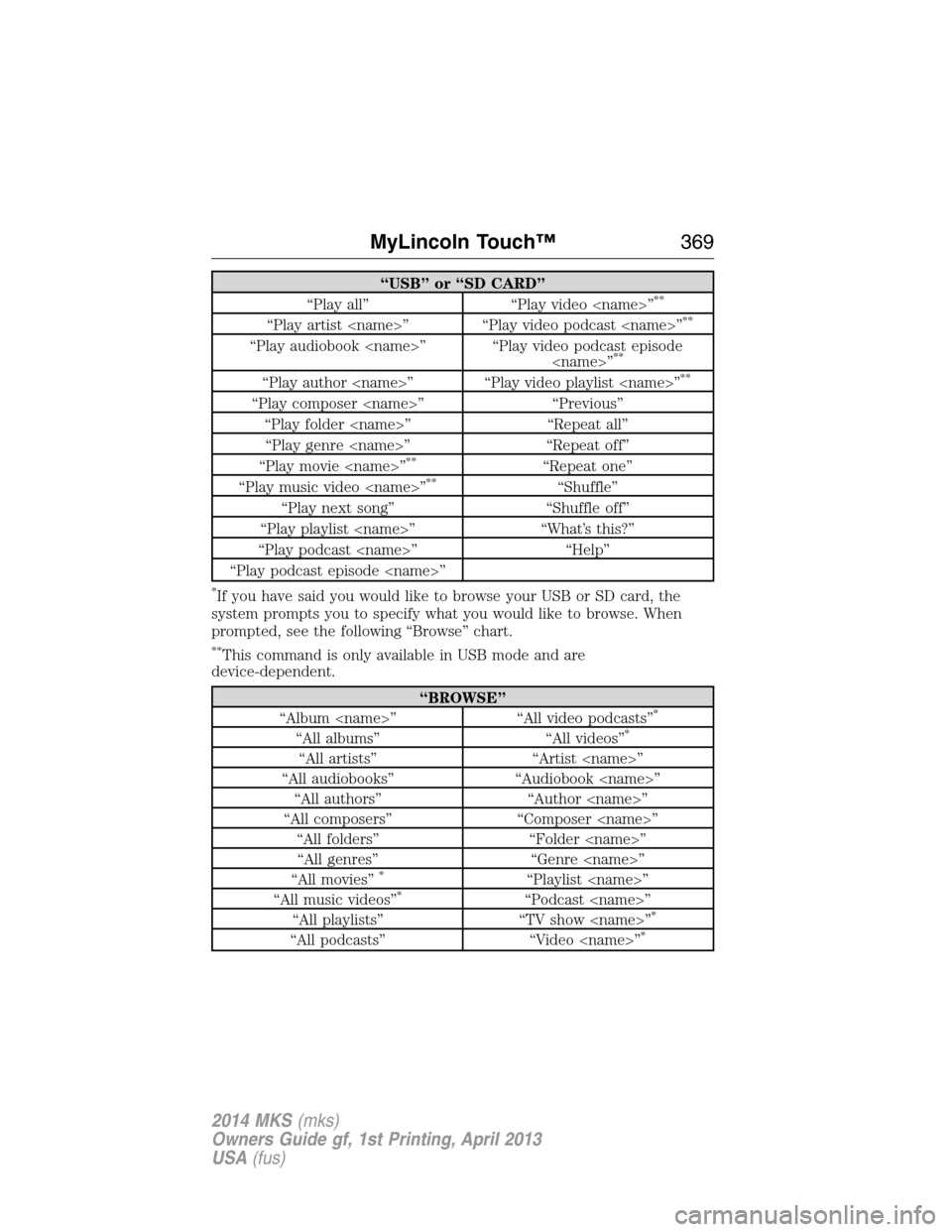
“USB” or “SD CARD”
“Play all” “Play video
“Play artist
“Play audiobook
“Play author
“Play composer
“Play folder
“Play genre
“Play movie
**“Repeat one”
“Play music video
“Play next song” “Shuffle off”
“Play playlist
“Play podcast
“Play podcast episode
*If you have said you would like to browse your USB or SD card, the
system prompts you to specify what you would like to browse. When
prompted, see the following “Browse” chart.
**This command is only available in USB mode and are
device-dependent.
“BROWSE”
“Album
“All albums” “All videos”*
“All artists” “Artist
“All audiobooks” “Audiobook
“All authors” “Author
“All composers” “Composer
“All folders” “Folder
“All genres” “Genre
“All movies”
*“Playlist
“All music videos”*“Podcast
“All playlists” “TV show
“All podcasts” “Video
MyLincoln Touch™369
2014 MKS(mks)
Owners Guide gf, 1st Printing, April 2013
USA(fus)
Page 371 of 461
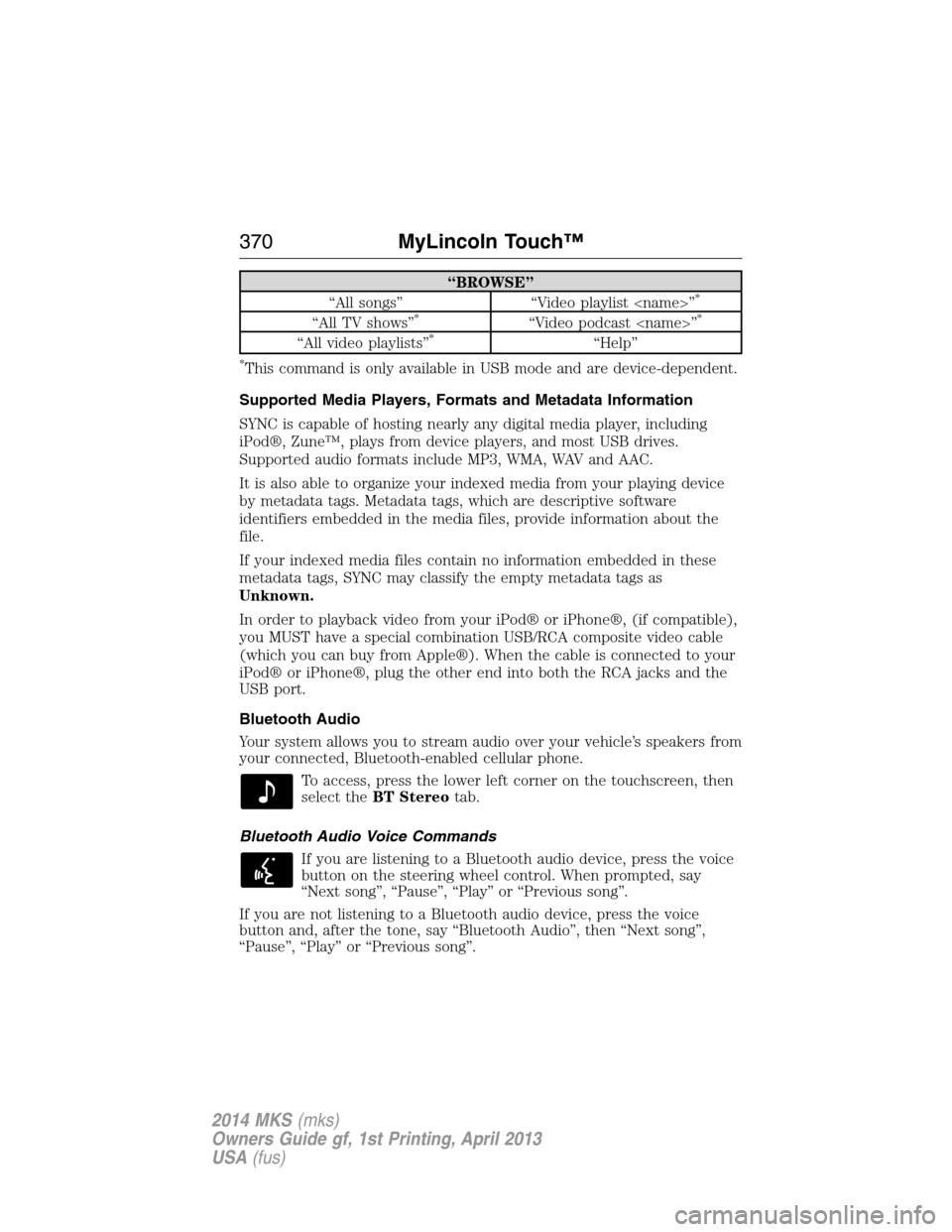
“BROWSE”
“All songs” “Video playlist
“All TV shows”*“Video podcast
“All video playlists”*“Help”
*This command is only available in USB mode and are device-dependent.
Supported Media Players, Formats and Metadata Information
SYNC is capable of hosting nearly any digital media player, including
iPod®, Zune™, plays from device players, and most USB drives.
Supported audio formats include MP3, WMA, WAV and AAC.
It is also able to organize your indexed media from your playing device
by metadata tags. Metadata tags, which are descriptive software
identifiers embedded in the media files, provide information about the
file.
If your indexed media files contain no information embedded in these
metadata tags, SYNC may classify the empty metadata tags as
Unknown.
In order to playback video from your iPod® or iPhone®, (if compatible),
you MUST have a special combination USB/RCA composite video cable
(which you can buy from Apple®). When the cable is connected to your
iPod® or iPhone®, plug the other end into both the RCA jacks and the
USB port.
Bluetooth Audio
Your system allows you to stream audio over your vehicle’s speakers from
your connected, Bluetooth-enabled cellular phone.
To access, press the lower left corner on the touchscreen, then
select theBT Stereotab.
Bluetooth Audio Voice Commands
If you are listening to a Bluetooth audio device, press the voice
button on the steering wheel control. When prompted, say
“Next song”, “Pause”, “Play” or “Previous song”.
If you are not listening to a Bluetooth audio device, press the voice
button and, after the tone, say “Bluetooth Audio”, then “Next song”,
“Pause”, “Play” or “Previous song”.
370MyLincoln Touch™
2014 MKS(mks)
Owners Guide gf, 1st Printing, April 2013
USA(fus)
Page 373 of 461
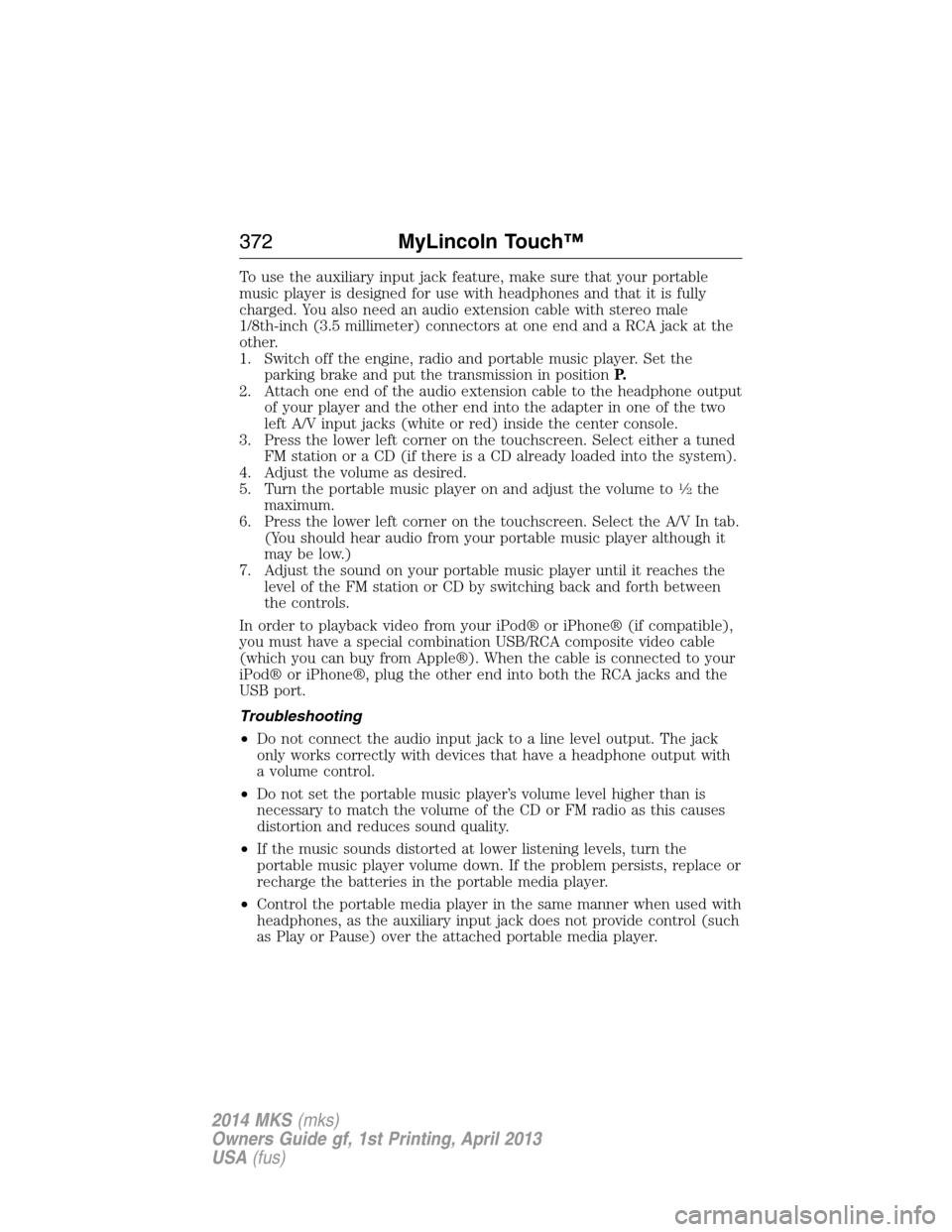
To use the auxiliary input jack feature, make sure that your portable
music player is designed for use with headphones and that it is fully
charged. You also need an audio extension cable with stereo male
1/8th-inch (3.5 millimeter) connectors at one end and a RCA jack at the
other.
1. Switch off the engine, radio and portable music player. Set the
parking brake and put the transmission in positionP.
2. Attach one end of the audio extension cable to the headphone output
of your player and the other end into the adapter in one of the two
left A/V input jacks (white or red) inside the center console.
3. Press the lower left corner on the touchscreen. Select either a tuned
FM station or a CD (if there is a CD already loaded into the system).
4. Adjust the volume as desired.
5. Turn the portable music player on and adjust the volume to
12the
maximum.
6. Press the lower left corner on the touchscreen. Select the A/V In tab.
(You should hear audio from your portable music player although it
may be low.)
7. Adjust the sound on your portable music player until it reaches the
level of the FM station or CD by switching back and forth between
the controls.
In order to playback video from your iPod® or iPhone® (if compatible),
you must have a special combination USB/RCA composite video cable
(which you can buy from Apple®). When the cable is connected to your
iPod® or iPhone®, plug the other end into both the RCA jacks and the
USB port.
Troubleshooting
•Do not connect the audio input jack to a line level output. The jack
only works correctly with devices that have a headphone output with
a volume control.
•Do not set the portable music player’s volume level higher than is
necessary to match the volume of the CD or FM radio as this causes
distortion and reduces sound quality.
•If the music sounds distorted at lower listening levels, turn the
portable music player volume down. If the problem persists, replace or
recharge the batteries in the portable media player.
•Control the portable media player in the same manner when used with
headphones, as the auxiliary input jack does not provide control (such
as Play or Pause) over the attached portable media player.
372MyLincoln Touch™
2014 MKS(mks)
Owners Guide gf, 1st Printing, April 2013
USA(fus)
Page 378 of 461
3. Choose from the following:
•Listen(speaker icon)
•Dial
•Send Text
•Vi e w
•Delete.
Composing a Text Message
Note:This is a speed-dependent feature. It is unavailable when your
vehicle is traveling at speeds over 3 mph (5 km/h).
Note:Downloading and sending text messages using Bluetooth are
phone-dependent features.
1. Touch the top left corner of the display to access thePhonemenu.
2. TouchMessaging>Send Text.
3. Enter a phone number or choose from your phone book.
4. You can select from the following options:
•Sendwhich sends the message as it is.
•Edit Textallows you to customize the pre-defined message or
create a message on your own.
You can then preview the message, verify the recipient as well as update
the message list, and send it to a connected device (such as a USB drive).
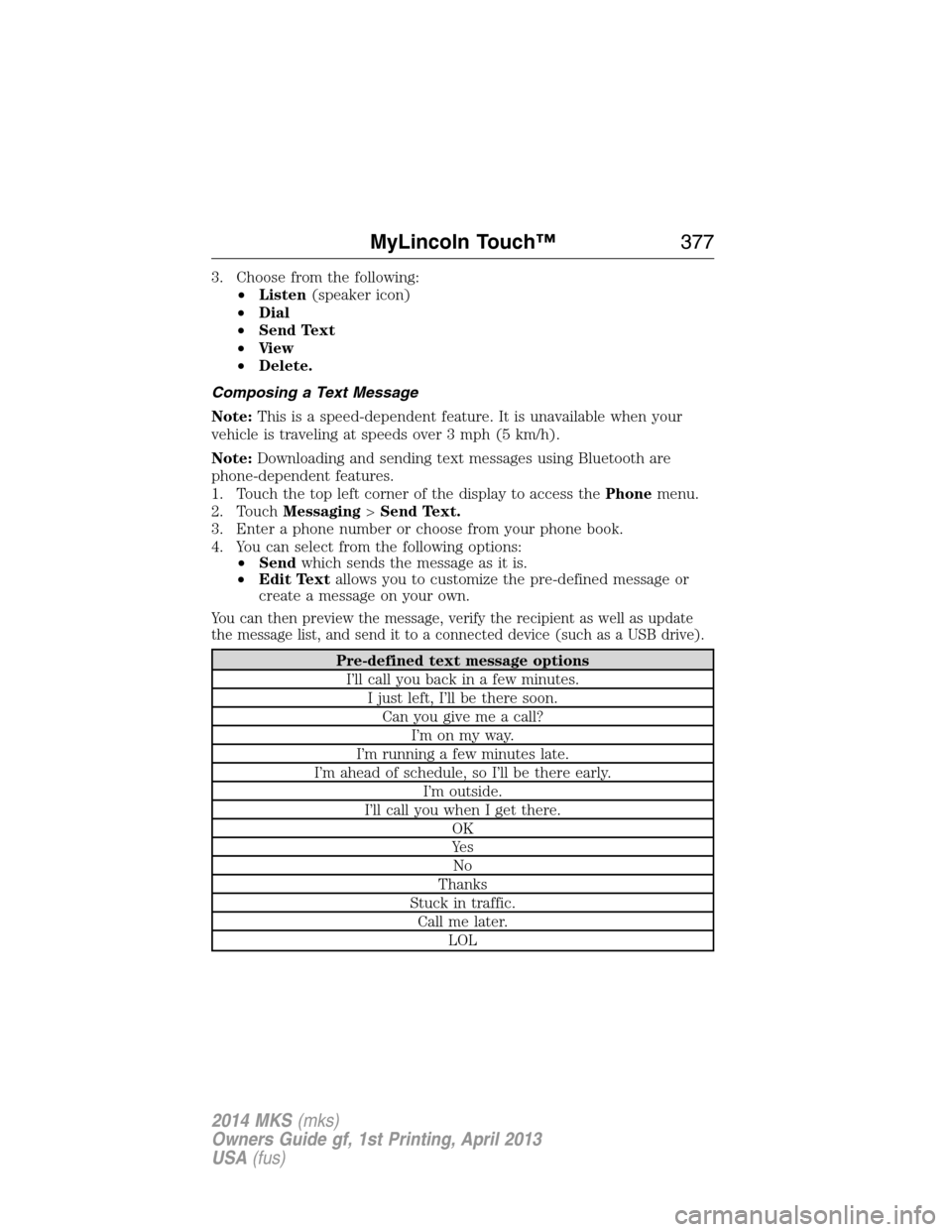
Pre-defined text message options
I’ll call you back in a few minutes.
I just left, I’ll be there soon.
Can you give me a call?
I’m on my way.
I’m running a few minutes late.
I’m ahead of schedule, so I’ll be there early.
I’m outside.
I’ll call you when I get there.
OK
Ye s
No
Thanks
Stuck in traffic.
Call me later.
LOL
MyLincoln Touch™377
2014 MKS(mks)
Owners Guide gf, 1st Printing, April 2013
USA(fus)
Page 394 of 461
Clock
Note:You cannot manually set the date. Your vehicle’s GPS does this for
you.
Note:If the battery has been disconnected, your vehicle needs to
acquire a GPS signal to update the clock. Once your vehicle acquires the
signal, it may take a few minutes for the update to display the correct
time.
1. Press theSettings icon >Clock.
2. Press+andto adjust the time.
From this screen, you can also make other adjustments, such as 12– or
24–hour mode, activate GPS time synchronization and have the system
automatically update for new time zones.
You can also turn the outside air temperature display on and off. It
appears at the top center of the touchscreen, next to the time and date.
The system automatically saves any updates you make to the settings.
Display
You can adjust the touchscreen display through the touchscreen or by
pressing the voice button on your steering wheel controls and when
prompted, say, “Display settings”.
Press the Settings icon >Display,then select from the
following:
Brightnessallows you to make the screen display brighter or dimmer.
Modeallows you to set the screen to a certain brightness or have the
system automatically change based on the outside light level, or turn the
display off.
•If you selectAUTOorNIGHT,you have the options of turning the
display’s Auto Dim feature on or off and changing the Auto Dim
Manual Offset feature.
Edit Wallpaper
•You can have your touchscreen display the default photo or upload
your own.
Uploading Photos for Your Home Screen Wallpaper
Note:You cannot load photos directly from your camera. You must
access the photos either from your USB mass storage device or from an
SD card.
Note:
Photographs with extremely large dimensions (such as 2048 x 1536)
may not be compatible and appear as a blank (black) image on the display.
MyLincoln Touch™393
2014 MKS(mks)
Owners Guide gf, 1st Printing, April 2013
USA(fus)
Page 402 of 461
Wireless & Internet
Your system has a Wi-Fi feature that creates a wireless network within
your vehicle, thereby allowing other devices (such as personal computers
or phones) in your vehicle to speak to each other, share files or play
games. Using this Wi-Fi feature, everyone in your vehicle can also gain
access the internet if you have a USB mobile broadband connection
inside your vehicle, your phone supports personal area networking and if
you park outside a wireless hotspot.
Press the Settings icon >Settings>Wireless & Internet,
then select from the following:
Wireless & Internet
Wi-Fi Settings Wi-Fi Network (Client) Modeturns the
Wi-Fi feature on and off in your vehicle. Make
sure you turn it on for connectivity purposes.
Choose a Wireless Networkallows you to
use a previously stored wireless network. You
can categorize by alphabetical listing, priority
and signal strength. You can also choose to
search for a network, connect to a network,
disconnect from a network, receive more
information, prioritize a network or delete a
network.
Gateway (Access Point) Modemakes
SYNC an access point for a phone or a
computer when turned on. This forms the
local area network within your vehicle for
things, such as game playing, file transfer and
internet browsing. Press?for more
information.
Gateway (Access Point) Settingsallows
you to view and change settings for using
SYNC as the internet gateway.
Gateway (Access Point) Device List
allows you to view recent connections to your
Wi-Fi system.
MyLincoln Touch™401
2014 MKS(mks)
Owners Guide gf, 1st Printing, April 2013
USA(fus)
Page 403 of 461
Wireless & Internet
USB Mobile
BroadbandInstead of using Wi-Fi, your system can also
use a USB mobile broadband connection to
access the internet. (You must turn on your
mobile broadband device on your personal
computer before connecting it to the system.)
This screen allows you to set up what is your
typical area for your USB mobile broadband
connection. (USB mobile broadband settings
may not display if the device is already on.)
You can select the following: Country, Carrier,
Phone Number, User Name and Password.
Bluetooth SettingsShows you the currently paired devices as
well as giving you your typical Bluetooth
options to connect, disconnect, set as favorite,
delete and add device. Bluetooth is a
registered trademark of the Bluetooth SIG.
Prioritize
Connection MethodsChoose your connection methods and change
them as needed. You can select to Change
Order and have the system either always
attempt to connect using a USB mobile
broadband or using Wi-Fi.
The Wi-Fi CERTIFIED Logo is a
certification mark of the Wi-Fi Alliance.
402MyLincoln Touch™
2014 MKS(mks)
Owners Guide gf, 1st Printing, April 2013
USA(fus)
Page 455 of 461
911 Assist™ ..............................388
A
ABS (see Brakes) .....................177
Accessing and using your
USB port ....................................366
Accessing your calendar ..........388
Accessory delay ..........................95
Active Park Assist .....................184
Adaptive Cruise Control ...........195
Adding (pairing) a phone ........374
Airbag supplemental restraint
system ..........................................46
and child safety seats ..............47
description ................................46
disposal ......................................56
driver airbag ..............................46
passenger airbag .......................46
side airbag ...........................46, 51
Air cleaner filter .......280–281, 328
Air filter, cabin ..........................126
All Wheel Drive (AWD),
driving off road .........................170
Ambient mood/lighting .............395
AM/FM .......................................353
Antifreeze
(see Engine coolant) ................267
Anti-lock brake system
(see Brakes) ..............................177
Anti-theft system ..................77, 79
arming the system ..............77, 79
disarming a triggered system ..79
Audio system
Single CD ................................338
Audio system (see Radio) .......338Automatic transmission
driving an automatic
overdrive .................................165
fluid, adding ............................272
fluid, checking ........................272
fluid, refill capacities ..............324
fluid, specification ..................324
Selectshift (SST) ....................166
Auxiliary Input Jack .................362
Auxiliary powerpoint ................145
A/V inputs ..........................339, 371
B
Battery .......................................278
acid, treating emergencies .....278
jumping a disabled battery ....242
maintenance-free ....................278
replacement, specifications ...328
servicing ..................................278
Blind Spot Information
System .......................................210
Booster seats ...............................22
Brakes ........................................177
anti-lock ...................................177
anti-lock brake system (ABS)
warning light ...........................177
brake warning light ................177
fluid, checking and adding ....277
fluid, refill capacities ..............324
fluid, specifications .................324
lubricant specifications ..........324
parking ....................................178
shift interlock ..........................168
trailer .......................................231
C
Capacities for refilling fluids ....324
CD ..............................................338
454Index
2014 MKS(mks)
Owners Guide gf, 1st Printing, April 2013
USA(fus)
Page 461 of 461
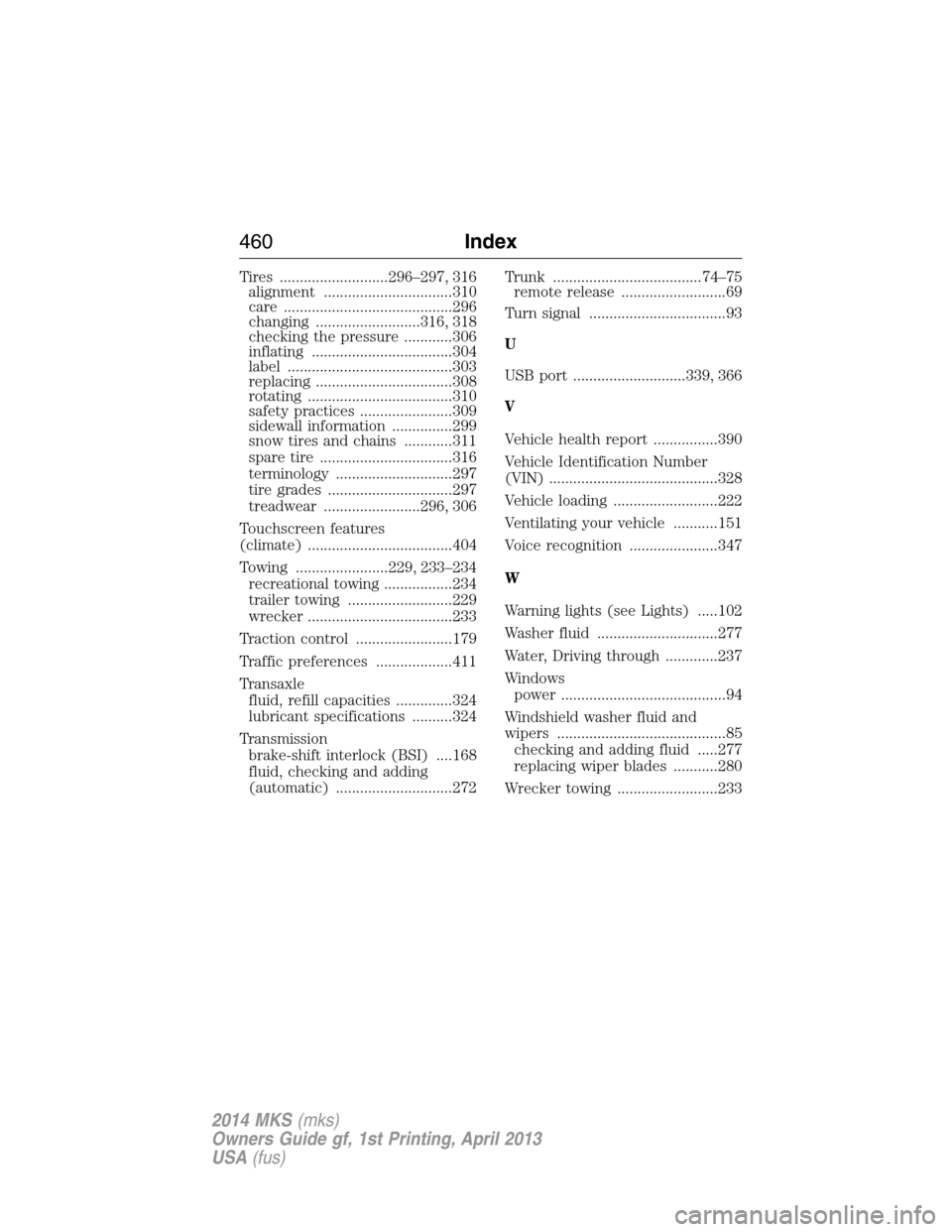
Tires ...........................296–297, 316
alignment ................................310
care ..........................................296
changing ..........................316, 318
checking the pressure ............306
inflating ...................................304
label .........................................303
replacing ..................................308
rotating ....................................310
safety practices .......................309
sidewall information ...............299
snow tires and chains ............311
spare tire .................................316
terminology .............................297
tire grades ...............................297
treadwear ........................296, 306
Touchscreen features
(climate) ....................................404
Towing .......................229, 233–234
recreational towing .................234
trailer towing ..........................229
wrecker ....................................233
Traction control ........................179
Traffic preferences ...................411
Transaxle
fluid, refill capacities ..............324
lubricant specifications ..........324
Transmission
brake-shift interlock (BSI) ....168
fluid, checking and adding
(automatic) .............................272Trunk .....................................74–75
remote release ..........................69
Turn signal ..................................93
U
USB port ............................339, 366
V
Vehicle health report ................390
Vehicle Identification Number
(VIN) ..........................................328
Vehicle loading ..........................222
Ventilating your vehicle ...........151
Voice recognition ......................347
W
Warning lights (see Lights) .....102
Washer fluid ..............................277
Water, Driving through .............237
Windows
power .........................................94
Windshield washer fluid and
wipers ..........................................85
checking and adding fluid .....277
replacing wiper blades ...........280
Wrecker towing .........................233
460Index
2014 MKS(mks)
Owners Guide gf, 1st Printing, April 2013
USA(fus)