USB port LINCOLN MKS 2015 User Guide
[x] Cancel search | Manufacturer: LINCOLN, Model Year: 2015, Model line: MKS, Model: LINCOLN MKS 2015Pages: 424, PDF Size: 3.96 MB
Page 346 of 424
WARNINGS
Store the portable music player in a
secure location, such as the center
console or the glove box, when your
vehicle is moving. Hard objects may become
projectiles in a crash or sudden stop, which
may increase the risk of serious injury. The
audio extension cable must be long enough
to allow the portable music player to be
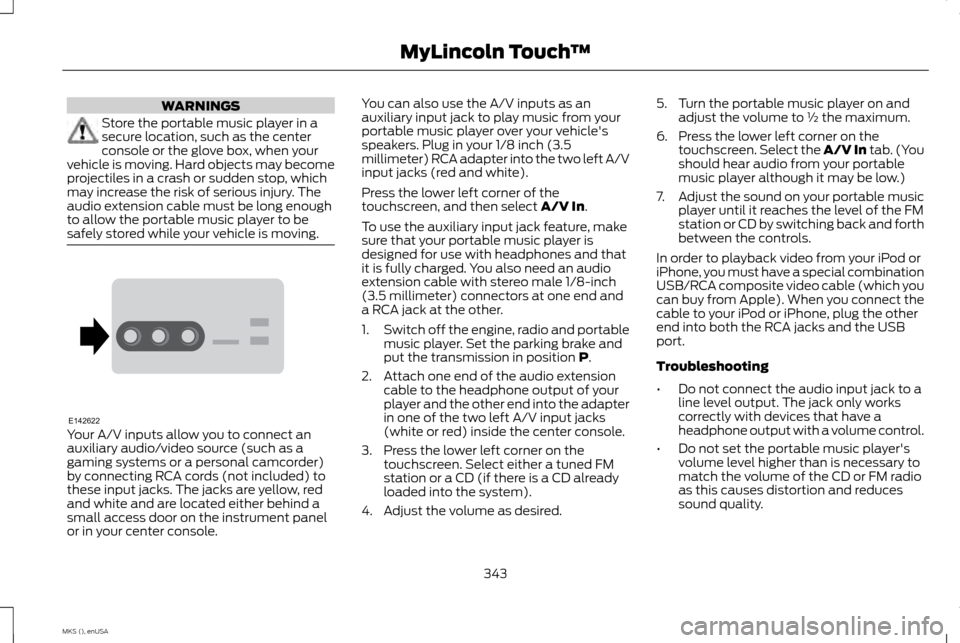
safely stored while your vehicle is moving. Your A/V inputs allow you to connect an
auxiliary audio/video source (such as a
gaming systems or a personal camcorder)
by connecting RCA cords (not included) to
these input jacks. The jacks are yellow, red
and white and are located either behind a
small access door on the instrument panel
or in your center console. You can also use the A/V inputs as an
auxiliary input jack to play music from your
portable music player over your vehicle's
speakers. Plug in your 1/8 inch (3.5
millimeter) RCA adapter into the two left A/V
input jacks (red and white).
Press the lower left corner of the
touchscreen, and then select A/V In.
To use the auxiliary input jack feature, make
sure that your portable music player is
designed for use with headphones and that
it is fully charged. You also need an audio
extension cable with stereo male 1/8-inch
(3.5 millimeter) connectors at one end and
a RCA jack at the other.
1. Switch off the engine, radio and portable
music player. Set the parking brake and
put the transmission in position
P.
2. Attach one end of the audio extension cable to the headphone output of your
player and the other end into the adapter
in one of the two left A/V input jacks
(white or red) inside the center console.
3. Press the lower left corner on the touchscreen. Select either a tuned FM
station or a CD (if there is a CD already
loaded into the system).
4. Adjust the volume as desired. 5. Turn the portable music player on and
adjust the volume to ½ the maximum.
6. Press the lower left corner on the touchscreen. Select the A/V In tab. (You
should hear audio from your portable
music player although it may be low.)
7. Adjust the sound on your portable music
player until it reaches the level of the FM
station or CD by switching back and forth
between the controls.
In order to playback video from your iPod or
iPhone, you must have a special combination
USB/RCA composite video cable (which you
can buy from Apple). When you connect the
cable to your iPod or iPhone, plug the other
end into both the RCA jacks and the USB
port.
Troubleshooting
• Do not connect the audio input jack to a
line level output. The jack only works
correctly with devices that have a
headphone output with a volume control.
• Do not set the portable music player's
volume level higher than is necessary to
match the volume of the CD or FM radio
as this causes distortion and reduces
sound quality.
343
MKS (), enUSA MyLincoln Touch
™E142622
Page 418 of 424
Drive Control.......................................................185
LINCOLN DRIVE CONTROL................................. 185
Driver Alert.............................................................171 Using Driver Alert....................................................... 171
Driver and Passenger Airbags.........................37 Children and Airbags................................................ 38
Proper Driver and Front Passenger Seating Adjustment.............................................................. 37
Driving Aids
...........................................................171
Driving Hints.......................................................204
Driving Through Water...................................204
DRL See: Daytime Running Lamps............................... 73
E
Economical Driving
.........................................204
Emission Control System...............................136 On-Board Diagnostics (OBD-II)......................... 137
Readiness for Inspection/Maintenance (I/M) Testing..................................................................... 138
End User License Agreement.......................375 SYNC End User License Agreement
(EULA).................................................................... 375
Engine Block Heater.........................................129 Using the Engine Block Heater........................... 130Engine Coolant Check
....................................240
Adding Engine Coolant.......................................... 241
Checking the Engine Coolant.............................. 241
Recycled Engine Coolant..................................... 242
Severe Climates....................................................... 242
What You Should Know About Fail-Safe Cooling................................................................... 242
Engine Immobilizer See: Passive Anti-Theft System.......................... 63
Engine Oil Check...............................................239 Adding Engine Oil................................................... 240
Engine Oil Dipstick...........................................239
Engine Specifications.....................................290 Drivebelt Routing.................................................... 290
Entertainment...................................................325 A/V Inputs.................................................................. 342
AM/FM Radio............................................................ 327
Bluetooth Audio...................................................... 342
Browsing Device Content..................................... 326
CD........................................................................\
.......... 337
SD Card Slot and USB Port................................. 338
Sirius® Satellite Radio (If Activated)..............333
Supported Media Players, Formats and Metadata Information...................................... 342Essential Towing Checks..............................200
Before Towing a Trailer.......................................... 201
Hitches....................................................................... 200
Launching or Retrieving a Boat or Personal Watercraft (PWC).............................................. 201
Safety Chains........................................................... 200
Trailer Brakes........................................................... 200
Trailer Lamps........................................................... 200
When Towing a Trailer........................................... 201
Event Data Recording See: Data Recording................................................... 9
Export Unique Options......................................13
Extended Service Plan (ESP)
.....................390
SERVICE PLANS (CANADA ONLY).................. 391
SERVICE PLANS (U.S. Only).............................. 390
Exterior Mirrors.....................................................79 Auto-Dimming Feature........................................... 79
Blind Spot Monitor................................................... 80
Fold-Away Exterior Mirrors..................................... 79
Heated Exterior Mirrors............................................ 79
Integrated Blind Spot Mirrors................................ 79
Memory Mirrors.......................................................... 79
Power Exterior Mirrors.............................................. 79
F
Fastening the Safety Belts
..............................28
Safety Belt Extension Assembly......................... 30
Safety Belt Locking Modes.................................... 29
Using Safety Belts During Pregnancy................28
Floor Mats...........................................................205
415
MKS (), enUSA Index