climate control LINCOLN MKS 2015 User Guide
[x] Cancel search | Manufacturer: LINCOLN, Model Year: 2015, Model line: MKS, Model: LINCOLN MKS 2015Pages: 424, PDF Size: 3.96 MB
Page 206 of 424
Recreational Towing
Note:
Put your climate control system in
recirculated air mode to prevent exhaust
fumes from entering the vehicle. See Climate
Control (page 105).
Follow these guidelines if you have a need
for recreational (RV) towing. An example of
recreational towing would be towing your
vehicle behind a motorhome or truck. These
guidelines are to make sure you do not
damage your vehicle after it is hooked-up to
the recreational vehicle or tow dolly.
You can tow your front-wheel drive vehicle
with all four wheels on the ground or with the
front wheels off the ground by using a tow
dolly. If you are using a tow dolly, follow the
instructions specified by the equipment
provider. If you are towing with all four wheels
on the ground, see the following instructions.
You can tow your all-wheel drive vehicle with
all four wheels on the ground or with all four
wheels off the ground using a vehicle
transport trailer. Do not tow your all-wheel
drive vehicle with the front wheels off the
ground (by using a tow dolly) and the rear wheels on the ground. This causes damage
to your all-wheel drive system. If you are
using a vehicle transport trailer, follow the
instruction specified by the equipment
provider. If you are towing with all four wheels
on the ground, see the following instructions.
If you tow your vehicle with all four wheels
on the ground:
•
Tow only in the forward direction.
• Release the parking brake.
• Place the transmission in neutral (N).
• Do not exceed 65 mph (105 km/h).
• Start the engine and allow it to run for
five minutes at the beginning of each day
and every six hours thereafter. With the
engine running and your foot on the brake,
shift into drive (D) and then into reverse
(R) before shifting back into neutral (N).
203
MKS (), enUSA Towing
Page 223 of 424
Protected components
Fuse amp rating
Fuse or relay number
Not used.
-
17
Front blower motor relay.
40A 2
18
Starter relay.
30A 2
19
Storage bin power point.
20A 2
A
20
Rear heated seat module.
20A 2
21
Massage control seats relay.
-
22
Driver power seat.
30A 2
23
Memory module.
Not used.
-
24
Not used.
-
25
Heated rear window relay.
40A 2
26
Cigar lighter.
20A 2
27
Climate controlled seats.
30A 2
28
Electric fan relay 1.
40A 2
29
Electric fan relay 2.
40A 2
30
220
MKS (), enUSA Fuses
Page 234 of 424
Protected components
Fuse amp rating
Fuse or relay number
Heated steering wheel.
10A
36
Not used (spare).
10A
37
Moonroof module and switch.
10A
38
High beams.
15A
39
Rear park lamps.
10A
40
Occupant classification sensor.
7.5A
41
Restraint control module.
Not used (spare).
5A
42
Not used (spare).
10A
43
Not used (spare).
10A
44
Not used (spare).
5A
45
Climate control module.
10A
46
Fog lamp relay.
15A
47
Front passenger power window.
30A Circuit breaker
48
Rear power windows.
231
MKS (), enUSA Fuses
Page 253 of 424
Always dispose of automotive batteries
in a responsible manner. Follow your
local authorized standards for disposal.
Call your local authorized recycling
center to find out more about recycling
automotive batteries.
Battery Management System (If
Equipped)
The battery management system (BMS)
monitors battery conditions and takes
actions to extend battery life. If excessive
battery drain is detected, the system may
temporarily disable certain electrical features
to protect the battery. Those electrical
accessories affected include the rear defrost,
heated/cooled seats, climate control fan,
heated steering wheel, audio and navigation
system. A message may be shown in the
information displays to alert the driver that
battery protection actions are active. These
messages are only for notification that an
action is taking place, and not intended to
indicate an electrical problem or that the
battery requires replacement.
Electrical accessory installation
To ensure proper operation of the Battery
Management System, any electrical devices
that are added to your vehicle should not
have their ground connection made directly
at the negative battery post. A connection at
the negative battery post can cause
inaccurate measurements of the battery
condition and potential incorrect system
operation.
Note:
Electrical or electronic accessories
added to your vehicle by the dealer or the
owner, may adversely affect battery
performance and durability, and may affect
the performance of other electrical systems
in your vehicle.
When a battery replacement is required, the
battery should only be replaced with a
Ford-recommended replacement battery
that matches the electrical requirements of
your vehicle. After battery replacement, or in
some cases after charging the battery with
the external charger, the Battery
Management System requires eight hours of
vehicle sleep time (key off with doors closed)
to relearn the new battery state of charge.
Prior to relearning the state of charge, the
Battery Management System may disable
electrical features (to protect the battery)
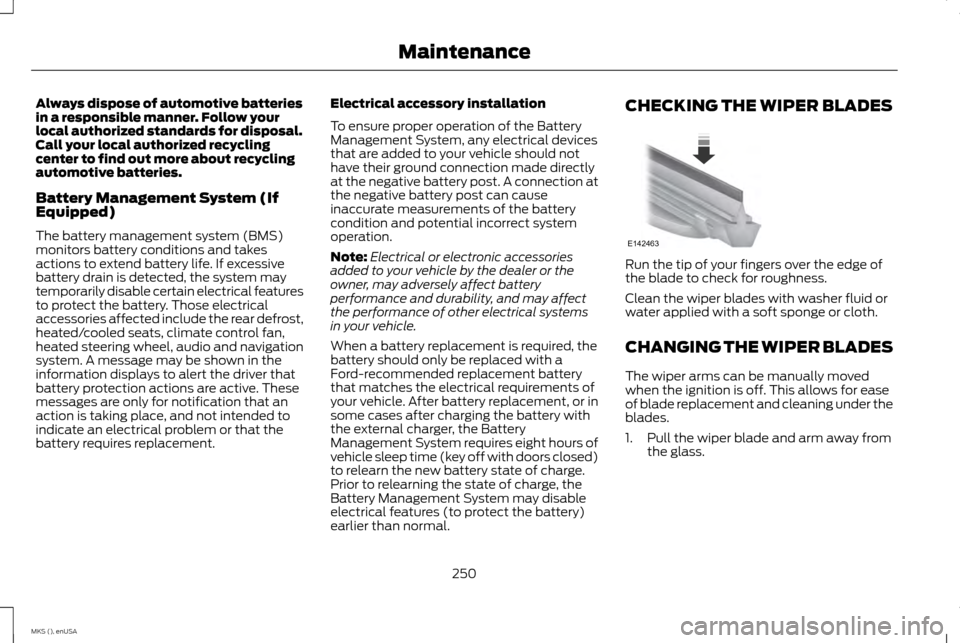
earlier than normal. CHECKING THE WIPER BLADES
Run the tip of your fingers over the edge of
the blade to check for roughness.
Clean the wiper blades with washer fluid or
water applied with a soft sponge or cloth.
CHANGING THE WIPER BLADES
The wiper arms can be manually moved
when the ignition is off. This allows for ease
of blade replacement and cleaning under the
blades.
1. Pull the wiper blade and arm away from
the glass.
250
MKS (), enUSA MaintenanceE142463
Page 265 of 424
•
Clean the wheels weekly using Motorcraft
Wheel and Tire Cleaner. Apply using
manufacturer's instructions.
• Use a sponge to remove heavy deposits
of dirt and brake dust accumulation.
• Rinse thoroughly with a strong stream of
water when you have completed the
cleaning process.
• To remove tar and grease, use Motorcraft
Bug and Tar Remover.
VEHICLE STORAGE
If you plan on storing your vehicle for 30 days
or more, read the following maintenance
recommendations to make sure your vehicle
stays in good operating condition.
We engineer and test all motor vehicles and
their components for reliable, regular driving.
Under various conditions, long-term storage
may lead to degraded engine performance
or failure unless you use specific precautions
to preserve engine components. General
•
Store all vehicles in a dry, ventilated
place.
• Protect from sunlight, if possible.
• If vehicles are stored outside, they require
regular maintenance to protect against
rust and damage.
Body
• Wash your vehicle thoroughly to remove
dirt, grease, oil, tar or mud from exterior
surfaces, rear-wheel housing and the
underside of front fenders.
• Periodically wash your vehicle if it is
stored in exposed locations.
• Touch-up exposed or primed metal to
prevent rust.
• Cover chrome and stainless steel parts
with a thick coat of auto wax to prevent
discoloration. Re-wax as necessary when
you wash your vehicle.
• Lubricate all hood, door and luggage
compartment hinges and latches with a
light grade oil.
• Cover interior trim to prevent fading.
• Keep all rubber parts free from oil and
solvents. Engine
•
Change the engine oil and filter prior to
storage because used engine oil contains
contaminates which may cause engine
damage.
• Start the engine every 15 days for a
minimum of 15 minutes. Run at fast idle
with the climate controls set to defrost
until the engine reaches normal operating
temperature.
• With your foot on the brake, shift through
all the gears while the engine is running.
• We recommend that you change the
engine oil before you use your vehicle
again.
Fuel system
• Fill the fuel tank with high-quality fuel
until the first automatic shutoff of the fuel
pump nozzle.
Cooling system
• Protect against freezing temperatures.
• When removing your vehicle from
storage, check coolant fluid level. Confirm
that there are no cooling system leaks
and that fluid is at the recommended
level.
262
MKS (), enUSA Vehicle Care
Page 267 of 424
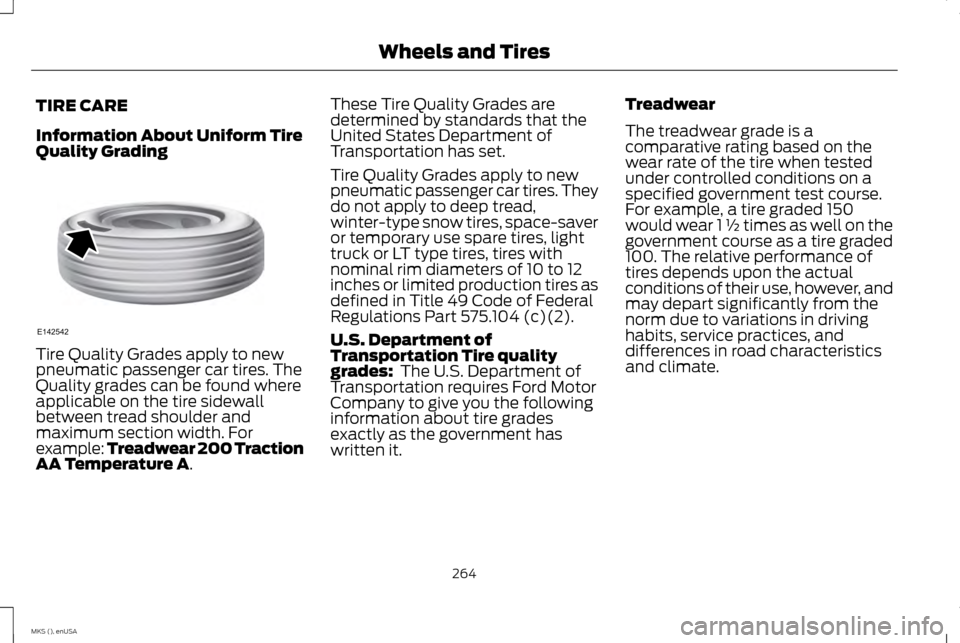
TIRE CARE
Information About Uniform Tire
Quality Grading
Tire Quality Grades apply to new
pneumatic passenger car tires. The
Quality grades can be found where
applicable on the tire sidewall
between tread shoulder and
maximum section width. For
example: Treadwear 200 Traction
AA Temperature A. These Tire Quality Grades are
determined by standards that the
United States Department of
Transportation has set.
Tire Quality Grades apply to new
pneumatic passenger car tires. They
do not apply to deep tread,
winter-type snow tires, space-saver
or temporary use spare tires, light
truck or LT type tires, tires with
nominal rim diameters of 10 to 12
inches or limited production tires as
defined in Title 49 Code of Federal
Regulations Part 575.104 (c)(2).
U.S. Department of
Transportation Tire quality
grades:
The U.S. Department of
Transportation requires Ford Motor
Company to give you the following
information about tire grades
exactly as the government has
written it. Treadwear
The treadwear grade is a
comparative rating based on the
wear rate of the tire when tested
under controlled conditions on a
specified government test course.
For example, a tire graded 150
would wear 1 ½ times as well on the
government course as a tire graded
100. The relative performance of
tires depends upon the actual
conditions of their use, however, and
may depart significantly from the
norm due to variations in driving
habits, service practices, and
differences in road characteristics
and climate.
264
MKS (), enUSA Wheels and TiresE142542
Page 307 of 424
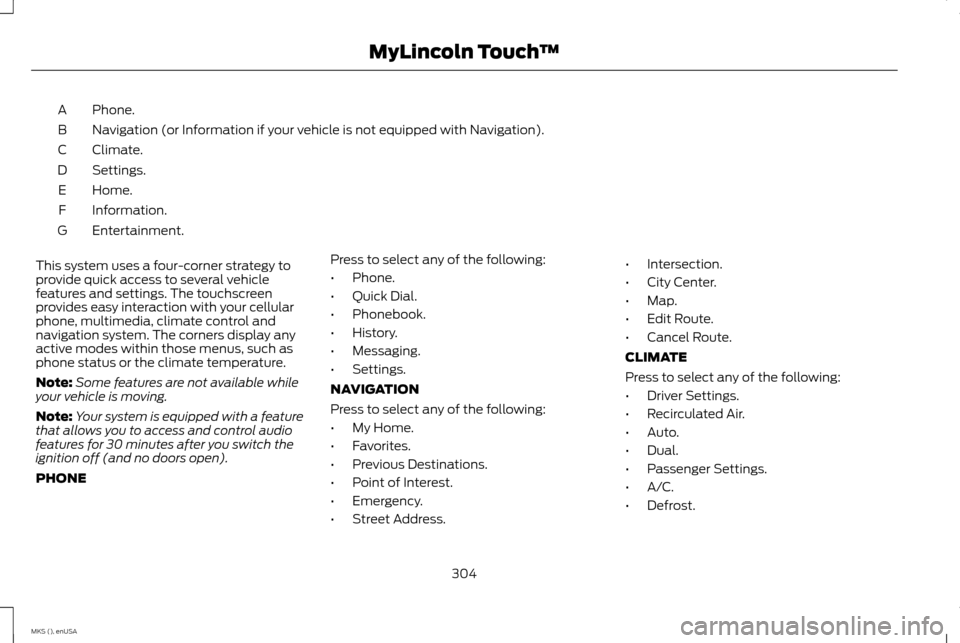
Phone.
A
Navigation (or Information if your vehicle is not equipped with Navigation).
B
Climate.
C
Settings.
D
Home.
E
Information.
F
Entertainment.
G
This system uses a four-corner strategy to
provide quick access to several vehicle
features and settings. The touchscreen
provides easy interaction with your cellular
phone, multimedia, climate control and
navigation system. The corners display any
active modes within those menus, such as
phone status or the climate temperature.
Note: Some features are not available while
your vehicle is moving.
Note: Your system is equipped with a feature
that allows you to access and control audio
features for 30 minutes after you switch the
ignition off (and no doors open).
PHONE Press to select any of the following:
•
Phone.
• Quick Dial.
• Phonebook.
• History.
• Messaging.
• Settings.
NAVIGATION
Press to select any of the following:
• My Home.
• Favorites.
• Previous Destinations.
• Point of Interest.
• Emergency.
• Street Address. •
Intersection.
• City Center.
• Map.
• Edit Route.
• Cancel Route.
CLIMATE
Press to select any of the following:
• Driver Settings.
• Recirculated Air.
• Auto.
• Dual.
• Passenger Settings.
• A/C.
• Defrost.
304
MKS (), enUSA MyLincoln Touch
™
Page 308 of 424
SETTINGS
Press to select any of the following:
• Clock.
• Display.
• Sound.
• Vehicle.
• Settings.
• Help. HOME
Press to access your home screen.
Depending on your vehicle
’s option
package and software, your screens may vary
in appearance from the descriptions in this
section. Your features may also be limited
depending on your market. Check with an
authorized dealer for availability. INFORMATION
Press to select any of the following:
• Services.
• Travel Link.
• Alerts. •
Calendar.
• Apps.
ENTERTAINMENT
Press to select any of the following:
• AM.
• FM.
• SIRIUS.
• CD.
• USB.
• BT Stereo.
• SD Card.
• A/V In.
Using the Touch-Sensitive Controls
on Your System
To switch a feature on and off, just touch the
graphic with your finger. To get the best
performance from the touch-sensitive
controls:
• Do not press hard on the controls. They
are sensitive to light touch.
• Use your bare finger to touch the center
of a touch-control graphic. Touching
off-center of the graphic may affect
operation of a nearby control.
• Make sure your hands are clean and dry. •
Since the touchscreen operates based
on the touch of a finger, you may have
trouble using it if you are wearing gloves.
• Keep metal and other conductive
material away from the surface of the
touchscreen as this may cause electronic
interference (for example, inadvertently
switching on a feature other than the one
you meant to switch on).
Depending on your vehicle and option
package, you may also have these controls
on your bezel:
• Power: Switch the media or climate
features off and on.
• VOL:
Control the volume of playing
media.
• Seek
and Tune buttons: Use as you
normally would in media modes.
• Eject:
Eject a CD from the entertainment
system.
• Climate Control:
Control the
temperature, fan speed or settings of the
climate control system.
Using Your Steering Wheel Controls
You can use your steering wheel controls to
interact with the touchscreen system.
305
MKS (), enUSA MyLincoln Touch
™E142607 E142613 E142608
Page 314 of 424
•
Speak naturally, without long pauses
between words.
• At any time, you can interrupt the system
while it is speaking by pressing the voice
icon.
Accessing a List of Available Commands
• If you use the touchscreen, press the
Settings icon > Help > Voice Command
List.
• If you use the steering wheel control,
press the voice icon. After the tone, speak
your command clearly. Available voice commands
"Audio list of commands"
"Bluetooth audio list of commands" "Browse list of commands""CD list of commands"
"Climate control list of commands" "List of commands"
"Navigation list of commands" *
"Phone list of commands" Available voice commands
"Radio list of commands"
"SD card list of commands"
"Sirius satellite list of commands" **
"Travel link list of commands" *
"USB list of commands"
"Voice instructions list of commands" "Voice settings list of commands" "Help"
* This command is only available when your
vehicle is equipped with the navigation
system, and the navigation system SD card
is in the card slot.
** This command is only available when you
have an active SIRIUS satellite radio
subscription. Voice Settings
Voice settings allow you to customize the
level of system interaction, help and
feedback. The system defaults to standard
interaction that uses candidate lists and
confirmation prompts as these provide the
highest level of guidance and feedback.
•
Interaction Mode:
Novice mode
provides detailed interaction and
guidance while the advanced mode has
less audible interaction and more tone
prompts.
• Confirmation Prompts:
The system
uses these short questions to confirm
your voice request. If switched off, the
system simply makes a best guess as to
what you requested. The system may still
occasionally ask you to confirm settings.
• Phone and Media Candidate Lists:
Candidate lists are lists of possible results
from your voice commands. The system
creates these lists when it has the same
confidence level of several options based
on your voice command.
To access these settings using the
touchscreen:
1. Press the Settings icon > Settings > then
Voice Control
.
2. Select from the following:
311
MKS (), enUSA MyLincoln Touch
™
Page 363 of 424
The system allows you to check your vehicle
’s
overall health in the form of a diagnostic
report card. The Vehicle Health Report
contains valuable information, such as:
• Vehicle diagnostic information
• Scheduled maintenance
• Open recalls and Field Service Actions
• Items noted during vehicle inspections by
your authorized dealer that still need
servicing.
Making a Report If you want to run a report by using
the touchscreen, touch Apps >
Vehicle Health Report. To run a report by voice command,
press the voice button on the
steering wheel and, when
prompted, say "Vehicle health report".
Vehicle Health Report Privacy Notice
When you create a Vehicle Health Report,
Ford Motor Company may collect your
cellular phone number (to process your
report request) and diagnostic information
about your vehicle. Certain versions or
updates to Vehicle Health Report may also
collect more vehicle information. Ford may
use your vehicle information it collects for
any purpose. If you do not want to disclose
your cellular phone number or vehicle information, do not run the feature or set up
your Vehicle Health Report profile at
www.SYNCMyRide.com. See
www.SYNCMyRide.com (Vehicle Health
Report Terms and Conditions, and Privacy
Statement) for more information.
CLIMATE
Touch the lower right corner on the
touchscreen to access your climate control
features. Depending on your vehicle line and
option package, your climate screen may look
different from this screen.
Note:
You can switch temperature units
between Fahrenheit and Celsius. See Settings
(page
313).
360
MKS (), enUSA MyLincoln Touch
™E142608 E142599