air condition LINCOLN MKS 2015 Owner's Manual
[x] Cancel search | Manufacturer: LINCOLN, Model Year: 2015, Model line: MKS, Model: LINCOLN MKS 2015Pages: 424, PDF Size: 3.96 MB
Page 250 of 424
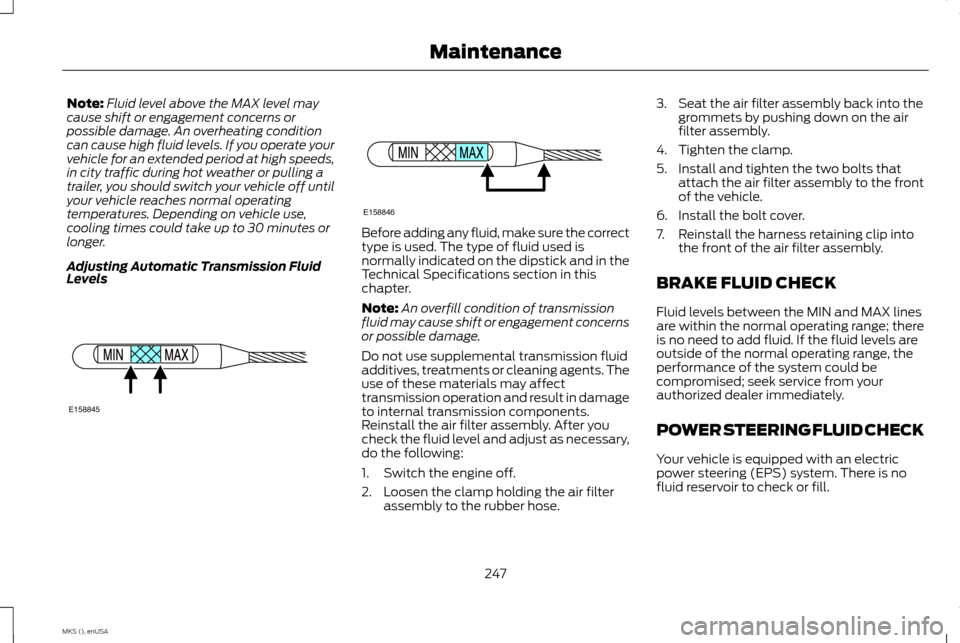
Note:
Fluid level above the MAX level may
cause shift or engagement concerns or
possible damage. An overheating condition
can cause high fluid levels. If you operate your
vehicle for an extended period at high speeds,
in city traffic during hot weather or pulling a
trailer, you should switch your vehicle off until
your vehicle reaches normal operating
temperatures. Depending on vehicle use,
cooling times could take up to 30 minutes or
longer.
Adjusting Automatic Transmission Fluid
Levels Before adding any fluid, make sure the correct
type is used. The type of fluid used is
normally indicated on the dipstick and in the
Technical Specifications section in this
chapter.
Note:
An overfill condition of transmission
fluid may cause shift or engagement concerns
or possible damage.
Do not use supplemental transmission fluid
additives, treatments or cleaning agents. The
use of these materials may affect
transmission operation and result in damage
to internal transmission components.
Reinstall the air filter assembly. After you
check the fluid level and adjust as necessary,
do the following:
1. Switch the engine off.
2. Loosen the clamp holding the air filter assembly to the rubber hose. 3. Seat the air filter assembly back into the
grommets by pushing down on the air
filter assembly.
4. Tighten the clamp.
5. Install and tighten the two bolts that attach the air filter assembly to the front
of the vehicle.
6. Install the bolt cover.
7. Reinstall the harness retaining clip into the front of the air filter assembly.
BRAKE FLUID CHECK
Fluid levels between the MIN and MAX lines
are within the normal operating range; there
is no need to add fluid. If the fluid levels are
outside of the normal operating range, the
performance of the system could be
compromised; seek service from your
authorized dealer immediately.
POWER STEERING FLUID CHECK
Your vehicle is equipped with an electric
power steering (EPS) system. There is no
fluid reservoir to check or fill.
247
MKS (), enUSA MaintenanceE158845 E158846
Page 252 of 424
Your vehicle is equipped with a Motorcraft
maintenance-free battery which normally
does not require additional water during its
life of service.
For longer, trouble-free operation, keep the
top of the battery clean and dry. Also, make
certain the battery cables are always tightly
fastened to the battery terminals.
If you see any corrosion on the battery or
terminals, remove the cables from the
terminals and clean with a wire brush. You
can neutralize the acid with a solution of
baking soda and water.
It is recommended that the negative battery
cable terminal be disconnected from the
battery if you plan to store your vehicle for
an extended period of time.
Because your vehicle
’s engine is electronically
controlled by a computer, some control
conditions are maintained by power from the
battery. When the battery is disconnected or
a new battery is installed, the engine must
relearn its idle and fuel trim strategy for
optimum driveability and performance.
Flexible fuel vehicles (FFV) must also relearn
the ethanol content of the fuel for optimum
driveability and performance. To begin this
process: 1.
With your vehicle at a complete stop, set
the parking brake.
2. Put the gearshift in P(Park), turn off all
accessories.
3. Start the engine. Run the engine until it reaches normal operating temperature.
4. Allow the engine to idle for at least one minute.
5. Turn the air conditioning on and allow the
engine to idle for at least one minute. 6.
Release the parking brake. With your foot
on the brake pedal and with the air
conditioning on, put your vehicle in D
(Drive) and allow the engine to idle for at
least one minute.
• If you do not allow the engine to
relearn its idle trim, the idle quality of
your vehicle may be adversely
affected until the idle trim is
eventually relearned.
7. Drive your vehicle to complete the relearning process
•Your vehicle may need to be driven 10
miles (16 kilometers) or more to
relearn the idle and fuel trim strategy
along with the ethanol content for
flexible fuel vehicles.
• For flexible fuel vehicles, if you are
operating on E85, you may experience
poor starts or an inability to start the
engine and driveability problems until
the fuel trim and ethanol content
have been relearned.
If the battery has been disconnected or a new
battery has been installed, the clock and
radio settings must be reset once the battery
is reconnected.
249
MKS (), enUSA Maintenance
Page 255 of 424
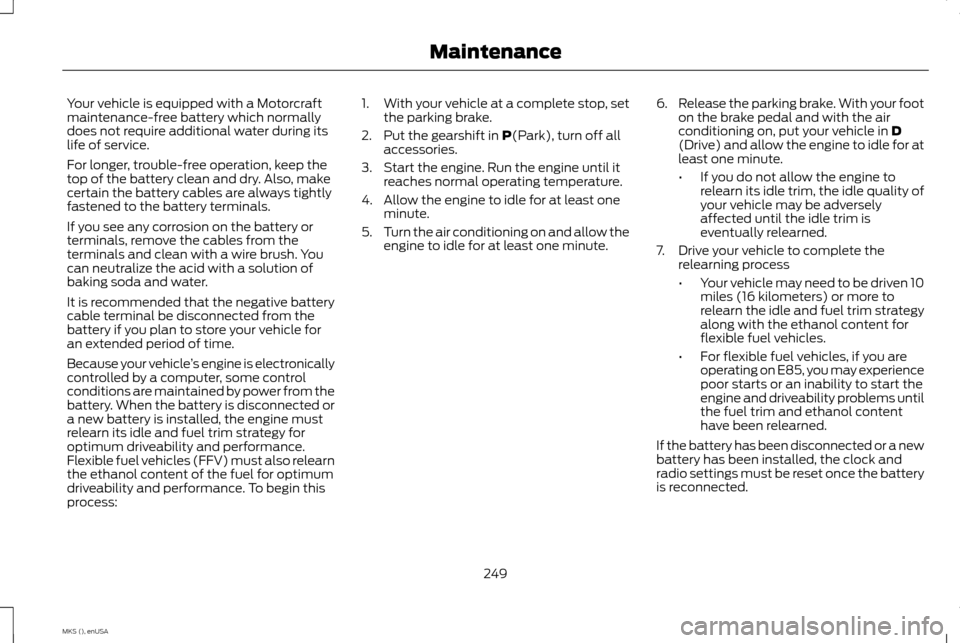
4. There is a distinct cut-off (change from
light to dark) in the left portion of the
beam pattern. Position the top edge of
this cut-off 2 inches (5 centimeters)
below the horizontal reference line. 5. Locate the vertical adjuster on each
headlamp. Use a Phillips #2 screwdriver
to turn the adjuster either clockwise or
counterclockwise to adjust the vertical
aim of the headlamp. The horizontal edge
of the brighter light should touch the
horizontal reference line.
6. Repeat Steps 3 through 7 to adjust the other headlamp.
7. Close the hood and turn off the lamps.
Horizontal Aim Adjustment
Horizontal aim is not required for this vehicle
and is not adjustable.
CHANGING A BULB
Lamp Assembly Condensation
Exterior lamps are vented to accommodate
normal changes in pressure. Condensation
can be a natural by-product of this design.
When moist air enters the lamp assembly
through the vents, there is a possibility that
condensation can occur when the
temperature is cold. When normal condensation occurs, a thin film of mist can
form on the interior of the lens. The thin mist
eventually clears and exits through the vents
during normal operation. Clearing time may
take as long as 48 hours under dry weather
conditions.
Examples of acceptable condensation are:
•
Presence of thin mist (no streaks, drip
marks or droplets).
• Fine mist covers less than 50% of the
lens.
Examples of unacceptable moisture (usually
caused by a lamp water leak) are:
• Water puddle inside the lamp.
• Large water droplets, drip marks or
streaks present on the interior of the lens.
Take your vehicle to a dealer for service if any
of the above conditions of unacceptable
moisture are present.
Replacing HID Headlamp Bulbs
The headlamps on your vehicle use a high
intensity discharge source. These lamps
operate at a high voltage. See an authorized
dealer.
252
MKS (), enUSA MaintenanceE142465 E167359
Page 264 of 424
For cleaning and removing spots and stains
such as dye transfer, use Motorcraft Premium
Leather and Vinyl Cleaner or a commercially
available leather cleaning product for
automotive interiors.
Note:
Test any cleaner or stain remover on an
inconspicuous area.
You should:
• Remove dust and loose dirt with a
vacuum cleaner.
• Clean and treat spills and stains as soon
as possible.
Do not use the following products as these
may damage the leather:
• Oil and petroleum or silicone-based
leather conditioners.
• Household cleaners.
• Alcohol solutions.
• Solvents or cleaners intended specifically
for rubber, vinyl and plastics. Note:
Do not use Motorcraft Premium Leather
and Vinyl Cleaner ZC-56 on Lincoln Black
Label, Presidential or Reserve Leathers
because it can damage those and other
semi-aniline leather seating fabrics. It can also
damage surround microfiber accent surfaces.
To clean Lincoln Black Label, Presidential or
Reserve Leathers, first vacuum the seats to
remove loose dirt. Then wipe the leather with
a clean soft cloth dampened with lukewarm
water and a mild soap. Wiper the leather again
with a slightly damp cloth to remove soap
residue, and dry with a soft cloth. To maintain
the leather's resiliency, it should be cleaned
whenever soiled.
REPAIRING MINOR PAINT
DAMAGE
Authorized dealers have touch-up paint to
match your vehicle ’s color. Your vehicle color
code is printed on a sticker on the front,
left-hand side door jamb. Take your color
code to your authorized dealer to make sure
you get the correct color.
Before repairing minor paint damage, use a
cleaner such as Motorcraft Bug and Tar
Remover to remove particles such as bird
droppings, tree sap, insect deposits, tar spots,
road salt and industrial fallout. Always read the instructions before using
cleaning products.
CLEANING THE ALLOY WHEELS
Note:
Do not apply a cleaning chemical to
warm or hot wheel rims and covers.
Note: Some automatic car washes may cause
damage to the finish on your wheel rims and
covers.
Note: Industrial-strength or heavy-duty
cleaners in combination with brush agitation
to remove brake dust and dirt, could wear
away the clear coat finish over a period time.
Note: Do not use hydrofluoric acid-based or
high caustic-based wheel cleaners, steel wool,
fuels or strong household detergents.
Note: If you intend parking your vehicle for an
extended period after cleaning the wheels with
a wheel cleaner, drive your vehicle for a few
minutes before doing so. This will reduce the
risk of increased corrosion of the brake discs.
Alloy wheels and wheel covers are coated
with a clear coat paint finish. To maintain
their condition we recommend that you:
261
MKS (), enUSA Vehicle Care
Page 268 of 424
Traction AA A B C
WARNING
The traction grade assigned to
this tire is based on
straight-ahead braking traction
tests, and does not include
acceleration, cornering,
hydroplaning or peak traction
characteristics. The traction grades, from highest to
lowest are AA, A, B, and C. The
grades represent the tire
’s ability to
stop on wet pavement as measured
under controlled conditions on
specified government test surfaces
of asphalt and concrete. A tire
marked C may have poor traction
performance. Temperature A B C WARNING
The temperature grade for this
tire is established for a tire that
is properly inflated and not
overloaded. Excessive speed,
underinflation, or excessive loading,
either separately or in combination,
can cause heat buildup and possible
tire failure. The temperature grades are A (the
highest), B and C, representing the
tire
’s resistance to the generation of
heat and its ability to dissipate heat
when tested under controlled
conditions on a specified indoor
laboratory test wheel. Sustained
high temperature can cause the
material of the tire to degenerate
and reduce tire life, and excessive
temperature can lead to sudden tire
failure. The grade C corresponds to
a level of performance which all
passenger car tires must meet under the Federal Motor Vehicle Safety
Standard No. 139. Grades B and A
represent higher levels of
performance on the laboratory test
wheel than the minimum required
by law.
Glossary of Tire Terminology
•
Tire label: A label showing the
original equipment tire sizes,
recommended inflation pressure
and the maximum weight the
vehicle can carry.
• Tire Identification Number:
A
number on the sidewall of each
tire providing information about
the tire brand and manufacturing
plant, tire size and date of
manufacture. Also referred to as
DOT code.
• Inflation pressure:
A measure
of the amount of air in a tire.
265
MKS (), enUSA Wheels and Tires
Page 277 of 424
Note:
If you overfill the tire, release
air by pressing on the metal stem in
the center of the valve. Then recheck
the pressure with your tire gauge.
4. Replace the valve cap.
5. Repeat this procedure for each
tire, including the spare.
Note: Some spare tires operate at a
higher inflation pressure than the
other tires. For T type mini-spare
tires, see the Dissimilar spare wheel
and tire assembly information for a
description. Store and maintain at 60
psi (4.15 bar). For full-size and
dissimilar spare tires, see the
Dissimilar spare wheel and tire
assembly information for a
description. Store and maintain at
the higher of the front and rear
inflation pressure as shown on the
Tire Label.
6. Visually inspect the tires to make
sure there are no nails or other
objects embedded that could
poke a hole in the tire and cause
an air leak. 7.
Check the sidewalls to make sure
there are no gouges, cuts or
bulges.
Inspecting Your Tires and Wheel
Valve Stems
Periodically inspect the tire treads
for uneven or excessive wear and
remove objects such as stones, nails
or glass that may be wedged in the
tread grooves. Check the tire and
valve stems for holes, cracks, or cuts
that may permit air leakage and
repair or replace the tire and replace
the valve stem. Inspect the tire
sidewalls for cracking, cuts, bruises
and other signs of damage or
excessive wear. If internal damage
to the tire is suspected, have the tire
demounted and inspected in case
it needs to be repaired or replaced.
For your safety, tires that are
damaged or show signs of excessive
wear should not be used because
they are more likely to blow out or
fail. Improper or inadequate vehicle
maintenance can cause tires to
wear abnormally. Inspect all your
tires, including the spare, frequently,
and replace them if one or more of
the following conditions exist:
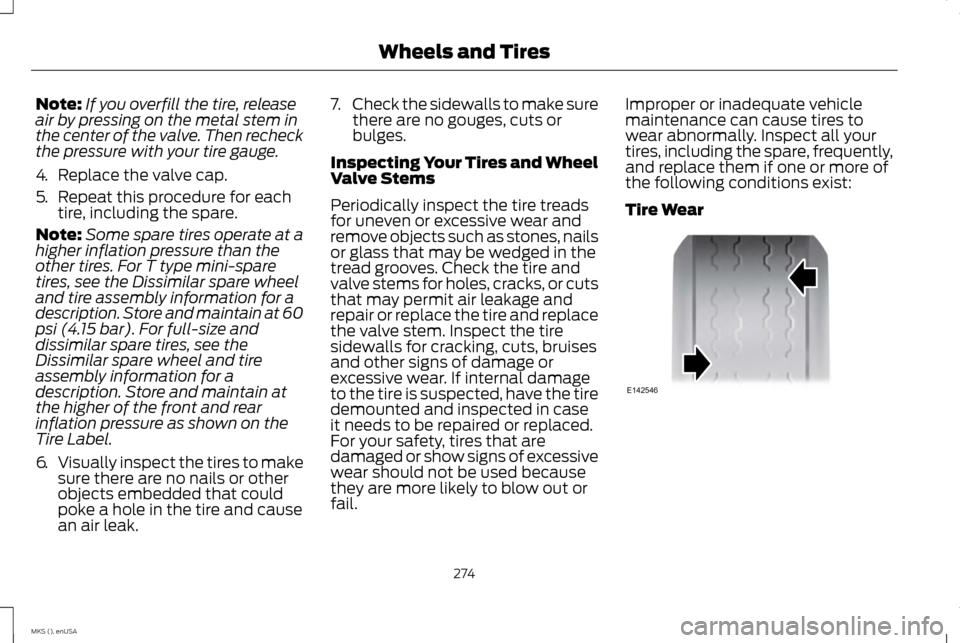
Tire Wear
274
MKS (), enUSA Wheels and TiresE142546
Page 297 of 424
TECHNICAL SPECIFICATIONS
WARNING
The air conditioning refrigerant system contains refrigerant R-134a under high pressure. Opening the air conditioning refrigerant system
can cause personal injury. Have the air conditioning refrigerant system serviced only by qualified personnel.
Ford part number / Ford specification
Recommended fluids and
lubricants
Capacity
Item
XL-1 (U.S.) / --
Motorcraft Penetrating and
Lock Lubricant (U.S.)
—
Lock cylinders
CXC-51-A (Canada) / --
Motorcraft Penetrating Fluid
(Canada)
XL-5
Motorcraft Multi-Purpose
Grease Spray
—
Hinges, latches, striker plates,
fuel filler door hinge and seat tracks
PM-20 / WSS-M6C65-A2
Motorcraft DOT 4 LV High
Performance Motor Vehicle Brake Fluid
Between MIN/MAX on brake fluid
reservoir
Brake fluid 1
XO-5W30-QSP or XO-5W30-QFS (U.S.)/ WSS-M2C946-A
Motorcraft SAE 5W-30
Premium Synthetic Blend Motor Oil or Motorcraft SAE 5W-30 Full Synthetic Motor Oil
6.0 qt (5.7 L)
3.5L EcoBoost engine oil
CXO-5W30-LSP12 or CXO-5W30-LFS12
(Canada) / WSS-M2C946-A
294
MKS (), enUSA Capacities and Specifications
Page 309 of 424
•
VOL: Control the volume of audio output.
• Seek:
•While in radio mode, press to seek
between memory presets or press
and hold to seek between stations.
• While in USB or CD mode, press to
seek between stations or press and
hold to fast seek.
• Voice: Press to start a voice session.
Press again and hold to end a voice
session.
• Phone:
Press to answer a call or to
switch between calls. Press and hold to
end a call or to reject an incoming call.
See
Steering Wheel (page 65).
Cleaning the Touchscreen Display
Use a clean, soft cloth such as one used for
cleaning glasses. If dirt or fingerprints are still
visible, apply a small amount of alcohol to
the cloth. Do not pour or spray alcohol onto
the display. Do not use detergent or any type
of solvent to clean the display.
Support
The SYNC support team is available to help
you with any questions you are not able to
answer on your own. Monday-Saturday, 8:30am-9:00pm EST.
Sunday, 10:30am-7:30pm EST.
In the United States, call: 1-800-392-3673.
In Canada, call: 1-800-565-3673.
Times are subject to change due to holidays.
Safety Information
WARNING
Driving while distracted can result in
loss of vehicle control, crash and injury.
We strongly recommend that you use
extreme caution when using any device that
may take your focus off the road. Your
primary responsibility is the safe operation
of your vehicle. We recommend against the
use of any hand-held device while driving and
encourage the use of voice-operated systems
when possible. Make sure you are aware of
all applicable local laws that may affect the
use of electronic devices while driving. •
Do not attempt to service or repair the
system. Contact an authorized dealer.
• Do not operate playing devices if the
power cords or cables are broken, split or
damaged. Place cords and cables out of
the way, so they do not interfere with the
operation of pedals, seats, compartments
or safe driving abilities.
• Do not leave playing devices in your
vehicle during extreme conditions as it
could cause them damage. See your
device's user guide for further
information.
• For your safety, some SYNC functions are
speed-dependent. Their use is limited to
when your vehicle is traveling at speeds
under 3 mph (5 km/h).
Make sure that you review your device's
manual before using it with SYNC.
306
MKS (), enUSA MyLincoln Touch
™
Page 310 of 424
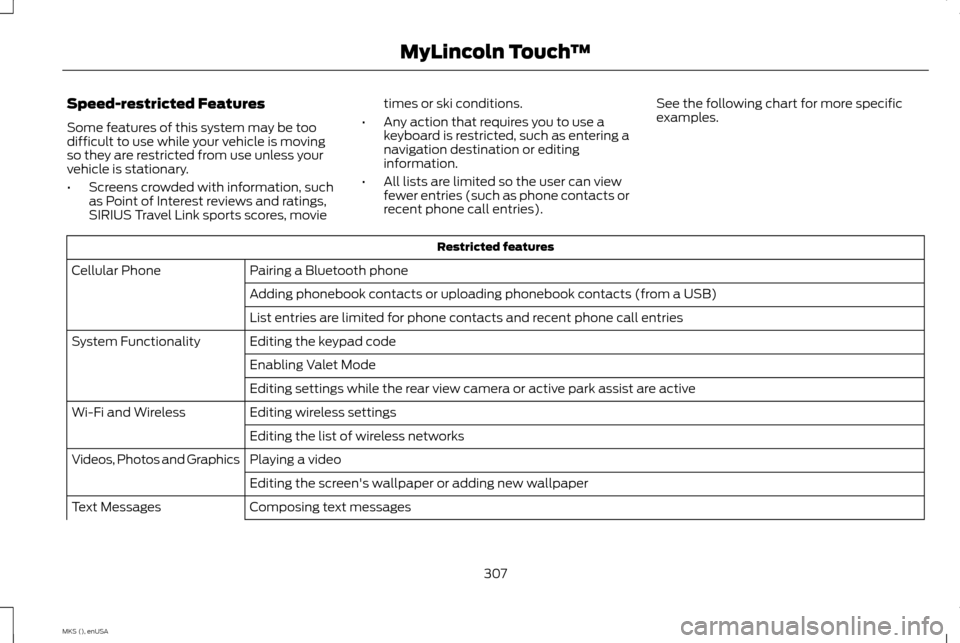
Speed-restricted Features
Some features of this system may be too
difficult to use while your vehicle is moving
so they are restricted from use unless your
vehicle is stationary.
•
Screens crowded with information, such
as Point of Interest reviews and ratings,
SIRIUS Travel Link sports scores, movie times or ski conditions.
• Any action that requires you to use a
keyboard is restricted, such as entering a
navigation destination or editing
information.
• All lists are limited so the user can view
fewer entries (such as phone contacts or
recent phone call entries). See the following chart for more specific
examples. Restricted features
Pairing a Bluetooth phone
Cellular Phone
Adding phonebook contacts or uploading phonebook contacts (from a USB)
List entries are limited for phone contacts and recent phone call entries
Editing the keypad code
System Functionality
Enabling Valet Mode
Editing settings while the rear view camera or active park assist are active
Editing wireless settings
Wi-Fi and Wireless
Editing the list of wireless networks
Playing a video
Videos, Photos and Graphics
Editing the screen's wallpaper or adding new wallpaper
Composing text messages
Text Messages
307
MKS (), enUSA MyLincoln Touch
™
Page 317 of 424
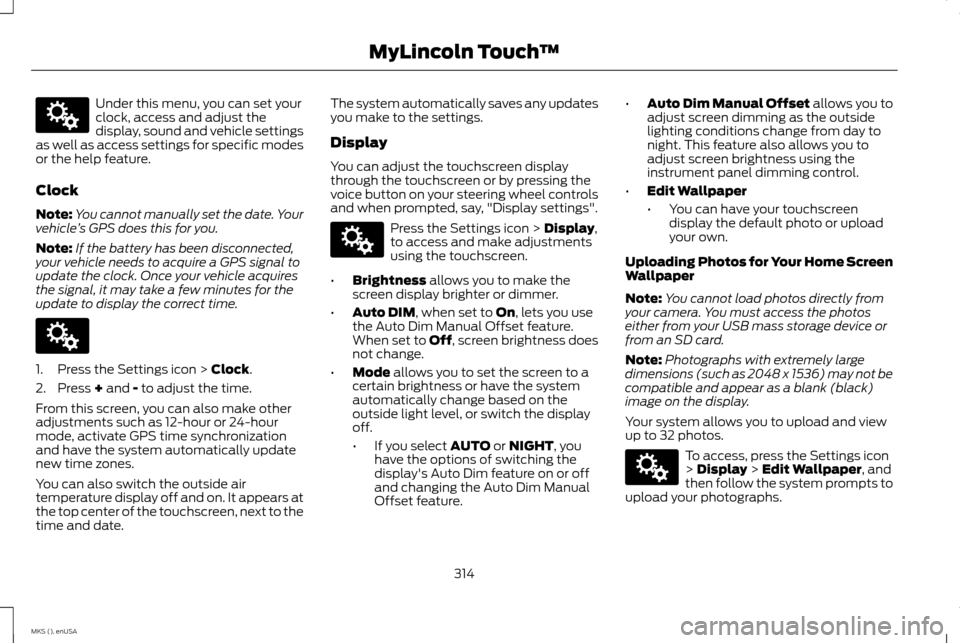
Under this menu, you can set your
clock, access and adjust the
display, sound and vehicle settings
as well as access settings for specific modes
or the help feature.
Clock
Note: You cannot manually set the date. Your
vehicle ’s GPS does this for you.
Note: If the battery has been disconnected,
your vehicle needs to acquire a GPS signal to
update the clock. Once your vehicle acquires
the signal, it may take a few minutes for the
update to display the correct time. 1. Press the Settings icon > Clock.
2. Press
+ and - to adjust the time.
From this screen, you can also make other
adjustments such as 12-hour or 24-hour
mode, activate GPS time synchronization
and have the system automatically update
new time zones.
You can also switch the outside air
temperature display off and on. It appears at
the top center of the touchscreen, next to the
time and date. The system automatically saves any updates
you make to the settings.
Display
You can adjust the touchscreen display
through the touchscreen or by pressing the
voice button on your steering wheel controls
and when prompted, say, "Display settings".
Press the Settings icon >
Display,
to access and make adjustments
using the touchscreen.
• Brightness
allows you to make the
screen display brighter or dimmer.
• Auto DIM
, when set to On, lets you use
the Auto Dim Manual Offset feature.
When set to Off, screen brightness does
not change.
• Mode
allows you to set the screen to a
certain brightness or have the system
automatically change based on the
outside light level, or switch the display
off.
• If you select
AUTO or NIGHT, you
have the options of switching the
display's Auto Dim feature on or off
and changing the Auto Dim Manual
Offset feature. •
Auto Dim Manual Offset allows you to
adjust screen dimming as the outside
lighting conditions change from day to
night. This feature also allows you to
adjust screen brightness using the
instrument panel dimming control.
• Edit Wallpaper
•You can have your touchscreen
display the default photo or upload
your own.
Uploading Photos for Your Home Screen
Wallpaper
Note: You cannot load photos directly from
your camera. You must access the photos
either from your USB mass storage device or
from an SD card.
Note: Photographs with extremely large
dimensions (such as 2048 x 1536) may not be
compatible and appear as a blank (black)
image on the display.
Your system allows you to upload and view
up to 32 photos. To access, press the Settings icon
>
Display > Edit Wallpaper, and
then follow the system prompts to
upload your photographs.
314
MKS (), enUSA MyLincoln Touch
™E142607 E142607 E142607 E142607