flat tire LINCOLN MKS 2015 Owner's Manual
[x] Cancel search | Manufacturer: LINCOLN, Model Year: 2015, Model line: MKS, Model: LINCOLN MKS 2015Pages: 424, PDF Size: 3.96 MB
Page 285 of 424
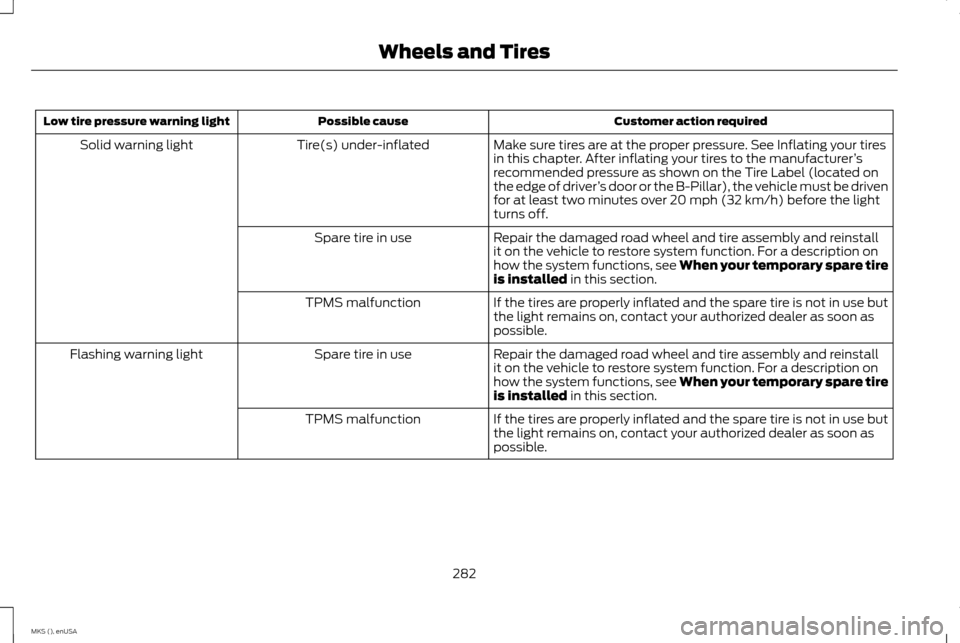
Customer action required
Possible cause
Low tire pressure warning light
Make sure tires are at the proper pressure. See Inflating your tires
in this chapter. After inflating your tires to the manufacturer’s
recommended pressure as shown on the Tire Label (located on
the edge of driver ’s door or the B-Pillar), the vehicle must be driven
for at least two minutes over 20 mph (32 km/h) before the light
turns off.
Tire(s) under-inflated
Solid warning light
Repair the damaged road wheel and tire assembly and reinstall
it on the vehicle to restore system function. For a description on
how the system functions, see When your temporary spare tire
is installed in this section.
Spare tire in use
If the tires are properly inflated and the spare tire is not in use but
the light remains on, contact your authorized dealer as soon as
possible.
TPMS malfunction
Repair the damaged road wheel and tire assembly and reinstall
it on the vehicle to restore system function. For a description on
how the system functions, see When your temporary spare tire
is installed
in this section.
Spare tire in use
Flashing warning light
If the tires are properly inflated and the spare tire is not in use but
the light remains on, contact your authorized dealer as soon as
possible.
TPMS malfunction
282
MKS (), enUSA Wheels and Tires
Page 286 of 424
When Inflating Your Tires
When putting air into your tires (such as at a
gas station or in your garage), the tire
pressure monitoring system may not respond
immediately to the air added to your tires.
It may take up to two minutes of driving over
20 mph (32 km/h) for the light to turn off
after you have filled your tires to the
recommended inflation pressure
How Temperature Affects Your Tire
Pressure
The tire pressure monitoring system monitors
tire pressure in each pneumatic tire. While
driving in a normal manner, a typical
passenger tire inflation pressure may increase
about 2 to 4 psi (14 to 28 kPa) from a cold
start situation. If the vehicle is stationary
overnight with the outside temperature
significantly lower than the daytime
temperature, the tire pressure may decrease
about 3 psi (21 kPa) for a drop of 30°F (17°C)
in ambient temperature. This lower pressure
value may be detected by the tire pressure
monitoring system as being significantly
lower than the recommended inflation
pressure and activate the system warning
light for low tire pressure. If the low tire
pressure warning light is on, visually check
each tire to verify that no tire is flat. If one or
more tires are flat, repair as necessary. Check
the air pressure in the road tires. If any tire is
under-inflated, carefully drive the vehicle to
the nearest location where air can be added
to the tires. Inflate all the tires to the
recommended inflation pressure.
CHANGING A ROAD WHEEL
WARNINGS
The use of tire sealant may damage
your tire pressure monitoring system
and should only be used in roadside
emergencies. If you must use a sealant, the
Ford Tire Mobility Kit sealant should be used.
The tire pressure monitoring system sensor
and valve stem on the wheel must be
replaced by an authorized dealer after use of
the sealant. If the tire pressure monitor sensor
becomes damaged, it will no longer
function. See Tire Pressure
Monitoring System (page 279). Note:
The tire pressure monitoring system
indicator light will illuminate when the spare
tire is in use. To restore the full function of the
monitoring system, all road wheels equipped
with tire pressure monitoring sensors must be
mounted on the vehicle. If you get a flat tire while driving, do not apply
the brake heavily. Instead, gradually decrease
your speed. Hold the steering wheel firmly
and slowly move to a safe place on the side
of the road.
Have a flat serviced by an authorized dealer
in order to prevent damage to the tire
pressure monitoring system sensors. See
Tire Pressure Monitoring System
(page
279). Replace the spare tire with a road tire
as soon as possible. During repairing or
replacing of the flat tire, have the authorized
dealer inspect the tire pressure monitoring
system sensor for damage.
Dissimilar Spare Wheel and Tire
Assembly Information WARNING
Failure to follow these guidelines could
result in an increased risk of loss of
vehicle control, injury or death.
283
MKS (), enUSA Wheels and Tires
Page 289 of 424
5.
Remove the second wing nut that secures
the jack retention bracket by turning it
counterclockwise. Then remove the jack
kit from your vehicle.
6. Remove the jack and the wrench from the felt bag. Fold down the wrench socket
used to loosen the lug nuts and to
operate the jack.
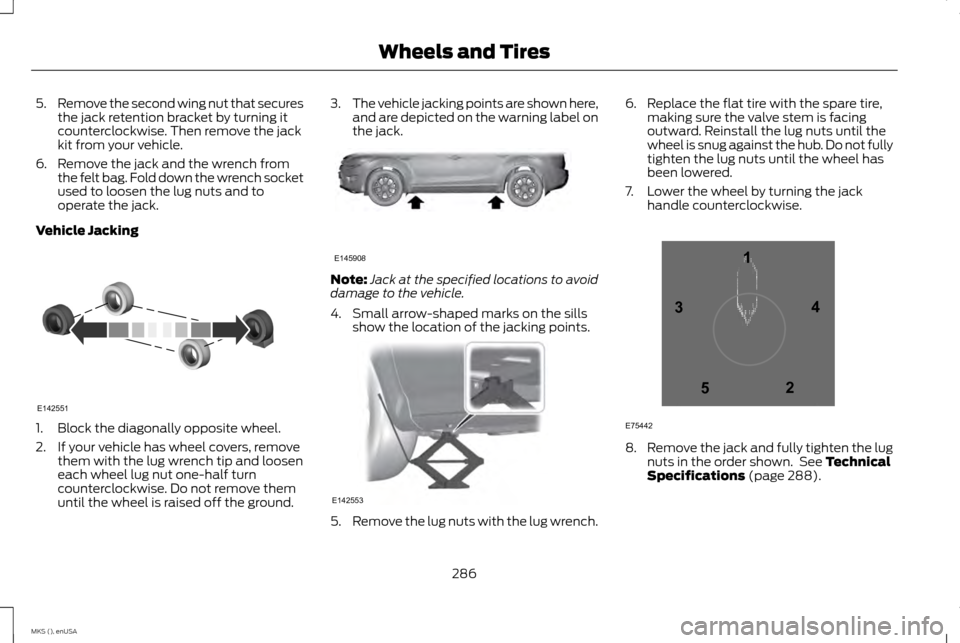
Vehicle Jacking 1. Block the diagonally opposite wheel.
2. If your vehicle has wheel covers, remove
them with the lug wrench tip and loosen
each wheel lug nut one-half turn
counterclockwise. Do not remove them
until the wheel is raised off the ground. 3.
The vehicle jacking points are shown here,
and are depicted on the warning label on
the jack. Note:
Jack at the specified locations to avoid
damage to the vehicle.
4. Small arrow-shaped marks on the sills show the location of the jacking points. 5.
Remove the lug nuts with the lug wrench. 6. Replace the flat tire with the spare tire,
making sure the valve stem is facing
outward. Reinstall the lug nuts until the
wheel is snug against the hub. Do not fully
tighten the lug nuts until the wheel has
been lowered.
7. Lower the wheel by turning the jack handle counterclockwise. 8.
Remove the jack and fully tighten the lug
nuts in the order shown. See Technical
Specifications (page 288).
286
MKS (), enUSA Wheels and TiresE142551 E145908 E142553 12
3
4
5
E75442
Page 290 of 424
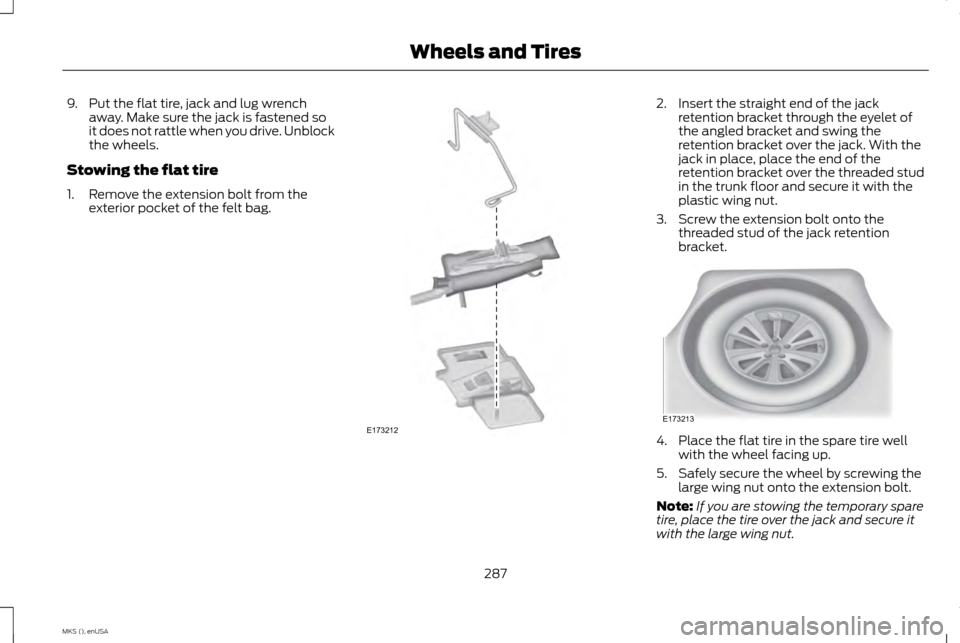
9. Put the flat tire, jack and lug wrench
away. Make sure the jack is fastened so
it does not rattle when you drive. Unblock
the wheels.
Stowing the flat tire
1. Remove the extension bolt from the exterior pocket of the felt bag. 2. Insert the straight end of the jack
retention bracket through the eyelet of
the angled bracket and swing the
retention bracket over the jack. With the
jack in place, place the end of the
retention bracket over the threaded stud
in the trunk floor and secure it with the
plastic wing nut.
3. Screw the extension bolt onto the threaded stud of the jack retention
bracket. 4. Place the flat tire in the spare tire well
with the wheel facing up.
5. Safely secure the wheel by screwing the large wing nut onto the extension bolt.
Note: If you are stowing the temporary spare
tire, place the tire over the jack and secure it
with the large wing nut.
287
MKS (), enUSA Wheels and TiresE173212 E173213
Page 291 of 424
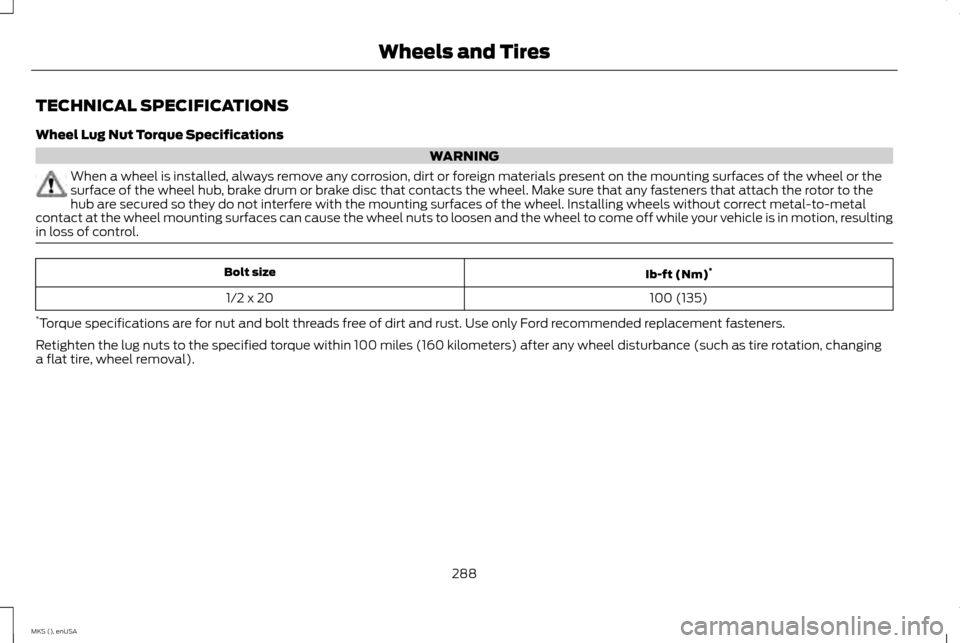
TECHNICAL SPECIFICATIONS
Wheel Lug Nut Torque Specifications
WARNING
When a wheel is installed, always remove any corrosion, dirt or foreign materials present on the mounting surfaces of the wheel or the
surface of the wheel hub, brake drum or brake disc that contacts the wheel. Make sure that any fasteners that attach the rotor to the
hub are secured so they do not interfere with the mounting surfaces of the wheel. Installing wheels without correct metal-to-metal
contact at the wheel mounting surfaces can cause the wheel nuts to loosen and the wheel to come off while your vehicle is in motion, resulting
in loss of control. Ib-ft (Nm)
*
Bolt size
100 (135)
1/2 x 20
* Torque specifications are for nut and bolt threads free of dirt and rust. Use only Ford recommended replacement fasteners.
Retighten the lug nuts to the specified torque within 100 miles (160 kilometers) after any wheel disturbance (such as tire rotation, changing
a flat tire, wheel removal).
288
MKS (), enUSA Wheels and Tires
Page 393 of 424
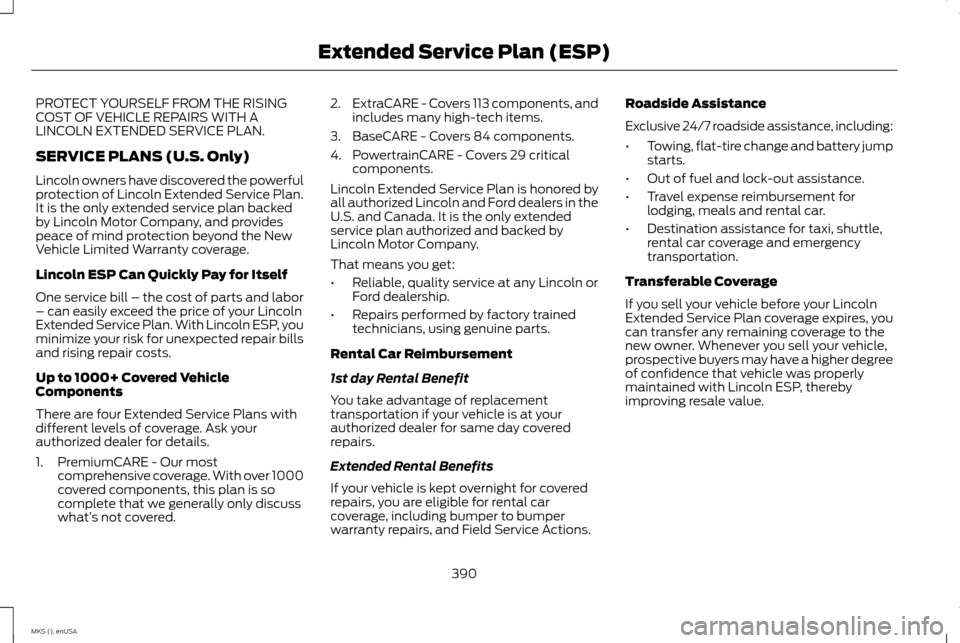
PROTECT YOURSELF FROM THE RISING
COST OF VEHICLE REPAIRS WITH A
LINCOLN EXTENDED SERVICE PLAN.
SERVICE PLANS (U.S. Only)
Lincoln owners have discovered the powerful
protection of Lincoln Extended Service Plan.
It is the only extended service plan backed
by Lincoln Motor Company, and provides
peace of mind protection beyond the New
Vehicle Limited Warranty coverage.
Lincoln ESP Can Quickly Pay for Itself
One service bill – the cost of parts and labor
– can easily exceed the price of your Lincoln
Extended Service Plan. With Lincoln ESP, you
minimize your risk for unexpected repair bills
and rising repair costs.
Up to 1000+ Covered Vehicle
Components
There are four Extended Service Plans with
different levels of coverage. Ask your
authorized dealer for details.
1. PremiumCARE - Our most
comprehensive coverage. With over 1000
covered components, this plan is so
complete that we generally only discuss
what’ s not covered. 2.
ExtraCARE - Covers 113 components, and
includes many high-tech items.
3. BaseCARE - Covers 84 components.
4. PowertrainCARE - Covers 29 critical components.
Lincoln Extended Service Plan is honored by
all authorized Lincoln and Ford dealers in the
U.S. and Canada. It is the only extended
service plan authorized and backed by
Lincoln Motor Company.
That means you get:
• Reliable, quality service at any Lincoln or
Ford dealership.
• Repairs performed by factory trained
technicians, using genuine parts.
Rental Car Reimbursement
1st day Rental Benefit
You take advantage of replacement
transportation if your vehicle is at your
authorized dealer for same day covered
repairs.
Extended Rental Benefits
If your vehicle is kept overnight for covered
repairs, you are eligible for rental car
coverage, including bumper to bumper
warranty repairs, and Field Service Actions. Roadside Assistance
Exclusive 24/7 roadside assistance, including:
•
Towing, flat-tire change and battery jump
starts.
• Out of fuel and lock-out assistance.
• Travel expense reimbursement for
lodging, meals and rental car.
• Destination assistance for taxi, shuttle,
rental car coverage and emergency
transportation.
Transferable Coverage
If you sell your vehicle before your Lincoln
Extended Service Plan coverage expires, you
can transfer any remaining coverage to the
new owner. Whenever you sell your vehicle,
prospective buyers may have a higher degree
of confidence that vehicle was properly
maintained with Lincoln ESP, thereby
improving resale value.
390
MKS (), enUSA Extended Service Plan (ESP)
Page 417 of 424
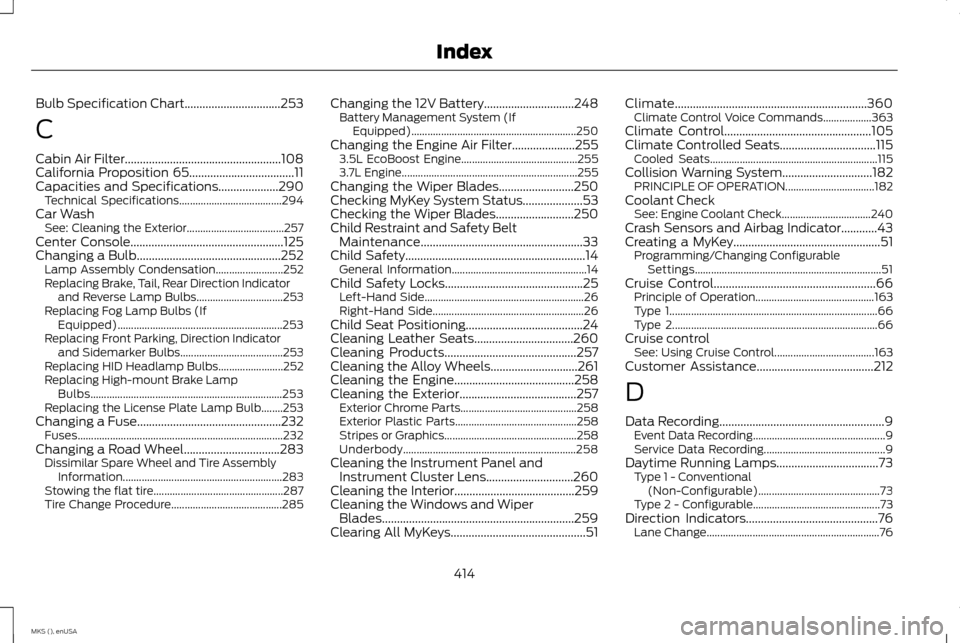
Bulb Specification Chart................................253
C
Cabin Air Filter....................................................108
California Proposition 65...................................11
Capacities and Specifications....................290 Technical Specifications...................................... 294
Car Wash See: Cleaning the Exterior.................................... 257
Center Console
...................................................125
Changing a Bulb................................................252
Lamp Assembly Condensation......................... 252
Replacing Brake, Tail, Rear Direction Indicator and Reverse Lamp Bulbs................................ 253
Replacing Fog Lamp Bulbs (If Equipped)............................................................. 253
Replacing Front Parking, Direction Indicator and Sidemarker Bulbs...................................... 253
Replacing HID Headlamp Bulbs........................ 252
Replacing High-mount Brake Lamp Bulbs....................................................................... 253
Replacing the License Plate Lamp Bulb........253
Changing a Fuse................................................232 Fuses........................................................................\
.... 232
Changing a Road Wheel
................................283
Dissimilar Spare Wheel and Tire Assembly
Information........................................................... 283
Stowing the flat tire................................................ 287
Tire Change Procedure......................................... 285Changing the 12V Battery..............................248
Battery Management System (If
Equipped)............................................................. 250
Changing the Engine Air Filter
.....................255
3.5L EcoBoost Engine........................................... 255
3.7L Engine................................................................. 255
Changing the Wiper Blades.........................250
Checking MyKey System Status....................53
Checking the Wiper Blades..........................250
Child Restraint and Safety Belt Maintenance......................................................33
Child Safety............................................................14 General Information.................................................. 14
Child Safety Locks..............................................25 Left-Hand Side........................................................... 26
Right-Hand Side........................................................ 26
Child Seat Positioning.......................................24
Cleaning Leather Seats.................................260
Cleaning Products
............................................257
Cleaning the Alloy Wheels.............................261
Cleaning the Engine
........................................258
Cleaning the Exterior.......................................257 Exterior Chrome Parts........................................... 258
Exterior Plastic Parts............................................. 258
Stripes or Graphics................................................. 258
Underbody................................................................ 258
Cleaning the Instrument Panel and Instrument Cluster Lens.............................260
Cleaning the Interior
........................................259
Cleaning the Windows and Wiper Blades................................................................259
Clearing All MyKeys.............................................51 Climate................................................................360
Climate Control Voice Commands.................. 363
Climate Control
.................................................105
Climate Controlled Seats................................115
Cooled Seats.............................................................. 115
Collision Warning System..............................182 PRINCIPLE OF OPERATION................................. 182
Coolant Check See: Engine Coolant Check................................. 240
Crash Sensors and Airbag Indicator............43
Creating a MyKey
.................................................51
Programming/Changing Configurable
Settings..................................................................... 51
Cruise Control
......................................................66
Principle of Operation............................................ 163
Type 1........................................................................\
..... 66
Type 2........................................................................\
.... 66
Cruise control See: Using Cruise Control..................................... 163
Customer Assistance
.......................................212
D
Data Recording
.......................................................9
Event Data Recording................................................. 9
Service Data Recording............................................. 9
Daytime Running Lamps..................................73 Type 1 - Conventional
(Non-Configurable)............................................. 73
Type 2 - Configurable............................................... 73
Direction Indicators
............................................76
Lane Change................................................................ 76
414
MKS (), enUSA Index