reset LINCOLN MKS 2015 Owner's Manual
[x] Cancel search | Manufacturer: LINCOLN, Model Year: 2015, Model line: MKS, Model: LINCOLN MKS 2015Pages: 424, PDF Size: 3.96 MB
Page 246 of 424
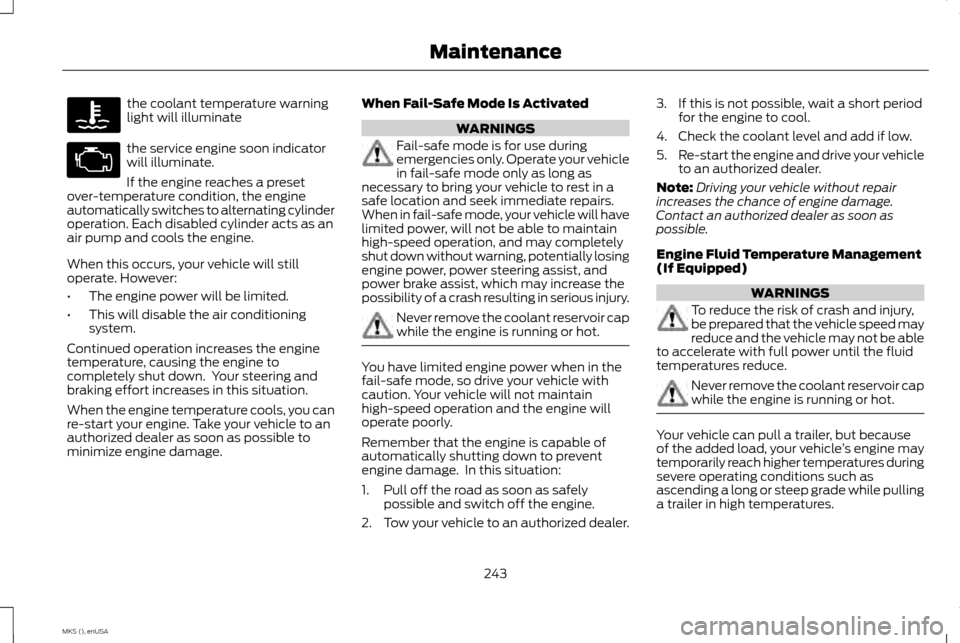
the coolant temperature warning
light will illuminate
the service engine soon indicator
will illuminate.
If the engine reaches a preset
over-temperature condition, the engine
automatically switches to alternating cylinder
operation. Each disabled cylinder acts as an
air pump and cools the engine.
When this occurs, your vehicle will still
operate. However:
• The engine power will be limited.
• This will disable the air conditioning
system.
Continued operation increases the engine
temperature, causing the engine to
completely shut down. Your steering and
braking effort increases in this situation.
When the engine temperature cools, you can
re-start your engine. Take your vehicle to an
authorized dealer as soon as possible to
minimize engine damage. When Fail-Safe Mode Is Activated WARNINGS
Fail-safe mode is for use during
emergencies only. Operate your vehicle
in fail-safe mode only as long as
necessary to bring your vehicle to rest in a
safe location and seek immediate repairs.
When in fail-safe mode, your vehicle will have
limited power, will not be able to maintain
high-speed operation, and may completely
shut down without warning, potentially losing
engine power, power steering assist, and
power brake assist, which may increase the
possibility of a crash resulting in serious injury. Never remove the coolant reservoir cap
while the engine is running or hot.
You have limited engine power when in the
fail-safe mode, so drive your vehicle with
caution. Your vehicle will not maintain
high-speed operation and the engine will
operate poorly.
Remember that the engine is capable of
automatically shutting down to prevent
engine damage. In this situation:
1. Pull off the road as soon as safely
possible and switch off the engine.
2. Tow your vehicle to an authorized dealer. 3. If this is not possible, wait a short period
for the engine to cool.
4. Check the coolant level and add if low.
5. Re-start the engine and drive your vehicle
to an authorized dealer.
Note: Driving your vehicle without repair
increases the chance of engine damage.
Contact an authorized dealer as soon as
possible.
Engine Fluid Temperature Management
(If Equipped) WARNINGS
To reduce the risk of crash and injury,
be prepared that the vehicle speed may
reduce and the vehicle may not be able
to accelerate with full power until the fluid
temperatures reduce. Never remove the coolant reservoir cap
while the engine is running or hot.
Your vehicle can pull a trailer, but because
of the added load, your vehicle
’s engine may
temporarily reach higher temperatures during
severe operating conditions such as
ascending a long or steep grade while pulling
a trailer in high temperatures.
243
MKS (), enUSA Maintenance
Page 252 of 424
Your vehicle is equipped with a Motorcraft
maintenance-free battery which normally
does not require additional water during its
life of service.
For longer, trouble-free operation, keep the
top of the battery clean and dry. Also, make
certain the battery cables are always tightly
fastened to the battery terminals.
If you see any corrosion on the battery or
terminals, remove the cables from the
terminals and clean with a wire brush. You
can neutralize the acid with a solution of
baking soda and water.
It is recommended that the negative battery
cable terminal be disconnected from the
battery if you plan to store your vehicle for
an extended period of time.
Because your vehicle
’s engine is electronically
controlled by a computer, some control
conditions are maintained by power from the
battery. When the battery is disconnected or
a new battery is installed, the engine must
relearn its idle and fuel trim strategy for
optimum driveability and performance.
Flexible fuel vehicles (FFV) must also relearn
the ethanol content of the fuel for optimum
driveability and performance. To begin this
process: 1.
With your vehicle at a complete stop, set
the parking brake.
2. Put the gearshift in P(Park), turn off all
accessories.
3. Start the engine. Run the engine until it reaches normal operating temperature.
4. Allow the engine to idle for at least one minute.
5. Turn the air conditioning on and allow the
engine to idle for at least one minute. 6.
Release the parking brake. With your foot
on the brake pedal and with the air
conditioning on, put your vehicle in D
(Drive) and allow the engine to idle for at
least one minute.
• If you do not allow the engine to
relearn its idle trim, the idle quality of
your vehicle may be adversely
affected until the idle trim is
eventually relearned.
7. Drive your vehicle to complete the relearning process
•Your vehicle may need to be driven 10
miles (16 kilometers) or more to
relearn the idle and fuel trim strategy
along with the ethanol content for
flexible fuel vehicles.
• For flexible fuel vehicles, if you are
operating on E85, you may experience
poor starts or an inability to start the
engine and driveability problems until
the fuel trim and ethanol content
have been relearned.
If the battery has been disconnected or a new
battery has been installed, the clock and
radio settings must be reset once the battery
is reconnected.
249
MKS (), enUSA Maintenance
Page 266 of 424
Battery
•
Check and recharge as necessary. Keep
connections clean.
• If storing your vehicle for more than 30
days without recharging the battery, we
recommend that you disconnect the
battery cables to maintain battery charge
for quick starting.
Note: It is necessary to reset memory features
if battery cables are disconnected.
Brakes
• Make sure the brakes and parking brake
release fully.
Tires
• Maintain recommended air pressure.
Miscellaneous
• Make sure all linkages, cables, levers and
pins under your vehicle are covered with
grease to prevent rust.
• Move vehicles at least 25 ft (7.5 m) every
15 days to lubricate working parts and
prevent corrosion. Removing Vehicle From Storage
When your vehicle is ready to come out of
storage, do the following:
•
Wash your vehicle to remove any dirt or
grease film build-up on window surfaces.
• Check windshield wipers for any
deterioration.
• Check under the hood for any foreign
material that may have collected during
storage such as mice or squirrel nests.
• Check the exhaust for any foreign
material that may have collected during
storage.
• Check tire pressures and set tire inflation
per the Tire Label.
• Check brake pedal operation. Drive your
vehicle 15 ft (4.5 m) back and forth to
remove rust build-up.
• Check fluid levels (including coolant, oil
and gas) to make sure there are no leaks,
and fluids are at recommended levels.
• If you remove the battery, clean the
battery cable ends and check for damage.
Contact an authorized dealer if you have any
concerns or issues.
263
MKS (), enUSA Vehicle Care
Page 309 of 424
•
VOL: Control the volume of audio output.
• Seek:
•While in radio mode, press to seek
between memory presets or press
and hold to seek between stations.
• While in USB or CD mode, press to
seek between stations or press and
hold to fast seek.
• Voice: Press to start a voice session.
Press again and hold to end a voice
session.
• Phone:
Press to answer a call or to
switch between calls. Press and hold to
end a call or to reject an incoming call.
See
Steering Wheel (page 65).
Cleaning the Touchscreen Display
Use a clean, soft cloth such as one used for
cleaning glasses. If dirt or fingerprints are still
visible, apply a small amount of alcohol to
the cloth. Do not pour or spray alcohol onto
the display. Do not use detergent or any type
of solvent to clean the display.
Support
The SYNC support team is available to help
you with any questions you are not able to
answer on your own. Monday-Saturday, 8:30am-9:00pm EST.
Sunday, 10:30am-7:30pm EST.
In the United States, call: 1-800-392-3673.
In Canada, call: 1-800-565-3673.
Times are subject to change due to holidays.
Safety Information
WARNING
Driving while distracted can result in
loss of vehicle control, crash and injury.
We strongly recommend that you use
extreme caution when using any device that
may take your focus off the road. Your
primary responsibility is the safe operation
of your vehicle. We recommend against the
use of any hand-held device while driving and
encourage the use of voice-operated systems
when possible. Make sure you are aware of
all applicable local laws that may affect the
use of electronic devices while driving. •
Do not attempt to service or repair the
system. Contact an authorized dealer.
• Do not operate playing devices if the
power cords or cables are broken, split or
damaged. Place cords and cables out of
the way, so they do not interfere with the
operation of pedals, seats, compartments
or safe driving abilities.
• Do not leave playing devices in your
vehicle during extreme conditions as it
could cause them damage. See your
device's user guide for further
information.
• For your safety, some SYNC functions are
speed-dependent. Their use is limited to
when your vehicle is traveling at speeds
under 3 mph (5 km/h).
Make sure that you review your device's
manual before using it with SYNC.
306
MKS (), enUSA MyLincoln Touch
™
Page 311 of 424
Restricted features
Viewing received text messages
Editing preset text messages
Using the keyboard to enter a destination
Navigation
Demo navigation route
Adding or editing Address Book entries or Avoid Areas
Privacy Information
When you connect a cellular phone to SYNC,
the system creates a profile within your
vehicle that links to that cellular phone. This
profile helps in offering you more cellular
features and operating more efficiently.
Among other things, this profile may contain
data about your cellular phone book, text
messages (read and unread), and call history,
including history of calls when your cell phone
was not connected to the system. In addition,
if you connect a media device, the system
creates and retains an index of supported media content. The system also records a
short development log of approximately 10
minutes of all recent system activity. The
system uses a log profile and other data to
improve the system and help diagnose any
problems that may occur.
The cellular profile, media device index, and
development log remain in your vehicle
unless you delete them and are generally
accessible only in your vehicle when the
cellular phone or media player is connected.
If you no longer plan to use the system or your
vehicle, we recommend you perform a Master
Reset to erase all stored information.
System data cannot be accessed without
special equipment and access to your
vehicle's SYNC module. Ford Motor Company
and Ford of Canada do not access the system
data for any purpose other than as described
absent consent, a court order, or where
required by law enforcement, other
government authorities, or other third parties
acting with lawful authority. Other parties
may seek to access the information
independently of Ford Motor Company and
Ford of Canada. For further privacy
information, see the sections on 911 Assist,
Vehicle Health Report, and Traffic, Directions
and Information.
308
MKS (), enUSA MyLincoln Touch
™
Page 312 of 424
Accessing and Adjusting Modes through Your Vehicle Information Display
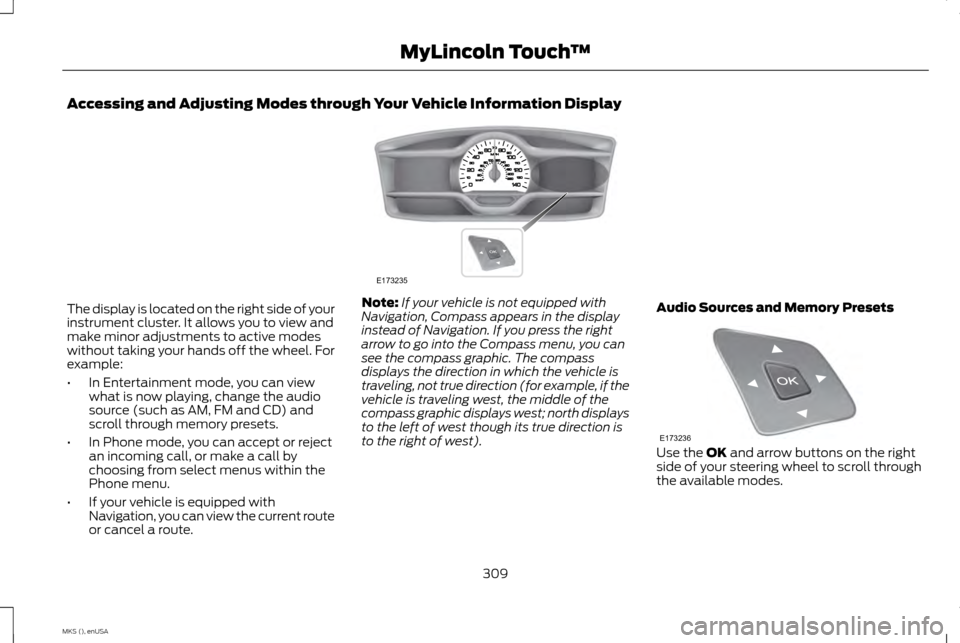
The display is located on the right side of your
instrument cluster. It allows you to view and
make minor adjustments to active modes
without taking your hands off the wheel. For
example:
•
In Entertainment mode, you can view
what is now playing, change the audio
source (such as AM, FM and CD) and
scroll through memory presets.
• In Phone mode, you can accept or reject
an incoming call, or make a call by
choosing from select menus within the
Phone menu.
• If your vehicle is equipped with
Navigation, you can view the current route
or cancel a route. Note:
If your vehicle is not equipped with
Navigation, Compass appears in the display
instead of Navigation. If you press the right
arrow to go into the Compass menu, you can
see the compass graphic. The compass
displays the direction in which the vehicle is
traveling, not true direction (for example, if the
vehicle is traveling west, the middle of the
compass graphic displays west; north displays
to the left of west though its true direction is
to the right of west). Audio Sources and Memory Presets Use the OK and arrow buttons on the right
side of your steering wheel to scroll through
the available modes.
309
MKS (), enUSA MyLincoln Touch
™E173235 E173236
Page 315 of 424
•
Interaction Mode
• Confirmation Prompts
• Media Candidate Lists
• Phone Candidate Lists
• Voice Control Volume.
To access these settings using voice
commands:
1. Press the voice icon. Wait for the prompt
"Please say a command". Another tone
sounds to let you know the system is
listening.
2. Say any of the following commands: Voice settings using voice commands
"Confirmation prompts off""Confirmation prompts on"
"Interaction mode advanced" "Interaction mode novice"
"Media candidate lists off" "Media candidate lists on" Voice settings using voice commands
"Phone candidate lists off""Phone candidate lists on" "Help"
Using Voice Commands with the
Touchscreen Options
Your voice system has a dual mode feature
which allows you to switch between using
voice commands and making on-screen
selections. This is available only when the
system displays a list of candidates
generated during a voice session. For
example, when entering in a street address
or trying to call a contact from the phone you
paired to the system. Privacy Notice for GPS Mapping with
MyLincoln Mobile in the United
States and Canada
MyLincoln Mobile allows for GPS mapping
when a vehicle is registered to a MyLincoln
Mobile account. To remove the vehicle from
the account, thereby removing GPS mapping
ability, preform a Master Reset in the vehicle.
See Settings (page 313).
Prior to transferring ownership of a vehicle,
owners may choose to execute a Master
Reset or Factory Reset (completed via the
MyLincoln Mobile website). Either method
removes the vehicle from all MyLincoln
Mobile accounts.
we recommend that new owners conduct a
Master Reset upon taking possession of the
vehicle to remove it from any existing
MyLincoln Mobile accounts. The new owner
can activate a MyLincoln Mobile account by
completing the registration process at: Web Address
http://support.lincoln.com/owner-services/ mylincoln-mobile-app.
312
MKS (), enUSA MyLincoln Touch
™
Page 319 of 424
You can find more information on the rear
view camera in another chapter. See Rear
View Camera (page 160).
Enable Valet Mode
Valet mode allows you to lock the system.
No information is accessible until the system
is unlocked with the correct PIN. You can
create your own four-digit PIN to lock and
unlock the system. 1. Press the Settings icon >
Vehicle >
Enable Valet Mode.
2. Enter a four-digit PIN twice, as prompted.
After you press
Continue, the system locks
until you enter the PIN again.
Note: If the system locks, and you need to
reset the PIN, enter 3681 and the system
unlocks. Settings
Access and adjust system settings, voice
features, as well as phone, navigation and
wireless settings.
System Press the Settings icon > Settings
> System, then select from the
following: System
Select to have the touchscreen display in English, Spanish or French.
Language
Select to display units in kilometers or miles.
Distance
Select to display units in Celsius or Fahrenheit.
Temperature
Adjust the volume of voice prompts from the system.
System Prompt Volume
Select to have the system beep to confirm choices made through the touchscreen.
Touch Screen Button Beep
Select to have the system beep to confirm button choices made through the climate or audio system.
Touch Panel Button Beep
Have the touchscreen keyboard display in QWERTY or ABC format.
Keyboard Layout
Install any downloaded applications or view the current software licenses.
Install Applications
Select to restore factory defaults. This erases all personal settings and personal data.
Master Reset
316
MKS (), enUSA MyLincoln Touch
™E142607 E142607
Page 329 of 424
USBE
Touch this button to scroll down for more options, such as SD Card, BT Stereo and A/V In
F
These buttons change with the media mode you are in.
G
Radio memory presets and CD controls.
H
Note: Some features may not be available in
your area. Contact an authorized dealer for
more information.
You can access these options using the
touchscreen or voice commands.
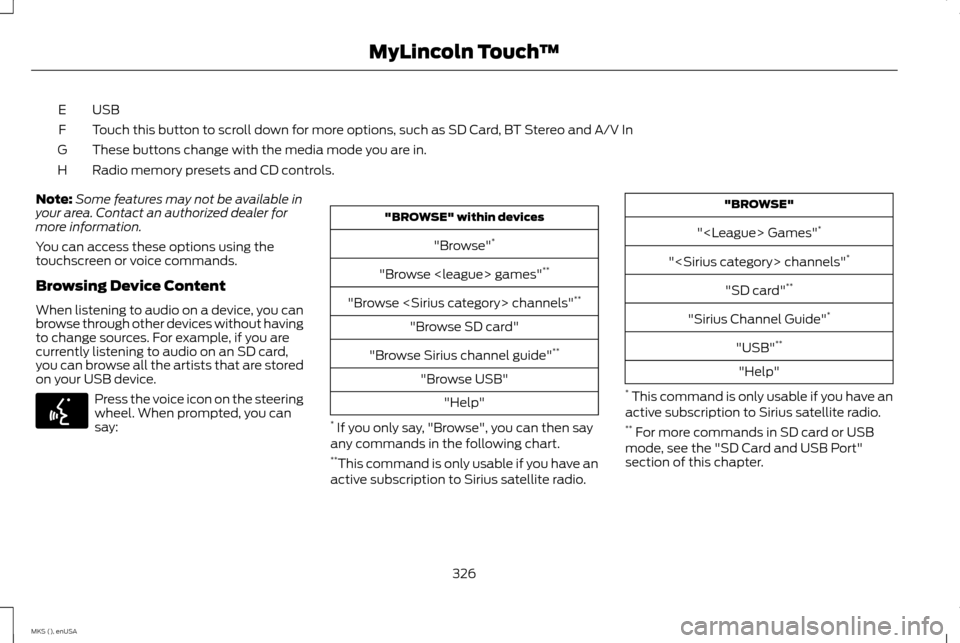
Browsing Device Content
When listening to audio on a device, you can
browse through other devices without having
to change sources. For example, if you are
currently listening to audio on an SD card,
you can browse all the artists that are stored
on your USB device. Press the voice icon on the steering
wheel. When prompted, you can
say: "BROWSE" within devices
"Browse" *
"Browse
"Browse
"Browse SD card"
"Browse Sirius channel guide" **
"Browse USB" "Help"
* If you only say, "Browse", you can then say
any commands in the following chart.
** This command is only usable if you have an
active subscription to Sirius satellite radio. "BROWSE"
"
"
"SD card" **
"Sirius Channel Guide" *
"USB" **
"Help"
* This command is only usable if you have an
active subscription to Sirius satellite radio.
** For more commands in SD card or USB
mode, see the "SD Card and USB Port"
section of this chapter.
326
MKS (), enUSA MyLincoln Touch
™E142599
Page 330 of 424
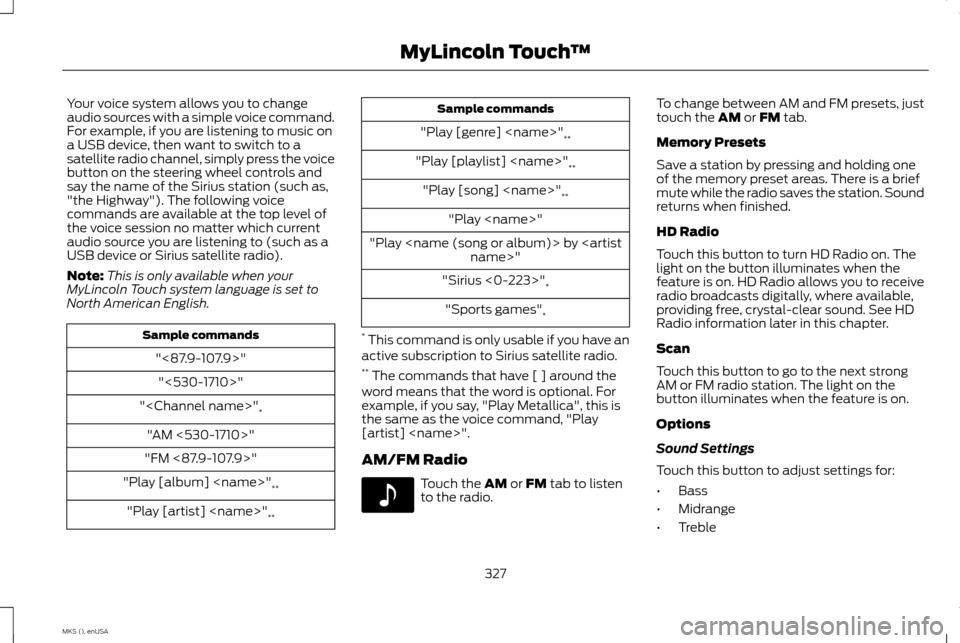
Your voice system allows you to change
audio sources with a simple voice command.
For example, if you are listening to music on
a USB device, then want to switch to a
satellite radio channel, simply press the voice
button on the steering wheel controls and
say the name of the Sirius station (such as,
"the Highway"). The following voice
commands are available at the top level of
the voice session no matter which current
audio source you are listening to (such as a
USB device or Sirius satellite radio).
Note:
This is only available when your
MyLincoln Touch system language is set to
North American English. Sample commands
"<87.9-107.9>""<530-1710>"
"
"AM <530-1710>"
"FM <87.9-107.9>"
"Play [album]
"Play [artist]
"Play [genre]
"Play [playlist]
"Play [song]
"Play
"Play
"Sirius <0-223>" *
"Sports games" *
* This command is only usable if you have an
active subscription to Sirius satellite radio.
** The commands that have [ ] around the
word means that the word is optional. For
example, if you say, "Play Metallica", this is
the same as the voice command, "Play
[artist]
AM/FM Radio Touch the AM or FM tab to listen
to the radio. To change between AM and FM presets, just
touch the
AM or FM tab.
Memory Presets
Save a station by pressing and holding one
of the memory preset areas. There is a brief
mute while the radio saves the station. Sound
returns when finished.
HD Radio
Touch this button to turn HD Radio on. The
light on the button illuminates when the
feature is on. HD Radio allows you to receive
radio broadcasts digitally, where available,
providing free, crystal-clear sound. See HD
Radio information later in this chapter.
Scan
Touch this button to go to the next strong
AM or FM radio station. The light on the
button illuminates when the feature is on.
Options
Sound Settings
Touch this button to adjust settings for:
• Bass
• Midrange
• Treble
327
MKS (), enUSA MyLincoln Touch
™E142611