belt LINCOLN MKS 2015 Owner's Guide
[x] Cancel search | Manufacturer: LINCOLN, Model Year: 2015, Model line: MKS, Model: LINCOLN MKS 2015Pages: 424, PDF Size: 3.96 MB
Page 53 of 424
PRINCIPLE OF OPERATION
MyKey allows you to program keys with
restricted driving modes to promote good
driving habits. All but one of the keys
programmed to the vehicle can be activated
with these restricted modes.
Any keys that have not been programmed
are referred to as administrator keys or admin
keys. These can be used to:
•
Create a MyKey.
• Program configurable MyKey settings.
• Clear all MyKey features.
When you have programmed a MyKey, you
can access the following information using
the information display:
• How many admin keys and MyKeys are
programmed to your vehicle.
• The total distance your vehicle has
traveled using a MyKey.
Note: All MyKeys are programmed to the
same settings. You cannot program them
individually. Note:
For vehicles with push-button start,
when both a MyKey and an admin remote
transmitter are present, the admin remote
transmitter will be recognized by the vehicle
while switching the ignition on to start the
vehicle.
Non-configurable Settings
The following settings cannot be changed by
an admin key user:
• Seat belt reminder or Belt Minder. You
cannot disable this feature. The audio
system will mute when the front seat
passengers' safety belts are not fastened.
• Early low fuel. The low-fuel warning
activates earlier, giving the MyKey user
more time to refuel.
• Driver assist features, if equipped on your
vehicle, are forced on: parking aid, blind
spot information system (BLIS) with
cross traffic alert, lane departure warning
and forward collision warning system or
active city-stop. Configurable Settings
With an admin key, you can configure certain
MyKey settings when you first create a MyKey
and before you recycle the key or restart the
vehicle. You can also change the settings
afterward with an admin key.
•
A vehicle speed limit can be set. Warnings
will be shown in the display followed by
an audible tone when your vehicle
reaches the set speed. You cannot
override the set speed by fully depressing
the accelerator pedal or by setting cruise
control. WARNING
Do not set MyKey maximum speed limit
to a limit that will prevent the driver
from maintaining a safe speed
considering posted speed limits and
prevailing road conditions. The driver is
always responsible to drive in accordance
with local laws and prevailing conditions.
Failure to do so could result in accident or
injury. 50
MKS (), enUSA MyKey
™
Page 88 of 424
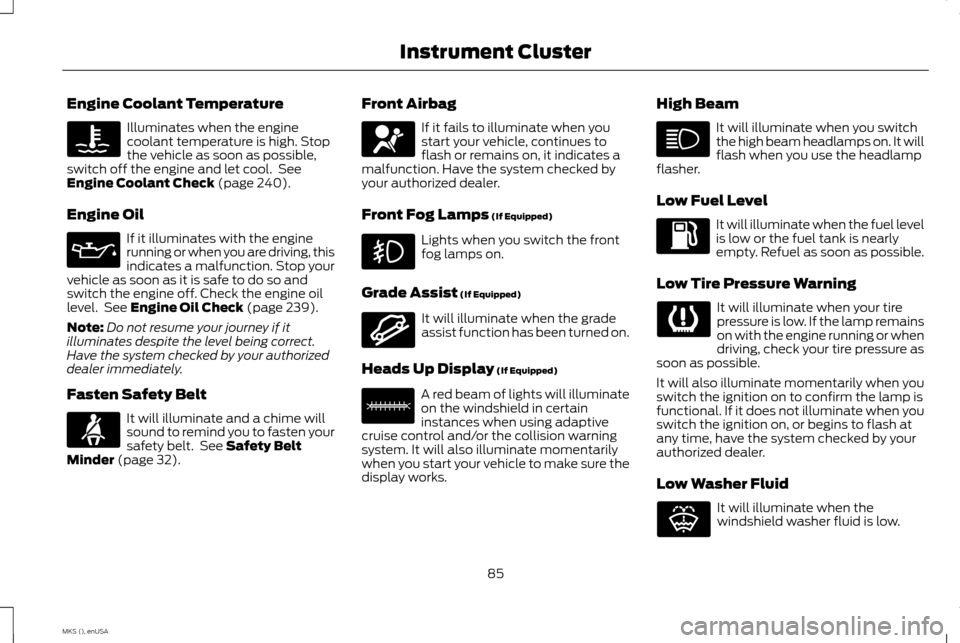
Engine Coolant Temperature
Illuminates when the engine
coolant temperature is high. Stop
the vehicle as soon as possible,
switch off the engine and let cool. See
Engine Coolant Check (page 240).
Engine Oil If it illuminates with the engine
running or when you are driving, this
indicates a malfunction. Stop your
vehicle as soon as it is safe to do so and
switch the engine off. Check the engine oil
level. See
Engine Oil Check (page 239).
Note: Do not resume your journey if it
illuminates despite the level being correct.
Have the system checked by your authorized
dealer immediately.
Fasten Safety Belt It will illuminate and a chime will
sound to remind you to fasten your
safety belt. See
Safety Belt
Minder (page 32). Front Airbag If it fails to illuminate when you
start your vehicle, continues to
flash or remains on, it indicates a
malfunction. Have the system checked by
your authorized dealer.
Front Fog Lamps
(If Equipped) Lights when you switch the front
fog lamps on.
Grade Assist
(If Equipped) It will illuminate when the grade
assist function has been turned on.
Heads Up Display
(If Equipped) A red beam of lights will illuminate
on the windshield in certain
instances when using adaptive
cruise control and/or the collision warning
system. It will also illuminate momentarily
when you start your vehicle to make sure the
display works. High Beam It will illuminate when you switch
the high beam headlamps on. It will
flash when you use the headlamp
flasher.
Low Fuel Level It will illuminate when the fuel level
is low or the fuel tank is nearly
empty. Refuel as soon as possible.
Low Tire Pressure Warning It will illuminate when your tire
pressure is low. If the lamp remains
on with the engine running or when
driving, check your tire pressure as
soon as possible.
It will also illuminate momentarily when you
switch the ignition on to confirm the lamp is
functional. If it does not illuminate when you
switch the ignition on, or begins to flash at
any time, have the system checked by your
authorized dealer.
Low Washer Fluid It will illuminate when the
windshield washer fluid is low.
85
MKS (), enUSA Instrument Cluster E144523 E156133 E132353
Page 105 of 424
Action
Message
When a MyKey is in use, the MyKey speed limit is on and your vehicle speed is approaching 80 mph (130 km/h).
Vehicle Near Top Speed
MyKey is active.
Check Speed Drive Safely
A MyKey is in use and Belt-Minder is activated.
Buckle Up to Unmute Audio
An attempt is made to program a spare key using two existing MyKeys.
Could Not Program Integrated Key
Park Aid Action
Message
The system has detected a condition that requires service. Contact your authorized dealer. See Parking Aid (page 153).
Check Park Aid
The system has detected a condition that requires service. Contact your authorized dealer.
See
Parking Aid (page 153).
Check Rear Park Aid
The park aid status.
Rear Park Aid On Off
102
MKS (), enUSA Information Displays
Page 112 of 424
SITTING IN THE CORRECT
POSITION
WARNINGS
Sitting improperly, out of position or
with the seatback reclined too far can
take weight off the seat cushion and
affect the decision of the passenger sensing
system, resulting in serious injury or death in
the event of a crash. Always sit upright
against your seat back, with your feet on the
floor. Do not recline the seatback as this can
cause the occupant to slide under the
safety belt, resulting in serious injury in
the event of a crash. Do not place objects higher than the
seatback to reduce the risk of serious
injury in the event of a crash or during
heavy braking. When you use them properly, the seat, head
restraint, safety belt and airbags will provide
optimum protection in the event of a crash.
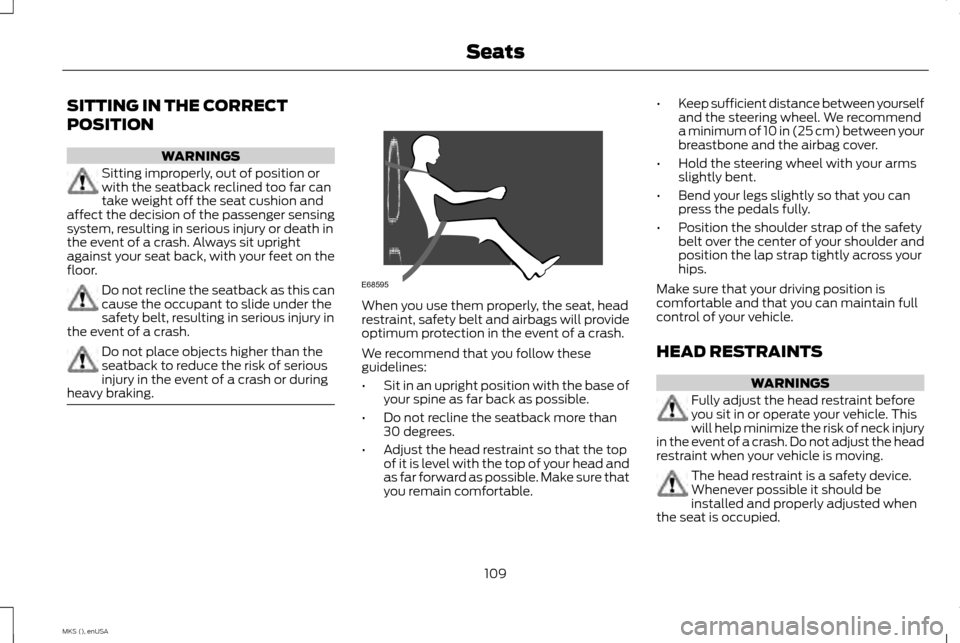
We recommend that you follow these
guidelines:
•
Sit in an upright position with the base of
your spine as far back as possible.
• Do not recline the seatback more than
30 degrees.
• Adjust the head restraint so that the top
of it is level with the top of your head and
as far forward as possible. Make sure that
you remain comfortable. •
Keep sufficient distance between yourself
and the steering wheel. We recommend
a minimum of 10 in (25 cm) between your
breastbone and the airbag cover.
• Hold the steering wheel with your arms
slightly bent.
• Bend your legs slightly so that you can
press the pedals fully.
• Position the shoulder strap of the safety
belt over the center of your shoulder and
position the lap strap tightly across your
hips.
Make sure that your driving position is
comfortable and that you can maintain full
control of your vehicle.
HEAD RESTRAINTS WARNINGS
Fully adjust the head restraint before
you sit in or operate your vehicle. This
will help minimize the risk of neck injury
in the event of a crash. Do not adjust the head
restraint when your vehicle is moving. The head restraint is a safety device.
Whenever possible it should be
installed and properly adjusted when
the seat is occupied.
109
MKS (), enUSA SeatsE68595
Page 130 of 424
On: All electrical circuits are operational and
the warning lamps and indicators illuminate.
• Without applying the brake pedal, press
and release the button once.
Start:
Starts the engine.
• Press the brake pedal, and then press the
button for any length of time. An indicator
light on the button illuminates when then
ignition is on and when the engine starts.
STARTING A GASOLINE ENGINE
When you start the engine, the idle speed
increases, this helps to warm up the engine.
If the engine idle speed does not slow down
automatically, have your vehicle checked by
an authorized dealer. Note:
You can crank the engine for a total of
60 seconds (without the engine starting)
before the starting system temporarily
disables. The 60 seconds does not have to be
all at once. For example, if you crank the
engine three times for 20 seconds each time,
without the engine starting, you reached the
60-second time limit. A message appears in
the information display alerting you that you
exceeded the cranking time. You cannot
attempt to start the engine for at least 15
minutes. After 15 minutes, you are limited to a
15-second engine cranking time. You need to
wait 60 minutes before you can crank the
engine for 60 seconds again.
Before starting the engine, check the
following:
• Make sure all occupants have fastened
their safety belts.
• Make sure the headlamps and electrical
accessories are off.
• Make sure the parking brake is on.
• Put the transmission in park (P).
Note: Do not touch the accelerator pedal.
1. Fully press the brake pedal.
2. Press the button. The system does not function if:
•
The key frequencies are jammed.
• The key battery has no charge.
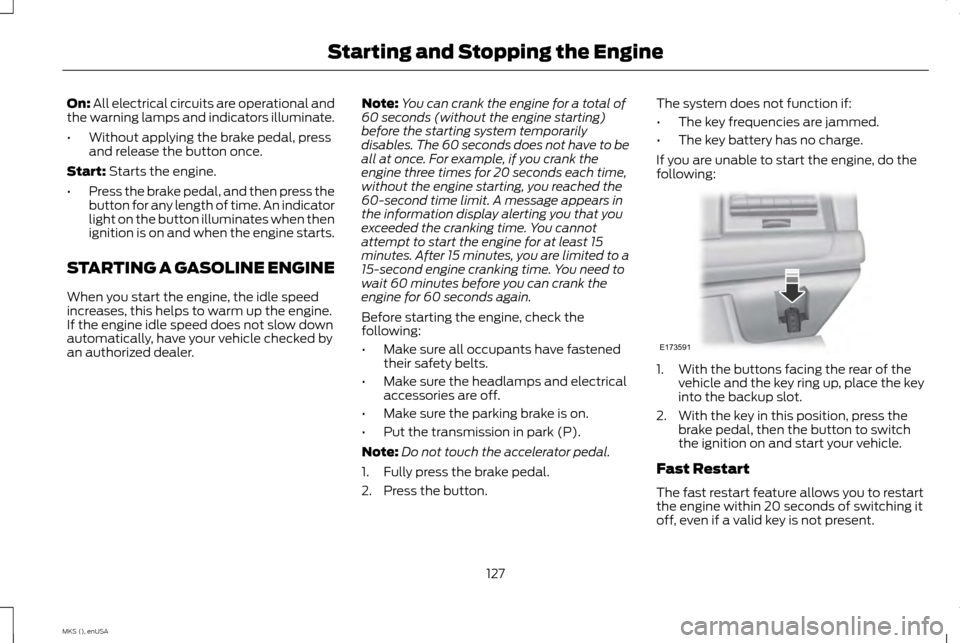
If you are unable to start the engine, do the
following: 1. With the buttons facing the rear of the
vehicle and the key ring up, place the key
into the backup slot.
2. With the key in this position, press the brake pedal, then the button to switch
the ignition on and start your vehicle.
Fast Restart
The fast restart feature allows you to restart
the engine within 20 seconds of switching it
off, even if a valid key is not present.
127
MKS (), enUSA Starting and Stopping the EngineE173591
Page 205 of 424
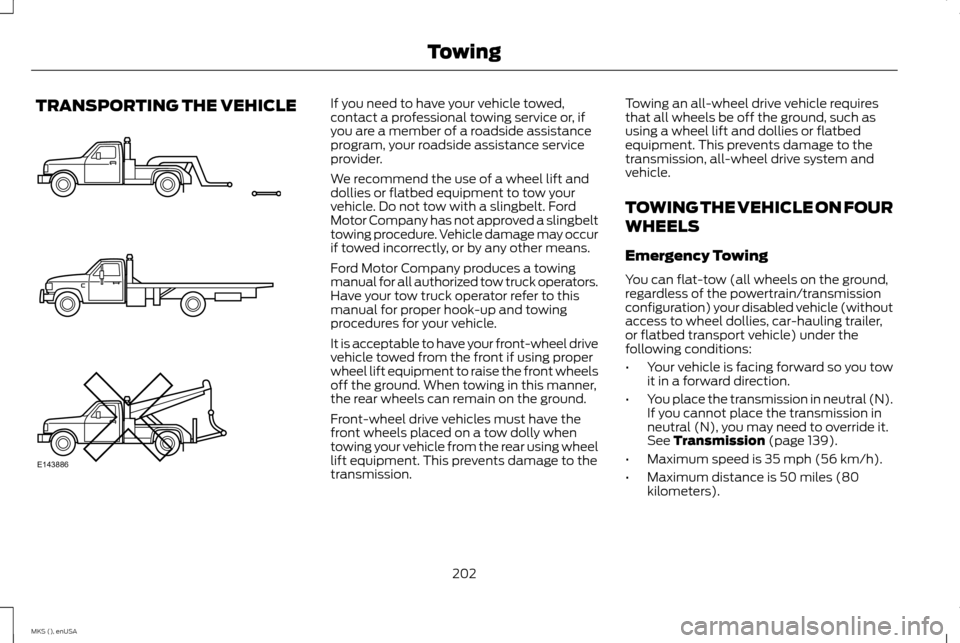
TRANSPORTING THE VEHICLE If you need to have your vehicle towed,
contact a professional towing service or, if
you are a member of a roadside assistance
program, your roadside assistance service
provider.
We recommend the use of a wheel lift and
dollies or flatbed equipment to tow your
vehicle. Do not tow with a slingbelt. Ford
Motor Company has not approved a slingbelt
towing procedure. Vehicle damage may occur
if towed incorrectly, or by any other means.
Ford Motor Company produces a towing
manual for all authorized tow truck operators.
Have your tow truck operator refer to this
manual for proper hook-up and towing
procedures for your vehicle.
It is acceptable to have your front-wheel drive
vehicle towed from the front if using proper
wheel lift equipment to raise the front wheels
off the ground. When towing in this manner,
the rear wheels can remain on the ground.
Front-wheel drive vehicles must have the
front wheels placed on a tow dolly when
towing your vehicle from the rear using wheel
lift equipment. This prevents damage to the
transmission.
Towing an all-wheel drive vehicle requires
that all wheels be off the ground, such as
using a wheel lift and dollies or flatbed
equipment. This prevents damage to the
transmission, all-wheel drive system and
vehicle.
TOWING THE VEHICLE ON FOUR
WHEELS
Emergency Towing
You can flat-tow (all wheels on the ground,
regardless of the powertrain/transmission
configuration) your disabled vehicle (without
access to wheel dollies, car-hauling trailer,
or flatbed transport vehicle) under the
following conditions:
•
Your vehicle is facing forward so you tow
it in a forward direction.
• You place the transmission in neutral (N).
If you cannot place the transmission in
neutral (N), you may need to override it.
See Transmission (page 139).
• Maximum speed is 35 mph (56 km/h).
• Maximum distance is 50 miles (80
kilometers).
202
MKS (), enUSA TowingE143886
Page 214 of 424
3. Remove the jumper cable from the
positive (+) terminal of the booster
vehicle's battery.
4. Remove the jumper cable from the positive (+) terminal of the disabled
vehicle's battery.
After the disabled vehicle has been started
and the jumper cables removed, allow it to
idle for several minutes so the battery can
recharge.
POST-CRASH ALERT SYSTEM
The system flashes the turn signal lamps and
sounds the horn (intermittently) in the event
of a serious impact that deploys an airbag
(front, side, side curtain or Safety Canopy)
or the safety belt pretensioners.
The horn and lamps will turn off when:
• You press the hazard control button.
• You press the panic button on the remote
entry transmitter (if equipped).
• Your vehicle runs out of power.
211
MKS (), enUSA Roadside Emergencies
Page 262 of 424
When washing:
•
Take care when using a power washer to
clean the engine. The high-pressure fluid
could penetrate the sealed parts and
cause damage.
• Do not spray a hot engine with cold water
to avoid cracking the engine block or
other engine components.
• Spray Motorcraft Engine Shampoo and
Degreaser on all parts that require
cleaning and pressure rinse clean. In
Canada, use Motorcraft Engine Shampoo.
• Never wash or rinse the engine while it is
hot or running; water in the running engine
may cause internal damage.
• Never wash or rinse any ignition coil, spark
plug wire or spark plug well, or the area
in and around these locations.
• Cover the battery, power distribution box,
and air filter assembly to prevent water
damage when cleaning the engine. CLEANING THE WINDOWS AND
WIPER BLADES
Car wash chemicals and environmental
fallout can result in windshield and wiper
blade contamination. Dirty windshield and
wipers will result in poor windshield wiper
operation. Keep the windshield and wiper
blades clean to maintain windshield wiper
performance.
To clean the windshield and wiper blades:
•
Clean the windshield with a non-abrasive
glass cleaner.
• For windshields contaminated with tree
sap, chemicals, wax or bugs, clean the
entire windshield using steel wool (no
greater than 0000 grade) in a circular
motion and rinse with water.
• Clean the wiper blades with isopropyl
rubbing alcohol or windshield washer
concentrate.
Note: Do not use razor blades or other sharp
objects to clean or remove decals from the
inside of the heated rear window. The vehicle
warranty does not cover damage caused to
the heated rear window grid lines. CLEANING THE INTERIOR WARNINGS
Do not use cleaning solvents, bleach or
dye on the vehicle
’s safety belts, as
these actions may weaken the belt
webbing. On vehicles equipped with
seat-mounted airbags, do not use
chemical solvents or strong detergents.
Such products could contaminate the side
airbag system and affect performance of the
side airbag in a collision. For fabric, carpets, cloth seats, safety belts
and seats equipped with side airbags:
•
Remove dust and loose dirt with a
vacuum cleaner.
• Remove light stains and soil with
Motorcraft Professional Strength Carpet
& Upholstery Cleaner.
259
MKS (), enUSA Vehicle Care
Page 293 of 424
ENGINE SPECIFICATIONS
3.7 V6
3.5L V6 Ecoboost
Engine
226
214
Cubic inches
Minimum 87 octane
Minimum 87 octane
Required fuel
1-4-2-5-3-6
1-4-2-5-3-6
Firing order
Coil on plug
Coil on plug
Ignition system
.049-.053 in. (1.25-1.35 mm)
.030-.033 in. (.75-.85 mm)
Spark plug gap
10.5:1
10.0:1
Compression ratio
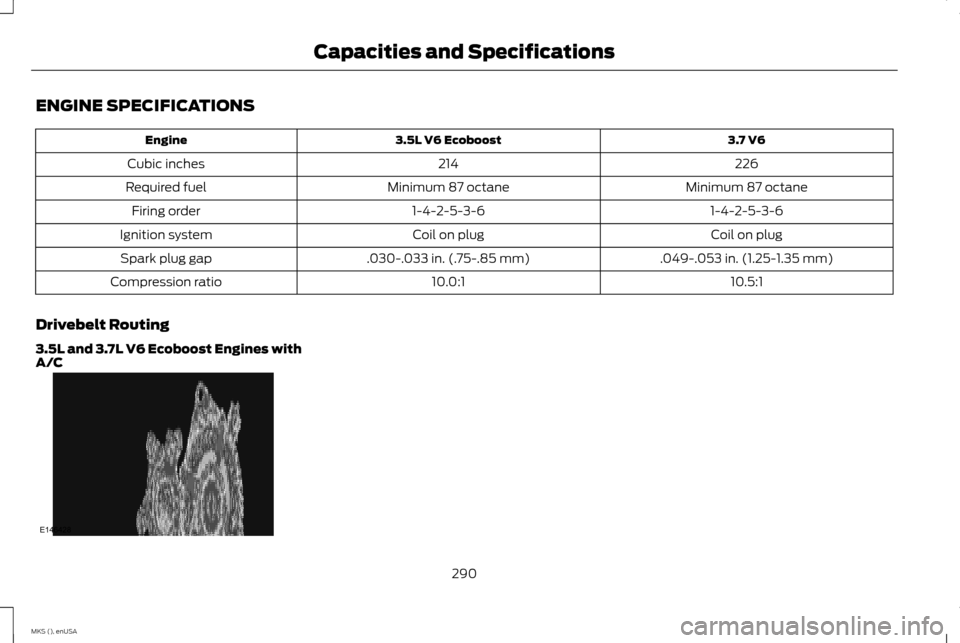
Drivebelt Routing
3.5L and 3.7L V6 Ecoboost Engines with
A/C 290
MKS (), enUSA Capacities and SpecificationsE146428
Page 361 of 424
Note:
Before setting this feature on, make
sure that you read the 911 Assist Privacy Notice
later in this section for important information.
Note: If any user turns 911 Assist on or off, that
setting applies for all paired phones. If 911
Assist is turned off, either a voice message
plays or a display message (or icon) comes
on (or both) when your vehicle is started after
a previously paired phone connects.
Note: Every phone operates differently. While
SYNC 911 Assist works with most cellular
phones, some may have trouble using this
feature.
If a crash deploys an airbag (excludes knee
airbags and rear inflatable safety belts [if
equipped]) or activates the fuel pump
shut-off, your SYNC-equipped vehicle may
be able to contact emergency services by
dialing 911 through a paired and connected
Bluetooth-enabled phone. You can learn
more about the 911 Assist feature, visit
www.SYNCMyRide.com,
www.SYNCMyRide.ca or
www.syncmaroute.ca.
See Supplementary Restraints System
(page 36). Important information regarding
airbag deployment is in this chapter. See
Roadside Emergencies (page 207).
Important information regarding the fuel
pump shut-off is in this chapter.
Setting 911 Assist On If your vehicle is equipped with
Navigation, touch the i
(Information) button to access
these features. If your vehicle is not equipped
with Navigation, touch the corner of the
touchscreen with the green tab.
Touch
Apps > 911 Assist, then select On. You can also access 911 Assist by:
• Pressing the Settings icon >
Settings >
Phone > 911 Assist, or
• Pressing the Settings icon >
Help > 911
Assist.
To make sure that 911 Assist works properly:
• SYNC must be powered and working
properly at the time of the incident and
throughout feature activation and use.
• The 911 Assist feature must be set on prior
to the incident.
• You must pair and connect a
Bluetooth-enabled and compatible
phone to SYNC. •
A connected Bluetooth-enabled phone
must have the ability to make and
maintain an outgoing call at the time of
the incident.
• A connected Bluetooth-enabled phone
must have adequate network coverage,
battery power and signal strength.
• The vehicle must have battery power and
be located in the United States, Canada
or in a territory in which 911 is the
emergency number.
In the Event of a Crash
Not all crashes deploy an airbag or activate
the fuel pump shut-off (which would trigger
911 Assist); however, SYNC tries to contact
emergency services if 911 Assist triggers. If a
connected phone sustains damage or loses
connection to SYNC, SYNC searches for, and
tries to connect to, any available previously
paired phone and tries to make the call to
911.
358
MKS (), enUSA MyLincoln Touch
™E142608 E142607