warning LINCOLN MKS 2015 Workshop Manual
[x] Cancel search | Manufacturer: LINCOLN, Model Year: 2015, Model line: MKS, Model: LINCOLN MKS 2015Pages: 424, PDF Size: 3.96 MB
Page 104 of 424
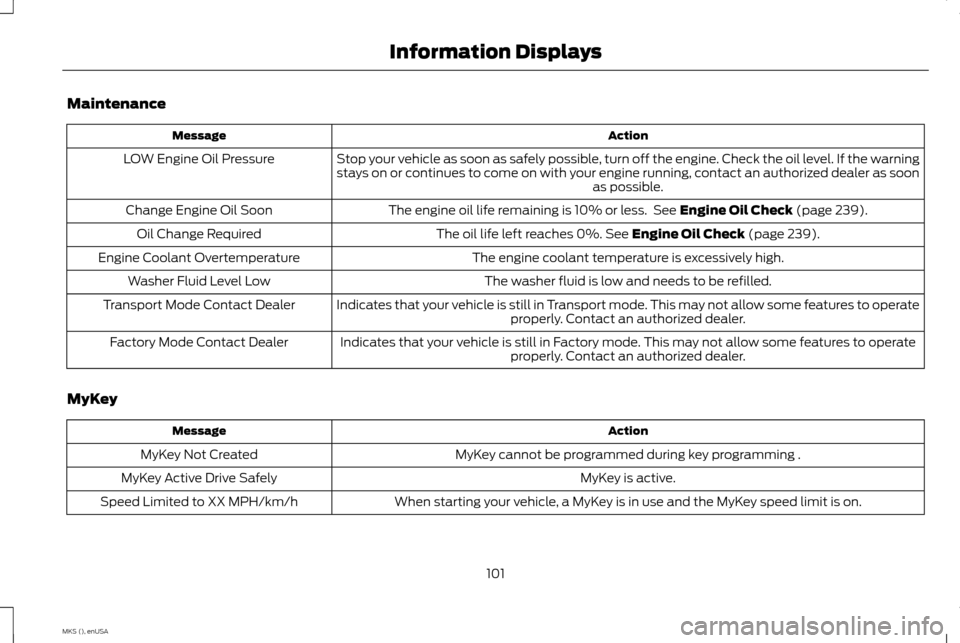
Maintenance
Action
Message
Stop your vehicle as soon as safely possible, turn off the engine. Check the oil level. If the warning
stays on or continues to come on with your engine running, contact an authorized dealer as soon as possible.
LOW Engine Oil Pressure
The engine oil life remaining is 10% or less. See Engine Oil Check (page 239).
Change Engine Oil Soon
The oil life left reaches 0%.
See Engine Oil Check (page 239).
Oil Change Required
The engine coolant temperature is excessively high.
Engine Coolant Overtemperature
The washer fluid is low and needs to be refilled.
Washer Fluid Level Low
Indicates that your vehicle is still in Transport mode. This may not allow some features to operateproperly. Contact an authorized dealer.
Transport Mode Contact Dealer
Indicates that your vehicle is still in Factory mode. This may not allow some features to operateproperly. Contact an authorized dealer.
Factory Mode Contact Dealer
MyKey Action
Message
MyKey cannot be programmed during key programming .
MyKey Not Created
MyKey is active.
MyKey Active Drive Safely
When starting your vehicle, a MyKey is in use and the MyKey speed limit is on.
Speed Limited to XX MPH/km/h
101
MKS (), enUSA Information Displays
Page 106 of 424
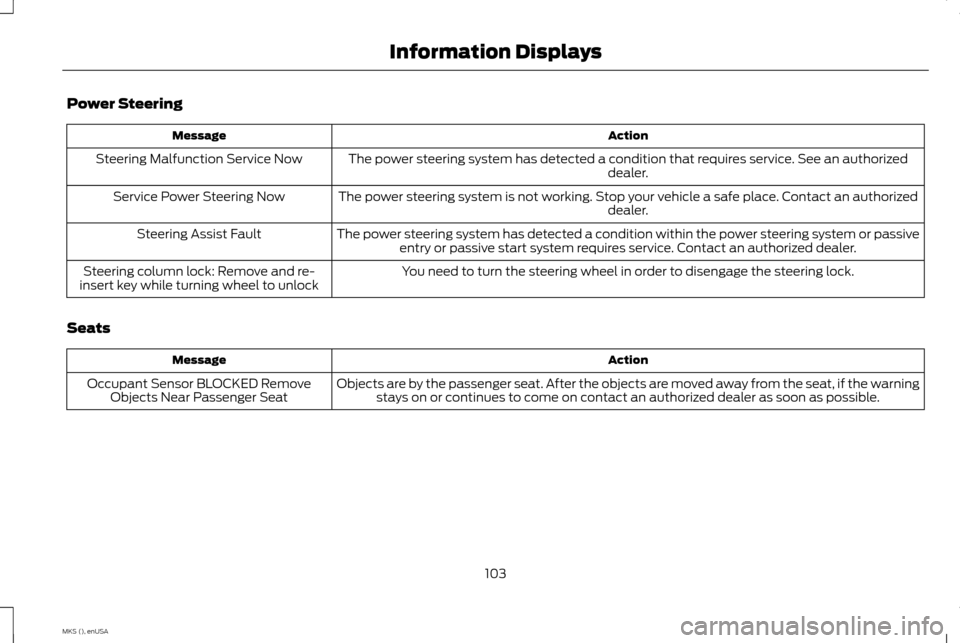
Power Steering
Action
Message
The power steering system has detected a condition that requires service. See an authorized dealer.
Steering Malfunction Service Now
The power steering system is not working. Stop your vehicle a safe place. Contact an authorized dealer.
Service Power Steering Now
The power steering system has detected a condition within the power steering system or passiveentry or passive start system requires service. Contact an authorized dealer.
Steering Assist Fault
You need to turn the steering wheel in order to disengage the steering lock.
Steering column lock: Remove and re-
insert key while turning wheel to unlock
Seats Action
Message
Objects are by the passenger seat. After the objects are moved away from the seat, if the warningstays on or continues to come on contact an authorized dealer as soon as possible.
Occupant Sensor BLOCKED Remove
Objects Near Passenger Seat
103
MKS (), enUSA Information Displays
Page 107 of 424
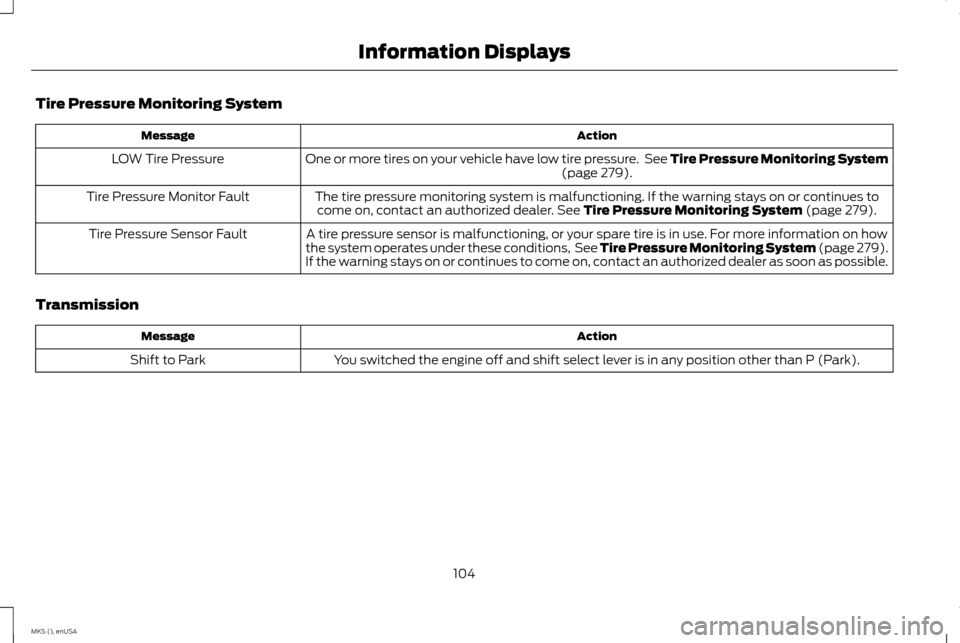
Tire Pressure Monitoring System
Action
Message
One or more tires on your vehicle have low tire pressure. See Tire Pressure Monitoring System (page 279).
LOW Tire Pressure
The tire pressure monitoring system is malfunctioning. If the warning stays on or continues tocome on, contact an authorized dealer.
See Tire Pressure Monitoring System (page 279).
Tire Pressure Monitor Fault
A tire pressure sensor is malfunctioning, or your spare tire is in use. For more information on how
the system operates under these conditions, See Tire Pressure Monitoring System (page 279).
If the warning stays on or continues to come on, contact an authorized dealer as soon as possible.
Tire Pressure Sensor Fault
Transmission Action
Message
You switched the engine off and shift select lever is in any position other than P (Park).
Shift to Park
104
MKS (), enUSA Information Displays
Page 112 of 424
SITTING IN THE CORRECT
POSITION
WARNINGS
Sitting improperly, out of position or
with the seatback reclined too far can
take weight off the seat cushion and
affect the decision of the passenger sensing
system, resulting in serious injury or death in
the event of a crash. Always sit upright
against your seat back, with your feet on the
floor. Do not recline the seatback as this can
cause the occupant to slide under the
safety belt, resulting in serious injury in
the event of a crash. Do not place objects higher than the
seatback to reduce the risk of serious
injury in the event of a crash or during
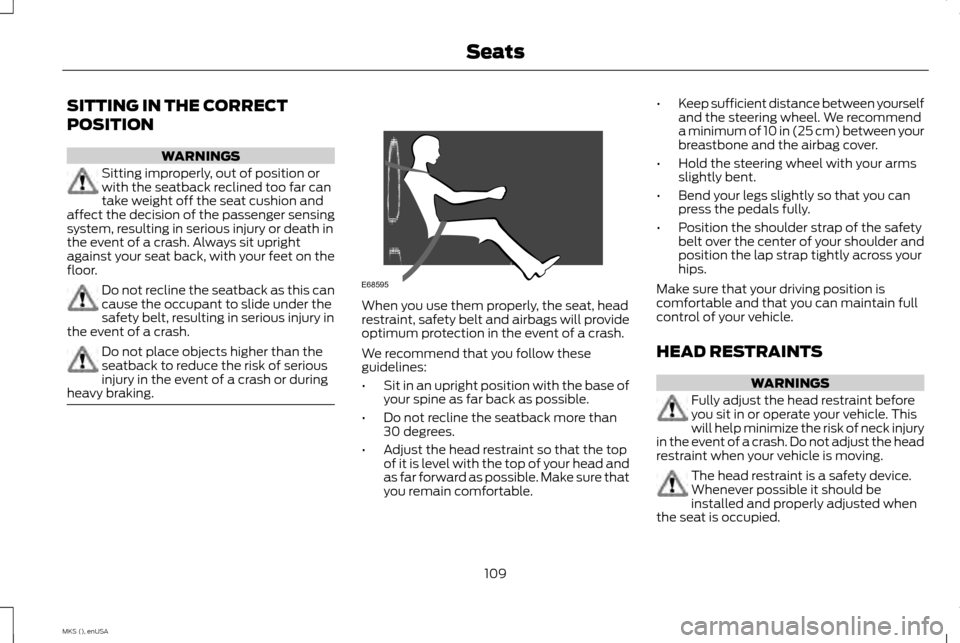
heavy braking. When you use them properly, the seat, head
restraint, safety belt and airbags will provide
optimum protection in the event of a crash.
We recommend that you follow these
guidelines:
•
Sit in an upright position with the base of
your spine as far back as possible.
• Do not recline the seatback more than
30 degrees.
• Adjust the head restraint so that the top
of it is level with the top of your head and
as far forward as possible. Make sure that
you remain comfortable. •
Keep sufficient distance between yourself
and the steering wheel. We recommend
a minimum of 10 in (25 cm) between your
breastbone and the airbag cover.
• Hold the steering wheel with your arms
slightly bent.
• Bend your legs slightly so that you can
press the pedals fully.
• Position the shoulder strap of the safety
belt over the center of your shoulder and
position the lap strap tightly across your
hips.
Make sure that your driving position is
comfortable and that you can maintain full
control of your vehicle.
HEAD RESTRAINTS WARNINGS
Fully adjust the head restraint before
you sit in or operate your vehicle. This
will help minimize the risk of neck injury
in the event of a crash. Do not adjust the head
restraint when your vehicle is moving. The head restraint is a safety device.
Whenever possible it should be
installed and properly adjusted when
the seat is occupied.
109
MKS (), enUSA SeatsE68595
Page 113 of 424
WARNINGS
Install the head restraint properly to
help minimize the risk of neck injury in
the event of a crash.
Note:
Adjust the seatback to an upright driving
position before adjusting the head restraint.
Adjust the head restraint so that the top of it
is level with the top of your head and as far
forward as possible. Make sure that you remain
comfortable. If you are extremely tall, adjust
the head restraint to its highest position.
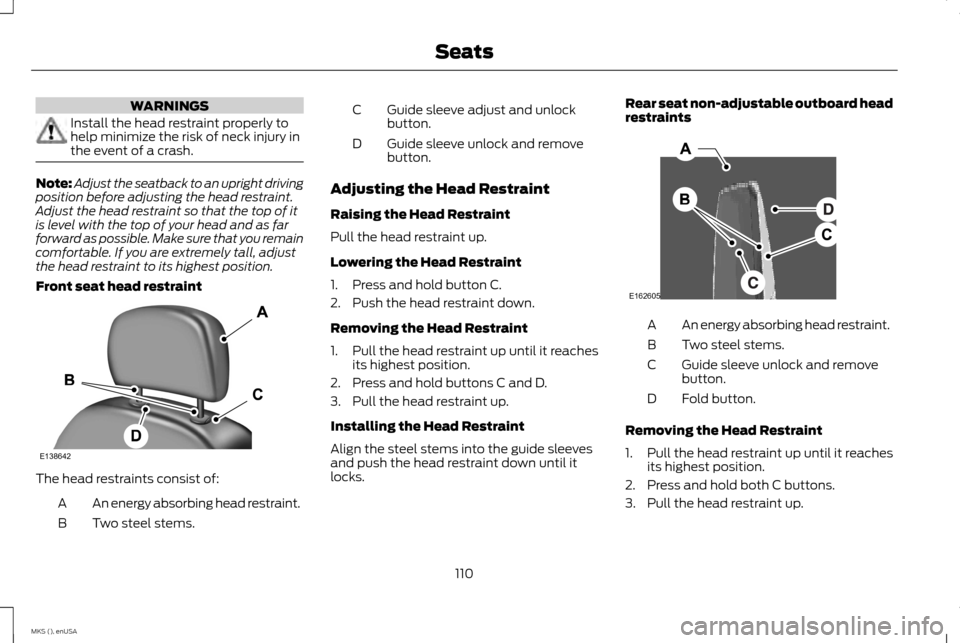
Front seat head restraint The head restraints consist of:
An energy absorbing head restraint.
A
Two steel stems.
B Guide sleeve adjust and unlock
button.
C
Guide sleeve unlock and remove
button.
D
Adjusting the Head Restraint
Raising the Head Restraint
Pull the head restraint up.
Lowering the Head Restraint
1. Press and hold button C.
2. Push the head restraint down.
Removing the Head Restraint
1. Pull the head restraint up until it reaches its highest position.
2. Press and hold buttons C and D.
3. Pull the head restraint up.
Installing the Head Restraint
Align the steel stems into the guide sleeves
and push the head restraint down until it
locks. Rear seat non-adjustable outboard head
restraints
An energy absorbing head restraint.
A
Two steel stems.
B
Guide sleeve unlock and remove
button.
C
Fold button.
D
Removing the Head Restraint
1. Pull the head restraint up until it reaches its highest position.
2. Press and hold both C buttons.
3. Pull the head restraint up.
110
MKS (), enUSA SeatsE138642 E162605
Page 114 of 424
Installing the Head Restraint
Align the steel stems into the guide sleeves
and push the head restraint down until it
locks.
Folding the Head Restraint
1. Press and hold button D.
2. Pull it back up to reset.
Tilting Head Restraints (If Equipped)
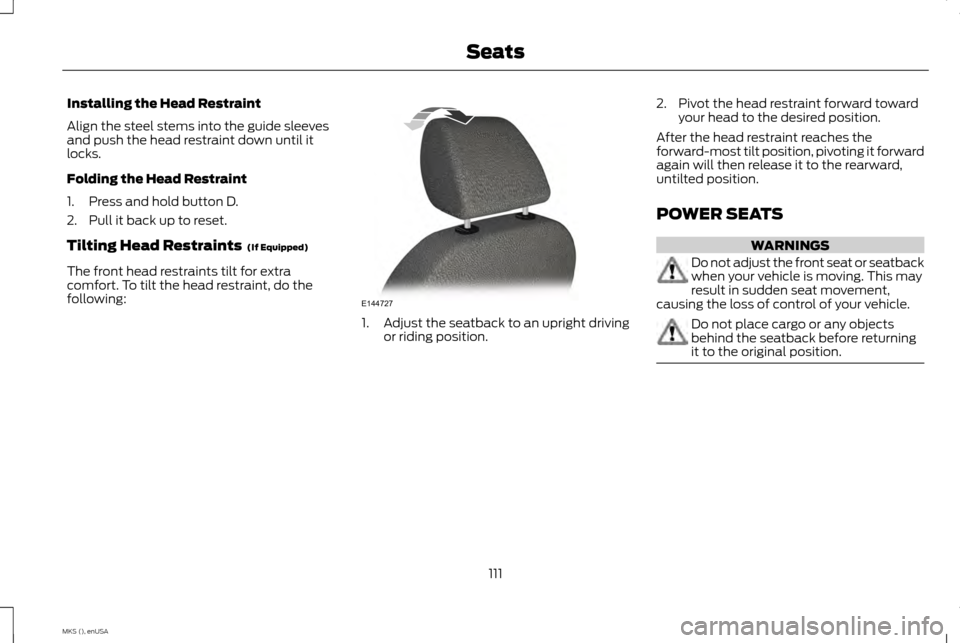
The front head restraints tilt for extra
comfort. To tilt the head restraint, do the
following: 1.
Adjust the seatback to an upright driving
or riding position. 2. Pivot the head restraint forward toward
your head to the desired position.
After the head restraint reaches the
forward-most tilt position, pivoting it forward
again will then release it to the rearward,
untilted position.
POWER SEATS WARNINGS
Do not adjust the front seat or seatback
when your vehicle is moving. This may
result in sudden seat movement,
causing the loss of control of your vehicle. Do not place cargo or any objects
behind the seatback before returning
it to the original position.
111
MKS (), enUSA SeatsE144727
Page 117 of 424
•
Lumbar adjust: Press and hold the front
of the lumbar control (B) to increase the
firmness of the selected portion of the
seatback. Press and hold the rear of the
lumbar to decrease the firmness.
• Power seat controls (C).
We recommend first selecting the lumbar to
the desired setting and then selecting the
back or cushion massage setting.
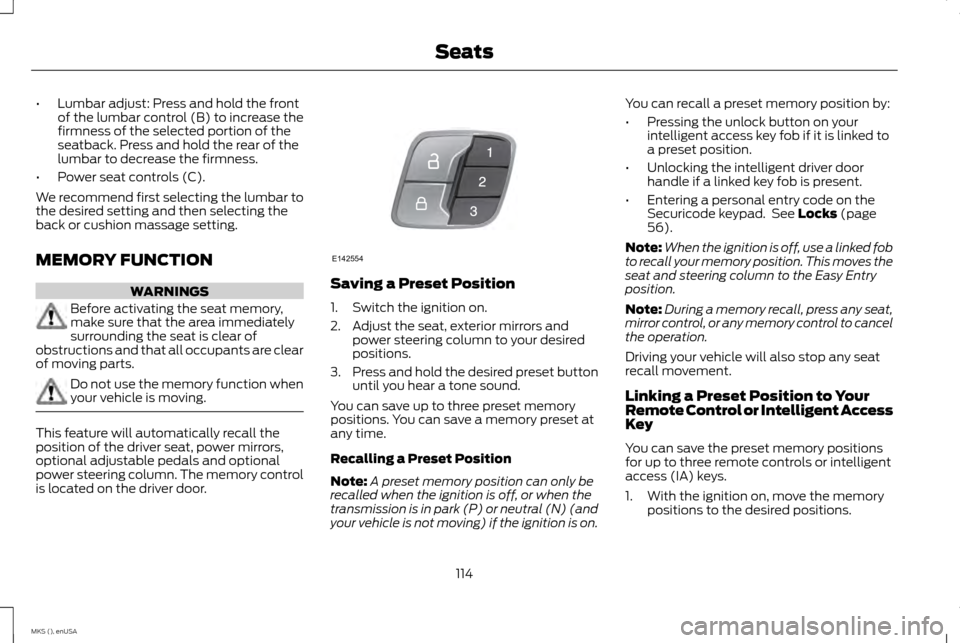
MEMORY FUNCTION WARNINGS
Before activating the seat memory,
make sure that the area immediately
surrounding the seat is clear of
obstructions and that all occupants are clear
of moving parts. Do not use the memory function when
your vehicle is moving.
This feature will automatically recall the
position of the driver seat, power mirrors,
optional adjustable pedals and optional
power steering column. The memory control
is located on the driver door. Saving a Preset Position
1. Switch the ignition on.
2. Adjust the seat, exterior mirrors and
power steering column to your desired
positions.
3. Press and hold the desired preset button
until you hear a tone sound.
You can save up to three preset memory
positions. You can save a memory preset at
any time.
Recalling a Preset Position
Note: A preset memory position can only be
recalled when the ignition is off, or when the
transmission is in park (P) or neutral (N) (and
your vehicle is not moving) if the ignition is on. You can recall a preset memory position by:
•
Pressing the unlock button on your
intelligent access key fob if it is linked to
a preset position.
• Unlocking the intelligent driver door
handle if a linked key fob is present.
• Entering a personal entry code on the
Securicode keypad. See Locks (page
56).
Note: When the ignition is off, use a linked fob
to recall your memory position. This moves the
seat and steering column to the Easy Entry
position.
Note: During a memory recall, press any seat,
mirror control, or any memory control to cancel
the operation.
Driving your vehicle will also stop any seat
recall movement.
Linking a Preset Position to Your
Remote Control or Intelligent Access
Key
You can save the preset memory positions
for up to three remote controls or intelligent
access (IA) keys.
1. With the ignition on, move the memory positions to the desired positions.
114
MKS (), enUSA SeatsE142554
Page 118 of 424
2.
Press and hold the desired preset button
for a few seconds. A tone will sound.
Continue holding until a second tone is
heard.
3. Within three seconds, press the lock button on the remote control you are
linking.
To unlink a remote control, follow the same
procedure – except in Step 3, press the
unlock button on the remote control.
Easy Entry and Exit Feature
If you enable the easy entry and exit feature,
it automatically moves the driver seat
position rearward up to two inches (five
centimeters) and the steering column up and
forward when you switch the ignition off.
When you switch the ignition on, the driver
seat will return to the previous position.
You can enable or disable this feature in the
information display. See Information
Displays (page 88). CLIMATE CONTROLLED SEATS
(If Equipped) WARNING
Persons who are unable to feel pain to
the skin because of advanced age,
chronic illness, diabetes, spinal cord
injury, medication, alcohol use, exhaustion,
or other physical conditions, must exercise
care when using the seat heater. The seat
heater may cause burns even at low
temperatures, especially if used for long
periods of time. Do not place anything on the
seat that insulates against heat, such as a
blanket or cushion, because this may cause
the seat heater to overheat. Do not puncture
the seat with pins, needles, or other pointed
objects because this may damage the
heating element which may cause the seat
heater to overheat. An overheated seat may
cause serious personal injury. Note:
Do not do the following:
• Place heavy objects on the seat.
• Operate the seat heater if water or any
other liquid is spilled on the seat. Allow
the seat to dry thoroughly. The heated seats will only function when the
engine is running.
To operate the heated seats:
Press the heated seat symbol located on the
touchscreen to cycle through the various heat
settings and off. Warmer settings are
indicated by more indicator lights.
If the engine falls below 350 RPM while the
heated seats are on, the feature will turn
itself off. You will need to reactivate it.
Cooled Seats
The cooled seats will only function when the
engine is running.
To operate the cooled seats:
115
MKS (), enUSA SeatsE146322
Page 119 of 424
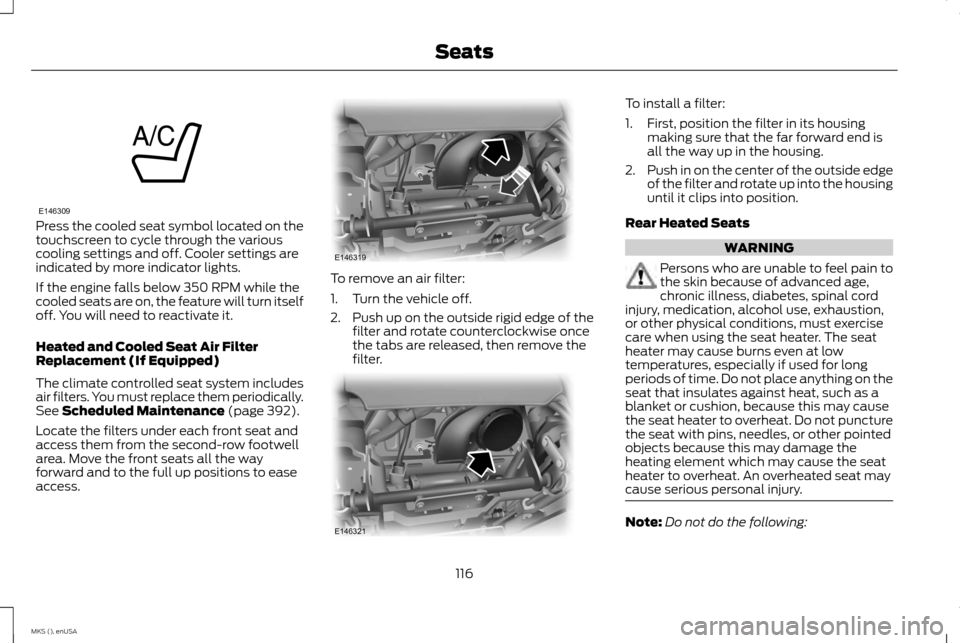
Press the cooled seat symbol located on the
touchscreen to cycle through the various
cooling settings and off. Cooler settings are
indicated by more indicator lights.
If the engine falls below 350 RPM while the
cooled seats are on, the feature will turn itself
off. You will need to reactivate it.
Heated and Cooled Seat Air Filter
Replacement (If Equipped)
The climate controlled seat system includes
air filters. You must replace them periodically.
See Scheduled Maintenance (page 392).
Locate the filters under each front seat and
access them from the second-row footwell
area. Move the front seats all the way
forward and to the full up positions to ease
access. To remove an air filter:
1. Turn the vehicle off.
2. Push up on the outside rigid edge of the
filter and rotate counterclockwise once
the tabs are released, then remove the
filter. To install a filter:
1. First, position the filter in its housing
making sure that the far forward end is
all the way up in the housing.
2. Push in on the center of the outside edge
of the filter and rotate up into the housing
until it clips into position.
Rear Heated Seats WARNING
Persons who are unable to feel pain to
the skin because of advanced age,
chronic illness, diabetes, spinal cord
injury, medication, alcohol use, exhaustion,
or other physical conditions, must exercise
care when using the seat heater. The seat
heater may cause burns even at low
temperatures, especially if used for long
periods of time. Do not place anything on the
seat that insulates against heat, such as a
blanket or cushion, because this may cause
the seat heater to overheat. Do not puncture
the seat with pins, needles, or other pointed
objects because this may damage the
heating element which may cause the seat
heater to overheat. An overheated seat may
cause serious personal injury. Note:
Do not do the following:
116
MKS (), enUSA SeatsE146309 E146319 E146321
Page 122 of 424
HomeLink Wireless Control System
(If Equipped)
WARNING
Do not use the system with any garage
door opener that does not have the
safety stop and reverse feature as
required by U.S. Federal Safety Standards
(this includes any garage door opener
manufactured before April 1, 1982). A garage
door opener which cannot detect an object,
signaling the door to stop and reverse, does
not meet current federal safety standards.
Using a garage door opener without these
features increases the risk of serious injury or
death. Note:
Make sure that the garage door and
security device are free from obstruction when
you are programming. Do not program the
system with the vehicle in the garage.
Note: Make sure you keep the original remote
control transmitter for use in other vehicles as
well as for future system programming.
Note: We recommend that upon the sale or
lease termination of your vehicle, you erase
the programmed function buttons for security
reasons. See Erasing the function button codes
later in this section. Note:
You can program a maximum of three
devices. To change or replace any of the three
devices after it has been initially programmed,
you must first erase the current settings. See
Erasing the function button codes later in this
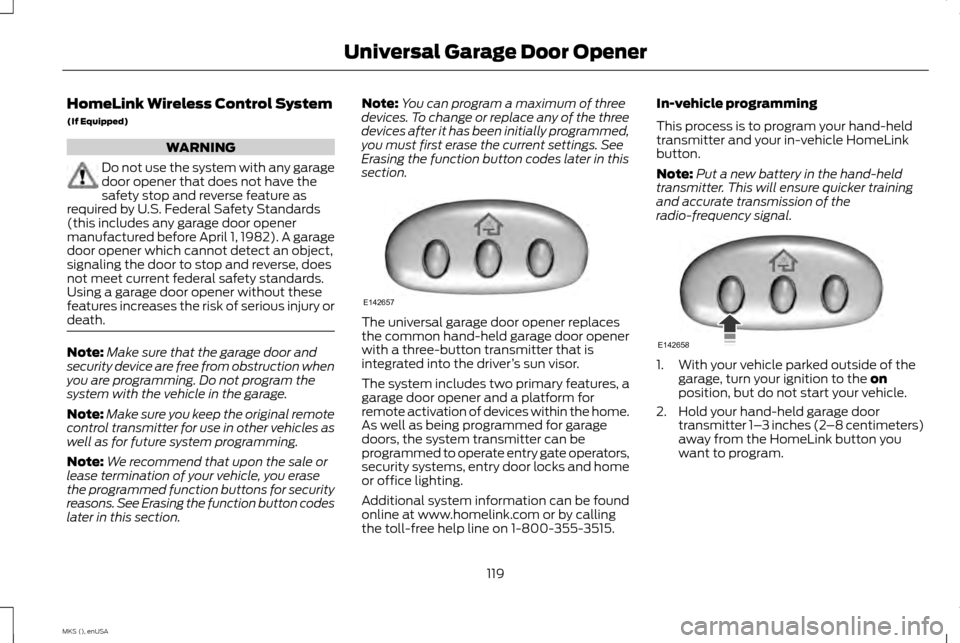
section. The universal garage door opener replaces
the common hand-held garage door opener
with a three-button transmitter that is
integrated into the driver
’s sun visor.
The system includes two primary features, a
garage door opener and a platform for
remote activation of devices within the home.
As well as being programmed for garage
doors, the system transmitter can be
programmed to operate entry gate operators,
security systems, entry door locks and home
or office lighting.
Additional system information can be found
online at www.homelink.com or by calling
the toll-free help line on 1-800-355-3515. In-vehicle programming
This process is to program your hand-held
transmitter and your in-vehicle HomeLink
button.
Note:
Put a new battery in the hand-held
transmitter. This will ensure quicker training
and accurate transmission of the
radio-frequency signal. 1. With your vehicle parked outside of the
garage, turn your ignition to the on
position, but do not start your vehicle.
2. Hold your hand-held garage door transmitter 1– 3 inches (2–8 centimeters)
away from the HomeLink button you
want to program.
119
MKS (), enUSA Universal Garage Door OpenerE142657 E142658