audio LINCOLN MKS 2016 User Guide
[x] Cancel search | Manufacturer: LINCOLN, Model Year: 2016, Model line: MKS, Model: LINCOLN MKS 2016Pages: 382, PDF Size: 3.81 MB
Page 236 of 382
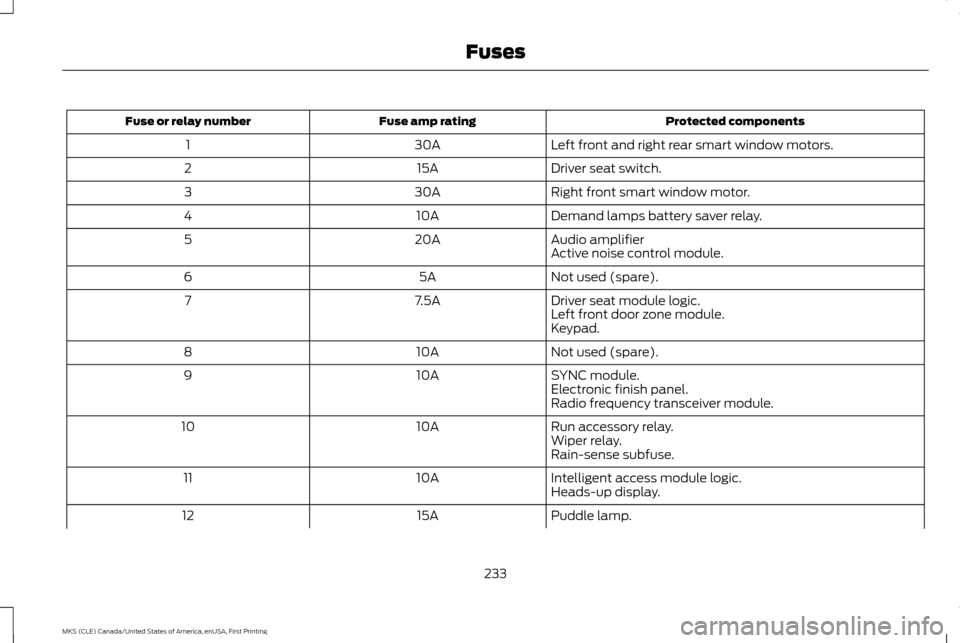
Protected components
Fuse amp rating
Fuse or relay number
Left front and right rear smart window motors.
30A
1
Driver seat switch.
15A
2
Right front smart window motor.
30A
3
Demand lamps battery saver relay.
10A
4
Audio amplifier
20A
5
Active noise control module.
Not used (spare).
5A
6
Driver seat module logic.
7.5A
7
Left front door zone module.
Keypad.
Not used (spare).
10A
8
SYNC module.
10A
9
Electronic finish panel.
Radio frequency transceiver module.
Run accessory relay.
10A
10
Wiper relay.
Rain-sense subfuse.
Intelligent access module logic.
10A
11
Heads-up display.
Puddle lamp.
15A
12
233
MKS (CLE) Canada/United States of America, enUSA, First Printing Fuses
Page 237 of 382
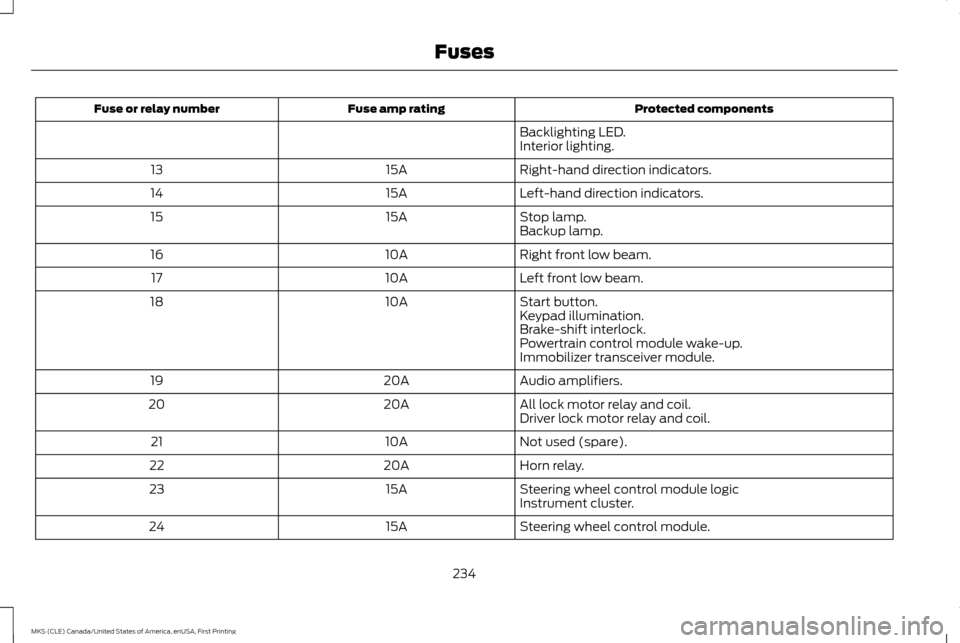
Protected components
Fuse amp rating
Fuse or relay number
Backlighting LED.
Interior lighting.
Right-hand direction indicators.
15A
13
Left-hand direction indicators.
15A
14
Stop lamp.
15A
15
Backup lamp.
Right front low beam.
10A
16
Left front low beam.
10A
17
Start button.
10A
18
Keypad illumination.
Brake-shift interlock.
Powertrain control module wake-up.
Immobilizer transceiver module.
Audio amplifiers.
20A
19
All lock motor relay and coil.
20A
20
Driver lock motor relay and coil.
Not used (spare).
10A
21
Horn relay.
20A
22
Steering wheel control module logic
15A
23
Instrument cluster.
Steering wheel control module.
15A
24
234
MKS (CLE) Canada/United States of America, enUSA, First Printing Fuses
Page 259 of 382
Because your vehicle
’s engine is electronically
controlled by a computer, some control
conditions are maintained by power from the
battery. When the battery is disconnected or
a new battery is installed, the engine must
relearn its idle and fuel trim strategy for
optimum driveability and performance.
Flexible fuel vehicles (FFV) must also relearn
the ethanol content of the fuel for optimum
driveability and performance.
To restore the settings, do the following:
1. Apply the parking brake.
2. Shift into park (P) or neutral (N).
3. Switch off all accessories.
4. Press the brake pedal and start your vehicle.
5. Run the engine until it reaches normal operating temperature. While the engine
is warming up, complete the following:
Reset the clock. See Audio System
(page 313). Reset the power windows
bounce-back feature. See Windows and
Mirrors
(page 78). Reset the radio
station presets. See Audio System
(page 313).
6. Allow the engine to idle for at least one minute. 7.
Drive the vehicle at least 10 mi (16 km) to
completely relearn the idle trim and fuel
trim strategy.
Note: If you do not allow the engine to relearn
the idle and fuel trim strategy, the idle quality
of your vehicle may be adversely affected until
the engine computer eventually relearns the
idle trim and fuel trim strategy.
Note: For flexible fuel vehicles, if you are
operating on E85, you may experience poor
starts or an inability to start the engine and
driveability problems until the fuel trim and
ethanol content have been relearned.
Make sure that you dispose of old batteries
in an environmentally friendly way. Seek
advice from your local authority about
recycling old batteries.
If storing your vehicle for more than 30 days
without recharging the battery, we
recommend that you disconnect the battery
cables to maintain battery charge for quick
starting. Battery Management System
(If
Equipped)
The battery management system monitors
battery conditions and takes actions to
extend battery life. If excessive battery drain
is detected, the system temporarily disables
some electrical systems to protect the
battery.
Systems included are:
• Heated rear window.
• Heated seats.
• Climate control.
• Heated steering wheel.
• Audio unit.
• Navigation system.
A message may appear in the information
displays to alert you that battery protection
actions are active. These messages are only
for notification that an action is taking place,
and not intended to indicate an electrical
problem or that the battery requires
replacement.
256
MKS (CLE) Canada/United States of America, enUSA, First Printing Maintenance
Page 316 of 382
GENERAL INFORMATION
Radio Frequencies and Reception
Factors
AM and FM frequencies are established by
the Federal Communications Commission
(FCC) and the Canadian Radio and
Telecommunications Commission (CRTC).
Those frequencies are:
•
AM: 530, 540-1700, 1710 kHz
• FM: 87.9-107.7, 107.9 MHz Radio Reception Factors
The further you travel from an AM or FM station, the weaker the signal and the weaker the reception.
Distance and strength
Hills, mountains, tall buildings, bridges, tunnels, freeway overpasses, parking garages, dense tree foliage and
thunderstorms can interfere with the reception.
Terrain
When you pass a ground-based broadcast repeating tower, a stronger signal may overtake a weaker one and
result in the audio system muting.
Station overload
CD and CD Player Information
Note: CD units play commercially pressed
4.75-inch (12 centimeter) audio compact discs
only. Due to technical incompatibility, certain
recordable and re-recordable compact discs
may not function correctly when used in Ford
CD players. Note:
Do not insert CDs with homemade
paper (adhesive) labels into the CD player as
the label may peel and cause the CD to
become jammed. You should use a permanent
felt tip marker rather than adhesive labels on
your homemade CDs. Ballpoint pens may
damage CDs. Please contact an authorized
dealer for further information.
Note: Do not use any irregularly shaped discs
or discs with a scratch protection film
attached. Always handle discs by their edges only.
Clean the disc with an approved CD cleaner
only. Wipe it from the center of the disc
toward the edge. Do not clean in a circular
motion.
Do not expose discs to direct sunlight or heat
sources for extended periods.
313
MKS (CLE) Canada/United States of America, enUSA, First Printing Audio System
Page 317 of 382
MP3 and WMA Track and Folder
Structure
Audio systems capable of recognizing and
playing MP3 and WMA individual tracks and
folder structures work as follows:
•
There are two different modes for MP3
and WMA disc playback: MP3 and WMA
track mode (system default) and MP3
and WMA folder mode.
• MP3 and WMA track mode ignores any
folder structure on the MP3 and WMA
disc. The player numbers each MP3 and
WMA track on the disc (noted by the MP3
or WMA file extension) from T001 to a
maximum of T255. The maximum
number of playable MP3 and WMA files
may be less depending on the structure
of the CD and exact model of radio
present. •
MP3 and WMA folder mode represents a
folder structure consisting of one level of
folders. The CD player numbers all MP3
and WMA tracks on the disc (noted by
the MP3 or WMA file extension) and all
folders containing MP3 and WMA files,
from F001 (folder) T001 (track) to F253
T255.
• Creating discs with only one level of
folders helps with navigation through the
disc files.
If you are burning your own MP3 and WMA
discs, it is important to understand how the
system reads the structures you create. While
various files may be present (files with
extensions other than MP3 and WMA), only
files with the MP3 and WMA extension are
played; other files are ignored by the system.
This enables you to use the same MP3 and
WMA disc for a variety of tasks on your work
computer, home computer and your
in-vehicle system. In track mode, the system displays and plays
the structure as if it were only one level deep
(all MP3 and WMA files play, regardless of
being in a specific folder). In folder mode, the
system only plays the MP3 and WMA files in
the current folder.
AUDIO UNIT - VEHICLES WITH:
PREMIUM AM/FM/CD WARNING
Driving while distracted can result in
loss of vehicle control, crash and injury.
We strongly recommend that you use
extreme caution when using any device that
may take your focus off the road. Your
primary responsibility is the safe operation
of your vehicle. We recommend against the
use of any hand-held device while driving and
encourage the use of voice-operated systems
when possible. Make sure you are aware of
all applicable local laws that may affect the
use of electronic devices while driving. Note:
The touchsceen system controls most
of the audio features. See your MyLincoln
Touch information.
314
MKS (CLE) Canada/United States of America, enUSA, First Printing Audio System
Page 318 of 382
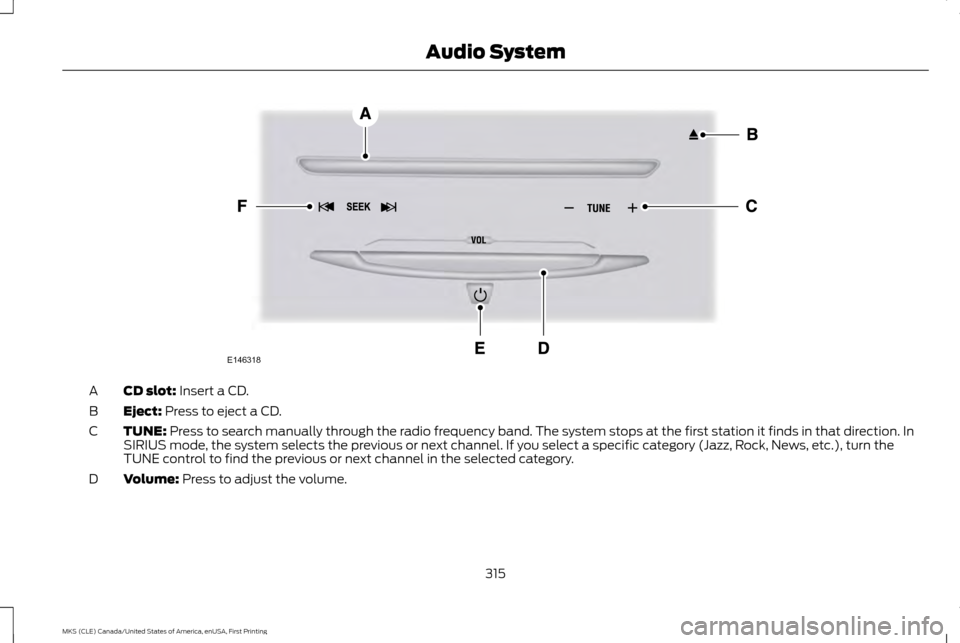
CD slot: Insert a CD.
A
Eject:
Press to eject a CD.
B
TUNE:
Press to search manually through the radio frequency band. The system stops at the first station it finds in that direction. In
SIRIUS mode, the system selects the previous or next channel. If you select a specific category (Jazz, Rock, News, etc.), turn the
TUNE control to find the previous or next channel in the selected category.
C
Volume:
Press to adjust the volume.
D
315
MKS (CLE) Canada/United States of America, enUSA, First Printing Audio SystemE146318
Page 319 of 382
Power: Press to switch the system on and off.
E
Seek/Fast Forward/Reverse:
Press to go to the previous or next track or available radio station. Press and hold to either reverse
or fast forward through the current track or to quickly reverse or advance through the radio bands in individual increments.
F
MEDIA HUB
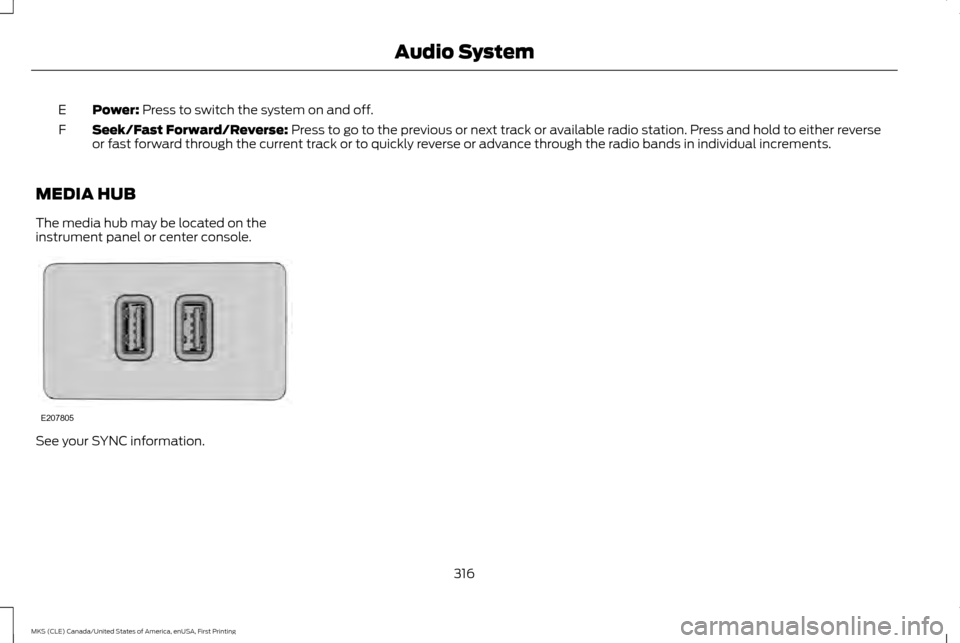
The media hub may be located on the
instrument panel or center console. See your SYNC information.
316
MKS (CLE) Canada/United States of America, enUSA, First Printing Audio SystemE207805
Page 357 of 382
•
Links to Third Party Sites: The
SOFTWARE may provide you with the
ability to link to third party sites. The third
party sites are not under the control of
FORD MOTOR COMPANY, its affiliates
and/or its designated agent. Neither
FORD MOTOR COMPANY nor its affiliates
nor its designated agent are responsible
for (i) the contents of any third party
sites, any links contained in third party
sites, or any changes or updates to third
party sites, or (ii) webcasting or any other
form of transmission received from any
third party sites. If the SOFTWARE
provides links to third party sites, those
links are provided to you only as a
convenience, and the inclusion of any link
does not imply an endorsement of the
third party site by FORD MOTOR
COMPANY, its affiliates and/or its
designated agent.
• Obligation to Drive Responsibly:
You
recognize your obligation to drive
responsibly and keep attention on the
road. You will read and abide with the
DEVICES operating instructions
particularly as they pertain to safety and
you agree to assume any risk associated
with the use of the DEVICES. UPGRADES AND RECOVERY MEDIA:
If
the SOFTWARE is provided by FORD MOTOR
COMPANY separate from the DEVICES on
media such as a ROM chip, CD ROM disk(s)
or via web download or other means, and is
labeled "For Upgrade Purposes Only" or "For
Recovery Purposes Only" you may install one
(1) copy of such SOFTWARE onto the
DEVICES as a replacement copy for the
existing SOFTWARE, and use it in accordance
with this EULA, including any additional EULA
terms accompanying the upgrade
SOFTWARE.
INTELLECTUAL PROPERTY RIGHTS: All
title and intellectual property rights in and to
the SOFTWARE (including but not limited to
any images, photographs, animations, video,
audio, music, text and "applets" incorporated
into the SOFTWARE), the accompanying
printed materials, and any copies of the
SOFTWARE, are owned by FORD MOTOR
COMPANY, or its affiliates or suppliers. The
SOFTWARE is licensed, not sold. You may
not copy the printed materials accompanying
the SOFTWARE. All title and intellectual
property rights in and to the content which
may be accessed through use of the
SOFTWARE is the property of the respective
content owner and may be protected by
applicable copyright or other intellectual
property laws and treaties. This EULA grants you no rights to use such content outside its
intended use. All rights not specifically
granted under this EULA are reserved by
FORD MOTOR COMPANY, its affiliates, and
third party software and service providers
and suppliers. Use of any on-line services
which may be accessed through the
SOFTWARE may be governed by the
respective terms of use relating to such
services. If this SOFTWARE contains
documentation that is provided only in
electronic form, you may print one copy of
such electronic documentation.
EXPORT RESTRICTIONS:
You
acknowledge that the SOFTWARE is subject
to U.S. and European Union export
jurisdiction. You agree to comply with all
applicable international and national laws
that apply to the SOFTWARE, including the
U.S. Export Administration Regulations, as
well as end-user, end-use and destination
restrictions issued by U.S. and other
governments.
TRADEMARKS:
This EULA does not grant
you any rights in connection with any
trademarks or service marks of FORD
MOTOR COMPANY, its affiliates, and third
party software and service providers.
354
MKS (CLE) Canada/United States of America, enUSA, First Printing Appendices
Page 365 of 382
3. Software License
•
Subject to your compliance with the
terms of this Agreement, TeleNav hereby
grants to you a personal, non-exclusive,
non-transferable license (except as
expressly permitted below in connection
with your permanent transfer of the
TeleNav Software license), without the
right to sublicense, to use the TeleNav
Software (in object code form only) in
order to access and use the TeleNav
Software. This license shall terminate
upon any termination or expiration of this
Agreement. You agree that you will use
the TeleNav Software only for your
personal business or leisure purposes,
and not to provide commercial navigation
services to other parties.
3.1 License Limitations
• (a) reverse engineer, decompile,
disassemble, translate, modify, alter or
otherwise change the TeleNav Software
or any part thereof; (b) attempt to derive
the source code, audio library or structure
of the TeleNav Software without the prior
express written consent of TeleNav;
(c)
remove from the TeleNav Software, or
alter, any of TeleNav's or its suppliers'
trademarks, trade names, logos, patent
or copyright notices, or other notices or markings;
(d) distribute, sublicense or
otherwise transfer the TeleNav Software
to others, except as part of your
permanent transfer of the TeleNav
Software; or
(e) use the TeleNav
Software in any manner that
i. infringes the intellectual property or
proprietary rights, rights of publicity or privacy
or other rights of any party,
ii. violates any law, statute, ordinance or
regulation, including but not limited to laws
and regulations related to spamming, privacy,
consumer and child protection, obscenity or
defamation, or
iii. is harmful, threatening, abusive, harassing,
tortuous, defamatory, vulgar, obscene,
libelous, or otherwise objectionable; and (f)
lease, rent out, or otherwise permit
unauthorized access by third parties to the
TeleNav Software without advanced written
permission of TeleNav.
4. Disclaimers
• To the fullest extent permissible pursuant
to applicable law, in no event will
TeleNav, its licensors and suppliers, or
agents or employees of any of the
foregoing, be liable for any decision made
or action taken by you or anyone else in
reliance on the information provided by the TeleNav Software. TeleNav also does
not warrant the accuracy of the map or
other data used for the TeleNav
Software. Such data may not always
reflect reality due to, among other things,
road closures, construction, weather, new
roads and other changing conditions. You
are responsible for the entire risk arising
out of your use of the TeleNav Software.
For example but without limitation, you
agree not to rely on the TeleNav Software
for critical navigation in areas where the
well-being or survival of you or others is
362
MKS (CLE) Canada/United States of America, enUSA, First Printing Appendices
Page 374 of 382
A
A/C
See: Climate Control.............................................. 105
About This Manual................................................7 Protecting the Environment..................................... 7
ABS See: Brakes................................................................ 150
ABS driving hints See: Hints on Driving With Anti-Lock
Brakes..................................................................... 150
Accessories..........................................................317 Exterior style............................................................... 317
Interior style................................................................ 317
Lifestyle........................................................................\
317
Peace of mind............................................................ 317
Accessories See: Replacement Parts Recommendation......11
ACC See: Using Adaptive Cruise Control.................. 167
Active Park Assist..............................................158 Automatic Steering into Parking Space..........159
Deactivating the Park Assist Feature...............160
Troubleshooting the System................................ 161
Using Active Park Assist........................................ 158
Adaptive Headlamps.........................................75
Adjusting the Headlamps.............................258 Horizontal Aim Adjustment................................ 259
Vertical Aim Adjustment...................................... 258
Adjusting the Pedals.........................................68 Adjusting the Steering Wheel........................65
Easy Entry and Exit Feature................................... 65
End of Travel Position.............................................. 65
Memory Feature........................................................ 65
AFS See: Adaptive Headlamps...................................... 75
Airbag Disposal...................................................45
Air Conditioning See: Climate Control.............................................. 105
Air Filter See: Changing the Engine Air Filter.................. 262
Alarm See: Anti-Theft Alarm............................................. 64
All-Wheel Drive..................................................143
Ambient Lighting
.................................................77
Anti-Theft Alarm................................................64 Arming the Alarm...................................................... 64
Disarming the Alarm................................................ 64
Appendices.........................................................352
Audible Warnings and Indicators..................87 Headlamps On Warning Chime........................... 88
Keyless Warning Alert.............................................. 87
Parking Brake On Warning Chime...................... 88
Audio Control
.......................................................65
MEDIA........................................................................\
.... 66
Seek, Next or Previous............................................ 66
Audio System
......................................................313
General Information................................................ 313
Audio Unit - Vehicles With: Premium AM/ FM/CD................................................................314
Autolamps.............................................................72 Windshield Wiper Activated Headlamps..........72 Automatic Climate Control
...........................105
Automatic High Beam Control.......................74 Activating the System.............................................. 74
Manually Overriding the System.......................... 75
Automatic Transmission
................................140
Automatic Transmission Adaptive
Learning.................................................................. 142
Brake-Shift Interlock................................................ 141
If Your Vehicle Gets Stuck In Mud or Snow........................................................................\
142
SelectShift Automatic ™ Transmission............141
Understanding the Positions of Your Automatic Transmission.................................. 140
Automatic Transmission Fluid Check.................................................................250
6F50/6F55 Transmission................................... 250
Autowipers............................................................69
Auxiliary Power Points.....................................124 110 Volt AC Power Point......................................... 124
12 Volt DC Power Point........................................... 124
Locations..................................................................... 124
AWD See: All-Wheel Drive............................................... 143
B
Battery See: Changing the 12V Battery........................... 255
Blind Spot Information System
....................179
Switching the System Off and On..................... 181
System Errors............................................................. 181
Using the System.................................................... 180
371
MKS (CLE) Canada/United States of America, enUSA, First Printing Index