brake LINCOLN MKS 2016 User Guide
[x] Cancel search | Manufacturer: LINCOLN, Model Year: 2016, Model line: MKS, Model: LINCOLN MKS 2016Pages: 382, PDF Size: 3.81 MB
Page 101 of 382
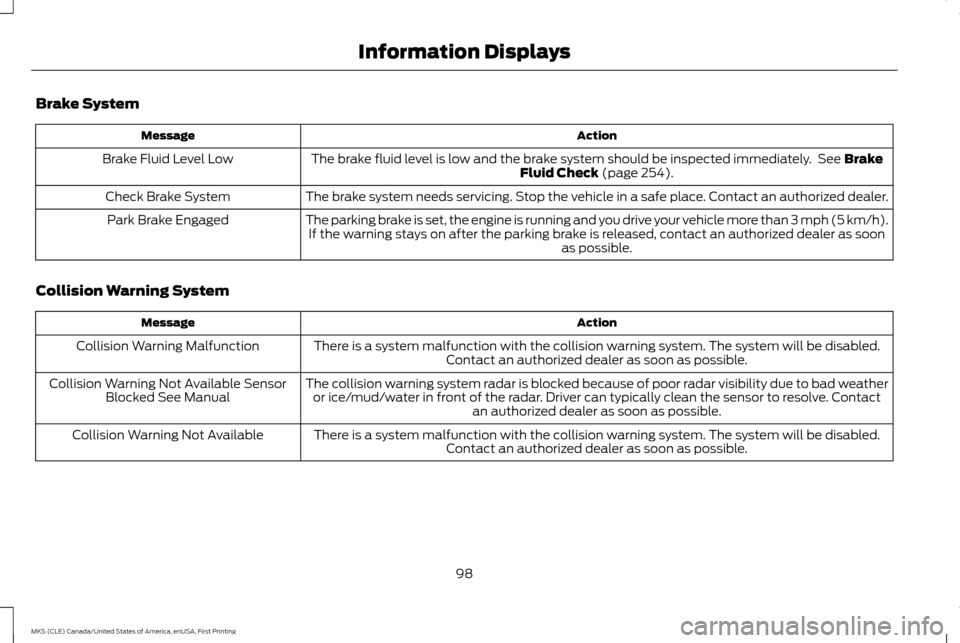
Brake System
Action
Message
The brake fluid level is low and the brake system should be inspected immediately. See Brake
Fluid Check (page 254).
Brake Fluid Level Low
The brake system needs servicing. Stop the vehicle in a safe place. Contact an authorized dealer.
Check Brake System
The parking brake is set, the engine is running and you drive your vehicle more than 3 mph (5 km/h).If the warning stays on after the parking brake is released, contact an authorized dealer as soon as possible.
Park Brake Engaged
Collision Warning System Action
Message
There is a system malfunction with the collision warning system. The system will be disabled.Contact an authorized dealer as soon as possible.
Collision Warning Malfunction
The collision warning system radar is blocked because of poor radar visibility due to bad weatheror ice/mud/water in front of the radar. Driver can typically clean the sensor to resolve. Contact an authorized dealer as soon as possible.
Collision Warning Not Available Sensor
Blocked See Manual
There is a system malfunction with the collision warning system. The system will be disabled.Contact an authorized dealer as soon as possible.
Collision Warning Not Available
98
MKS (CLE) Canada/United States of America, enUSA, First Printing Information Displays
Page 102 of 382
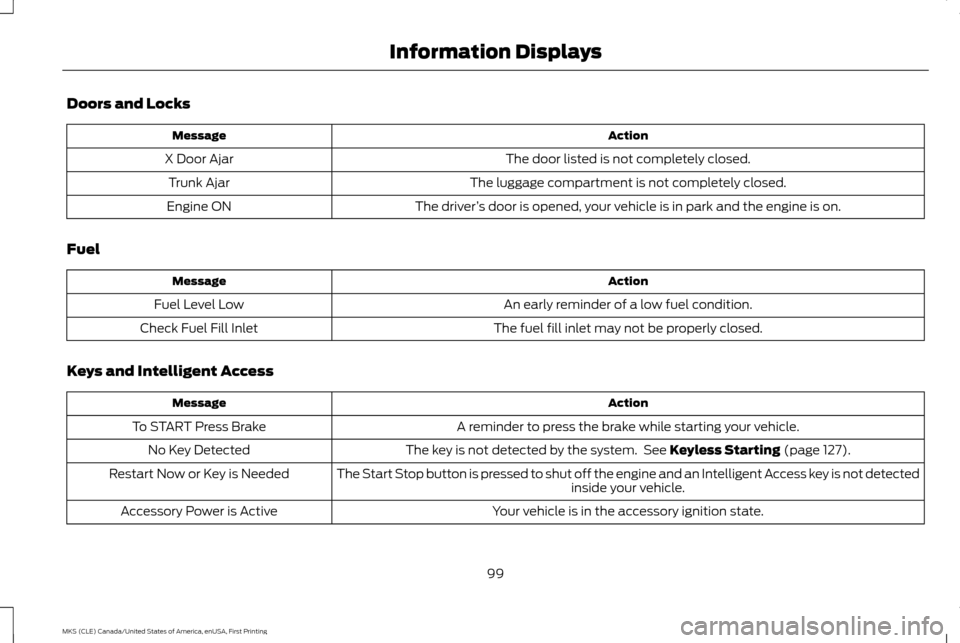
Doors and Locks
Action
Message
The door listed is not completely closed.
X Door Ajar
The luggage compartment is not completely closed.
Trunk Ajar
The driver’s door is opened, your vehicle is in park and the engine is on.
Engine ON
Fuel Action
Message
An early reminder of a low fuel condition.
Fuel Level Low
The fuel fill inlet may not be properly closed.
Check Fuel Fill Inlet
Keys and Intelligent Access Action
Message
A reminder to press the brake while starting your vehicle.
To START Press Brake
The key is not detected by the system. See Keyless Starting (page 127).
No Key Detected
The Start Stop button is pressed to shut off the engine and an Intelligent Access key is not detected inside your vehicle.
Restart Now or Key is Needed
Your vehicle is in the accessory ignition state.
Accessory Power is Active
99
MKS (CLE) Canada/United States of America, enUSA, First Printing Information Displays
Page 131 of 382
•
Without applying the brake pedal, press
and release the button once when the
ignition is in the on mode, or when the
engine is running but the vehicle is not
moving.
On: All electrical circuits are operational and
the warning lamps and indicators illuminate.
• Without applying the brake pedal, press
and release the button once.
Start:
Starts the engine.
• Press the brake pedal, and then press the
button for any length of time. An indicator
light on the button illuminates when then
ignition is on and when the engine starts.
STARTING A GASOLINE ENGINE
When you start the engine, the idle speed
increases, this helps to warm up the engine.
If the engine idle speed does not slow down
automatically, have your vehicle checked by
an authorized dealer. Note:
You can crank the engine for a total of
60 seconds (without the engine starting)
before the starting system temporarily
disables. The 60 seconds does not have to be
all at once. For example, if you crank the
engine three times for 20 seconds each time,
without the engine starting, you reached the
60-second time limit. A message appears in
the information display alerting you that you
exceeded the cranking time. You cannot
attempt to start the engine for at least 15
minutes. After 15 minutes, you are limited to a
15-second engine cranking time. You need to
wait 60 minutes before you can crank the
engine for 60 seconds again.
Before starting the engine, check the
following:
• Make sure all occupants have fastened
their safety belts.
• Make sure the headlamps and electrical
accessories are off.
• Make sure the parking brake is on.
• Put the transmission in park (P).
Note: Do not touch the accelerator pedal.
1. Fully press the brake pedal.
2. Press the button. The system does not function if:
•
The key frequencies are jammed.
• The key battery has no charge.
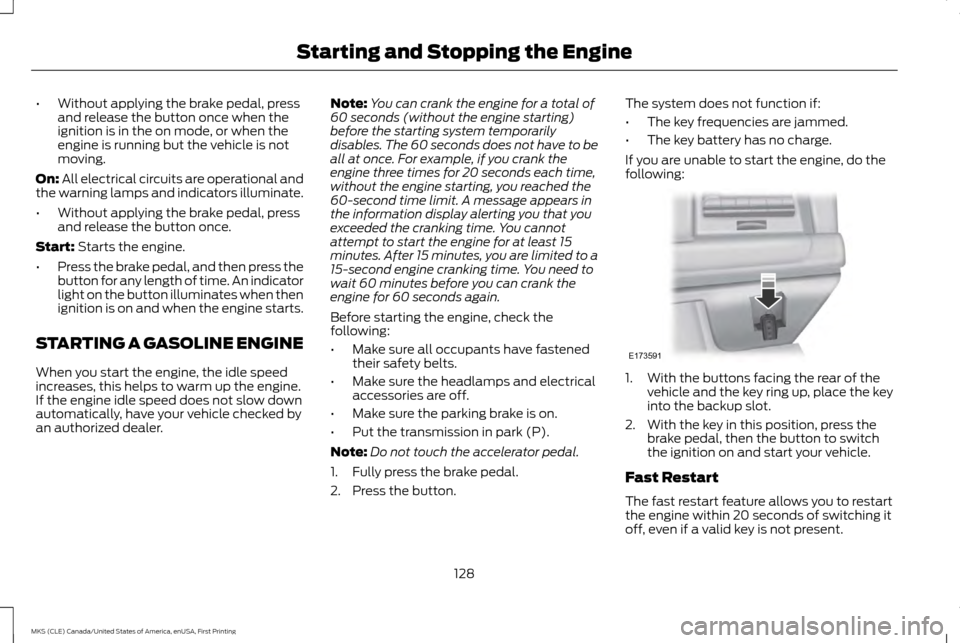
If you are unable to start the engine, do the
following: 1. With the buttons facing the rear of the
vehicle and the key ring up, place the key
into the backup slot.
2. With the key in this position, press the brake pedal, then the button to switch
the ignition on and start your vehicle.
Fast Restart
The fast restart feature allows you to restart
the engine within 20 seconds of switching it
off, even if a valid key is not present.
128
MKS (CLE) Canada/United States of America, enUSA, First Printing Starting and Stopping the EngineE173591
Page 132 of 382
Within 20 seconds of switching the engine
off, press the brake pedal and press the
button. After 20 seconds have expired, you
can no longer restart the engine without the
key present inside your vehicle.
Once the engine has started, it remains
running until you press the button, even if the
system does not detect a valid key. If you
open and close a door while the engine is
running, the system searches for a valid key.
You cannot restart the engine if the system
does not detect a valid key within 20
seconds.
Failure to Start
If you cannot start the engine after three
attempts, wait 10 seconds and follow this
procedure:
1. Fully press the brake pedal.
2.
Fully press the accelerator pedal and hold
it there.
3. Start the engine. Automatic Engine Shutdown
If your vehicle is equipped with a keyless
ignition, it has a feature that automatically
shuts down the engine if it has been idling for
an extended period. The ignition also turns
off in order to save battery power. Before the
engine shuts down, a message appears in
the information display showing a timer
counting down from 30 seconds. If you do
not intervene within 30 seconds, the engine
shuts down. Another message appears in the
information display to inform you that the
engine has shut down in order to save fuel.
Start your vehicle as you normally do.
Automatic Engine Shutdown Override
Note:
You cannot permanently switch off the
automatic engine shutdown feature. When
you switch it off temporarily, it turns on at the
next ignition cycle.
You can stop the engine shutdown, or reset
the timer, at any point before the 30-second
countdown has expired by doing any of the
following: •
You can reset the timer by interacting
with your vehicle (such as pressing the
brake pedal or accelerator pedal).
• You can temporarily switch off the
shutdown feature any time the ignition is
on (for the current ignition cycle only).
Use the information display to do so. See
Information Displays (page 89).
• During the countdown before engine
shutdown, you are prompted to press OK
or RESET (depending on your type of
information display) to temporarily
switch the feature off (for the current
ignition cycle only).
Stopping the Engine When Your
Vehicle is Stationary
1. Put the transmission in park (P).
2. Press the button once.
3. Apply the parking brake.
Note: This switches off the ignition, all
electrical circuits, warning lamps and
indicators.
129
MKS (CLE) Canada/United States of America, enUSA, First Printing Starting and Stopping the Engine
Page 133 of 382
Stopping the Engine When Your
Vehicle is Moving
WARNING
Switching off the engine when the
vehicle is still moving will result in a loss
of brake and steering assistance. The
steering will not lock, but higher effort will be
required. When the ignition is switched off,
some electrical circuits, including air bags,
warning lamps and indicators may also be
off. If the ignition was turned off accidentally,
you can shift into neutral (N) and re-start the
engine. 1.
Press and hold the button for one second,
or press it three times within two seconds.
2. Move the transmission selector lever to neutral (N) and use the brakes to bring
your vehicle to a safe stop. When your
vehicle has stopped, move the
transmission selector lever to park (P)
and switch the ignition off.
3. Apply the parking brake. Guarding Against Exhaust Fumes WARNING
If you smell exhaust fumes inside your
vehicle, have your vehicle checked by
your authorized dealer immediately. Do
not drive your vehicle if you smell exhaust
fumes. Carbon monoxide is present in
exhaust fumes. Take precautions to avoid its
dangerous effects. Important Ventilating Information
If you stop your vehicle and then leave the
engine idling for long periods, we recommend
that you do one of the following:
•
Open the windows at least 1 inch (2.5
centimeters).
• Set your climate control to outside air.
ENGINE BLOCK HEATER (If Equipped) WARNINGS
Failure to follow engine block heater
instructions could result in property
damage or serious personal injury. WARNINGS
Do not use your heater with
ungrounded electrical systems or
two-pronged adapters. There is a risk
of electrical shock. Do not fully close the hood, or allow it
to drop under its own weight when
using the engine block heater. This
could damage the power cable and may
cause an electrical short resulting in fire, injury
and property damage. Note:
The heater is most effective when
outdoor temperatures are below 0°F (-18°C).
The heater acts as a starting aid by warming
the engine coolant. This allows the climate
control system to respond quickly. The
equipment includes a heater element
(installed in the engine block) and a wire
harness. You can connect the system to a
grounded 120-volt AC electrical source.
130
MKS (CLE) Canada/United States of America, enUSA, First Printing Starting and Stopping the Engine
Page 143 of 382
AUTOMATIC TRANSMISSION
WARNINGS
Always set the parking brake fully and
make sure the gearshift is latched in
Park (P). Turn the ignition to the off
position and remove the key whenever you
leave your vehicle. Do not apply the brake pedal and
accelerator pedal simultaneously.
Applying both pedals simultaneously
for more than three seconds will limit engine
rpm, which may result in difficulty
maintaining speed in traffic and could lead
to serious injury. Understanding the Positions of Your
Automatic Transmission
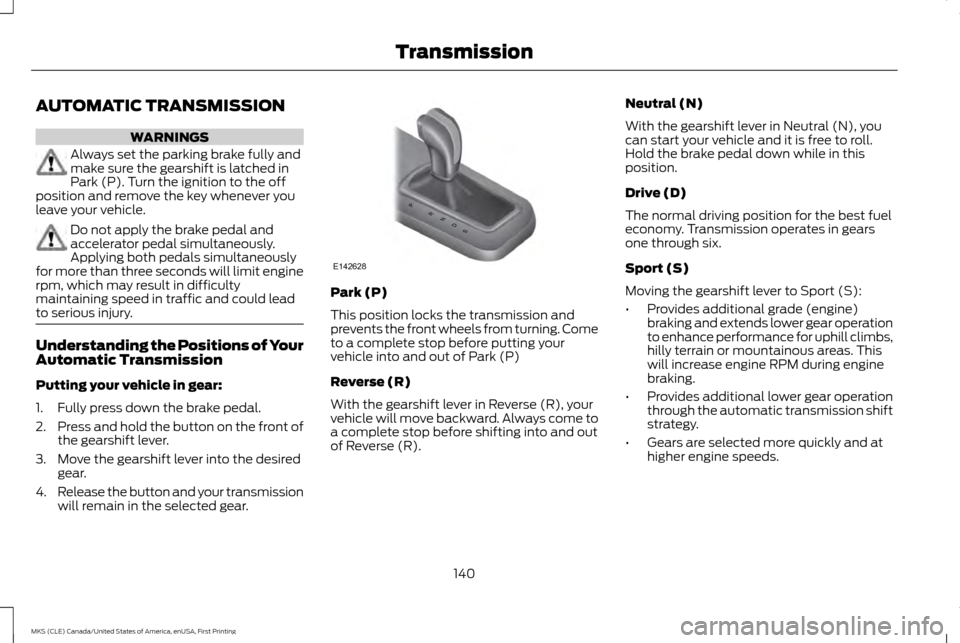
Putting your vehicle in gear:
1. Fully press down the brake pedal.
2.
Press and hold the button on the front of
the gearshift lever.
3. Move the gearshift lever into the desired gear.
4. Release the button and your transmission
will remain in the selected gear. Park (P)
This position locks the transmission and
prevents the front wheels from turning. Come
to a complete stop before putting your
vehicle into and out of Park (P)
Reverse (R)
With the gearshift lever in Reverse (R), your
vehicle will move backward. Always come to
a complete stop before shifting into and out
of Reverse (R).Neutral (N)
With the gearshift lever in Neutral (N), you
can start your vehicle and it is free to roll.
Hold the brake pedal down while in this
position.
Drive (D)
The normal driving position for the best fuel
economy. Transmission operates in gears
one through six.
Sport (S)
Moving the gearshift lever to Sport (S):
•
Provides additional grade (engine)
braking and extends lower gear operation
to enhance performance for uphill climbs,
hilly terrain or mountainous areas. This
will increase engine RPM during engine
braking.
• Provides additional lower gear operation
through the automatic transmission shift
strategy.
• Gears are selected more quickly and at
higher engine speeds.
140
MKS (CLE) Canada/United States of America, enUSA, First Printing TransmissionPRNDS
E142628
Page 144 of 382
SelectShift Automatic
™
Transmission (If Equipped)
Your SelectShift Automatic transmission
gives you the ability to change gears
manually.
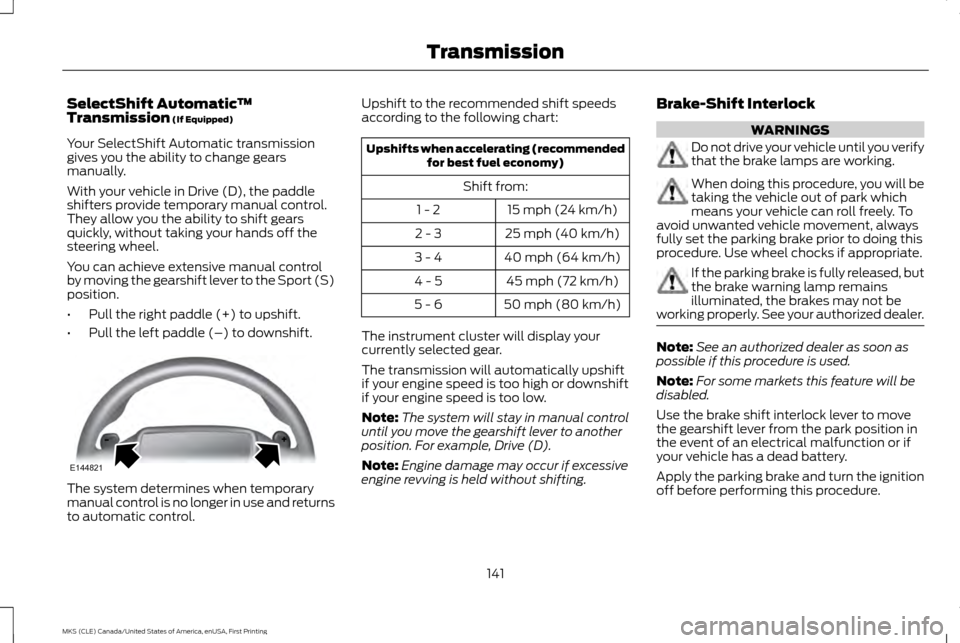
With your vehicle in Drive (D), the paddle
shifters provide temporary manual control.
They allow you the ability to shift gears
quickly, without taking your hands off the
steering wheel.
You can achieve extensive manual control
by moving the gearshift lever to the Sport (S)
position.
• Pull the right paddle (+) to upshift.
• Pull the left paddle (–) to downshift. The system determines when temporary
manual control is no longer in use and returns
to automatic control. Upshift to the recommended shift speeds
according to the following chart: Upshifts when accelerating (recommended
for best fuel economy)
Shift from: 15 mph (24 km/h)
1 - 2
25 mph (40 km/h)
2 - 3
40 mph (64 km/h)
3 - 4
45 mph (72 km/h)
4 - 5
50 mph (80 km/h)
5 - 6
The instrument cluster will display your
currently selected gear.
The transmission will automatically upshift
if your engine speed is too high or downshift
if your engine speed is too low.
Note: The system will stay in manual control
until you move the gearshift lever to another
position. For example, Drive (D).
Note: Engine damage may occur if excessive
engine revving is held without shifting. Brake-Shift Interlock WARNINGS
Do not drive your vehicle until you verify
that the brake lamps are working.
When doing this procedure, you will be
taking the vehicle out of park which
means your vehicle can roll freely. To
avoid unwanted vehicle movement, always
fully set the parking brake prior to doing this
procedure. Use wheel chocks if appropriate. If the parking brake is fully released, but
the brake warning lamp remains
illuminated, the brakes may not be
working properly. See your authorized dealer. Note:
See an authorized dealer as soon as
possible if this procedure is used.
Note: For some markets this feature will be
disabled.
Use the brake shift interlock lever to move
the gearshift lever from the park position in
the event of an electrical malfunction or if
your vehicle has a dead battery.
Apply the parking brake and turn the ignition
off before performing this procedure.
141
MKS (CLE) Canada/United States of America, enUSA, First Printing TransmissionE144821
Page 145 of 382
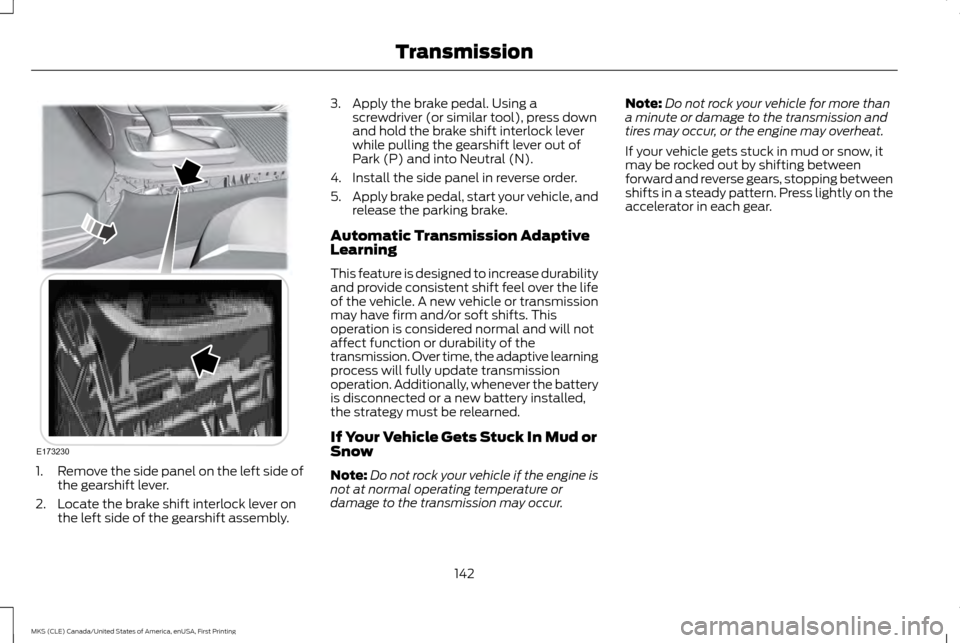
1.
Remove the side panel on the left side of
the gearshift lever.
2. Locate the brake shift interlock lever on the left side of the gearshift assembly. 3. Apply the brake pedal. Using a
screwdriver (or similar tool), press down
and hold the brake shift interlock lever
while pulling the gearshift lever out of
Park (P) and into Neutral (N).
4. Install the side panel in reverse order.
5. Apply brake pedal, start your vehicle, and
release the parking brake.
Automatic Transmission Adaptive
Learning
This feature is designed to increase durability
and provide consistent shift feel over the life
of the vehicle. A new vehicle or transmission
may have firm and/or soft shifts. This
operation is considered normal and will not
affect function or durability of the
transmission. Over time, the adaptive learning
process will fully update transmission
operation. Additionally, whenever the battery
is disconnected or a new battery installed,
the strategy must be relearned.
If Your Vehicle Gets Stuck In Mud or
Snow
Note: Do not rock your vehicle if the engine is
not at normal operating temperature or
damage to the transmission may occur. Note:
Do not rock your vehicle for more than
a minute or damage to the transmission and
tires may occur, or the engine may overheat.
If your vehicle gets stuck in mud or snow, it
may be rocked out by shifting between
forward and reverse gears, stopping between
shifts in a steady pattern. Press lightly on the
accelerator in each gear.
142
MKS (CLE) Canada/United States of America, enUSA, First Printing TransmissionE173230
Page 149 of 382
If Your Vehicle Goes Off the Edge of the
Pavement
•
If your vehicle goes off the edge of the
pavement, slow down, but avoid severe
brake application, ease the vehicle back
onto the pavement only after reducing
your speed. Do not turn the steering
wheel too sharply while returning to the
road surface.
• It may be safer to stay on the apron or
shoulder of the road and slow down
gradually before returning to the
pavement. You may lose control if you do
not slow down or if you turn the steering
wheel too sharply or abruptly.
• It often may be less risky to strike small
objects, such as highway reflectors, with
minor damage to your vehicle rather than
attempt a sudden return to the pavement
which could cause the vehicle to slide
sideways out of control or rollover.
Remember, your safety and the safety of
others should be your primary concern. If Your Vehicle Gets Stuck WARNINGS
Always set the parking brake fully and
make sure the transmission is in P
(Park). Turn the ignition to the lock
position or turn the vehicle off using the
start/stop button and remove the key
whenever you leave your vehicle. If the parking brake is fully released, but
the brake warning lamp remains
illuminated, the brakes may not be
working properly. See your authorized dealer. Do not spin the wheels at over 35 mph
(56 km/h). The tires may fail and injure
a passenger or bystander.
Note:
Do not rock the vehicle if the engine is
not at normal operating temperature or
damage to the transmission may occur.
Note: Do not rock the vehicle for more than a
few minutes or damage to the transmission
and tires may occur or the engine may
overheat.
If your vehicle gets stuck in mud or snow it
may be rocked out by shifting between
forward and reverse gears, stopping between
shifts, in a steady pattern. Press lightly on the
accelerator in each gear. If your vehicle is equipped with
AdvanceTrac® with Roll Stability Control
™,
it may be beneficial to disengage the
AdvanceTrac® with Roll Stability Control ™
system while attempting to rock the vehicle.
Emergency Maneuvers
• In an unavoidable emergency situation
where a sudden sharp turn must be
made, remember to avoid "over-driving"
your vehicle (that is, turn the steering
wheel only as rapidly and as far as
required to avoid the emergency).
Excessive steering will result in less
vehicle control, not more. Additionally,
smooth variations of the accelerator
and/or brake pedal pressure should be
utilized if changes in vehicle speed are
called for. Avoid abrupt steering,
146
MKS (CLE) Canada/United States of America, enUSA, First Printing All-Wheel Drive (If Equipped)
Page 150 of 382
acceleration or braking which could result
in an increased risk of loss of vehicle
control, vehicle rollover and/or personal
injury. Use all available road surface to
return the vehicle to a safe direction of
travel.
• In the event of an emergency stop, avoid
skidding the tires and do not attempt any
sharp steering wheel movements.
• If the vehicle goes from one type of
surface to another (that is, from concrete
to gravel) there will be a change in the
way the vehicle responds to a maneuver
(steering, acceleration or braking). Again,
avoid these abrupt inputs.
Sand
Most of the time traction control improves
tire traction by managing wheel slip through
Brake, Engine, and AWD calibrations.
However, during low speed driving, disabling
traction control in deep sand can help keep
the wheels moving to maintain vehicle
momentum.
When driving over sand, try to keep all four
wheels on the most solid area of the trail.
Avoid reducing the tire pressures but shift to
a lower gear and drive steadily through the
terrain. Apply the accelerator slowly and
avoid spinning the wheels. Do not drive your vehicle in deep sand for an
extended period of time. This could cause
the AWD system to overheat and default to
front-wheel drive. If this occurs, an AWD OFF
message displays in the information display.
To resume normal AWD function as soon as
possible, stop the vehicle in a safe location
and stop the engine for at least 10 minutes.
After the engine has been restarted and the
AWD system has adequately cooled, the
AWD OFF message turns off and normal
AWD function returns. In the event the engine
is not stopped, the AWD OFF message turns
off when the system cools and normal AWD
function returns.
When driving at slow speeds in deep sand
under high outside temperatures, use L (Low)
gear when possible. L (Low) gear operation
will maximize the engine and transmission
cooling capability.
Under severe operating conditions, the A/C
may cycle on and off to protect overheating
of the engine.
Avoid excessive speed because vehicle
momentum can work against you and cause
the vehicle to become stuck to the point that
assistance may be required from another
vehicle. Remember, you may be able to back
out the way you came if you proceed with
caution. Mud and Water
If you must drive through high water, drive
slowly. Traction or brake capability may be
limited.
When driving through water, determine the
depth; avoid water higher than the bottom
of the wheel rims (for cars) or the bottom of
the hubs (for trucks) (if possible) and
proceed slowly. If the ignition system gets
wet, the vehicle may stall.
Once through water, always try the brakes.
Wet brakes do not stop the vehicle as
effectively as dry brakes. Drying can be
improved by moving your vehicle slowly while
applying light pressure on the brake pedal.
Be cautious of sudden changes in vehicle
speed or direction when you are driving in
mud. Even AWD vehicles can lose traction in
slick mud. As when you are driving over sand,
apply the accelerator slowly and avoid
spinning your wheels. If the vehicle does slide,
steer in the direction of the slide until you
regain control of the vehicle.
After driving through mud, clean off residue
stuck to rotating driveshafts and tires. Excess
mud stuck on tires and rotating driveshafts
causes an imbalance that could damage
drive components.
147
MKS (CLE) Canada/United States of America, enUSA, First Printing All-Wheel Drive
(If Equipped)