ECO mode LINCOLN MKS 2016 Owner's Manual
[x] Cancel search | Manufacturer: LINCOLN, Model Year: 2016, Model line: MKS, Model: LINCOLN MKS 2016Pages: 382, PDF Size: 3.81 MB
Page 170 of 382
Switching Cruise Control Off
Press and release OFF when the system is
in stand by mode or switch the ignition off.
Note: You erase the set speed when you
switch the system off.
USING ADAPTIVE CRUISE
CONTROL
(If Equipped) WARNINGS
Always pay close attention to changing
road conditions when using adaptive
cruise control. The system does not
replace attentive driving. Failing to pay
attention to the road may result in a crash,
serious injury or death. Adaptive cruise control is not a crash
warning or avoidance system.
Adaptive cruise control will not detect
stationary or slow moving vehicles
below 6 mph (10 km/h).
Adaptive cruise control does not detect
pedestrians or objects in the road.
Adaptive cruise control does not detect
oncoming vehicles in the same lane. WARNINGS
Do not use the adaptive cruise control
when entering or leaving a highway, in
heavy traffic or on roads that are
winding, slippery or unpaved. Do not use the system in poor visibility,
for example fog, heavy rain, spray or
snow.
Do not use adaptive cruise control
when towing a trailer that has trailer
brakes. The auto-brake component of
the adaptive cruise control system does not
operate the trailer brakes. Using adaptive
cruise control when towing a trailer that has
trailer brakes may result in the loss of vehicle
control, which could result in serious injury. Do not use tire sizes other than those
recommended because this can affect
the normal operation of the system.
Failing to do so may result in a loss of vehicle
control, which could result in serious injury. Note:
It is your responsibility to stay alert, drive
safely and be in control of the vehicle at all
times.
The system adjusts your speed to maintain
a proper distance between you and the
vehicle in front of you in the same lane. You
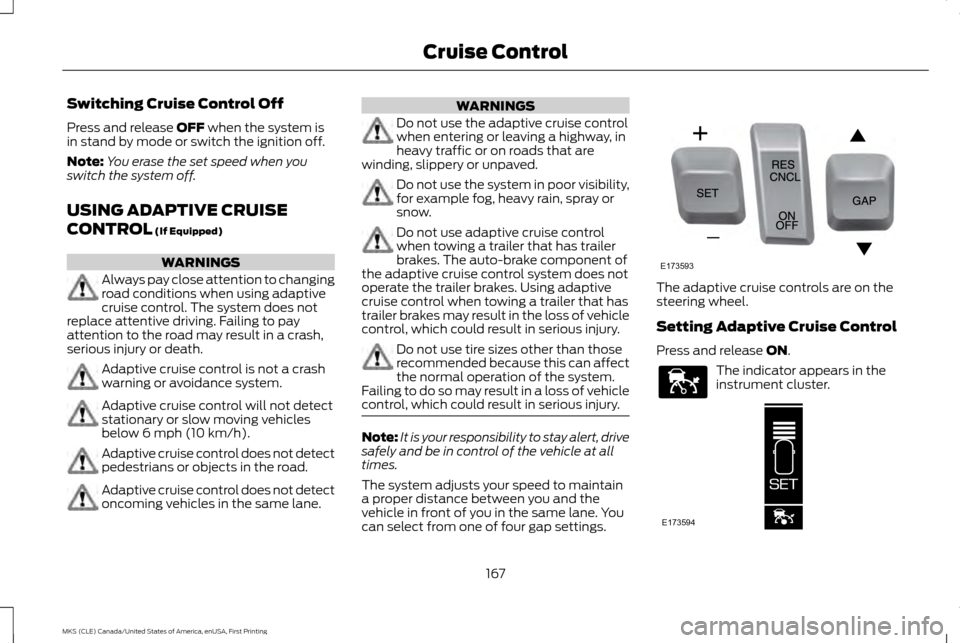
can select from one of four gap settings. The adaptive cruise controls are on the
steering wheel.
Setting Adaptive Cruise Control
Press and release
ON.
The indicator appears in the
instrument cluster.
167
MKS (CLE) Canada/United States of America, enUSA, First Printing Cruise ControlE173593 E144529 E173594
Page 178 of 382
The current assessment of your alertness
indicates that you should rest as soon as
safely possible.
The status bar will travel from left to right as
the calculated alertness level decreases. As
the rest icon is approached the color turns
from green to yellow to red. The yellow
position indicates the first warning is active
and the red position indicates the second
warning is active.
Note:
If you have recently received a warning;
you should consider resting, even if the current
assessment is within the typical range.
Note: If the camera sensor cannot track the
road lane markings or if your vehicle speed
drops below approximately 40 mph
(64 km/h), the alertness level will change to
grey for a short time and the information
display will inform you that the system is
unavailable.
Resetting the System
You can reset the system by either:
• Switching the ignition off and on.
• Stopping the vehicle and then opening
and closing the driver ’s door. LANE KEEPING SYSTEM (If Equipped) WARNING
The system is designed to aid the driver.
It is not intended to replace your
attention and judgment. You are still
responsible to drive with due care and
attention. Note:
The system works above
40 mph
(64 km/h).
Note: The system works as long as the
camera can detect one lane marking.
Note: The system may not function if the
camera is blocked or there is damage to the
windshield.
Note: When Aid mode is on and the system
detects no steering activity for a short period,
the system will alert you to put your hands on
the steering wheel. The system may detect a
light grip or touch on the steering wheel as
hands off driving. The system notifies you to stay in your lane
through the steering system and the
instrument cluster display when the front
camera detects an unintentional drift out of
your lane is likely to occur. The system
automatically detects and tracks the road
lane markings using a camera mounted
behind the interior rear view mirror.
Switching the System On and Off
Note:
The system on or off setting is stored
until it is manually changed, unless a MyKey®
is detected. If the system detects a MyKey®,
it defaults to on and the mode is set to alert.
Note: If a MyKey® is detected, pressing the
button will not affect the on or off status of
the system. You can only change the mode
and intensity settings. Press the button located on the
center console to switch the
system on or off.
175
MKS (CLE) Canada/United States of America, enUSA, First Printing Driving AidsE173233
Page 211 of 382
BREAKING-IN
You need to break in new tires for
approximately 300 miles (480 kilometers).
During this time, your vehicle may exhibit
some unusual driving characteristics.
Avoid driving too fast during the first 1000
miles (1600 kilometers). Vary your speed
frequently and change up through the gears
early. Do not labor the engine.
Do not tow during the first 1000 miles (1600
kilometers).
ECONOMICAL DRIVING
Fuel economy is affected by several things
such as how you drive, the conditions you
drive under and how you maintain your
vehicle.
There are some things to keep in mind that
may improve your fuel economy:
•
Accelerate and slow down in a smooth,
moderate fashion.
• Drive at steady speeds.
• Anticipate stops; slowing down may
eliminate the need to stop. •
Combine errands and minimize
stop-and-go driving (When running
errands, go to the furthest destination
first and then work your way back home).
• Close the windows for high-speed driving.
• Drive at reasonable speeds.
• Keep the tires properly inflated and use
only the recommended size.
• Use the recommended engine oil.
• Perform all regularly scheduled
maintenance.
There are also some things you may want to
avoid doing because they reduce your fuel
economy:
• Avoid sudden or hard accelerations.
• Avoid revving the engine before turning
off the car.
• Avoid long idle periods.
• Do not warm up your vehicle on cold
mornings.
• Reduce the use of air conditioning and
heat.
• Avoid using speed control in hilly terrain.
• Do not rest your foot on the brake pedal
while driving.
• Avoid carrying unnecessary weight. •
Avoid adding particular accessories to
your vehicle (e.g. bug deflectors,
rollbars/light bars, running boards, ski
racks).
• Avoid driving with the wheels out of
alignment.
DRIVING THROUGH WATER WARNING
Do not drive through flowing or deep
water as you may lose control of your
vehicle.
Note:
Driving through standing water can
cause vehicle damage.
Note: Engine damage can occur if water
enters the air filter.
Before driving through standing water, check
the depth. Never drive through water that is
higher than the bottom of the front rocker
area of your vehicle.
208
MKS (CLE) Canada/United States of America, enUSA, First Printing Driving Hints
Page 215 of 382
Vehicles Sold in Canada: Using
Roadside Assistance
Complete the roadside assistance
identification card and place it in your wallet
for quick reference.
In Canada, this card is found in the Warranty
Guide in the glove compartment of your
vehicle.
Vehicles Sold in Canada: Roadside
Assistance Program Coverage
The service is available 24 hours a day, seven
days a week.
Canadian roadside coverage and benefits
may differ from the U.S. coverage.
For complete program coverage details
review your warranty guide, contact your
dealer, call us in Canada at 1-800-387-9333,
or visit our website at
www.lincolncanada.com.
HAZARD WARNING FLASHERS
Note:
If used when the vehicle is not running,
the battery will lose charge. There may be
insufficient power to restart your vehicle. The hazard warning button is
located on the instrument panel.
Use it when your vehicle is creating
a safety hazard for other motorists.
• Press the button to turn on the hazard
warning function, and the front and rear
direction indicators will flash.
• Press the button again to turn them off.
FUEL SHUTOFF WARNING
Failure to inspect and, if necessary,
repair fuel leaks after a collision may
increase the risk of fire and serious
injury. Ford Motor Company recommends
that the fuel system be inspected by an
authorized dealer after any collision. In the event of a moderate to severe collision,
this vehicle includes a fuel pump shutoff
feature that stops the flow of fuel to the
engine. Not every impact will cause a shutoff.Should your vehicle shut off after a collision,
you may restart your vehicle. For vehicles
equipped with a key system:
1. Switch off the ignition.
2. Switch on the ignition.
3.
Repeat Steps 1 and 2 to re-enable the fuel
pump.
For vehicles equipped with a push button
start system:
1. Press the START/STOP button to
switch off the ignition.
2. Press the brake pedal and press the START/STOP
button to switch on the
ignition.
3. Remove your foot from the brake pedal and press the
START/STOP button to
switch off the ignition.
4. You can either attempt to start the engine
by pressing the brake pedal and the
START/STOP
button, or switch on the
ignition only by pressing the
START/STOP
button without pressing
the brake pedal. Both ways re-enable the
fuel system.
212
MKS (CLE) Canada/United States of America, enUSA, First Printing Roadside Emergencies
Page 253 of 382
At this time, you may notice your engine
coolant temperature gauge needle move
toward the H and the POWER REDUCED
TO LOWER TEMP message may appear in
the information display.
You may notice a reduction in vehicle speed
caused by reduced engine power. In order to
manage the engine fluid temperatures, your
vehicle may enter this mode if certain
high-temperature and high-load conditions
take place. The amount of speed reduction
depends on many factors such as vehicle
loading, towing, grade and ambient
temperature. If this occurs, there is no need
to pull off the road. You can continue to drive
your vehicle while this message is active.
The air conditioning may also cycle on and
off during severe operating conditions to
protect overheating of the engine. When the
engine coolant temperature decreases to a
normal operating temperature, the air
conditioning will turn on once again.
If the engine coolant temperature gauge
moves fully into the red (hot) area, or if the
coolant temperature warning or service
engine soon messages appear in your
information display:
1. Pull off the road as soon as safely possible and shift the transmission into
P
. 2.
Leave the engine running until the coolant
temperature gauge needle moves away
from the red (hot) area. After several
minutes, if the temperature does not
drop, follow the remaining steps.
3. Switch the engine off and wait for it to cool before checking the coolant level.
4. If the coolant level is normal, restart your
engine and continue.
5. If the coolant is low, add coolant, and restart the engine. See
Adding Engine
Coolant or How Fail-Safe Cooling
Works in this chapter for more
information.
AUTOMATIC TRANSMISSION
FLUID CHECK
6F50/6F55 Transmission
(If Equipped) WARNINGS
The dipstick cap and surrounding
components may be hot, use gloves.
Use gloves when moving the air filter
assembly. Components will be hot. Note:
Automatic transmission fluid expands
when warmed. To obtain an accurate fluid
check, drive your vehicle until you warm it up,
approximately
20 mi (30 km). If you operate
your vehicle for an extended period at high
speeds, in city traffic during hot weather or
pulling a trailer, switch your vehicle off until it
reaches normal operating temperatures to
allow the fluid to cool before checking.
Depending on vehicle use, cooling times could
take up to 30 minutes or longer.
Refer to your scheduled maintenance
information for scheduled intervals for fluid
checks and changes. Your transmission does
not consume fluid. However, you should
check the fluid level if the transmission is not
working properly. For example, if the
transmission slips or shifts slowly or if you
notice some sign of a fluid leak.
1. Drive your vehicle 20 mi (30 km) or until it reaches normal operating temperature.
2. Park your vehicle on a level surface and engage the parking brake.
3. With the parking brake engaged and your
foot on the brake pedal, start the engine
and move the gearshift lever through all
of the gear ranges. Allow a minimum of
10 seconds for each gear to engage.
4. Put the gearshift lever in park (P) and leave the engine running.
250
MKS (CLE) Canada/United States of America, enUSA, First Printing Maintenance
Page 317 of 382
MP3 and WMA Track and Folder
Structure
Audio systems capable of recognizing and
playing MP3 and WMA individual tracks and
folder structures work as follows:
•
There are two different modes for MP3
and WMA disc playback: MP3 and WMA
track mode (system default) and MP3
and WMA folder mode.
• MP3 and WMA track mode ignores any
folder structure on the MP3 and WMA
disc. The player numbers each MP3 and
WMA track on the disc (noted by the MP3
or WMA file extension) from T001 to a
maximum of T255. The maximum
number of playable MP3 and WMA files
may be less depending on the structure
of the CD and exact model of radio
present. •
MP3 and WMA folder mode represents a
folder structure consisting of one level of
folders. The CD player numbers all MP3
and WMA tracks on the disc (noted by
the MP3 or WMA file extension) and all
folders containing MP3 and WMA files,
from F001 (folder) T001 (track) to F253
T255.
• Creating discs with only one level of
folders helps with navigation through the
disc files.
If you are burning your own MP3 and WMA
discs, it is important to understand how the
system reads the structures you create. While
various files may be present (files with
extensions other than MP3 and WMA), only
files with the MP3 and WMA extension are
played; other files are ignored by the system.
This enables you to use the same MP3 and
WMA disc for a variety of tasks on your work
computer, home computer and your
in-vehicle system. In track mode, the system displays and plays
the structure as if it were only one level deep
(all MP3 and WMA files play, regardless of
being in a specific folder). In folder mode, the
system only plays the MP3 and WMA files in
the current folder.
AUDIO UNIT - VEHICLES WITH:
PREMIUM AM/FM/CD WARNING
Driving while distracted can result in
loss of vehicle control, crash and injury.
We strongly recommend that you use
extreme caution when using any device that
may take your focus off the road. Your
primary responsibility is the safe operation
of your vehicle. We recommend against the
use of any hand-held device while driving and
encourage the use of voice-operated systems
when possible. Make sure you are aware of
all applicable local laws that may affect the
use of electronic devices while driving. Note:
The touchsceen system controls most
of the audio features. See your MyLincoln
Touch information.
314
MKS (CLE) Canada/United States of America, enUSA, First Printing Audio System
Page 376 of 382
D
Data Recording.......................................................9
Event Data Recording................................................. 9
Service Data Recording............................................. 9
Daytime Running Lamps..................................73
Direction Indicators
............................................76
Lane Change................................................................ 76
Drive Control
.......................................................190
LINCOLN DRIVE CONTROL................................. 190
Driver Alert
............................................................174
Using Driver Alert...................................................... 174
Driver and Passenger Airbags........................38 Children and Airbags................................................ 39
Proper Driver and Front Passenger Seating Adjustment............................................................. 38
Driving Aids
..........................................................174
Driving Hints.......................................................208
Driving Through Water...................................208
DRL See: Daytime Running Lamps............................... 73
E
Economical Driving
.........................................208
Emission Control System................................137 On-Board Diagnostics (OBD-II)......................... 138
Readiness for Inspection and Maintenance (I/M) Testing......................................................... 138
End User License Agreement......................352 VEHICLE SOFTWARE END USER LICENSE
AGREEMENT (EULA) ...................................... 352Engine Block Heater.........................................130
Using the Engine Block Heater............................. 131
Engine Coolant Check
.....................................247
Adding Engine Coolant.......................................... 247
Checking the Engine Coolant............................. 247
Recycled Engine Coolant..................................... 248
Severe Climates...................................................... 248
What You Should Know About Fail-Safe Cooling................................................................... 248
Engine Immobilizer See: Passive Anti-Theft System.......................... 63
Engine Oil Check...............................................245 Adding Engine Oil.................................................... 245
Engine Oil Dipstick...........................................245
Engine Specifications - 3.5L Ecoboost™......................................................296
Drivebelt Routing.................................................... 296
Engine Specifications - 3.7L..........................297 Drivebelt Routing..................................................... 297
Environment..........................................................14
Essential Towing Checks..............................204 Before Towing a Trailer......................................... 205
Hitches........................................................................\
204
Launching or Retrieving a Boat or Personal Watercraft (PWC)............................................. 205
Safety Chains........................................................... 204
Trailer Brakes............................................................ 204
Trailer Lamps........................................................... 204
When Towing a Trailer.......................................... 205
Event Data Recording See: Data Recording................................................... 9
Export Unique Options......................................13 Extended Service Plan (ESP).......................319
EXTENDED SERVICE PLANS (CANADA
ONLY)..................................................................... 320
EXTENDED SERVICE PLANS (U.S. Only)........................................................................\
319
Exterior Mirrors.....................................................79 Auto-Dimming Feature........................................... 80
Blind Spot Monitor..................................................... 81
Fold-Away Exterior Mirrors..................................... 79
Heated Exterior Mirrors........................................... 80
Integrated Blind Spot Mirrors............................... 80
Memory Mirrors.......................................................... 80
Power Exterior Mirrors.............................................. 79
F
Fastening the Seatbelts...................................29 Safety Belt Extension Assembly........................... 31
Safety Belt Locking Modes.................................... 30
Using Safety Belts During Pregnancy................29
Floor Mats
...........................................................209
Fog Lamps - Front See: Front Fog Lamps.............................................. 75
Foot Pedals See: Adjusting the Pedals...................................... 68
Front Fog Lamps
.................................................75
Front Parking Aid................................................157
Front Passenger Sensing System.................39
Fuel and Refueling............................................132
Fuel Consumption............................................136 Calculating Fuel Economy................................... 136
Filling the Tank.......................................................... 136
373
MKS (CLE) Canada/United States of America, enUSA, First Printing Index
Page 378 of 382
Installing Child Restraints.................................17
Child Seats..................................................................... 17
Using Lap and Shoulder Belts................................ 17
Using Lower Anchors and Tethers for CHildren (LATCH)................................................................... 20
Using Tether Straps................................................... 21
Instrument Cluster
.............................................84
Instrument Lighting Dimmer...........................73
Interior Lamps......................................................76 Front Row Map Lamps............................................ 76
Second Row Map Lamps........................................ 77
Interior Luggage Compartment Release.................................................................61
Interior Mirror
.........................................................81
Auto-Dimming Mirror................................................ 81
Introduction.............................................................7
J
Jump Starting the Vehicle..............................213 Connecting the Jumper Cables........................... 213
Jump Starting............................................................ 214
Preparing Your Vehicle........................................... 213
Removing the Jumper Cables............................. 214
K
Keyless Entry........................................................59 SECURICODE™ KEYLESS ENTRY
KEYPAD.................................................................... 59
Keyless Starting..................................................127 Ignition Modes........................................................... 127Keys and Remote Controls.............................46
L
Lane Keeping System
......................................175
Switching the System On and Off..................... 175
Lighting Control
....................................................71
Headlamp Flasher..................................................... 72
High Beams................................................................... 71
Lighting.....................................................................71 General Information................................................... 71
Lincoln Automotive Financial Services........11
Load Carrying......................................................192
Load Limit............................................................192 Vehicle Loading - with and without a
Trailer....................................................................... 192
Locking and Unlocking.....................................56 Activating Intelligent Access................................. 56
Autolock Feature (If Enabled).............................. 57
Battery Saver.............................................................. 58
Illuminated Entry....................................................... 58
Illuminated Exit.......................................................... 58
Luggage Compartment Release......................... 58
Power Door Locks..................................................... 56
Remote Control......................................................... 56
Smart Unlocks............................................................ 57
Locks.......................................................................56
Lug Nuts See: Changing a Road Wheel............................ 289M
Maintenance......................................................240
General Information.............................................. 240
Media Hub
............................................................316
Memory Function...............................................114
Easy Entry and Exit Feature.................................. 115
Linking a Preset Position to Your Remote Control or Intelligent Access Key................... 115
Saving a Preset Position......................................... 114
Message Center See: Information Displays...................................... 89
Mirrors See: Heated Windows and Mirrors.................... 107
See: Windows and Mirrors..................................... 78
Mobile Communications Equipment...........12
Moonroof...............................................................82 Bounce-Back.............................................................. 82
Opening and Closing the Moonroof................... 82
Opening and Closing the Sunscreen.................82
Venting the Moonroof.............................................. 83
Motorcraft Parts - 3.5L Ecoboost™..........298
Motorcraft Parts - 3.7L...................................299
MyKey Troubleshooting....................................54
MyKey ™
.................................................................50
Principle of Operation............................................. 50
N
Normal Scheduled Maintenance...............325 Intelligent Oil-Life Monitor™.............................. 325
Maintenance Intervals.......................................... 326
375
MKS (CLE) Canada/United States of America, enUSA, First Printing Index