light LINCOLN MKS 2016 Service Manual
[x] Cancel search | Manufacturer: LINCOLN, Model Year: 2016, Model line: MKS, Model: LINCOLN MKS 2016Pages: 382, PDF Size: 3.81 MB
Page 125 of 382
4. Press and hold both the programmed
Genie button on the hand-held
transmitter and the button you want to
program. The indicator light on the visor
will flash rapidly when the programming
is successful.
Note: The Genie transmitter will transmit for
up to 30 seconds. If HomeLink does not
program within 30 seconds the Genie
transmitter will need to be pressed again. If
the Genie transmitter indicator light displays
green and red, release the button until the
indicator light turns off before pressing the
button again.
Once HomeLink has been programmed
successfully, the Genie transmitter must be
changed out of program mode. To do this:
1. Press and hold the previously programmed Genie button on the
hand-held transmitter for 10 seconds. The
indicator light will change from red to red
and green.
2. Press the same button twice to confirm the change. If done correctly the indicator
light will turn green.
Programming HomeLink to the Genie
Intellicode Garage Door Opener Motor
Note: You may need a ladder to access the
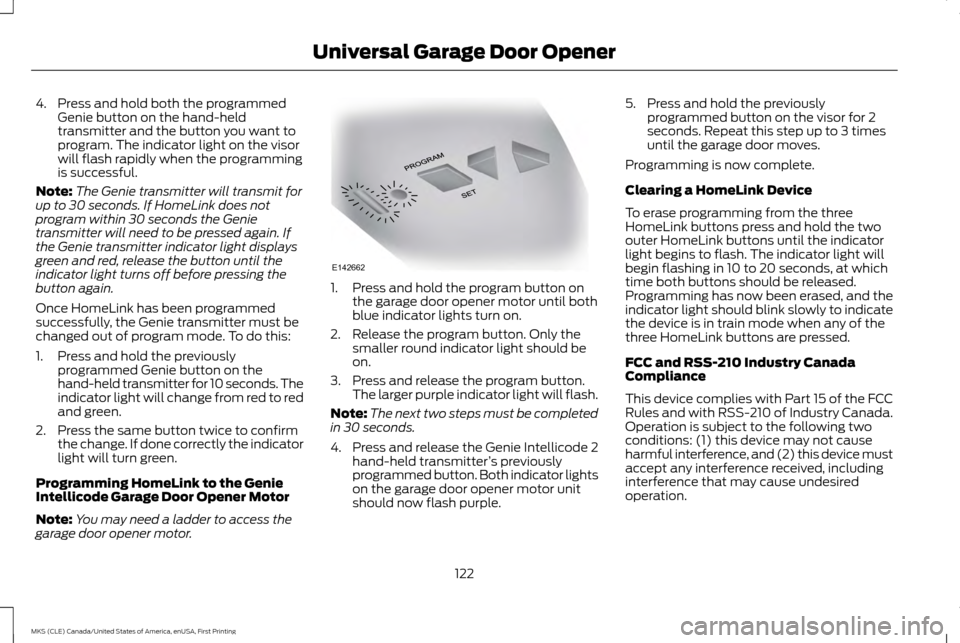
garage door opener motor. 1. Press and hold the program button on
the garage door opener motor until both
blue indicator lights turn on.
2. Release the program button. Only the smaller round indicator light should be
on.
3. Press and release the program button. The larger purple indicator light will flash.
Note: The next two steps must be completed
in 30 seconds.
4. Press and release the Genie Intellicode 2 hand-held transmitter ’s previously
programmed button. Both indicator lights
on the garage door opener motor unit
should now flash purple. 5. Press and hold the previously
programmed button on the visor for 2
seconds. Repeat this step up to 3 times
until the garage door moves.
Programming is now complete.
Clearing a HomeLink Device
To erase programming from the three
HomeLink buttons press and hold the two
outer HomeLink buttons until the indicator
light begins to flash. The indicator light will
begin flashing in 10 to 20 seconds, at which
time both buttons should be released.
Programming has now been erased, and the
indicator light should blink slowly to indicate
the device is in train mode when any of the
three HomeLink buttons are pressed.
FCC and RSS-210 Industry Canada
Compliance
This device complies with Part 15 of the FCC
Rules and with RSS-210 of Industry Canada.
Operation is subject to the following two
conditions: (1) this device may not cause
harmful interference, and (2) this device must
accept any interference received, including
interference that may cause undesired
operation.
122
MKS (CLE) Canada/United States of America, enUSA, First Printing Universal Garage Door OpenerE142662
Page 127 of 382
12 Volt DC Power Point
WARNING
Do not plug optional electrical
accessories into the cigar lighter socket
(if equipped). Improper use of the
lighter can cause damage not covered by
your warranty, and can result in fire or serious
injury. Note:
If used when the vehicle is not running,
the battery will discharge. There may be
insufficient power to restart your vehicle.
Note: Do not insert objects other than an
accessory plug into the power point. This will
damage the outlet and blow the fuse.
Note: Do not hang any type of accessory or
accessory bracket from the plug.
Note: Do not use the power point over the
vehicle capacity of 12 volt DC 180 watts or a
fuse may blow.
Note: Do not use the power point for
operating a cigar lighter element.
Note: Improper use of the power point can
cause damage not covered by your warranty.
Note: Always keep the power point caps
closed when not in use. Run the vehicle for full capacity use of the
power point. To prevent the battery from
discharging accidentally:
•
Do not use the power point longer than
necessary when the vehicle is not running.
• Do not leave devices plugged in overnight
or when you park your vehicle for
extended periods.
Locations
Power points may be in the following
locations:
• In the front of the center console.
• Inside the center console storage bin.
• On the rear of the center console.
110 Volt AC Power Point (If Equipped) WARNING
Do not keep electrical devices plugged
in the power point whenever the device
is not in use. Do not use any extension
cord with the 110 volt AC power point, since
it will defeat the safety protection design.
Doing so my cause the power point to
overload due to powering multiple devices
that can reach beyond the 150 watt load limit
and could result in fire or serious injury. Note:
Keep the vehicle running to use the
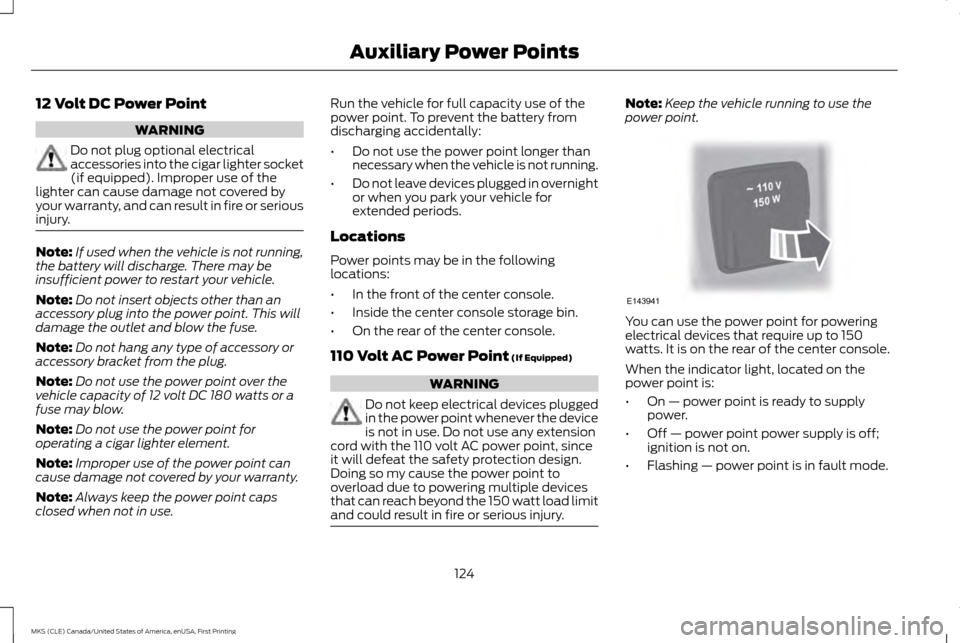
power point. You can use the power point for powering
electrical devices that require up to 150
watts. It is on the rear of the center console.
When the indicator light, located on the
power point is:
•
On — power point is ready to supply
power.
• Off — power point power supply is off;
ignition is not on.
• Flashing — power point is in fault mode.
124
MKS (CLE) Canada/United States of America, enUSA, First Printing Auxiliary Power PointsE143941
Page 128 of 382
The power outlet temporarily turns off power
when in fault mode if the device exceeds the
150 watt limit. Unplug your device and switch
the ignition off. Switch the ignition back on,
but do not plug your device back in. Let the
system cool off and switch the ignition off to
reset the fault mode. Switch the ignition back
on and make sure the indicator light remains
on.
Do not use the power point for certain electric
devices, including:
•
Cathode ray tube type televisions.
• Motor loads, for example vacuum
cleaners, electric saws and other electric
power tools, or compressor-driven
refrigerators.
• Measuring devices which process precise
data, for example medical equipment or
measuring equipment.
• Other appliances requiring an extremely
stable power supply, for example
microcomputer-controlled electric
blankets or touch sensor lamps.
125
MKS (CLE) Canada/United States of America, enUSA, First Printing Auxiliary Power Points
Page 131 of 382
•
Without applying the brake pedal, press
and release the button once when the
ignition is in the on mode, or when the
engine is running but the vehicle is not
moving.
On: All electrical circuits are operational and
the warning lamps and indicators illuminate.
• Without applying the brake pedal, press
and release the button once.
Start:
Starts the engine.
• Press the brake pedal, and then press the
button for any length of time. An indicator
light on the button illuminates when then
ignition is on and when the engine starts.
STARTING A GASOLINE ENGINE
When you start the engine, the idle speed
increases, this helps to warm up the engine.
If the engine idle speed does not slow down
automatically, have your vehicle checked by
an authorized dealer. Note:
You can crank the engine for a total of
60 seconds (without the engine starting)
before the starting system temporarily
disables. The 60 seconds does not have to be
all at once. For example, if you crank the
engine three times for 20 seconds each time,
without the engine starting, you reached the
60-second time limit. A message appears in
the information display alerting you that you
exceeded the cranking time. You cannot
attempt to start the engine for at least 15
minutes. After 15 minutes, you are limited to a
15-second engine cranking time. You need to
wait 60 minutes before you can crank the
engine for 60 seconds again.
Before starting the engine, check the
following:
• Make sure all occupants have fastened
their safety belts.
• Make sure the headlamps and electrical
accessories are off.
• Make sure the parking brake is on.
• Put the transmission in park (P).
Note: Do not touch the accelerator pedal.
1. Fully press the brake pedal.
2. Press the button. The system does not function if:
•
The key frequencies are jammed.
• The key battery has no charge.
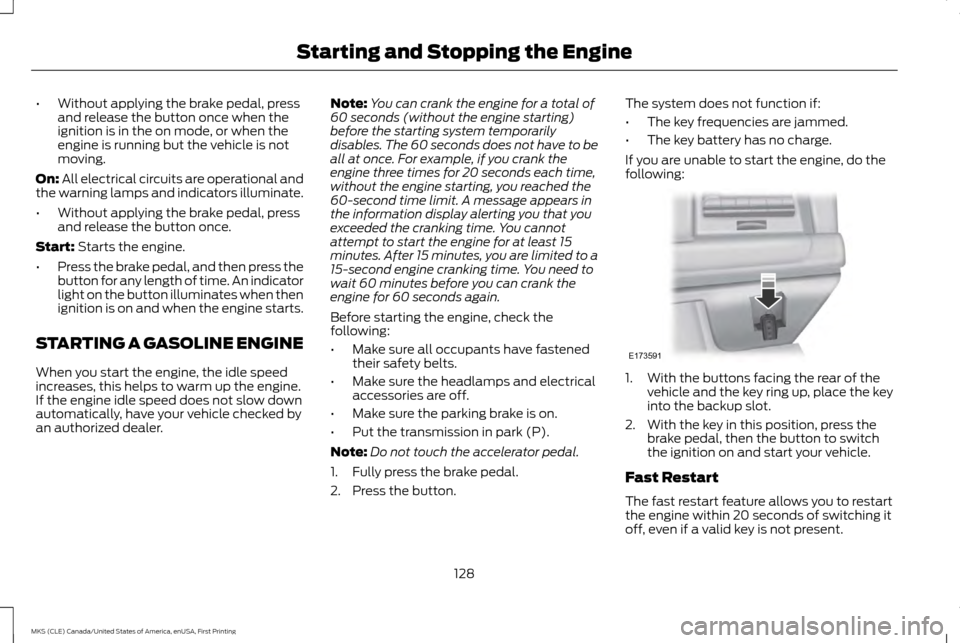
If you are unable to start the engine, do the
following: 1. With the buttons facing the rear of the
vehicle and the key ring up, place the key
into the backup slot.
2. With the key in this position, press the brake pedal, then the button to switch
the ignition on and start your vehicle.
Fast Restart
The fast restart feature allows you to restart
the engine within 20 seconds of switching it
off, even if a valid key is not present.
128
MKS (CLE) Canada/United States of America, enUSA, First Printing Starting and Stopping the EngineE173591
Page 136 of 382
We recommend regular unleaded gasoline
with a pump (R+M)/2 octane rating of 87.
Some stations offer fuels posted as regular
with an octane rating below 87, particularly
in high altitude areas. We do not recommend
fuels with an octane rating below 87. To
provide improved performance, we
recommend premium fuel for severe duty
usage such as trailer tow.
Do not use any fuel other than those
recommended because they could lead to
engine damage that may not be covered by
the vehicle Warranty.
Note:
Use of any fuel other than those
recommended can impair the emission control
system and cause a loss of vehicle
performance.
Do not use:
• Diesel fuel.
• Fuels containing kerosene or paraffin.
• Fuel containing more than 15% ethanol
or E85 fuel.
• Fuels containing methanol.
• Fuels containing metallic-based
additives, including manganese-based
compounds. •
Fuels containing the octane booster
additive, methylcyclopentadienyl
manganese tricarbonyl (MMT).
• Leaded fuel (using leaded fuel is
prohibited by law).
The use of fuels with metallic compounds
such as methylcyclopentadienyl manganese
tricarbonyl (commonly known as MMT),
which is a manganese-based fuel additive,
will impair engine performance and affect
the emission control system.
Do not be concerned if the engine sometimes
knocks lightly. However, if it knocks heavily
under most driving conditions while you are
using fuel with the recommended octane
rating, contact an authorized dealer to
prevent any engine damage.
FUEL FILLER FUNNEL LOCATION
The fuel filler funnel is located in the spare
wheel storage tray.
RUNNING OUT OF FUEL
Running out of fuel can cause damage not
covered by the vehicle Warranty. If your vehicle runs out of fuel:
•
Add a minimum of 1.3 gal (5 L) of fuel to
restart the engine. If your vehicle is out of
fuel and on a steep slope, more fuel may
be required.
• You may need to switch the ignition from
off to on several times after refueling to
allow the fuel system to pump the fuel
from the tank to the engine. When
restarting, cranking time takes a few
seconds longer than normal.
Filling a Portable Fuel Container
Use the following guidelines to avoid
electrostatic charge build-up when filling an
ungrounded fuel container:
• Only use an approved fuel container to
transfer fuel to your vehicle. Place the
container on the ground when filling it.
• Do not fill a fuel container when it is inside
your vehicle (including the cargo area).
• Keep the fuel pump nozzle in contact with
the fuel container when filling it.
• Do not use a device that holds the fuel
pump nozzle lever in the fill position.
133
MKS (CLE) Canada/United States of America, enUSA, First Printing Fuel and Refueling
Page 140 of 382
Keep a record for at least one month and
record the type of driving (city or highway).
This provides an accurate estimate of your
vehicle
’s fuel economy under current driving
conditions. Keeping records during summer
and winter will show how temperature
impacts fuel economy.
Conditions
• Heavily loading your vehicle reduces fuel
economy.
• Carrying unnecessary weight in your
vehicle may reduce fuel economy.
• Adding certain accessories to your vehicle
such as bug deflectors, rollbars or light
bars, running boards and ski racks may
reduce fuel economy.
• Using fuel blended with alcohol may
lower fuel economy.
• Fuel economy may decrease with lower
temperatures.
• Fuel economy may decrease when driving
short distances.
• You will get better fuel economy when
driving on flat terrain than when driving
on hilly terrain. EMISSION CONTROL SYSTEM WARNINGS
Do not park, idle, or drive your vehicle
in dry grass or other dry ground cover.
The emission system heats up the
engine compartment and exhaust system,
which can start a fire. Exhaust leaks may result in entry of
harmful and potentially lethal fumes
into the passenger compartment. If you
smell exhaust fumes inside your vehicle, have
your dealer inspect your vehicle immediately.
Do not drive if you smell exhaust fumes. Your vehicle is equipped with various
emission control components and a catalytic
converter that will enable your vehicle to
comply with applicable exhaust emission
standards.
To make sure that the catalytic converter and
other emission control components continue
to work properly:
•
Use only the specified fuel listed.
• Avoid running out of fuel. •
Do not turn off the ignition while your
vehicle is moving, especially at high
speeds.
• Have the items listed in scheduled
maintenance information performed
according to the specified schedule.
The scheduled maintenance items listed in
scheduled maintenance information are
essential to the life and performance of your
vehicle and to its emissions system.
If you use anything other than Ford,
Motorcraft or Ford-authorized parts for
maintenance replacements or for service of
components affecting emission control, such
non-Ford parts should be equivalent to
genuine Ford Motor Company parts in
performance and durability.
Illumination of the service engine soon
indicator, charging system warning light or
the temperature warning light, fluid leaks,
strange odors, smoke or loss of engine power
could indicate that the emission control
system is not working properly.
An improperly operating or damaged exhaust
system may allow exhaust to enter the
vehicle. Have a damaged or improperly
operating exhaust system inspected and
repaired immediately.
137
MKS (CLE) Canada/United States of America, enUSA, First Printing Fuel and Refueling
Page 145 of 382
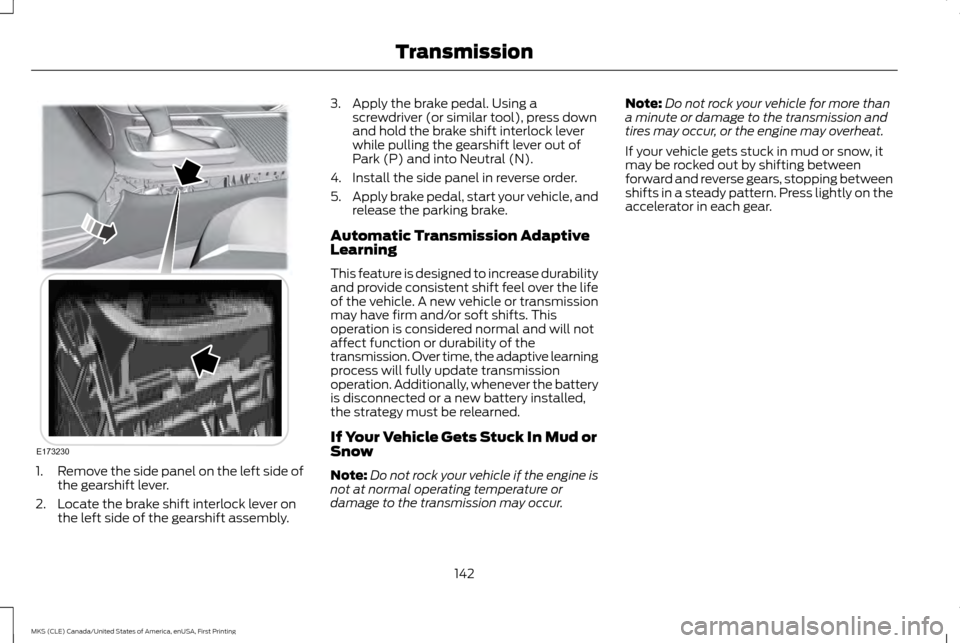
1.
Remove the side panel on the left side of
the gearshift lever.
2. Locate the brake shift interlock lever on the left side of the gearshift assembly. 3. Apply the brake pedal. Using a
screwdriver (or similar tool), press down
and hold the brake shift interlock lever
while pulling the gearshift lever out of
Park (P) and into Neutral (N).
4. Install the side panel in reverse order.
5. Apply brake pedal, start your vehicle, and
release the parking brake.
Automatic Transmission Adaptive
Learning
This feature is designed to increase durability
and provide consistent shift feel over the life
of the vehicle. A new vehicle or transmission
may have firm and/or soft shifts. This
operation is considered normal and will not
affect function or durability of the
transmission. Over time, the adaptive learning
process will fully update transmission
operation. Additionally, whenever the battery
is disconnected or a new battery installed,
the strategy must be relearned.
If Your Vehicle Gets Stuck In Mud or
Snow
Note: Do not rock your vehicle if the engine is
not at normal operating temperature or
damage to the transmission may occur. Note:
Do not rock your vehicle for more than
a minute or damage to the transmission and
tires may occur, or the engine may overheat.
If your vehicle gets stuck in mud or snow, it
may be rocked out by shifting between
forward and reverse gears, stopping between
shifts in a steady pattern. Press lightly on the
accelerator in each gear.
142
MKS (CLE) Canada/United States of America, enUSA, First Printing TransmissionE173230
Page 147 of 382
All-Wheel Drive Messages
Action / Description
AWD Messages
Displayed when the system has been automatically disabled to protect
itself. This is caused by operating the vehicle with the compact spare
tire installed or if the system is overheating. The system will resume
normal function and clear this message after cycling the ignition on
and off and driving a short distance with the road tire re-installed or
after the system is allowed to cool.
AWD OFF
Displayed in conjunction with the powertrain malfunction/reduced
power light when the system is not operating properly. If the warning
stays on or continues to come on, contact your authorized dealer as
soon as possible.
Check AWD
Operating AWD Vehicles With Spare
Tires
A spare tire of a different size other than the
tire provided should never be used. The AWD
system may disable automatically and enter
front-wheel drive only mode to protect
driveline components if a non-full sized tire
is installed. This condition may display an
AWD OFF message in the information
display. If there is an AWD OFF message in
the information display from using a non-full
sized spare tire, this indicator should turn off
after reinstalling the repaired or replaced
normal road tire and cycling the ignition off and on. It is recommended to reinstall the
repaired or replaced road tire as soon as
possible. Major dissimilar tire sizes between
the front and rear axles (for example, 17 inch
low profile tires on the front axle and 22 inch
high profile tires on the rear axle) could cause
the AWD system to stop functioning and
default to front-wheel drive or damage the
AWD system.
144
MKS (CLE) Canada/United States of America, enUSA, First Printing All-Wheel Drive
(If Equipped)
Page 149 of 382
If Your Vehicle Goes Off the Edge of the
Pavement
•
If your vehicle goes off the edge of the
pavement, slow down, but avoid severe
brake application, ease the vehicle back
onto the pavement only after reducing
your speed. Do not turn the steering
wheel too sharply while returning to the
road surface.
• It may be safer to stay on the apron or
shoulder of the road and slow down
gradually before returning to the
pavement. You may lose control if you do
not slow down or if you turn the steering
wheel too sharply or abruptly.
• It often may be less risky to strike small
objects, such as highway reflectors, with
minor damage to your vehicle rather than
attempt a sudden return to the pavement
which could cause the vehicle to slide
sideways out of control or rollover.
Remember, your safety and the safety of
others should be your primary concern. If Your Vehicle Gets Stuck WARNINGS
Always set the parking brake fully and
make sure the transmission is in P
(Park). Turn the ignition to the lock
position or turn the vehicle off using the
start/stop button and remove the key
whenever you leave your vehicle. If the parking brake is fully released, but
the brake warning lamp remains
illuminated, the brakes may not be
working properly. See your authorized dealer. Do not spin the wheels at over 35 mph
(56 km/h). The tires may fail and injure
a passenger or bystander.
Note:
Do not rock the vehicle if the engine is
not at normal operating temperature or
damage to the transmission may occur.
Note: Do not rock the vehicle for more than a
few minutes or damage to the transmission
and tires may occur or the engine may
overheat.
If your vehicle gets stuck in mud or snow it
may be rocked out by shifting between
forward and reverse gears, stopping between
shifts, in a steady pattern. Press lightly on the
accelerator in each gear. If your vehicle is equipped with
AdvanceTrac® with Roll Stability Control
™,
it may be beneficial to disengage the
AdvanceTrac® with Roll Stability Control ™
system while attempting to rock the vehicle.
Emergency Maneuvers
• In an unavoidable emergency situation
where a sudden sharp turn must be
made, remember to avoid "over-driving"
your vehicle (that is, turn the steering
wheel only as rapidly and as far as
required to avoid the emergency).
Excessive steering will result in less
vehicle control, not more. Additionally,
smooth variations of the accelerator
and/or brake pedal pressure should be
utilized if changes in vehicle speed are
called for. Avoid abrupt steering,
146
MKS (CLE) Canada/United States of America, enUSA, First Printing All-Wheel Drive (If Equipped)
Page 150 of 382
acceleration or braking which could result
in an increased risk of loss of vehicle
control, vehicle rollover and/or personal
injury. Use all available road surface to
return the vehicle to a safe direction of
travel.
• In the event of an emergency stop, avoid
skidding the tires and do not attempt any
sharp steering wheel movements.
• If the vehicle goes from one type of
surface to another (that is, from concrete
to gravel) there will be a change in the
way the vehicle responds to a maneuver
(steering, acceleration or braking). Again,
avoid these abrupt inputs.
Sand
Most of the time traction control improves
tire traction by managing wheel slip through
Brake, Engine, and AWD calibrations.
However, during low speed driving, disabling
traction control in deep sand can help keep
the wheels moving to maintain vehicle
momentum.
When driving over sand, try to keep all four
wheels on the most solid area of the trail.
Avoid reducing the tire pressures but shift to
a lower gear and drive steadily through the
terrain. Apply the accelerator slowly and
avoid spinning the wheels. Do not drive your vehicle in deep sand for an
extended period of time. This could cause
the AWD system to overheat and default to
front-wheel drive. If this occurs, an AWD OFF
message displays in the information display.
To resume normal AWD function as soon as
possible, stop the vehicle in a safe location
and stop the engine for at least 10 minutes.
After the engine has been restarted and the
AWD system has adequately cooled, the
AWD OFF message turns off and normal
AWD function returns. In the event the engine
is not stopped, the AWD OFF message turns
off when the system cools and normal AWD
function returns.
When driving at slow speeds in deep sand
under high outside temperatures, use L (Low)
gear when possible. L (Low) gear operation
will maximize the engine and transmission
cooling capability.
Under severe operating conditions, the A/C
may cycle on and off to protect overheating
of the engine.
Avoid excessive speed because vehicle
momentum can work against you and cause
the vehicle to become stuck to the point that
assistance may be required from another
vehicle. Remember, you may be able to back
out the way you came if you proceed with
caution. Mud and Water
If you must drive through high water, drive
slowly. Traction or brake capability may be
limited.
When driving through water, determine the
depth; avoid water higher than the bottom
of the wheel rims (for cars) or the bottom of
the hubs (for trucks) (if possible) and
proceed slowly. If the ignition system gets
wet, the vehicle may stall.
Once through water, always try the brakes.
Wet brakes do not stop the vehicle as
effectively as dry brakes. Drying can be
improved by moving your vehicle slowly while
applying light pressure on the brake pedal.
Be cautious of sudden changes in vehicle
speed or direction when you are driving in
mud. Even AWD vehicles can lose traction in
slick mud. As when you are driving over sand,
apply the accelerator slowly and avoid
spinning your wheels. If the vehicle does slide,
steer in the direction of the slide until you
regain control of the vehicle.
After driving through mud, clean off residue
stuck to rotating driveshafts and tires. Excess
mud stuck on tires and rotating driveshafts
causes an imbalance that could damage
drive components.
147
MKS (CLE) Canada/United States of America, enUSA, First Printing All-Wheel Drive
(If Equipped)