air filter LINCOLN MKS 2016 Owners Manual
[x] Cancel search | Manufacturer: LINCOLN, Model Year: 2016, Model line: MKS, Model: LINCOLN MKS 2016Pages: 382, PDF Size: 3.81 MB
Page 5 of 382
Pedals
Adjusting the Pedals.........................................68
Wipers and Washers
Windshield Wipers.............................................69
Autowipers............................................................69
Windshield Washers
..........................................70
Lighting
General Information
............................................71
Lighting Control
....................................................71
Autolamps.............................................................72
Instrument Lighting Dimmer...........................73
Headlamp Exit Delay.........................................73
Daytime Running Lamps..................................73
Automatic High Beam Control
.......................74
Front Fog Lamps.................................................75
Adaptive Headlamps.........................................75
Direction Indicators
............................................76
Interior Lamps
......................................................76
Ambient Lighting
.................................................77
Windows and Mirrors
Power Windows
...................................................78
Global Opening and Closing
...........................79
Exterior Mirrors.....................................................79 Interior Mirror
.........................................................81
Sun Visors
...............................................................81
Sun Shades
............................................................81
Moonroof...............................................................82
Instrument Cluster
Gauges....................................................................84
Warning Lamps and Indicators.....................85
Audible Warnings and Indicators..................87
Information Displays
General Information..........................................89
Information Messages
......................................95
Climate Control
Automatic Climate Control
...........................105
Hints on Controlling the Interior Climate.............................................................106
Heated Windows and Mirrors
.......................107
Cabin Air Filter....................................................108
Remote Start......................................................108
Seats
Sitting in the Correct Position......................109
Head Restraints
.................................................109
Power Seats..........................................................111 Memory Function
...............................................114
Climate Controlled Seats
................................115
Rear Seat Armrest..............................................117
Universal Garage Door Opener
Universal Garage Door Opener.....................119
Auxiliary Power Points
Auxiliary Power Points
.....................................124
Storage Compartments
Center Console
...................................................126
Overhead Console
............................................126
Starting and Stopping the Engine
General Information
..........................................127
Keyless Starting..................................................127
Starting a Gasoline Engine
............................128
Engine Block Heater.........................................130
Fuel and Refueling
Safety Precautions
............................................132
Fuel Quality
..........................................................132
Fuel Filler Funnel Location.............................133
Running Out of Fuel..........................................133
2
MKS (CLE) Canada/United States of America, enUSA, First Printing Table of Contents
Page 7 of 382
Ordering Additional Owner's
Literature.........................................................220
Reporting Safety Defects (U.S. Only).......220
Reporting Safety Defects (Canada Only)...................................................................221
Fuses
Fuse Specification Chart...............................223
Changing a Fuse................................................237
Maintenance
General Information
.......................................240
Opening and Closing the Hood..................240
Under Hood Overview - 3.5L Ecoboost™.....................................................242
Under Hood Overview - 3.7L........................244
Engine Oil Dipstick...........................................245
Engine Oil Check...............................................245
Oil Change Indicator Reset...........................246
Engine Coolant Check.....................................247
Automatic Transmission Fluid Check......250
Brake Fluid Check.............................................254
Power Steering Fluid Check.........................254
Washer Fluid Check
.........................................254
Fuel Filter
.............................................................255
Changing the 12V Battery..............................255
Checking the Wiper Blades...........................257 Changing the Wiper Blades..........................257
Adjusting the Headlamps.............................258
Changing a Bulb
...............................................259
Bulb Specification Chart
...............................260
Changing the Engine Air Filter.....................262
Vehicle Care
General Information........................................263
Cleaning Products............................................263
Cleaning the Exterior
......................................264
Waxing
..................................................................265
Cleaning the Engine........................................265
Cleaning the Windows and Wiper Blades
...............................................................265
Cleaning the Interior
.......................................266
Cleaning the Instrument Panel and Instrument Cluster Lens............................266
Cleaning Leather Seats..................................267
Repairing Minor Paint Damage...................267
Cleaning the Alloy Wheels...........................268
Vehicle Storage
.................................................268
Wheels and Tires
Tire Care...............................................................270
Using Snow Chains
..........................................285
Tire Pressure Monitoring System...............286 Changing a Road Wheel................................289
Technical Specifications...............................294
Capacities and Specifications
Engine Specifications - 3.5L
Ecoboost™....................................................296
Engine Specifications - 3.7L.........................297
Motorcraft Parts - 3.5L Ecoboost™..........298
Motorcraft Parts - 3.7L...................................299
Vehicle Identification Number....................299
Vehicle Certification Label...........................300
Transmission Code Designation..................301
Capacities and Specifications - 3.5L Ecoboost™....................................................302
Capacities and Specifications - 3.7L.........307
Audio System
General Information.........................................313
Audio Unit - Vehicles With: Premium AM/ FM/CD...............................................................314
Media Hub
............................................................316
Accessories
Accessories..........................................................317
Extended Service Plan (ESP)
Extended Service Plan (ESP).......................319
4
MKS (CLE) Canada/United States of America, enUSA, First Printing Table of Contents
Page 11 of 382
Battery acid
Brake fluid - non petroleum based
Brake system
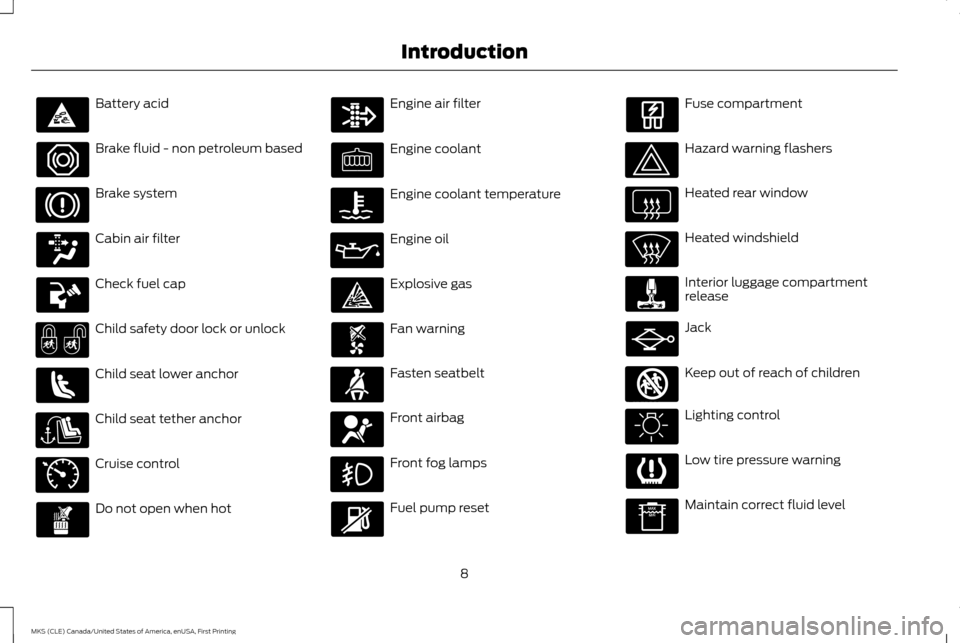
Cabin air filter
Check fuel cap
Child safety door lock or unlock
Child seat lower anchor
Child seat tether anchor
Cruise control
Do not open when hot Engine air filter
Engine coolant
Engine coolant temperature
Engine oil
Explosive gas
Fan warning
Fasten seatbelt
Front airbag
Front fog lamps
Fuel pump reset Fuse compartment
Hazard warning flashers
Heated rear window
Heated windshield
Interior luggage compartment
release
Jack
Keep out of reach of children
Lighting control
Low tire pressure warning
Maintain correct fluid level
8
MKS (CLE) Canada/United States of America, enUSA, First Printing Introduction E71340 E161353
Page 111 of 382
CABIN AIR FILTER
Your vehicle is equipped with a cabin air filter,
which gives you and your passengers the
following benefits:
•
It improves your driving comfort by
reducing particle concentration.
• It improves the interior compartment
cleanliness.
• It protects the climate control
components from particle deposits.
You can locate the cabin air filter behind the
glove box.
Note: Make sure you have a cabin air filter
installed at all times. This prevents foreign
objects from entering the system. Running the
system without a filter in place could result in
degradation or damage to the system.
Replace the filter at regular intervals. See
Scheduled Maintenance (page 321).
For additional cabin air filter information, or
to replace the filter, see an authorized dealer. REMOTE START
The remote start feature allows you to
pre-condition the interior of your vehicle. The
climate control system works to achieve
comfort according to your pre-selected
settings.
Note:
You cannot adjust the system during
remote start operation. You cannot switch on
the displays or indicators during remote start.
Switch the ignition on to return the system
to its previous settings. The following
features remain on if they automatically
turned on during remote start, or remain off
if they did not turn on during remote start.
• Heated seats.
• Cooled seats.
• Heated steering wheel.
• Heated mirrors.
• Heated rear window.
Note: Passenger heated and cooled seats
only remain on during remote start if they were
on when you switched the vehicle off.
You can adjust the default remote start
settings using the information display
controls. See
Information Displays (page
89). Automatic Settings
In hot weather, the system is set to 72°F
(22°C). The cooled seats are set to high (if
available, and selected to AUTO in the
information display).
In moderate weather, the system either heats
or cools (based on pre-selected settings).
The rear defroster, heated mirrors and heated
seats do not automatically switch on.
In cold weather, the system is set to 72°F
(22°C). The heated and cooled seats and
heated steering wheel are set to high (if
available, and selected to AUTO in the
information display). The rear defroster and
heated mirrors automatically switch on.
108
MKS (CLE) Canada/United States of America, enUSA, First Printing Climate Control
Page 119 of 382
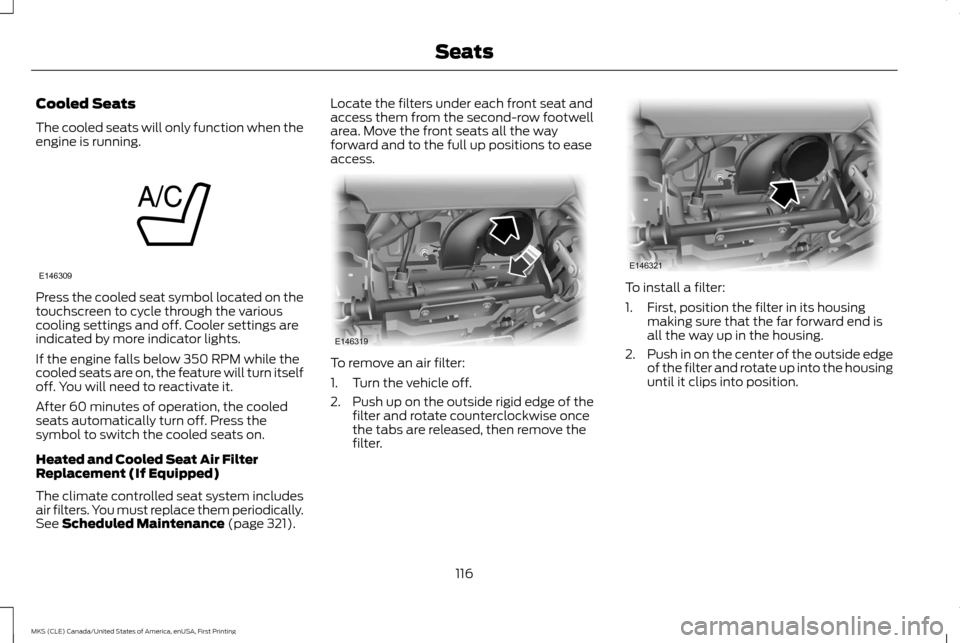
Cooled Seats
The cooled seats will only function when the
engine is running.
Press the cooled seat symbol located on the
touchscreen to cycle through the various
cooling settings and off. Cooler settings are
indicated by more indicator lights.
If the engine falls below 350 RPM while the
cooled seats are on, the feature will turn itself
off. You will need to reactivate it.
After 60 minutes of operation, the cooled
seats automatically turn off. Press the
symbol to switch the cooled seats on.
Heated and Cooled Seat Air Filter
Replacement (If Equipped)
The climate controlled seat system includes
air filters. You must replace them periodically.
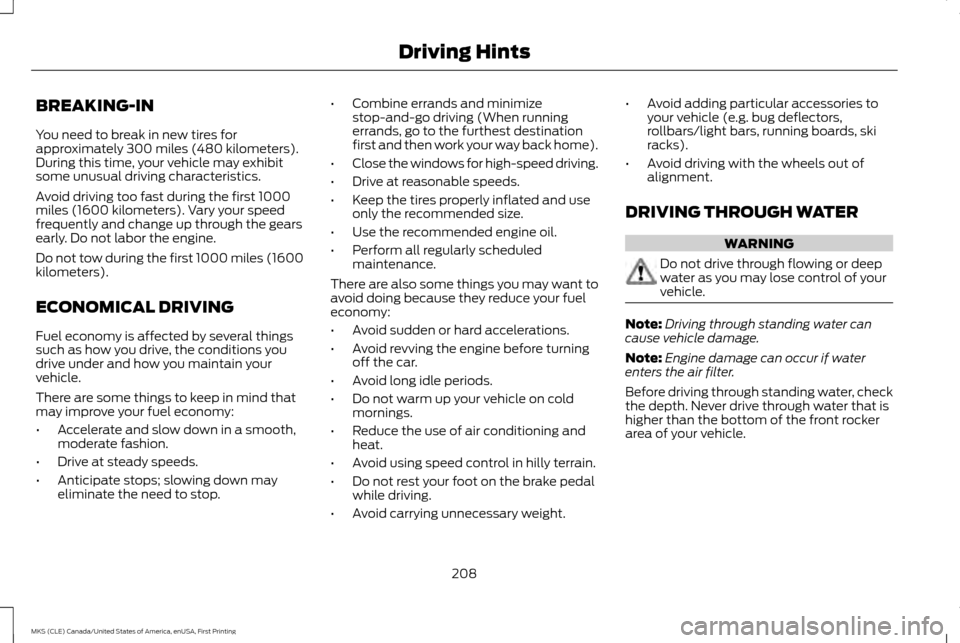
See Scheduled Maintenance (page 321). Locate the filters under each front seat and
access them from the second-row footwell
area. Move the front seats all the way
forward and to the full up positions to ease
access.
To remove an air filter:
1. Turn the vehicle off.
2. Push up on the outside rigid edge of the
filter and rotate counterclockwise once
the tabs are released, then remove the
filter. To install a filter:
1. First, position the filter in its housing
making sure that the far forward end is
all the way up in the housing.
2. Push in on the center of the outside edge
of the filter and rotate up into the housing
until it clips into position.
116
MKS (CLE) Canada/United States of America, enUSA, First Printing SeatsE146309 E146319 E146321
Page 211 of 382
BREAKING-IN
You need to break in new tires for
approximately 300 miles (480 kilometers).
During this time, your vehicle may exhibit
some unusual driving characteristics.
Avoid driving too fast during the first 1000
miles (1600 kilometers). Vary your speed
frequently and change up through the gears
early. Do not labor the engine.
Do not tow during the first 1000 miles (1600
kilometers).
ECONOMICAL DRIVING
Fuel economy is affected by several things
such as how you drive, the conditions you
drive under and how you maintain your
vehicle.
There are some things to keep in mind that
may improve your fuel economy:
•
Accelerate and slow down in a smooth,
moderate fashion.
• Drive at steady speeds.
• Anticipate stops; slowing down may
eliminate the need to stop. •
Combine errands and minimize
stop-and-go driving (When running
errands, go to the furthest destination
first and then work your way back home).
• Close the windows for high-speed driving.
• Drive at reasonable speeds.
• Keep the tires properly inflated and use
only the recommended size.
• Use the recommended engine oil.
• Perform all regularly scheduled
maintenance.
There are also some things you may want to
avoid doing because they reduce your fuel
economy:
• Avoid sudden or hard accelerations.
• Avoid revving the engine before turning
off the car.
• Avoid long idle periods.
• Do not warm up your vehicle on cold
mornings.
• Reduce the use of air conditioning and
heat.
• Avoid using speed control in hilly terrain.
• Do not rest your foot on the brake pedal
while driving.
• Avoid carrying unnecessary weight. •
Avoid adding particular accessories to
your vehicle (e.g. bug deflectors,
rollbars/light bars, running boards, ski
racks).
• Avoid driving with the wheels out of
alignment.
DRIVING THROUGH WATER WARNING
Do not drive through flowing or deep
water as you may lose control of your
vehicle.
Note:
Driving through standing water can
cause vehicle damage.
Note: Engine damage can occur if water
enters the air filter.
Before driving through standing water, check
the depth. Never drive through water that is
higher than the bottom of the front rocker
area of your vehicle.
208
MKS (CLE) Canada/United States of America, enUSA, First Printing Driving Hints
Page 246 of 382
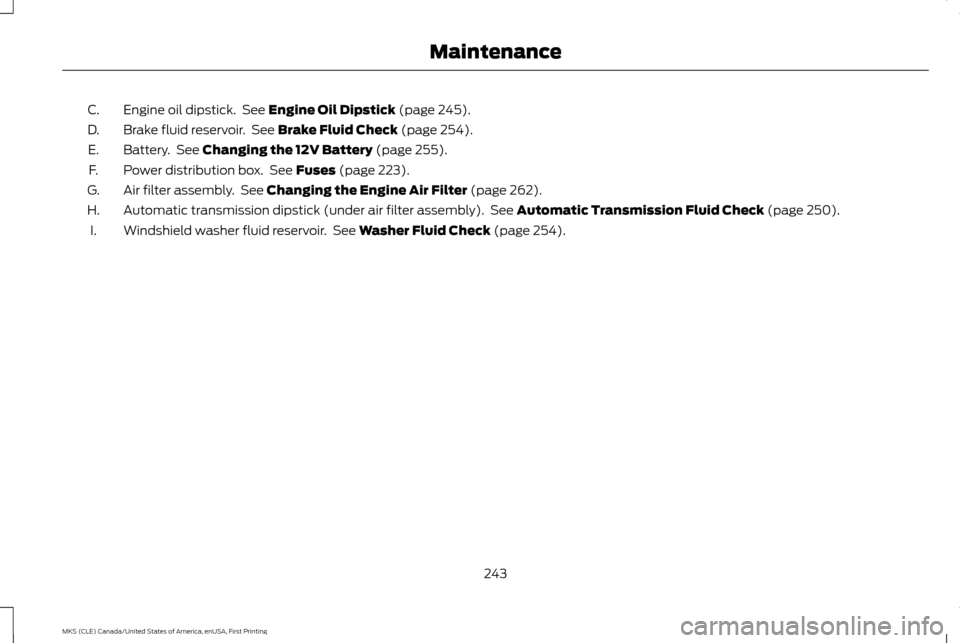
Engine oil dipstick. See Engine Oil Dipstick (page 245).
C.
Brake fluid reservoir. See
Brake Fluid Check (page 254).
D.
Battery. See
Changing the 12V Battery (page 255).
E.
Power distribution box. See
Fuses (page 223).
F.
Air filter assembly. See
Changing the Engine Air Filter (page 262).
G.
Automatic transmission dipstick (under air filter assembly). See
Automatic Transmission Fluid Check (page 250).
H.
Windshield washer fluid reservoir. See
Washer Fluid Check (page 254).
I.
243
MKS (CLE) Canada/United States of America, enUSA, First Printing Maintenance
Page 248 of 382
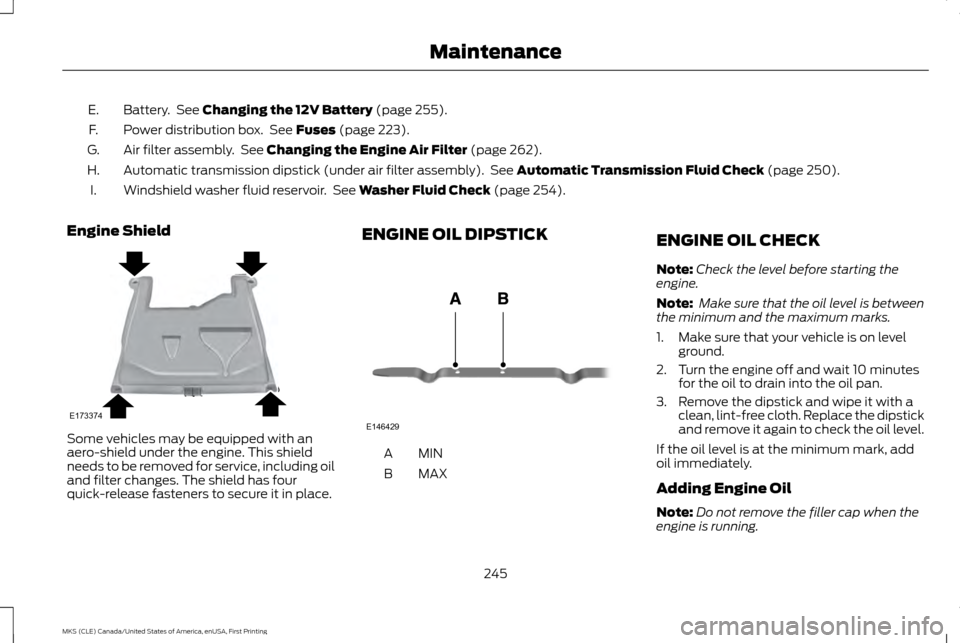
Battery. See Changing the 12V Battery (page 255).
E.
Power distribution box. See
Fuses (page 223).
F.
Air filter assembly. See
Changing the Engine Air Filter (page 262).
G.
Automatic transmission dipstick (under air filter assembly). See
Automatic Transmission Fluid Check (page 250).
H.
Windshield washer fluid reservoir. See
Washer Fluid Check (page 254).
I.
Engine Shield Some vehicles may be equipped with an
aero-shield under the engine. This shield
needs to be removed for service, including oil
and filter changes. The shield has four
quick-release fasteners to secure it in place. ENGINE OIL DIPSTICK
MINA
MAX
B ENGINE OIL CHECK
Note:
Check the level before starting the
engine.
Note: Make sure that the oil level is between
the minimum and the maximum marks.
1. Make sure that your vehicle is on level ground.
2. Turn the engine off and wait 10 minutes for the oil to drain into the oil pan.
3. Remove the dipstick and wipe it with a clean, lint-free cloth. Replace the dipstick
and remove it again to check the oil level.
If the oil level is at the minimum mark, add
oil immediately.
Adding Engine Oil
Note: Do not remove the filler cap when the
engine is running.
245
MKS (CLE) Canada/United States of America, enUSA, First Printing MaintenanceE173374 E146429
Page 253 of 382
At this time, you may notice your engine
coolant temperature gauge needle move
toward the H and the POWER REDUCED
TO LOWER TEMP message may appear in
the information display.
You may notice a reduction in vehicle speed
caused by reduced engine power. In order to
manage the engine fluid temperatures, your
vehicle may enter this mode if certain
high-temperature and high-load conditions
take place. The amount of speed reduction
depends on many factors such as vehicle
loading, towing, grade and ambient
temperature. If this occurs, there is no need
to pull off the road. You can continue to drive
your vehicle while this message is active.
The air conditioning may also cycle on and
off during severe operating conditions to
protect overheating of the engine. When the
engine coolant temperature decreases to a
normal operating temperature, the air
conditioning will turn on once again.
If the engine coolant temperature gauge
moves fully into the red (hot) area, or if the
coolant temperature warning or service
engine soon messages appear in your
information display:
1. Pull off the road as soon as safely possible and shift the transmission into
P
. 2.
Leave the engine running until the coolant
temperature gauge needle moves away
from the red (hot) area. After several
minutes, if the temperature does not
drop, follow the remaining steps.
3. Switch the engine off and wait for it to cool before checking the coolant level.
4. If the coolant level is normal, restart your
engine and continue.
5. If the coolant is low, add coolant, and restart the engine. See
Adding Engine
Coolant or How Fail-Safe Cooling
Works in this chapter for more
information.
AUTOMATIC TRANSMISSION
FLUID CHECK
6F50/6F55 Transmission
(If Equipped) WARNINGS
The dipstick cap and surrounding
components may be hot, use gloves.
Use gloves when moving the air filter
assembly. Components will be hot. Note:
Automatic transmission fluid expands
when warmed. To obtain an accurate fluid
check, drive your vehicle until you warm it up,
approximately
20 mi (30 km). If you operate
your vehicle for an extended period at high
speeds, in city traffic during hot weather or
pulling a trailer, switch your vehicle off until it
reaches normal operating temperatures to
allow the fluid to cool before checking.
Depending on vehicle use, cooling times could
take up to 30 minutes or longer.
Refer to your scheduled maintenance
information for scheduled intervals for fluid
checks and changes. Your transmission does
not consume fluid. However, you should
check the fluid level if the transmission is not
working properly. For example, if the
transmission slips or shifts slowly or if you
notice some sign of a fluid leak.
1. Drive your vehicle 20 mi (30 km) or until it reaches normal operating temperature.
2. Park your vehicle on a level surface and engage the parking brake.
3. With the parking brake engaged and your
foot on the brake pedal, start the engine
and move the gearshift lever through all
of the gear ranges. Allow a minimum of
10 seconds for each gear to engage.
4. Put the gearshift lever in park (P) and leave the engine running.
250
MKS (CLE) Canada/United States of America, enUSA, First Printing Maintenance
Page 254 of 382
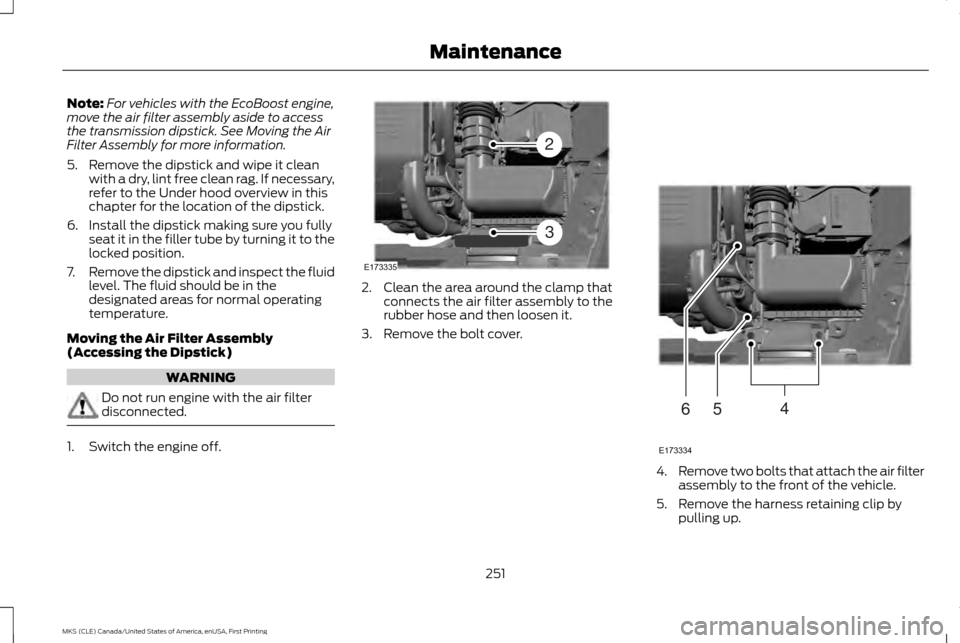
Note:
For vehicles with the EcoBoost engine,
move the air filter assembly aside to access
the transmission dipstick. See Moving the Air
Filter Assembly for more information.
5. Remove the dipstick and wipe it clean with a dry, lint free clean rag. If necessary,
refer to the Under hood overview in this
chapter for the location of the dipstick.
6. Install the dipstick making sure you fully seat it in the filler tube by turning it to the
locked position.
7. Remove the dipstick and inspect the fluid
level. The fluid should be in the
designated areas for normal operating
temperature.
Moving the Air Filter Assembly
(Accessing the Dipstick) WARNING
Do not run engine with the air filter
disconnected.
1. Switch the engine off. 2. Clean the area around the clamp that
connects the air filter assembly to the
rubber hose and then loosen it.
3. Remove the bolt cover. 4.
Remove two bolts that attach the air filter
assembly to the front of the vehicle.
5. Remove the harness retaining clip by pulling up.
251
MKS (CLE) Canada/United States of America, enUSA, First Printing MaintenanceE173335
2
3 E173334
654