ignition LINCOLN MKT 2014 User Guide
[x] Cancel search | Manufacturer: LINCOLN, Model Year: 2014, Model line: MKT, Model: LINCOLN MKT 2014Pages: 498, PDF Size: 7.3 MB
Page 75 of 498
4. PressOKor>to make a selection.
Note:You can clear or change your MyKey settings at any time during
the same key cycle as you created the MyKey. Once you have switched
the engine off, however, you will need an admin key to change or clear
your MyKey settings.
CLEARING ALL MYKEYS
You can clear all MyKeys within the same key cycle as you created the
MyKey. If you switch your ignition off, however, you will need to use an
admin key to clear your MyKeys.
Note:When you clear your MyKeys, you remove all restrictions and
return all MyKeys to their original admin key status at once.
To clear all MyKeys of all MyKey settings, use the information display to
do the following:
1. Access the main menu and selectSettings, thenMyKey.
2. Scroll toClear Alland press theOKbutton.
3. Hold theOKbutton untilALL MYKEYS CLEAREDdisplays .
CHECKING MYKEY SYSTEM STATUS
You can find information about your programmed MyKeys by using the
information display.
MYKEY DISTANCE
Tracks the distance when drivers use a MyKey. The only way to delete
the accumulated distance is by using an admin key to clear your MyKey.
If the distance does not accumulate as expected, then the intended user
is not using the MyKey, or an admin key user recently cleared and then
recreated a MyKey.
NUMBER OF MYKEY(S)
Indicates the number of MyKeys programmed to your vehicle. Use this
feature to detect how many MyKeys you have for your vehicle and
determine when a MyKey has been deleted.
NUMBER OF ADMIN KEY(S)
Indicates how many admin keys are programmed to your vehicle. Use
this feature to determine how many unrestricted keys you have for your
vehicle, and detect if an additional MyKey has been programmed.
USING MYKEY WITH REMOTE START SYSTEMS
MyKey is not compatible with non-Ford-approved aftermarket remote
start systems. If you choose to install a remote start system, please see
your Ford authorized dealer for a Ford-approved remote start system.
74MyKey
2014 MKT(mkt)
Owners Guide gf, 1st Printing, April 2013
USA(fus)
Page 78 of 498
Note:If any door or the luggage compartment is open, or if the hood is
open on vehicles with an anti-theft alarm or remote start, the horn
sounds twice and the lamps will not flash.
Activating intelligent access
The intelligent access key must be within 3 feet (1 meter) of your
vehicle.
At the front doors
Pull a front exterior door handle. The door will unlock and can be
opened.
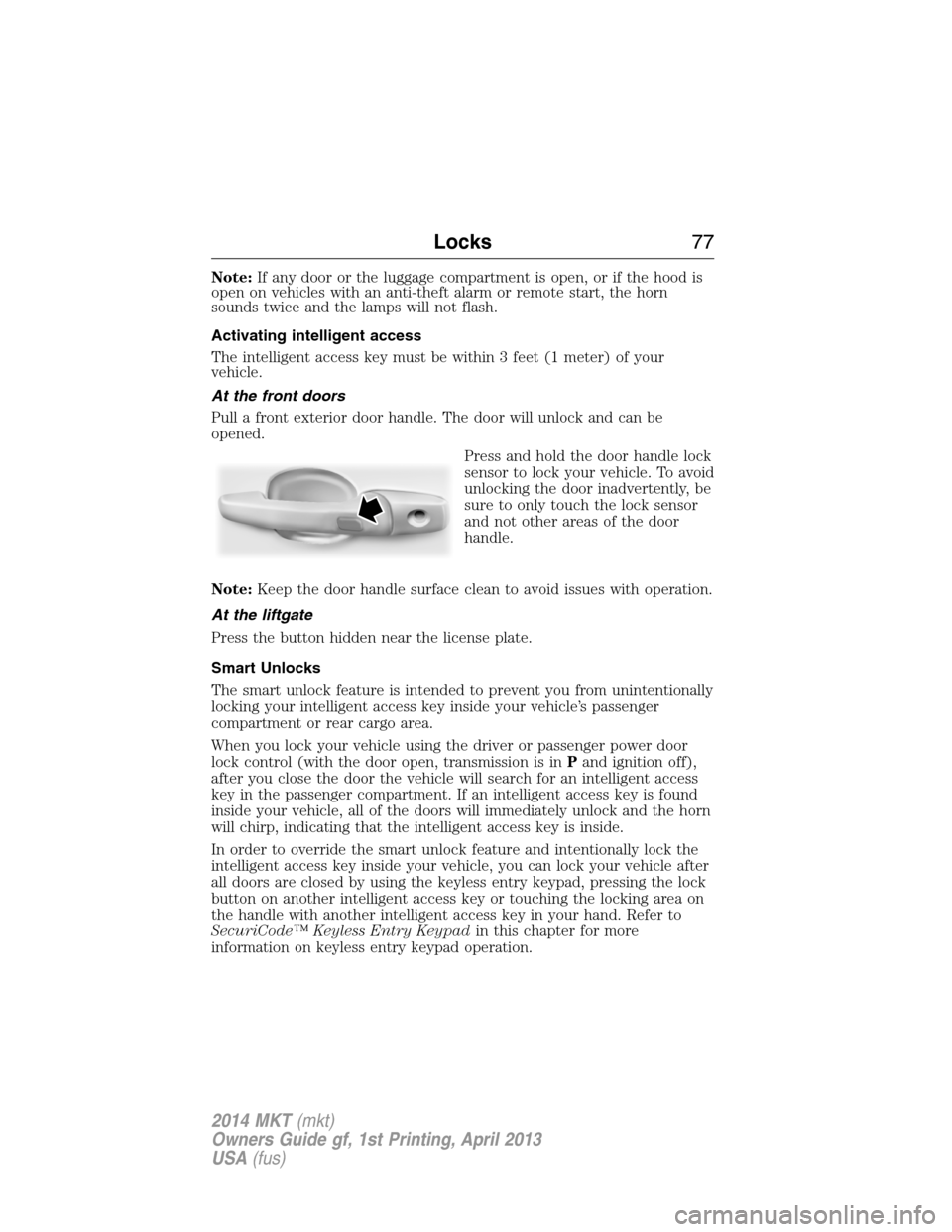
Press and hold the door handle lock
sensor to lock your vehicle. To avoid
unlocking the door inadvertently, be
sure to only touch the lock sensor
and not other areas of the door
handle.
Note:Keep the door handle surface clean to avoid issues with operation.
At the liftgate
Press the button hidden near the license plate.
Smart Unlocks
The smart unlock feature is intended to prevent you from unintentionally
locking your intelligent access key inside your vehicle’s passenger
compartment or rear cargo area.
When you lock your vehicle using the driver or passenger power door
lock control (with the door open, transmission is inPand ignition off),
after you close the door the vehicle will search for an intelligent access
key in the passenger compartment. If an intelligent access key is found
inside your vehicle, all of the doors will immediately unlock and the horn
will chirp, indicating that the intelligent access key is inside.
In order to override the smart unlock feature and intentionally lock the
intelligent access key inside your vehicle, you can lock your vehicle after
all doors are closed by using the keyless entry keypad, pressing the lock
button on another intelligent access key or touching the locking area on
the handle with another intelligent access key in your hand. Refer to
SecuriCode™ Keyless Entry Keypadin this chapter for more
information on keyless entry keypad operation.
Locks77
2014 MKT(mkt)
Owners Guide gf, 1st Printing, April 2013
USA(fus)
Page 79 of 498
When you open one of the front doors and lock your vehicle using the
power door lock control, all doors will lock then unlock if:
•the ignition is on, or
•the ignition is off and the transmission is not inP.
Autolock Feature (If Enabled)
The autolock feature will lock all the doors when:
•all the doors are closed,
•the ignition is on,
•you shift into any gear putting your vehicle in motion, and
•your vehicle reaches a speed greater than 12 mph (20 km/h).
The autolock feature repeats when:
•you open then close any door while the ignition is on and the vehicle
speed is 9 mph (15 km/h) or lower, and
•your vehicle then reaches a speed greater than 12 mph (20 km/h).
Autounlock Feature (If Enabled)
The autounlock feature unlocks all the doors when:
•the ignition is on, all the doors are closed, and your vehicle has been
in motion at a speed greater than 12 mph (20 km/h);
•your vehicle has then come to a stop and you switch the off ignition
or to accessory; and
•you open the driver door within 10 minutes of switching the ignition
off or to accessory.
Note:The doors will not autounlock if you electronically lock the vehicle
after you switch the ignition off and before you open the driver door.
Enabling or Disabling
Note:You can enable or disable the autolock and autounlock features
independently of each other.
You can enable or disable these features:
•through an authorized dealer
•using the information display.
Illuminated Entry
The interior lamps, parking lamps and puddle lamps (if equipped)
illuminate when you use the intelligent access key or the keyless entry
keypad to unlock your vehicle.
78Locks
2014 MKT(mkt)
Owners Guide gf, 1st Printing, April 2013
USA(fus)
Page 80 of 498
The system will turn off the lights if:
•you switch the ignition on
•you press the lock button on the remote control
•you lock the vehicle using the keyless entry keypad
•they have been on for 25 seconds.
The lights will not turn off if:
•you have turned them on with the dimmer control
•any door is open.
Illuminated Exit
The interior dome lamps, parking lamps and puddle lamps (if equipped)
illuminate when all doors are closed and the ignition is turned off.
The lights turn off if all the doors remain closed and:
•25 seconds elapse
•you press theSTART/STOPbutton.
Battery Saver
If you leave the courtesy lamps, dome lamps or headlamps on, the
battery saver shuts them off 10 minutes after you switch the ignition off.
Accessory Mode Battery Saver for Intelligent Access Keys
If you leave your vehicle in the run ignition state, it will shut off once it
detects a certain amount of battery drain or after 45 minutes.
LIFTGATE
WARNING:It is extremely dangerous to ride in a cargo area,
inside or outside of a vehicle. In a crash, people riding in these
areas are more likely to be seriously injured or killed. Do not allow
people to ride in any area of your vehicle that is not equipped with
seats and safety belts. Be sure everyone in your vehicle is in a seat and
using a safety belt properly.
Power Liftgate
WARNING:Make sure all persons are clear of the power liftgate
area before using the power liftgate control.
Locks79
2014 MKT(mkt)
Owners Guide gf, 1st Printing, April 2013
USA(fus)
Page 81 of 498
WARNING:Keep keys out of reach of children. Do not allow
children to play near an open or moving power liftgate.
Note:Cycling the ignition while the liftgate is power closing and is
6–10 inches (15–24 cm) from being latched may cause the liftgate to
reverse to full open position. Make sure that the liftgate is closed before
operating or moving the vehicle, especially in an enclosure, like a garage
or a parking structure. The liftgate or its components could be damaged.
Note:Do not drive with the liftgate open without first disabling the
power function and securing the liftgate to the vehicle.
Note:In case of operation in extreme cold -40°F (-40°C), or on extreme
inclines, manual operation of the liftgate is suggested.
The power liftgate can be enabled or disabled using the information
display. The remote control and instrument panel button will still operate
the liftgate regardless of the setting.
Opening and Closing the Power Liftgate
Note:The liftgate movement direction can be reversed with a second
press of the instrument panel, or the control button on the liftgate, or a
second double press of the transmitter button.
The liftgate will only operate with the vehicle in P (Park).
A chime will sound three times as the liftgate begins to power close.
A single chime indicates a problem with the close request, caused by:
•the ignition is on and the transmission is not in P (Park);
•or the battery voltage is below the minimum operating voltage;
•or the vehicle speed is at or above 3 mph (5 km/h).
If the liftgate reverses and starts to close after an open request, a fast
continuous chime indicates excessive load on the gate or a possible strut
failure. See your authorized dealer if you still have a fast chime after the
load is removed.
To open or close from the instrument panel:Press the
instrument panel button.
To open or close with the remote control:Press the remote
control button twice within three seconds.
80Locks
2014 MKT(mkt)
Owners Guide gf, 1st Printing, April 2013
USA(fus)
Page 86 of 498
The anti-scan feature will turn off after:
•one minute of keypad inactivity
•pressing the unlock button on the remote control
•the ignition is turned on
•unlocking the vehicle using intelligent access.
Unlocking and Locking the Doors
To unlock the driver door:Enter the factory-set 5-digit code or your
personal code. You must press each number within five seconds of each
other. The interior lamps will illuminate.Note:All doors will unlock if
the two-stage unlocking feature is disabled. Refer toLocking and
Unlockingearlier in this chapter.
To unlock all doors:Enter the factory-set code or your personal code,
then press the3•4control within five seconds.
To lock all doors:Press and hold7•8and9•0at the same time with
the driver door closed. You do not need to enter the keypad code first.
Displaying the Factory Set Code
Note:You will need to have two programmed intelligent access keys for
this procedure.
To display the factory-set code in the information display:
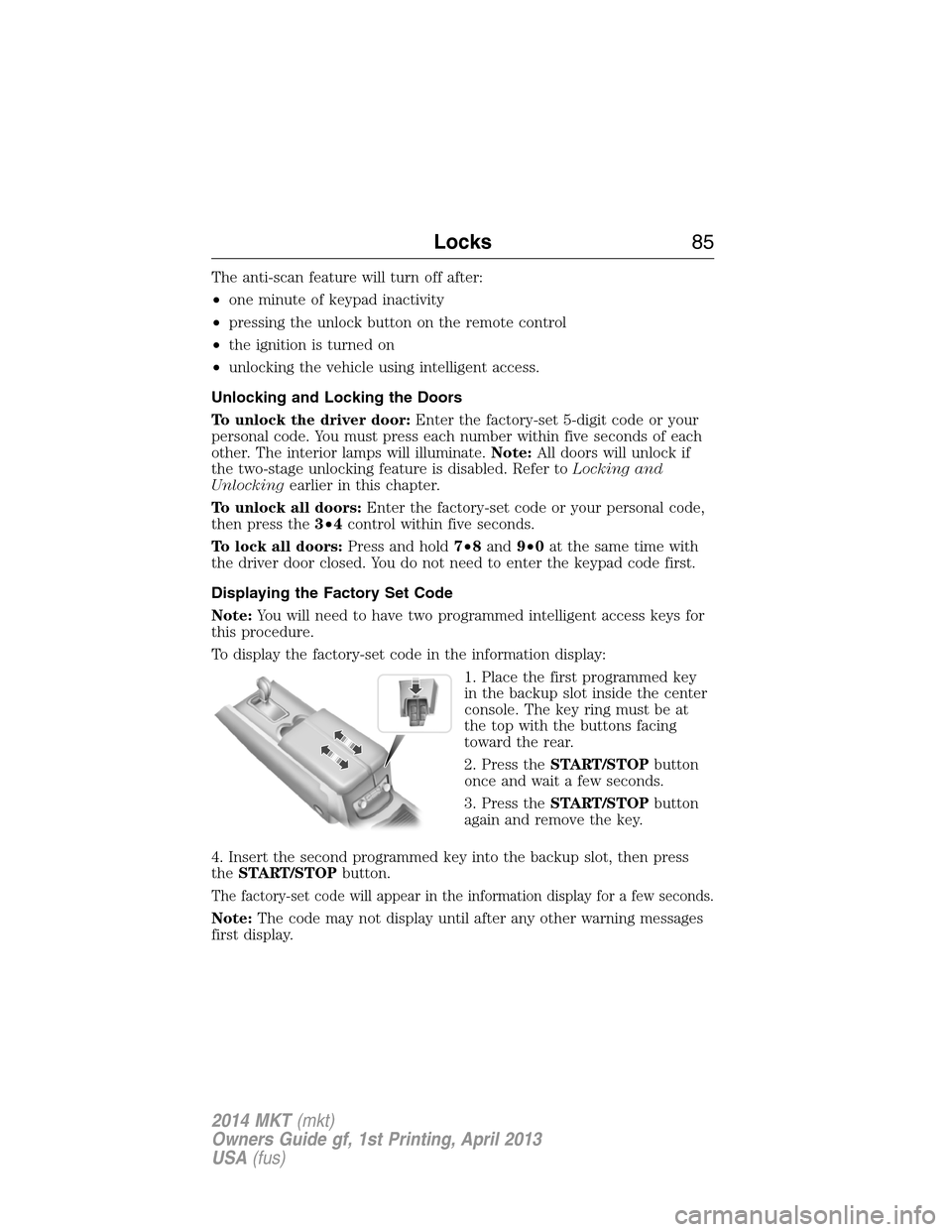
1. Place the first programmed key
in the backup slot inside the center
console. The key ring must be at
the top with the buttons facing
toward the rear.
2. Press theSTART/STOPbutton
once and wait a few seconds.
3. Press theSTART/STOPbutton
again and remove the key.
4. Insert the second programmed key into the backup slot, then press
theSTART/STOPbutton.
The factory-set code will appear in the information display for a few seconds.
Note:The code may not display until after any other warning messages
first display.
Locks85
2014 MKT(mkt)
Owners Guide gf, 1st Printing, April 2013
USA(fus)
Page 87 of 498
SECURILOCK® PASSIVE ANTI-THEFT SYSTEM
Note:The system is not compatible with non-Ford aftermarket remote
start systems. Use of these systems may result in vehicle starting
problems and a loss of security protection.
Note:Metallic objects, electronic devices or a second coded key on the
same key chain may cause vehicle starting issues if they are too close to
the key when starting the engine. Prevent these objects from touching
the coded key while starting the engine. Switch the ignition off, move all
objects on the key chain away from the coded key and restart the engine
if a problem occurs.
Note:Do not leave a duplicate coded key in the vehicle. Always take
your keys and lock all doors when leaving the vehicle.
The system is an engine immobilization system. It helps prevent the
engine from starting unless a coded key programmed to your vehicle
is used. Using the wrong key may prevent the engine from starting.
A message may appear in the information display.
If you are unable to start the engine with a correctly coded key, a
malfunction has happened and a message may appear in the information
display.
Automatic Arming
Your vehicle arms immediately after you switch the ignition off.
Automatic Disarming
Your vehicle disarms when you switch the ignition on with a coded key.
Replacement Keys
Note:Your vehicle comes with two intelligent access keys.
The intelligent access key functions as a programmed key that operates
the driver door lock and activates the intelligent access with push button
start systems, as well as a remote control.
If your intelligent access key is lost or stolen and you do not have an
extra coded key, you will need to have your vehicle towed to an
authorized dealer. The key codes need to be erased from your vehicle
and new coded keys will need to be programmed.
Store an extra programmed key away from the vehicle in a safe place to
help prevent any inconveniences. See an authorized dealer to purchase
additional spare or replacement keys.
86Security
2014 MKT(mkt)
Owners Guide gf, 1st Printing, April 2013
USA(fus)
Page 89 of 498
8. Verify that the remote entry functions operate (press lock then
unlock, making sure you end in unlock) and that your vehicle starts with
new intelligent access key.
ANTI-THEFT ALARM
The system will warn you of unauthorized entry to your vehicle.
The turn signal lamps will flash and sound the horn up to a total of 10
times when:
•any door, the hood or the luggage compartment is opened without
using the keypad, the remote control or the intelligent access
transmitter
•the ignition is turned on with an invalid key.
Take all keys and remote controls to an authorized dealer if there is any
potential alarm problem with your vehicle.
Arming the Alarm
The system is ready to arm whenever the ignition is off. Lock the vehicle
to arm the alarm.
The turn signal lamps will flash once after locking the vehicle to indicate
the alarm is in the pre-armed mode. It will become fully armed in
20 seconds.
Disarming the Alarm
To disarm the alarm, do any of the following:
•Press the power door unlock button within the 20-second pre-armed
mode will.
•Press the unlock button on the remote control.
•Unlock the doors with the keyless entry pad.
•Enter the vehicle using intelligent access.
•Press the panic button on the remote control. The alarm system will
still be armed, but this shuts off the horn and turn lamps when the
alarm is sounding.
Note:If the driver door is unlocked with a key, a tone will sound when
you open the door and a message will appear in the information display.
You will have 12 seconds to disarm the alarm using any of the actions
above, otherwise the alarm will trigger.
88Security
2014 MKT(mkt)
Owners Guide gf, 1st Printing, April 2013
USA(fus)
Page 90 of 498
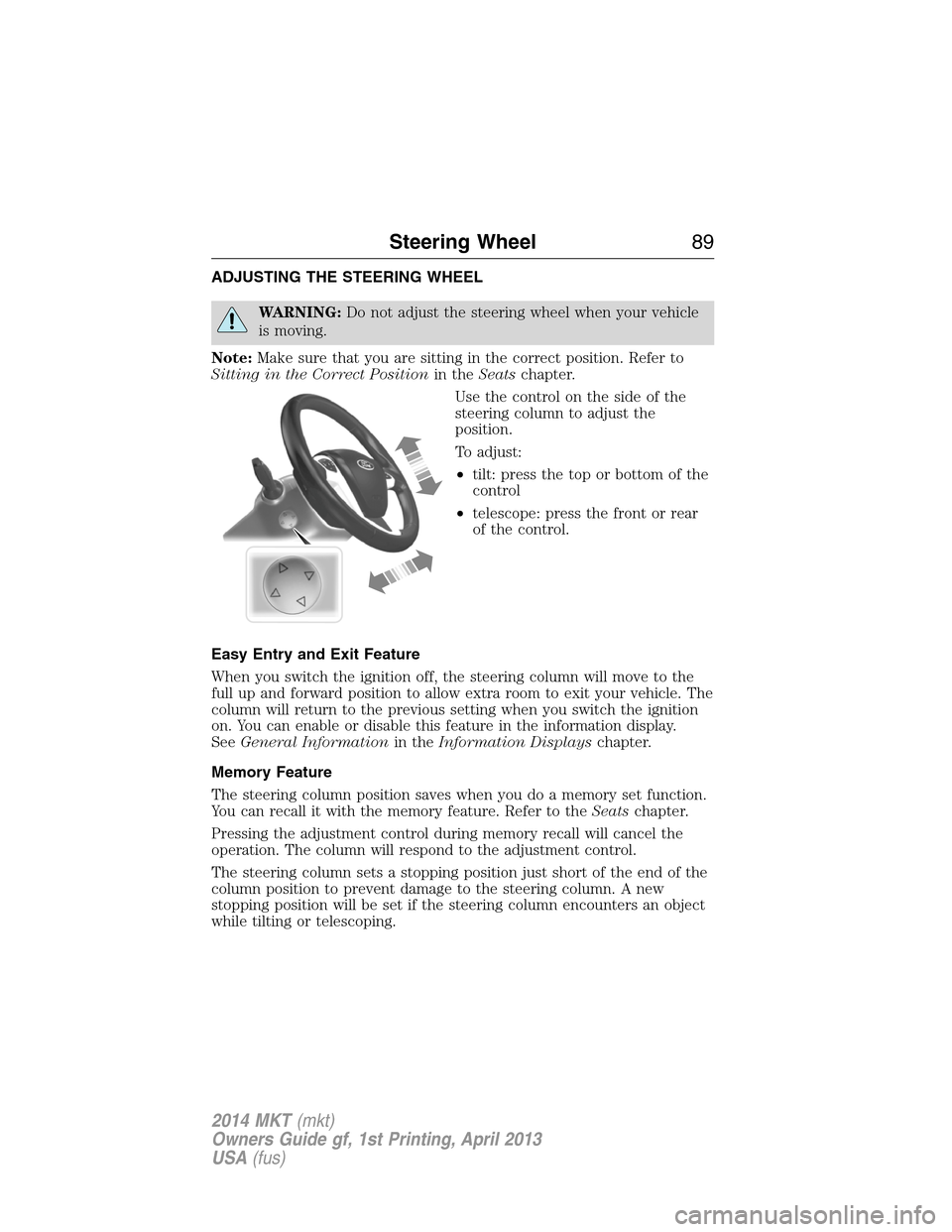
ADJUSTING THE STEERING WHEEL
WARNING:Do not adjust the steering wheel when your vehicle
is moving.
Note:Make sure that you are sitting in the correct position. Refer to
Sitting in the Correct Positionin theSeatschapter.
Use the control on the side of the
steering column to adjust the
position.
To adjust:
•tilt: press the top or bottom of the
control
•telescope: press the front or rear
of the control.
Easy Entry and Exit Feature
When you switch the ignition off, the steering column will move to the
full up and forward position to allow extra room to exit your vehicle. The
column will return to the previous setting when you switch the ignition
on. You can enable or disable this feature in the information display.
SeeGeneral Informationin theInformation Displayschapter.
Memory Feature
The steering column position saves when you do a memory set function.
You can recall it with the memory feature. Refer to theSeatschapter.
Pressing the adjustment control during memory recall will cancel the
operation. The column will respond to the adjustment control.
The steering column sets a stopping position just short of the end of the
column position to prevent damage to the steering column. A new
stopping position will be set if the steering column encounters an object
while tilting or telescoping.
Steering Wheel89
2014 MKT(mkt)
Owners Guide gf, 1st Printing, April 2013
USA(fus)
Page 98 of 498
AUTOLAMPS
WARNING:In severe weather conditions, it may be necessary to
switch your headlamps on manually.
Note:If the vehicle is equipped with autolamps, it will have the
windshield wiper rainlamp feature.When the windshield wipers are
turned to low- or high-speed wiping during daylight, and the headlamp
control is in the autolamp position, the exterior lamps will turn on after a
brief delay and will remain on until the wipers are turned off.
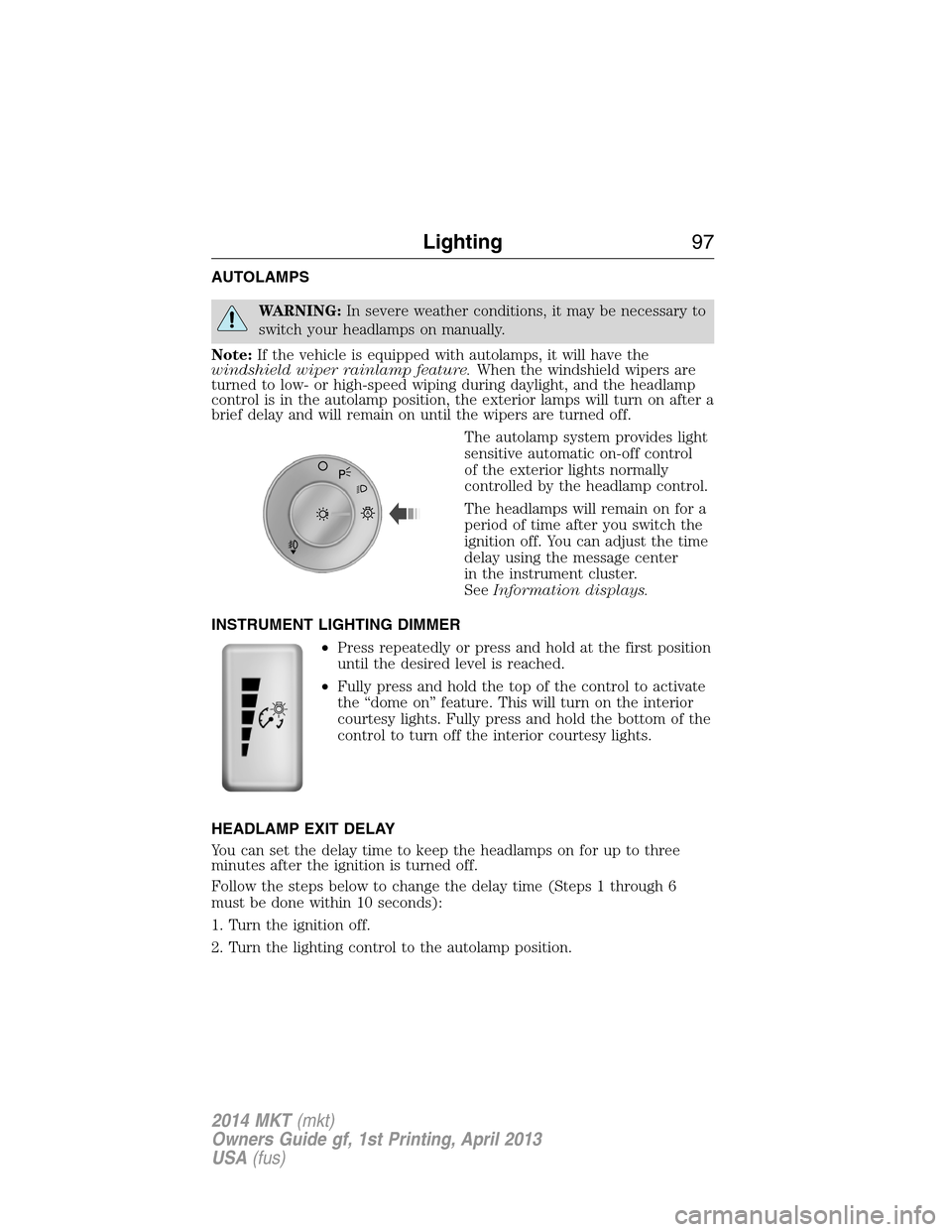
The autolamp system provides light
sensitive automatic on-off control
of the exterior lights normally
controlled by the headlamp control.
The headlamps will remain on for a
period of time after you switch the
ignition off. You can adjust the time
delay using the message center
in the instrument cluster.
SeeInformation displays.
INSTRUMENT LIGHTING DIMMER
•Press repeatedly or press and hold at the first position
until the desired level is reached.
•Fully press and hold the top of the control to activate
the “dome on” feature. This will turn on the interior
courtesy lights. Fully press and hold the bottom of the
control to turn off the interior courtesy lights.
HEADLAMP EXIT DELAY
You can set the delay time to keep the headlamps on for up to three
minutes after the ignition is turned off.
Follow the steps below to change the delay time (Steps 1 through 6
must be done within 10 seconds):
1. Turn the ignition off.
2. Turn the lighting control to the autolamp position.
A
Lighting97
2014 MKT(mkt)
Owners Guide gf, 1st Printing, April 2013
USA(fus)