tow LINCOLN MKT 2014 User Guide
[x] Cancel search | Manufacturer: LINCOLN, Model Year: 2014, Model line: MKT, Model: LINCOLN MKT 2014Pages: 498, PDF Size: 7.3 MB
Page 66 of 498
GENERAL INFORMATION ON RADIO FREQUENCIES
This device complies with part 15 of the FCC Rules and with Industry
Canada license-exempt RSS standard(s). Operation is subject to the
following two conditions: (1) This device may not cause harmful
interference, and (2) This device must accept any interference received,
including interference that may cause undesired operation.
Note:Changes or modifications not expressly approved by the party
responsible for compliance could void the user’s authority to operate the
equipment. The termICbefore the radio certification number only
signifies that Industry Canada technical specifications were met.
The typical operating range for your transmitter is approximately 33 feet
(10 meters). Vehicles with the remote start feature will have a greater
range. A decrease in operating range could be caused by:
•weather conditions
•nearby radio towers
•structures around your vehicle
•other vehicles parked next to your vehicle.
The radio frequency used by your remote control can also be used by
other short-distance radio transmissions, for example amateur radios,
medical equipment, wireless headphones, remote controls and alarm
systems. If the frequencies are jammed, you will not be able to use your
remote control. You can lock and unlock the doors with the key.
Note:Make sure your vehicle is locked before leaving it unattended.
Note:If you are in range, the remote control will operate if you press
any button unintentionally.
Intelligent Access
The system uses a radio frequency signal to communicate with your
vehicle and authorize your vehicle to unlock when one of the following
conditions is met:
•You touch the inside of the front exterior door handle.
•You press the luggage compartment button.
•You press a button on the transmitter.
If excessive radio frequency interference is present in the area or if the
transmitter battery is low, it may be necessary to mechanically unlock
your door. You can use the mechanical key blade in your intelligent
access key to open the driver door in this situation. Refer toRemote
Controlin this chapter for more information on the location and use of
the mechanical key blade.
Keys and Remote Control65
2014 MKT(mkt)
Owners Guide gf, 1st Printing, April 2013
USA(fus)
Page 86 of 498
The anti-scan feature will turn off after:
•one minute of keypad inactivity
•pressing the unlock button on the remote control
•the ignition is turned on
•unlocking the vehicle using intelligent access.
Unlocking and Locking the Doors
To unlock the driver door:Enter the factory-set 5-digit code or your
personal code. You must press each number within five seconds of each
other. The interior lamps will illuminate.Note:All doors will unlock if
the two-stage unlocking feature is disabled. Refer toLocking and
Unlockingearlier in this chapter.
To unlock all doors:Enter the factory-set code or your personal code,
then press the3•4control within five seconds.
To lock all doors:Press and hold7•8and9•0at the same time with
the driver door closed. You do not need to enter the keypad code first.
Displaying the Factory Set Code
Note:You will need to have two programmed intelligent access keys for
this procedure.
To display the factory-set code in the information display:
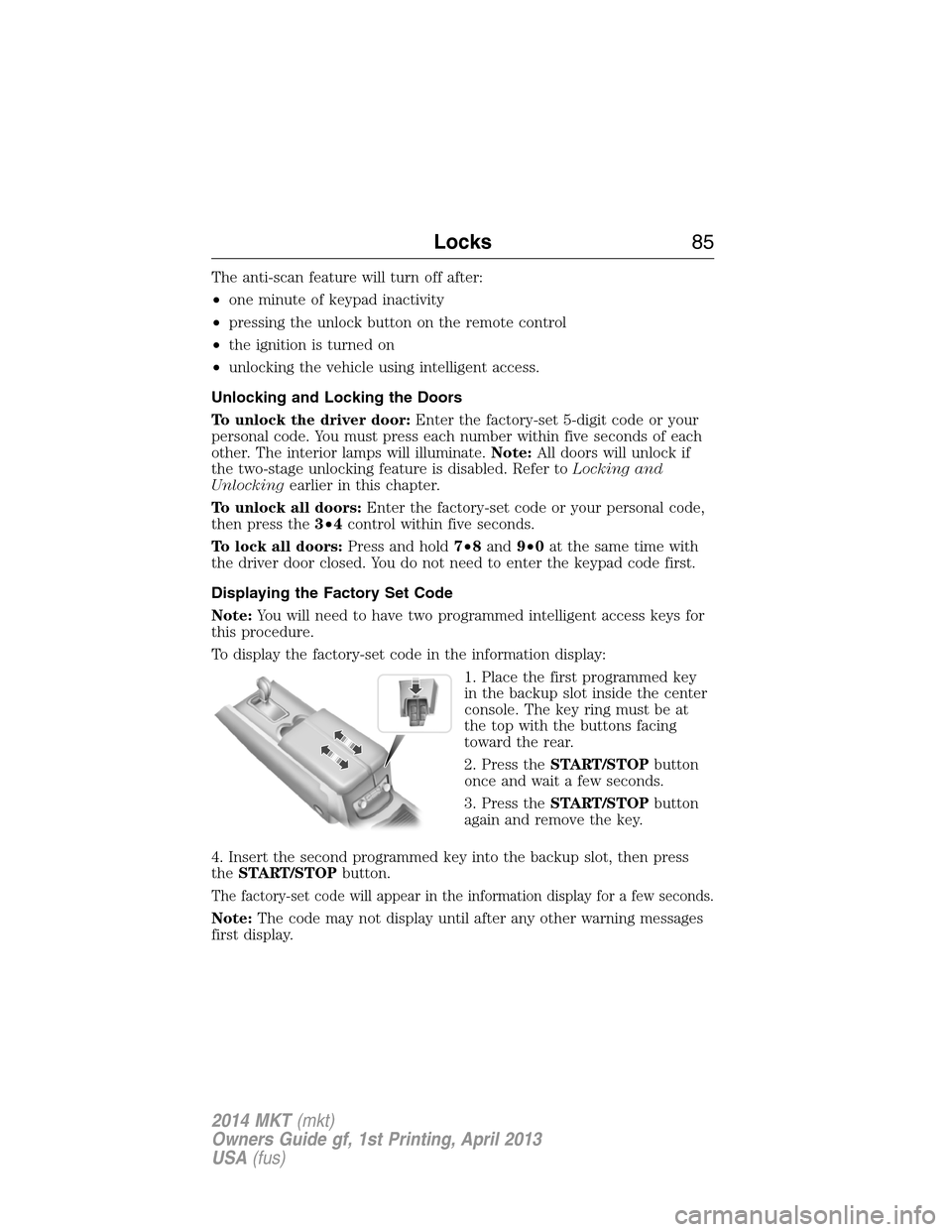
1. Place the first programmed key
in the backup slot inside the center
console. The key ring must be at
the top with the buttons facing
toward the rear.
2. Press theSTART/STOPbutton
once and wait a few seconds.
3. Press theSTART/STOPbutton
again and remove the key.
4. Insert the second programmed key into the backup slot, then press
theSTART/STOPbutton.
The factory-set code will appear in the information display for a few seconds.
Note:The code may not display until after any other warning messages
first display.
Locks85
2014 MKT(mkt)
Owners Guide gf, 1st Printing, April 2013
USA(fus)
Page 87 of 498
SECURILOCK® PASSIVE ANTI-THEFT SYSTEM
Note:The system is not compatible with non-Ford aftermarket remote
start systems. Use of these systems may result in vehicle starting
problems and a loss of security protection.
Note:Metallic objects, electronic devices or a second coded key on the
same key chain may cause vehicle starting issues if they are too close to
the key when starting the engine. Prevent these objects from touching
the coded key while starting the engine. Switch the ignition off, move all
objects on the key chain away from the coded key and restart the engine
if a problem occurs.
Note:Do not leave a duplicate coded key in the vehicle. Always take
your keys and lock all doors when leaving the vehicle.
The system is an engine immobilization system. It helps prevent the
engine from starting unless a coded key programmed to your vehicle
is used. Using the wrong key may prevent the engine from starting.
A message may appear in the information display.
If you are unable to start the engine with a correctly coded key, a
malfunction has happened and a message may appear in the information
display.
Automatic Arming
Your vehicle arms immediately after you switch the ignition off.
Automatic Disarming
Your vehicle disarms when you switch the ignition on with a coded key.
Replacement Keys
Note:Your vehicle comes with two intelligent access keys.
The intelligent access key functions as a programmed key that operates
the driver door lock and activates the intelligent access with push button
start systems, as well as a remote control.
If your intelligent access key is lost or stolen and you do not have an
extra coded key, you will need to have your vehicle towed to an
authorized dealer. The key codes need to be erased from your vehicle
and new coded keys will need to be programmed.
Store an extra programmed key away from the vehicle in a safe place to
help prevent any inconveniences. See an authorized dealer to purchase
additional spare or replacement keys.
86Security
2014 MKT(mkt)
Owners Guide gf, 1st Printing, April 2013
USA(fus)
Page 95 of 498
WINDSHIELD WIPERS
Note:Fully defrost the windshield before switching on the windshield
wipers.
Note:Make sure the windshield wipers are switched off before entering
a car wash.
Note:Clean the windshield and wiper blades if they begin to leave
streaks or smears. If that does not resolve the issue, install new wiper
blades.
Note:Do not operate the wipers on a dry windshield. This may scratch
the glass, damage the wiper blades or cause the wiper motor to burn out.
Always use the windshield washers before wiping a dry windshield.
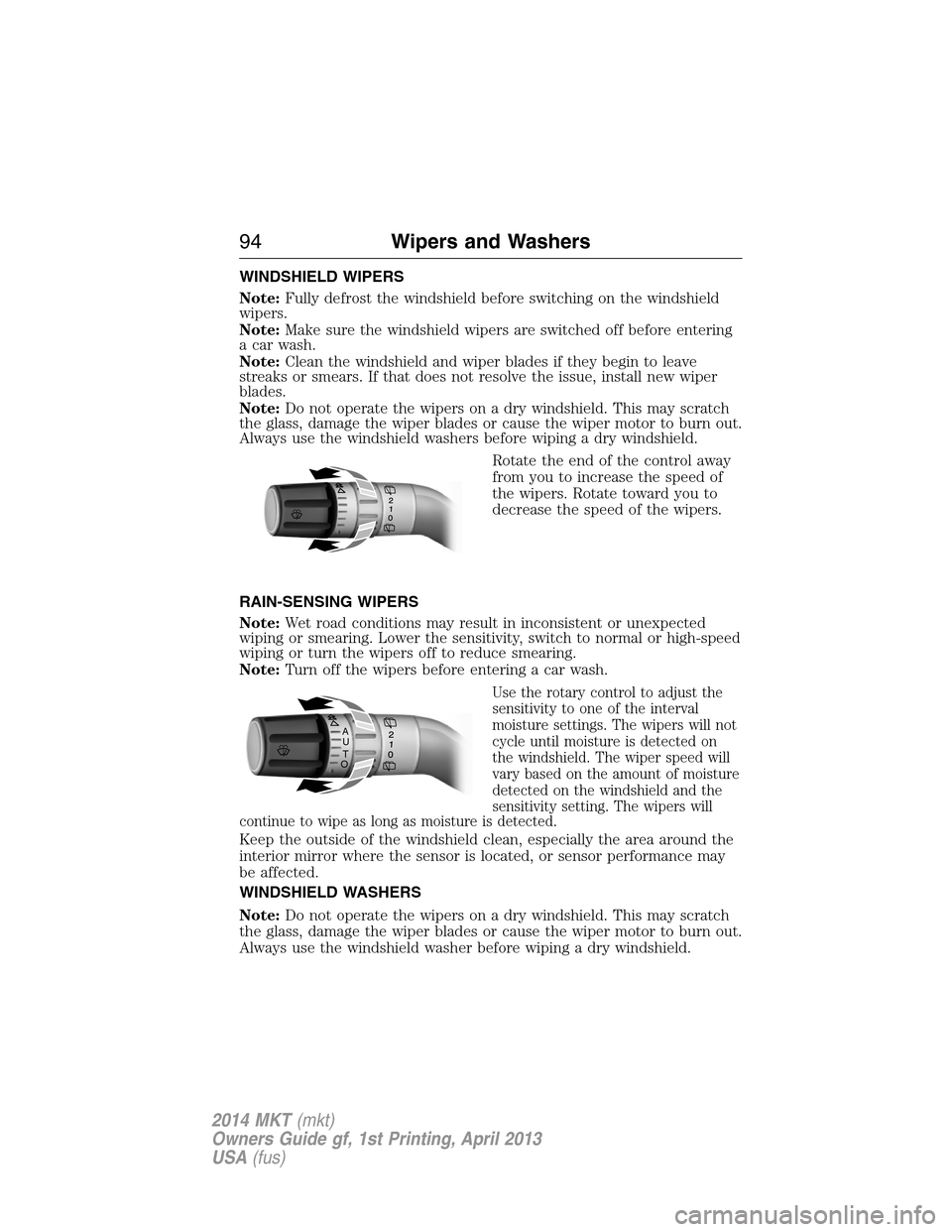
Rotate the end of the control away
from you to increase the speed of
the wipers. Rotate toward you to
decrease the speed of the wipers.
RAIN-SENSING WIPERS
Note:Wet road conditions may result in inconsistent or unexpected
wiping or smearing. Lower the sensitivity, switch to normal or high-speed
wiping or turn the wipers off to reduce smearing.
Note:Turn off the wipers before entering a car wash.
Use the rotary control to adjust the
sensitivity to one of the interval
moisture settings. The wipers will not
cycle until moisture is detected on
the windshield. The wiper speed will
vary based on the amount of moisture
detected on the windshield and the
sensitivity setting. The wipers will
continue to wipe as long as moisture is detected.
Keep the outside of the windshield clean, especially the area around the
interior mirror where the sensor is located, or sensor performance may
be affected.
WINDSHIELD WASHERS
Note:Do not operate the wipers on a dry windshield. This may scratch
the glass, damage the wiper blades or cause the wiper motor to burn out.
Always use the windshield washer before wiping a dry windshield.
A
U
T
O
94Wipers and Washers
2014 MKT(mkt)
Owners Guide gf, 1st Printing, April 2013
USA(fus)
Page 97 of 498
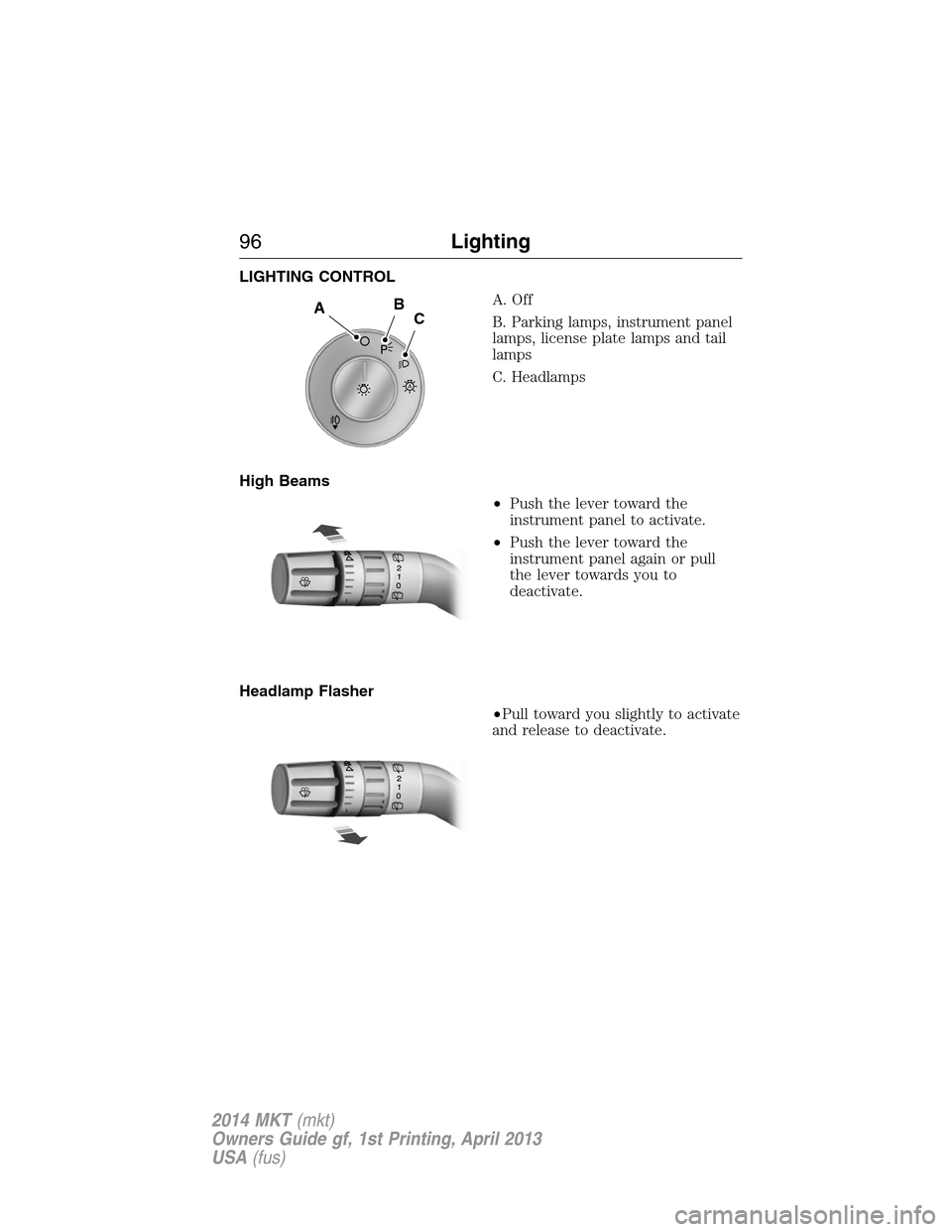
LIGHTING CONTROL
A. Off
B. Parking lamps, instrument panel
lamps, license plate lamps and tail
lamps
C. Headlamps
High Beams
•Push the lever toward the
instrument panel to activate.
•Push the lever toward the
instrument panel again or pull
the lever towards you to
deactivate.
Headlamp Flasher
•Pull toward you slightly to activate
and release to deactivate.
A
ABC
96Lighting
2014 MKT(mkt)
Owners Guide gf, 1st Printing, April 2013
USA(fus)
Page 102 of 498
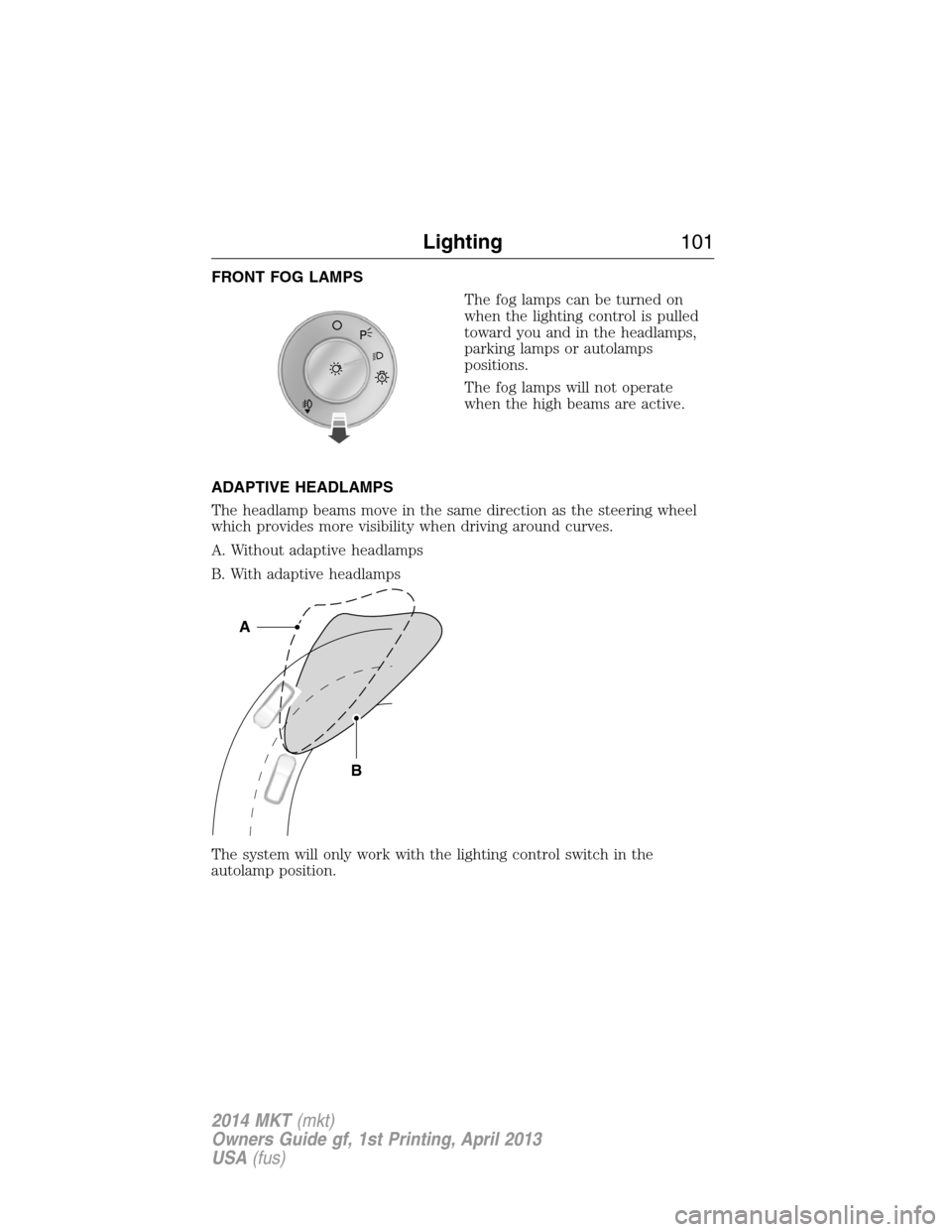
FRONT FOG LAMPS
The fog lamps can be turned on
when the lighting control is pulled
toward you and in the headlamps,
parking lamps or autolamps
positions.
The fog lamps will not operate
when the high beams are active.
ADAPTIVE HEADLAMPS
The headlamp beams move in the same direction as the steering wheel
which provides more visibility when driving around curves.
A. Without adaptive headlamps
B. With adaptive headlamps
The system will only work with the lighting control switch in the
autolamp position.
A
B
A
Lighting101
2014 MKT(mkt)
Owners Guide gf, 1st Printing, April 2013
USA(fus)
Page 108 of 498
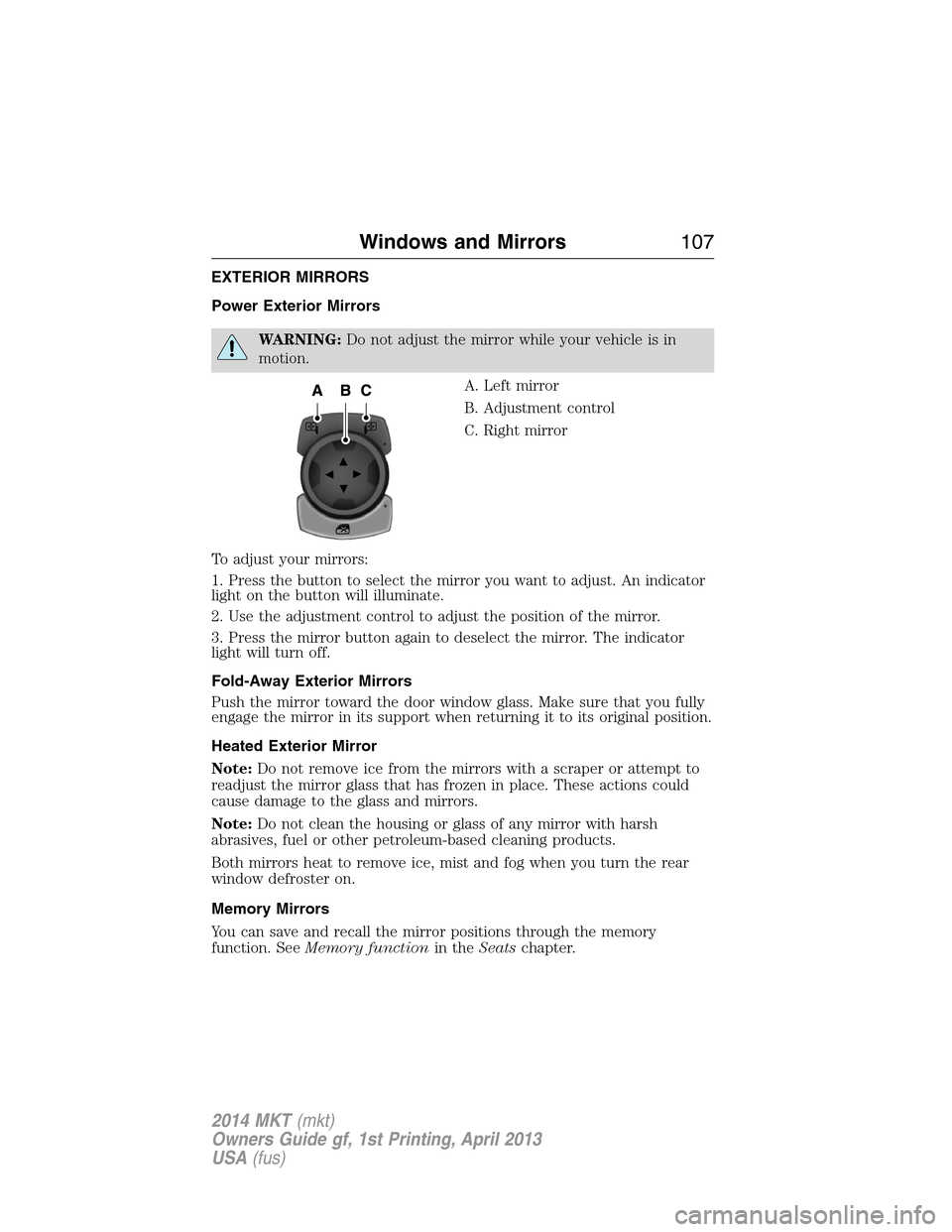
EXTERIOR MIRRORS
Power Exterior Mirrors
WARNING:Do not adjust the mirror while your vehicle is in
motion.
A. Left mirror
B. Adjustment control
C. Right mirror
To adjust your mirrors:
1. Press the button to select the mirror you want to adjust. An indicator
light on the button will illuminate.
2. Use the adjustment control to adjust the position of the mirror.
3. Press the mirror button again to deselect the mirror. The indicator
light will turn off.
Fold-Away Exterior Mirrors
Push the mirror toward the door window glass. Make sure that you fully
engage the mirror in its support when returning it to its original position.
Heated Exterior Mirror
Note:Do not remove ice from the mirrors with a scraper or attempt to
readjust the mirror glass that has frozen in place. These actions could
cause damage to the glass and mirrors.
Note:Do not clean the housing or glass of any mirror with harsh
abrasives, fuel or other petroleum-based cleaning products.
Both mirrors heat to remove ice, mist and fog when you turn the rear
window defroster on.
Memory Mirrors
You can save and recall the mirror positions through the memory
function. SeeMemory functionin theSeatschapter.
Windows and Mirrors107
2014 MKT(mkt)
Owners Guide gf, 1st Printing, April 2013
USA(fus)
Page 111 of 498
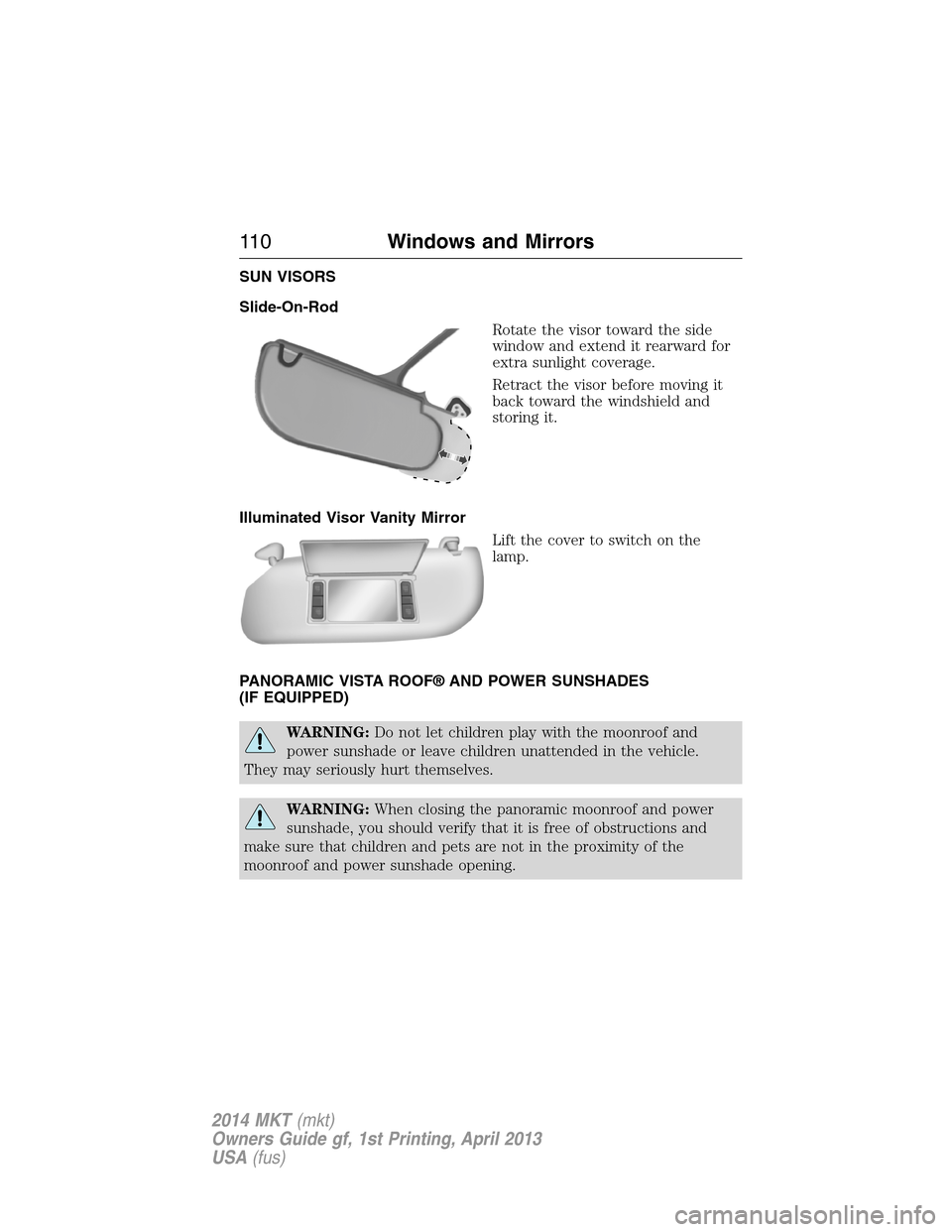
SUN VISORS
Slide-On-Rod
Rotate the visor toward the side
window and extend it rearward for
extra sunlight coverage.
Retract the visor before moving it
back toward the windshield and
storing it.
Illuminated Visor Vanity Mirror
Lift the cover to switch on the
lamp.
PANORAMIC VISTA ROOF® AND POWER SUNSHADES
(IF EQUIPPED)
WARNING:Do not let children play with the moonroof and
power sunshade or leave children unattended in the vehicle.
They may seriously hurt themselves.
WARNING:When closing the panoramic moonroof and power
sunshade, you should verify that it is free of obstructions and
make sure that children and pets are not in the proximity of the
moonroof and power sunshade opening.
11 0Windows and Mirrors
2014 MKT(mkt)
Owners Guide gf, 1st Printing, April 2013
USA(fus)
Page 124 of 498
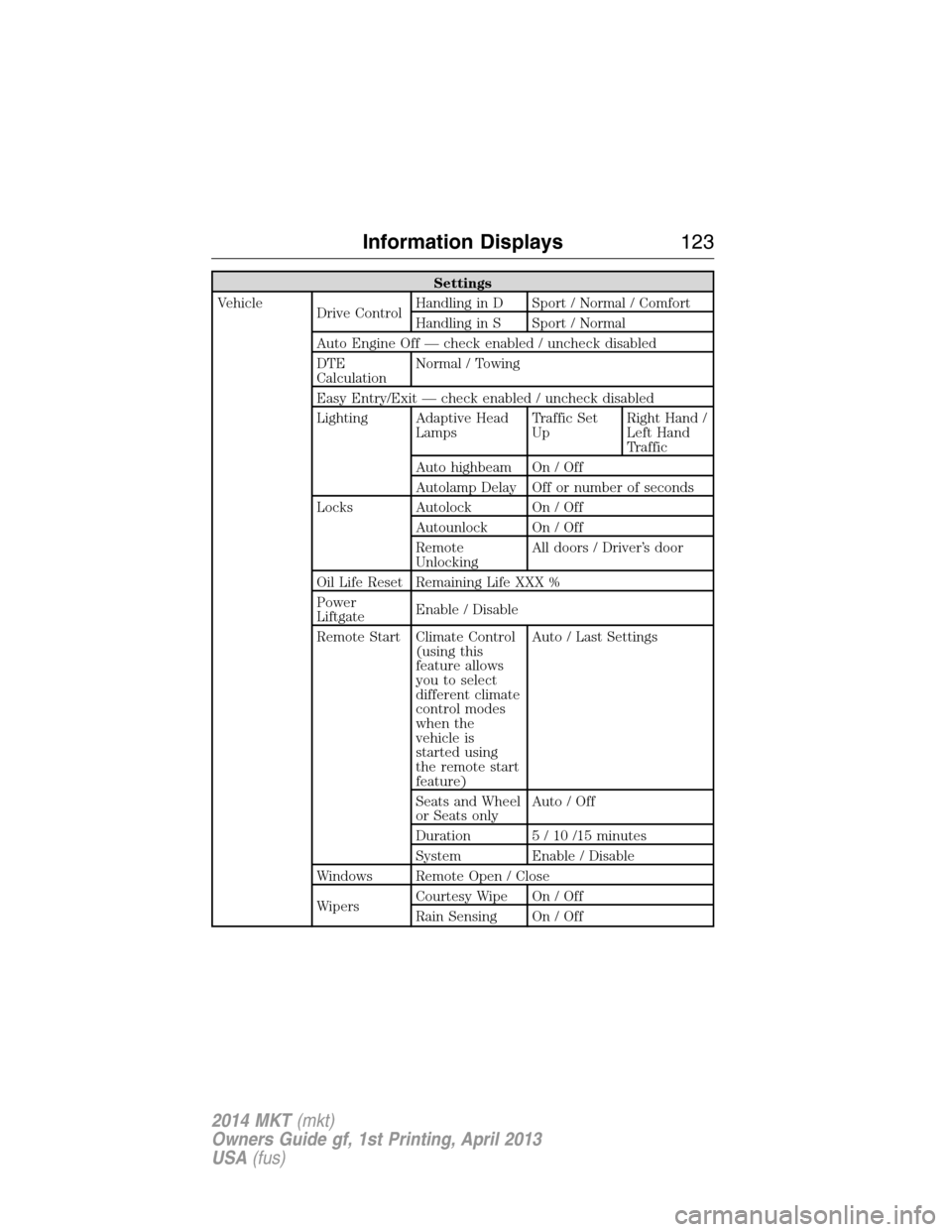
Settings
Vehicle
Drive ControlHandling in D Sport / Normal / Comfort
Handling in S Sport / Normal
Auto Engine Off — check enabled / uncheck disabled
DTE
CalculationNormal / Towing
Easy Entry/Exit — check enabled / uncheck disabled
Lighting Adaptive Head
LampsTraffic Set
UpRight Hand /
Left Hand
Traffic
Auto highbeam On / Off
Autolamp Delay Off or number of seconds
Locks Autolock On / Off
Autounlock On / Off
Remote
UnlockingAll doors / Driver’s door
Oil Life Reset Remaining Life XXX %
Power
LiftgateEnable / Disable
Remote Start Climate Control
(using this
feature allows
you to select
different climate
control modes
when the
vehicle is
started using
the remote start
feature)Auto / Last Settings
Seats and Wheel
or Seats onlyAuto / Off
Duration 5 / 10 /15 minutes
System Enable / Disable
Windows Remote Open / Close
WipersCourtesy Wipe On / Off
Rain Sensing On / Off
Information Displays123
2014 MKT(mkt)
Owners Guide gf, 1st Printing, April 2013
USA(fus)
Page 145 of 498
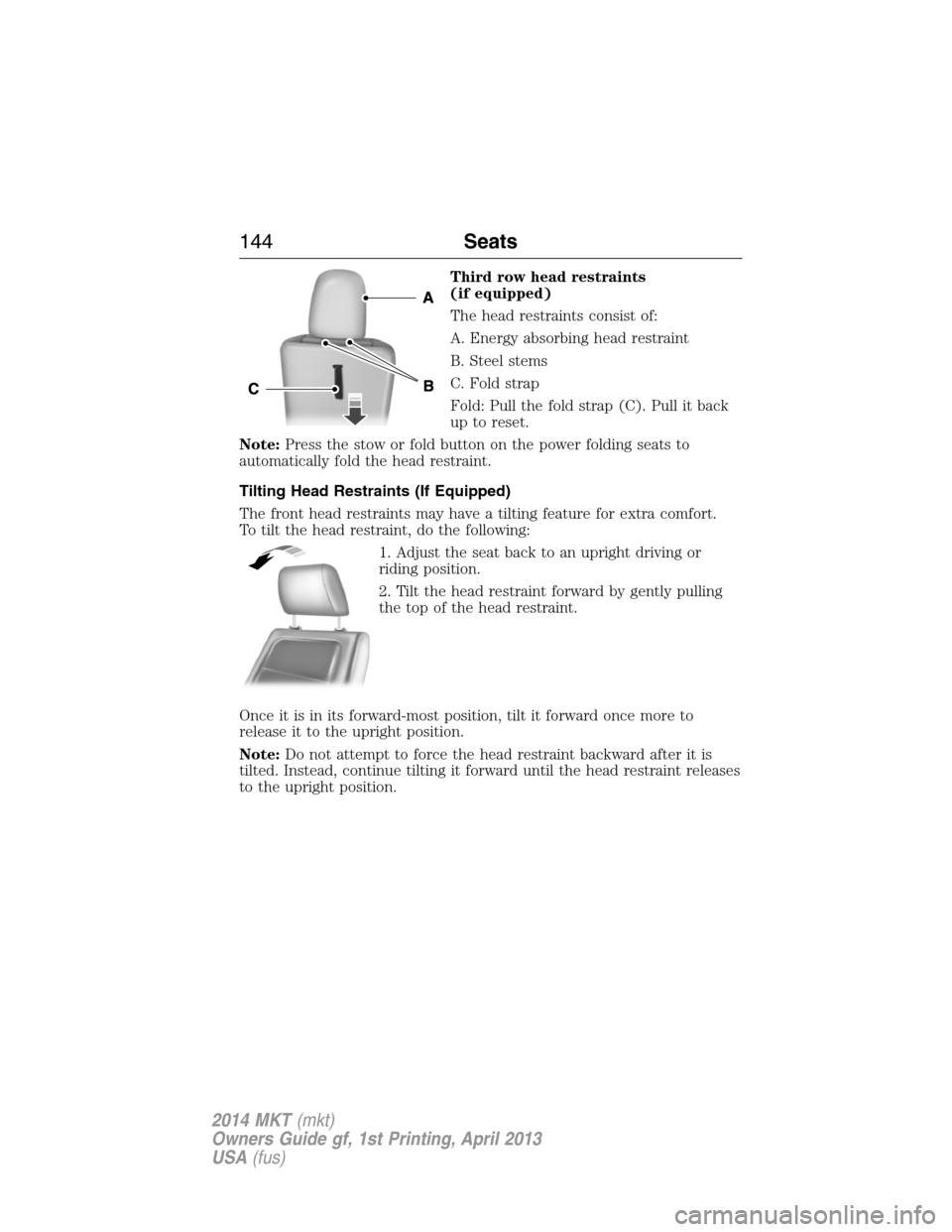
Third row head restraints
(if equipped)
The head restraints consist of:
A. Energy absorbing head restraint
B. Steel stems
C. Fold strap
Fold: Pull the fold strap (C). Pull it back
up to reset.
Note:Press the stow or fold button on the power folding seats to
automatically fold the head restraint.
Tilting Head Restraints (If Equipped)
The front head restraints may have a tilting feature for extra comfort.
To tilt the head restraint, do the following:
1. Adjust the seat back to an upright driving or
riding position.
2. Tilt the head restraint forward by gently pulling
the top of the head restraint.
Once it is in its forward-most position, tilt it forward once more to
release it to the upright position.
Note:Do not attempt to force the head restraint backward after it is
tilted. Instead, continue tilting it forward until the head restraint releases
to the upright position.
144Seats
2014 MKT(mkt)
Owners Guide gf, 1st Printing, April 2013
USA(fus)