ECO mode LINCOLN MKT 2014 Owner's Manual
[x] Cancel search | Manufacturer: LINCOLN, Model Year: 2014, Model line: MKT, Model: LINCOLN MKT 2014Pages: 498, PDF Size: 7.3 MB
Page 136 of 498
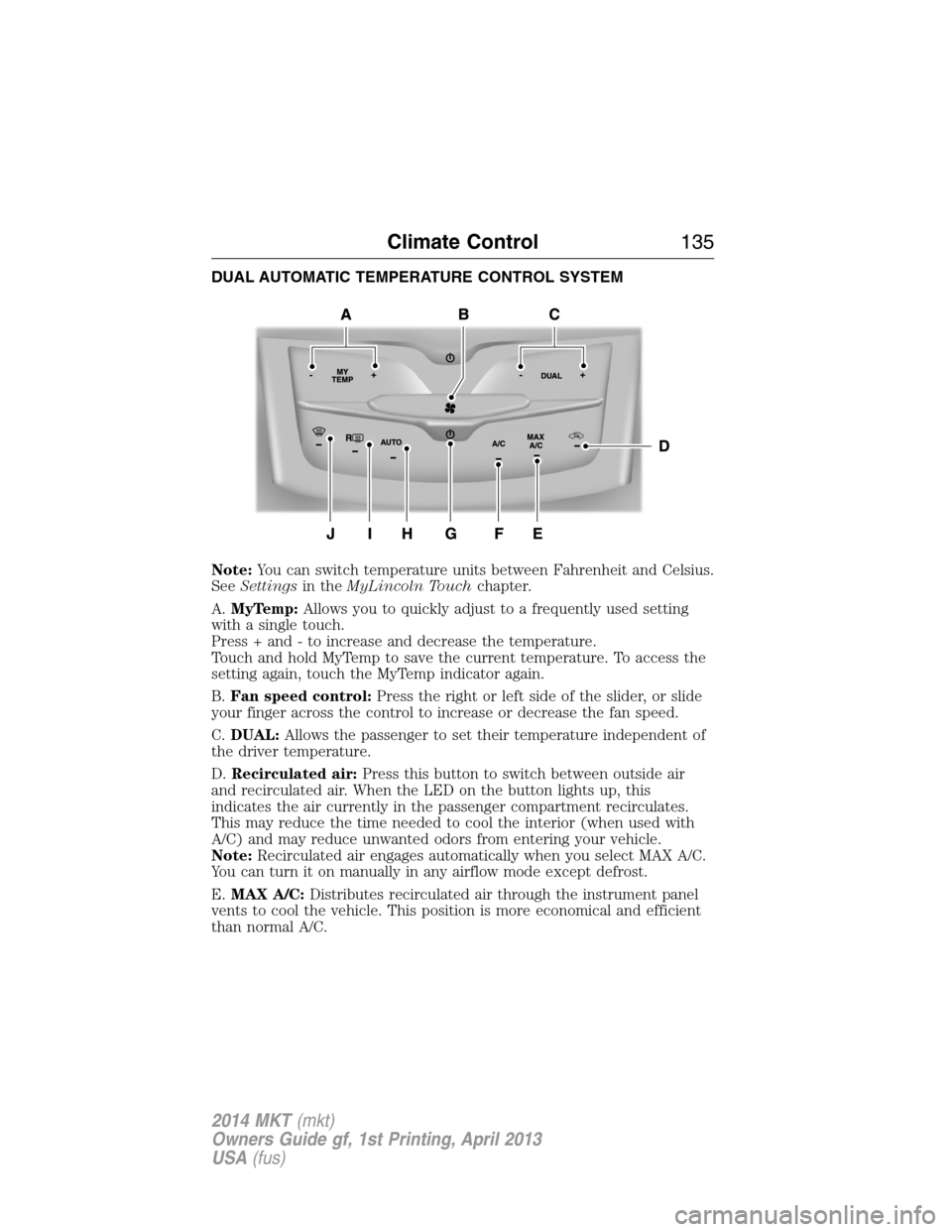
DUAL AUTOMATIC TEMPERATURE CONTROL SYSTEM
Note:You can switch temperature units between Fahrenheit and Celsius.
SeeSettingsin theMyLincoln Touchchapter.
A.MyTemp:Allows you to quickly adjust to a frequently used setting
with a single touch.
Press + and - to increase and decrease the temperature.
Touch and hold MyTemp to save the current temperature. To access the
setting again, touch the MyTemp indicator again.
B.Fan speed control:Press the right or left side of the slider, or slide
your finger across the control to increase or decrease the fan speed.
C.DUAL:Allows the passenger to set their temperature independent of
the driver temperature.
D.Recirculated air:Press this button to switch between outside air
and recirculated air. When the LED on the button lights up, this
indicates the air currently in the passenger compartment recirculates.
This may reduce the time needed to cool the interior (when used with
A/C) and may reduce unwanted odors from entering your vehicle.
Note:Recirculated air engages automatically when you select MAX A/C.
You can turn it on manually in any airflow mode except defrost.
E.MAX A/C:Distributes recirculated air through the instrument panel
vents to cool the vehicle. This position is more economical and efficient
than normal A/C.
Climate Control135
2014 MKT(mkt)
Owners Guide gf, 1st Printing, April 2013
USA(fus)
Page 139 of 498
•To improve the A/C cool down, drive with the windows slightly open
for 2-3 minutes after start-up or until the vehicle has been aired out.
•A small amount of air may be felt from the floor vent regardless of
the air distribution setting that is selected.
During extreme high ambient temperatures when idling stationary for
extended periods of time in gear, it is recommended to run the A/C in
the MAX A/C mode, adjust the blower fan speed to the lowest setting
and put the vehicle’s transmission into positionPto continue to receive
cool air from your A/C system.
For maximum cooling performance in AUTO, pressMAX A/C.
For maximum cooling performance in manual override control (using the
MyLincoln Touch climate controls):
1. Choose panel, A/C, and recirculation controls.
2. Set the temperature to LO.
3. Set the fan to the highest blower setting.
To aid in side window defogging and demisting in cold or humid weather:
1. Select defrost or floor/defrost (on the MyLincoln Touch climate
controls). To maximize performance select defrost.
2. SelectA/C.
3. Adjust the temperature control to maintain comfort.
4. Set the fan speed to the highest setting.
HEATED WINDOWS AND MIRRORS
Heated Rear Window
Note:The ignition must be switched on to use this feature.
Press the button to clear the rear window of thin ice and fog. Press the
button again within 10 minutes to switch it off. It switches off
automatically after 10 minutes, or when you switch the ignition off.
Do not use razor blades or other sharp objects to clean the inside
of the rear window or to remove decals from the inside of the
rear window. This may cause damage to the heated grid lines.
Your warranty does not cover this damage.
138Climate Control
2014 MKT(mkt)
Owners Guide gf, 1st Printing, April 2013
USA(fus)
Page 148 of 498
Programming a memory position
Note:You can program a memory position at any time.
•To program position 1, move the memory features to the desired
positions using the associated controls. Press and hold button 1 for at
least two seconds. A chime will sound confirming that a memory
position has been set.
•To program position 2 and 3, repeat the previous procedure using the
respective buttons.
Recalling a memory position
You can recall a programmed memory position:
•in any gearshift position if the ignition is not on.
•only in positionPorNif the ignition is on.
Press the desired memory control to recall a memory position.
Recalling memory positions with the remote control
You can recall memory positions when you press unlock on your remote
control (if the transmitter is programmed to a memory position) or,
when you enter a valid personal entry code that is programmed to a
memory position. If the easy entry feature is enabled, the seat will first
move to the easy entry position. The seat will move to the final position
when the key is in the ignition or when the push button start system
(if equipped) is put in accessory mode or started.
To program the memory feature to a remote control, see theKeys and
Remote Controlchapter.
Easy Entry and Exit Feature
This feature can move the seat rearward and the steering column up and
forward to allow extra room to exit the vehicle.
This occurs when:
•the transmission selector lever is in positionNorP
•the ignition is turned off
The seat and steering wheel will move to their original positions when:
•the transmission selector lever is in positionNorP
•the ignition is put in accessory mode or is started
Turn the easy entry feature off or on through the information display.
See theInformation Displayschapter.
Seats147
2014 MKT(mkt)
Owners Guide gf, 1st Printing, April 2013
USA(fus)
Page 166 of 498
Programing the transmitters
To program HomeLink to the transmitter you must first put the
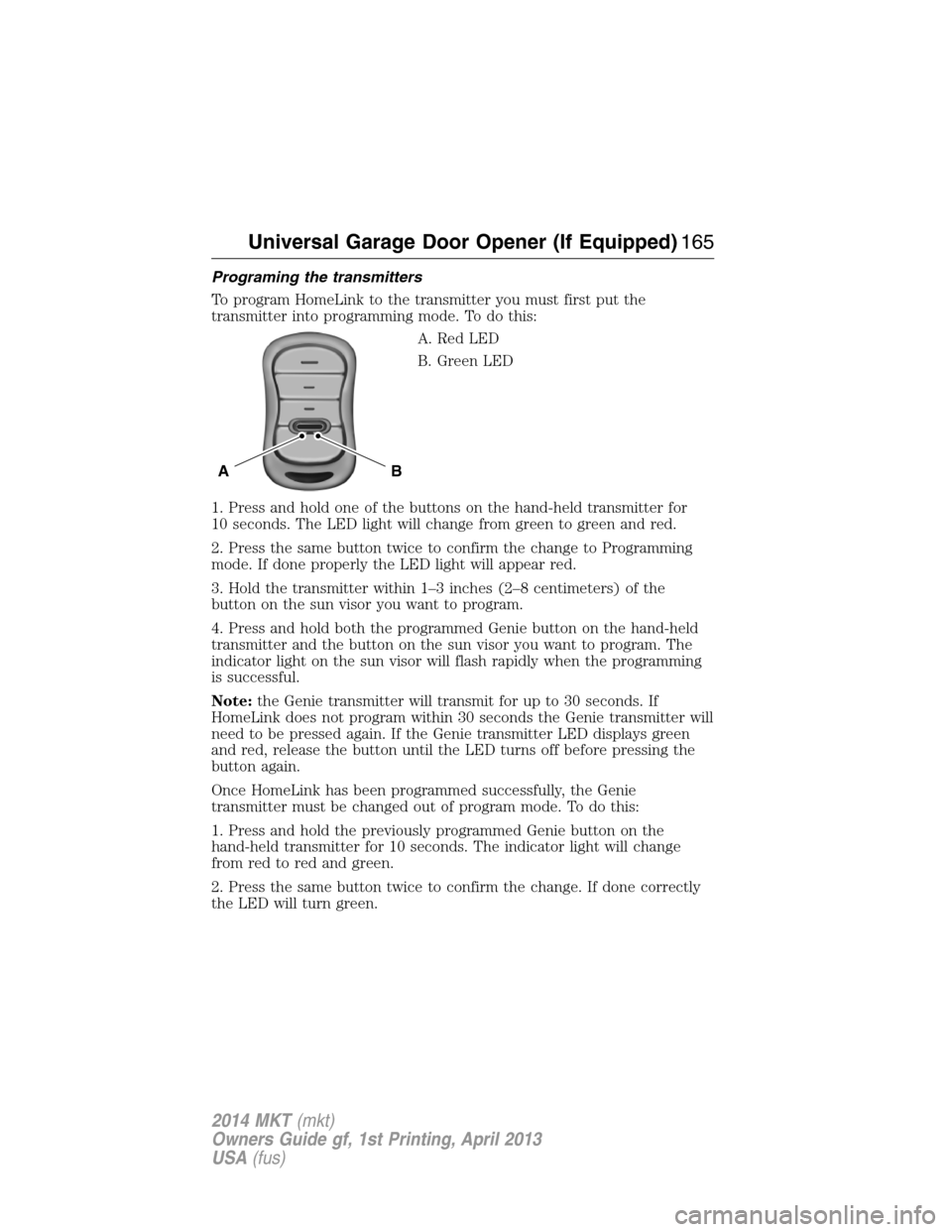
transmitter into programming mode. To do this:
A. Red LED
B. Green LED
1. Press and hold one of the buttons on the hand-held transmitter for
10 seconds. The LED light will change from green to green and red.
2. Press the same button twice to confirm the change to Programming
mode. If done properly the LED light will appear red.
3. Hold the transmitter within 1–3 inches (2–8 centimeters) of the
button on the sun visor you want to program.
4. Press and hold both the programmed Genie button on the hand-held
transmitter and the button on the sun visor you want to program. The
indicator light on the sun visor will flash rapidly when the programming
is successful.
Note:the Genie transmitter will transmit for up to 30 seconds. If
HomeLink does not program within 30 seconds the Genie transmitter will
need to be pressed again. If the Genie transmitter LED displays green
and red, release the button until the LED turns off before pressing the
button again.
Once HomeLink has been programmed successfully, the Genie
transmitter must be changed out of program mode. To do this:
1. Press and hold the previously programmed Genie button on the
hand-held transmitter for 10 seconds. The indicator light will change
from red to red and green.
2. Press the same button twice to confirm the change. If done correctly
the LED will turn green.
BA
Universal Garage Door Opener (If Equipped)165
2014 MKT(mkt)
Owners Guide gf, 1st Printing, April 2013
USA(fus)
Page 167 of 498
Programming HomeLink to the Genie Intellicode garage door
opener motor
Note:You may need a ladder to access the garage door opener motor.
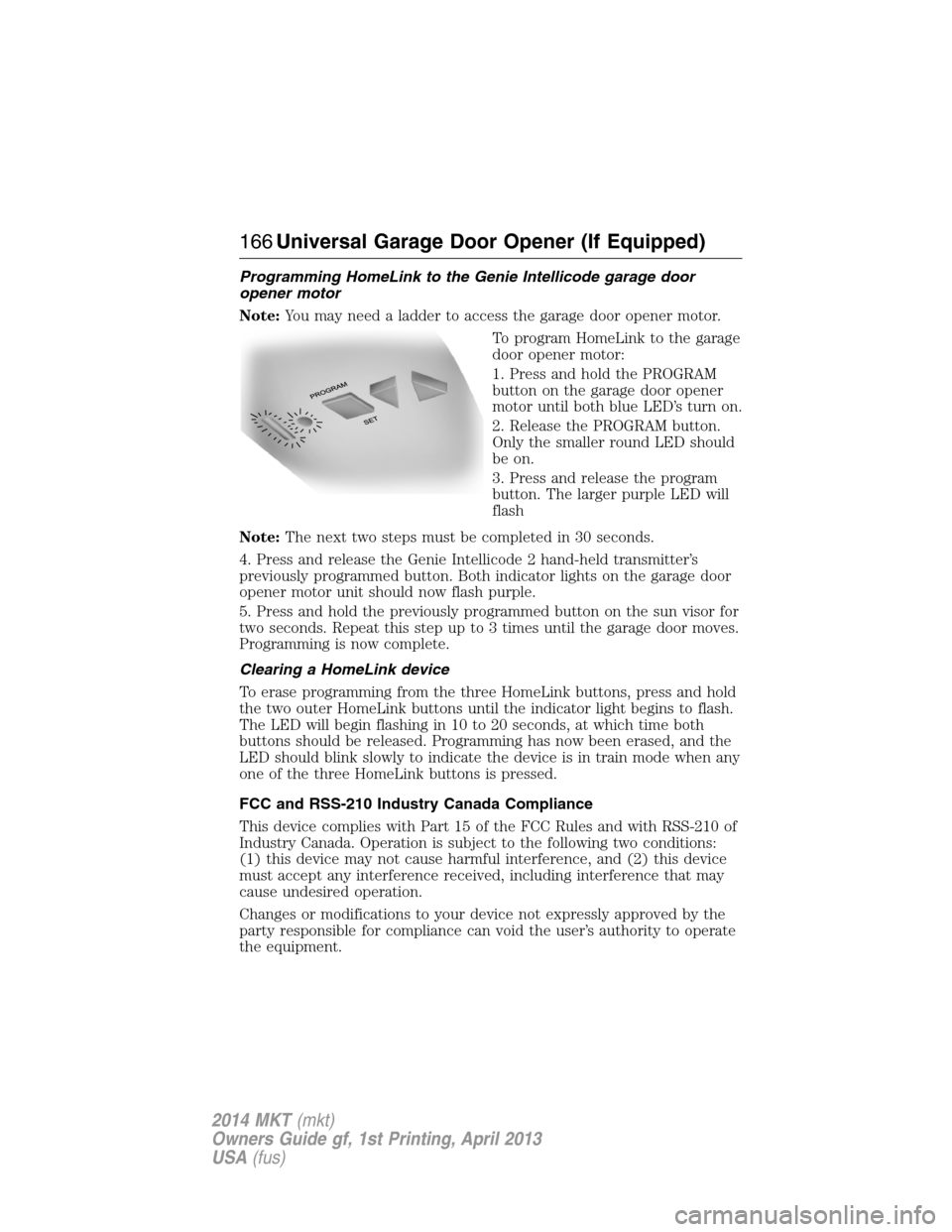
To program HomeLink to the garage
door opener motor:
1. Press and hold the PROGRAM
button on the garage door opener
motor until both blue LED’s turn on.
2. Release the PROGRAM button.
Only the smaller round LED should
be on.
3. Press and release the program
button. The larger purple LED will
flash
Note:The next two steps must be completed in 30 seconds.
4. Press and release the Genie Intellicode 2 hand-held transmitter’s
previously programmed button. Both indicator lights on the garage door
opener motor unit should now flash purple.
5. Press and hold the previously programmed button on the sun visor for
two seconds. Repeat this step up to 3 times until the garage door moves.
Programming is now complete.
Clearing a HomeLink device
To erase programming from the three HomeLink buttons, press and hold
the two outer HomeLink buttons until the indicator light begins to flash.
The LED will begin flashing in 10 to 20 seconds, at which time both
buttons should be released. Programming has now been erased, and the
LED should blink slowly to indicate the device is in train mode when any
one of the three HomeLink buttons is pressed.
FCC and RSS-210 Industry Canada Compliance
This device complies with Part 15 of the FCC Rules and with RSS-210 of
Industry Canada. Operation is subject to the following two conditions:
(1) this device may not cause harmful interference, and (2) this device
must accept any interference received, including interference that may
cause undesired operation.
Changes or modifications to your device not expressly approved by the
party responsible for compliance can void the user’s authority to operate
the equipment.
166Universal Garage Door Opener (If Equipped)
2014 MKT(mkt)
Owners Guide gf, 1st Printing, April 2013
USA(fus)
Page 169 of 498
110 Volt AC Power Point (If Equipped)
WARNING:Do not keep electrical devices plugged in the power
point whenever the device is not in use. Do not use any
extension cord with the 110 volt AC power point, since it will defeat
the safety protection design. Doing so my cause the power point to
overload due to powering multiple devices that can reach beyond the
150 watt load limit and could result in fire or serious injury.
Note:The cap should always be closed whenever the power point outlet
is not in use.
Note:Keep the engine running to use the power point.
The 110 volt AC power point outlet is used for powering electrical
devices that require up to 150 watts. Exceeding the 150 watt limit will
cause the power point to cut off the power temporarily to provide
overload protection.
The power point is located on the
back of the center console (inside
the second row center console on
vehicles equipped with that
feature).
The power point is not designed for the following electric appliances;
they may not work properly:
•Cathode ray tube type televisions
•Motor loads, such as vacuum cleaners, electric saws and other electric
power tools, compressor-driven refrigerators, etc.
•Measuring devices, which process precise data, such as medical
equipment, measuring equipment, etc.
•Other appliances requiring an extremely stable power supply:
microcomputer-controlled electric blankets, touch sensor lamps, etc.
The power point can switch to a fault mode when it is overloaded,
overheated, or shorted. Unplug your device and turn the ignition off then
on for overloading and shorting conditions. Let the system cool off, then
turn the ignition off then on for an overheating condition.
168Auxiliary Power Points
2014 MKT(mkt)
Owners Guide gf, 1st Printing, April 2013
USA(fus)
Page 171 of 498
CENTER CONSOLE
Stow items in the cupholder carefully as items may become loose during
hard braking, acceleration or collisions, including hot drinks which may
spill.
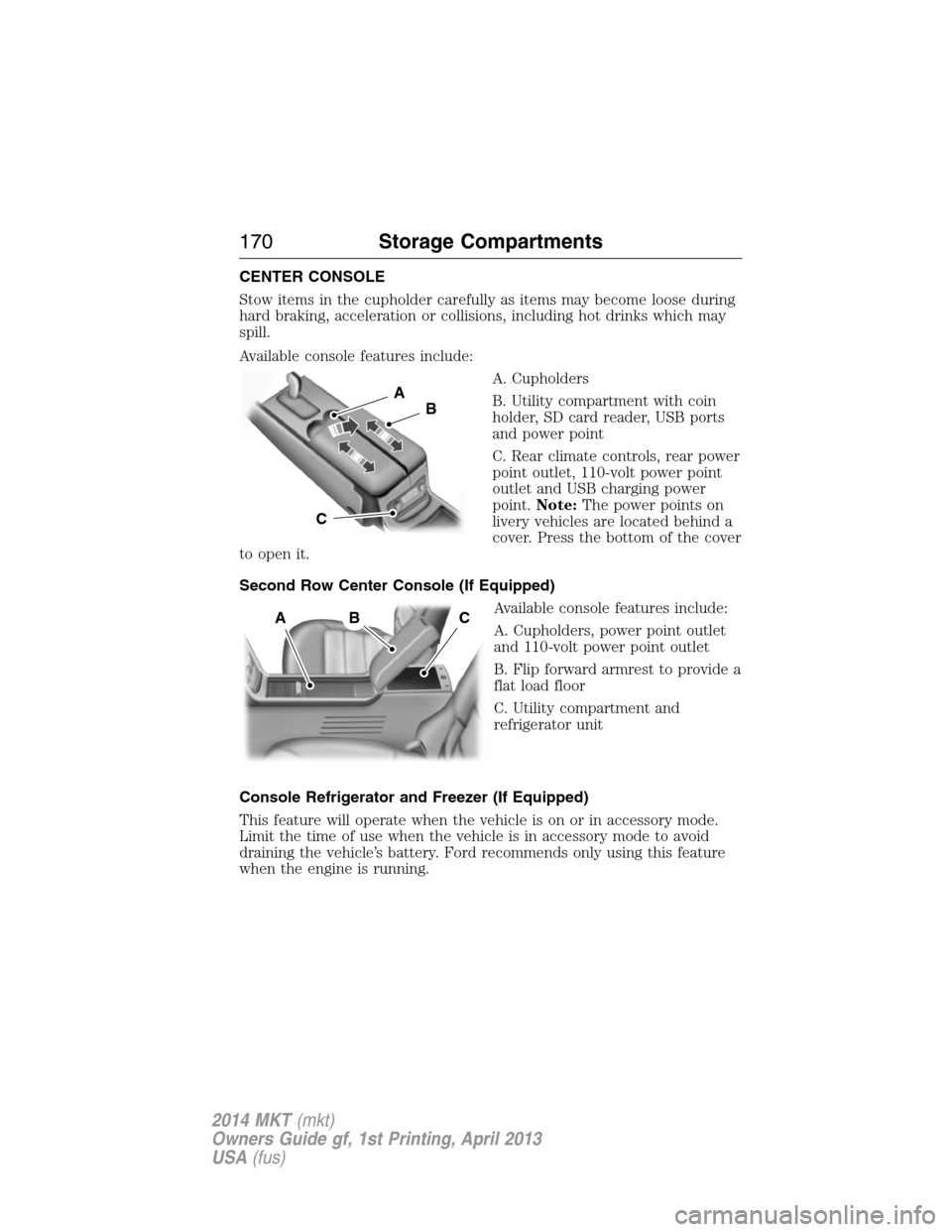
Available console features include:
A. Cupholders
B. Utility compartment with coin
holder, SD card reader, USB ports
and power point
C. Rear climate controls, rear power
point outlet, 110-volt power point
outlet and USB charging power
point.Note:The power points on
livery vehicles are located behind a
cover. Press the bottom of the cover
to open it.
Second Row Center Console (If Equipped)
Available console features include:
A. Cupholders, power point outlet
and 110-volt power point outlet
B. Flip forward armrest to provide a
flat load floor
C. Utility compartment and
refrigerator unit
Console Refrigerator and Freezer (If Equipped)
This feature will operate when the vehicle is on or in accessory mode.
Limit the time of use when the vehicle is in accessory mode to avoid
draining the vehicle’s battery. Ford recommends only using this feature
when the engine is running.
A
B
C
ABC
170Storage Compartments
2014 MKT(mkt)
Owners Guide gf, 1st Printing, April 2013
USA(fus)
Page 175 of 498
Ignition Modes
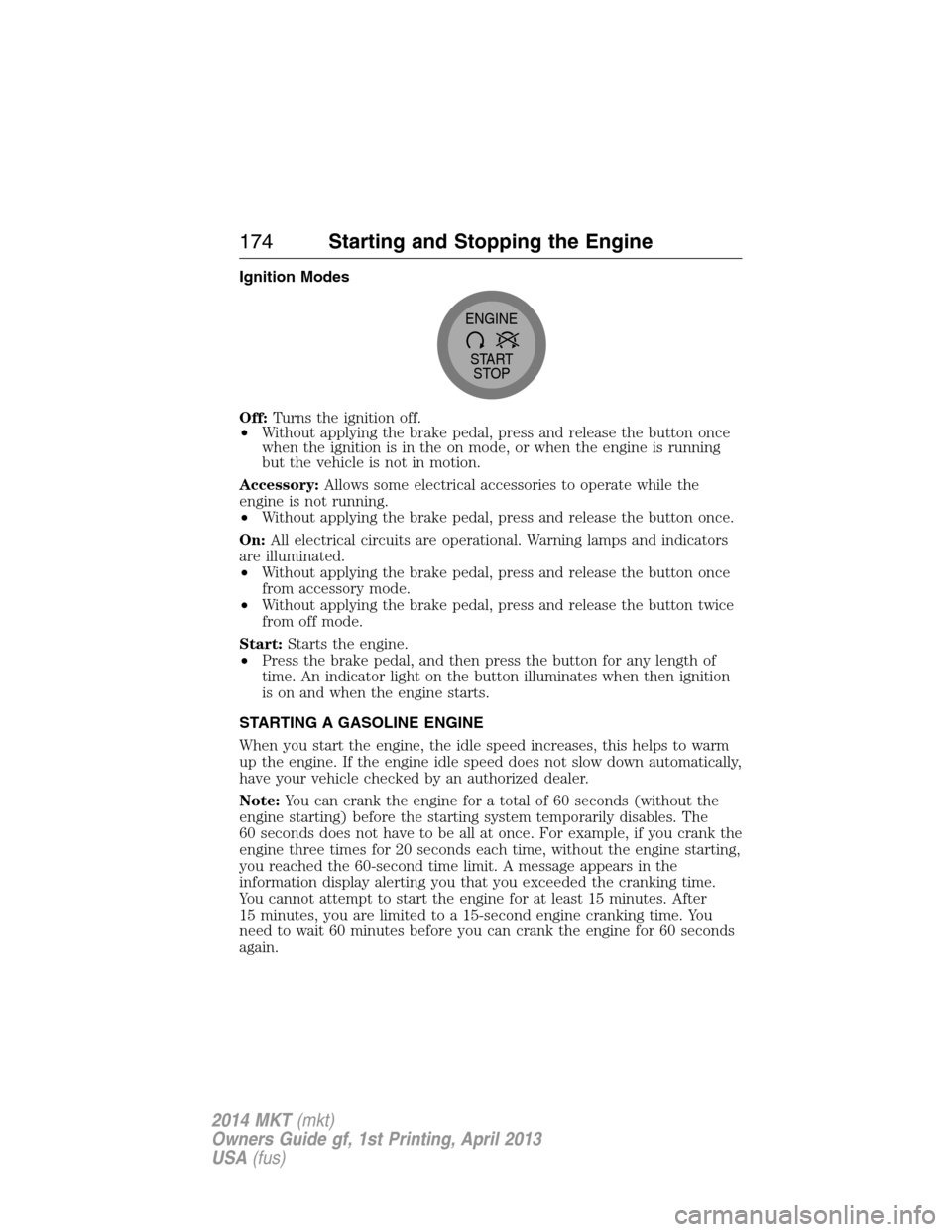
Off:Turns the ignition off.
•Without applying the brake pedal, press and release the button once
when the ignition is in the on mode, or when the engine is running
but the vehicle is not in motion.
Accessory:Allows some electrical accessories to operate while the
engine is not running.
•Without applying the brake pedal, press and release the button once.
On:All electrical circuits are operational. Warning lamps and indicators
are illuminated.
•Without applying the brake pedal, press and release the button once
from accessory mode.
•Without applying the brake pedal, press and release the button twice
from off mode.
Start:Starts the engine.
•Press the brake pedal, and then press the button for any length of
time. An indicator light on the button illuminates when then ignition
is on and when the engine starts.
STARTING A GASOLINE ENGINE
When you start the engine, the idle speed increases, this helps to warm
up the engine. If the engine idle speed does not slow down automatically,
have your vehicle checked by an authorized dealer.
Note:You can crank the engine for a total of 60 seconds (without the
engine starting) before the starting system temporarily disables. The
60 seconds does not have to be all at once. For example, if you crank the
engine three times for 20 seconds each time, without the engine starting,
you reached the 60-second time limit. A message appears in the
information display alerting you that you exceeded the cranking time.
You cannot attempt to start the engine for at least 15 minutes. After
15 minutes, you are limited to a 15-second engine cranking time. You
need to wait 60 minutes before you can crank the engine for 60 seconds
again.
START
STOP ENGINE
174Starting and Stopping the Engine
2014 MKT(mkt)
Owners Guide gf, 1st Printing, April 2013
USA(fus)
Page 194 of 498
USING YOUR ALL-WHEEL DRIVE (AWD) SYSTEM (IF EQUIPPED)
AWD uses all four wheels to power the vehicle. This increases traction,
enabling you to drive over terrain and road conditions that a
conventional two-wheel drive vehicles cannot. The AWD system is active
all the time and requires no input from the operator.
Note:Your AWD vehicle is not intended for off-road use. The AWD
feature gives your vehicle some limited off-road capabilities in which
driving surfaces are relatively level, obstruction-free and otherwise
similar to normal on-road driving conditions. Operating your vehicle
under other than those conditions could subject the vehicle to excessive
stress which might result in damage which is not covered under your
warranty.
Note:When an AWD system fault is present, the warning Check AWD
will display in the information display. The AWD system is not
functioning correctly and defaulted to front-wheel drive. When this
warning is displayed, have your vehicle serviced at an authorized dealer.
Note:The AWD Off message may also be displayed in the information
display if the AWD system has overheated and defaulted to front-wheel
drive. This condition may occur if the vehicle was operated in extreme
conditions with excessive wheel slip, such as deep sand. To resume
normal AWD function as soon as possible, stop the vehicle in a safe
location and stop the engine for at least 10 minutes. After the engine has
been restarted and the AWD system has adequately cooled, the AWD Off
message will turn off and normal AWD function will return. In the event
the engine is not stopped, the AWD Off message will turn off when the
system cools and normal AWD function returns.
Do not use a spare tire of a different size other than the tire provided.
If the mini-spare tire is installed, the AWD system may disable
automatically and enter front-wheel drive only mode to protect driveline
components. This condition may be indicated by an AWD Off message in
the information display. If there is an AWD Off message in the message
center from using the spare tire, this indicator should turn off after
reinstalling the repaired or replaced normal road tire and cycling the
ignition off and on. It is recommended to reinstall the repaired or
replaced road tire as soon as possible. Major dissimilar tire sizes between
the front and rear axles could cause the AWD system to stop functioning
and default to front-wheel drive or damage the AWD system.
Driving In Special Conditions With All-Wheel Drive (AWD)
AWD vehicles are equipped for driving on sand, snow, mud and rough
roads and have operating characteristics that are somewhat different
from conventional vehicles, both on and off the highway.
All-Wheel Drive (If Equipped)193
2014 MKT(mkt)
Owners Guide gf, 1st Printing, April 2013
USA(fus)
Page 231 of 498
Troubleshooting
Why is the feature not available (line markings are gray) when I
can see the lane markings on the road?
Vehicle speed is outside the operational range of the feature
Sun is shining directly into the camera lens
Quick intentional lane change
Staying too close to the lane marking
Driving at high speeds in curves
Previous feature activation happened within the last one second
Ambiguous lane markings (mainly in construction zones)
Rapid transition from light to dark or vice versa
Sudden offset in lane markings
ABS or AdvanceTrac activation
Camera blockage due to dirt, grime, fog, frost or water on the
windshield
Too close to the vehicle in front of you
Transitioning between no lane markings to lane markings or vice versa
Standing water on the road
Faint lane markings (partial yellow lane markings on concrete roads)
Lane width too narrow or too wide
Camera not calibrated after a windshield replacement
When driving on tight roads or on uneven roads
Why does the vehicle not come back into the middle of the lane
always, as expected, in the Aid or Aid + Alert mode?
High cross winds
Large road crown
Rough roads, grooves, shoulder drop-offs
Heavy uneven loading of the vehicle or improper tire inflation pressure
If the tires have been exchanged (including snow tires), or the
suspension has been modified
230Driving Aids
2014 MKT(mkt)
Owners Guide gf, 1st Printing, April 2013
USA(fus)