engine LINCOLN MKT 2014 Owner's Manual
[x] Cancel search | Manufacturer: LINCOLN, Model Year: 2014, Model line: MKT, Model: LINCOLN MKT 2014Pages: 498, PDF Size: 7.3 MB
Page 129 of 498
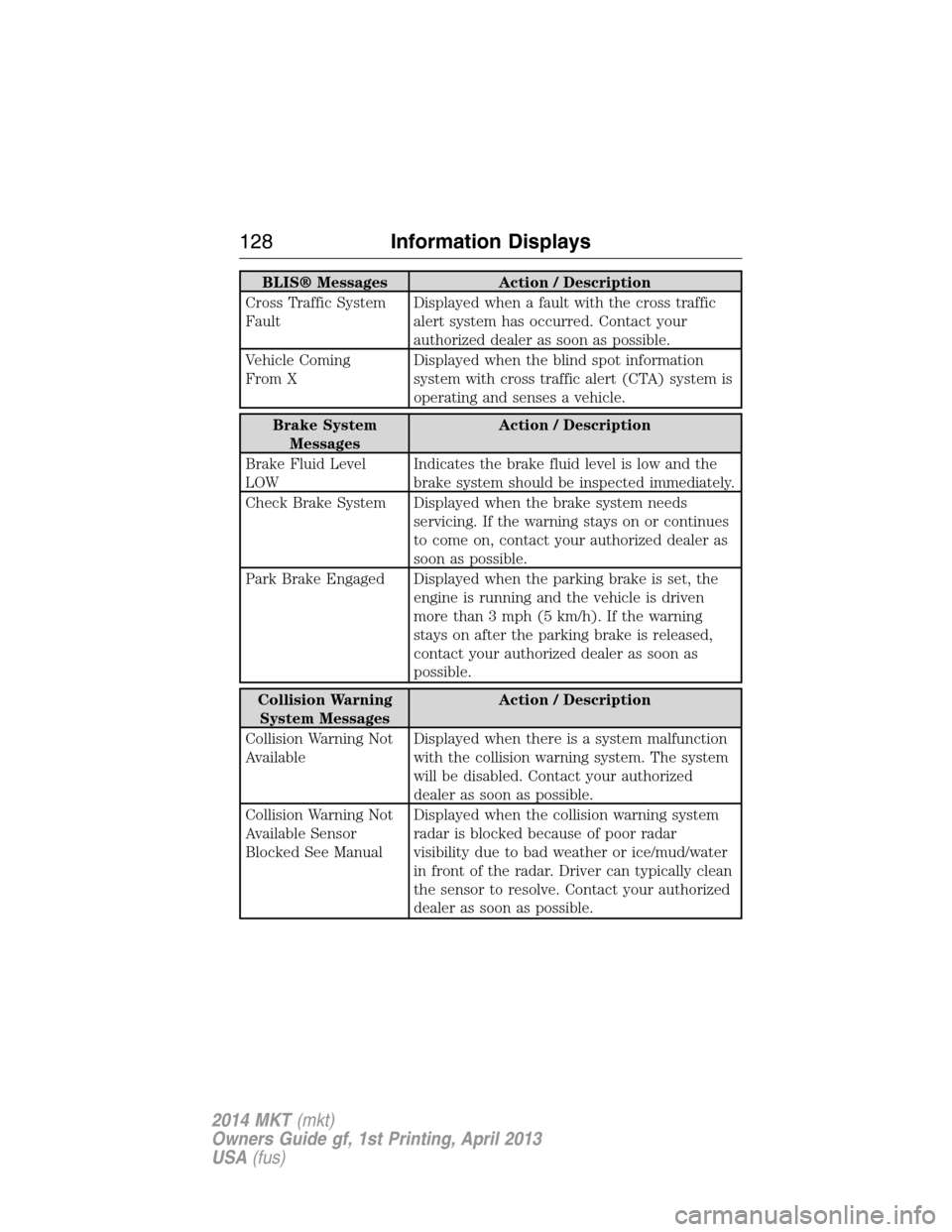
BLIS® Messages Action / Description
Cross Traffic System
FaultDisplayed when a fault with the cross traffic
alert system has occurred. Contact your
authorized dealer as soon as possible.
Vehicle Coming
From XDisplayed when the blind spot information
system with cross traffic alert (CTA) system is
operating and senses a vehicle.
Brake System
MessagesAction / Description
Brake Fluid Level
LOWIndicates the brake fluid level is low and the
brake system should be inspected immediately.
Check Brake System Displayed when the brake system needs
servicing. If the warning stays on or continues
to come on, contact your authorized dealer as
soon as possible.
Park Brake Engaged Displayed when the parking brake is set, the
engine is running and the vehicle is driven
more than 3 mph (5 km/h). If the warning
stays on after the parking brake is released,
contact your authorized dealer as soon as
possible.
Collision Warning
System MessagesAction / Description
Collision Warning Not
AvailableDisplayed when there is a system malfunction
with the collision warning system. The system
will be disabled. Contact your authorized
dealer as soon as possible.
Collision Warning Not
Available Sensor
Blocked See ManualDisplayed when the collision warning system
radar is blocked because of poor radar
visibility due to bad weather or ice/mud/water
in front of the radar. Driver can typically clean
the sensor to resolve. Contact your authorized
dealer as soon as possible.
128Information Displays
2014 MKT(mkt)
Owners Guide gf, 1st Printing, April 2013
USA(fus)
Page 131 of 498
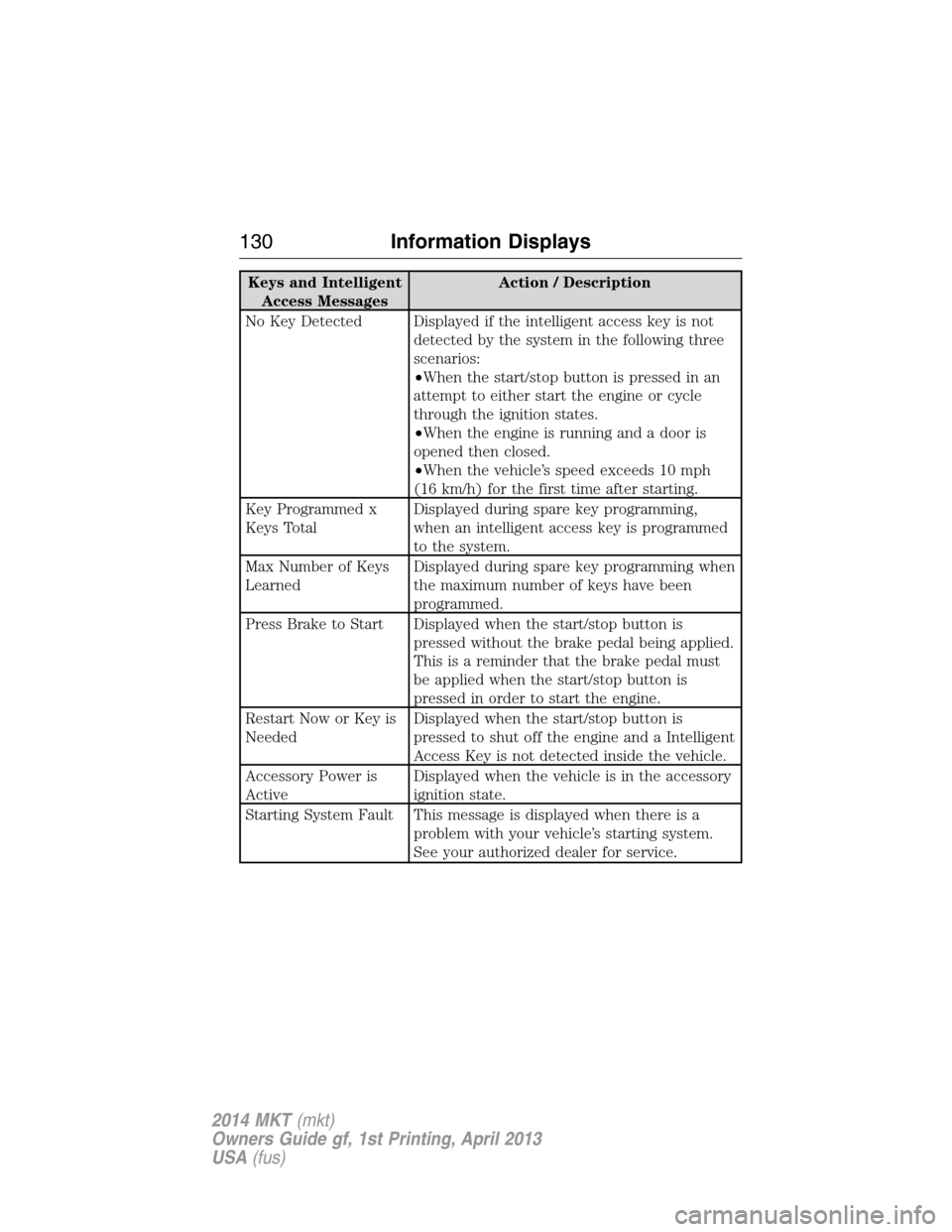
Keys and Intelligent
Access MessagesAction / Description
No Key Detected Displayed if the intelligent access key is not
detected by the system in the following three
scenarios:
•When the start/stop button is pressed in an
attempt to either start the engine or cycle
through the ignition states.
•When the engine is running and a door is
opened then closed.
•When the vehicle’s speed exceeds 10 mph
(16 km/h) for the first time after starting.
Key Programmed x
Keys TotalDisplayed during spare key programming,
when an intelligent access key is programmed
to the system.
Max Number of Keys
LearnedDisplayed during spare key programming when
the maximum number of keys have been
programmed.
Press Brake to Start Displayed when the start/stop button is
pressed without the brake pedal being applied.
This is a reminder that the brake pedal must
be applied when the start/stop button is
pressed in order to start the engine.
Restart Now or Key is
NeededDisplayed when the start/stop button is
pressed to shut off the engine and a Intelligent
Access Key is not detected inside the vehicle.
Accessory Power is
ActiveDisplayed when the vehicle is in the accessory
ignition state.
Starting System Fault This message is displayed when there is a
problem with your vehicle’s starting system.
See your authorized dealer for service.
130Information Displays
2014 MKT(mkt)
Owners Guide gf, 1st Printing, April 2013
USA(fus)
Page 132 of 498
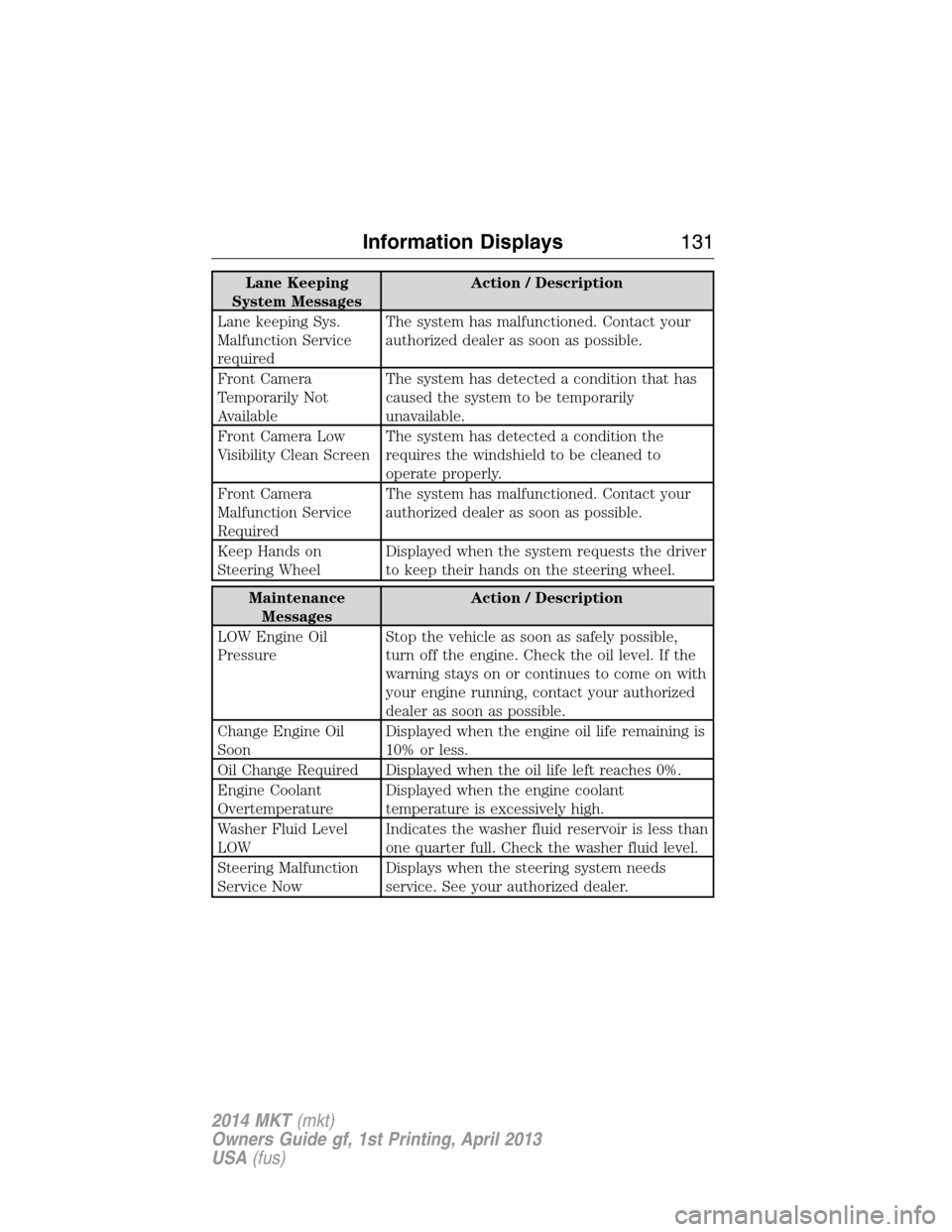
Lane Keeping
System MessagesAction / Description
Lane keeping Sys.
Malfunction Service
requiredThe system has malfunctioned. Contact your
authorized dealer as soon as possible.
Front Camera
Temporarily Not
AvailableThe system has detected a condition that has
caused the system to be temporarily
unavailable.
Front Camera Low
Visibility Clean ScreenThe system has detected a condition the
requires the windshield to be cleaned to
operate properly.
Front Camera
Malfunction Service
RequiredThe system has malfunctioned. Contact your
authorized dealer as soon as possible.
Keep Hands on
Steering WheelDisplayed when the system requests the driver
to keep their hands on the steering wheel.
Maintenance
MessagesAction / Description
LOW Engine Oil
PressureStop the vehicle as soon as safely possible,
turn off the engine. Check the oil level. If the
warning stays on or continues to come on with
your engine running, contact your authorized
dealer as soon as possible.
Change Engine Oil
SoonDisplayed when the engine oil life remaining is
10% or less.
Oil Change Required Displayed when the oil life left reaches 0%.
Engine Coolant
OvertemperatureDisplayed when the engine coolant
temperature is excessively high.
Washer Fluid Level
LOWIndicates the washer fluid reservoir is less than
one quarter full. Check the washer fluid level.
Steering Malfunction
Service NowDisplays when the steering system needs
service. See your authorized dealer.
Information Displays131
2014 MKT(mkt)
Owners Guide gf, 1st Printing, April 2013
USA(fus)
Page 134 of 498
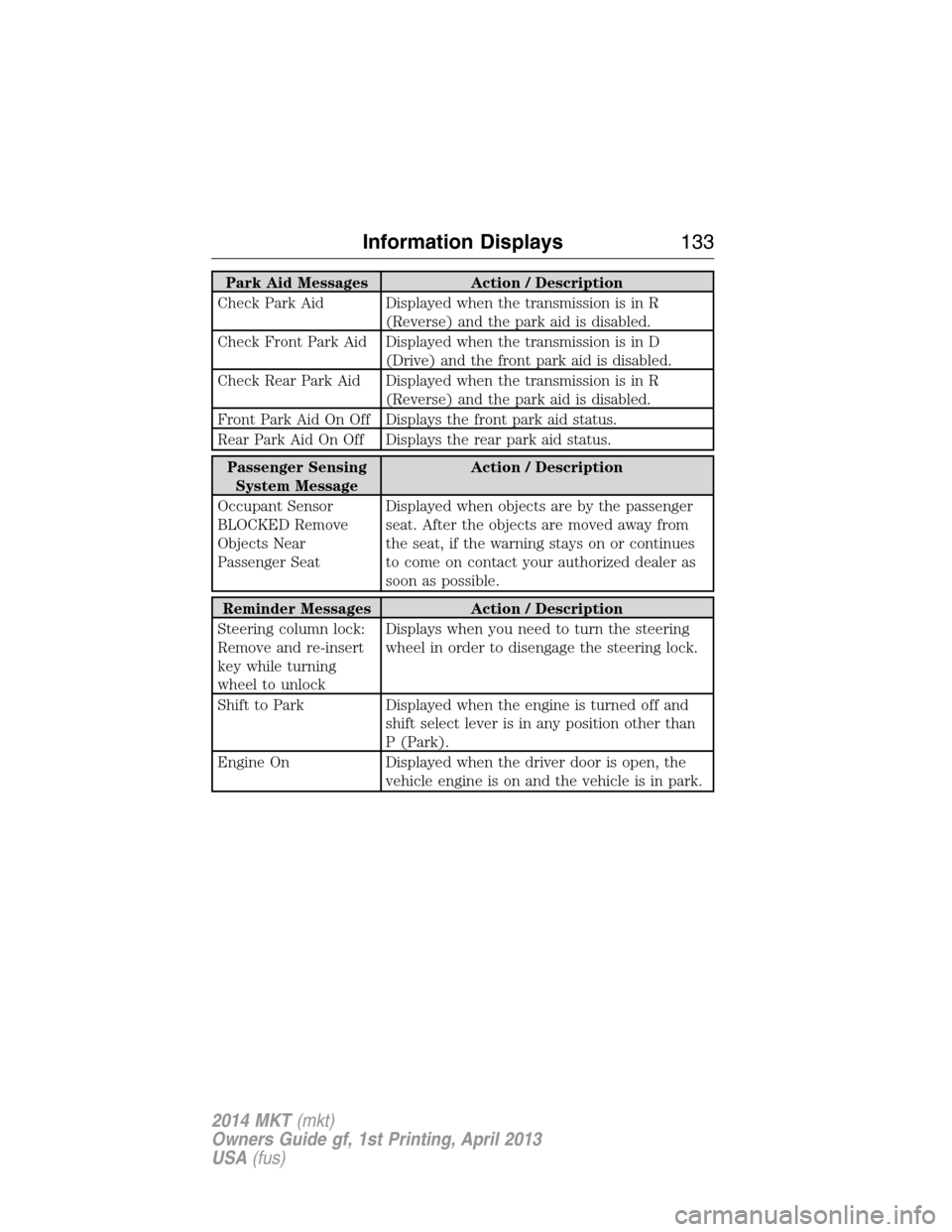
Park Aid Messages Action / Description
Check Park Aid Displayed when the transmission is in R
(Reverse) and the park aid is disabled.
Check Front Park Aid Displayed when the transmission is in D
(Drive) and the front park aid is disabled.
Check Rear Park Aid Displayed when the transmission is in R
(Reverse) and the park aid is disabled.
Front Park Aid On Off Displays the front park aid status.
Rear Park Aid On Off Displays the rear park aid status.
Passenger Sensing
System MessageAction / Description
Occupant Sensor
BLOCKED Remove
Objects Near
Passenger SeatDisplayed when objects are by the passenger
seat. After the objects are moved away from
the seat, if the warning stays on or continues
to come on contact your authorized dealer as
soon as possible.
Reminder Messages Action / Description
Steering column lock:
Remove and re-insert
key while turning
wheel to unlockDisplays when you need to turn the steering
wheel in order to disengage the steering lock.
Shift to Park Displayed when the engine is turned off and
shift select lever is in any position other than
P (Park).
Engine On Displayed when the driver door is open, the
vehicle engine is on and the vehicle is in park.
Information Displays133
2014 MKT(mkt)
Owners Guide gf, 1st Printing, April 2013
USA(fus)
Page 150 of 498
HEATED AND VENTILATED SEATS (IF EQUIPPED)
Heated Seats
WARNING:Persons who are unable to feel pain to the skin
because of advanced age, chronic illness, diabetes, spinal cord
injury, medication, alcohol use, exhaustion, or other physical conditions,
must exercise care when using the seat heater. The seat heater may
cause burns even at low temperatures, especially if used for long
periods of time. Do not place anything on the seat that insulates against
heat, such as a blanket or cushion, because this may cause the seat
heater to overheat. Do not puncture the seat with pins, needles, or
other pointed objects because this may damage the heating element
which may cause the seat heater to overheat. An overheated seat may
cause serious personal injury.
The heated seats will only function when the engine is running.
Note:Do not do the following:
•Place heavy objects on the seat
•Operate the seat heater if water or any other liquid is spilled on the
seat. Allow the seat to dry thoroughly.
To operate the heated seats:
Press the heated seat symbol to cycle through the various
heat settings and off. Warmer settings are indicated by
more indicator lights.
If the engine falls below 350 RPM while the heated seats are on, the
feature will turn itself off. You will need to be reactivate it.
Seats149
2014 MKT(mkt)
Owners Guide gf, 1st Printing, April 2013
USA(fus)
Page 151 of 498
Ventilated Seats
The ventilated seats will only function when the engine is running.
To operate the ventilated seats:
Press the ventilated seat symbol to cycle through the
various cooling settings and off. Cooler settings are
indicated by more indicator lights.
If the engine falls below 350 RPM while the ventilated seats are on, the
feature will turn itself off. You will need to be reactivate it.
Note:When the heated or ventilated front seat is active, you will be able
to hear the fan operating inside the seat. This is normal.
Heated and Ventilated Seat Air Filter Replacement
The climate controlled seat system includes air filters. You must replace
them periodically. See thescheduled maintenance information.
Locate the filters under each front seat and access them from the
second-row foot-well area. Move the front seats all the way forward and
to the full up positions to ease access.
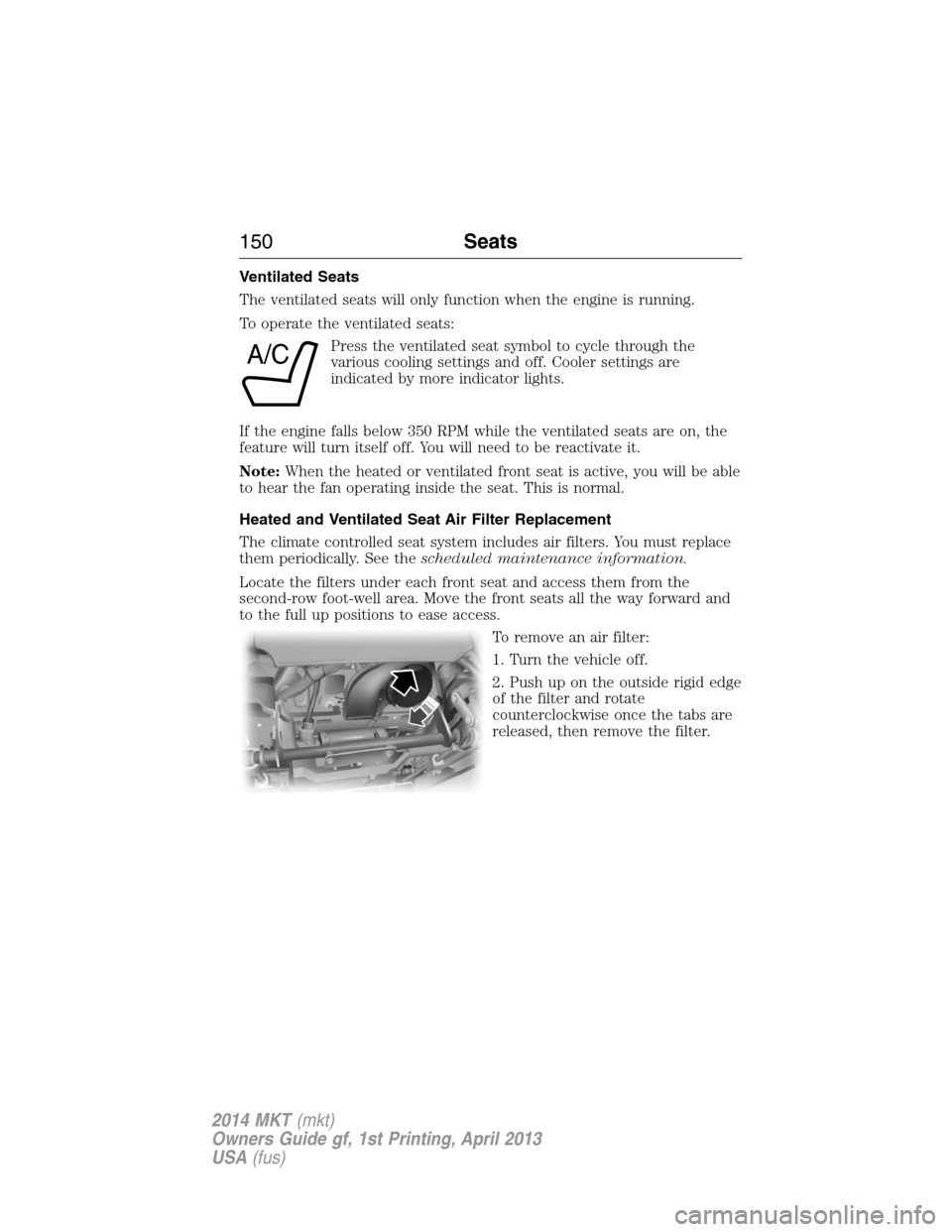
To remove an air filter:
1. Turn the vehicle off.
2. Push up on the outside rigid edge
of the filter and rotate
counterclockwise once the tabs are
released, then remove the filter.
A/C
150Seats
2014 MKT(mkt)
Owners Guide gf, 1st Printing, April 2013
USA(fus)
Page 168 of 498
AUXILIARY POWER POINTS
WARNING:Do not plug optional electrical accessories into the
cigarette lighter socket (if equipped). Improper use of the lighter
can cause damage not covered by your warranty, and can result in fire
or serious injury.
Note:If used when the engine is not running, the battery will discharge.
There may be insufficient power to restart your engine.
Note:Do not insert objects other than an accessory plug into the power
point. This will damage the outlet and blow the fuse.
Note:Do not hang any type of accessory or accessory bracket from the
plug.
Note:Do not use the power point over the vehicle capacity of 12 volt
DC 180 watts or a fuse may blow.
Note:Do not use the power point for operating a cigarette lighter
element.
Note:Improper use of the power outlet can cause damage not covered
by your warranty.
Note:Always keep the power point caps closed when not in use.
Run the engine for full capacity use of the power point. To prevent the
battery from being discharged:
•Do not use the power point longer than necessary when the engine is
not running.
•Do not leave devices plugged in overnight or when the vehicle is
parked for extended periods.
Locations
Power points may be found:
•near the floor in the front console bin on the driver’s side
•in the center console storage compartment
•on the rear of the center console (inside the second row center
console on vehicle equipped with that feature)
•in the rear cargo area on the left rear trim panel.
Auxiliary Power Points167
2014 MKT(mkt)
Owners Guide gf, 1st Printing, April 2013
USA(fus)
Page 169 of 498
110 Volt AC Power Point (If Equipped)
WARNING:Do not keep electrical devices plugged in the power
point whenever the device is not in use. Do not use any
extension cord with the 110 volt AC power point, since it will defeat
the safety protection design. Doing so my cause the power point to
overload due to powering multiple devices that can reach beyond the
150 watt load limit and could result in fire or serious injury.
Note:The cap should always be closed whenever the power point outlet
is not in use.
Note:Keep the engine running to use the power point.
The 110 volt AC power point outlet is used for powering electrical
devices that require up to 150 watts. Exceeding the 150 watt limit will
cause the power point to cut off the power temporarily to provide
overload protection.
The power point is located on the
back of the center console (inside
the second row center console on
vehicles equipped with that
feature).
The power point is not designed for the following electric appliances;
they may not work properly:
•Cathode ray tube type televisions
•Motor loads, such as vacuum cleaners, electric saws and other electric
power tools, compressor-driven refrigerators, etc.
•Measuring devices, which process precise data, such as medical
equipment, measuring equipment, etc.
•Other appliances requiring an extremely stable power supply:
microcomputer-controlled electric blankets, touch sensor lamps, etc.
The power point can switch to a fault mode when it is overloaded,
overheated, or shorted. Unplug your device and turn the ignition off then
on for overloading and shorting conditions. Let the system cool off, then
turn the ignition off then on for an overheating condition.
168Auxiliary Power Points
2014 MKT(mkt)
Owners Guide gf, 1st Printing, April 2013
USA(fus)
Page 170 of 498
The power point can provide power whenever the ignition is on and the
indicator light is on. The indicator light is located in the top left corner
of the power point.
When the indicator light is:
•on — power point is ready to supply power
•off — power point power supply is off; ignition is not on
•blinking — power point is in fault mode
USB Charging Power Point (If Equipped)
Note:The USB power point is for charging only and works with most
devices.
The power point is located on the rear of the center console. It provides
power for charging devices whenever the engine is running.
Auxiliary Power Points169
2014 MKT(mkt)
Owners Guide gf, 1st Printing, April 2013
USA(fus)
Page 171 of 498
CENTER CONSOLE
Stow items in the cupholder carefully as items may become loose during
hard braking, acceleration or collisions, including hot drinks which may
spill.
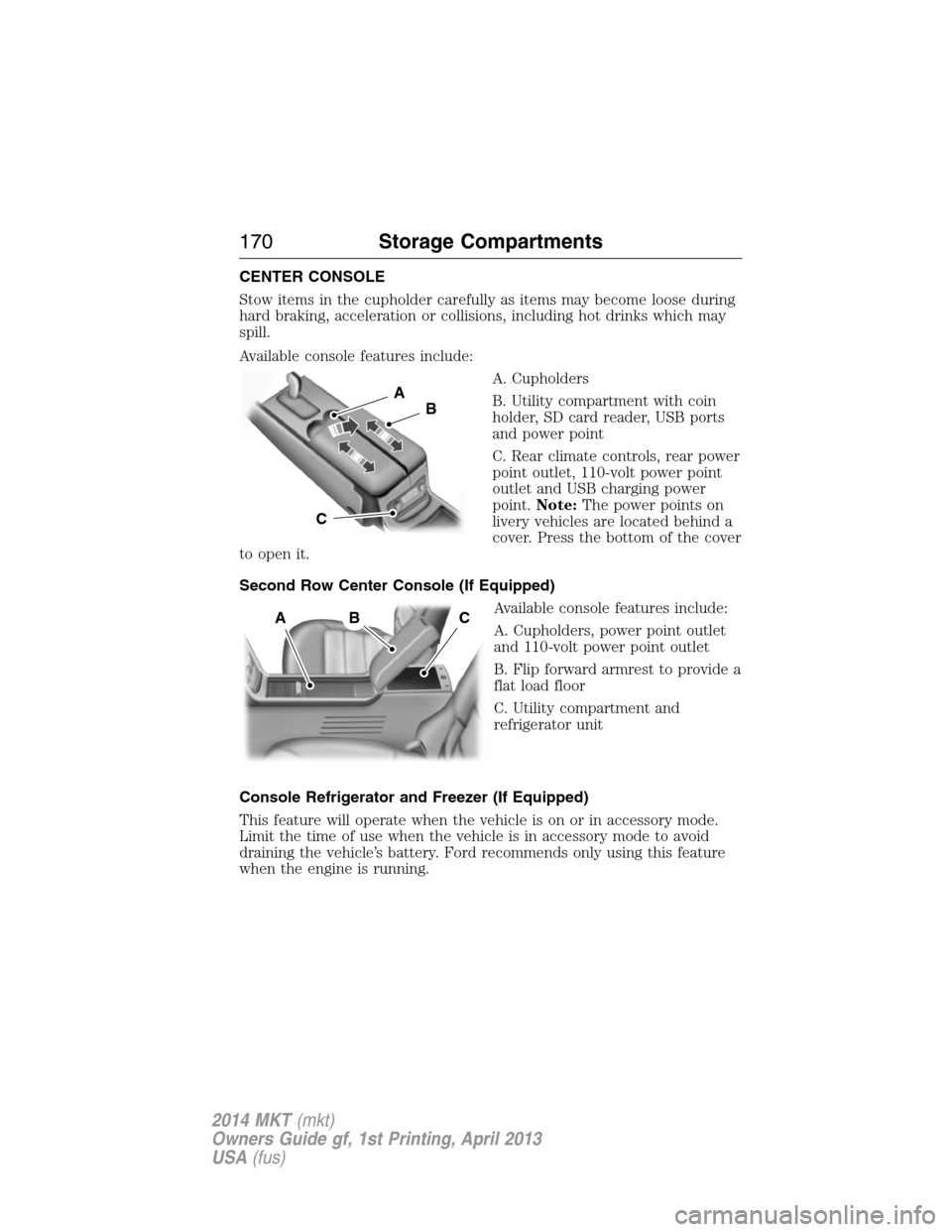
Available console features include:
A. Cupholders
B. Utility compartment with coin
holder, SD card reader, USB ports
and power point
C. Rear climate controls, rear power
point outlet, 110-volt power point
outlet and USB charging power
point.Note:The power points on
livery vehicles are located behind a
cover. Press the bottom of the cover
to open it.
Second Row Center Console (If Equipped)
Available console features include:
A. Cupholders, power point outlet
and 110-volt power point outlet
B. Flip forward armrest to provide a
flat load floor
C. Utility compartment and
refrigerator unit
Console Refrigerator and Freezer (If Equipped)
This feature will operate when the vehicle is on or in accessory mode.
Limit the time of use when the vehicle is in accessory mode to avoid
draining the vehicle’s battery. Ford recommends only using this feature
when the engine is running.
A
B
C
ABC
170Storage Compartments
2014 MKT(mkt)
Owners Guide gf, 1st Printing, April 2013
USA(fus)