reset LINCOLN MKT 2014 Owners Manual
[x] Cancel search | Manufacturer: LINCOLN, Model Year: 2014, Model line: MKT, Model: LINCOLN MKT 2014Pages: 498, PDF Size: 7.3 MB
Page 12 of 498
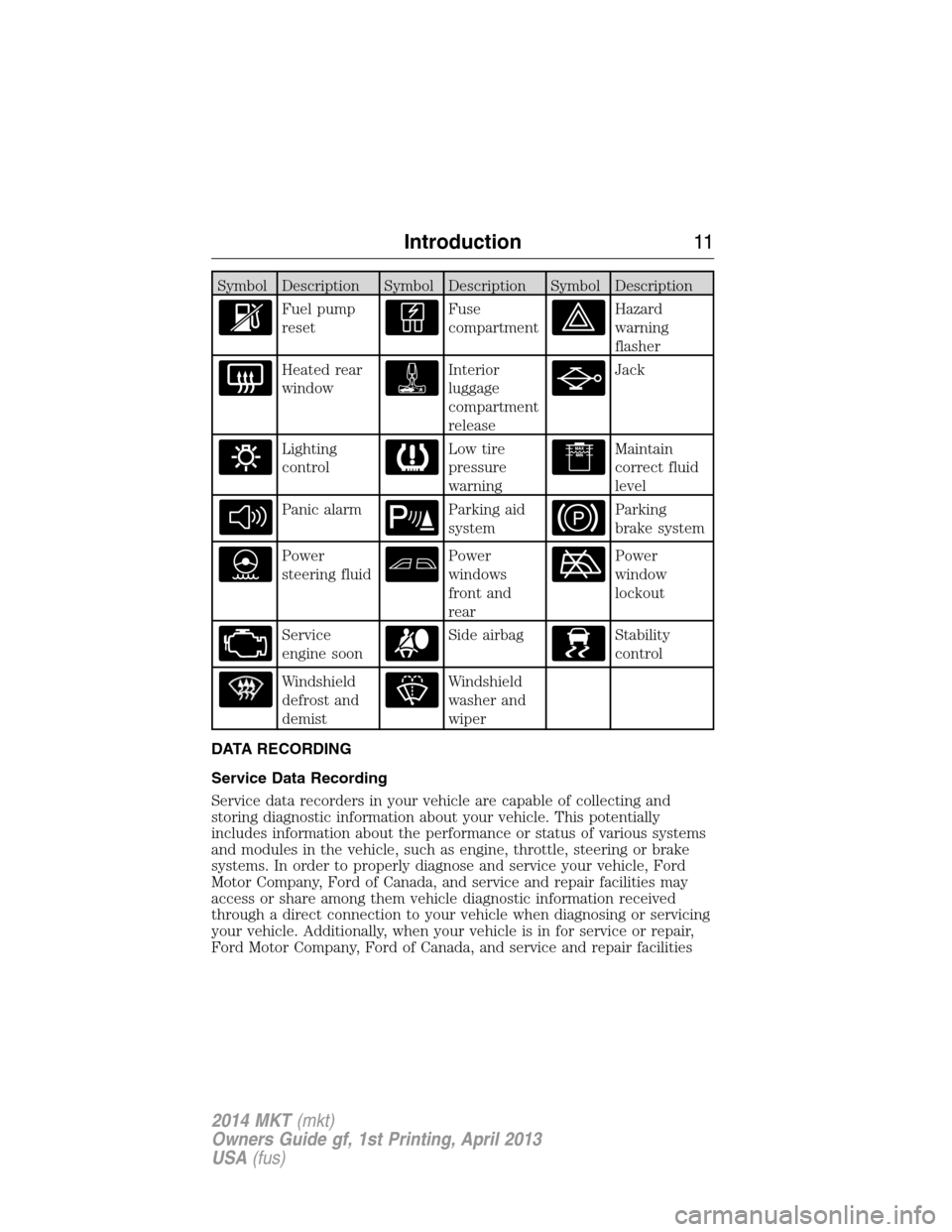
Symbol Description Symbol Description Symbol Description
Fuel pump
resetFuse
compartmentHazard
warning
flasher
Heated rear
windowInterior
luggage
compartment
releaseJack
Lighting
controlLow tire
pressure
warningMaintain
correct fluid
level
Panic alarmParking aid
systemParking
brake system
Power
steering fluidPower
windows
front and
rearPower
window
lockout
Service
engine soonSide airbagStability
control
Windshield
defrost and
demistWindshield
washer and
wiper
DATA RECORDING
Service Data Recording
Service data recorders in your vehicle are capable of collecting and
storing diagnostic information about your vehicle. This potentially
includes information about the performance or status of various systems
and modules in the vehicle, such as engine, throttle, steering or brake
systems. In order to properly diagnose and service your vehicle, Ford
Motor Company, Ford of Canada, and service and repair facilities may
access or share among them vehicle diagnostic information received
through a direct connection to your vehicle when diagnosing or servicing
your vehicle. Additionally, when your vehicle is in for service or repair,
Ford Motor Company, Ford of Canada, and service and repair facilities
Introduction11
2014 MKT(mkt)
Owners Guide gf, 1st Printing, April 2013
USA(fus)
Page 76 of 498
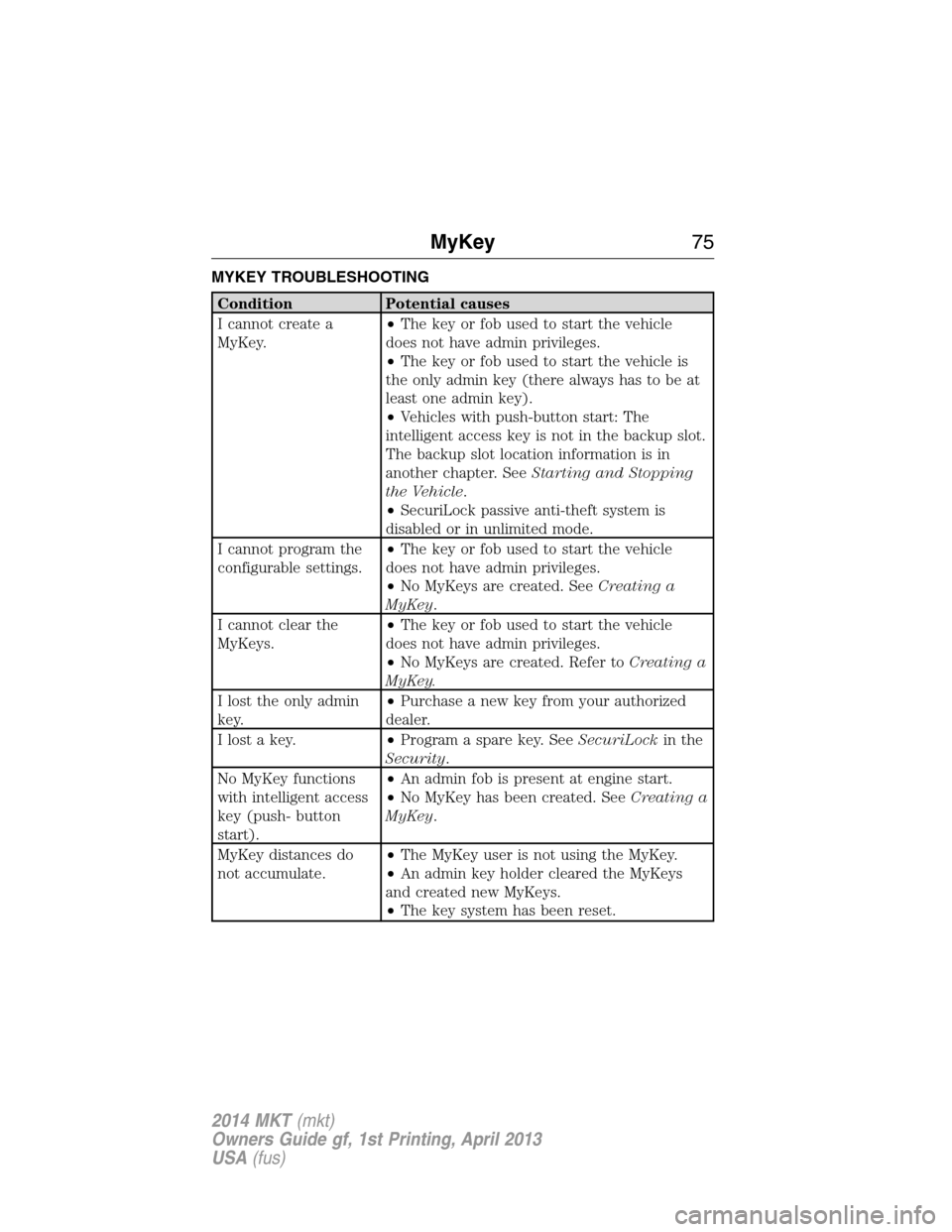
MYKEY TROUBLESHOOTING
Condition Potential causes
I cannot create a
MyKey.•The key or fob used to start the vehicle
does not have admin privileges.
•The key or fob used to start the vehicle is
the only admin key (there always has to be at
least one admin key).
•Vehicles with push-button start: The
intelligent access key is not in the backup slot.
The backup slot location information is in
another chapter. SeeStarting and Stopping
the Vehicle.
•SecuriLock passive anti-theft system is
disabled or in unlimited mode.
I cannot program the
configurable settings.•The key or fob used to start the vehicle
does not have admin privileges.
•No MyKeys are created. SeeCreating a
MyKey.
I cannot clear the
MyKeys.•The key or fob used to start the vehicle
does not have admin privileges.
•No MyKeys are created. Refer toCreating a
MyKey.
I lost the only admin
key.•Purchase a new key from your authorized
dealer.
I lost a key.•Program a spare key. SeeSecuriLockin the
Security.
No MyKey functions
with intelligent access
key (push- button
start).•An admin fob is present at engine start.
•No MyKey has been created. SeeCreating a
MyKey.
MyKey distances do
not accumulate.•The MyKey user is not using the MyKey.
•An admin key holder cleared the MyKeys
and created new MyKeys.
•The key system has been reset.
MyKey75
2014 MKT(mkt)
Owners Guide gf, 1st Printing, April 2013
USA(fus)
Page 83 of 498
Resetting the Power Liftgate
The liftgate may not operate properly and may need to be reset if any of
these conditions occur:
•a low voltage or dead battery
•disconnected battery
•the liftgate is manually closed and left ajar (unlatched)
To reset the power liftgate:
1. Disconnect the battery for 20 seconds then, reconnect the battery.
2. Manually close and fully latch the liftgate.
3. Power open the liftgate by using the transmitter, or the instrument
panel control button.
Manual Operation
WARNING:Make sure to close and latch the liftgate to prevent
drawing exhaust fumes into your vehicle. This will also prevent
passengers and cargo from falling out. If you must drive with the
liftgate open, keep the vents or windows open so outside air comes into
your vehicle. Failure to follow this warning could result in serious
personal injury.
Note:Be careful when opening or closing the liftgate in a garage or
other enclosed area to avoid damaging the liftgate.
Note:Do not hang anything (bike rack, etc.) from the spoiler, glass or
liftgate. This could damage the liftgate and its components.
Note:Do not leave the liftgate open while driving. This could damage
the liftgate and its components.
The liftgate area is only intended for cargo, not passengers.
82Locks
2014 MKT(mkt)
Owners Guide gf, 1st Printing, April 2013
USA(fus)
Page 91 of 498
To reset the steering column to its normal stopping position:
1. Press the steering column control again after encountering the new
stopping position.
2. Continue pressing the control until it reaches the end of the column
position.
A new stopping position will be set. The steering column will stop just
short of the end of the column position the next time it is tilted or
telescoped.
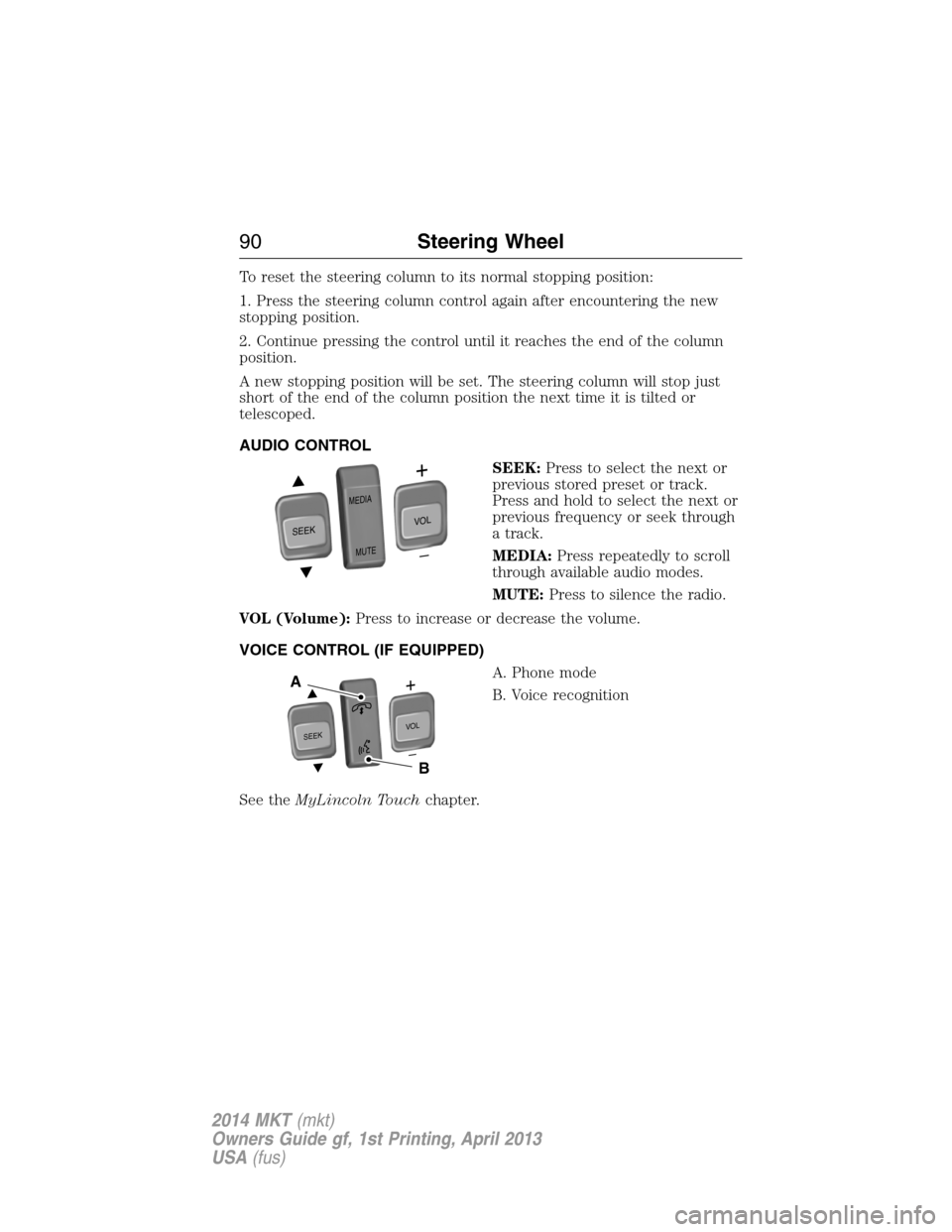
AUDIO CONTROL
SEEK:Press to select the next or
previous stored preset or track.
Press and hold to select the next or
previous frequency or seek through
a track.
MEDIA:Press repeatedly to scroll
through available audio modes.
MUTE:Press to silence the radio.
VOL (Volume):Press to increase or decrease the volume.
VOICE CONTROL (IF EQUIPPED)
A. Phone mode
B. Voice recognition
See theMyLincoln Touchchapter.
SEEK
MEDIA
MUTE
V
O
L
S
E
E
KVOL
A
B
90Steering Wheel
2014 MKT(mkt)
Owners Guide gf, 1st Printing, April 2013
USA(fus)
Page 122 of 498
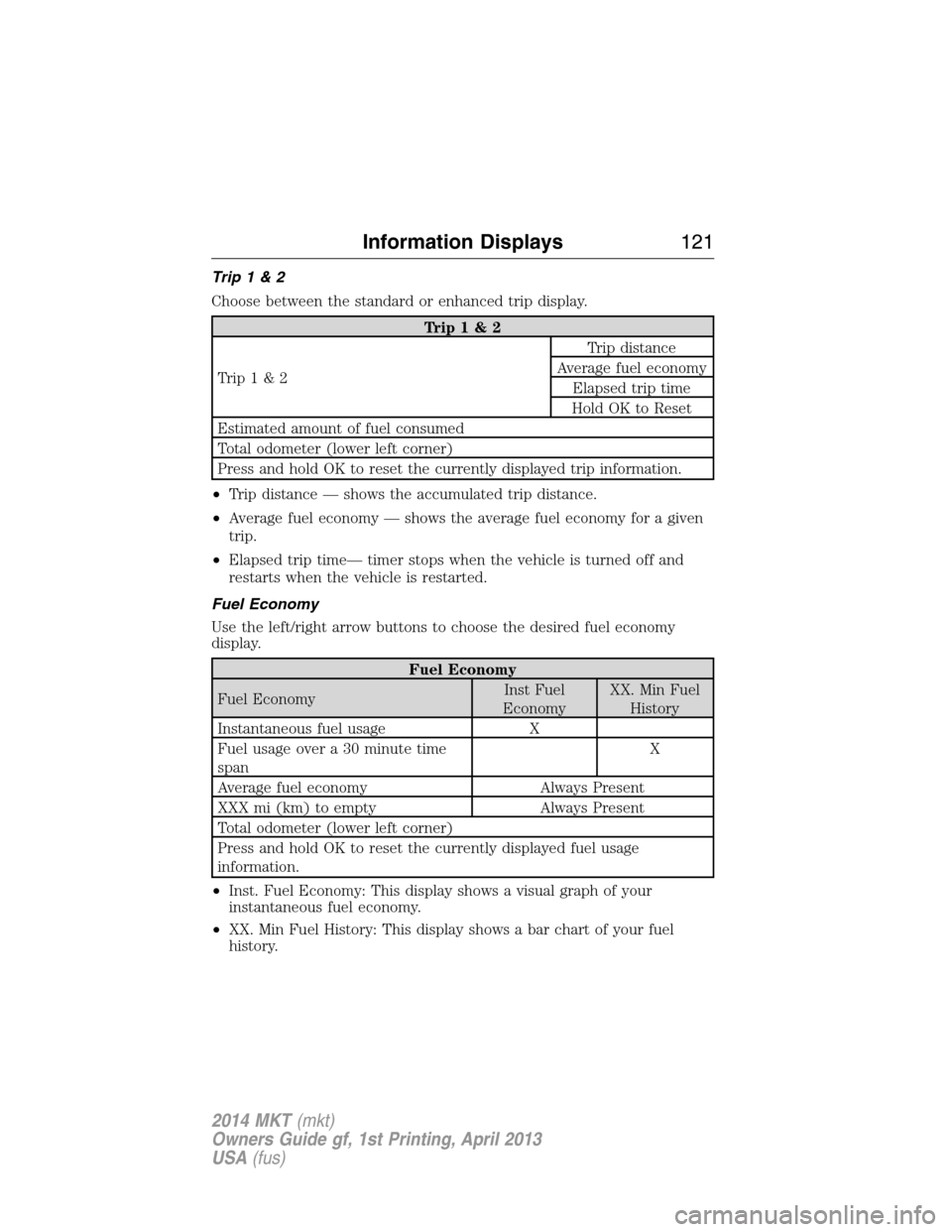
Trip1&2
Choose between the standard or enhanced trip display.
Trip1&2
Trip1&2Trip distance
Average fuel economy
Elapsed trip time
Hold OK to Reset
Estimated amount of fuel consumed
Total odometer (lower left corner)
Press and hold OK to reset the currently displayed trip information.
•Trip distance — shows the accumulated trip distance.
•Average fuel economy — shows the average fuel economy for a given
trip.
•Elapsed trip time— timer stops when the vehicle is turned off and
restarts when the vehicle is restarted.
Fuel Economy
Use the left/right arrow buttons to choose the desired fuel economy
display.
Fuel Economy
Fuel EconomyInst Fuel
EconomyXX. Min Fuel
History
Instantaneous fuel usage X
Fuel usage over a 30 minute time
spanX
Average fuel economy Always Present
XXX mi (km) to empty Always Present
Total odometer (lower left corner)
Press and hold OK to reset the currently displayed fuel usage
information.
•Inst. Fuel Economy: This display shows a visual graph of your
instantaneous fuel economy.
•XX. Min Fuel History: This display shows a bar chart of your fuel
history.
Information Displays121
2014 MKT(mkt)
Owners Guide gf, 1st Printing, April 2013
USA(fus)
Page 124 of 498
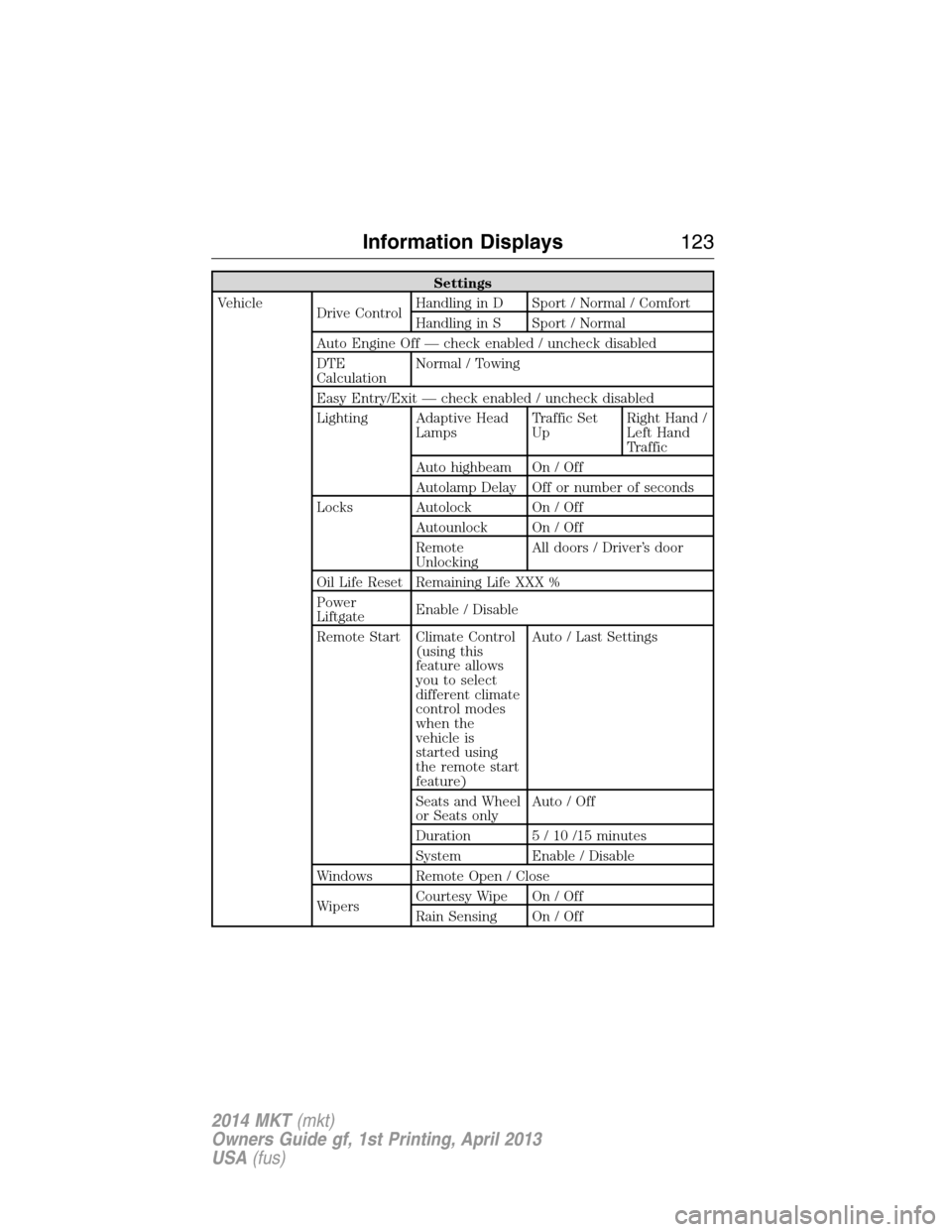
Settings
Vehicle
Drive ControlHandling in D Sport / Normal / Comfort
Handling in S Sport / Normal
Auto Engine Off — check enabled / uncheck disabled
DTE
CalculationNormal / Towing
Easy Entry/Exit — check enabled / uncheck disabled
Lighting Adaptive Head
LampsTraffic Set
UpRight Hand /
Left Hand
Traffic
Auto highbeam On / Off
Autolamp Delay Off or number of seconds
Locks Autolock On / Off
Autounlock On / Off
Remote
UnlockingAll doors / Driver’s door
Oil Life Reset Remaining Life XXX %
Power
LiftgateEnable / Disable
Remote Start Climate Control
(using this
feature allows
you to select
different climate
control modes
when the
vehicle is
started using
the remote start
feature)Auto / Last Settings
Seats and Wheel
or Seats onlyAuto / Off
Duration 5 / 10 /15 minutes
System Enable / Disable
Windows Remote Open / Close
WipersCourtesy Wipe On / Off
Rain Sensing On / Off
Information Displays123
2014 MKT(mkt)
Owners Guide gf, 1st Printing, April 2013
USA(fus)
Page 145 of 498
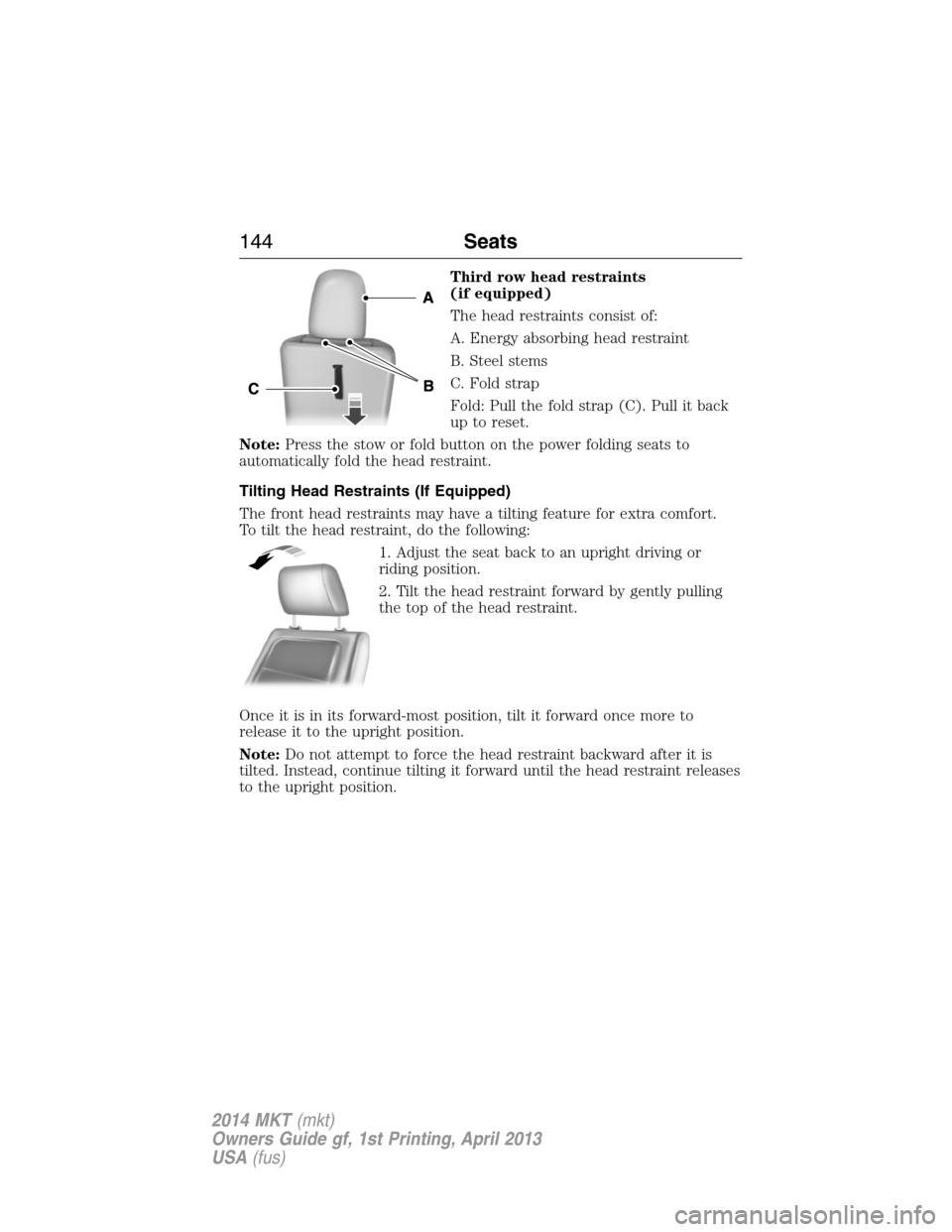
Third row head restraints
(if equipped)
The head restraints consist of:
A. Energy absorbing head restraint
B. Steel stems
C. Fold strap
Fold: Pull the fold strap (C). Pull it back
up to reset.
Note:Press the stow or fold button on the power folding seats to
automatically fold the head restraint.
Tilting Head Restraints (If Equipped)
The front head restraints may have a tilting feature for extra comfort.
To tilt the head restraint, do the following:
1. Adjust the seat back to an upright driving or
riding position.
2. Tilt the head restraint forward by gently pulling
the top of the head restraint.
Once it is in its forward-most position, tilt it forward once more to
release it to the upright position.
Note:Do not attempt to force the head restraint backward after it is
tilted. Instead, continue tilting it forward until the head restraint releases
to the upright position.
144Seats
2014 MKT(mkt)
Owners Guide gf, 1st Printing, April 2013
USA(fus)
Page 162 of 498
Note:In order to allow the seat to complete the stowed position, do not
place objects under the seat before stowing. Remove all objects from the
seat and stowage tub. Sharp objects may result in damage to the seat
upholstery and improper seat function.
Note:In the unlikely event that the third row power seat stops
prematurely, or travels to an unexpected position, press the FOLD
button (C) to reset the seat and return it to a normal position.
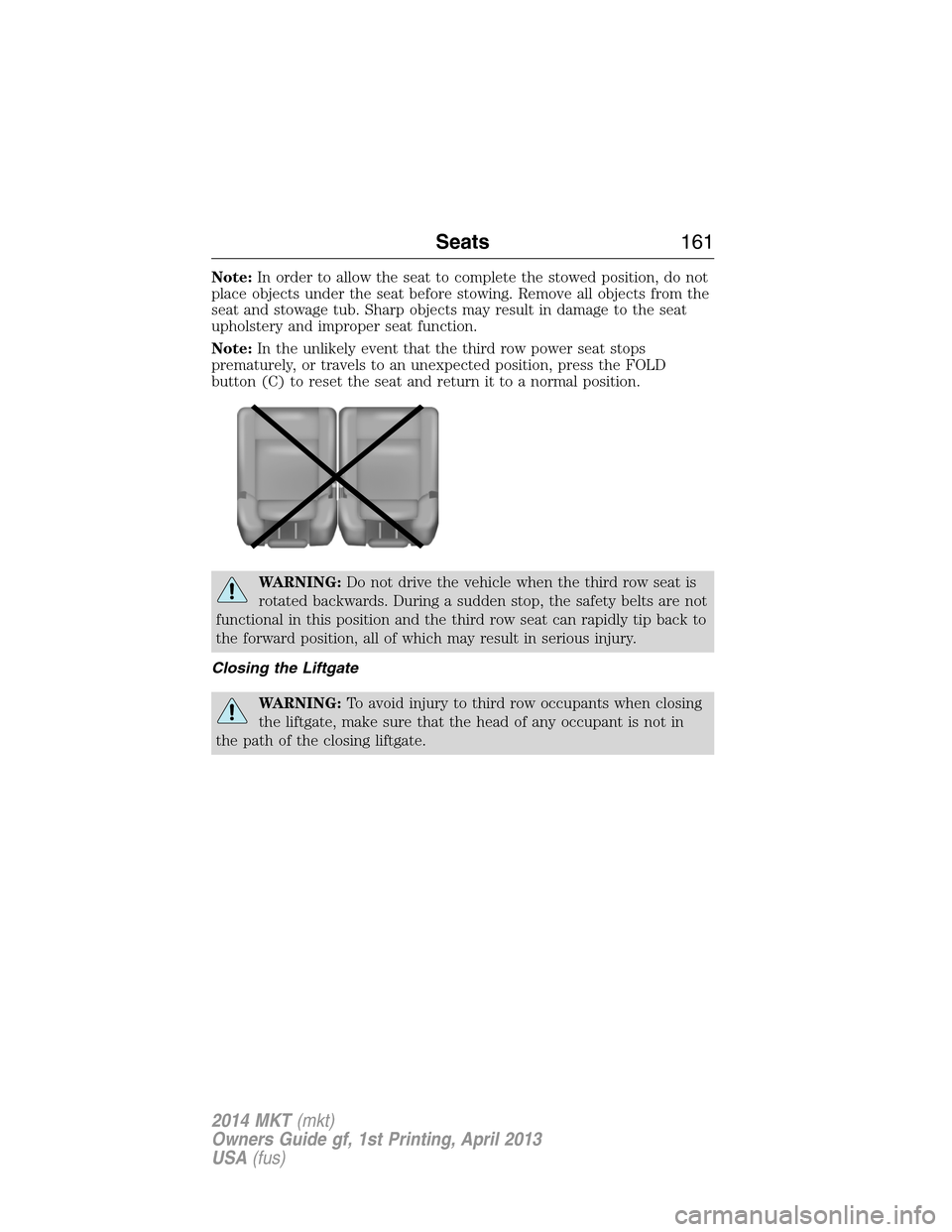
WARNING:Do not drive the vehicle when the third row seat is
rotated backwards. During a sudden stop, the safety belts are not
functional in this position and the third row seat can rapidly tip back to
the forward position, all of which may result in serious injury.
Closing the Liftgate
WARNING:To avoid injury to third row occupants when closing
the liftgate, make sure that the head of any occupant is not in
the path of the closing liftgate.
Seats161
2014 MKT(mkt)
Owners Guide gf, 1st Printing, April 2013
USA(fus)
Page 177 of 498
Failure to Start
If you cannot start the engine after three attempts, wait 10 seconds and
follow this procedure:
1. Fully press the brake pedal.
2. Fully press the accelerator pedal and hold it there.
3. Start the engine.
Automatic Engine Shutdown
Your vehicle has a feature that automatically shuts down the engine if it
has been idling for an extended period. The ignition also turns off in
order to save battery power. Before the engine shuts down, a message
appears in the information display showing a timer counting down from
30 seconds. If you do not intervene within 30 seconds, the engine shuts
down. Another message appears in the information display to inform you
that the engine has shut down in order to save fuel. Start your vehicle as
you normally do.
Automatic Engine Shutdown Override
Note:You cannot permanently switch off the automatic engine shutdown
feature. When you switch it off temporarily, it turns on at the next
ignition cycle.
You can stop the engine shutdown, or reset the timer, at any point
before the 30-second countdown has expired by doing any of the
following:
•You can reset the timer by interacting with your vehicle (such as
pressing the brake pedal or accelerator pedal).
•You can temporarily switch off the shutdown feature any time the
ignition is on (for the current ignition cycle only). Use the
information display to do so.
•During the countdown before engine shutdown, you are prompted to
pressOKorRESET(depending on your type of information display)
to temporarily switch the feature off (for the current ignition cycle
only).
Stopping the Engine When Your Vehicle is Stationary
1. Move the transmission selector lever to positionP.
2. Press the button once.
3. Apply the parking brake.
Note:This switches off the ignition, all electrical circuits, warning lamps
and indicators.
Note:If the engine is idling for 30 minutes, the ignition and engine
automatically shut down.
176Starting and Stopping the Engine
2014 MKT(mkt)
Owners Guide gf, 1st Printing, April 2013
USA(fus)
Page 184 of 498
Easy Fuel® “No Cap” Fuel System
WARNING:The fuel system may be under pressure. If you hear
a hissing sound near the fuel filler door, do not refuel until the
sound stops. Otherwise, fuel may spray out, which could cause serious
personal injury.
When fueling your vehicle:
1. Turn the engine off.
2. Open the fuel filler door by pressing the center of the door about one
inch from the door’s rear edge.
3. Insert the fuel plug key (if equipped) into the locking plug and turn it
counterclockwise to unlock it.
4. Slowly insert the fuel filler nozzle fully into the fuel system, and leave
the nozzle fully inserted until you are done pumping.
5. After you are done pumping fuel, slowly remove the fuel filler
nozzle—allow about ten seconds after pumping fuel before removing the
fuel filler nozzle. This allows residual fuel to drain back into the fuel tank
and not spill onto the vehicle.
6. Reinstall the plug (if equipped) into the fuel fill inlet and turn the key
clockwise to lock.
Note:Do not overfill the tank or fuel spillage will occur.
If the fuel fill inlet was not properly closed, a Check Fuel Fill Inlet
message may appear on the information display. See theInformation
Displayschapter for more information.
At the next opportunity, do the following:
1. Safely pull off the road.
2. Turn off the engine.
3. Open the fuel filler door and remove any visible debris from the fuel
fill opening.
4. Insert either the fuel fill nozzle or the fuel fill funnel provided with the
vehicle several times to dislodge any debris and/or allow the inlet to
close properly.
If this action corrects the problem, the message may not reset
immediately. It may take several driving cycles for the message to turn
off. A driving cycle consists of an engine start-up (after four or more
hours with the engine off) followed by city/highway driving. Continuing
to drive with the message on may cause the service engine soon lamp to
turn on as well.
Fuel and Refueling183
2014 MKT(mkt)
Owners Guide gf, 1st Printing, April 2013
USA(fus)