ECU LINCOLN MKT 2015 Owner's Guide
[x] Cancel search | Manufacturer: LINCOLN, Model Year: 2015, Model line: MKT, Model: LINCOLN MKT 2015Pages: 500, PDF Size: 4.94 MB
Page 294 of 500
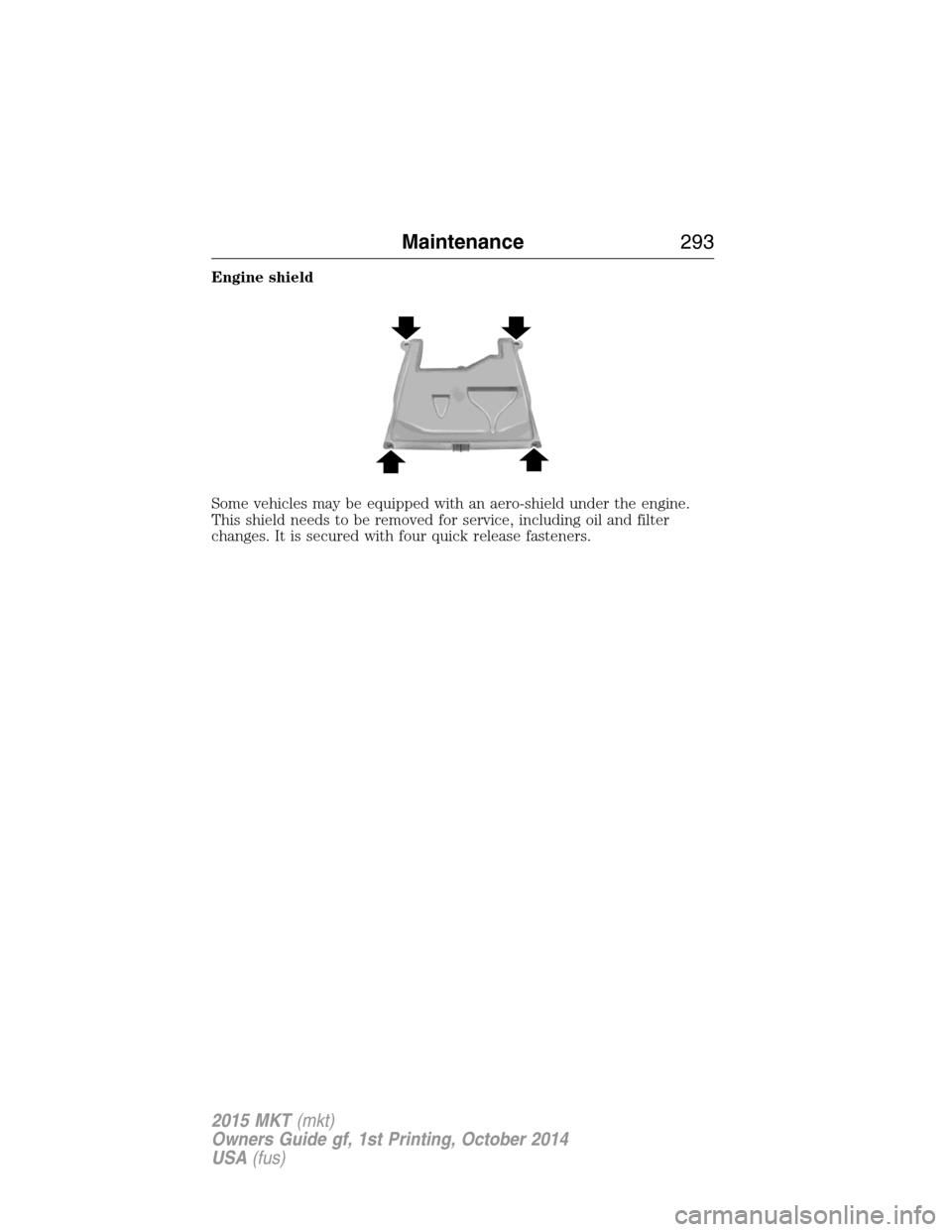
Engine shield
Some vehicles may be equipped with an aero-shield under the engine.
This shield needs to be removed for service, including oil and filter
changes. It is secured with four quick release fasteners.
Maintenance293
2015 MKT(mkt)
Owners Guide gf, 1st Printing, October 2014
USA(fus)
Page 313 of 500
7. Lower the driver’s side of the cover and slide the three tabs on the
cover into the three slots in the housing.
8. Lower the passenger’s side of the cover. Engage the two clamps to
secure the cover to the housing.
ADJUSTING THE HEADLAMPS
The headlamps on your vehicle are properly aimed at the assembly plant.
If your vehicle has been in an accident, an authorized dealer should
check the alignment of your headlamps.
Vertical Aim Adjustment
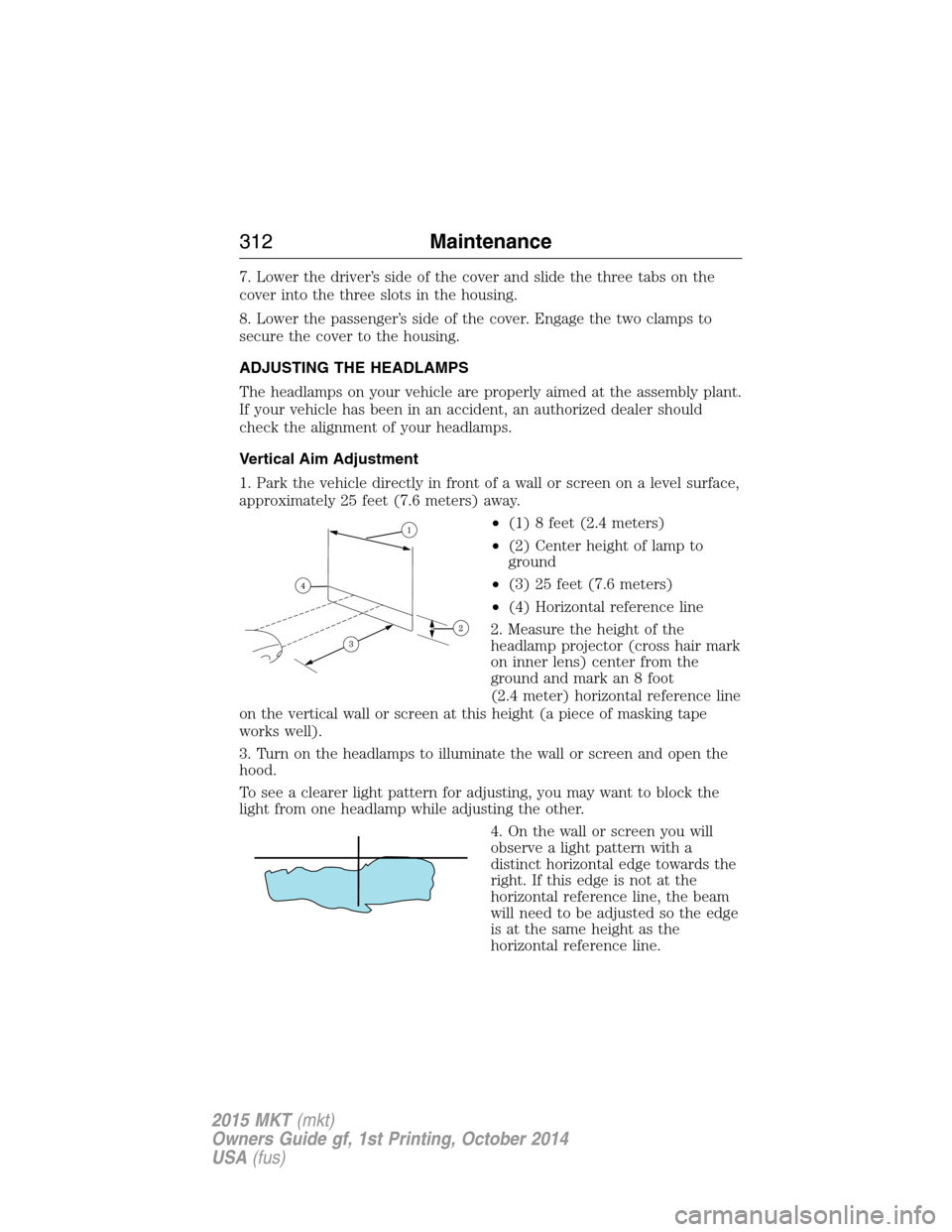
1. Park the vehicle directly in front of a wall or screen on a level surface,
approximately 25 feet (7.6 meters) away.
•(1) 8 feet (2.4 meters)
•(2) Center height of lamp to
ground
•(3) 25 feet (7.6 meters)
•(4) Horizontal reference line
2. Measure the height of the
headlamp projector (cross hair mark
on inner lens) center from the
ground and mark an 8 foot
(2.4 meter) horizontal reference line
on the vertical wall or screen at this height (a piece of masking tape
works well).
3. Turn on the headlamps to illuminate the wall or screen and open the
hood.
To see a clearer light pattern for adjusting, you may want to block the
light from one headlamp while adjusting the other.
4. On the wall or screen you will
observe a light pattern with a
distinct horizontal edge towards the
right. If this edge is not at the
horizontal reference line, the beam
will need to be adjusted so the edge
is at the same height as the
horizontal reference line.
312Maintenance
2015 MKT(mkt)
Owners Guide gf, 1st Printing, October 2014
USA(fus)
Page 346 of 500
The tires on your vehicle have all-weather treads to provide traction in
rain and snow. However, in some climates, you may need to use snow
tires and cables. If you need to use cables, it is recommended that steel
wheels (of the same size and specifications) be used, as cables may chip
aluminum wheels.
Follow these guidelines when using snow tires and chains:
•If possible, avoid fully loading your vehicle.
•Use only SAE Class S snow chains, snow cables or equivalent on the
front axle for P235/55R19 equipped vehicles. The use of snow chains,
snow cables or other traction assist devices that are larger than SAE
Class S may cause damage to your vehicle’s wheel house, suspension
or body.
•Do not install tire chains, cables or optional traction devices on the
rear tires. This could cause damage to the vehicle’s wheel house or
body.
•Do not use tire chains, cables or optional traction devices with
optional 255/45R20 tires.
•Install cable chains securely, verifying that the cables do not touch any
wiring, brake lines or fuel lines.
•Do not exceed 30 mph (48 km/h) with tire cables on your vehicle.
•Drive cautiously. If you hear the cables rub or bang against your
vehicle, stop and retighten the cables. If this does not work, remove
the cables to prevent damage to your vehicle.
•Remove the tire cables when they are no longer needed. Do not use
tire cables on dry roads.
TIRE PRESSURE MONITORING SYSTEM
WARNING:The tire pressure monitoring system is NOT a
substitute for manually checking tire pressure. The tire pressure
should be checked periodically (at least monthly) using a tire gauge.
SeeInflating Your Tiresin this chapter. Failure to properly maintain
your tire pressure could increase the risk of tire failure, loss of control,
vehicle rollover and personal injury.
Each tire, including the spare (if provided), should be checked
monthly when cold and inflated to the inflation pressure
recommended by the vehicle manufacturer on the vehicle
placard or tire inflation pressure label. (If your vehicle has tires of a
Wheels and Tires345
2015 MKT(mkt)
Owners Guide gf, 1st Printing, October 2014
USA(fus)
Page 354 of 500
WARNING:Always use the jack provided as original equipment
with your vehicle. If using a jack other than the one provided as
original equipment with your vehicle, make sure the jack capacity is
adequate for the vehicle weight, including any vehicle cargo or
modifications.
Note:Passengers should not remain in the vehicle when the vehicle is
being jacked.
1. Park on a level surface, set the parking brake and activate the hazard
flashers.
2. Place the transmission in park (P) and turn the engine off.
Non-limousine:If the third row seat is stowed in the floor, you will
need to unstow it to access the spare tire and jack.
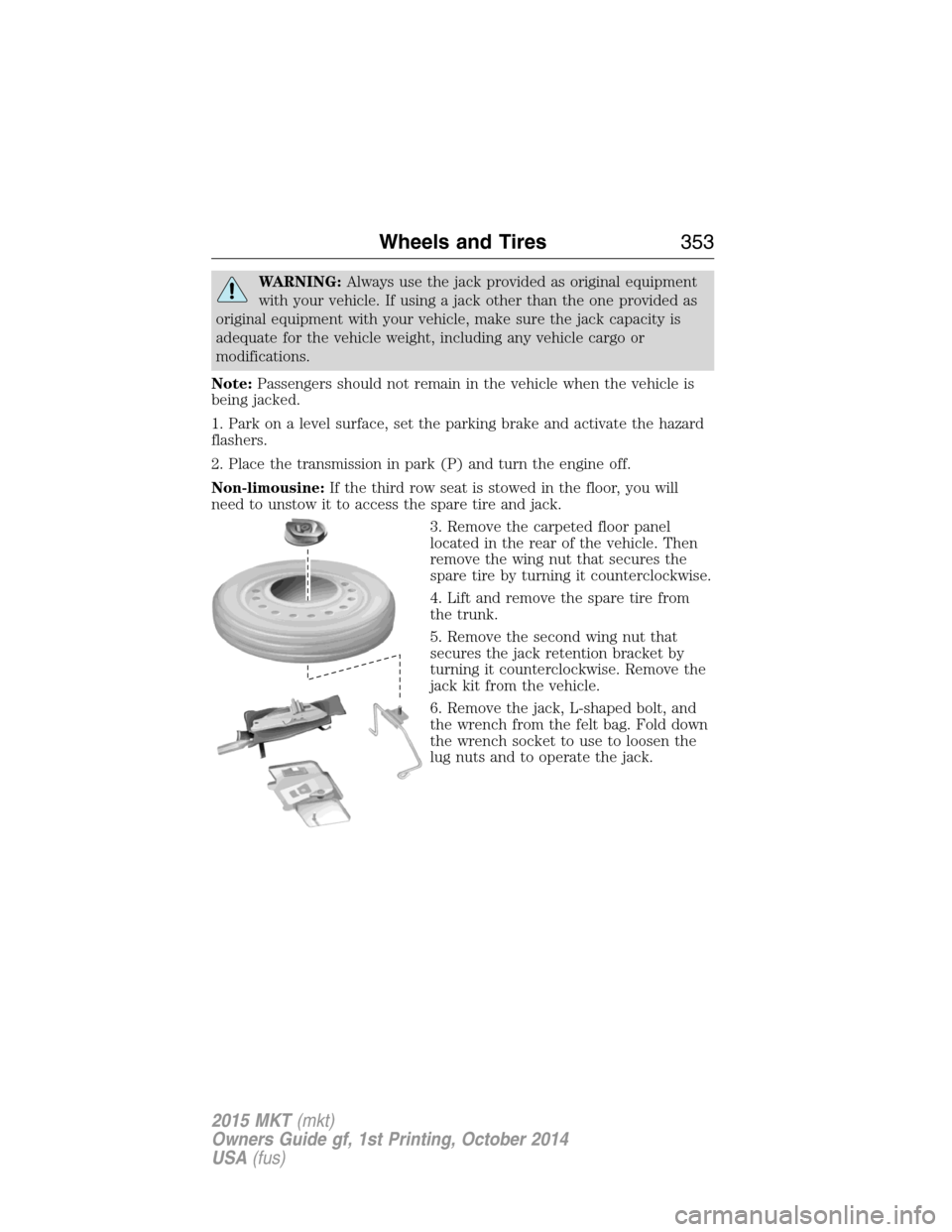
3. Remove the carpeted floor panel
located in the rear of the vehicle. Then
remove the wing nut that secures the
spare tire by turning it counterclockwise.
4. Lift and remove the spare tire from
the trunk.
5. Remove the second wing nut that
secures the jack retention bracket by
turning it counterclockwise. Remove the
jack kit from the vehicle.
6. Remove the jack, L-shaped bolt, and
the wrench from the felt bag. Fold down
the wrench socket to use to loosen the
lug nuts and to operate the jack.
Wheels and Tires353
2015 MKT(mkt)
Owners Guide gf, 1st Printing, October 2014
USA(fus)
Page 355 of 500
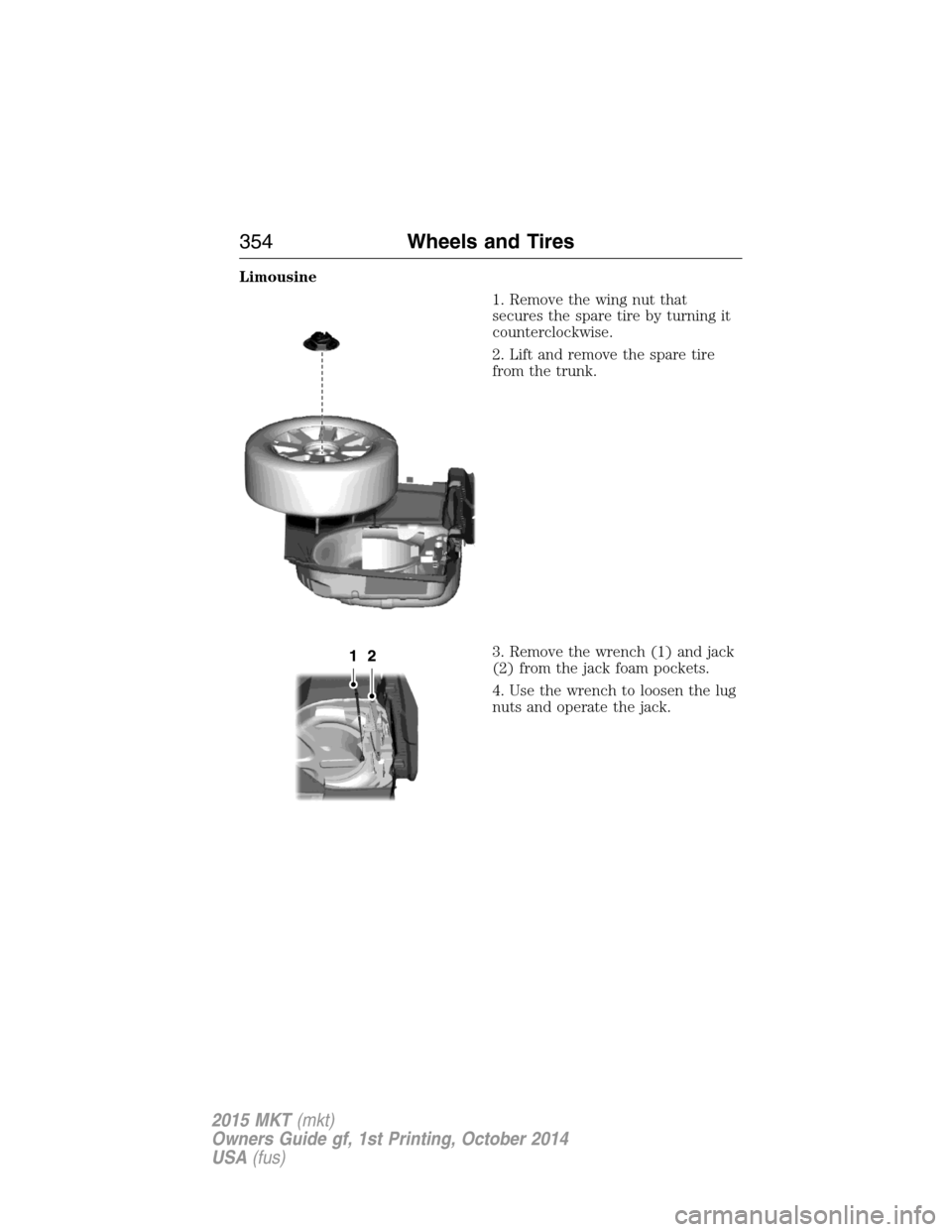
Limousine
1. Remove the wing nut that
secures the spare tire by turning it
counterclockwise.
2. Lift and remove the spare tire
from the trunk.
3. Remove the wrench (1) and jack
(2) from the jack foam pockets.
4. Use the wrench to loosen the lug
nuts and operate the jack.
354Wheels and Tires
2015 MKT(mkt)
Owners Guide gf, 1st Printing, October 2014
USA(fus)
Page 357 of 500
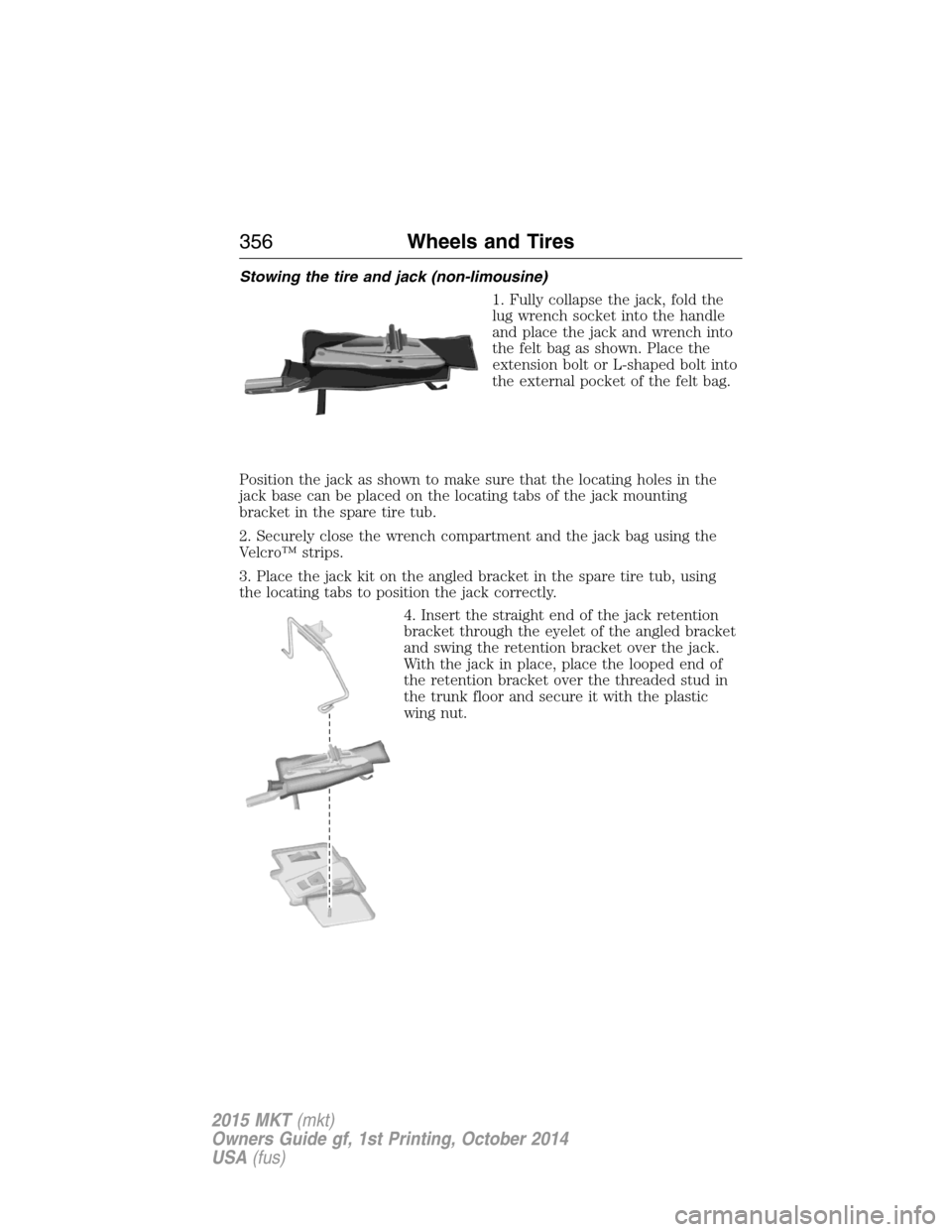
Stowing the tire and jack (non-limousine)
1. Fully collapse the jack, fold the
lug wrench socket into the handle
and place the jack and wrench into
the felt bag as shown. Place the
extension bolt or L-shaped bolt into
the external pocket of the felt bag.
Position the jack as shown to make sure that the locating holes in the
jack base can be placed on the locating tabs of the jack mounting
bracket in the spare tire tub.
2. Securely close the wrench compartment and the jack bag using the
Velcro™ strips.
3. Place the jack kit on the angled bracket in the spare tire tub, using
the locating tabs to position the jack correctly.
4. Insert the straight end of the jack retention
bracket through the eyelet of the angled bracket
and swing the retention bracket over the jack.
With the jack in place, place the looped end of
the retention bracket over the threaded stud in
the trunk floor and secure it with the plastic
wing nut.
356Wheels and Tires
2015 MKT(mkt)
Owners Guide gf, 1st Printing, October 2014
USA(fus)
Page 358 of 500
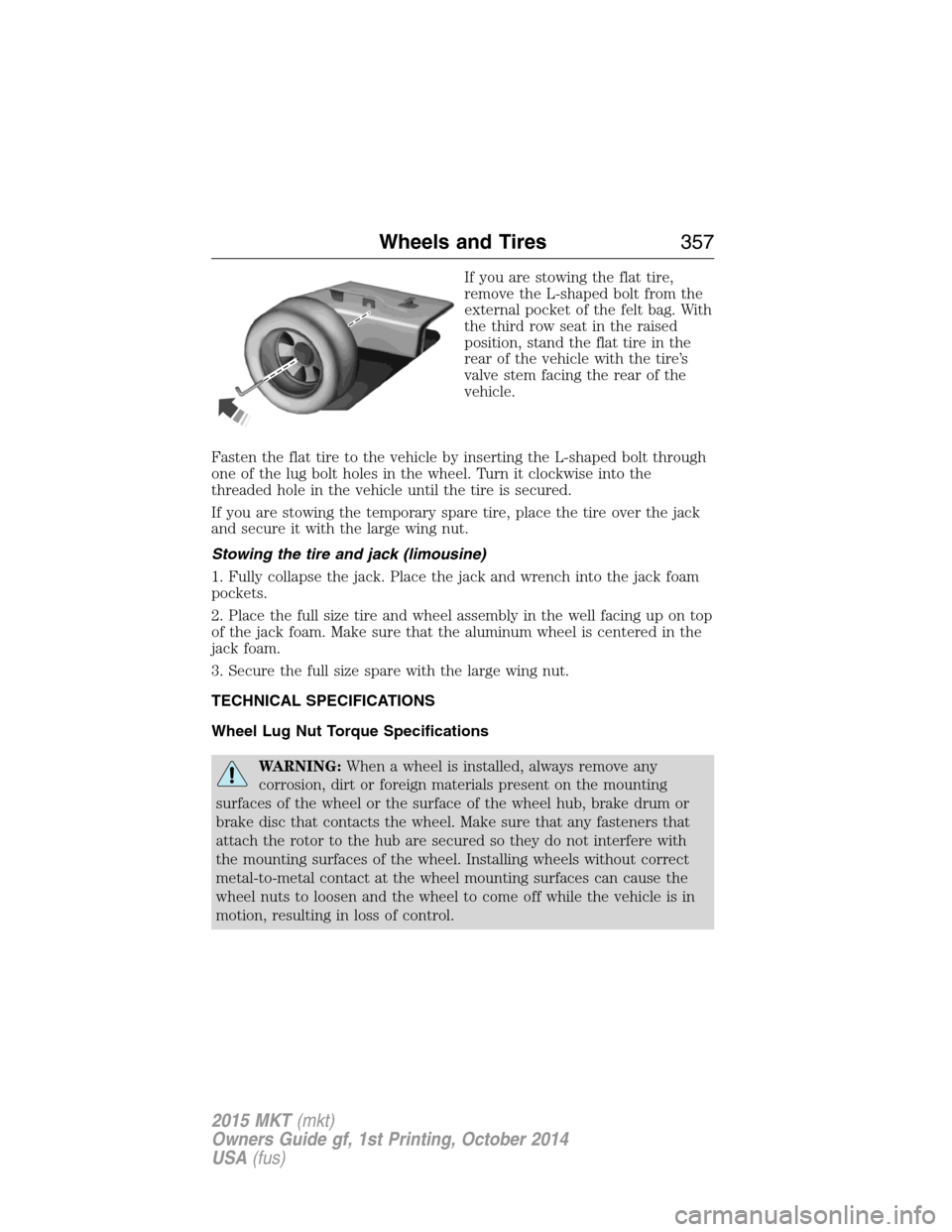
If you are stowing the flat tire,
remove the L-shaped bolt from the
external pocket of the felt bag. With
the third row seat in the raised
position, stand the flat tire in the
rear of the vehicle with the tire’s
valve stem facing the rear of the
vehicle.
Fasten the flat tire to the vehicle by inserting the L-shaped bolt through
one of the lug bolt holes in the wheel. Turn it clockwise into the
threaded hole in the vehicle until the tire is secured.
If you are stowing the temporary spare tire, place the tire over the jack
and secure it with the large wing nut.
Stowing the tire and jack (limousine)
1. Fully collapse the jack. Place the jack and wrench into the jack foam
pockets.
2. Place the full size tire and wheel assembly in the well facing up on top
of the jack foam. Make sure that the aluminum wheel is centered in the
jack foam.
3. Secure the full size spare with the large wing nut.
TECHNICAL SPECIFICATIONS
Wheel Lug Nut Torque Specifications
WARNING:When a wheel is installed, always remove any
corrosion, dirt or foreign materials present on the mounting
surfaces of the wheel or the surface of the wheel hub, brake drum or
brake disc that contacts the wheel. Make sure that any fasteners that
attach the rotor to the hub are secured so they do not interfere with
the mounting surfaces of the wheel. Installing wheels without correct
metal-to-metal contact at the wheel mounting surfaces can cause the
wheel nuts to loosen and the wheel to come off while the vehicle is in
motion, resulting in loss of control.
Wheels and Tires357
2015 MKT(mkt)
Owners Guide gf, 1st Printing, October 2014
USA(fus)
Page 369 of 500
ACCESSORIES
For a complete listing of the accessories that are available for your
vehicle, please contact an authorized dealer or visit our online store at:
www.Accessories.Lincoln.com (United States only).
Lincoln Motor Company will repair or replace any properly authorized
dealer-installed Lincoln Genuine Accessory found to be defective in
factory-supplied materials or workmanship during the warranty period, as
well as any component damaged by the defective accessories.
Lincoln Motor Company will warrant your accessory through the
warranty that provides the greatest benefit:
•24 months, unlimited mileage.
•The remainder of your new vehicle limited warranty.
Contact an authorized dealer for details and a copy of the warranty.
Exterior style
•Side window deflectors
Interior style
•Floor mats•Rear seat entertainment*
Lifestyle
•Ash cup / smoker’s package•Cargo organization and
management
•Conversation mirror•Trailer towing accessories
•Hitch-mounted bike carrier
Peace of mind
•Remote start•Wheel locks
•Vehicle security•Locking fuel plug
*The accessory manufacturer designs, develops and therefore warrants
Lincoln Licensed Accessories, and does not design or test these
accessories to Lincoln Motor Company engineering requirements.
Contact an authorized Lincoln dealer for the manufacturer’s limited
warranty details, and request a copy of the Lincoln Licensed Accessories
product limited warranty from the accessory manufacturer.
368Accessories
2015 MKT(mkt)
Owners Guide gf, 1st Printing, October 2014
USA(fus)
Page 373 of 500
Interest Free Finance Options Available
Take advantage of our interest free installment payment plan. Just a 10%
down payment will provide you with an affordable, no interest, no fee
payment program allowing you all the security and benefits Ford ESP
has to offer while paying over time. You are pre-approved with no credit
checks, no hassles! To learn more, call our Ford ESP specialists at
800-367-3377.
Ford ESP
PO Box 8072
Royal Oak Michigan 48068-0039
SERVICE PLANS (CANADA ONLY)
You can get more protection for your vehicle by purchasing a Ford
Extended Service Plan. Ford Extended Service Plan is the only service
contract backed by Ford Motor Company of Canada, Limited. Depending
on the plan you purchase, Ford Extended Service Plan provides benefits
such as:
•Rental reimbursement.
•Coverage for certain maintenance and wear items.
•Protection against repair costs after your New Vehicle Limited
Warranty Coverage expires.
•Roadside Assistance benefits.
There are several Ford Extended Service Plans available in various time,
distance and deductible combinations. Each plan is tailored to fit your
own driving needs, including reimbursement for towing and rental. When
you purchase Ford Extended Service Plan, you receive added
peace-of-mind protection throughout Canada and the United States,
provided by a network of participating Ford Motor Company dealers.
Note:Repairs performed outside of Canada and the United States are
not eligible for Ford Extended Service Plan coverage.
This information is subject to change. For more information, visit your
local Ford of Canada dealer or www.ford.ca to find the Ford Extended
Service Plan that is right for you.
372Extended Service Plan
2015 MKT(mkt)
Owners Guide gf, 1st Printing, October 2014
USA(fus)
Page 385 of 500
Privacy information
When a cellular phone is connected to SYNC®, SYNC® creates a profile
within your vehicle that is linked to that cellular phone. This profile is
created in order to offer you more cellular features and to operate more
efficiently. Among other things, this profile may contain data about your
cellular phone book, text messages (read and unread), and call history,
including history of calls when your cell phone was not connected to
SYNC®. In addition, if you connect a media device, SYNC® creates and
retains an index of media content supported by SYNC®. SYNC® also
records a short development log of approximately 10 minutes of all
recent SYNC® activity. The log profile and other SYNC® data may be
used to improve SYNC® and help diagnose any problems that may occur.
The cellular profile, media device index, and development log will remain
in the vehicle unless you delete it and are generally accessible only in
the vehicle when the cellular phone or media player is connected. If you
no longer plan to use SYNC® or the vehicle, we recommend you perform
a Master Reset to erase all information stored in SYNC®.
SYNC® data cannot be accessed without special equipment and access
to the vehicle’s SYNC® module. Ford Motor Company and Ford of
Canada will not access SYNC® data for any purpose other than as
described absent consent, a court order, or where required by law
enforcement, other government authorities, or other third parties acting
with lawful authority. Other parties may seek to access the information
independently of Ford Motor Company and Ford of Canada. For further
privacy information, see the sections on 911 Assist™ (if equipped),
Vehicle Health Report (if equipped), and Traffic, Directions and
Information (if equipped).
Privacy Notice for GPS Mapping with MyLincoln Mobile in the
United States and Canada
MyLincoln Mobile allows for GPS mapping when a vehicle is registered to
a MyLincoln Mobile account. To remove the vehicle from the account,
thereby removing GPS mapping ability, a Master Reset can be performed
in the vehicle. SeeSettingsin the MyLincoln Touch chapter.
Prior to transferring ownership of a vehicle, owners may choose to
execute a Master Reset or Factory Reset (completed via the MyLincoln
Mobile website). Either method will remove the vehicle from all
MyLincoln Mobile accounts.
384MyLincoln Touch™
2015 MKT(mkt)
Owners Guide gf, 1st Printing, October 2014
USA(fus)