ignition LINCOLN MKT 2015 Owner's Guide
[x] Cancel search | Manufacturer: LINCOLN, Model Year: 2015, Model line: MKT, Model: LINCOLN MKT 2015Pages: 500, PDF Size: 4.94 MB
Page 124 of 500
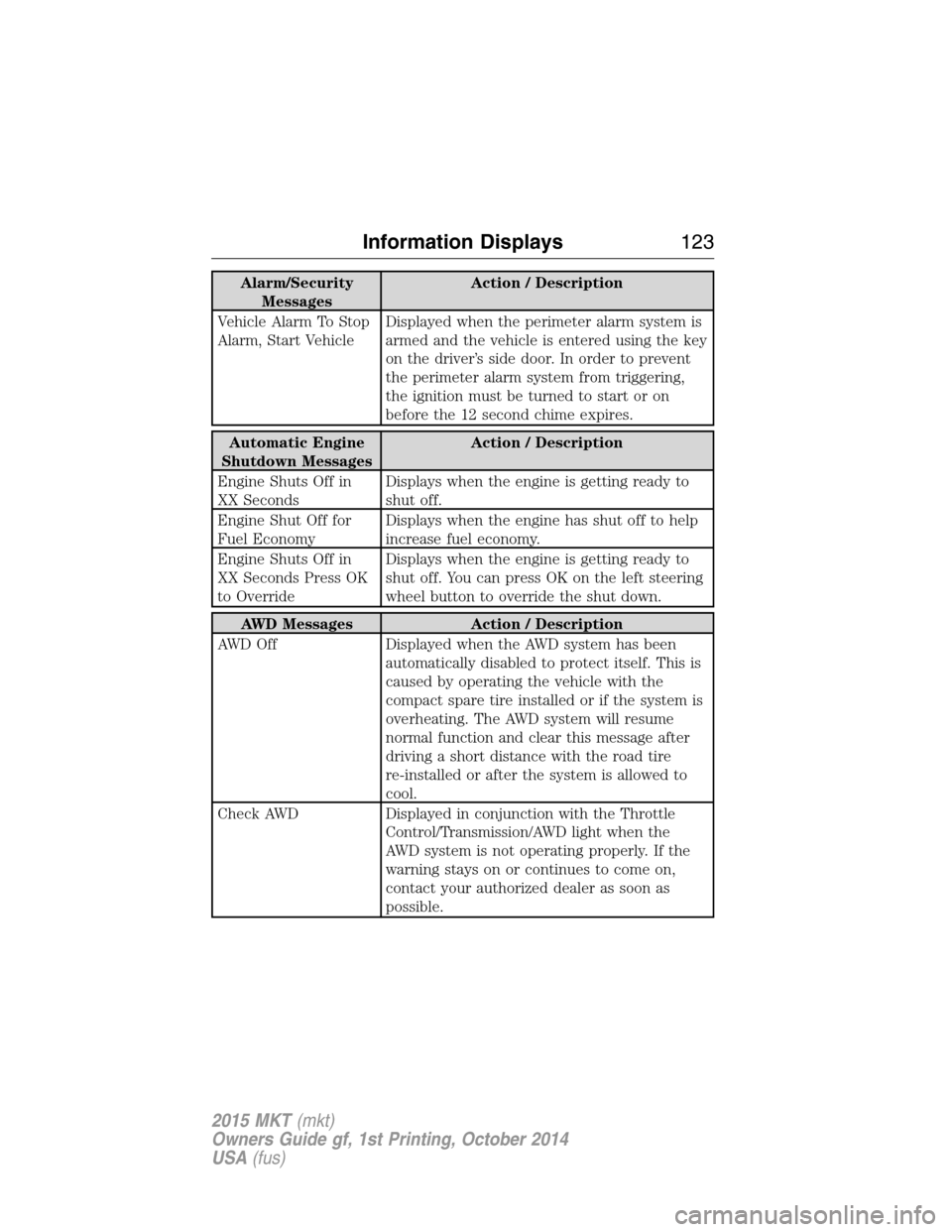
Alarm/Security
MessagesAction / Description
Vehicle Alarm To Stop
Alarm, Start VehicleDisplayed when the perimeter alarm system is
armed and the vehicle is entered using the key
on the driver’s side door. In order to prevent
the perimeter alarm system from triggering,
the ignition must be turned to start or on
before the 12 second chime expires.
Automatic Engine
Shutdown MessagesAction / Description
Engine Shuts Off in
XX SecondsDisplays when the engine is getting ready to
shut off.
Engine Shut Off for
Fuel EconomyDisplays when the engine has shut off to help
increase fuel economy.
Engine Shuts Off in
XX Seconds Press OK
to OverrideDisplays when the engine is getting ready to
shut off. You can press OK on the left steering
wheel button to override the shut down.
AWD Messages Action / Description
AWD Off Displayed when the AWD system has been
automatically disabled to protect itself. This is
caused by operating the vehicle with the
compact spare tire installed or if the system is
overheating. The AWD system will resume
normal function and clear this message after
driving a short distance with the road tire
re-installed or after the system is allowed to
cool.
Check AWD Displayed in conjunction with the Throttle
Control/Transmission/AWD light when the
AWD system is not operating properly. If the
warning stays on or continues to come on,
contact your authorized dealer as soon as
possible.
Information Displays123
2015 MKT(mkt)
Owners Guide gf, 1st Printing, October 2014
USA(fus)
Page 125 of 500
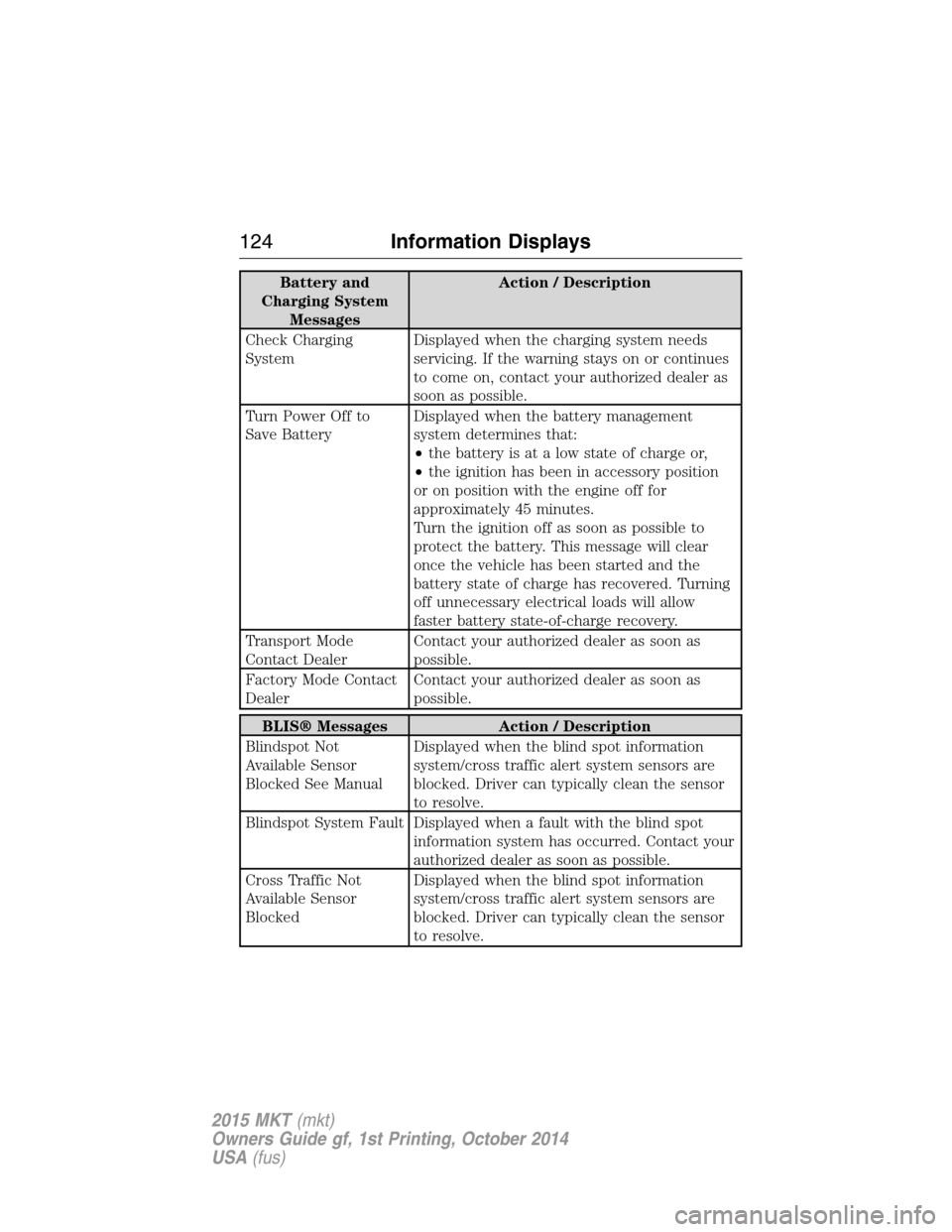
Battery and
Charging System
MessagesAction / Description
Check Charging
SystemDisplayed when the charging system needs
servicing. If the warning stays on or continues
to come on, contact your authorized dealer as
soon as possible.
Turn Power Off to
Save BatteryDisplayed when the battery management
system determines that:
•the battery is at a low state of charge or,
•the ignition has been in accessory position
or on position with the engine off for
approximately 45 minutes.
Turn the ignition off as soon as possible to
protect the battery. This message will clear
once the vehicle has been started and the
battery state of charge has recovered. Turning
off unnecessary electrical loads will allow
faster battery state-of-charge recovery.
Transport Mode
Contact DealerContact your authorized dealer as soon as
possible.
Factory Mode Contact
DealerContact your authorized dealer as soon as
possible.
BLIS® Messages Action / Description
Blindspot Not
Available Sensor
Blocked See ManualDisplayed when the blind spot information
system/cross traffic alert system sensors are
blocked. Driver can typically clean the sensor
to resolve.
Blindspot System Fault Displayed when a fault with the blind spot
information system has occurred. Contact your
authorized dealer as soon as possible.
Cross Traffic Not
Available Sensor
BlockedDisplayed when the blind spot information
system/cross traffic alert system sensors are
blocked. Driver can typically clean the sensor
to resolve.
124Information Displays
2015 MKT(mkt)
Owners Guide gf, 1st Printing, October 2014
USA(fus)
Page 128 of 500
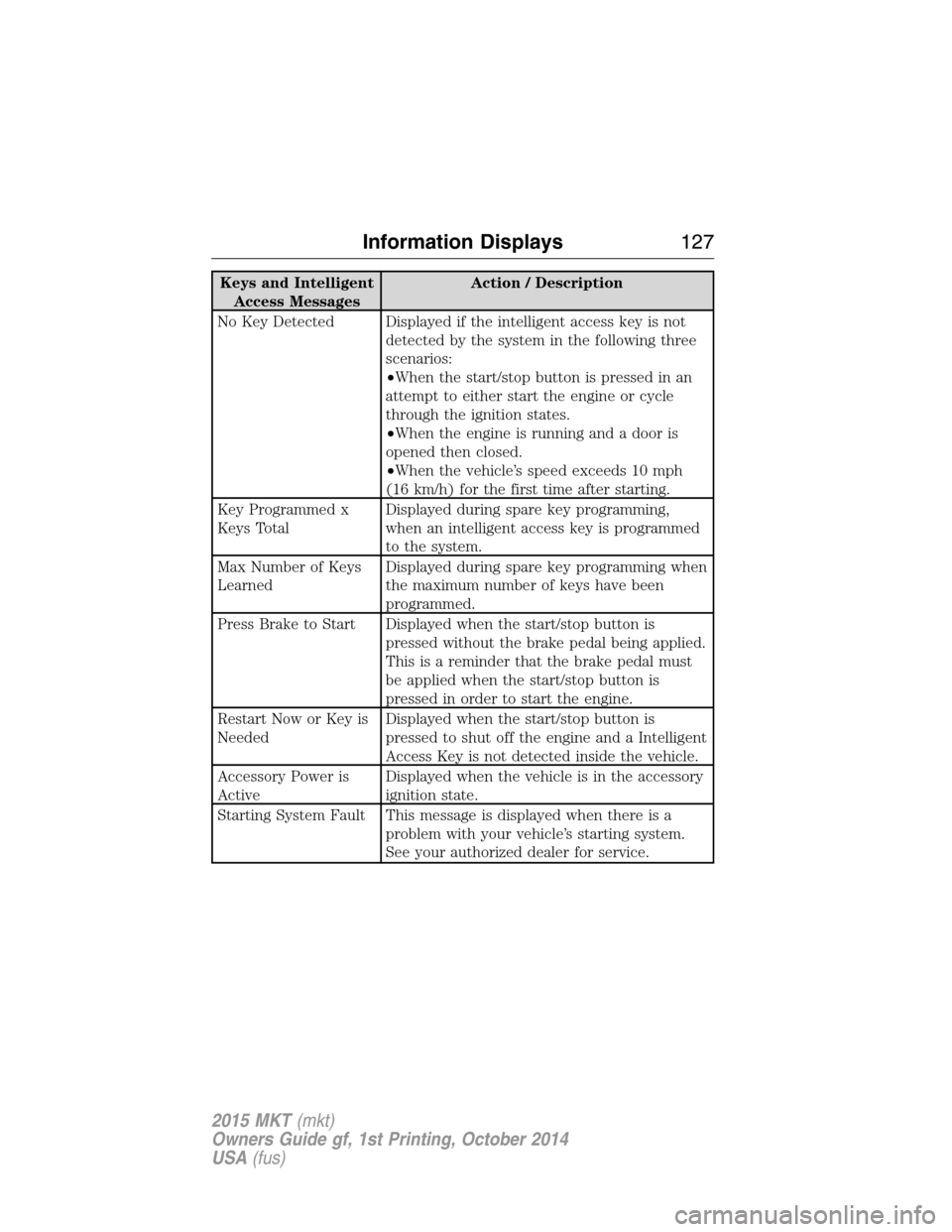
Keys and Intelligent
Access MessagesAction / Description
No Key Detected Displayed if the intelligent access key is not
detected by the system in the following three
scenarios:
•When the start/stop button is pressed in an
attempt to either start the engine or cycle
through the ignition states.
•When the engine is running and a door is
opened then closed.
•When the vehicle’s speed exceeds 10 mph
(16 km/h) for the first time after starting.
Key Programmed x
Keys TotalDisplayed during spare key programming,
when an intelligent access key is programmed
to the system.
Max Number of Keys
LearnedDisplayed during spare key programming when
the maximum number of keys have been
programmed.
Press Brake to Start Displayed when the start/stop button is
pressed without the brake pedal being applied.
This is a reminder that the brake pedal must
be applied when the start/stop button is
pressed in order to start the engine.
Restart Now or Key is
NeededDisplayed when the start/stop button is
pressed to shut off the engine and a Intelligent
Access Key is not detected inside the vehicle.
Accessory Power is
ActiveDisplayed when the vehicle is in the accessory
ignition state.
Starting System Fault This message is displayed when there is a
problem with your vehicle’s starting system.
See your authorized dealer for service.
Information Displays127
2015 MKT(mkt)
Owners Guide gf, 1st Printing, October 2014
USA(fus)
Page 137 of 500
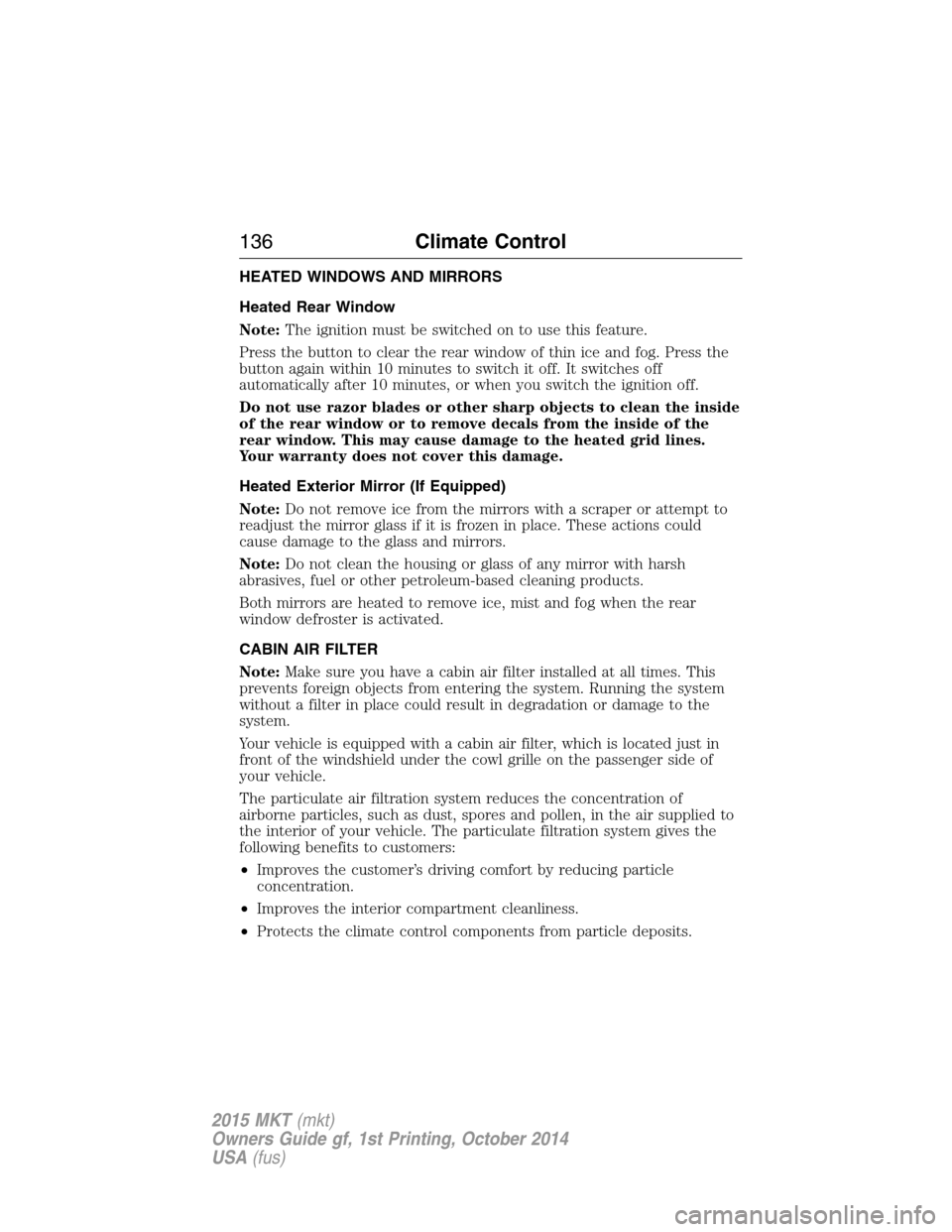
HEATED WINDOWS AND MIRRORS
Heated Rear Window
Note:The ignition must be switched on to use this feature.
Press the button to clear the rear window of thin ice and fog. Press the
button again within 10 minutes to switch it off. It switches off
automatically after 10 minutes, or when you switch the ignition off.
Do not use razor blades or other sharp objects to clean the inside
of the rear window or to remove decals from the inside of the
rear window. This may cause damage to the heated grid lines.
Your warranty does not cover this damage.
Heated Exterior Mirror (If Equipped)
Note:Do not remove ice from the mirrors with a scraper or attempt to
readjust the mirror glass if it is frozen in place. These actions could
cause damage to the glass and mirrors.
Note:Do not clean the housing or glass of any mirror with harsh
abrasives, fuel or other petroleum-based cleaning products.
Both mirrors are heated to remove ice, mist and fog when the rear
window defroster is activated.
CABIN AIR FILTER
Note:Make sure you have a cabin air filter installed at all times. This
prevents foreign objects from entering the system. Running the system
without a filter in place could result in degradation or damage to the
system.
Your vehicle is equipped with a cabin air filter, which is located just in
front of the windshield under the cowl grille on the passenger side of
your vehicle.
The particulate air filtration system reduces the concentration of
airborne particles, such as dust, spores and pollen, in the air supplied to
the interior of your vehicle. The particulate filtration system gives the
following benefits to customers:
•Improves the customer’s driving comfort by reducing particle
concentration.
•Improves the interior compartment cleanliness.
•Protects the climate control components from particle deposits.
136Climate Control
2015 MKT(mkt)
Owners Guide gf, 1st Printing, October 2014
USA(fus)
Page 138 of 500
For more information regarding the interval at which you should replace
the cabin air filter, see theScheduled Maintenancechapter.
For additional cabin air filter information, or to replace the filter, see an
authorized dealer.
REMOTE START (IF EQUIPPED)
The remote start feature allows you to pre-condition the interior of your
vehicle. The climate control system works to achieve comfort according
to your previous settings.
Note:You cannot adjust the system during remote start operation.
Turn the ignition on to return the system to its previous settings. You
can now make adjustments normally, but you need to turn certain
vehicle-dependent features back on, such as:
•Heated seats.
•Cooled seats.
•Heated steering wheel.
•Heated mirrors.
•Heated rear window.
You can adjust the default remote start settings using the information
display controls. See theInformation Displayschapter.
Automatic Settings
In hot weather, the system is set to 72°F (22°C). The cooled seats are
set to high (if available, and selected to AUTO in the information
display).
In moderate weather, the system either heats or cools (based on
previous settings). The rear defroster, heated mirrors and heated seats
do not automatically turn on.
In cold weather, the system is set to 72°F (22°C). The heated seats are
set to high (if available, and selected to AUTO in the information
display). The rear defroster and heated mirrors automatically turn on.
Climate Control137
2015 MKT(mkt)
Owners Guide gf, 1st Printing, October 2014
USA(fus)
Page 145 of 500
Four-Way Power Lumbar (If Equipped)
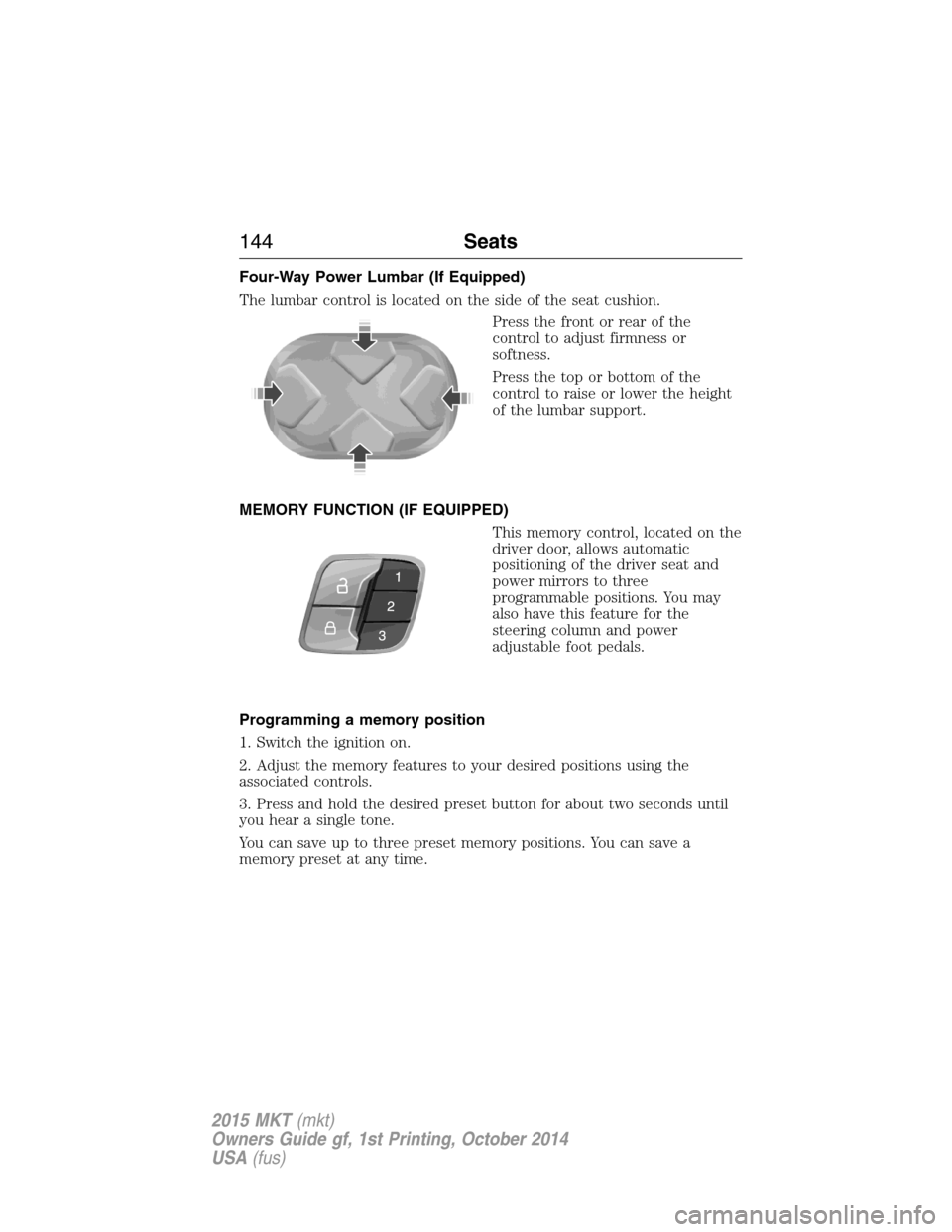
The lumbar control is located on the side of the seat cushion.
Press the front or rear of the
control to adjust firmness or
softness.
Press the top or bottom of the
control to raise or lower the height
of the lumbar support.
MEMORY FUNCTION (IF EQUIPPED)
This memory control, located on the
driver door, allows automatic
positioning of the driver seat and
power mirrors to three
programmable positions. You may
also have this feature for the
steering column and power
adjustable foot pedals.
Programming a memory position
1. Switch the ignition on.
2. Adjust the memory features to your desired positions using the
associated controls.
3. Press and hold the desired preset button for about two seconds until
you hear a single tone.
You can save up to three preset memory positions. You can save a
memory preset at any time.
144Seats
2015 MKT(mkt)
Owners Guide gf, 1st Printing, October 2014
USA(fus)
Page 146 of 500
Recalling a memory position
Press and release the desired memory preset button to recall a saved
memory position.
You can recall a programmed memory position:
•In any gearshift position if the ignition is not on.
•Only in park (P) or neutral (N) if the ignition is on.
Recalling a memory position with the remote control
The memory positions are also recalled when you press unlock on your
remote control (if the transmitter is programmed to a memory position),
activate intelligent access, or, when you enter a valid personal entry code
that is programmed to a memory position.
To program the memory feature to a remote control, see theKeys and
Remote Controlchapter.
Easy Access and Easy-Out Feature (If Equipped)
This feature can move the seat rearward and the steering column up and
forward to allow extra room to exit the vehicle.
This occurs when:
•You place the transmission in neutral (N) or park (P).
•You switch the keyless ignition off or take the key out of the ignition
switch.
The seat and steering wheel will move to their original positions when:
•You place the transmission in neutral (N) or park (P).
•You switch the keyless ignition on or put the key in the ignition
switch.
Switch the Easy Entry/Exit feature on or off through the information
display settings menu. See theInformation Displayschapter.
Seats145
2015 MKT(mkt)
Owners Guide gf, 1st Printing, October 2014
USA(fus)
Page 147 of 500
HEATED SEATS (IF EQUIPPED)
WARNING:Persons who are unable to feel pain to the skin
because of advanced age, chronic illness, diabetes, spinal cord
injury, medication, alcohol use, exhaustion, or other physical conditions,
must exercise care when using the seat heater. The seat heater may
cause burns even at low temperatures, especially if used for long
periods of time. Do not place anything on the seat that insulates against
heat, such as a blanket or cushion, because this may cause the seat
heater to overheat. Do not puncture the seat with pins, needles, or
other pointed objects because this may damage the heating element
which may cause the seat heater to overheat. An overheated seat may
cause serious personal injury.
The heated seats will only function when the ignition is in the on
position.
Note:Do not do the following:
•Place heavy objects on the seat
•Operate the seat heater if water or any other liquid is spilled on the
seat. Allow the seat to dry thoroughly.
To operate the heated seats:
Press the heated seat symbol to cycle through the various
heat settings and off. Warmer settings are indicated by
more indicator lights.
Second-Row Climate Controlled Seats (If Equipped)
The second-row climate controlled seat controls are located on the rear
of the floor console. They function the same as the front-row climate
controlled seats.
Second-Row Climate Controlled Seats Air Filter Replacement
The climate controlled seat system includes air filters that must be
replaced periodically. See thescheduled maintenance information.
There is an air filter located under the rear of each second-row seat.
Tumble the seat forward to access the filter.
146Seats
2015 MKT(mkt)
Owners Guide gf, 1st Printing, October 2014
USA(fus)
Page 152 of 500
Power Fold and Tumble Seat (If Equipped)
WARNING:Make sure that the seat is unoccupied when folding
it down. Folding the seat while occupied could result in occupant
injury or damage to the seat.
This feature is available for the right-hand seat on seven-passenger
vehicles and on both sides for six-passenger vehicles.
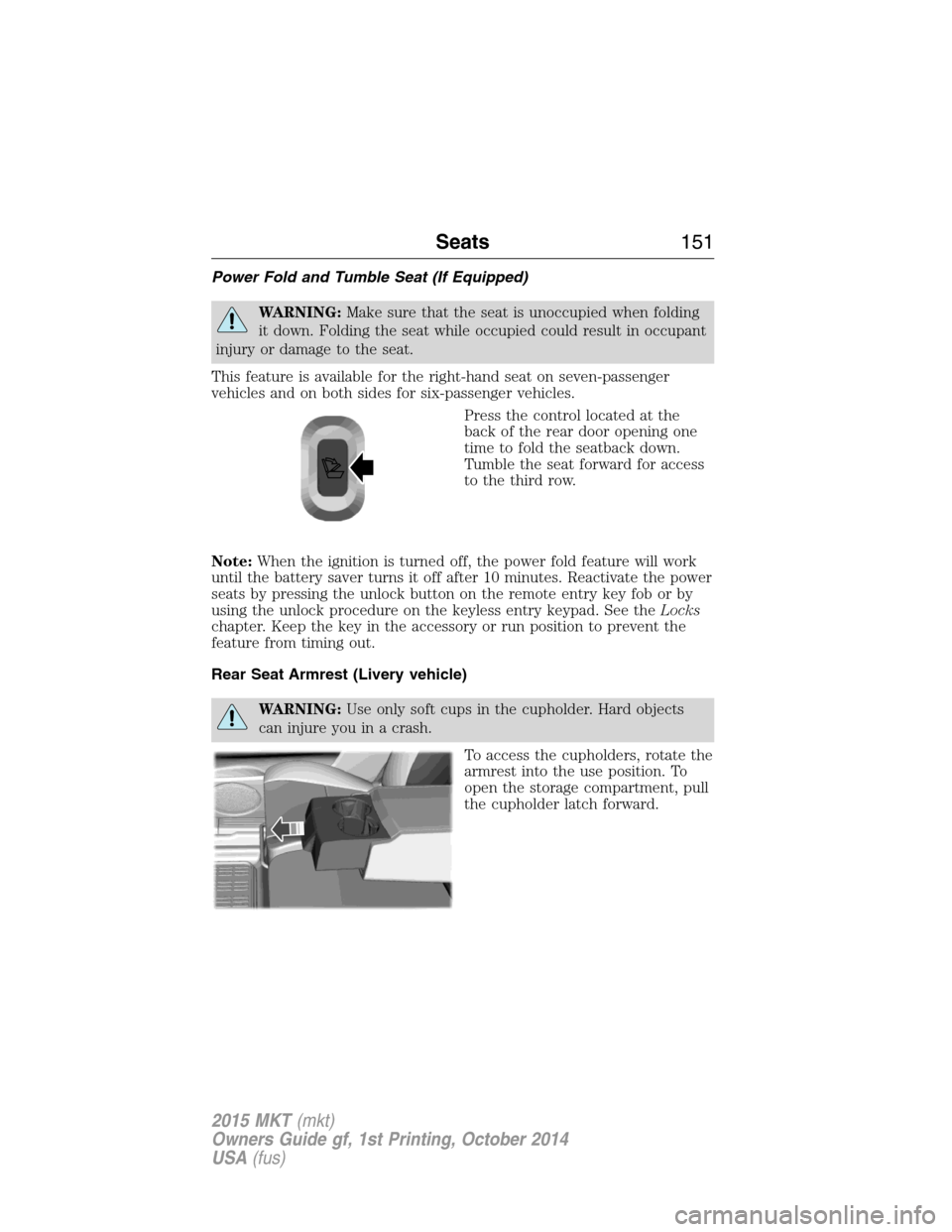
Press the control located at the
back of the rear door opening one
time to fold the seatback down.
Tumble the seat forward for access
to the third row.
Note:When the ignition is turned off, the power fold feature will work
until the battery saver turns it off after 10 minutes. Reactivate the power
seats by pressing the unlock button on the remote entry key fob or by
using the unlock procedure on the keyless entry keypad. See theLocks
chapter. Keep the key in the accessory or run position to prevent the
feature from timing out.
Rear Seat Armrest (Livery vehicle)
WARNING:Use only soft cups in the cupholder. Hard objects
can injure you in a crash.
To access the cupholders, rotate the
armrest into the use position. To
open the storage compartment, pull
the cupholder latch forward.
Seats151
2015 MKT(mkt)
Owners Guide gf, 1st Printing, October 2014
USA(fus)
Page 159 of 500
Note:The power fold seats work only when the transmission is in park
(P) and the tailgate is open. If the ignition is off and the feature is still
running, the battery saver will turn it off after 10 minutes. You can
reactivate the power seats by pressing the unlock button on the remote
entry key fob or by using the unlock procedure on the keyless entry
keypad. SeeSecuriCode keyless keypadin theLockschapter. Keep the
key in the accessory or run position to prevent the feature from timing
out.
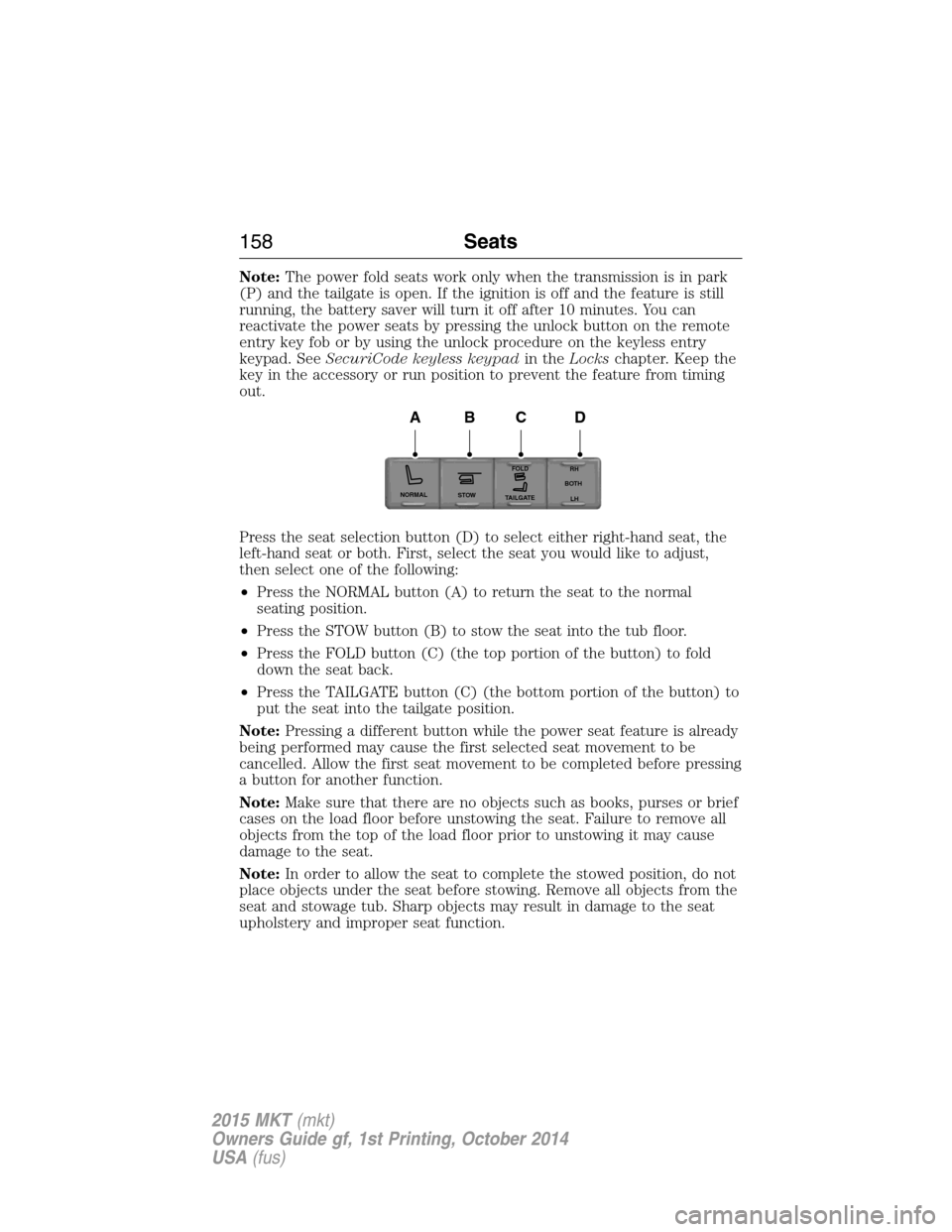
Press the seat selection button (D) to select either right-hand seat, the
left-hand seat or both. First, select the seat you would like to adjust,
then select one of the following:
•Press the NORMAL button (A) to return the seat to the normal
seating position.
•Press the STOW button (B) to stow the seat into the tub floor.
•Press the FOLD button (C) (the top portion of the button) to fold
down the seat back.
•Press the TAILGATE button (C) (the bottom portion of the button) to
put the seat into the tailgate position.
Note:Pressing a different button while the power seat feature is already
being performed may cause the first selected seat movement to be
cancelled. Allow the first seat movement to be completed before pressing
a button for another function.
Note:Make sure that there are no objects such as books, purses or brief
cases on the load floor before unstowing the seat. Failure to remove all
objects from the top of the load floor prior to unstowing it may cause
damage to the seat.
Note:In order to allow the seat to complete the stowed position, do not
place objects under the seat before stowing. Remove all objects from the
seat and stowage tub. Sharp objects may result in damage to the seat
upholstery and improper seat function.
NORMAL
STOWRH
BOTH
LH
FOLD
TA I L G AT E
ABCD
158Seats
2015 MKT(mkt)
Owners Guide gf, 1st Printing, October 2014
USA(fus)