seats LINCOLN MKT 2015 Repair Manual
[x] Cancel search | Manufacturer: LINCOLN, Model Year: 2015, Model line: MKT, Model: LINCOLN MKT 2015Pages: 500, PDF Size: 4.94 MB
Page 286 of 500
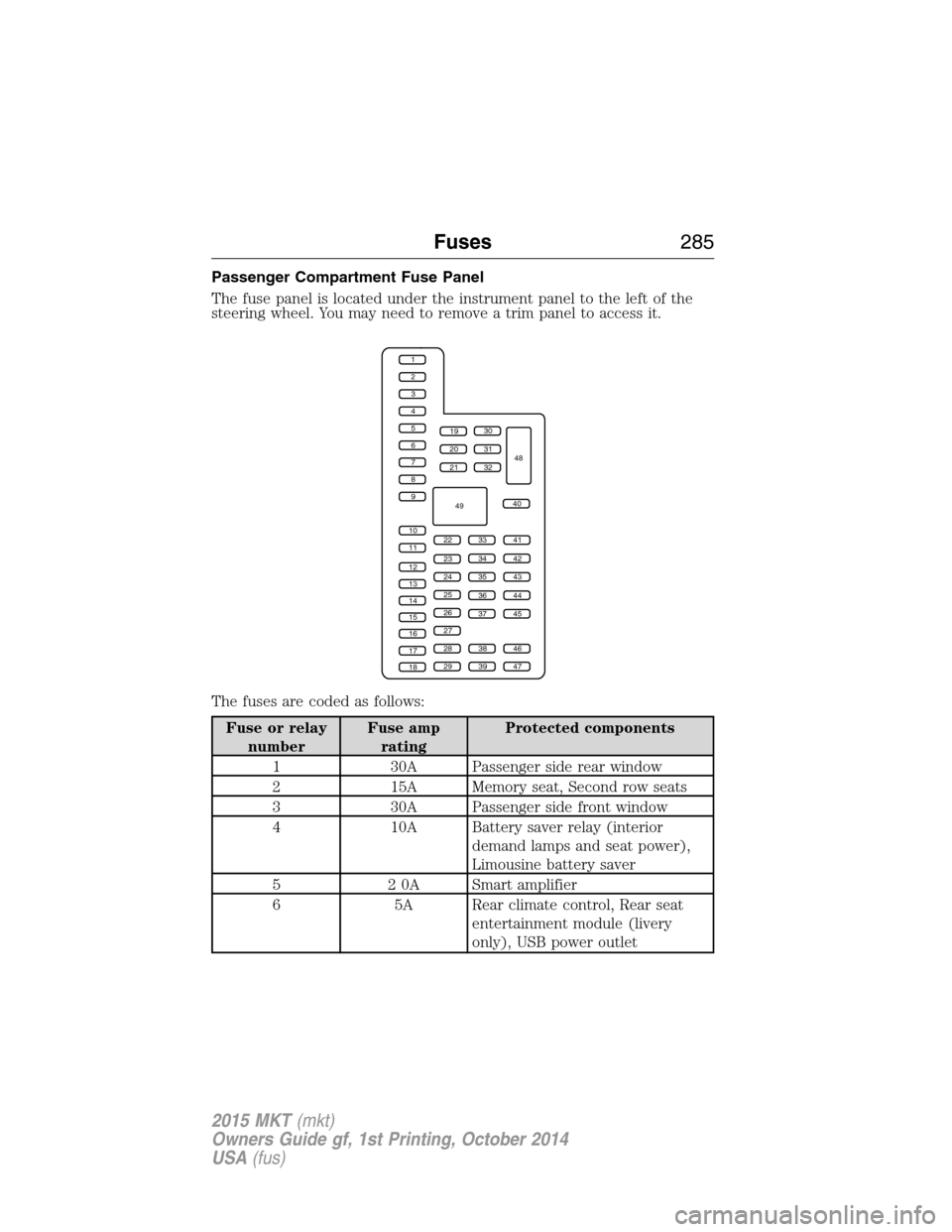
Passenger Compartment Fuse Panel
The fuse panel is located under the instrument panel to the left of the
steering wheel. You may need to remove a trim panel to access it.
The fuses are coded as follows:
Fuse or relay
numberFuse amp
ratingProtected components
1 30A Passenger side rear window
2 15A Memory seat, Second row seats
3 30A Passenger side front window
4 10A Battery saver relay (interior
demand lamps and seat power),
Limousine battery saver
5 2 0A Smart amplifier
6 5A Rear climate control, Rear seat
entertainment module (livery
only), USB power outlet
1
2
3
4
5
6
7
8
9
10
11
12
13
14
15
16
17
18
19
20
21
223341
42
43
44
45
34
35
36
37
23
24
25
26
27
283846
394729
32
40
31
30
48
49
Fuses285
2015 MKT(mkt)
Owners Guide gf, 1st Printing, October 2014
USA(fus)
Page 287 of 500
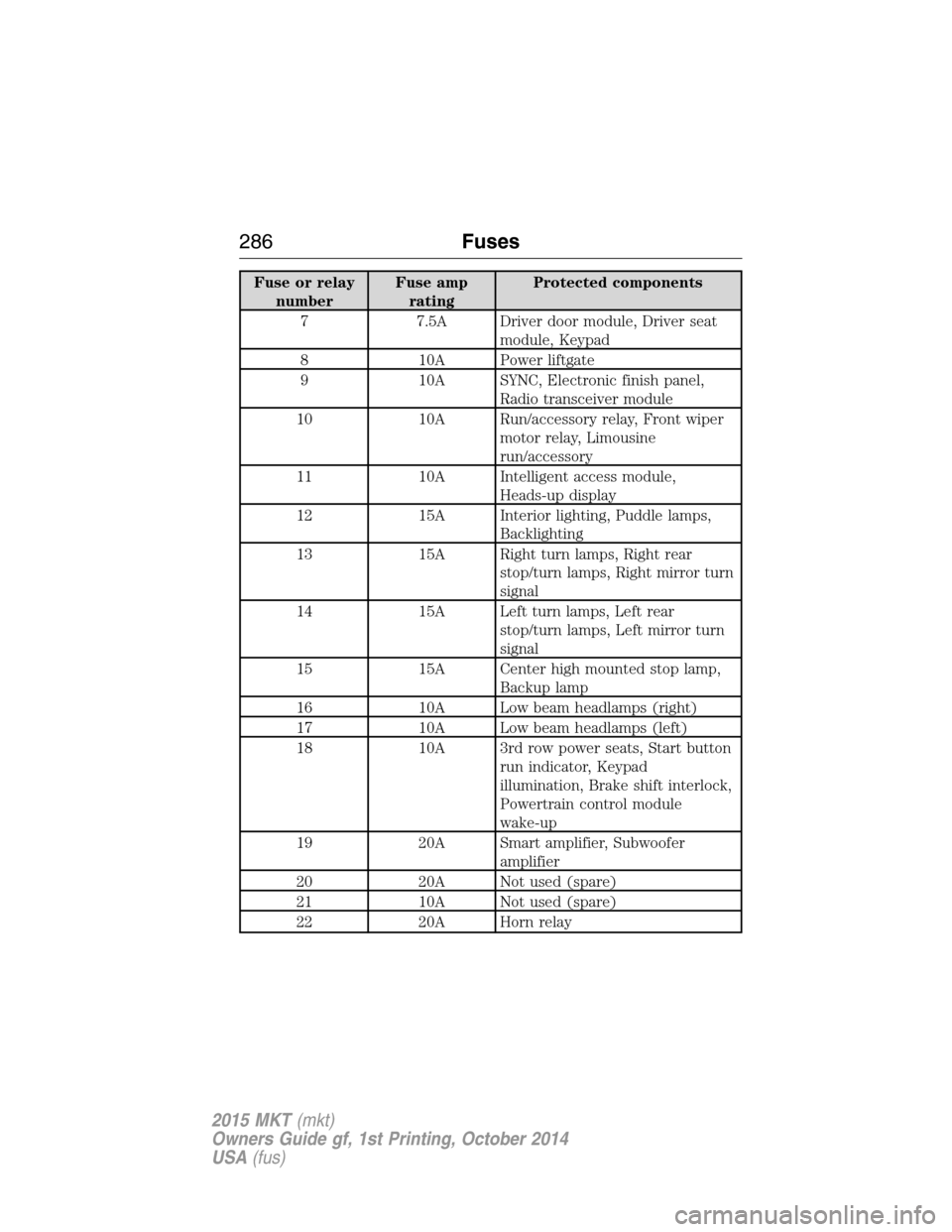
Fuse or relay
numberFuse amp
ratingProtected components
7 7.5A Driver door module, Driver seat
module, Keypad
8 10A Power liftgate
9 10A SYNC, Electronic finish panel,
Radio transceiver module
10 10A Run/accessory relay, Front wiper
motor relay, Limousine
run/accessory
11 10A Intelligent access module,
Heads-up display
12 15A Interior lighting, Puddle lamps,
Backlighting
13 15A Right turn lamps, Right rear
stop/turn lamps, Right mirror turn
signal
14 15A Left turn lamps, Left rear
stop/turn lamps, Left mirror turn
signal
15 15A Center high mounted stop lamp,
Backup lamp
16 10A Low beam headlamps (right)
17 10A Low beam headlamps (left)
18 10A 3rd row power seats, Start button
run indicator, Keypad
illumination, Brake shift interlock,
Powertrain control module
wake-up
19 20A Smart amplifier, Subwoofer
amplifier
20 20A Not used (spare)
21 10A Not used (spare)
22 20A Horn relay
286Fuses
2015 MKT(mkt)
Owners Guide gf, 1st Printing, October 2014
USA(fus)
Page 288 of 500
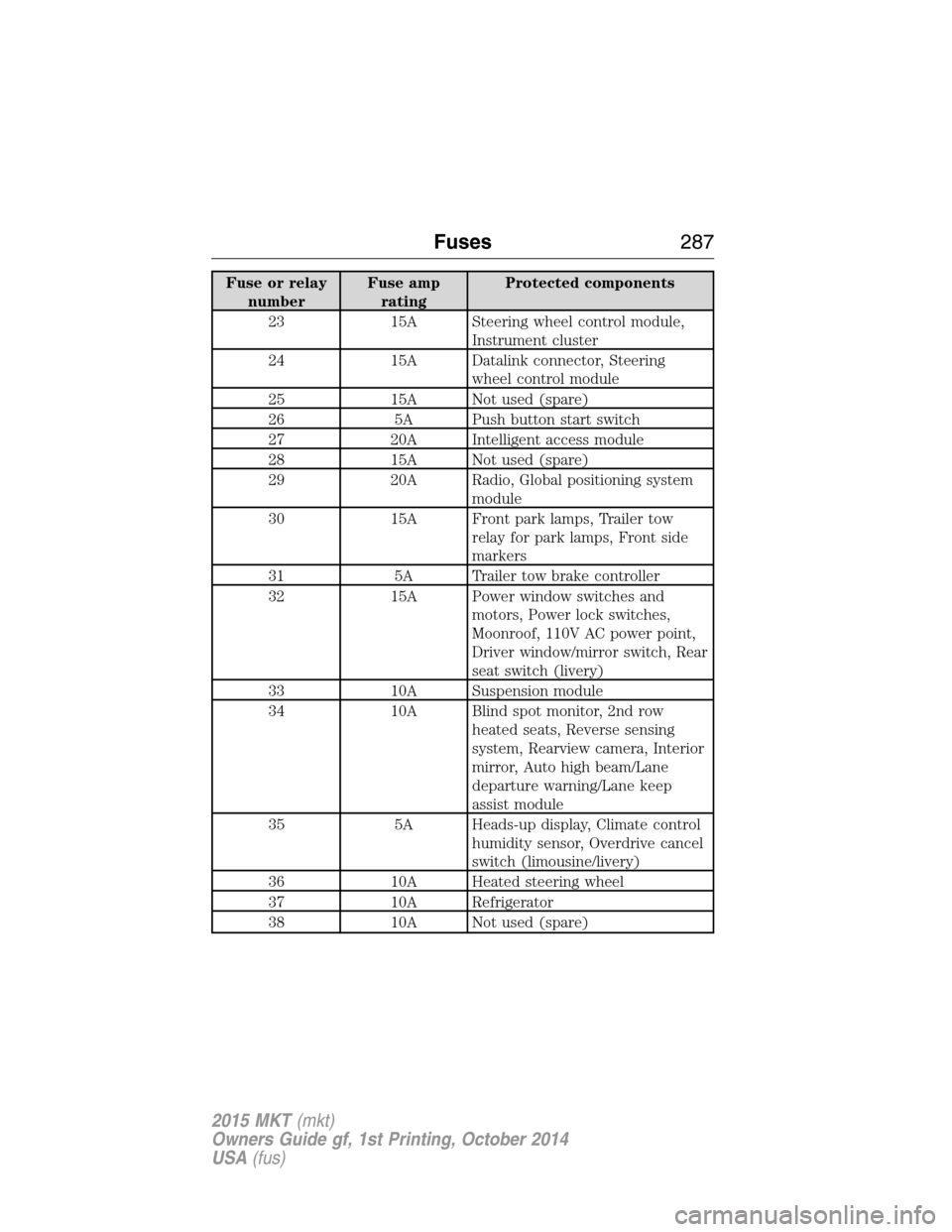
Fuse or relay
numberFuse amp
ratingProtected components
23 15A Steering wheel control module,
Instrument cluster
24 15A Datalink connector, Steering
wheel control module
25 15A Not used (spare)
26 5A Push button start switch
27 20A Intelligent access module
28 15A Not used (spare)
29 20A Radio, Global positioning system
module
30 15A Front park lamps, Trailer tow
relay for park lamps, Front side
markers
31 5A Trailer tow brake controller
32 15A Power window switches and
motors, Power lock switches,
Moonroof, 110V AC power point,
Driver window/mirror switch, Rear
seat switch (livery)
33 10A Suspension module
34 10A Blind spot monitor, 2nd row
heated seats, Reverse sensing
system, Rearview camera, Interior
mirror, Auto high beam/Lane
departure warning/Lane keep
assist module
35 5A Heads-up display, Climate control
humidity sensor, Overdrive cancel
switch (limousine/livery)
36 10A Heated steering wheel
37 10A Refrigerator
38 10A Not used (spare)
Fuses287
2015 MKT(mkt)
Owners Guide gf, 1st Printing, October 2014
USA(fus)
Page 322 of 500
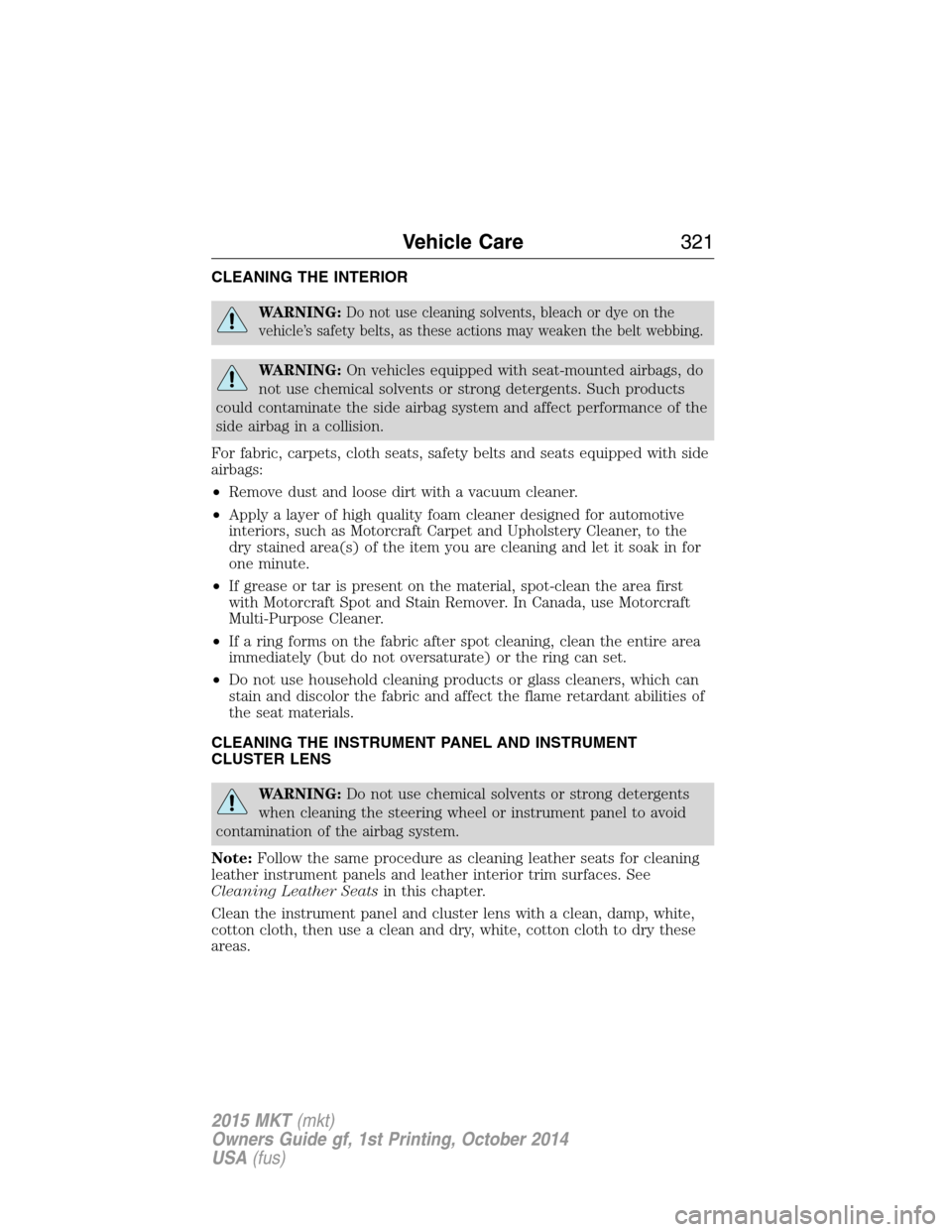
CLEANING THE INTERIOR
WARNING:Do not use cleaning solvents, bleach or dye on the
vehicle’s safety belts, as these actions may weaken the belt webbing.
WARNING:On vehicles equipped with seat-mounted airbags, do
not use chemical solvents or strong detergents. Such products
could contaminate the side airbag system and affect performance of the
side airbag in a collision.
For fabric, carpets, cloth seats, safety belts and seats equipped with side
airbags:
•Remove dust and loose dirt with a vacuum cleaner.
•Apply a layer of high quality foam cleaner designed for automotive
interiors, such as Motorcraft Carpet and Upholstery Cleaner, to the
dry stained area(s) of the item you are cleaning and let it soak in for
one minute.
•If grease or tar is present on the material, spot-clean the area first
with Motorcraft Spot and Stain Remover. In Canada, use Motorcraft
Multi-Purpose Cleaner.
•If a ring forms on the fabric after spot cleaning, clean the entire area
immediately (but do not oversaturate) or the ring can set.
•Do not use household cleaning products or glass cleaners, which can
stain and discolor the fabric and affect the flame retardant abilities of
the seat materials.
CLEANING THE INSTRUMENT PANEL AND INSTRUMENT
CLUSTER LENS
WARNING:Do not use chemical solvents or strong detergents
when cleaning the steering wheel or instrument panel to avoid
contamination of the airbag system.
Note:Follow the same procedure as cleaning leather seats for cleaning
leather instrument panels and leather interior trim surfaces. See
Cleaning Leather Seatsin this chapter.
Clean the instrument panel and cluster lens with a clean, damp, white,
cotton cloth, then use a clean and dry, white, cotton cloth to dry these
areas.
Vehicle Care321
2015 MKT(mkt)
Owners Guide gf, 1st Printing, October 2014
USA(fus)
Page 323 of 500
•Avoid cleaners or polishes that increase the gloss of the upper portion
of the instrument panel. The dull finish in this area helps protect the
driver from undesirable windshield reflection.
•Be certain to wash or wipe your hands clean if you have been in
contact with certain products, such as insect repellent and suntan
lotion, in order to avoid possible damage to the interior painted
surfaces.
•Do not use household or glass cleaners as these may damage the
finish of the instrument panel, interior trim and cluster lens.
•Do not allow air fresheners and hand sanitizers to spill on interior
surfaces. If a spill occurs, wipe off immediately. Damage may not be
covered by your warranty.
If a staining liquid like coffee or juice has been spilled on the instrument
panel or on interior trim surfaces, clean as follows:
1. Wipe up spilled liquid using a clean, white, cotton cloth.
2. Use Motorcraft Premium Leather and Vinyl Cleaner or a commercially
available leather cleaning product for automotive interiors. Test any
cleaner or stain remover on an inconspicuous area.
3. Alternatively, wipe the surface with a damp, clean, white, cotton cloth
and a mild soap and water solution. Dry the area with a clean, soft cloth.
4. If necessary, apply more soap and water solution or cleaning product
to a clean, white, cotton cloth and press the cloth onto the soiled area.
Allow this to set at room temperature for 30 minutes.
5. Remove the soaked cloth, then with a clean, damp cloth, use a rubbing
motion for 60 seconds on the soiled area.
6. Following this, wipe area dry with a clean, white, cotton cloth.
CLEANING LEATHER SEATS (IF EQUIPPED)
Note:Follow the same procedure as cleaning leather seats for cleaning
leather instrument panels and leather interior trim surfaces.
For routine cleaning, wipe the surface with a soft, damp cloth and a mild
soap and water solution. Dry the area with a clean, soft cloth.
For cleaning and removing spots and stains such as dye transfer, use
Motorcraft Premium Leather and Vinyl Cleaner or a commercially
available leather cleaning product for automotive interiors.
Note:Test any cleaner or stain remover on an inconspicuous area.
322Vehicle Care
2015 MKT(mkt)
Owners Guide gf, 1st Printing, October 2014
USA(fus)
Page 324 of 500
You should:
•Remove dust and loose dirt with a vacuum cleaner.
•Clean and treat spills and stains as soon as possible.
Do not use the following products as these may damage the leather:
•Oil and petroleum or silicone-based leather conditioners.
•Household cleaners.
•Alcohol solutions.
•Solvents or cleaners intended specifically for rubber, vinyl and
plastics.Motorcraft
Note:Do not use Motorcraft Premium Leather and Vinyl Cleaner ZC-56
on Lincoln Black Label, Presidential or Reserve Leathers because it can
damage these and other semi-aniline leather seating fabrics. It can also
damage surrounding microfiber accent surfaces. To clean Lincoln Black
Label, Presidential or Reserve Leather, first vacuum the seats to remove
loose dirt. Then wipe the leather with a clean soft cloth dampened with
lukewarm water and a mild soap. Wipe the leather again with a slightly
damp cloth to remove soap residue, and dry with a soft cloth. To
maintain the leather’s resiliency, it should be cleaned whenever soiled.
CLEANING THE ALLOY WHEELS
Note:Do not use chrome cleaner, metal cleaner or polish on wheels and
wheel covers.
A clearcoat paint finish coats aluminum wheels and wheel covers. In
order to maintain their condition:
•Clean weekly with Motorcraft Wheel and Tire Cleaner. Use a sponge to
remove heavy deposits of dirt and brake dust accumulation. Rinse
thoroughly with a strong stream of water when you have completed
the cleaning process.
•To remove tar and grease, use Motorcraft Bug and Tar Remover.
•Never apply any cleaning chemical to hot or warm wheel rims or
covers.
•Some automatic car washes may cause damage to the finish on your
wheel rims or covers.
•Industrial-strength (heavy-duty) cleaners, or cleaning chemicals, in
combination with brush agitation to remove brake dust and dirt, could
wear away the clearcoat finish over time.
Vehicle Care323
2015 MKT(mkt)
Owners Guide gf, 1st Printing, October 2014
USA(fus)
Page 383 of 500
Support
The SYNC support team is available to help you with any questions you
aren’t able to answer on your own.
Monday-Saturday, 8:30 am-8pm EST
In the United States, call: 1–888–270–1055
In Canada, call: 1–800–565–3673
Times are subject to change due to holidays.
SYNC Owner Account
Why do I need a SYNC owner account?
•Required to activate Vehicle Health Report and to view the reports
online.
•Required to activate the subscription-based SYNC Services and to
personalize your Saved Points and Favorites.
•Essential for keeping up with the latest software downloads available
for SYNC.
•Access to customer support for any questions you may have.
Safety information
WARNING:Driving while distracted can result in loss of vehicle
control, accident and injury. Ford strongly recommends that
drivers use extreme caution when using any device that may take their
focus off the road. Your primary responsibility is the safe operation of
the vehicle. We recommend against the use of any handheld device
while driving, encourage the use of voice-operated systems when
possible and that you become aware of applicable state and local laws
that may affect use of electronic devices while driving.
•Do not attempt to service or repair SYNC®. See your authorized
dealer.
•Do not operate playing devices if the power cords and/or cables are
broken, split or damaged. Carefully place cords and/or cables where
they will not be stepped on or interfere with the operation of pedals,
seats and/or compartments, or safe driving abilities.
•Do not leave playing devices in the vehicle in extreme conditions as it
could cause damage to your device. Refer to your device’s user guide
for further information.
382MyLincoln Touch™
2015 MKT(mkt)
Owners Guide gf, 1st Printing, October 2014
USA(fus)
Page 446 of 500
L.Driver settings:Depending on your vehicle and option package, you
may have the following features:
•Touch+or–to adjust the temperature.
•If your vehicle is equipped with heated seats, touch the heated seat
icon to control the heated seat. See theSeatschapter.
•If your vehicle is equipped with cooled seats, touch the cooled seat
icon to control the cooled seat. See theSeatschapter.
•Touch and holdMyTempto select a temperature you would like your
vehicle to remember and maintain for you.
•If your vehicle is equipped with a heated steering wheel, touch the
heated steering wheel icon to warm the steering wheel.
Note:If your vehicle is equipped with a wood-trimmed steering wheel, it
does not heat between the 10 o’clock and 2 o’clock positions.
Climate Control Voice Commands
The following voice commands are available at the main menu
level of a voice session. For example, press the voice button
and after the prompt, “Say a command”; say any of the
following commands:
Climate control voice commands
“Climate automatic”
“Climate my temperature”
“Climate off”
“Climate on”
“Climate temperature <15.5–29.5> degrees”
“Climate temperature <60–85> degrees”
“Help”
There are additional climate control commands but in order to access
them, you have to say “Climate” first, then when the system is ready to
listen, you may say any of the following commands:
Additional climate control voice commands
“Automatic” “Panel on”
“A/C off” “Rear defrost off”
“A/C on” “Rear defrost on”
“Defrost off” “Recirc off”
“Defrost on” “Recirc on”
“Dual off” “Temperature”
*
MyLincoln Touch™445
2015 MKT(mkt)
Owners Guide gf, 1st Printing, October 2014
USA(fus)
Page 494 of 500
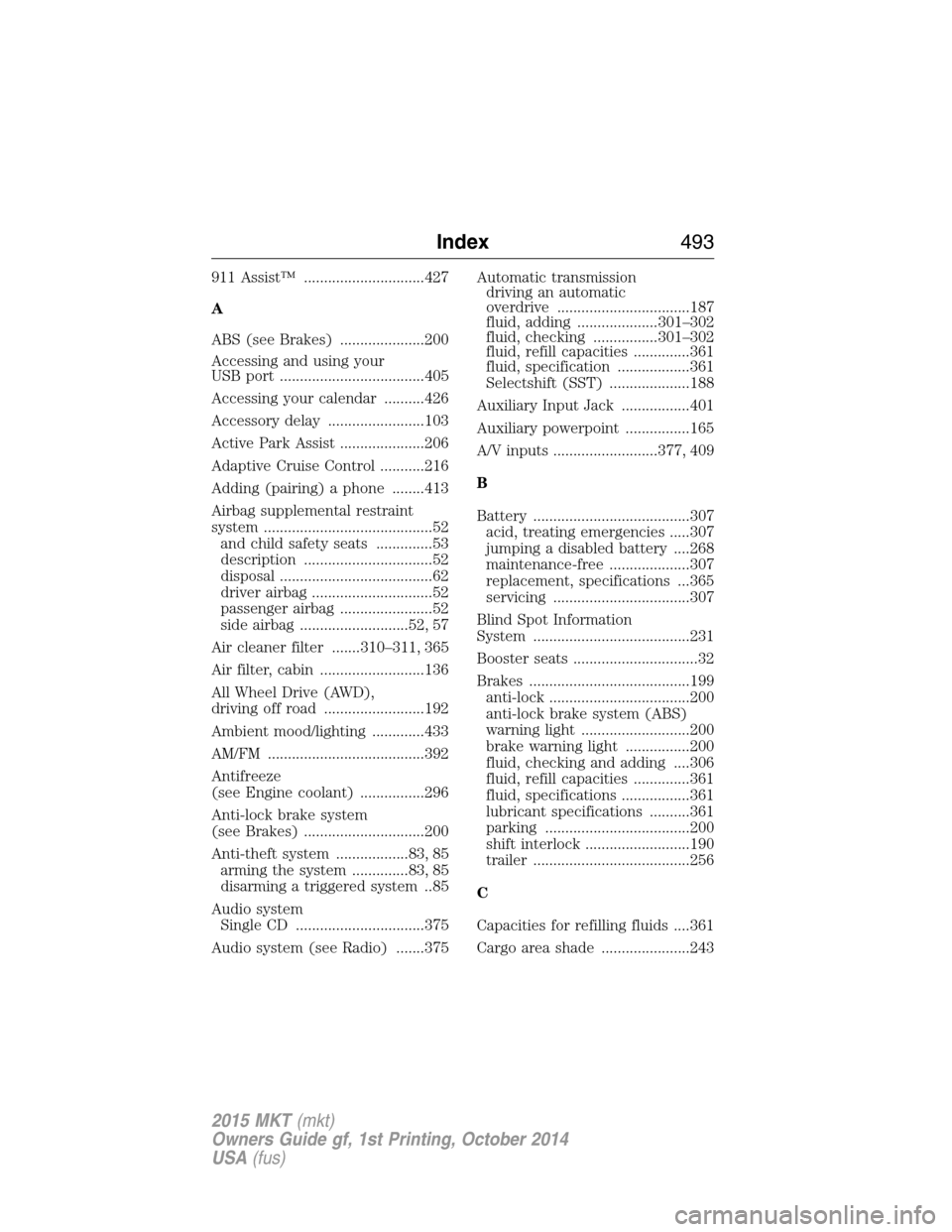
911 Assist™ ..............................427
A
ABS (see Brakes) .....................200
Accessing and using your
USB port ....................................405
Accessing your calendar ..........426
Accessory delay ........................103
Active Park Assist .....................206
Adaptive Cruise Control ...........216
Adding (pairing) a phone ........413
Airbag supplemental restraint
system ..........................................52
and child safety seats ..............53
description ................................52
disposal ......................................62
driver airbag ..............................52
passenger airbag .......................52
side airbag ...........................52, 57
Air cleaner filter .......310–311, 365
Air filter, cabin ..........................136
All Wheel Drive (AWD),
driving off road .........................192
Ambient mood/lighting .............433
AM/FM .......................................392
Antifreeze
(see Engine coolant) ................296
Anti-lock brake system
(see Brakes) ..............................200
Anti-theft system ..................83, 85
arming the system ..............83, 85
disarming a triggered system ..85
Audio system
Single CD ................................375
Audio system (see Radio) .......375Automatic transmission
driving an automatic
overdrive .................................187
fluid, adding ....................301–302
fluid, checking ................301–302
fluid, refill capacities ..............361
fluid, specification ..................361
Selectshift (SST) ....................188
Auxiliary Input Jack .................401
Auxiliary powerpoint ................165
A/V inputs ..........................377, 409
B
Battery .......................................307
acid, treating emergencies .....307
jumping a disabled battery ....268
maintenance-free ....................307
replacement, specifications ...365
servicing ..................................307
Blind Spot Information
System .......................................231
Booster seats ...............................32
Brakes ........................................199
anti-lock ...................................200
anti-lock brake system (ABS)
warning light ...........................200
brake warning light ................200
fluid, checking and adding ....306
fluid, refill capacities ..............361
fluid, specifications .................361
lubricant specifications ..........361
parking ....................................200
shift interlock ..........................190
trailer .......................................256
C
Capacities for refilling fluids ....361
Cargo area shade ......................243
Index493
2015 MKT(mkt)
Owners Guide gf, 1st Printing, October 2014
USA(fus)
Page 495 of 500
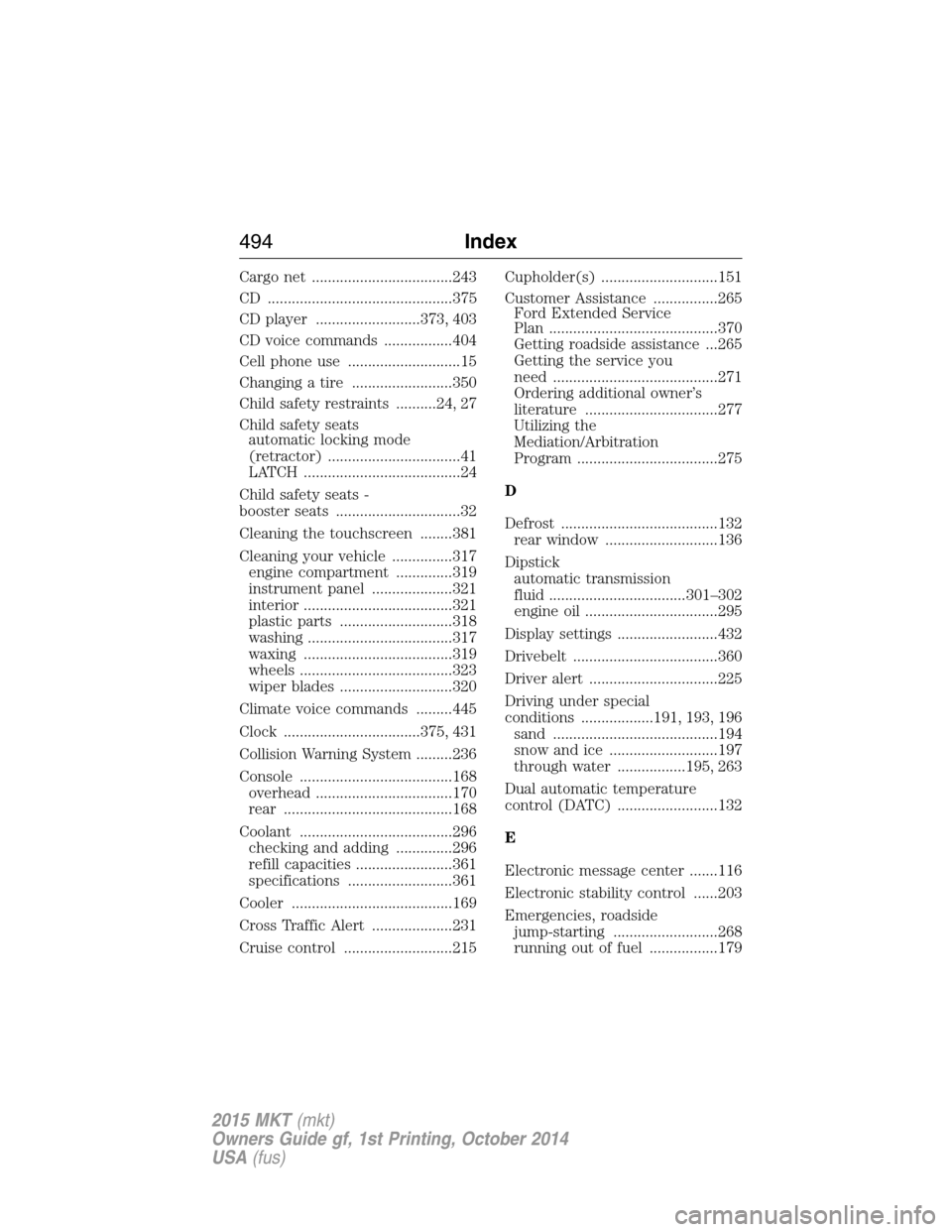
Cargo net ...................................243
CD ..............................................375
CD player ..........................373, 403
CD voice commands .................404
Cell phone use ............................15
Changing a tire .........................350
Child safety restraints ..........24, 27
Child safety seats
automatic locking mode
(retractor) .................................41
LATCH .......................................24
Child safety seats -
booster seats ...............................32
Cleaning the touchscreen ........381
Cleaning your vehicle ...............317
engine compartment ..............319
instrument panel ....................321
interior .....................................321
plastic parts ............................318
washing ....................................317
waxing .....................................319
wheels ......................................323
wiper blades ............................320
Climate voice commands .........445
Clock ..................................375, 431
Collision Warning System .........236
Console ......................................168
overhead ..................................170
rear ..........................................168
Coolant ......................................296
checking and adding ..............296
refill capacities ........................361
specifications ..........................361
Cooler ........................................169
Cross Traffic Alert ....................231
Cruise control ...........................215Cupholder(s) .............................151
Customer Assistance ................265
Ford Extended Service
Plan ..........................................370
Getting roadside assistance ...265
Getting the service you
need .........................................271
Ordering additional owner’s
literature .................................277
Utilizing the
Mediation/Arbitration
Program ...................................275
D
Defrost .......................................132
rear window ............................136
Dipstick
automatic transmission
fluid ..................................301–302
engine oil .................................295
Display settings .........................432
Drivebelt ....................................360
Driver alert ................................225
Driving under special
conditions ..................191, 193, 196
sand .........................................194
snow and ice ...........................197
through water .................195, 263
Dual automatic temperature
control (DATC) .........................132
E
Electronic message center .......116
Electronic stability control ......203
Emergencies, roadside
jump-starting ..........................268
running out of fuel .................179
494Index
2015 MKT(mkt)
Owners Guide gf, 1st Printing, October 2014
USA(fus)