suspension LINCOLN MKT 2015 Owners Manual
[x] Cancel search | Manufacturer: LINCOLN, Model Year: 2015, Model line: MKT, Model: LINCOLN MKT 2015Pages: 500, PDF Size: 4.94 MB
Page 199 of 500
Maintenance and Modifications
The suspension and steering systems on your vehicle have been designed
and tested to provide predictable performance whether loaded or empty
and durable load carrying capability. For this reason, Ford Motor
Company strongly recommends that you do not make modifications such
as adding or removing parts (such as lift kits or stabilizer bars) or by
using replacement parts not equivalent to the original factory equipment.
Any modifications to a vehicle that raise the center of gravity can make
it more likely the vehicle will rollover as a result of a loss of control.
Ford Motor Company recommends that caution be used with any vehicle
equipped with a high load or device (such as ladder or luggage racks).
Failure to maintain your vehicle properly may void the warranty, increase
your repair cost, reduce vehicle performance and operational capabilities
and adversely affect driver and passenger safety. Frequent inspection of
vehicle chassis components is recommended if the vehicle is subjected to
off-highway usage.
198All-Wheel Drive (If Equipped)
2015 MKT(mkt)
Owners Guide gf, 1st Printing, October 2014
USA(fus)
Page 203 of 500
PRINCIPLES OF OPERATION
WARNING:Vehicle modifications involving braking system,
aftermarket roof racks, suspension, steering system, tire
construction and wheel or tire size may change the handling
characteristics of your vehicle and may adversely affect the
performance of the AdvanceTrac® system. In addition, installing any
stereo loudspeakers may interfere with and adversely affect the
AdvanceTrac® system. Install any aftermarket stereo loudspeaker as far
as possible from the front center console, the tunnel, and the front
seats in order to minimize the risk of interfering with the
AdvanceTrac® sensors. Reducing the effectiveness of the
AdvanceTrac® system could lead to an increased risk of loss of vehicle
control, vehicle rollover, personal injury and death.
WARNING:Remember that even advanced technology cannot
defy the laws of physics. It is always possible to lose control of a
vehicle due to inappropriate driver input for the conditions. Aggressive
driving on any road condition can cause you to lose control of your
vehicle increasing the risk of personal injury or property damage.
Activation of the AdvanceTrac® system is an indication that at least
some of the tires have exceeded their ability to grip the road; this could
reduce the operator’s ability to control the vehicle potentially resulting
in a loss of vehicle control, vehicle rollover, personal injury and death. If
your AdvanceTrac® system activates, SLOW DOWN.
202Stability Control
2015 MKT(mkt)
Owners Guide gf, 1st Printing, October 2014
USA(fus)
Page 231 of 500
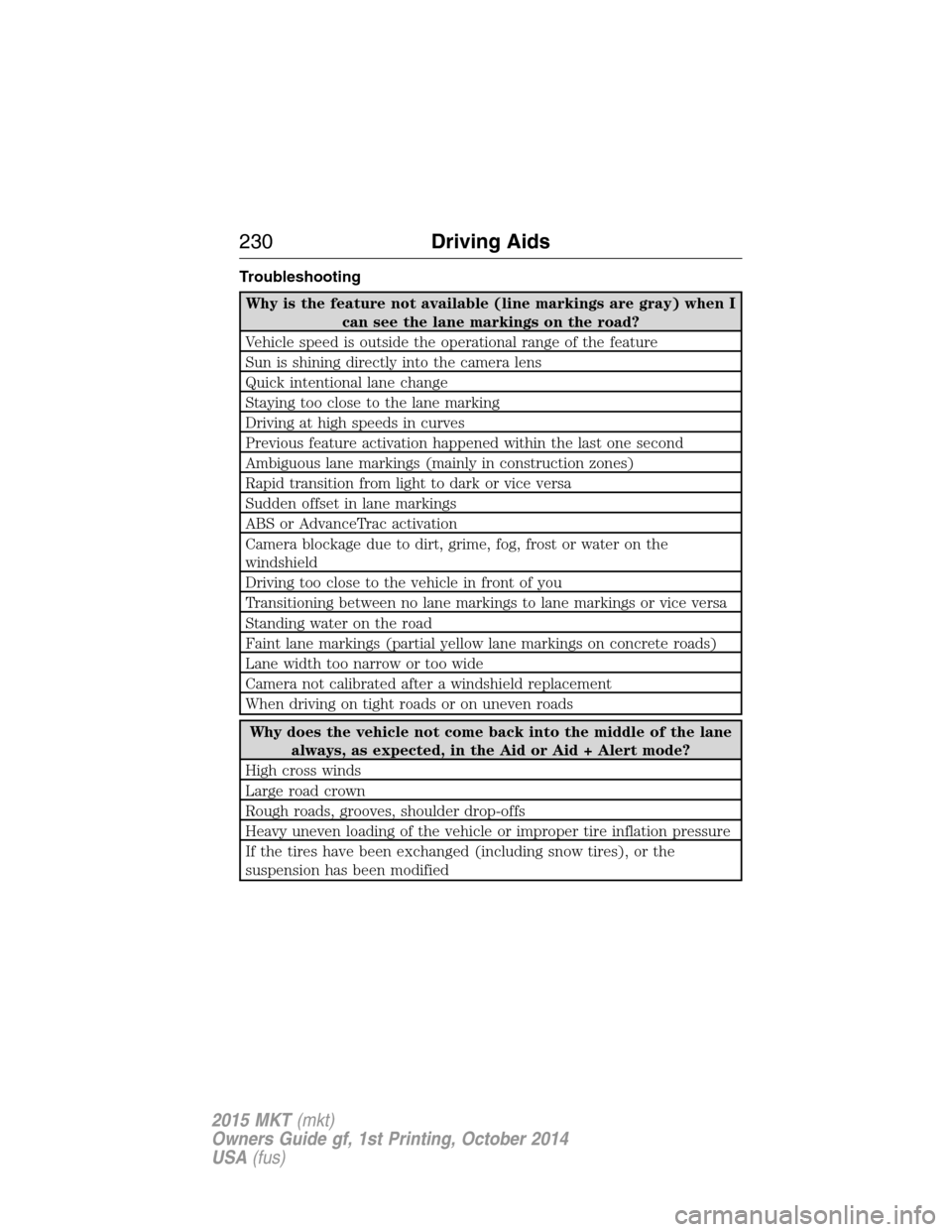
Troubleshooting
Why is the feature not available (line markings are gray) when I
can see the lane markings on the road?
Vehicle speed is outside the operational range of the feature
Sun is shining directly into the camera lens
Quick intentional lane change
Staying too close to the lane marking
Driving at high speeds in curves
Previous feature activation happened within the last one second
Ambiguous lane markings (mainly in construction zones)
Rapid transition from light to dark or vice versa
Sudden offset in lane markings
ABS or AdvanceTrac activation
Camera blockage due to dirt, grime, fog, frost or water on the
windshield
Driving too close to the vehicle in front of you
Transitioning between no lane markings to lane markings or vice versa
Standing water on the road
Faint lane markings (partial yellow lane markings on concrete roads)
Lane width too narrow or too wide
Camera not calibrated after a windshield replacement
When driving on tight roads or on uneven roads
Why does the vehicle not come back into the middle of the lane
always, as expected, in the Aid or Aid + Alert mode?
High cross winds
Large road crown
Rough roads, grooves, shoulder drop-offs
Heavy uneven loading of the vehicle or improper tire inflation pressure
If the tires have been exchanged (including snow tires), or the
suspension has been modified
230Driving Aids
2015 MKT(mkt)
Owners Guide gf, 1st Printing, October 2014
USA(fus)
Page 241 of 500
LINCOLN DRIVE CONTROL (IF EQUIPPED)
Lincoln Drive Control delivers the Lincoln driving experience through a
suite of sophisticated electronic vehicle systems. These systems
continuously monitor both your driving inputs and the road conditions to
optimize ride comfort, steering, handling, powertrain response and
sound. You can preset your preferences for these systems within the
information display. Lincoln Drive Control will respond to your
preferences based on what gear position you select. This provides a
single location to control multiple systems performance settings.
Lincoln Drive Control consists of the following systems:
•Continuously Controlled Damping (CCD) dynamically adjusts the
shock absorbers stiffness in real time to match the road surface and
driver inputs. Vehicle motion (roll, pitch, bounce), suspension
position, vehicle loading, vehicle speed, road conditions, and steering
are continuously monitored to adjust the suspension damping for
optimal vehicle control.
•Electronically Power-Assisted Steering (EPAS) adjusts steering effort
and feel based on vehicle speed and your inputs.
•Active Noise Control (ANC) utilizes vehicle electronics to enhance the
acoustic experience.
•Electronic Stability Control and Traction Control (ESC and TC)
maintain vehicle control in adverse conditions or high performance
driving.
•Electronic Throttle Control (ETC) which enhances the powertrain
response to your inputs.
These systems have a range of modes which you can choose from in
order to customize your ideal driving experience:
•Comfort – Provides a more relaxed driving experience, maximizing
comfort. Steering effort is decreased and suspension movement is
more fluid. Comfort mode is ideal when enhanced traveling comfort is
desired.
•Normal – Delivers a balanced combination of comfortable, controlled
ride and confident handling. This mode provides an engaging drive
experience and a direct connection to the road without sacrificing any
of the composure demanded from a luxury vehicle.
•Sport – Provides a sportier driving experience. Suspension stiffens,
with an emphasis on handling and control. The engine responds more
directly to your inputs and takes on a more powerful tone. Sport mode
is intended to be used during more spirited driving.
240Driving Aids
2015 MKT(mkt)
Owners Guide gf, 1st Printing, October 2014
USA(fus)
Page 243 of 500
WARNING:Obtain immediate service if a system error is
detected. You may not notice any difference in the feel of your
steering, but a serious condition may exist. Failure to do so may result
in loss of steering control.
Your vehicle is equipped with an electric power-assisted steering system.
There is no fluid reservoir to check or fill.
If your vehicle loses electrical power while you are driving (or if the
ignition is turned off), you can steer the vehicle manually, but it takes
more effort. Extreme continuous steering may increase the effort it takes
for you to steer. This occurs to prevent internal overheating and
permanent damage to your steering system. If this should occur, you will
neither lose the ability to steer the vehicle manually nor will it cause
permanent damage. Typical steering and driving maneuvers will allow the
system to cool and steering assist will return to normal.
When a steering system error is detected, steering messages may appear
in the information display.
Steering Tips
If the steering wanders or pulls, check for:
•an improperly inflated tire
•uneven tire wear
•loose or worn suspension components
•loose or worn steering components
•improper vehicle alignment
A high crown in the road or high crosswinds may also make the steering
seem to wander/pull.
242Driving Aids
2015 MKT(mkt)
Owners Guide gf, 1st Printing, October 2014
USA(fus)
Page 253 of 500
TOWING A TRAILER
WARNING:Do not exceed the GVWR or the GAWR specified on
the certification label.
WARNING:Towing trailers beyond the maximum recommended
gross trailer weight exceeds the limit of your vehicle and could
result in engine damage, transmission damage, structural damage, loss
of vehicle control, vehicle rollover and personal injury.
Note:For information on electrical items such as fuses or relays, see the
Fuseschapter.
The load capacity of your vehicle is designated by weight not volume.
You may not necessarily be able to use all available space when loading
your vehicle or trailer.
Towing a trailer places extra load on the engine, transmission, axle,
brakes, tires, and suspension. Inspect these components before, during
and after towing.
Load Placement
To help minimize how trailer movement affects your vehicle when
driving:
•Load the heaviest items closest to the trailer floor.
•Load the heaviest items centered between the left and right side
trailer tires.
•Load the heaviest items above the trailer axles or just slightly forward
toward the trailer tongue. Do not allow the final trailer tongue weight
to go above or below 10–15% of the loaded trailer weight.
•Select a tow bar with the correct rise or drop. When both the loaded
vehicle and trailer are connected, the trailer frame should be level, or
slightly angled down toward your vehicle, when viewed from the side.
When driving with a trailer or payload, a slight takeoff vibration or
shudder may be present due to the increased payload weight. You can
find more information about proper trailer loading and setting your
vehicle up for towing underLoad limitin theLoad Carryingchapter.
You can also find information in theRV and Trailer Towing Guide
available at your authorized dealer, or online at
http://www.fleet.ford.com/towing-guides.
252Towing
2015 MKT(mkt)
Owners Guide gf, 1st Printing, October 2014
USA(fus)
Page 288 of 500
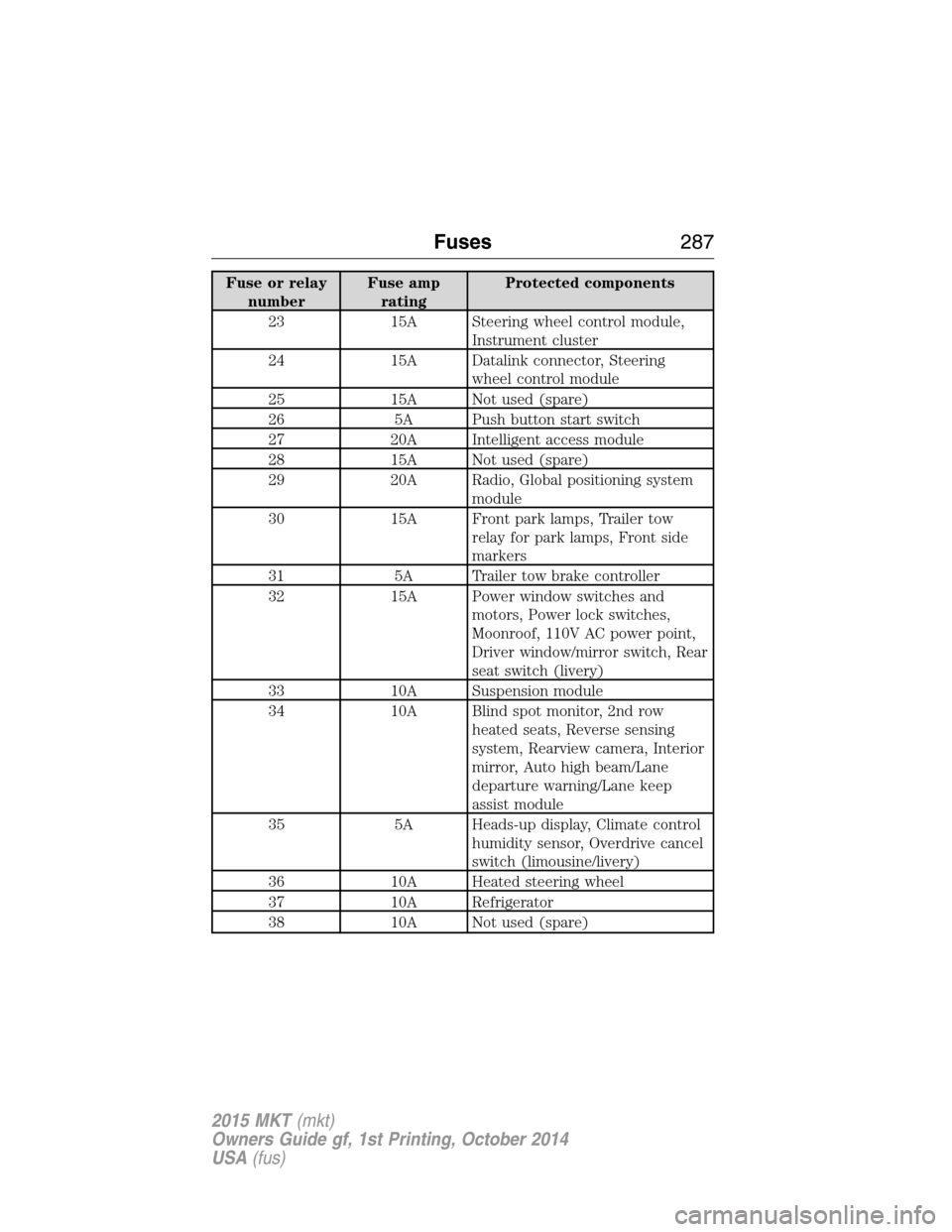
Fuse or relay
numberFuse amp
ratingProtected components
23 15A Steering wheel control module,
Instrument cluster
24 15A Datalink connector, Steering
wheel control module
25 15A Not used (spare)
26 5A Push button start switch
27 20A Intelligent access module
28 15A Not used (spare)
29 20A Radio, Global positioning system
module
30 15A Front park lamps, Trailer tow
relay for park lamps, Front side
markers
31 5A Trailer tow brake controller
32 15A Power window switches and
motors, Power lock switches,
Moonroof, 110V AC power point,
Driver window/mirror switch, Rear
seat switch (livery)
33 10A Suspension module
34 10A Blind spot monitor, 2nd row
heated seats, Reverse sensing
system, Rearview camera, Interior
mirror, Auto high beam/Lane
departure warning/Lane keep
assist module
35 5A Heads-up display, Climate control
humidity sensor, Overdrive cancel
switch (limousine/livery)
36 10A Heated steering wheel
37 10A Refrigerator
38 10A Not used (spare)
Fuses287
2015 MKT(mkt)
Owners Guide gf, 1st Printing, October 2014
USA(fus)
Page 342 of 500
Tire Replacement Requirements
WARNING:Only use replacement tires and wheels that are the
same size, load index, speed rating and type (such as P-metric
versus LT-metric or all-season versus all-terrain) as those originally
provided by Ford. The recommended tire and wheel size may be found
on either the Safety Compliance Certification Label (affixed to either
the door hinge pillar, door-latch post, or the door edge that meets the
door-latch post, next to the driver’s seating position), or the Tire Label
which is located on the B-Pillar or edge of the driver’s door. If this
information is not found on these labels, then you should contact your
authorized dealer as soon as possible. Use of any tire or wheel not
recommended by Ford can affect the safety and performance of your
vehicle, which could result in an increased risk of loss of vehicle
control, vehicle rollover, personal injury and death. Additionally the use
of non-recommended tires and wheels could cause steering, suspension,
axle, transfer case or power transfer unit failure. If you have questions
regarding tire replacement, contact your authorized dealer as soon as
possible.
Wheels and Tires341
2015 MKT(mkt)
Owners Guide gf, 1st Printing, October 2014
USA(fus)
Page 344 of 500
Safety Practices
WARNING:If your vehicle is stuck in snow, mud, or sand, do not
rapidly spin the tires. Spinning the tires can tear the tire and cause
an explosion. A tire can explode in as little as three to five seconds.
WARNING:Do not spin the wheels at over 35 mph (56 km/h).
The tires may fail and injure a passenger or bystander.
Driving habits have a great deal to do with your tire mileage and safety.
•Observe posted speed limits.
•Avoid fast starts, stops and turns.
•Avoid potholes and objects on the road.
•Do not run over curbs or hit the tire against a curb when parking.
Highway Hazards
No matter how carefully you drive, there is always the possibility that
you may eventually have a flat tire on the highway. Drive slowly to the
closest safe area out of traffic. This may further damage the flat tire, but
your safety is more important.
If you feel a sudden vibration or ride disturbance while driving, or you
suspect your tire or vehicle has been damaged, immediately reduce your
speed. Drive with caution until you can safely pull off the road. Stop and
inspect the tires for damage. If a tire is under-inflated or damaged,
deflate it, remove the wheel and replace it with your spare tire and
wheel. If you cannot detect a cause, have the vehicle towed to the
nearest repair facility or tire dealer to have the vehicle inspected.
Tire and Wheel Alignment
A bad jolt from hitting a curb or pothole can cause the front end of your
vehicle to become misaligned or cause damage to your tires. If your
vehicle seems to pull to one side when you are driving, the wheels may
be out of alignment. Have an authorized dealer check the wheel
alignment periodically.
Wheel misalignment in the front or the rear can cause uneven and rapid
treadwear of your tires and should be corrected by an authorized dealer.
Front-wheel drive vehicles and those with an independent rear
suspension may require alignment of all four wheels.
The tires should also be balanced periodically. An unbalanced tire and
wheel assembly may result in irregular tire wear.
Wheels and Tires343
2015 MKT(mkt)
Owners Guide gf, 1st Printing, October 2014
USA(fus)
Page 345 of 500
Tire Rotation
Note:If your tires show uneven wear ask an authorized dealer to check
for and correct any wheel misalignment, tire imbalance or mechanical
problem involved before tire rotation.
Note:Your vehicle may be equipped with a dissimilar spare tire and
wheel assembly. A dissimilar spare tire and wheel assembly is defined as
a spare tire or wheel that is different in brand, size or appearance from
the road tires and wheels. If you have a dissimilar spare tire and wheel
assembly, it is intended for temporary use only and should not be used
in a tire rotation.
Note:After having your tires rotated, inflation pressure must be checked
and adjusted to the vehicle requirements.
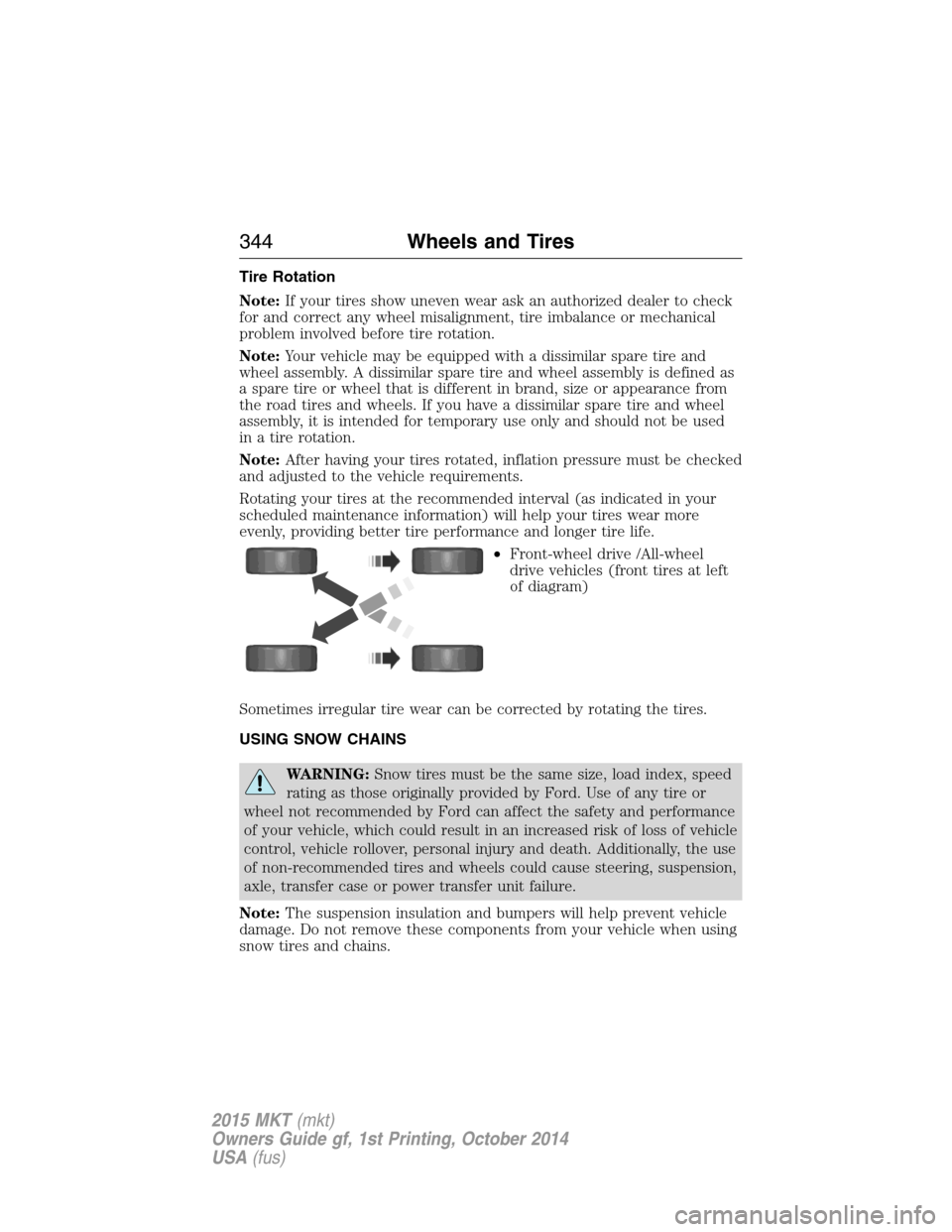
Rotating your tires at the recommended interval (as indicated in your
scheduled maintenance information) will help your tires wear more
evenly, providing better tire performance and longer tire life.
•Front-wheel drive /All-wheel
drive vehicles (front tires at left
of diagram)
Sometimes irregular tire wear can be corrected by rotating the tires.
USING SNOW CHAINS
WARNING:Snow tires must be the same size, load index, speed
rating as those originally provided by Ford. Use of any tire or
wheel not recommended by Ford can affect the safety and performance
of your vehicle, which could result in an increased risk of loss of vehicle
control, vehicle rollover, personal injury and death. Additionally, the use
of non-recommended tires and wheels could cause steering, suspension,
axle, transfer case or power transfer unit failure.
Note:The suspension insulation and bumpers will help prevent vehicle
damage. Do not remove these components from your vehicle when using
snow tires and chains.
344Wheels and Tires
2015 MKT(mkt)
Owners Guide gf, 1st Printing, October 2014
USA(fus)