remote start LINCOLN MKT 2016 User Guide
[x] Cancel search | Manufacturer: LINCOLN, Model Year: 2016, Model line: MKT, Model: LINCOLN MKT 2016Pages: 452, PDF Size: 4.69 MB
Page 83 of 452
Make sure that the ignition is switched off
before beginning this procedure. Make sure
that you close all the doors before beginning
and that they remain closed throughout the
procedure. Carry out all steps within 30
seconds of starting the sequence. Stop and
wait for at least one minute before starting
again if you carry out any steps out of
sequence.
Read and understand the entire procedure
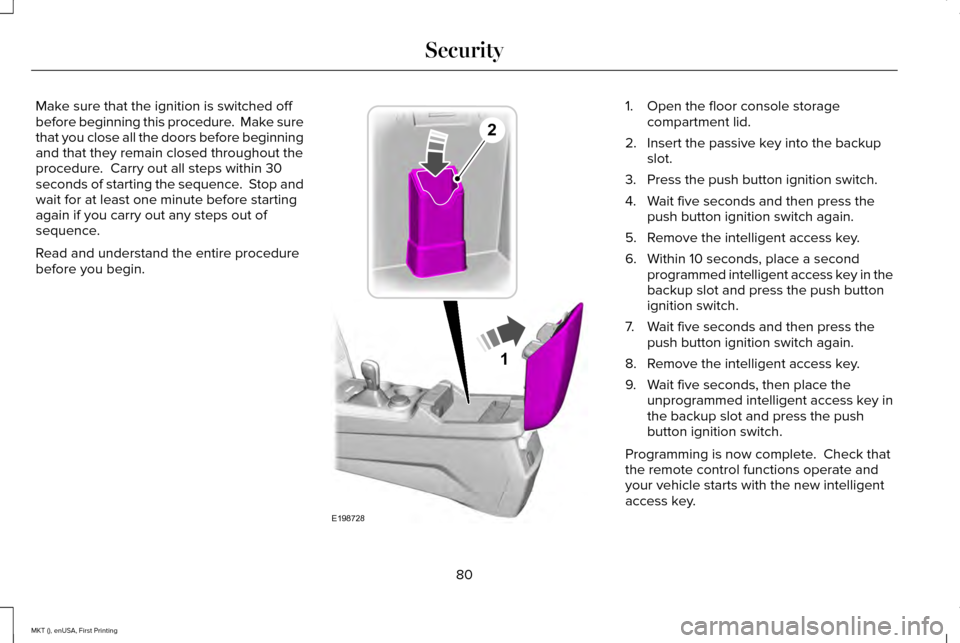
before you begin. 1. Open the floor console storage
compartment lid.
2. Insert the passive key into the backup slot.
3. Press the push button ignition switch.
4. Wait five seconds and then press the push button ignition switch again.
5. Remove the intelligent access key.
6. Within 10 seconds, place a second programmed intelligent access key in the
backup slot and press the push button
ignition switch.
7. Wait five seconds and then press the push button ignition switch again.
8. Remove the intelligent access key.
9. Wait five seconds, then place the unprogrammed intelligent access key in
the backup slot and press the push
button ignition switch.
Programming is now complete. Check that
the remote control functions operate and
your vehicle starts with the new intelligent
access key.
80
MKT (), enUSA, First Printing Security1
E198728
2
Page 84 of 452
If programming was unsuccessful, wait 10
seconds and repeat Steps 1 through 7. If
programming remains unsuccessful, contact
an authorized dealer.
ANTI-THEFT ALARM
The system will warn you of an unauthorized
entry to your vehicle. It will be triggered if
any door, the luggage compartment or the
hood is opened without using the key,
remote control or keyless entry keypad.
The direction indicators will flash and the
horn will sound if unauthorized entry is
attempted while the alarm is armed.
Take all remote controls to an authorized
dealer if there is any potential alarm problem
with your vehicle.
Arming the Alarm
The alarm is ready to arm when there is not
a key in your vehicle. Electronically lock your
vehicle to arm the alarm.
Disarming the Alarm
Disarm the alarm by any of the following
actions:
•
Unlock the doors or luggage
compartment with the remote control or
keyless entry keypad.
• Switch your vehicle on or start your
vehicle.
• Use a key in the driver door to unlock
your vehicle, then switch your vehicle on
within 12 seconds.
Note: Pressing the panic button on the
remote control will stop the horn and signal
indicators, but will not disarm the system.
81
MKT (), enUSA, First Printing Security
Page 101 of 452
Accessory Delay
The window switches remain operational for
several minutes when you switch the ignition
off or until you open either front door.
GLOBAL OPENING AND CLOSING
You can use the remote control to operate
the windows with the ignition off.
Note:
You can enable or disable this feature
in the information display or see an
authorized dealer. See General Information
(page 108).
Note: To operate this feature, accessory
delay must not be active.
Opening the Windows
You can only open the windows for a short
time after you unlock your vehicle with the
remote control. After you unlock your vehicle,
press and hold the remote control unlock
button to open the windows and vent the
moonroof. Release the button once
movement starts. Press the lock or unlock
button to stop movement. Closing the Windows WARNING
When closing the windows and
moonroof, you should verify they are
free of obstructions and make sure that
children and pets are not in the proximity of
the window openings. To close the windows and moonroof, press
and hold the remote control lock button.
Release the button once movement starts.
Press the lock or unlock button to stop
movement.
EXTERIOR MIRRORS
Power Exterior Mirrors
WARNING
Do not adjust the mirrors when your
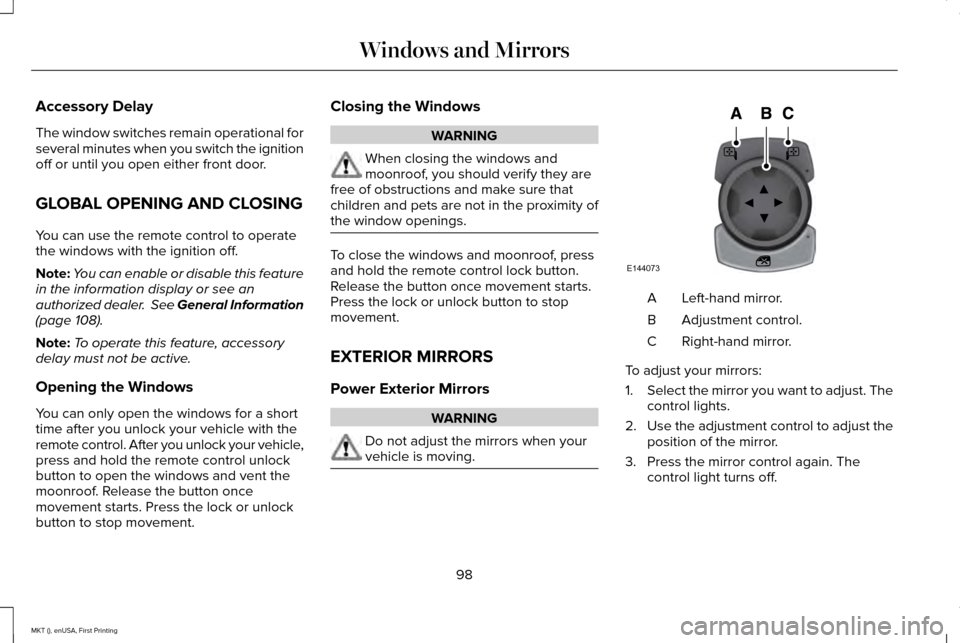
vehicle is moving. Left-hand mirror.
A
Adjustment control.
B
Right-hand mirror.
C
To adjust your mirrors:
1. Select the mirror you want to adjust. The
control lights.
2. Use the adjustment control to adjust the
position of the mirror.
3. Press the mirror control again. The control light turns off.
98
MKT (), enUSA, First Printing Windows and MirrorsE144073
Page 116 of 452
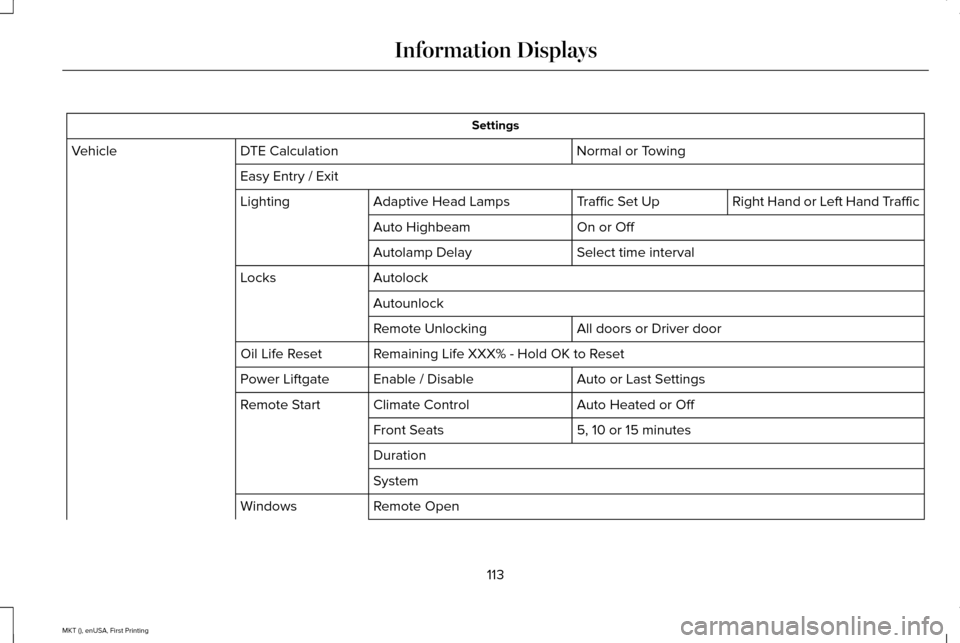
Settings
Normal or Towing
DTE Calculation
Vehicle
Easy Entry / Exit Right Hand or Left Hand Traffic
Traffic Set Up
Adaptive Head Lamps
Lighting
On or Off
Auto Highbeam
Select time interval
Autolamp Delay
Autolock
Locks
Autounlock All doors or Driver door
Remote Unlocking
Remaining Life XXX% - Hold OK to Reset
Oil Life Reset
Auto or Last Settings
Enable / Disable
Power Liftgate
Auto Heated or Off
Climate Control
Remote Start
5, 10 or 15 minutes
Front Seats
Duration
System
Remote Open
Windows
113
MKT (), enUSA, First Printing Information Displays
Page 135 of 452
Note:
Make sure you have a cabin air filter
installed at all times. This prevents foreign
objects from entering the system. Running
the system without a filter in place could
result in degradation or damage to the
system.
Replace the filter at regular intervals. See
Scheduled Maintenance (page 387).
For additional cabin air filter information, or
to replace the filter, see an authorized dealer.
REMOTE START
The remote start feature allows you to
pre-condition the interior of your vehicle. The
climate control system works to achieve
comfort according to your pre-selected
settings.
Note: You cannot adjust the system during
remote start operation. You cannot switch
on the displays or indicators during remote
start. Switch the ignition on to return the system
to its pre-selected settings. You can now
make adjustments normally, but you need to
switch certain vehicle-dependent features
back on, such as:
•
Heated seats.
• Cooled seats.
• Heated steering wheel.
• Heated mirrors.
• Heated rear window.
You can adjust the default remote start
settings using the information display
controls.
See Information Displays (page
108).
Automatic Settings
In hot weather, the system is set to 72°F
(22°C). The cooled seats are set to high (if
available, and selected to AUTO in the
information display).
In moderate weather, the system either heats
or cools (based on pre-selected settings).
The rear defroster, heated mirrors and
heated seats do not automatically switch on. In cold weather, the system is set to 72°F
(22°C). The heated seats and heated steering
wheel are set to high (if available, and
selected to AUTO in the information display).
The rear defroster and heated mirrors
automatically switch on.
132
MKT (), enUSA, First Printing Climate Control
Page 338 of 452
WARNINGS
1. Make sure that you have the correct
tire and wheel size.
2. Lubricate the tire bead and wheel
bead seat area again.
3. Stand at a minimum of 12 feet (3.66
meters) away from the wheel and tire
assembly.
4. Use both eye and ear protection.
For a mounting pressure more than
20 psi (1.38 bar) greater than the
maximum pressure, a Ford dealer or
other tire service professional should do
the mounting.
Always inflate steel carcass tires with a
remote air fill with the person inflating
standing at a minimum of 12 feet (3.66
meters) away from the wheel and tire
assembly. Important:
Remember to replace the
wheel valve stems when the road tires
are replaced on your vehicle.
It is recommended that the two front
tires or two rear tires generally be
replaced as a pair.
The tire pressure sensors mounted in
the wheels (originally installed on your
vehicle) are not designed to be used in
aftermarket wheels.
The use of wheels or tires not
recommended by Ford Motor Company
may affect the operation of your tire
pressure monitoring system.
If the tire pressure monitoring system
indicator is flashing, your system is
malfunctioning. Your replacement tire
might be incompatible with your tire
pressure monitoring system, or some
component of the system may be
damaged. Safety Practices WARNINGS
If your vehicle is stuck in snow,
mud, or sand, do not rapidly spin
the tires. Spinning the tires can tear the
tire and cause an explosion. A tire can
explode in as little as three to five
seconds. Do not spin the wheels at over
35 mph (56 km/h)
. The tires may
fail and injure a passenger or bystander. Driving habits have a great deal to do
with your tire mileage and safety.
*Observe posted speed limits
*Avoid fast starts, stops and turns
*Avoid potholes and objects on the road
*Do not run over curbs or hit the tire
against a curb when parking
335
MKT (), enUSA, First Printing Wheels and Tires
Page 385 of 452
For a complete listing of the accessories that
are available for your vehicle, please contact
your authorized dealer or visit the online
store web site:
Web Address (United States)
www.Accessories.Lincoln.com Web Address (Canada)
www.LincolnCanada.com
Lincoln Motor Company will repair or replace
any properly authorized dealer-installed
Lincoln Original Accessory found to be
defective in factory-supplied materials or
workmanship during the warranty period, as
well as any component damaged by the
defective accessories.
Lincoln Motor Company will warrant your
Lincoln Original Accessory through the
warranty that provides the greatest benefit:
• 24 months, unlimited mileage.
• The remainder of your new vehicle
limited warranty. Contact an authorized dealer for details and
a copy of the warranty.
Exterior Style
•
Side window deflectors.
Interior Style
• Floor mats.
• Rear seat entertainment*.
Lifestyle
• Ash cup or smoker's package.
• Camping tents*.
• Cargo organization and management.
• Conversation mirror.
• Hitch-mounted bike carrier*.
• Racks and carriers.
• Trailer towing accessories.
Peace of Mind
• Car cover*.
• Locking fuel plug.
• Remote start. •
Vehicle security systems.
• Wheel locks.
*Lincoln Licensed Accessory. The accessory
manufacturer designs, develops and
therefore warrants Lincoln Licensed
Accessories, and does not design or test
these accessories to Lincoln Motor Company
engineering requirements. Contact an
authorized Lincoln dealer for the
manufacturer's limited warranty details and
request a copy of the Lincoln Licensed
Accessories product limited warranty from
the accessory manufacturer.
382
MKT (), enUSA, First Printing Accessories
Page 447 of 452
Information Messages..................................115
Adaptive Cruise Control.....................................116
AdvanceTrac ™........................................................116
Alarm........................................................................\
117
Automatic Engine Shutdown.............................117
AWD........................................................................\
.118
Battery and Charging System...........................118
Blind Spot Information and Cross Traffic Alert System................................................................119
Brake System........................................................119
Collision Warning System.................................120
Doors and Locks.................................................120
Fuel........................................................................\
..121
Keys and Intelligent Access...............................
121
Lane Keeping System........................................122
Maintenance.........................................................122
MyKey.....................................................................123
Park Aid..................................................................124
Power Steering....................................................125
Seats.......................................................................125
Tire Pressure Monitoring System....................
126
Traction Control...................................................126
Transmission.........................................................126 Installing Child Restraints
..............................18
Child Seats...............................................................18
Using Lap and Shoulder Belts............................18
Using Lower Anchors and Tethers for
CHildren (LATCH).............................................24
Using Tether Straps..............................................26
Instrument Cluster
.........................................103
Instrument Lighting Dimmer.........................91
Interior Lamps
..................................................96
Front Row Map Lamps.........................................96
Second Row Map Lamps....................................96
Interior Mirror
.................................................100
Auto-Dimming Mirror..........................................100
Second Row Illuminated Vanity Mirror..........100
Introduction
.........................................................7
J
Jump Starting the Vehicle
..........................258
Connecting the Jumper Cables.....................259
Jump Starting......................................................259
Preparing Your Vehicle.....................................258
Removing the Jumper Cables........................260
K
Keyless Entry
....................................................76
SECURICODE™ Keyless Entry Keypad.............76 Keyless Starting
..............................................161
Ignition Modes......................................................161
Keys and Remote Controls..........................58
L
Lane Keeping System..................................216 Switching the System On and Off...................217
Lighting Control
..............................................89
Headlamp Flasher................................................90
High Beams............................................................90
Lighting..............................................................89 General Information.............................................89
Lincoln Automotive Financial Services
.......11
Load Carrying................................................234
Load Limit.......................................................235
Special Loading Instructions for Owners of
Pick-up Trucks and Utility-type
Vehicles............................................................242
Vehicle Loading - with and without a Trailer................................................................235
444
MKT (), enUSA, First Printing Index
Page 449 of 452
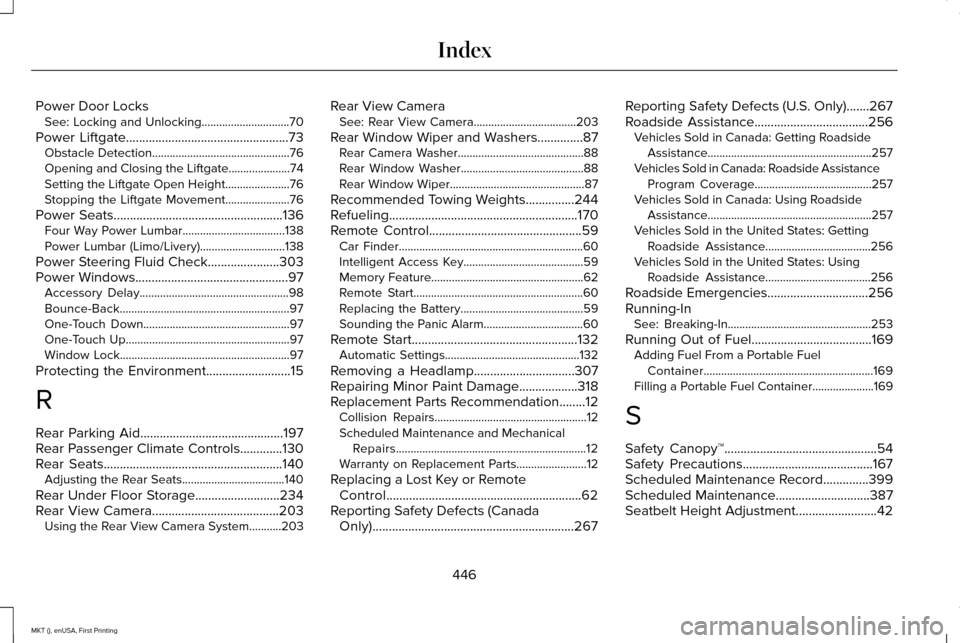
Power Door Locks
See: Locking and Unlocking..............................70
Power Liftgate
..................................................73
Obstacle Detection...............................................76
Opening and Closing the Liftgate.....................74
Setting the Liftgate Open Height......................76
Stopping the Liftgate Movement......................
76
Power Seats
....................................................136
Four Way Power Lumbar...................................138
Power Lumbar (Limo/Livery).............................
138
Power Steering Fluid Check
......................303
Power Windows...............................................97
Accessory Delay...................................................98
Bounce-Back..........................................................97
One-Touch Down..................................................97
One-Touch Up........................................................97
Window Lock..........................................................97
Protecting the Environment
..........................15
R
Rear Parking Aid
............................................197
Rear Passenger Climate Controls.............130
Rear Seats
.......................................................140
Adjusting the Rear Seats...................................140
Rear Under Floor Storage..........................234
Rear View Camera.......................................203 Using the Rear View Camera System...........203 Rear View Camera
See: Rear View Camera...................................203
Rear Window Wiper and Washers..............87 Rear Camera Washer...........................................88
Rear Window Washer..........................................88
Rear Window Wiper..............................................87
Recommended Towing Weights...............244
Refueling..........................................................170
Remote Control...............................................59 Car Finder...............................................................60
Intelligent Access Key.........................................59
Memory Feature....................................................62
Remote Start..........................................................60
Replacing the Battery..........................................59
Sounding the Panic Alarm..................................60
Remote Start...................................................132 Automatic Settings..............................................132
Removing a Headlamp...............................307
Repairing Minor Paint Damage..................318
Replacement Parts Recommendation........12 Collision Repairs....................................................12
Scheduled Maintenance and Mechanical
Repairs.................................................................12
Warranty on Replacement Parts........................12
Replacing a Lost Key or Remote Control............................................................62
Reporting Safety Defects (Canada Only)..............................................................267 Reporting Safety Defects (U.S. Only).......267
Roadside Assistance
...................................256
Vehicles Sold in Canada: Getting Roadside
Assistance........................................................257
Vehicles Sold in Canada: Roadside Assistance Program Coverage........................................257
Vehicles Sold in Canada: Using Roadside Assistance........................................................257
Vehicles Sold in the United States: Getting Roadside Assistance....................................256
Vehicles Sold in the United States: Using Roadside Assistance....................................256
Roadside Emergencies...............................256
Running-In See: Breaking-In.................................................253
Running Out of Fuel
.....................................169
Adding Fuel From a Portable Fuel
Container..........................................................169
Filling a Portable Fuel Container.....................
169
S
Safety Canopy™...............................................54
Safety Precautions........................................167
Scheduled Maintenance Record..............399
Scheduled Maintenance
.............................387
Seatbelt Height Adjustment.........................42
446
MKT (), enUSA, First Printing Index
Page 451 of 452

Towing the Vehicle on Four Wheels - 3.5L
Ecoboost™/3.7L............................................251
Emergency Towing.............................................251
Recreational Towing...........................................251
Towing.............................................................243
Traction Control.............................................192
Principle of Operation........................................192
Trailer Sway Control....................................244
Transmission Code Designation..............359
Transmission...................................................177
Transmission See: Transmission................................................177
Transporting the Vehicle............................249
U
Under Hood Overview - 2.0L EcoBoost™...................................................288
Under Hood Overview - 3.5L Ecoboost™....................................................290
Under Hood Overview - 3.7L....................292 Engine Shield......................................................293
Universal Garage Door Opener................152 HomeLink Wireless Control System...............152
USB Port
..........................................................381 Using Adaptive Cruise Control.................207
Automatic Cancellation.......................................211
Blocked Sensor....................................................213
Canceling the Set Speed..................................210
Changing the Set Speed....................................211
Detection Issues...................................................211
Following a Vehicle...........................................208
Hilly Condition Usage.........................................211
Overriding the System.......................................210
Resuming the Set Speed....................................211
Setting the Adaptive Cruise Speed...............208
Setting the Gap Distance.................................209
Switching Adaptive Cruise Control Off...........211
Switching Adaptive Cruise Control On........208
Switching to Normal Cruise Control...............214
System Not Available.........................................213
Using All-Wheel Drive...................................181 Driving In Special Conditions With All-Wheel
Drive (AWD)......................................................184
Operating AWD Vehicles With Mismatched Tires....................................................................183
Operating AWD Vehicles With Spare Tires ....................................................................182
Using Cruise Control...................................206 Switching Cruise Control Off...........................207
Switching Cruise Control On...........................206
Using MyKey With Remote Start Systems..........................................................68 Using Snow Chains......................................337
Using Stability Control.................................195
Using Traction Control
.................................192
Switching the System Off..................................192
System Indicator Lights and Messages.........192
Using a Switch.....................................................192
Using the Information Display Controls........192
Utilizing the Mediation/Arbitration Program (Canada Only)
.............................................264
V
Vehicle Care...................................................312 General Information............................................312
Vehicle Certification Label.........................358
Vehicle Identification Number..................358
Vehicle Storage.............................................319 Battery...................................................................320
Body........................................................................\
319
Brakes...................................................................320
Cooling system...................................................320
Engine...................................................................320
Fuel system..........................................................320
General..................................................................319
Miscellaneous.....................................................320
Removing Vehicle From Storage...................320
Tires.......................................................................320
448
MKT (), enUSA, First Printing Index