warning light LINCOLN MKT 2016 User Guide
[x] Cancel search | Manufacturer: LINCOLN, Model Year: 2016, Model line: MKT, Model: LINCOLN MKT 2016Pages: 452, PDF Size: 4.69 MB
Page 53 of 452
Proper Driver and Front Passenger
Seating Adjustment
WARNING
National Highway Traffic Safety
Administration (NHTSA) recommends
a minimum distance of at least 10 inches (25
centimeters) between an occupant’ s chest
and the driver airbag module. To properly position yourself away from the
airbag:
•
Move your seat to the rear as far as you
can while still reaching the pedals
comfortably.
• Recline the seat slightly (one or two
degrees) from the upright position.
After all occupants have adjusted their seats
and put on safety belts, it is very important
that they continue to sit properly. A properly
seated occupant sits upright, leaning against
the seat back, and centered on the seat
cushion, with their feet comfortably extended
on the floor. Sitting improperly can increase the chance of injury in a crash event. For
example, if an occupant slouches, lies down,
turns sideways, sits forward, leans forward
or sideways, or puts one or both feet up, the
chance of injury during a crash is greatly
increased.
Children and Airbags
WARNING
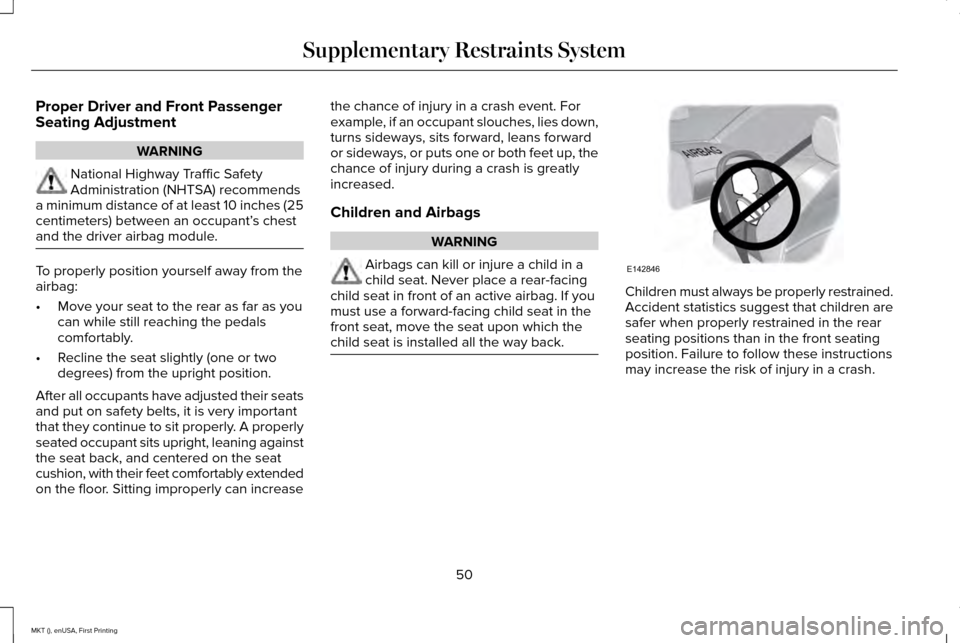
Airbags can kill or injure a child in a
child seat. Never place a rear-facing
child seat in front of an active airbag. If you
must use a forward-facing child seat in the
front seat, move the seat upon which the
child seat is installed all the way back. Children must always be properly restrained.
Accident statistics suggest that children are
safer when properly restrained in the rear
seating positions than in the front seating
position. Failure to follow these instructions
may increase the risk of injury in a crash.
50
MKT (), enUSA, First Printing Supplementary Restraints SystemE142846
Page 56 of 452
Note:
When the passenger airbag status
indicator OFF light is illuminated, the
passenger (seat mounted) side airbag may
be disabled to avoid the risk of airbag
deployment injuries.
After all occupants have adjusted their seats
and put on seatbelts, it is very important that
they continue to sit properly. A properly
seated occupant sits upright, leaning against
the seatback, and centered on the seat
cushion, with their feet comfortably extended
on the floor. Sitting improperly can increase
the chance of injury in a crash event. For
example, if an occupant slouches, lies down,
turns sideways, sits forward, leans forward
or sideways, or puts one or both feet up, the
chance of injury during a crash is greatly
increased. Make sure the front passenger
sensing system is operating
properly. See Crash Sensors and
Airbag Indicator (page 55).
Do not attempt to repair or service the
system. Take your vehicle immediately to an
authorized dealer. If it is necessary to modify an advanced front
airbag system to accommodate a person
with disabilities, contact the Ford Customer
Relationship Center.
See Getting the
Services You Need (page 261).
SIDE AIRBAGS WARNINGS
Do not place objects or mount
equipment on or near the airbag cover,
on the side of the seatbacks (of the front
seats), or in front seat areas that may come
into contact with a deploying airbag. Failure
to follow these instructions may increase the
risk of personal injury in the event of a crash. Do not use accessory seat covers. The
use of accessory seat covers may
prevent the deployment of the side airbags
and increase the risk of injury in an accident. Do not lean your head on the door. The
side airbag could injure you as it
deploys from the side of the seatback. WARNINGS
Do not attempt to service, repair, or
modify the airbag, its fuses or the seat
cover on a seat containing an airbag as you
could be seriously injured or killed. Contact
your authorized dealer as soon as possible. If the side airbag has deployed, the
airbag will not function again. The side
airbag system (including the seat) must be
inspected and serviced by an authorized
dealer. If the airbag is not replaced, the
unrepaired area will increase the risk of injury
in a crash. The side airbags are located on the outboard
side of the seatbacks of the front seats. In
certain sideways crashes, the airbag on the
side affected by the crash will be inflated.
The airbag was designed to inflate between
the door panel and occupant to further
enhance the protection provided occupants
in side impact crashes.
53
MKT (), enUSA, First Printing Supplementary Restraints System
Page 59 of 452
Your vehicle has a collection of crash and
occupant sensors which provide information
to the restraints control module. The
restraints control module deploys (activates)
the front safety belt pretensioners, driver
airbag, passenger airbag, seat mounted side
airbags, the Safety Canopy and rear
inflatable safety belts. Based on the type of
crash, the restraints control module will
deploy the appropriate safety devices.
The restraints control module also monitors
the readiness of the above safety devices
plus the crash and occupant sensors. The
readiness of the safety system is indicated
by a warning indicator light in the instrument
cluster or by a backup tone if the warning
light is not working. Routine maintenance of
the airbag is not required.
A difficulty with the system is indicated by
one or more of the following:
The readiness light will not
illuminate immediately after the
ignition is turned on. •
The readiness light will either flash or
stay lit.
• A series of five beeps will be heard. The
tone pattern will repeat periodically until
the problem, the light or both are
repaired.
If any of these things happen, even
intermittently, have the supplemental
restraint system serviced at an authorized
dealer immediately. Unless serviced, the
system may not function properly in the
event of a crash. The fact that the safety belt pretensioners or
front airbags did not activate for both front
seat occupants in a crash does not mean
that something is wrong with the system.
Rather, it means the restraints control module
determined the accident conditions (crash
severity, belt usage) were not appropriate to
activate these safety devices.
•
The design of the front airbags is to
activate only in frontal and near-frontal
crashes (not rollovers, side impacts or
rear impacts) unless the crash causes
sufficient frontal deceleration.
• The safety belt pretensioners and rear
inflatable safety belts are designed to
activate in frontal, near-frontal, side and
rollover crashes.
56
MKT (), enUSA, First Printing Supplementary Restraints System
Page 76 of 452
4. Press the power door unlock control
three times.
5. Switch the ignition on. The horn sounds
indicating your vehicle is in programming
mode.
6. Press the power door lock control and within five seconds, press the power door
unlock control. The horn sounds once if
disabled or twice if enabled.
7. Switch the ignition off. The horn sounds
indicating programming is complete.
Illuminated Entry
The interior lamps and some exterior lamps
illuminate when you unlock the doors with
the remote control.
The lamps turn off if:
• The ignition is on.
• You press the remote control lock button.
• 25 seconds have elapsed.
The lamps do not turn off if:
• You switch them on with the lighting
control.
• Any door is open. Illuminated Exit
The interior lamps and some exterior lamps
illuminate when all doors are closed and you
switch the ignition off.
The lamps will turn off if all the doors remain
closed and:
•
25 seconds have elapsed.
• You lock your vehicle from the outside.
Battery Saver
If you leave the courtesy lamps, interior
lamps or headlamps on, the battery saver
shuts them off 10 minutes after you switch
the ignition off.
Battery Saver for Intelligent Access Keys
If you leave the ignition switched on and the
engine is not running, the battery saver will
turn the ignition off when it detects a certain
amount of battery drain, or after 45 minutes
have elapsed. POWER LIFTGATE WARNINGS
It is extremely dangerous to ride in a
cargo area, inside or outside of a
vehicle. In a crash, people riding in these
areas are more likely to be seriously injured
or killed. Do not allow people to ride in any
area of your vehicle that is not equipped with
seats and seatbelts. Make sure everyone in
your vehicle is in a seat and properly using
a seatbelt. Failure to follow this warning
could result in serious personal injury or
death. Make sure to close and latch the
liftgate to prevent drawing exhaust
fumes into your vehicle. This will also prevent
passengers and cargo from falling out. If you
must drive with the liftgate open, keep the
vents or windows open so outside air comes
into your vehicle. Failure to follow this
warning could result in serious personal
injury.
73
MKT (), enUSA, First Printing Locks
Page 93 of 452
High Beams
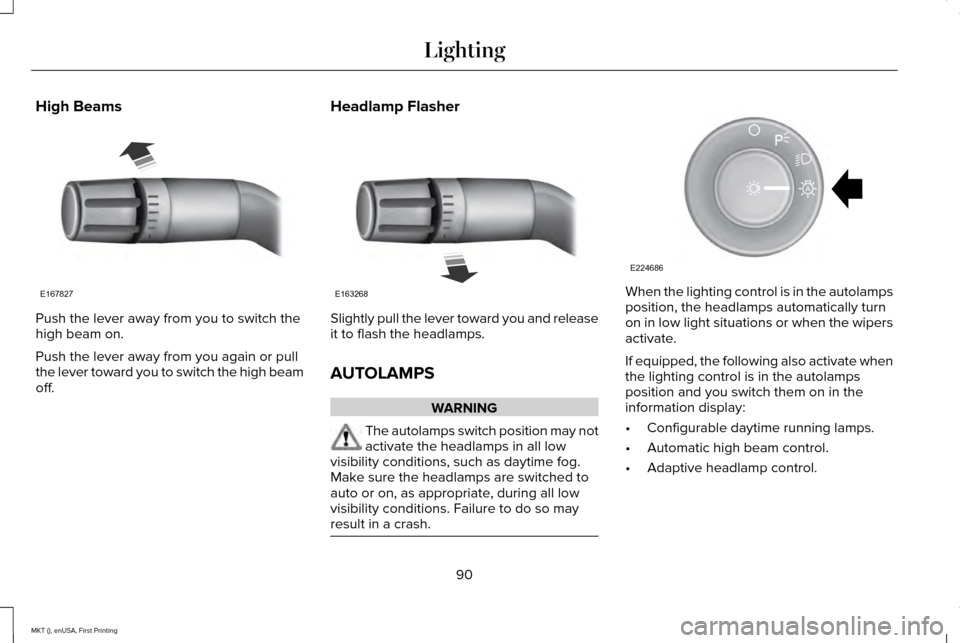
Push the lever away from you to switch the
high beam on.
Push the lever away from you again or pull
the lever toward you to switch the high beam
off.
Headlamp Flasher Slightly pull the lever toward you and release
it to flash the headlamps.
AUTOLAMPS
WARNING
The autolamps switch position may not
activate the headlamps in all low
visibility conditions, such as daytime fog.
Make sure the headlamps are switched to
auto or on, as appropriate, during all low
visibility conditions. Failure to do so may
result in a crash. When the lighting control is in the autolamps
position, the headlamps automatically turn
on in low light situations or when the wipers
activate.
If equipped, the following also activate when
the lighting control is in the autolamps
position and you switch them on in the
information display:
•
Configurable daytime running lamps.
• Automatic high beam control.
• Adaptive headlamp control.
90
MKT (), enUSA, First Printing LightingE167827 E163268 E224686
A
Page 95 of 452
4. Switch the ignition on.
5. Switch the ignition off.
6. Select the autolamp position on the
lighting control. The headlamps and
parking lamps will turn on.
7. Turn the lighting control to the off position when the required delay time
has been reached. The headlamps and
parking lamps will turn off.
You can set the headlamp exit delay to one
of the following settings:
• Off
• 10 seconds
• 20 seconds
• 120 seconds
Note: You can adjust the time delay using
the display controls in the instrument cluster.
See Information Displays (page 108). DAYTIME RUNNING LAMPS
(If
Equipped) WARNING
Always remember to switch your
headlamps on in low light situations or
during inclement weather. The system does
not activate the tail lamps and may not
provide adequate lighting during these
conditions. Failure to activate your
headlamps under these conditions may result
in a collision. The system switches the signature lamps on
in day light conditions.
To switch the system on, switch the ignition
on, and switch the lighting control to the off,
autolamp, or parking lamp position.AUTOMATIC HIGH BEAM
CONTROL
(If Equipped)
The system will automatically turn on your
high beams if it is dark enough and no other
traffic is present. When it detects the
headlights of an approaching vehicle, the tail
lamps of the preceding vehicle or street
lighting, the system will turn off the high
beams before they distract other drivers. The
low beams remain on.
Note: If it appears that automatic control of
the high beams is not functioning properly,
check the windshield in front of the camera
for a blockage. A clear view of the road is
required for proper system operation. Have
any windshield damage in the area of the
camera ’s field-of-view repaired.
Note: If the system detects a blockage such
as bird droppings, bug splatter, snow or ice,
and you do not observe changes, the system
will go into low beam mode until you clear
the blockage. A message may also appear
in the instrument cluster display noting the
front camera is blocked.
92
MKT (), enUSA, First Printing Lighting
Page 100 of 452
POWER WINDOWS
WARNINGS
Do not leave children unattended in
your vehicle and do not let them play
with the power windows. They may seriously
injure themselves. When closing the power windows, you
should verify they are free of
obstructions and make sure that children and
pets are not in the proximity of the window
openings. Note:
You may hear a pulsing noise when
just one of the windows is open. Lower the
opposite window slightly to reduce this
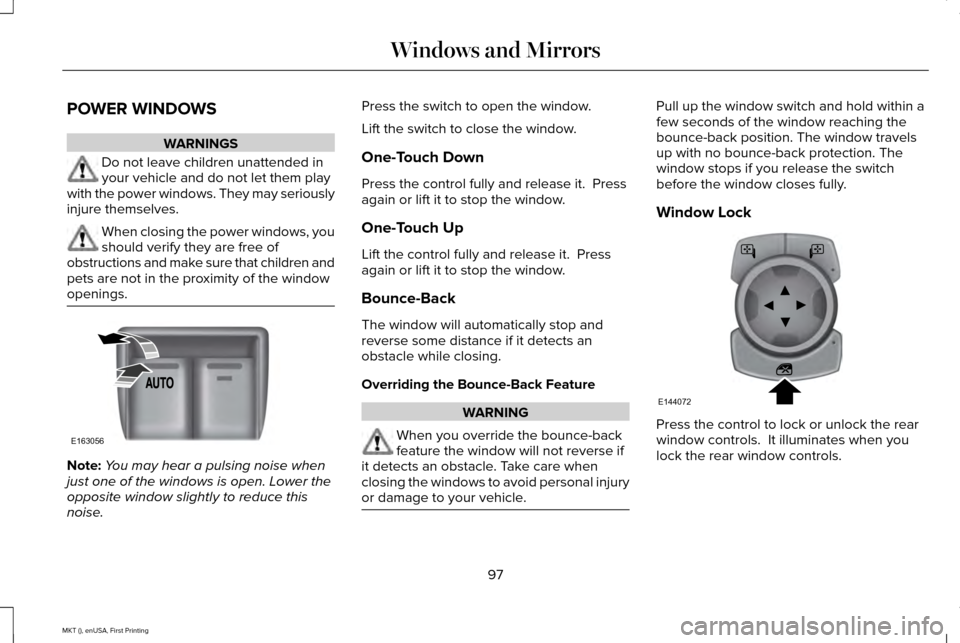
noise. Press the switch to open the window.
Lift the switch to close the window.
One-Touch Down
Press the control fully and release it. Press
again or lift it to stop the window.
One-Touch Up
Lift the control fully and release it. Press
again or lift it to stop the window.
Bounce-Back
The window will automatically stop and
reverse some distance if it detects an
obstacle while closing.
Overriding the Bounce-Back Feature
WARNING
When you override the bounce-back
feature the window will not reverse if
it detects an obstacle. Take care when
closing the windows to avoid personal injury
or damage to your vehicle. Pull up the window switch and hold within a
few seconds of the window reaching the
bounce-back position. The window travels
up with no bounce-back protection. The
window stops if you release the switch
before the window closes fully.
Window Lock
Press the control to lock or unlock the rear
window controls. It illuminates when you
lock the rear window controls.
97
MKT (), enUSA, First Printing Windows and MirrorsE163056 E144072
Page 101 of 452
Accessory Delay
The window switches remain operational for
several minutes when you switch the ignition
off or until you open either front door.
GLOBAL OPENING AND CLOSING
You can use the remote control to operate
the windows with the ignition off.
Note:
You can enable or disable this feature
in the information display or see an
authorized dealer. See General Information
(page 108).
Note: To operate this feature, accessory
delay must not be active.
Opening the Windows
You can only open the windows for a short
time after you unlock your vehicle with the
remote control. After you unlock your vehicle,
press and hold the remote control unlock
button to open the windows and vent the
moonroof. Release the button once
movement starts. Press the lock or unlock
button to stop movement. Closing the Windows WARNING
When closing the windows and
moonroof, you should verify they are
free of obstructions and make sure that
children and pets are not in the proximity of
the window openings. To close the windows and moonroof, press
and hold the remote control lock button.
Release the button once movement starts.
Press the lock or unlock button to stop
movement.
EXTERIOR MIRRORS
Power Exterior Mirrors
WARNING
Do not adjust the mirrors when your
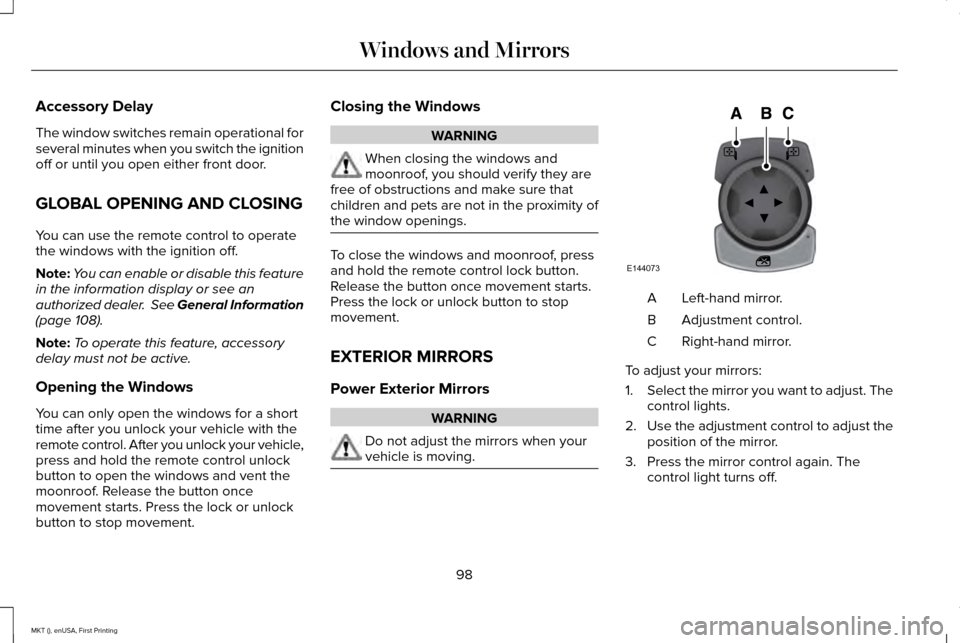
vehicle is moving. Left-hand mirror.
A
Adjustment control.
B
Right-hand mirror.
C
To adjust your mirrors:
1. Select the mirror you want to adjust. The
control lights.
2. Use the adjustment control to adjust the
position of the mirror.
3. Press the mirror control again. The control light turns off.
98
MKT (), enUSA, First Printing Windows and MirrorsE144073
Page 102 of 452
Fold-Away Exterior Mirrors
Push the mirror toward the door window
glass. Make sure that you fully engage the
mirror in its support when returning it to its
original position.
Heated Exterior Mirrors
See Heated Windows and Mirrors (page
131).
Memory Mirrors
You can save and recall the mirror positions
through the memory function. See Memory
Function
(page 138).
Auto-dimming Feature
The driver exterior mirror automatically dims
with the auto-dimming interior mirror.
Direction Indicator Mirrors
While the vehicle is running, the
forward-facing portion of the appropriate
mirror housing blinks when you switch on
the direction indicator. Puddle Lamps
The lamps on the bottom part of the mirror
housing light when you use your transmitter
to unlock the doors or when you open a
door.
Integrated Blind Spot Mirror
(If Equipped)
WARNING
Objects in the blind spot mirror are
closer than they appear.
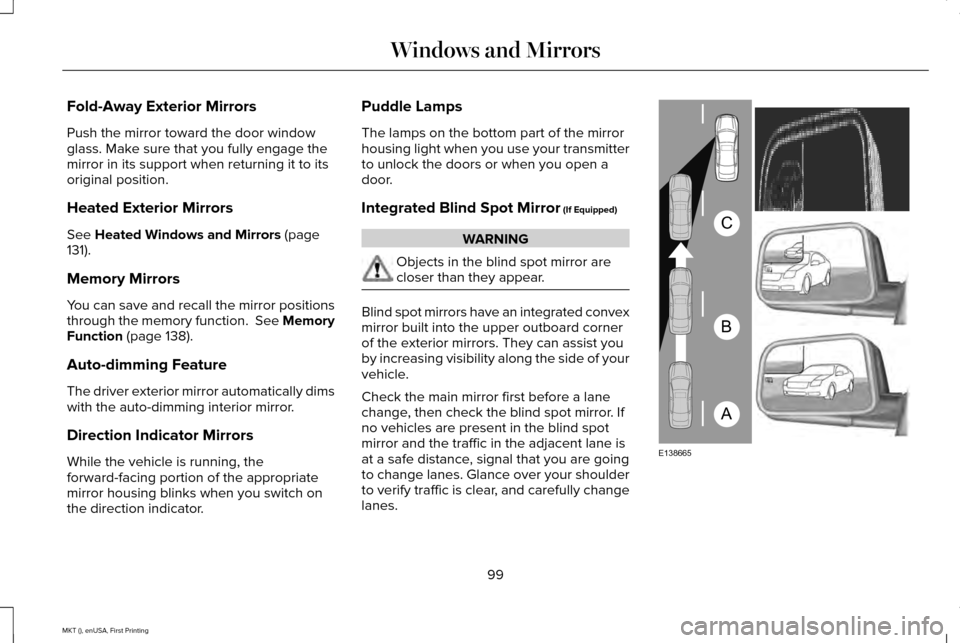
Blind spot mirrors have an integrated convex
mirror built into the upper outboard corner
of the exterior mirrors. They can assist you
by increasing visibility along the side of your
vehicle.
Check the main mirror first before a lane
change, then check the blind spot mirror. If
no vehicles are present in the blind spot
mirror and the traffic in the adjacent lane is
at a safe distance, signal that you are going
to change lanes. Glance over your shoulder
to verify traffic is clear, and carefully change
lanes.
99
MKT (), enUSA, First Printing Windows and MirrorsA
B
C
E138665
Page 103 of 452
The image of the approaching vehicle is
small and near the inboard edge of the main
mirror when it is at a distance. The image
becomes larger and begins to move
outboard across the main mirror as the
vehicle approaches (A). The image transitions
from the main mirror and begins to appear
in the blind spot mirror as the vehicle
approaches (B). The vehicle transitions to
your peripheral field of view as it leaves the
blind spot mirror (C).
Blind Spot Information System (If Equipped)
See Blind Spot Information System (page
221).
INTERIOR MIRROR WARNING
Do not adjust the mirror when your
vehicle is moving.
Note:
Do not clean the housing or glass of
any mirror with harsh abrasives, fuel or other
petroleum or ammonia-based cleaning
products. You can adjust the interior mirror to your
preference. Some mirrors also have a second
pivot point. This lets you move the mirror
head up or down and from side to side.
Auto-Dimming Mirror
Note:
Do not block the sensors on the front
and back of the mirror. Mirror performance
may be affected. A rear center passenger
or raised rear center head restraint may also
block light from reaching the sensor.
The mirror will dim automatically to reduce
glare when bright lights are detected from
behind your vehicle. It will automatically
return to normal reflection when you select
reverse gear to make sure you have a clear
view when backing up. Second Row Illuminated Vanity Mirror
(If Equipped) Pull the cover down to turn on the lamp.
SUN VISORS
100
MKT (), enUSA, First Printing Windows and MirrorsE210723 E138666