wipers LINCOLN MKT 2016 Owners Manual
[x] Cancel search | Manufacturer: LINCOLN, Model Year: 2016, Model line: MKT, Model: LINCOLN MKT 2016Pages: 452, PDF Size: 4.69 MB
Page 5 of 452
Anti-Theft Alarm...............................................81
Steering Wheel
Adjusting the Steering Wheel.....................82
Audio Control
...................................................83
Voice Control
...................................................83
Cruise Control..................................................83
Information Display Control.........................84
Heated Steering Wheel.................................84
Pedals
Adjusting the Pedals......................................85
Wipers and Washers
Windshield Wipers
.........................................86
Autowipers.......................................................86
Windshield Washers.......................................87
Rear Window Wiper and Washers..............87
Lighting
General Information.......................................89
Lighting Control
..............................................89
Autolamps........................................................90 Instrument Lighting Dimmer.........................91
Headlamp Exit Delay......................................91
Daytime Running Lamps...............................92
Automatic High Beam Control....................92
Front Fog Lamps.............................................94
Headlamp Leveling........................................94
Adaptive Headlamps.....................................94
Direction Indicators
........................................95
Welcome Lighting...........................................95
Interior Lamps
..................................................96
Ambient Lighting............................................96
Windows and Mirrors
Power Windows
...............................................97
Global Opening and Closing.......................98
Exterior Mirrors
................................................98
Interior Mirror
.................................................100
Sun Visors.......................................................100
Moonroof..........................................................101
Instrument Cluster
Gauges.............................................................103
Warning Lamps and Indicators..................104 Audible Warnings and Indicators..............107
Information Displays
General Information......................................108
Information Messages
..................................115
Climate Control
Automatic Climate Control..........................127
Hints on Controlling the Interior Climate.........................................................129
Rear Passenger Climate Controls.............130
Heated Windows and Mirrors.....................131
Cabin Air Filter
................................................131
Remote Start...................................................132
Seats
Sitting in the Correct Position
....................133
Head Restraints
.............................................133
Power Seats
....................................................136
Memory Function..........................................138
Rear Seats
.......................................................140
Heated Seats
..................................................148
Climate Controlled Seats............................150
2
MKT (), enUSA, First Printing Table of Contents
Page 89 of 452
WINDSHIELD WIPERS
Note:
Fully defrost the windshield before you
switch the windshield wipers on.
Note: Make sure you switch the windshield
wipers off before entering a car wash.
Note: Clean the windshield and wiper blades
if they begin to leave streaks or smears. If
that does not resolve the issue, install new
wiper blades. See Changing the Wiper
Blades (page 305).
Note: Do not operate the wipers on a dry
windshield. This may scratch the glass,
damage the wiper blades or cause the wiper
motor to burn out. Always use the windshield
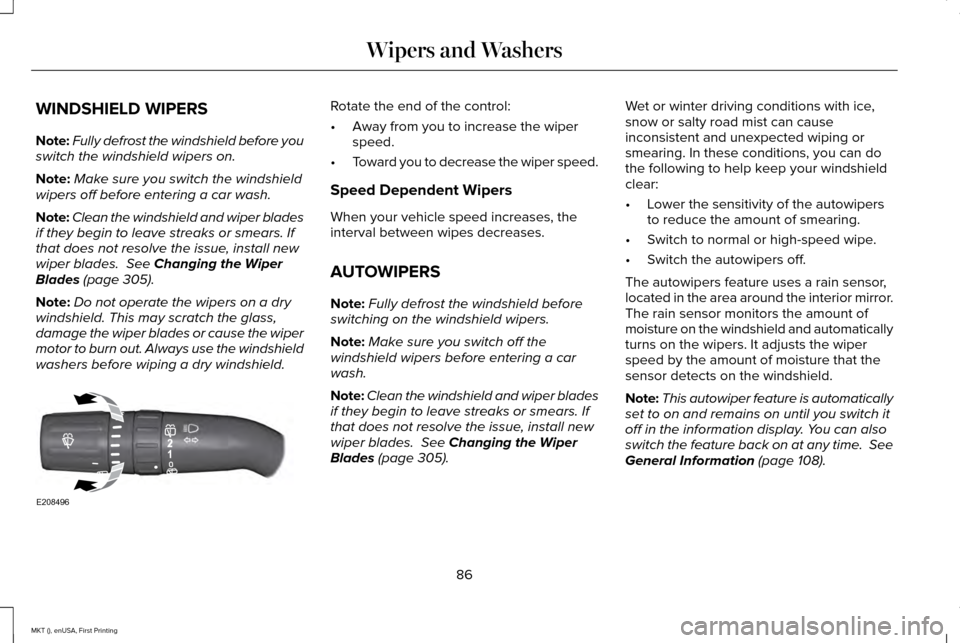
washers before wiping a dry windshield. Rotate the end of the control:
•
Away from you to increase the wiper
speed.
• Toward you to decrease the wiper speed.
Speed Dependent Wipers
When your vehicle speed increases, the
interval between wipes decreases.
AUTOWIPERS
Note: Fully defrost the windshield before
switching on the windshield wipers.
Note: Make sure you switch off the
windshield wipers before entering a car
wash.
Note: Clean the windshield and wiper blades
if they begin to leave streaks or smears. If
that does not resolve the issue, install new
wiper blades.
See Changing the Wiper
Blades (page 305). Wet or winter driving conditions with ice,
snow or salty road mist can cause
inconsistent and unexpected wiping or
smearing. In these conditions, you can do
the following to help keep your windshield
clear:
•
Lower the sensitivity of the autowipers
to reduce the amount of smearing.
• Switch to normal or high-speed wipe.
• Switch the autowipers off.
The autowipers feature uses a rain sensor,
located in the area around the interior mirror.
The rain sensor monitors the amount of
moisture on the windshield and automatically
turns on the wipers. It adjusts the wiper
speed by the amount of moisture that the
sensor detects on the windshield.
Note: This autowiper feature is automatically
set to on and remains on until you switch it
off in the information display. You can also
switch the feature back on at any time. See
General Information (page 108).
86
MKT (), enUSA, First Printing Wipers and WashersE208496
Page 90 of 452
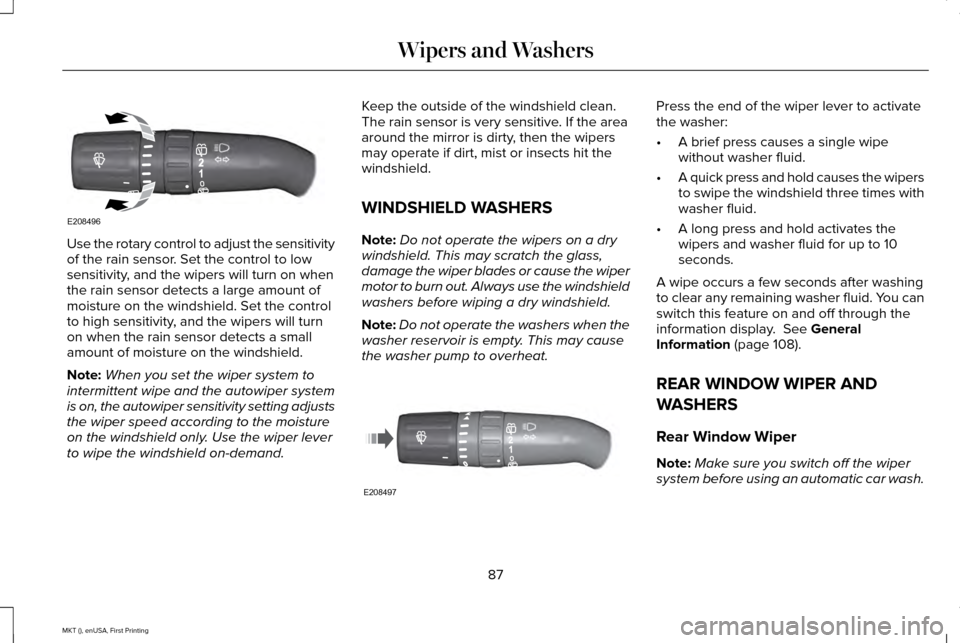
Use the rotary control to adjust the sensitivity
of the rain sensor. Set the control to low
sensitivity, and the wipers will turn on when
the rain sensor detects a large amount of
moisture on the windshield. Set the control
to high sensitivity, and the wipers will turn
on when the rain sensor detects a small
amount of moisture on the windshield.
Note:
When you set the wiper system to
intermittent wipe and the autowiper system
is on, the autowiper sensitivity setting adjusts
the wiper speed according to the moisture
on the windshield only. Use the wiper lever
to wipe the windshield on-demand. Keep the outside of the windshield clean.
The rain sensor is very sensitive. If the area
around the mirror is dirty, then the wipers
may operate if dirt, mist or insects hit the
windshield.
WINDSHIELD WASHERS
Note:
Do not operate the wipers on a dry
windshield. This may scratch the glass,
damage the wiper blades or cause the wiper
motor to burn out. Always use the windshield
washers before wiping a dry windshield.
Note: Do not operate the washers when the
washer reservoir is empty. This may cause
the washer pump to overheat. Press the end of the wiper lever to activate
the washer:
•
A brief press causes a single wipe
without washer fluid.
• A quick press and hold causes the wipers
to swipe the windshield three times with
washer fluid.
• A long press and hold activates the
wipers and washer fluid for up to 10
seconds.
A wipe occurs a few seconds after washing
to clear any remaining washer fluid. You can
switch this feature on and off through the
information display. See General
Information (page 108).
REAR WINDOW WIPER AND
WASHERS
Rear Window Wiper
Note: Make sure you switch off the wiper
system before using an automatic car wash.
87
MKT (), enUSA, First Printing Wipers and WashersE208496 E208497
Page 91 of 452
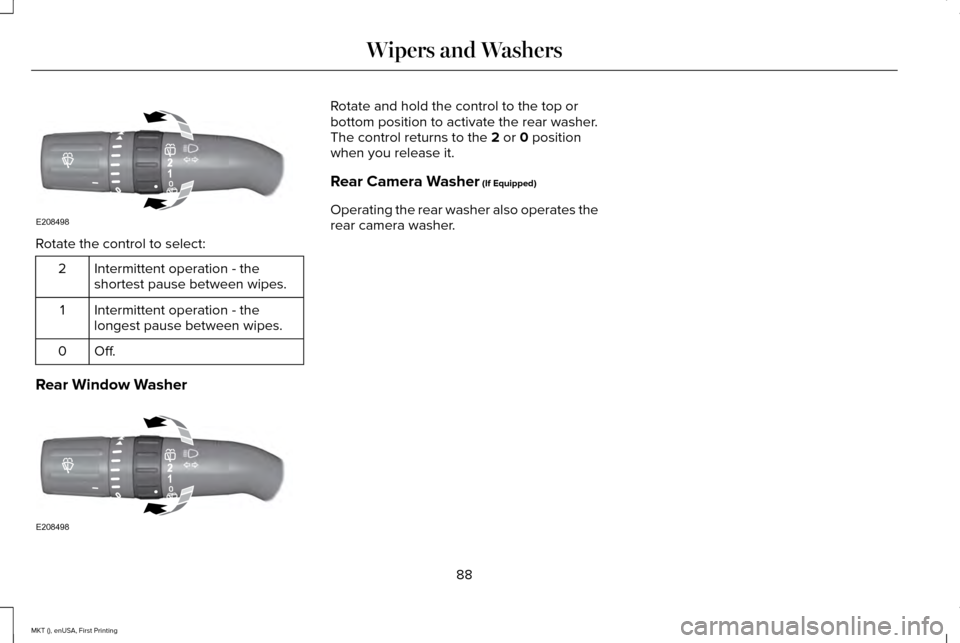
Rotate the control to select:
Intermittent operation - the
shortest pause between wipes.
2
Intermittent operation - the
longest pause between wipes.
1
Off.0
Rear Window Washer Rotate and hold the control to the top or
bottom position to activate the rear washer.
The control returns to the 2 or 0 position
when you release it.
Rear Camera Washer
(If Equipped)
Operating the rear washer also operates the
rear camera washer.
88
MKT (), enUSA, First Printing Wipers and WashersE208498 E208498
Page 93 of 452
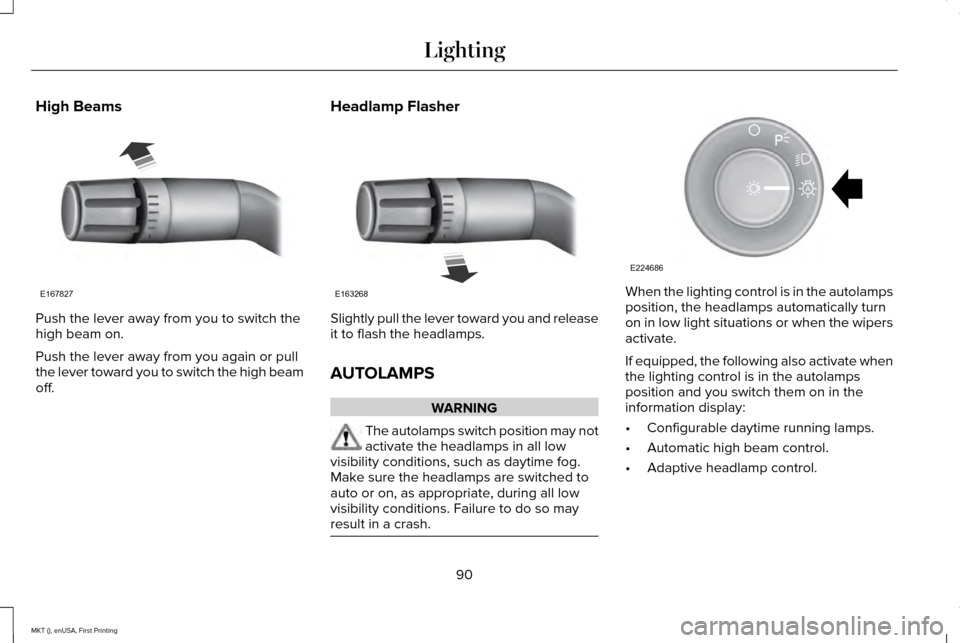
High Beams
Push the lever away from you to switch the
high beam on.
Push the lever away from you again or pull
the lever toward you to switch the high beam
off.
Headlamp Flasher Slightly pull the lever toward you and release
it to flash the headlamps.
AUTOLAMPS
WARNING
The autolamps switch position may not
activate the headlamps in all low
visibility conditions, such as daytime fog.
Make sure the headlamps are switched to
auto or on, as appropriate, during all low
visibility conditions. Failure to do so may
result in a crash. When the lighting control is in the autolamps
position, the headlamps automatically turn
on in low light situations or when the wipers
activate.
If equipped, the following also activate when
the lighting control is in the autolamps
position and you switch them on in the
information display:
•
Configurable daytime running lamps.
• Automatic high beam control.
• Adaptive headlamp control.
90
MKT (), enUSA, First Printing LightingE167827 E163268 E224686
A
Page 94 of 452
The headlamps remain on for a period of
time after you switch the ignition off. Use the
information display controls to adjust the
period of time that the headlamps remain
on. See Information Displays (page 108).
Note: With the headlamps in the autolamps
position, you cannot switch the high beam
headlamps on until the autolamps system
turns the low beam headlamps on.
Windshield Wiper Activated Headlamps
The windshield wiper activated headlamps
turn on within 10 seconds when you switch
the windshield wipers on and the lighting
control is in the autolamps position. They
turn off approximately 60 seconds after you
switch the windshield wipers off.
The headlamps do not turn on by wiper
activation:
• During a mist wipe.
• When the wipers are on to clear washer
fluid during a wash condition.
• If the wipers are in intermittent mode. Note:
If you switch autolamps and
autowipers on, the headlamps will
automatically turn on when the windshield
wipers continuously operate.
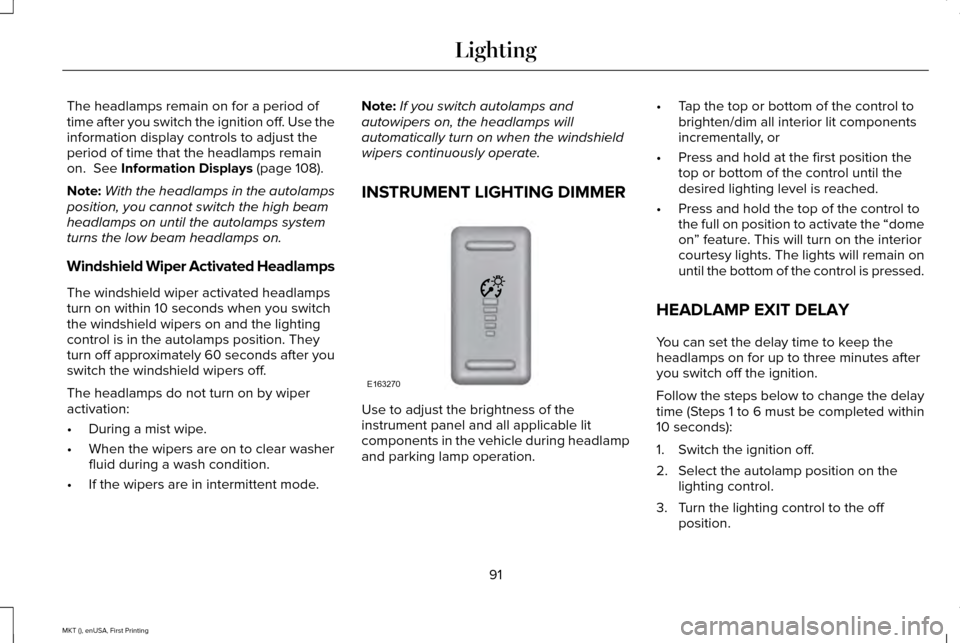
INSTRUMENT LIGHTING DIMMER Use to adjust the brightness of the
instrument panel and all applicable lit
components in the vehicle during headlamp
and parking lamp operation.•
Tap the top or bottom of the control to
brighten/dim all interior lit components
incrementally, or
• Press and hold at the first position the
top or bottom of the control until the
desired lighting level is reached.
• Press and hold the top of the control to
the full on position to activate the “dome
on” feature. This will turn on the interior
courtesy lights. The lights will remain on
until the bottom of the control is pressed.
HEADLAMP EXIT DELAY
You can set the delay time to keep the
headlamps on for up to three minutes after
you switch off the ignition.
Follow the steps below to change the delay
time (Steps 1 to 6 must be completed within
10 seconds):
1. Switch the ignition off.
2. Select the autolamp position on the lighting control.
3. Turn the lighting control to the off position.
91
MKT (), enUSA, First Printing LightingE163270
Page 117 of 452
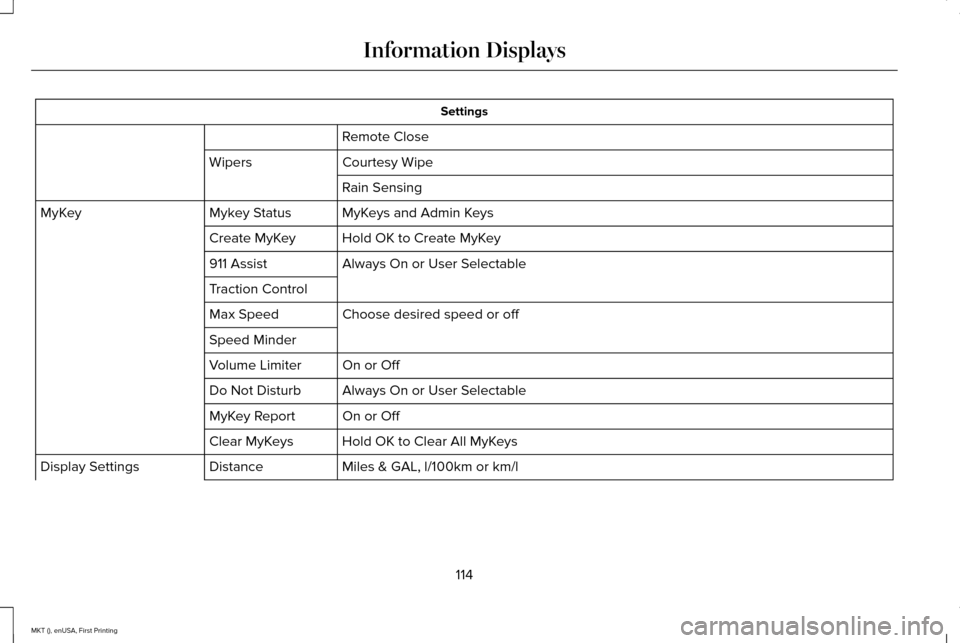
Settings
Remote Close
Courtesy Wipe
Wipers
Rain Sensing
MyKeys and Admin Keys
Mykey Status
MyKey
Hold OK to Create MyKey
Create MyKey
Always On or User Selectable
911 Assist
Traction Control
Choose desired speed or off
Max Speed
Speed Minder
On or Off
Volume Limiter
Always On or User Selectable
Do Not Disturb
On or Off
MyKey Report
Hold OK to Clear All MyKeys
Clear MyKeys
Miles & GAL, l/100km or km/l
Distance
Display Settings
114
MKT (), enUSA, First Printing Information Displays
Page 273 of 452
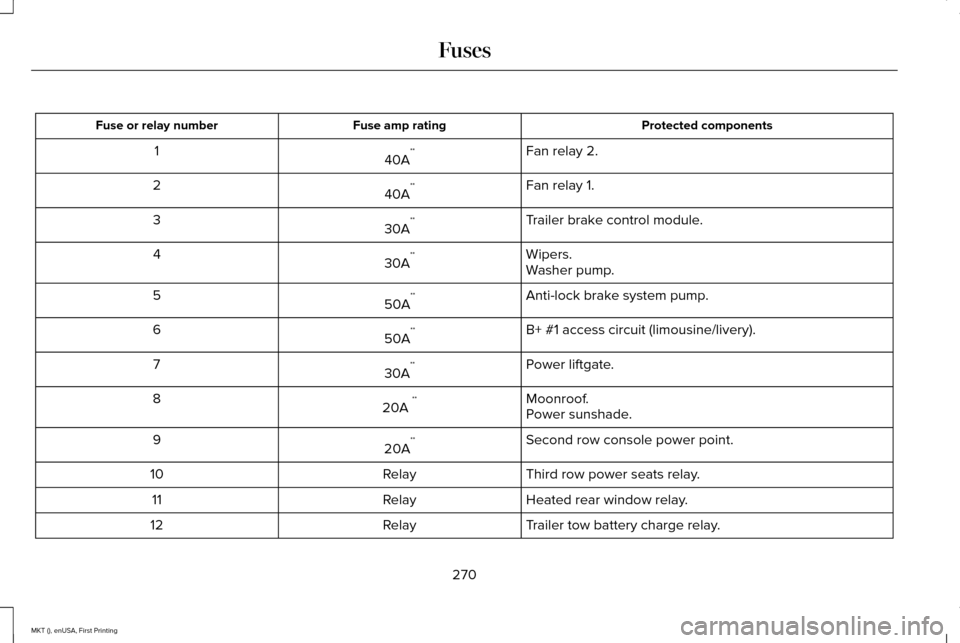
Protected components
Fuse amp rating
Fuse or relay number
Fan relay 2.
40A **
1
Fan relay 1.
40A **
2
Trailer brake control module.
30A **
3
Wipers.
30A **
4
Washer pump.
Anti-lock brake system pump.
50A **
5
B+ #1 access circuit (limousine/livery).
50A **
6
Power liftgate.
30A **
7
Moonroof.
20A **
8
Power sunshade.
Second row console power point.
20A **
9
Third row power seats relay.
Relay
10
Heated rear window relay.
Relay
11
Trailer tow battery charge relay.
Relay
12
270
MKT (), enUSA, First Printing Fuses
Page 278 of 452
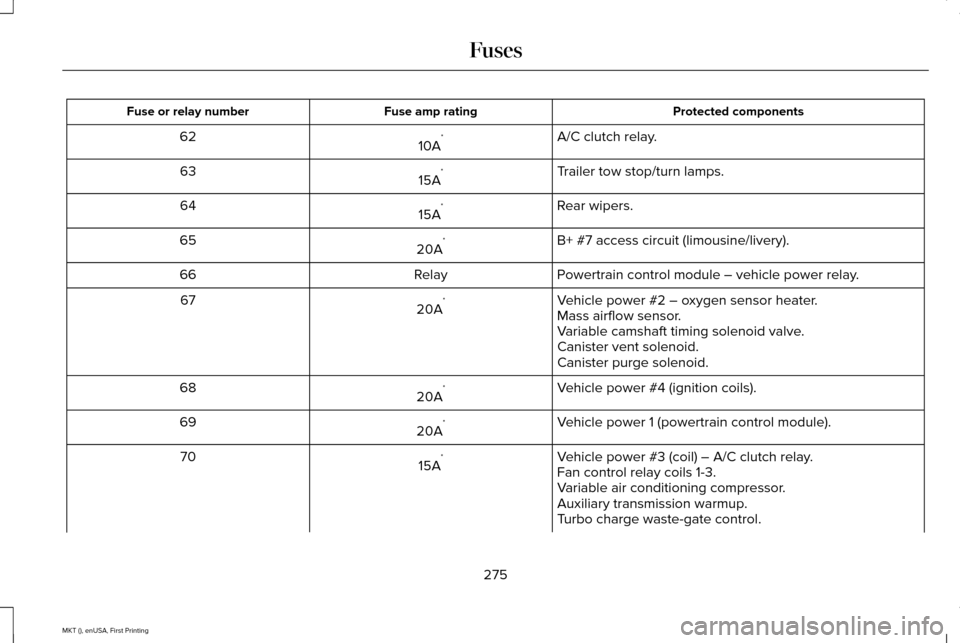
Protected components
Fuse amp rating
Fuse or relay number
A/C clutch relay.
10A *
62
Trailer tow stop/turn lamps.
15A *
63
Rear wipers.
15A *
64
B+ #7 access circuit (limousine/livery).
20A *
65
Powertrain control module – vehicle power relay.
Relay
66
Vehicle power #2 – oxygen sensor heater.
20A *
67
Mass airflow sensor.
Variable camshaft timing solenoid valve.
Canister vent solenoid.
Canister purge solenoid.
Vehicle power #4 (ignition coils).
20A *
68
Vehicle power 1 (powertrain control module).
20A *
69
Vehicle power #3 (coil) – A/C clutch relay.
15A *
70
Fan control relay coils 1-3.
Variable air conditioning compressor.
Auxiliary transmission warmup.
Turbo charge waste-gate control.
275
MKT (), enUSA, First Printing Fuses
Page 318 of 452
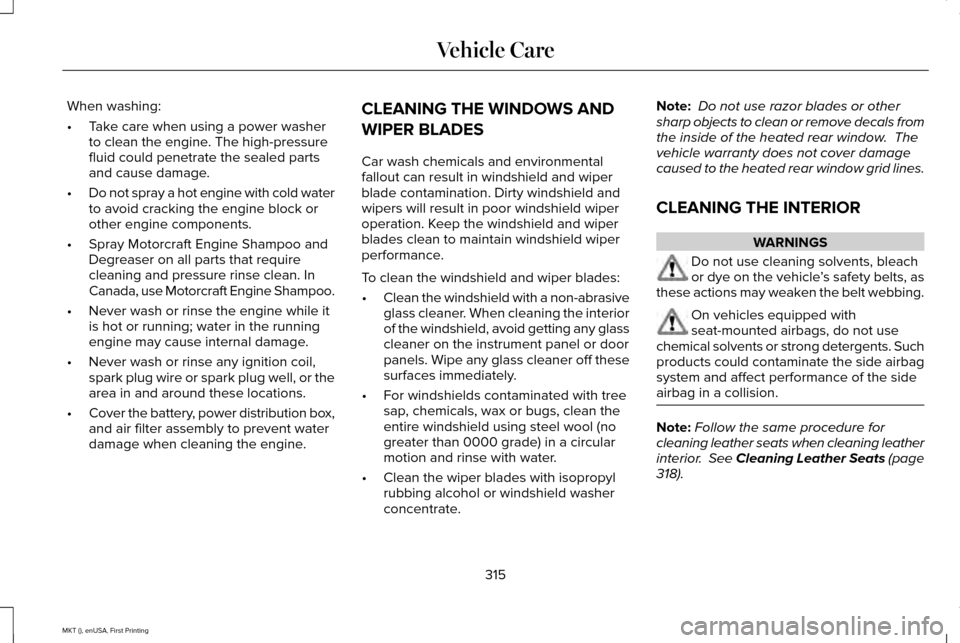
When washing:
•
Take care when using a power washer
to clean the engine. The high-pressure
fluid could penetrate the sealed parts
and cause damage.
• Do not spray a hot engine with cold water
to avoid cracking the engine block or
other engine components.
• Spray Motorcraft Engine Shampoo and
Degreaser on all parts that require
cleaning and pressure rinse clean. In
Canada, use Motorcraft Engine Shampoo.
• Never wash or rinse the engine while it
is hot or running; water in the running
engine may cause internal damage.
• Never wash or rinse any ignition coil,
spark plug wire or spark plug well, or the
area in and around these locations.
• Cover the battery, power distribution box,
and air filter assembly to prevent water
damage when cleaning the engine. CLEANING THE WINDOWS AND
WIPER BLADES
Car wash chemicals and environmental
fallout can result in windshield and wiper
blade contamination. Dirty windshield and
wipers will result in poor windshield wiper
operation. Keep the windshield and wiper
blades clean to maintain windshield wiper
performance.
To clean the windshield and wiper blades:
•
Clean the windshield with a non-abrasive
glass cleaner. When cleaning the interior
of the windshield, avoid getting any glass
cleaner on the instrument panel or door
panels. Wipe any glass cleaner off these
surfaces immediately.
• For windshields contaminated with tree
sap, chemicals, wax or bugs, clean the
entire windshield using steel wool (no
greater than 0000 grade) in a circular
motion and rinse with water.
• Clean the wiper blades with isopropyl
rubbing alcohol or windshield washer
concentrate. Note:
Do not use razor blades or other
sharp objects to clean or remove decals from
the inside of the heated rear window. The
vehicle warranty does not cover damage
caused to the heated rear window grid lines.
CLEANING THE INTERIOR WARNINGS
Do not use cleaning solvents, bleach
or dye on the vehicle
’s safety belts, as
these actions may weaken the belt webbing. On vehicles equipped with
seat-mounted airbags, do not use
chemical solvents or strong detergents. Such
products could contaminate the side airbag
system and affect performance of the side
airbag in a collision. Note:
Follow the same procedure for
cleaning leather seats when cleaning leather
interior. See Cleaning Leather Seats (page
318).
315
MKT (), enUSA, First Printing Vehicle Care