warning LINCOLN MKT 2017 Owners Manual
[x] Cancel search | Manufacturer: LINCOLN, Model Year: 2017, Model line: MKT, Model: LINCOLN MKT 2017Pages: 558, PDF Size: 4.59 MB
Page 347 of 558
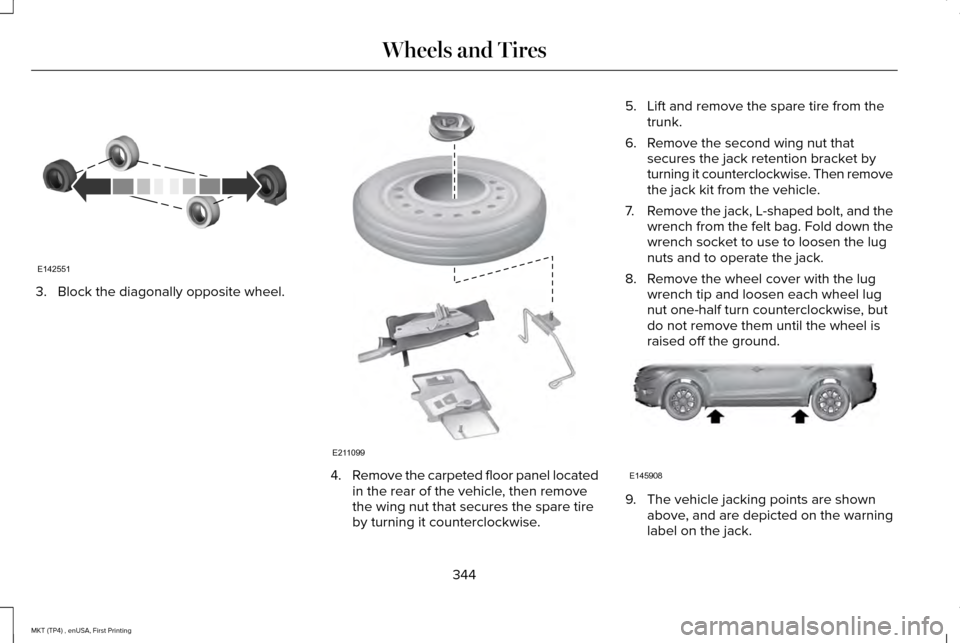
3. Block the diagonally opposite wheel.
4.
Remove the carpeted floor panel located
in the rear of the vehicle, then remove
the wing nut that secures the spare tire
by turning it counterclockwise. 5. Lift and remove the spare tire from the
trunk.
6. Remove the second wing nut that secures the jack retention bracket by
turning it counterclockwise. Then remove
the jack kit from the vehicle.
7. Remove the jack, L-shaped bolt, and the
wrench from the felt bag. Fold down the
wrench socket to use to loosen the lug
nuts and to operate the jack.
8. Remove the wheel cover with the lug wrench tip and loosen each wheel lug
nut one-half turn counterclockwise, but
do not remove them until the wheel is
raised off the ground. 9. The vehicle jacking points are shown
above, and are depicted on the warning
label on the jack.
344
MKT (TP4) , enUSA, First Printing Wheels and TiresE142551 E211099 E145908
Page 349 of 558
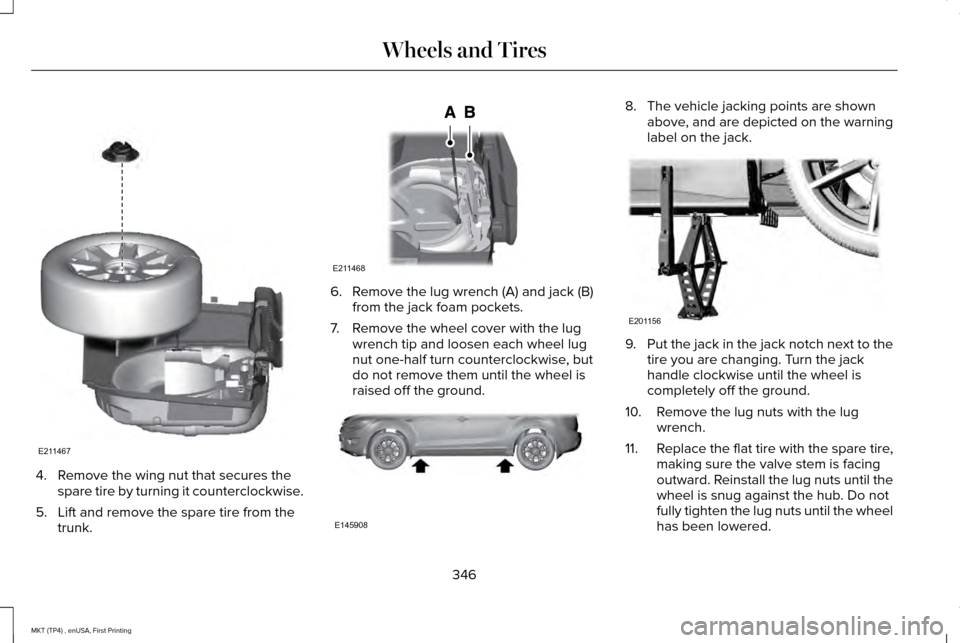
4. Remove the wing nut that secures the
spare tire by turning it counterclockwise.
5. Lift and remove the spare tire from the trunk. 6. Remove the lug wrench (A) and jack (B)
from the jack foam pockets.
7. Remove the wheel cover with the lug wrench tip and loosen each wheel lug
nut one-half turn counterclockwise, but
do not remove them until the wheel is
raised off the ground. 8. The vehicle jacking points are shown
above, and are depicted on the warning
label on the jack. 9.
Put the jack in the jack notch next to the
tire you are changing. Turn the jack
handle clockwise until the wheel is
completely off the ground.
10. Remove the lug nuts with the lug wrench.
11. Replace the flat tire with the spare tire,
making sure the valve stem is facing
outward. Reinstall the lug nuts until the
wheel is snug against the hub. Do not
fully tighten the lug nuts until the wheel
has been lowered.
346
MKT (TP4) , enUSA, First Printing Wheels and TiresE211467 E211468 E145908 E201156
Page 352 of 558

TECHNICAL SPECIFICATIONS
Wheel Lug Nut Torque Specifications
WARNING
When you install a wheel, always remove any corrosion, dirt or foreign m\
aterials present on the mounting surfaces of the wheel or the
surface of the wheel hub, brake drum or brake disc that contacts the wheel. Make sure to secure any fasteners that attach the rotor to
the hub so they do not interfere with the mounting surfaces of the wheel\
. Installing wheels without correct metal-to-metal contact at the wheel
mounting surfaces can cause the wheel nuts to loosen and the wheel to co\
me off while your vehicle is in motion, resulting in loss of vehicle
control, personal injury or death. lb.ft (Nm) *
Bolt size
100 lb.ft (135 Nm)
1/2 x 20
150 lb.ft (204 Nm)
M14 x 1.5 (Limousine only)
*Torque specifications are for nut and bolt threads free of dirt and rust.\
Use only Ford recommended replacement fasteners.
Retighten the lug nuts to the specified torque within 100 miles (160 kil\
ometers) after any wheel disturbance (such as tire rotation, changing \
a
flat tire, wheel removal).
349
MKT (TP4) , enUSA, First Printing Wheels and Tires
Page 360 of 558

CAPACITIES AND SPECIFICATIONS - 3.5L ECOBOOST™
Capacities
WARNING
The air conditioning refrigerant system contains refrigerant under high \
pressure. Only qualified personnel should service the air
conditioning refrigerant system. Opening the air conditioning refrigeran\
t system can cause personal injury.
Capacity
Item
6.0 qt (5.7 L)
Engine oil
13.7 qt (13 L)
Engine coolant
Between MIN/MAX on brake fluid reservoir
Brake fluid
2.4 pt (1.15)
Rear differential fluid (All Wheel Drive)
10.9 qt (10.3 L)*
Automatic transmission fluid (6F50)
11.6 qt (11 L)
*
Automatic transmission fluid (6F55)
17.9 fl oz (0.53 L)
Power Transfer Unit (PTU) fluid (All Wheel Drive)
Fill as required
Windshield washer fluid
18.6 gal (70.4 L)
Fuel tank
357
MKT (TP4) , enUSA, First Printing Capacities and Specifications
Page 367 of 558

CAPACITIES AND SPECIFICATIONS - 3.7L
Capacities
WARNING
The air conditioning refrigerant system contains refrigerant under high \
pressure. Only qualified personnel should service the air
conditioning refrigerant system. Opening the air conditioning refrigeran\
t system can cause personal injury.
Capacity
Item
6.0 qt (5.7 L)
Engine oil
13.2 qt (12.5 L)
Engine coolant
Between MIN/MAX on brake fluid reservoir
Brake fluid
2.4 pt (1.15)
Rear differential fluid (All Wheel Drive)
10.9 qt (10.3 L)*
Automatic transmission fluid (6F50)
11.6 qt (11 L)
*
Automatic transmission fluid (6F55)
17.9 fl oz (0.53 L)
Power Transfer Unit (PTU) fluid (All Wheel Drive)
Fill as required
Windshield washer fluid
18.6 gal (70.4 L)
Fuel tank
364
MKT (TP4) , enUSA, First Printing Capacities and Specifications
Page 375 of 558
Do not expose discs to direct sunlight or heat
sources for extended periods.
MP3 and WMA Track and Folder
Structure
Audio systems capable of recognizing and
playing MP3 and WMA individual tracks and
folder structures work as follows:
•
There are two different modes for MP3
and WMA disc playback: MP3 and WMA
track mode (system default) and MP3 and
WMA folder mode.
• MP3 and WMA track mode ignores any
folder structure on the MP3 and WMA
disc. The player numbers each MP3 and
WMA track on the disc (noted by the MP3
or WMA file extension) from T001 to a
maximum of T255. The maximum number
of playable MP3 and WMA files may be
less depending on the structure of the
CD and exact model of radio present. •
MP3 and WMA folder mode represents
a folder structure consisting of one level
of folders. The CD player numbers all
MP3 and WMA tracks on the disc (noted
by the MP3 or WMA file extension) and
all folders containing MP3 and WMA files,
from F001 (folder) T001 (track) to F253
T255.
• Creating discs with only one level of
folders helps with navigation through the
disc files.
If you are burning your own MP3 and WMA
discs, it is important to understand how the
system reads the structures you create. While
various files may be present (files with
extensions other than MP3 and WMA), only
files with the MP3 and WMA extension are
played; other files are ignored by the system.
This enables you to use the same MP3 and
WMA disc for a variety of tasks on your work
computer, home computer and your
in-vehicle system. In track mode, the system displays and plays
the structure as if it were only one level deep
(all MP3 and WMA files play, regardless of
being in a specific folder). In folder mode,
the system only plays the MP3 and WMA files
in the current folder.
AUDIO UNIT WARNING
Driving while distracted can result in
loss of vehicle control, crash and injury.
We strongly recommend that you use
extreme caution when using any device that
may take your focus off the road. Your
primary responsibility is the safe operation
of your vehicle. We recommend against the
use of any hand-held device while driving
and encourage the use of voice-operated
systems when possible. Make sure you are
aware of all applicable local laws that may
affect the use of electronic devices while
driving. 372
MKT (TP4) , enUSA, First Printing Audio System
Page 379 of 558
GENERAL INFORMATION
WARNING
Driving while distracted can result in
loss of vehicle control, crash and injury.
We strongly recommend that you use
extreme caution when using any device that
may take your focus off the road. Your
primary responsibility is the safe operation
of your vehicle. We recommend against the
use of any hand-held device while driving
and encourage the use of voice-operated
systems when possible. Make sure you are
aware of all applicable local laws that may
affect the use of electronic devices while
driving. Getting to Know Your System
The SYNC 3 system allows you to interact
with a variety of features using the
touchscreen and voice commands. By
integrating with your Bluetooth-enabled
phone, the touchscreen provides easy
interaction with audio, multimedia, climate
control, navigation, and your phone's SYNC
3 compatible apps.
Using the Touchscreen
To operate the touchscreen, you can simply
touch the item or option that you want to
select. The button changes color when you
select it.
The SYNC 3 layout allows you to quickly
select the feature you wish to use.
376
MKT (TP4) , enUSA, First Printing SYNC™ 3
Page 389 of 558
•
DISP: Switch the display on or off. You
can also touch the screen to switch the
display back on.
• Temperature, fan and climate control
buttons:
Control the temperature, fan
speed or settings of the climate control
system. See Climate Control (page 130).
911 Assist WARNINGS
Unless the 911 Assist setting is set on
before a crash, the system will not dial
for help which could delay response time,
potentially increasing the risk of serious
injury or death after a crash. setting is set on
before a crash, the system will not dial for
help which could delay response time,
potentially increasing the risk of serious
injury or death after a crash. WARNINGS
Do not wait for 911 Assist to make an
emergency call if you can do it yourself.
Dial emergency services immediately to
avoid delayed response time which could
increase the risk of serious injury or death
after a crash. If you do not hear 911 Assist
within five seconds of the crash, the system
or phone may be damaged or non-functional. Always place your phone in a secure
location in your vehicle so it does not
become a projectile or get damaged in a
crash. Failure to do so may cause serious
injury to someone or damage the phone
which could prevent 911 Assist from working
properly. Note:
The SYNC 911 Assist feature must be
set on before the incident.
Note: The SYNC 911 Assist feature only
operates in the U.S., Canada or in a territory
in which 911 is the emergency number.
Note: Before setting this feature on, make
sure that you read the 911 Assist Privacy
Notice later in this section for important
information. Note:
If any user sets 911 Assist to on or off,
that setting applies for all paired phones. If
911 Assist is switched off and the phone is
connected to SYNC, an icon displays on the
status bar.
Note: Every phone operates differently.
While SYNC 911 Assist works with most
cellular phones, some may have trouble
using this feature.
If a crash deploys an airbag (excluding knee
airbags and rear inflatable safety belts [if
equipped]) or activates the fuel pump
shut-off, your SYNC-equipped vehicle may
be able to contact emergency services by
dialing 911 through a paired and connected
Bluetooth-enabled phone. You can learn
more about the 911 Assist feature, by visiting: Website
www.owner.lincoln.com
www.syncmyride.ca
386
MKT (TP4) , enUSA, First Printing SYNC™ 3
Page 391 of 558
911 Assist May Not Work If
•
Your cellular phone or 911 Assist
hardware sustains damage in a crash.
• The vehicle's battery or the SYNC system
has no power.
• The phone(s) thrown from your vehicle
are the ones paired and connected to
the system.
911 Assist Privacy Notice
When you switch on 911 Assist, it may
disclose to emergency services that your
vehicle has been in a crash involving the
deployment of an airbag or activation of the
fuel pump shut-off. Certain versions or
updates to 911 Assist may also be capable
of electronically or verbally disclosing to 911
operators your vehicle location or other
details about your vehicle or crash to assist
911 operators to provide the most appropriate
emergency services. If you do not want to
disclose this information, do not switch the
feature on. Safety Information WARNING
Driving while distracted can result in
loss of vehicle control, crash and injury.
We strongly recommend that you use
extreme caution when using any device that
may take your focus off the road. Your
primary responsibility is the safe operation
of your vehicle. We recommend against the
use of any hand-held device while driving
and encourage the use of voice-operated
systems when possible. Make sure you are
aware of all applicable local laws that may
affect the use of electronic devices while
driving. •
Do not attempt to service or repair the
system. Have an authorized dealer check
your vehicle.
• Do not operate playing devices if the
power cords or cables are broken, split
or damaged. Place cords and cables out
of the way, so they do not interfere with
the operation of pedals, seats,
compartments or safe driving abilities. •
Do not leave playing devices in your
vehicle during extreme conditions as it
could cause them damage. See your
device's user guide for further
information.
• For your safety, some SYNC 3 functions
are speed-dependent. Their use is limited
to when your vehicle is traveling at
speeds under 3 mph (5 km/h). Make sure
that you review your device's manual
before using it with SYNC 3.
Speed-restricted Features
Some features of this system may be too
difficult to use while your vehicle is moving
so they are restricted from use unless your
vehicle is stationary.
388
MKT (TP4) , enUSA, First Printing SYNC™ 3
Page 425 of 558
PHONE
WARNING
Driving while distracted can result in
loss of vehicle control, crash and injury.
We strongly recommend that you use
extreme caution when using any device that
may take your focus off the road. Your
primary responsibility is the safe operation
of your vehicle. We recommend against the
use of any hand-held device while driving
and encourage the use of voice-operated
systems when possible. Make sure you are
aware of all applicable local laws that may
affect the use of electronic devices while
driving. Hands-free calling is one of the main features
of the system. Once you pair your cell phone,
you can access many options using the
touchscreen or voice commands. While the
system supports a variety of features, many
are dependent on your cell phone
’s
functionality. Pairing Your Cell Phone for the First
Time
Pair your Bluetooth-enabled phone with the
system before using the functions in
hands-free mode.
Switch on Bluetooth on your device to begin
pairing. See your phone
’s manual if
necessary.
To add a phone, select: Menu Item
Add Phone
1. Follow the on-screen instructions.
2. A prompt alerts you to search for the system on your phone.
3. Select your vehicle's make and model as
it displays on your phone.
4. Confirm that the six-digit number appearing on your phone matches the
six-digit number on the touchscreen.
5. The touchscreen indicates when the pairing is successful. 6. Your phone may prompt you to give the
system permission to access information.
To check your phone ’s compatibility, see
your phone ’s manual or visit the website.
Alternatively, to add a phone, select: Menu Item
Add Phone
Then select:
Discover Other Bluetooth Devices
1. Follow the on-screen instructions.
2. Select your phone's name when it appears on the touchscreen.
3. Confirm that the six-digit number appearing on your phone matches the
six-digit number on the touchscreen.
4. The touchscreen indicates when the pairing is successful.
5. Your phone may prompt you to give the system permission to access information.
To check your phone ’s compatibility, see
your phone ’s manual or visit the website.
422
MKT (TP4) , enUSA, First Printing SYNC™ 3