key battery LINCOLN MKT 2017 User Guide
[x] Cancel search | Manufacturer: LINCOLN, Model Year: 2017, Model line: MKT, Model: LINCOLN MKT 2017Pages: 558, PDF Size: 4.59 MB
Page 170 of 558
Automatic Engine Shutdown
For vehicles with a keyless ignition, this
feature automatically shuts down the engine
if it has been idling for an extended period.
The ignition also turns off to save battery
power. Before your vehicle shuts down, a
message appears in the information display
showing a timer counting down. If you do
not intervene within 30 seconds, your vehicle
shuts down. Another message appears in
the information display to inform you that
your vehicle has shut down to save fuel.
Start your vehicle as normal.
Automatic Engine Shutdown Override
Note:
You cannot permanently switch off
the automatic shutdown. When you switch
it off temporarily, it turns on at the next
ignition cycle. You can stop the shutdown, or reset the
timer, at any point before the 30-second
countdown has expired by doing any of the
following:
•
Interacting with your vehicle, for example
pressing the brake or accelerator pedal.
• You can temporarily switch off the
shutdown feature any time the ignition is
on using the information display. See
Information Displays (page 110). The
feature only remains off for the current
ignition cycle.
• During the 30-second countdown, the
system prompts you to press OK or
RESET to temporarily switch the feature
off for the current ignition cycle only.
Stopping the Engine When Your
Vehicle is Stationary
1. Shift into park (P).
2. Press the push button ignition switch.
3. Apply the parking brake.
Note: The ignition, all electrical circuits and
all warning lamps and indicators will be
turned off. Note:
If the engine is idling for 30 minutes,
the ignition and engine automatically shuts
down.
Stopping the Engine When Your
Vehicle is Moving WARNING
Switching off the engine when the
vehicle is still moving will result in a
loss of brake and steering assistance. The
steering will not lock, but higher effort will
be required. When the ignition is switched
off, some electrical circuits, including air
bags, warning lamps and indicators may also
be off. If the ignition was turned off
accidentally, you can shift into neutral (N) and
re-start the engine. 1. Shift into neutral and use the brakes to
bring your vehicle to a safe stop.
2. When your vehicle has stopped, shift into
park (P).
3. Press and hold the push button ignition switch, or press it three times within two
seconds.
167
MKT (TP4) , enUSA, First Printing Starting and Stopping the Engine
Page 182 of 558
Readiness for Inspection and
Maintenance (I/M) Testing
Some state and provincial and local
governments may have
Inspection/Maintenance (I/M) programs to
inspect the emission control equipment on
your vehicle. Failure to pass this inspection
could prevent you from getting a vehicle
registration.
If the service engine soon indicator
is on or the bulb does not work,
your vehicle may need service.
See On-Board Diagnostics.
Your vehicle may not pass the I/M test if the
service engine soon indicator is on or not
working properly (bulb is burned out), or if
the OBD-II system has determined that some
of the emission control systems have not
been properly checked. In this case, the
vehicle is not ready for I/M testing. If the vehicle
’s engine or transmission has
just been serviced, or the battery has
recently run down or been replaced, the
OBD-II system may indicate that the vehicle
is not ready for I/M testing. To determine if
the vehicle is ready for I/M testing, turn the
ignition key to the on position for 15 seconds
without cranking the engine. If the service
engine soon indicator blinks eight times, it
means that the vehicle is not ready for I/M
testing; if the service engine soon indicator
stays on solid, it means that your vehicle is
ready for I/M testing.
The OBD-II system checks the emission
control system during normal driving. A
complete check may take several days.
If the vehicle is not ready for I/M testing, you
can perform the following driving cycle
consisting of mixed city and highway driving:
1. 15 minutes of steady driving on an expressway or highway followed by 20
minutes of stop-and-go driving with at
least four 30-second idle periods. 2.
Allow your vehicle to sit for at least eight
hours with the ignition off. Then, start the
vehicle and complete the above driving
cycle. The vehicle must warm up to its
normal operating temperature. Once
started, do not turn off the vehicle until
the above driving cycle is complete.
If the vehicle is still not ready for I/M testing,
you need to repeat the above driving cycle.
179
MKT (TP4) , enUSA, First Printing Fuel and Refueling
Page 252 of 558
Recreational Towing
Note:
Put your climate control system in
recirculated air mode to prevent exhaust
fumes from entering the vehicle. See
Climate Control (page 130).
Follow these guidelines if you have a need
for recreational (RV) towing. An example of
recreational towing would be towing your
vehicle behind a motorhome. We designed
these guidelines to prevent damage to your
transmission.
You can tow your 3.5L EcoBoost or 3.7L
Duratec equipped vehicle with all four
wheels on the ground.
If you tow your vehicle with all four wheels
on the ground:
• Tow only in the forward direction.
• Release the parking brake.
Vehicles with Keyless Start
1. Start the vehicle by pressing the brake pedal, and then pressing the keyless start
button until the vehicle starts. 2. Press the brake pedal and shift the
gearshift into neutral (N).
3. Turn the vehicle off by pressing the keyless start button once.
4. Disconnect the negative (black) cable from the battery. You need the door key
to lock and unlock doors when the
battery cable is disconnected.
See
Changing the 12V Battery (page 301).
Note: The anti-theft system does not work
until you reconnect the battery cable.
Start the engine within 15 minutes of
reconnecting the battery cable.
Vehicles with an Ignition Key
1. Start the vehicle by pressing the brake pedal, and then turning the ignition key
until the vehicle starts.
2. Press the brake pedal and shift the transmission into neutral (N).
3. Turn off your vehicle by turning the ignition key past the accessory position.
The key position is between the
accessory and off positions. 4. Disconnect the negative (black) cable
from the battery. See Changing the 12V
Battery
(page 301).
Note: The anti-theft system does not work
until you reconnect the battery cable.
Start the engine within 15 minutes of
reconnecting the battery cable.
All Vehicles
• Do not exceed
65 mph (105 km/h).
• Start the engine and allow it to run for
five minutes at the beginning of each day
and every six hours thereafter. With the
engine running and your foot on the
brake, shift into drive (D) and then into
reverse (R) before shifting back into
neutral (N).
Front-wheel Drive Vehicles
Alternatively, you can tow your front-wheel
drive vehicle with the front wheels off the
ground by using a tow dolly, or with all four
wheels off the ground using a vehicle
transport trailer. If you are using a tow dolly,
follow the instructions specified by the
equipment provider.
249
MKT (TP4) , enUSA, First Printing Towing
Page 257 of 558
ROADSIDE ASSISTANCE
Vehicles Sold in the United States:
Getting Roadside Assistance
To fully assist you should you have a vehicle
concern, Lincoln Motor Company offers a
complimentary roadside assistance program.
This program is separate from the New
Vehicle Limited Warranty.
The service is available:
•
Throughout the life of the vehicle for
original owners.
• For six years or 70,000 mi (110,000 km)
(whichever comes first) for subsequent
owners.
Roadside Assistance covers:
• A flat tire change with a good spare
(except vehicles supplied with a tire
inflation kit).
• Battery jump start.
• Lock-out assistance (key replacement
cost is the client's responsibility). •
Fuel delivery — independent service
contractors, if not prohibited by state,
local or municipal law shall deliver up to
2 gal (8 L)
of gasoline or 5 gal (20 L) of
diesel fuel to a disabled vehicle.
Roadside Assistance limits fuel delivery
service to two no-charge occurrences
within a 12-month period.
• Winch out — available within 100 ft (30 m)
of a paved or county maintained road,
no recoveries. •
Towing — independent service
contractors, if not prohibited by state,
local or municipal law shall tow Lincoln
eligible vehicles to the client's selling or
preferred dealer within 100 mi (160 km)
of the disablement location or to the
nearest Lincoln dealer. If a client requests
a tow to a selling or preferred dealer that
is more than
100 mi (160 km) from the
disablement location, the client shall be
responsible for any mileage costs in
excess of
100 mi (160 km).
• Roadside Assistance includes up to $200
for a towed trailer if the disabled eligible
vehicle requires service at the nearest
authorized dealer. If the towing vehicle
is operational but the trailer is not, then
the trailer does not qualify for any
roadside services.
Vehicles Sold in the United States:
Using Roadside Assistance
United States clients who require roadside
assistance, call 1-800-521-4140.
254
MKT (TP4) , enUSA, First Printing Roadside Emergencies
Page 259 of 558
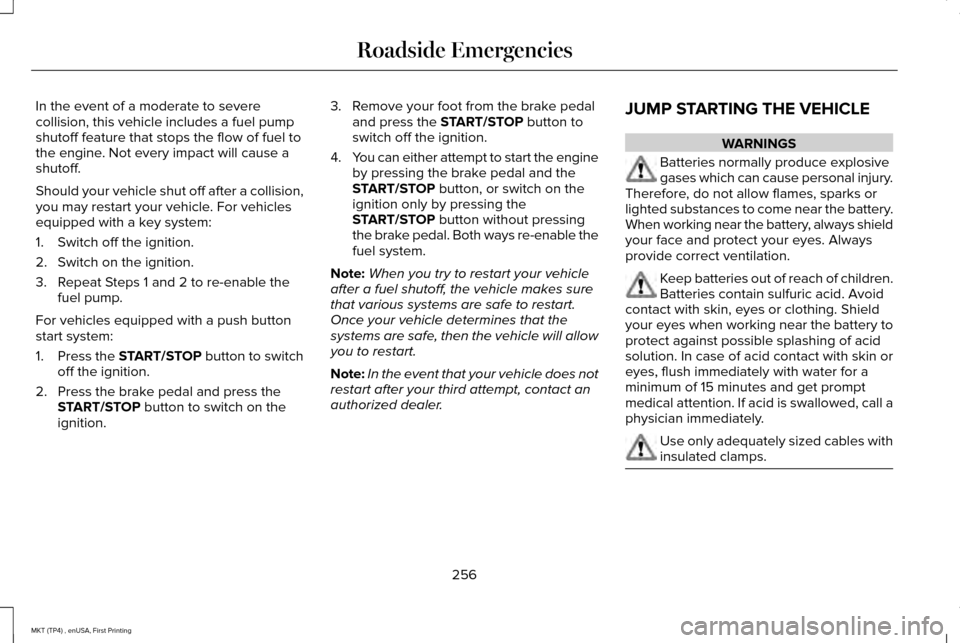
In the event of a moderate to severe
collision, this vehicle includes a fuel pump
shutoff feature that stops the flow of fuel to
the engine. Not every impact will cause a
shutoff.
Should your vehicle shut off after a collision,
you may restart your vehicle. For vehicles
equipped with a key system:
1. Switch off the ignition.
2. Switch on the ignition.
3. Repeat Steps 1 and 2 to re-enable the
fuel pump.
For vehicles equipped with a push button
start system:
1. Press the START/STOP button to switch
off the ignition.
2. Press the brake pedal and press the START/STOP button to switch on the
ignition. 3. Remove your foot from the brake pedal
and press the
START/STOP button to
switch off the ignition.
4. You can either attempt to start the engine
by pressing the brake pedal and the
START/STOP
button, or switch on the
ignition only by pressing the
START/STOP
button without pressing
the brake pedal. Both ways re-enable the
fuel system.
Note: When you try to restart your vehicle
after a fuel shutoff, the vehicle makes sure
that various systems are safe to restart.
Once your vehicle determines that the
systems are safe, then the vehicle will allow
you to restart.
Note: In the event that your vehicle does not
restart after your third attempt, contact an
authorized dealer. JUMP STARTING THE VEHICLE WARNINGS
Batteries normally produce explosive
gases which can cause personal injury.
Therefore, do not allow flames, sparks or
lighted substances to come near the battery.
When working near the battery, always shield
your face and protect your eyes. Always
provide correct ventilation. Keep batteries out of reach of children.
Batteries contain sulfuric acid. Avoid
contact with skin, eyes or clothing. Shield
your eyes when working near the battery to
protect against possible splashing of acid
solution. In case of acid contact with skin or
eyes, flush immediately with water for a
minimum of 15 minutes and get prompt
medical attention. If acid is swallowed, call a
physician immediately. Use only adequately sized cables with
insulated clamps.
256
MKT (TP4) , enUSA, First Printing Roadside Emergencies
Page 281 of 558
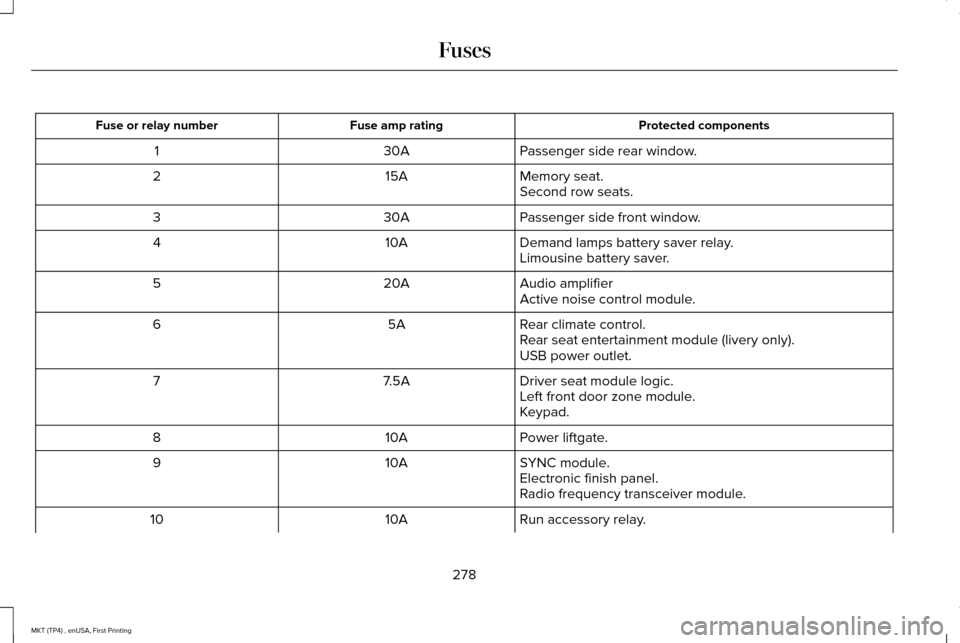
Protected components
Fuse amp rating
Fuse or relay number
Passenger side rear window.
30A
1
Memory seat.
15A
2
Second row seats.
Passenger side front window.
30A
3
Demand lamps battery saver relay.
10A
4
Limousine battery saver.
Audio amplifier
20A
5
Active noise control module.
Rear climate control.
5A
6
Rear seat entertainment module (livery only).
USB power outlet.
Driver seat module logic.
7.5A
7
Left front door zone module.
Keypad.
Power liftgate.
10A
8
SYNC module.
10A
9
Electronic finish panel.
Radio frequency transceiver module.
Run accessory relay.
10A
10
278
MKT (TP4) , enUSA, First Printing Fuses
Page 430 of 558
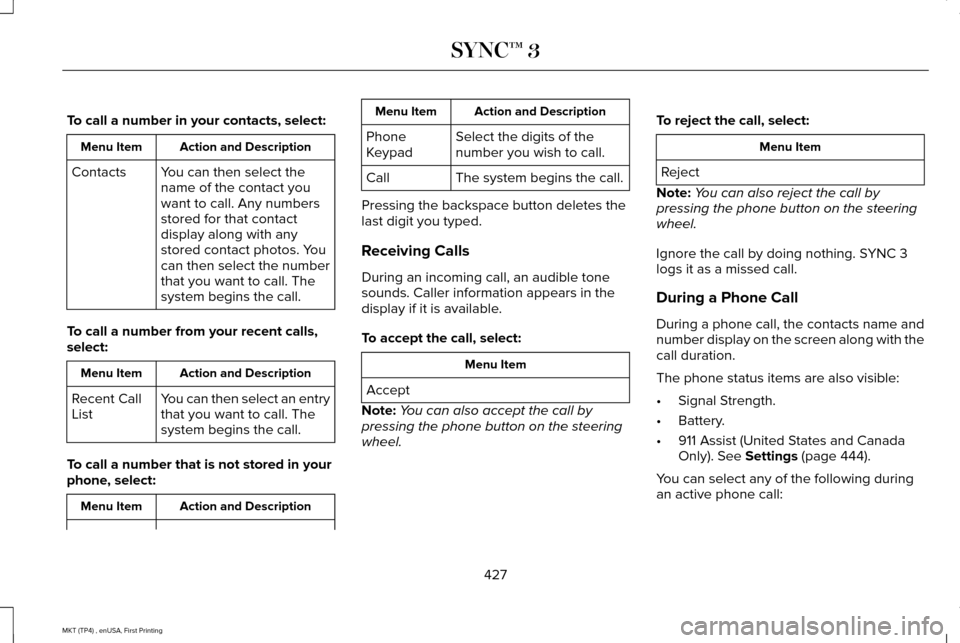
To call a number in your contacts, select:
Action and Description
Menu Item
You can then select the
name of the contact you
want to call. Any numbers
stored for that contact
display along with any
stored contact photos. You
can then select the number
that you want to call. The
system begins the call.
Contacts
To call a number from your recent calls,
select: Action and Description
Menu Item
You can then select an entry
that you want to call. The
system begins the call.
Recent Call
List
To call a number that is not stored in your
phone, select: Action and Description
Menu Item Action and Description
Menu Item
Select the digits of the
number you wish to call.
Phone
Keypad
The system begins the call.
Call
Pressing the backspace button deletes the
last digit you typed.
Receiving Calls
During an incoming call, an audible tone
sounds. Caller information appears in the
display if it is available.
To accept the call, select: Menu Item
Accept
Note: You can also accept the call by
pressing the phone button on the steering
wheel. To reject the call, select: Menu Item
Reject
Note: You can also reject the call by
pressing the phone button on the steering
wheel.
Ignore the call by doing nothing. SYNC 3
logs it as a missed call.
During a Phone Call
During a phone call, the contacts name and
number display on the screen along with the
call duration.
The phone status items are also visible:
• Signal Strength.
• Battery.
• 911 Assist (United States and Canada
Only). See Settings (page 444).
You can select any of the following during
an active phone call:
427
MKT (TP4) , enUSA, First Printing SYNC™ 3
Page 549 of 558
Auxiliary Power Points.................................160
110 Volt AC Power Point....................................160
12 Volt DC Power Point......................................160
Locations...............................................................160
AWD See: All-Wheel Drive...........................................184
B
Battery See: Changing the 12V Battery........................301
Blind Spot Information System.................224 Switching the System Off and On..................226
System Errors......................................................226
System Limitations.............................................226
Using the System...............................................225
Bonnet Lock See: Opening and Closing the Hood............287
Booster Seats..................................................32
Types of Booster Seats.......................................33
Brake Fluid Check.......................................300
Brakes..............................................................192 General Information............................................192
Breaking-In......................................................251
Bulb Specification Chart.............................307 C
Cabin Air Filter
...............................................134
California Proposition 65................................11
Capacities and Specifications - 3.5L Ecoboost™....................................................357
Alternative Engine Oil for Extremely Cold Climates...........................................................362
Specifications......................................................358
Capacities and Specifications - 3.7L........364 Alternative Engine Oil for Extremely Cold
Climates...........................................................369
Specifications......................................................365
Capacities and Specifications....................351
Cargo Nets
.....................................................236
Car Wash See: Cleaning the Exterior................................
312
Center Console.............................................162 Console Refrigerator and Freezer..................162
Second Row Center Console...........................162
Changing a Bulb...........................................305 Front Direction Indicator Lamp.......................
306
Front Fog Lamp..................................................306
High Intensity Discharge Headlamp.............
306
LED Lamps...........................................................306
License Plate Lamp............................................307
Changing a Fuse..........................................283 Fuses.....................................................................283 Changing a Road Wheel
..............................341
Dissimilar Spare Wheel and Tire Assembly
Information........................................................341
Tire Change Procedure....................................343
Changing the 12V Battery...........................301
Changing the Engine Air Filter
..................310
Changing the Wiper Blades......................303 Front Wiper Blades............................................303
Rear Window Wiper Blade...............................
304
Checking MyKey System Status.................69
Checking the Wiper Blades.......................303
Child Restraint and Seatbelt Maintenance..................................................47
Child Restraint Positioning...........................35
Child Safety.......................................................18 General Information..............................................18
Child Safety Locks..........................................36 Left-Hand Side.......................................................37
Right-Hand Side....................................................37
Cleaning Leather Seats................................317
Cleaning Products..........................................311 Materials.................................................................311
Cleaning the Engine
.....................................313
Cleaning the Exterior....................................312
Exterior Chrome Parts........................................312
Exterior Plastic Parts...........................................313
Stripes or Graphics..............................................313
Underbody............................................................313
546
MKT (TP4) , enUSA, First Printing Index
Page 552 of 558
General Information on Radio
Frequencies..................................................60
Intelligent Access.................................................60
General Maintenance Information...........482 Multi-Point Inspection........................................485
Owner Checks and Services...........................484
Protecting Your Investment.............................482
Why Maintain Your Vehicle?............................482
Why Maintain Your Vehicle at Your
Dealership?......................................................482
Getting Assistance Outside the U.S. and Canada.........................................................263
Getting the Services You Need................259 Away From Home..............................................259
Global Opening and Closing.....................100 Closing the Windows.........................................100
Opening the Windows.......................................100
H
Handbrake See: Parking Brake.............................................193
Hazard Warning Flashers...........................255
Headlamp Adjusting See: Adjusting the Headlamps.......................
304
Headlamp Exit Delay.....................................93
Headlamp Removal See: Removing a Headlamp............................
305 Head Restraints
.............................................136
Adjusting the Head Restraint............................137
Tilting Head Restraints ......................................138
Heated Seats..................................................152 Front Seats............................................................152
Second-Row Heated Seats...............................152
Heated Steering Wheel................................86
Heated Windows and Mirrors....................134 Heated Exterior Mirror.......................................134
Heated Rear Window.........................................134
Heating See: Climate Control..........................................130
Hints on Controlling the Interior Climate..........................................................132
Cooling the Interior Quickly..............................132
General Hints........................................................132
Heating the Interior Quickly.............................132
Recommended Settings for Cooling .............
132
Recommended Settings for Heating..............132
Side Window Defogging in Cold Weather.............................................................132
Hints on Driving With Anti-Lock Brakes...........................................................192
Home Screen
................................................393
Hood Lock See: Opening and Closing the Hood............287 I
In California (U.S. Only)...............................260
Information Display Control
.........................86
Information Displays......................................110 General Information.............................................110
Information Messages
...................................117
Adaptive Cruise Control.....................................118
AdvanceTrac ™........................................................118
Alarm.......................................................................119
Automatic Engine Shutdown.............................119
AWD........................................................................\
120
Battery and Charging System...........................121
Blind Spot Information and Cross Traffic Alert System...............................................................122
Brake System.......................................................122
Collision Warning System..................................123
Doors and Locks..................................................123
Fuel........................................................................\
.124
Keys and Intelligent Access..............................124
Lane Keeping System........................................125
Maintenance.........................................................125
MyKey.....................................................................126
Park Aid..................................................................127
Power Steering....................................................128
Seats.......................................................................128
Tire Pressure Monitoring System....................
129
Traction Control...................................................129
549
MKT (TP4) , enUSA, First Printing Index
Page 553 of 558
Transmission.........................................................129
Installing Child Restraints.............................20 Child Seats.............................................................20
Using Lap and Shoulder Belts...........................20
Using Lower Anchors and Tethers for
CHildren (LATCH).............................................26
Using Tether Straps..............................................28
Instrument Cluster........................................105
Instrument Lighting Dimmer........................93
Instrument Panel Overview...........................16
Interior Lamps..................................................97 Front Row Map Lamps.........................................98
Second Row Map Lamps....................................98
Interior Mirror.................................................102 Auto-Dimming Mirror..........................................102
Second Row Illuminated Vanity Mirror..........102
Introduction
.........................................................7
J
Jump Starting the Vehicle
..........................256
Connecting the Jumper Cables......................257
Jump Starting......................................................258
Preparing Your Vehicle.....................................257
Removing the Jumper Cables........................258 K
Keyless Entry....................................................78
SECURICODE™ Keyless Entry Keypad.............78
Keyless Starting
.............................................164
Ignition Modes.....................................................164
Keys and Remote Controls..........................60
L
Lane Keeping System..................................219 Switching the System On and Off..................220
Lighting Control
................................................91
Headlamp Flasher................................................92
High Beams............................................................92
Lighting...............................................................91 General Information..............................................91
Lincoln Automotive Financial Services......12
Lincoln Protect..............................................479 Lincoln Protect (CANADA ONLY)...................480
Lincoln Protect Extended Service Plans (U.S.
Only)..................................................................479
Load Carrying
................................................236
Load Limit.......................................................237
Special Loading Instructions for Owners of
Pick-up Trucks and Utility-type
Vehicles.............................................................241 Vehicle Loading - with and without a
Trailer.................................................................237
Locking and Unlocking..................................72 Activating Intelligent Access..............................
73
Autolock..................................................................74
Autounlock..............................................................74
Battery Saver..........................................................75
Enabling or Disabling Autolock and Autounlock.........................................................74
Illuminated Entry....................................................75
Illuminated Exit......................................................75
Locking and Unlocking the Doors with the Key Blade............................................................72
Opening a Rear Door From the Inside............73
Power Door Locks................................................72
Remote Control.....................................................72
Smart Unlocks for Intelligent Access Keys......................................................................73
Luggage Covers
...........................................236
Lug Nuts See: Changing a Road Wheel..........................341
M
Maintenance..................................................286 General Information...........................................286
Media Hub
......................................................375
550
MKT (TP4) , enUSA, First Printing Index