ECO mode LINCOLN MKT 2017 Owner's Manual
[x] Cancel search | Manufacturer: LINCOLN, Model Year: 2017, Model line: MKT, Model: LINCOLN MKT 2017Pages: 558, PDF Size: 4.59 MB
Page 124 of 558

Battery and Charging System
Action
Message
The charging system needs servicing. If the warning stays on or continue\
s to come on, contactan authorized dealer as soon as possible.
Check Charging System
The battery management system determines that the battery is at a low st\
ate of charge. Turn
the ignition off as soon as possible to protect the battery. This message will clear once the vehicle
has been started and the battery state of charge has recovered. Turning off unnecessary electrical loads will allow faster battery state-of-charge recovery.
Turn Power Off To Save Battery
Contact your authorized dealer as soon as possible.
Transport Mode Contact Dealer
Contact your authorized dealer as soon as possible.
Factory Mode Contact Dealer
121
MKT (TP4) , enUSA, First Printing Information Displays
Page 134 of 558
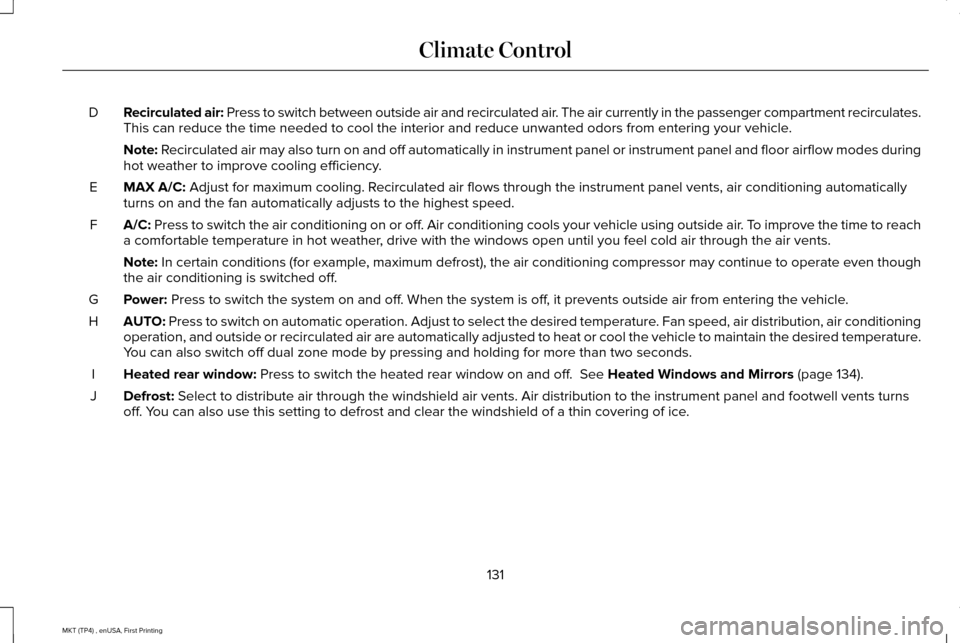
Recirculated air: Press to switch between outside air and recirculated air. The air currently in the passenger compartment recirculates.
This can reduce the time needed to cool the interior and reduce unwanted\
odors from entering your vehicle.
D
Note: Recirculated air may also turn on and off automatically in instrument pan\
el or instrument panel and floor airflow modes during
hot weather to improve cooling efficiency.
MAX A/C:
Adjust for maximum cooling. Recirculated air flows through the instrument panel vents, air conditioni\
ng automatically
turns on and the fan automatically adjusts to the highest speed.
E
A/C:
Press to switch the air conditioning on or off. Air conditioning cools your vehicle using outside air. To improve the time to reach
a comfortable temperature in hot weather, drive with the windows open until you feel cold air through the air ve\
nts.
F
Note:
In certain conditions (for example, maximum defrost), the air conditioning compressor may continue to ope\
rate even though
the air conditioning is switched off.
Power:
Press to switch the system on and off. When the system is off, it prevents outside air from entering the vehicle.
G
AUTO:
Press to switch on automatic operation. Adjust to select the desired te\
mperature. Fan speed, air distribution, air conditioning
operation, and outside or recirculated air are automatically adjusted to\
heat or cool the vehicle to maintain the desired temperature .
You can also switch off dual zone mode by pressing and holding for more t\
han two seconds.
H
Heated rear window:
Press to switch the heated rear window on and off. See Heated Windows and Mirrors (page 134).
I
Defrost:
Select to distribute air through the windshield air vents. Air distribu\
tion to the instrument panel and footwell vents turns
off. You can also use this setting to defrost and clear the windshield of a th\
in covering of ice.
J
131
MKT (TP4) , enUSA, First Printing Climate Control
Page 161 of 558
2.
The indicator light will begin to flash after
20 seconds. Without releasing the
button, follow Step 1 in the Programming
section.
For questions or comments, contact
HomeLink at www.homelink.com,
www.youtube.com/HomeLinkGentex or
1-800-355-3515.
Programming to a Genie Intellicode 2
Garage Door Opener
Note: The Genie Intellicode 2 transmitter
must already be programmed to operate
with the garage door opener.
Note: To program HomeLink to the
transmitter you must first put the transmitter
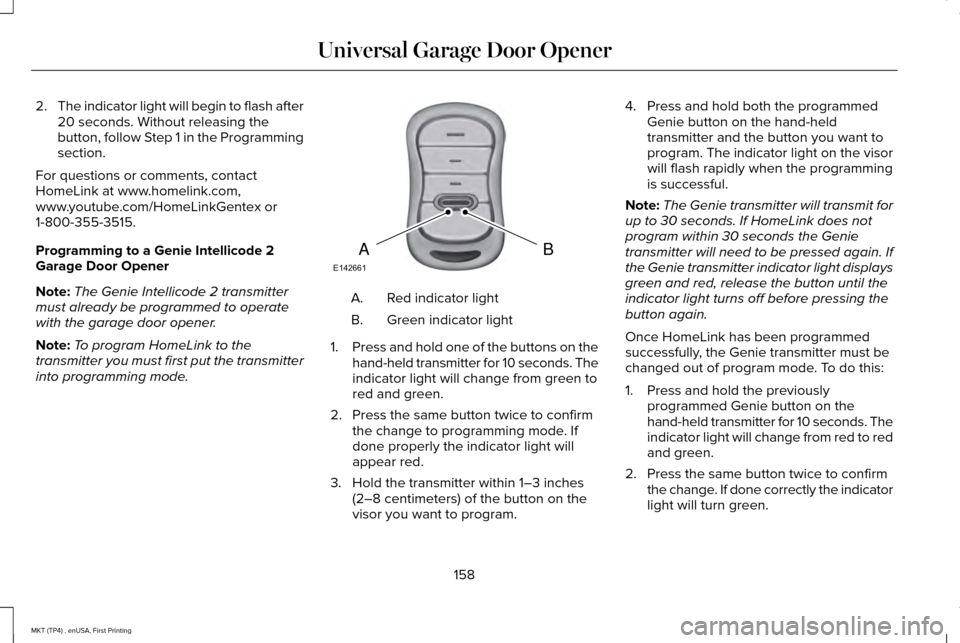
into programming mode. Red indicator light
A.
Green indicator light
B.
1. Press and hold one of the buttons on the
hand-held transmitter for 10 seconds. The
indicator light will change from green to
red and green.
2. Press the same button twice to confirm the change to programming mode. If
done properly the indicator light will
appear red.
3. Hold the transmitter within 1–3 inches (2–8 centimeters) of the button on the
visor you want to program. 4. Press and hold both the programmed
Genie button on the hand-held
transmitter and the button you want to
program. The indicator light on the visor
will flash rapidly when the programming
is successful.
Note: The Genie transmitter will transmit for
up to 30 seconds. If HomeLink does not
program within 30 seconds the Genie
transmitter will need to be pressed again. If
the Genie transmitter indicator light displays
green and red, release the button until the
indicator light turns off before pressing the
button again.
Once HomeLink has been programmed
successfully, the Genie transmitter must be
changed out of program mode. To do this:
1. Press and hold the previously programmed Genie button on the
hand-held transmitter for 10 seconds. The
indicator light will change from red to red
and green.
2. Press the same button twice to confirm the change. If done correctly the indicator
light will turn green.
158
MKT (TP4) , enUSA, First Printing Universal Garage Door OpenerBAE142661
Page 162 of 558
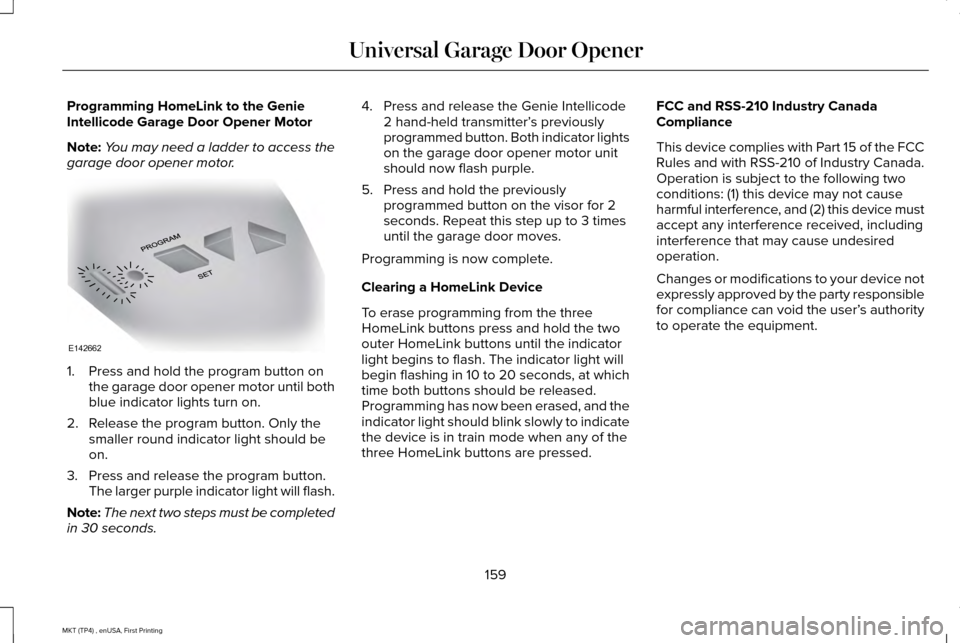
Programming HomeLink to the Genie
Intellicode Garage Door Opener Motor
Note:
You may need a ladder to access the
garage door opener motor. 1. Press and hold the program button on
the garage door opener motor until both
blue indicator lights turn on.
2. Release the program button. Only the smaller round indicator light should be
on.
3. Press and release the program button. The larger purple indicator light will flash.
Note: The next two steps must be completed
in 30 seconds. 4. Press and release the Genie Intellicode
2 hand-held transmitter’ s previously
programmed button. Both indicator lights
on the garage door opener motor unit
should now flash purple.
5. Press and hold the previously programmed button on the visor for 2
seconds. Repeat this step up to 3 times
until the garage door moves.
Programming is now complete.
Clearing a HomeLink Device
To erase programming from the three
HomeLink buttons press and hold the two
outer HomeLink buttons until the indicator
light begins to flash. The indicator light will
begin flashing in 10 to 20 seconds, at which
time both buttons should be released.
Programming has now been erased, and the
indicator light should blink slowly to indicate
the device is in train mode when any of the
three HomeLink buttons are pressed. FCC and RSS-210 Industry Canada
Compliance
This device complies with Part 15 of the FCC
Rules and with RSS-210 of Industry Canada.
Operation is subject to the following two
conditions: (1) this device may not cause
harmful interference, and (2) this device must
accept any interference received, including
interference that may cause undesired
operation.
Changes or modifications to your device not
expressly approved by the party responsible
for compliance can void the user’
s authority
to operate the equipment.
159
MKT (TP4) , enUSA, First Printing Universal Garage Door OpenerE142662
Page 165 of 558
CENTER CONSOLE
Stow items in the cup holder carefully as
items may become loose during hard
braking, acceleration or crashes, including
hot drinks which may spill.
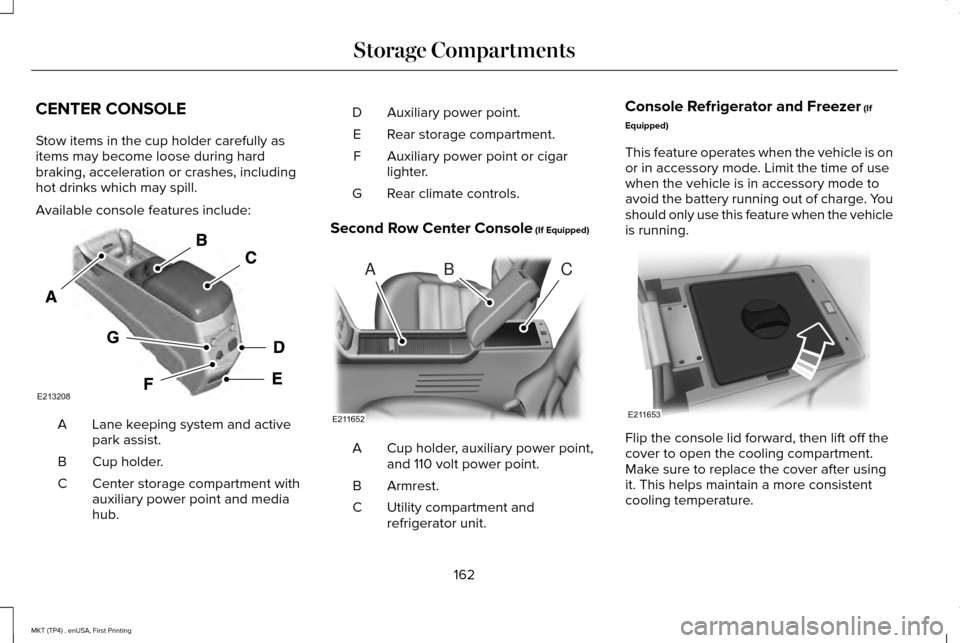
Available console features include:
Lane keeping system and active
park assist.
A
Cup holder.
B
Center storage compartment with
auxiliary power point and media
hub.
C Auxiliary power point.
D
Rear storage compartment.
E
Auxiliary power point or cigar
lighter.
F
Rear climate controls.
G
Second Row Center Console (If Equipped) Cup holder, auxiliary power point,
and 110 volt power point.
A
Armrest.
B
Utility compartment and
refrigerator unit.
C Console Refrigerator and Freezer
(If
Equipped)
This feature operates when the vehicle is on
or in accessory mode. Limit the time of use
when the vehicle is in accessory mode to
avoid the battery running out of charge. You
should only use this feature when the vehicle
is running. Flip the console lid forward, then lift off the
cover to open the cooling compartment.
Make sure to replace the cover after using
it. This helps maintain a more consistent
cooling temperature.
162
MKT (TP4) , enUSA, First Printing Storage CompartmentsE213208 ABC
E211652 E211653
Page 167 of 558
GENERAL INFORMATION
WARNINGS
Extended idling at high engine speeds
can produce very high temperatures
in the engine and exhaust system, creating
the risk of fire or other damage. Do not park, idle or drive your vehicle
on dry grass or other dry ground cover.
The emission system heats up the engine
compartment and exhaust system, creating
the risk of fire. Do not start the engine in a closed
garage or in other enclosed areas.
Exhaust fumes can be toxic. Always open
the garage door before you start the engine. Exhaust leaks may result in entry of
harmful and potentially lethal fumes
into the passenger compartment. If you smell
exhaust fumes inside your vehicle, have your
vehicle inspected immediately. Do not drive
if you smell exhaust fumes. If you disconnect the battery, your vehicle
may exhibit some unusual driving
characteristics for approximately 5 mi (8 km)
after you reconnect it. This is because the
engine management system must realign
itself with the engine. You can disregard any
unusual driving characteristics during this
period.
The powertrain control system meets all
Canadian interference-causing equipment
standard requirements regulating the
impulse electrical field or radio noise.
When you start the engine, avoid pressing
the accelerator pedal before and during
operation. Only use the accelerator pedal
when you have difficulty starting the engine.
KEYLESS STARTING
Note:
The keyless starting system may not
function if the key is close to metal objects
or electronic devices such as cellular
phones.
Note: A valid key must be located inside
your vehicle to switch the ignition on and
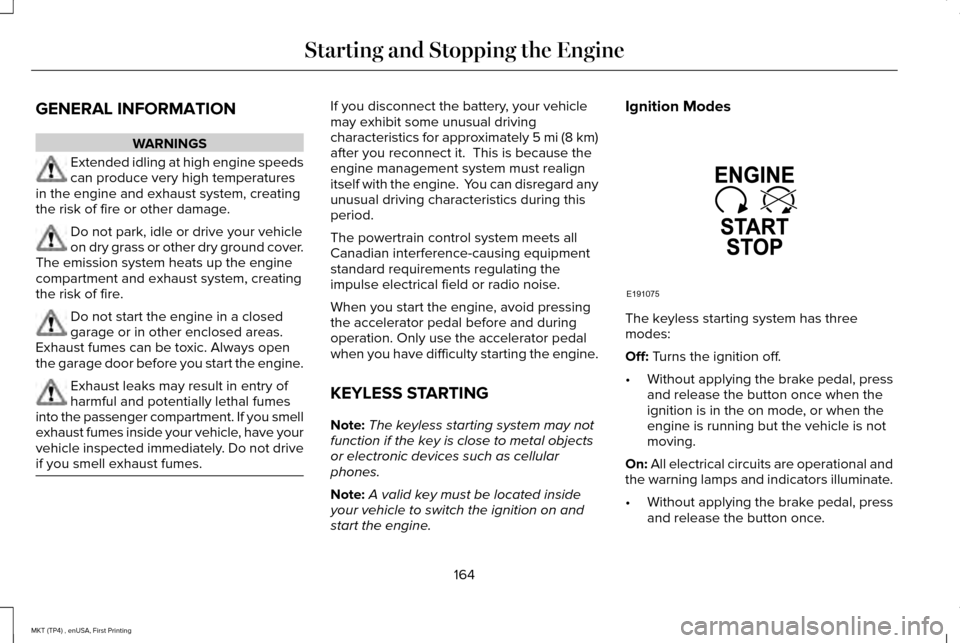
start the engine. Ignition Modes
The keyless starting system has three
modes:
Off: Turns the ignition off.
• Without applying the brake pedal, press
and release the button once when the
ignition is in the on mode, or when the
engine is running but the vehicle is not
moving.
On:
All electrical circuits are operational and
the warning lamps and indicators illuminate.
• Without applying the brake pedal, press
and release the button once.
164
MKT (TP4) , enUSA, First Printing Starting and Stopping the EngineE191075
Page 184 of 558
SelectShift Automatic
™ Transmission (If
Equipped)
Your vehicle is equipped with a SelectShift
Automatic transmission. The SelectShift
Automatic transmission gives you the ability
to change gears up or down (without a
clutch) as desired.
In order to prevent the engine from running
at too low an RPM, which may cause it to
stall, SelectShift still automatically makes
some downshifts if it has determined that
you have not downshifted in time. Although
SelectShift makes some downshifts for you,
it still allows you to downshift at any time as
long as the SelectShift determines that
damage will not be caused to the engine
from over-revving.
Note: Engine damage may occur if you
maintain excessive engine revving without
shifting. SelectShift does not automatically upshift,
even if the engine is approaching the RPM
limit. It must be shifted manually by pressing
the + button. Notice should be taken of the
shift indicator lamp, which alerts you when
to shift to make sure you achieve the highest
level or efficiency and fuel economy.
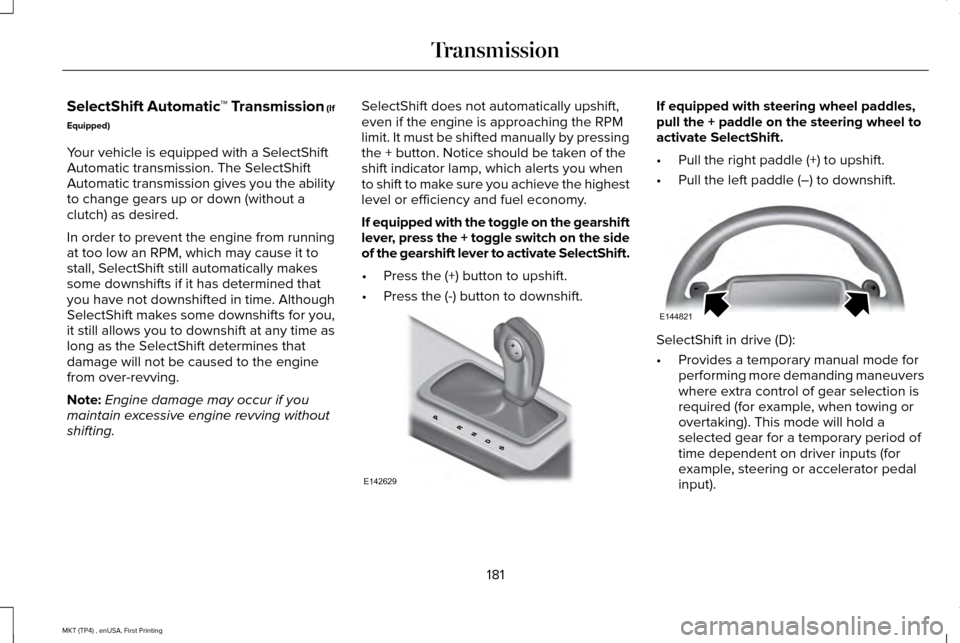
If equipped with the toggle on the gearshift
lever, press the + toggle switch on the side
of the gearshift lever to activate SelectShift.
•
Press the (+) button to upshift.
• Press the (-) button to downshift. If equipped with steering wheel paddles,
pull the + paddle on the steering wheel to
activate SelectShift.
•
Pull the right paddle (+) to upshift.
• Pull the left paddle (–) to downshift. SelectShift in drive (D):
•
Provides a temporary manual mode for
performing more demanding maneuvers
where extra control of gear selection is
required (for example, when towing or
overtaking). This mode will hold a
selected gear for a temporary period of
time dependent on driver inputs (for
example, steering or accelerator pedal
input).
181
MKT (TP4) , enUSA, First Printing TransmissionE142629 E144821
Page 185 of 558
SelectShift in sport (S):
•
Provides a permanent manual gear
selection where full control of gear
selection is required.
To exit SelectShift mode shift the
transmission into another gear (for example,
drive [D]).
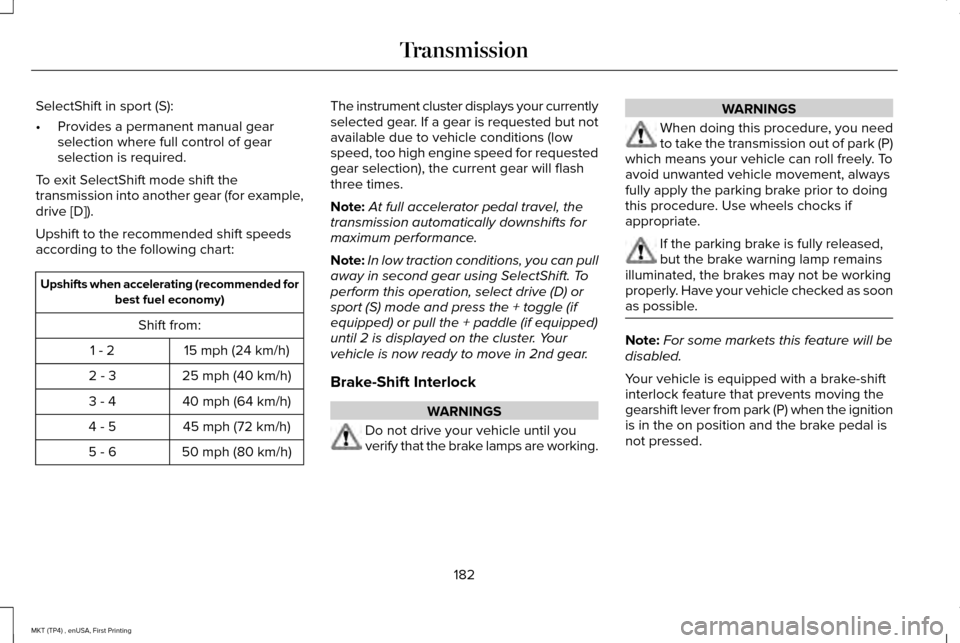
Upshift to the recommended shift speeds
according to the following chart: Upshifts when accelerating (recommended for
best fuel economy)
Shift from: 15 mph (24 km/h)
1 - 2
25 mph (40 km/h)
2 - 3
40 mph (64 km/h)
3 - 4
45 mph (72 km/h)
4 - 5
50 mph (80 km/h)
5 - 6 The instrument cluster displays your currently
selected gear. If a gear is requested but not
available due to vehicle conditions (low
speed, too high engine speed for requested
gear selection), the current gear will flash
three times.
Note:
At full accelerator pedal travel, the
transmission automatically downshifts for
maximum performance.
Note: In low traction conditions, you can pull
away in second gear using SelectShift. To
perform this operation, select drive (D) or
sport (S) mode and press the + toggle (if
equipped) or pull the + paddle (if equipped)
until 2 is displayed on the cluster. Your
vehicle is now ready to move in 2nd gear.
Brake-Shift Interlock WARNINGS
Do not drive your vehicle until you
verify that the brake lamps are working. WARNINGS
When doing this procedure, you need
to take the transmission out of park (P)
which means your vehicle can roll freely. To
avoid unwanted vehicle movement, always
fully apply the parking brake prior to doing
this procedure. Use wheels chocks if
appropriate. If the parking brake is fully released,
but the brake warning lamp remains
illuminated, the brakes may not be working
properly. Have your vehicle checked as soon
as possible. Note:
For some markets this feature will be
disabled.
Your vehicle is equipped with a brake-shift
interlock feature that prevents moving the
gearshift lever from park (P) when the ignition
is in the on position and the brake pedal is
not pressed.
182
MKT (TP4) , enUSA, First Printing Transmission
Page 188 of 558
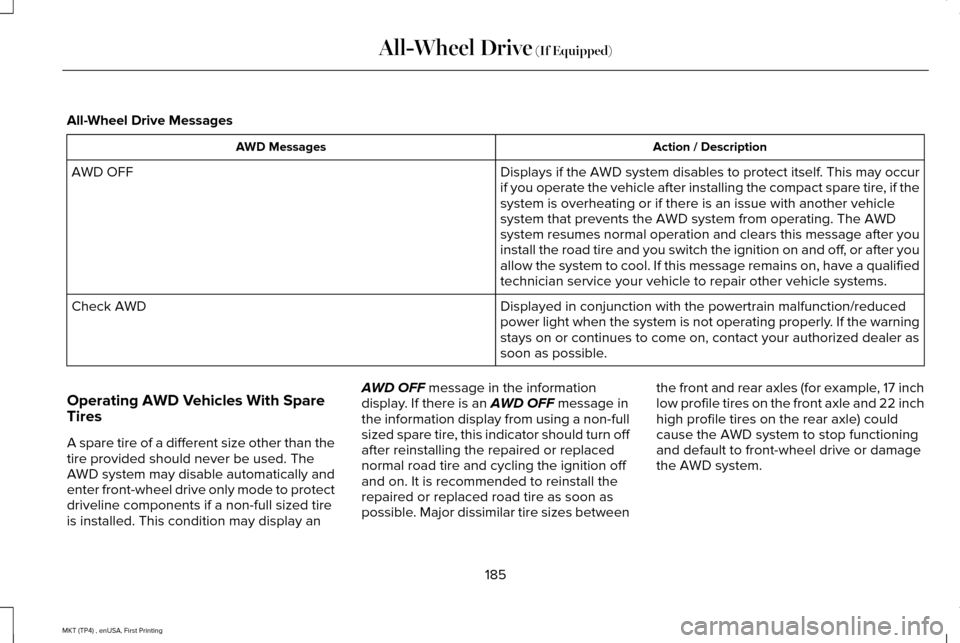
All-Wheel Drive Messages
Action / Description
AWD Messages
Displays if the AWD system disables to protect itself. This may occur
if you operate the vehicle after installing the compact spare tire, if the
system is overheating or if there is an issue with another vehicle
system that prevents the AWD system from operating. The AWD
system resumes normal operation and clears this message after you
install the road tire and you switch the ignition on and off, or after you
allow the system to cool. If this message remains on, have a qualified
technician service your vehicle to repair other vehicle systems.
AWD OFF
Displayed in conjunction with the powertrain malfunction/reduced
power light when the system is not operating properly. If the warning
stays on or continues to come on, contact your authorized dealer as
soon as possible.
Check AWD
Operating AWD Vehicles With Spare
Tires
A spare tire of a different size other than the
tire provided should never be used. The
AWD system may disable automatically and
enter front-wheel drive only mode to protect
driveline components if a non-full sized tire
is installed. This condition may display an AWD OFF message in the information
display. If there is an AWD OFF message in
the information display from using a non-full
sized spare tire, this indicator should turn off
after reinstalling the repaired or replaced
normal road tire and cycling the ignition off
and on. It is recommended to reinstall the
repaired or replaced road tire as soon as
possible. Major dissimilar tire sizes between the front and rear axles (for example, 17 inch
low profile tires on the front axle and 22 inch
high profile tires on the rear axle) could
cause the AWD system to stop functioning
and default to front-wheel drive or damage
the AWD system.
185
MKT (TP4) , enUSA, First Printing All-Wheel Drive
(If Equipped)
Page 213 of 558
Resuming the Set Speed
Press and release RES.
Switching Cruise Control Off
Press and release
OFF when the system is
in stand by mode or switch the ignition off.
Note: You erase the set speed when you
switch the system off.
USING ADAPTIVE CRUISE
CONTROL
(If Equipped) WARNINGS
Always pay close attention to changing
road conditions when using adaptive
cruise control. The system does not replace
attentive driving. Failing to pay attention to
the road may result in a crash, serious injury
or death. Adaptive cruise control is not a crash
warning or avoidance system.
Adaptive cruise control may not detect
stationary or slow moving vehicles
below
6 mph (10 km/h). WARNINGS
Adaptive cruise control does not detect
pedestrians or objects in the road.
Adaptive cruise control does not detect
oncoming vehicles in the same lane.
Do not use the system in poor visibility,
for example fog, heavy rain, spray or
snow. Do not use adaptive cruise control on
winding roads, in heavy traffic or when
the road surface is slippery. This could result
in loss of vehicle control, serious injury or
death. Do not use adaptive cruise control
when towing a trailer that has trailer
brakes. The auto-brake component of the
adaptive cruise control system does not
operate the trailer brakes. Using adaptive
cruise control when towing a trailer that has
trailer brakes may result in the loss of vehicle
control, which could result in serious injury. WARNINGS
Do not use tire sizes other than those
recommended because this can affect
the normal operation of the system. Failure
to do so may result in a loss of vehicle
control, which could result in serious injury. The system adjusts your vehicle speed to
maintain the set gap between you and the
vehicle in front of you in the same lane.
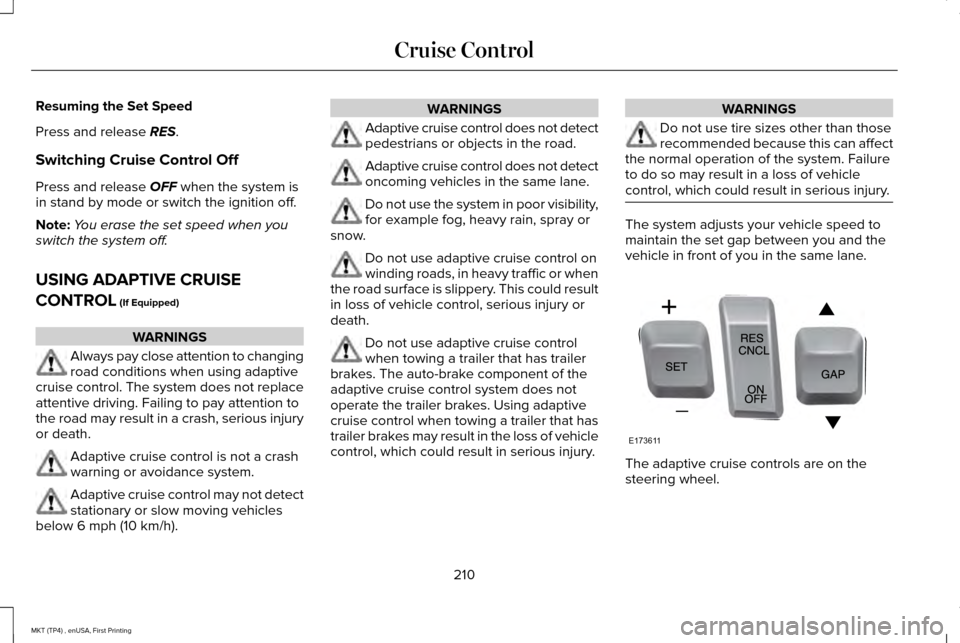
The adaptive cruise controls are on the
steering wheel.
210
MKT (TP4) , enUSA, First Printing Cruise ControlE173611