change time LINCOLN MKT 2017 Owner's Guide
[x] Cancel search | Manufacturer: LINCOLN, Model Year: 2017, Model line: MKT, Model: LINCOLN MKT 2017Pages: 558, PDF Size: 4.59 MB
Page 418 of 558
Website
http://www.ibiquity.com/automotive/report_radio_station_experiences
HD Radio Technology manufactured under
license from iBiquity Digital Corp. U.S. and
foreign patents. HD Radio and the HD and
HD Radio logos are proprietary trademarks
of iBiquity Digital Corp. Ford Motor Company
and iBiquity Digital Corp. are not responsible
for the content sent using HD Radio
technology. Content may be changed, added
or deleted at any time at the station owner's
discretion. CD (If equipped)
Once you select this option, the system
returns you to the main audio screen.
The current audio information appears on
the screen.
The following buttons are also available: Function
Button
You can use the browse button to select a track.
Browse
Select this button and a small number one displays to indicate the track\
is set to repeat.
Repeat
For MP3 CDs, this button allows you to toggle through repeat off, repeat one track (a small number
one displays), and repeat current folder (a small folder displays).
Select the shuffle symbol to have the audio on the disk play in random o\
rder.
Shuffle
415
MKT (TP4) , enUSA, First Printing SYNC™ 3
Page 445 of 558
App Permissions
The system organizes the App permissions
into groups. You can grant these group
permissions individually. You can change a
permission group status any time when not
driving, by using the settings menu. While in
the settings menu, you can also see the data
included in each group.
When you launch an app using SYNC 3, the
system may ask you to grant certain
permissions, for example Vehicle information,
Driving characteristics, GPS and Speed,
and/or Push notifications. You can enable all
groups or none of them during the initial app
permissions prompts. The settings menu
offers individual group permission control.
Note:
You are only prompted to grant
permissions the first time you use an app
with SYNC 3.
Note: If you disable group permissions, apps
will still be enabled to work with SYNC 3
unless you deactivate All Apps in the settings
menu. SiriusXM Traffic and Travel Link (If
Equipped) WARNING
Driving while distracted can result in
loss of vehicle control, crash and injury.
We strongly recommend that you use
extreme caution when using any device that
may take your focus off the road. Your
primary responsibility is the safe operation
of your vehicle. We recommend against the
use of any hand-held device while driving
and encourage the use of voice-operated
systems when possible. Make sure you are
aware of all applicable local laws that may
affect the use of electronic devices while
driving. Note:
SiriusXM Traffic and Travel Link may
not be available in all markets.
Note: In order to use SiriusXM Traffic and
Travel Link, your vehicle must have
navigation. Note:
A paid subscription is required to
access and use these features. Go to
www.siriusxm.com/travellink for more
information.
Note: Visit www.siriusxm.com/traffic and click
on Coverage map and details for a complete
listing of all traffic areas covered by SiriusXM
Traffic and Travel Link.
Note: Neither Sirius nor Ford is responsible
for any errors or inaccuracies in the SiriusXM
Traffic and Travel Link services or its use in
vehicles.
When you subscribe to SiriusXM Traffic and
Travel Link, it can help you locate the best
gas prices, find movie listings, get current
traffic alerts, view the current weather map,
get accurate ski conditions and see scores
to current sports games.
442
MKT (TP4) , enUSA, First Printing SYNC™ 3
Page 449 of 558
Clock
To adjust the time, select the up and down
arrows on either side of the screen. The
arrows on the left adjust the hour and arrows
on the right adjust the minute. You can then
select AM or PM.
You can adjust the following features: Action and Description
Menu Item
Select how time displays.
Clock Format
When active, the clock adjusts to time zone changes.
Auto Time Zone Update
This feature is only available in vehicles with navigation.
When selected, the vehicle clock resets to GPS satellite time.
Reset Clock to GPS Time
The system automatically saves any updates
you make to the settings. Bluetooth
Pressing this button allows you to access the
following: Action
Menu Item
On
Bluetooth
Off
You must activate Bluetooth to pair a
Bluetooth-enabled device. The processes of pairing a Bluetooth device
is the same as pairing a phone. See Pairing
a Device in Phone settings for how to pair a
device and the available options.
446
MKT (TP4) , enUSA, First Printing SYNC™ 3
Page 486 of 558
Your vehicle is equipped with the Intelligent
Oil-Life Monitor system, which displays a
message in the information display at the
proper oil change interval. This interval may
be up to one year or 10000 miles (16000
kilometers).
When the oil change message appears in
the information display, it is time for an oil
change. Make sure you perform the oil
change within two weeks or 500 miles (800
kilometers) of the message appearing. Make
sure you reset the Intelligent Oil-Life Monitor
after each oil change. See Oil Change
Indicator Reset (page 293).
If your information display resets prematurely
or becomes inoperative, you should perform
the oil change interval at six months or 5000
miles (8000 kilometers) from your last oil
change. Never exceed one year or 10000
miles (16000 kilometers) between oil change
intervals. Your vehicle is very sophisticated and built
with multiple, complex, performance systems.
Every manufacturer develops these systems
using different specifications and
performance features. That is why it is
important to rely upon your dealership to
properly diagnose and repair your vehicle.
Ford Motor Company has recommended
maintenance intervals for various parts and
component systems based upon engineering
testing. Ford Motor Company relies upon this
testing to determine the most appropriate
mileage for replacement of oils and fluids to
protect your vehicle at the lowest overall cost
to you and recommends against
maintenance schedules that deviate from
the scheduled maintenance information.
We strongly recommend the use of only
genuine Ford, Motorcraft or Ford-authorized
re-manufactured replacement parts
engineered for your vehicle.Additives and Chemicals
This owner's manual and the Ford Workshop
Manual list the recommended additives and
chemicals for your vehicle. We do not
recommend using chemicals or additives not
approved by us as part of your vehicle
’s
normal maintenance. Please consult your
warranty information.
Oils, Fluids and Flushing
In many cases, fluid discoloration is a normal
operating characteristic and, by itself, does
not necessarily indicate a concern or that the
fluid needs to be changed. However, a
qualified expert, such as the factory-trained
technicians at your dealership, should
inspect discolored fluids that also show signs
of overheating or foreign material
contamination immediately.
483
MKT (TP4) , enUSA, First Printing Scheduled Maintenance
Page 489 of 558
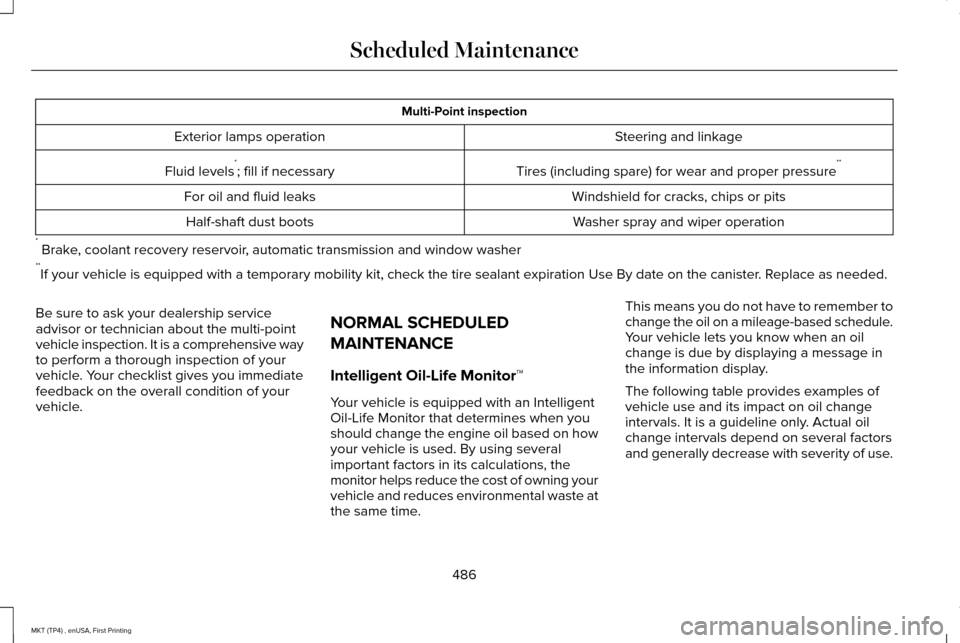
Multi-Point inspection
Steering and linkage
Exterior lamps operation
Tires (including spare) for wear and proper pressure**
Fluid levels *
; fill if necessary
Windshield for cracks, chips or pits
For oil and fluid leaks
Washer spray and wiper operation
Half-shaft dust boots
* Brake, coolant recovery reservoir, automatic transmission and window washer
** If your vehicle is equipped with a temporary mobility kit, check the tir\
e sealant expiration Use By date on the canister. Replace as needed.
Be sure to ask your dealership service
advisor or technician about the multi-point
vehicle inspection. It is a comprehensive way
to perform a thorough inspection of your
vehicle. Your checklist gives you immediate
feedback on the overall condition of your
vehicle. NORMAL SCHEDULED
MAINTENANCE
Intelligent Oil-Life Monitor™
Your vehicle is equipped with an Intelligent
Oil-Life Monitor that determines when you
should change the engine oil based on how
your vehicle is used. By using several
important factors in its calculations, the
monitor helps reduce the cost of owning your
vehicle and reduces environmental waste at
the same time.This means you do not have to remember to
change the oil on a mileage-based schedule.
Your vehicle lets you know when an oil
change is due by displaying a message in
the information display.
The following table provides examples of
vehicle use and its impact on oil change
intervals. It is a guideline only. Actual oil
change intervals depend on several factors
and generally decrease with severity of use.
486
MKT (TP4) , enUSA, First Printing Scheduled Maintenance
Page 544 of 558

ERROR-FREE OR THAT THE FUNCTIONING
OF THE GRACENOTE SOFTWARE OR
GRACENOTE SERVERS WILL BE
UNINTERRUPTED. GRACENOTE IS NOT
OBLIGATED TO PROVIDE YOU WITH ANY
ENHANCED OR ADDITIONAL DATA TYPES
THAT GRACENOTE MAY CHOOSE TO
PROVIDE IN THE FUTURE AND IS FREE TO
DISCONTINUE ITS ONLINE SERVICES AT
ANY TIME. GRACENOTE DISCLAIM ALL
WARRANTIES EXPRESS OR IMPLIED,
INCLUDING, BUT NOT LIMITED TO, IMPLIED
WARRANTIES OF MERCHANTABILITY,
FITNESS FOR A PARTICULAR PURPOSE,
TITLE, AND NON-INFRINGEMENT. NEITHER
GRACENOTE WARRANTS THE RESULTS
THAT WILL BE OBTAINED BY YOUR USE
OF THE GRACENOTE SOFTWARE OR ANY
GRACENOTE SERVER. IN NO CASE WILL
GRACENOTE BE LIABLE FOR ANY
CONSEQUENTIAL OR INCIDENTAL
DAMAGES OR FOR ANY LOST PROFITS OR
LOST REVENUES FOR ANY REASON
WHATSOEVER. © Gracenote 2007.
Radio Frequency Statement
FCC ID: ACJ-SYNCG3-L
IC: 216B-SYNCG3-L
This device complies with Part 15 of the FCC
Rules and with RSS-210 of Industry Canada.
Operation is subject to the following two
conditions:
(1) This device may not cause harmful
interference, and
(2)
this device must accept any interference
received, including interference that may
cause undesired operation.
Note: Changes or modifications not
expressively approved by the party
responsible for compliance could void the
user's authority to operate the equipment.
The antenna used for this transmitter must
not be co-located or operating in conjunction
with any other antenna or transmitter. SUNA TRAFFIC CHANNEL – TERMS AND
CONDITIONS
By activating, using and/or accessing the
SUNA Traffic Channel, SUNA Predictive or
other content or material provided by
Intelematics (together,
SUNA Products
and/or Services), you must accept certain
terms and conditions. The following is a brief
summary of the terms and conditions that
apply to you. To view the full terms and
conditions relevant to your use of the SUNA
Products and/or Services, please consult: Website
www.sunatraffic.com.au/termsandcondi- tions/
1. Acceptance
By using SUNA Products and/or Services,
you will be deemed to have accepted and
agreed to be bound by the terms and
conditions fully detailed at:
541
MKT (TP4) , enUSA, First Printing Appendices
Page 550 of 558
Under Hood..........................................................313
Cleaning the Instrument Panel and Instrument Cluster Lens............................316
Cleaning the Interior.....................................314 Cleaning Black Label or Presidential
Interior................................................................315
Cleaning the Wheels....................................317
Cleaning the Windows and Wiper Blades............................................................314
Clearing All MyKeys.......................................67
Climate.............................................................418
Climate Control
..............................................130
Climate Controlled Seats............................153 Cooled Seats........................................................153
Heated Seats........................................................153
Collision Warning System...........................231 PRINCIPLE OF OPERATION.............................
231
Coolant Check See: Engine Coolant Check............................
294
Crash Sensors and Airbag Indicator
..........57
Creating a MyKey...........................................66 Programming/Changing Configurable
Settings...............................................................66
Cross Traffic Alert.........................................227 False Alerts..........................................................230
Switching the System Off and On..................230
System Errors......................................................230 System Lights, Messages and Audible
Alerts.................................................................229
System Limitations.............................................229
Using the System...............................................227
Cruise Control
.................................................85
Principle of Operation.......................................209
Type 1.......................................................................85
Type 2......................................................................86
Cruise control See: Using Cruise Control...............................209
Customer Assistance
..................................259
D
Data Recording
..................................................9
Event Data Recording...........................................10
Service Data Recording.........................................9
Daytime Running Lamps
...............................94
Direction Indicators........................................97
Lane Change..........................................................97
Doors and Locks.............................................72
Drive Control
.................................................234
LINCOLN DRIVE CONTROL............................234
Driver Alert
......................................................218
Using Driver Alert................................................218
Driver and Passenger Airbags.....................51 Children and Airbags...........................................52 Proper Driver and Front Passenger Seating
Adjustment.........................................................52
Driving Aids....................................................218
Driving Hints...................................................251
Driving Through Water
................................251
DRL See: Daytime Running Lamps...........................94
E
Economical Driving
.......................................251
Emission Control System.............................177 On-Board Diagnostics (OBD-II)........................178
Readiness for Inspection and Maintenance
(I/M) Testing......................................................179
End User License Agreement
....................514
VEHICLE SOFTWARE END USER LICENSE
AGREEMENT (EULA) .....................................514
Engine Block Heater....................................168 Using the Engine Block Heater.......................169
Engine Coolant Check................................294 Adding Coolant...................................................294
Coolant Change.................................................296
Engine Coolant Temperature
Management...................................................298
Fail-Safe Cooling................................................296
Recycled Coolant...............................................296
Severe Climates.................................................296
547
MKT (TP4) , enUSA, First Printing Index
Page 554 of 558
Memory Function...........................................141
Easy Entry and Exit Feature..............................142
Linking a PreSet Position to your Remote
Control or Intelligent Access Key Fob
........................................................................\
.....142
Saving a PreSet Position...................................142
Message Center See: Information Displays..................................110
Mirrors See: Heated Windows and Mirrors.................134
See: Windows and Mirrors.................................99
Mobile Communications Equipment...........14
Moonroof.........................................................103 Closing the Moonroof and Sunshades..........104
Opening the Sunshade and Moonroof..........103
Venting the Moonroof........................................104
Motorcraft Parts - 3.5L Ecoboost™............353
Motorcraft Parts - 3.7L.................................354
MyKey Troubleshooting
................................70
MyKey™..............................................................65 Principle of Operation.........................................65
N
Navigation......................................................430 cityseeker.............................................................439
Destination Mode................................................431
Map Mode............................................................430 Navigation Map Updates..................................440
Navigation Menu................................................436
SiriusXM Traffic and Travel Link......................440
Waypoints.............................................................438
Normal Scheduled Maintenance.............486 Intelligent Oil-Life Monitor™..............................486
Normal Maintenance Intervals........................
488
O
Oil Change Indicator Reset
.......................293
Oil Check See: Engine Oil Check......................................292
Opening and Closing the Hood...............287 Closing the Hood...............................................287
Opening the Hood.............................................287
Ordering Additional Owner's Literature.....................................................265
Obtaining a French Owner’ s Manual............265
Overhead Console
........................................163
P
Parking Aids
....................................................198
Principle of Operation........................................198
Parking Brake.................................................193
Passive Anti-Theft System.............................81 SecuriLock®.............................................................81 PATS
See: Passive Anti-Theft System.........................
81
Pedals................................................................87
Perchlorate........................................................12
Personal Safety System ™
..............................49
How Does the Personal Safety System
Work?...................................................................49
Phone
..............................................................422
During a Phone Call...........................................427
Making Calls........................................................426
Pairing Your Cell Phone for the First
Time...................................................................422
Phone Menu........................................................423
Receiving Calls....................................................427
Smartphone Connectivity................................429
Text Messaging...................................................428
Power Door Locks See: Locking and Unlocking..............................
72
Power Liftgate
..................................................75
Obstacle Detection...............................................78
Opening and Closing the Liftgate....................76
Setting the Liftgate Open Height......................78
Stopping the Liftgate Movement......................78
Power Seats
....................................................139
Four Way Power Lumbar....................................141
Power Lumbar (Limo/Livery)..............................141
Power Steering Fluid Check.......................301
551
MKT (TP4) , enUSA, First Printing Index