child LINCOLN MKT 2017 Service Manual
[x] Cancel search | Manufacturer: LINCOLN, Model Year: 2017, Model line: MKT, Model: LINCOLN MKT 2017Pages: 558, PDF Size: 4.59 MB
Page 259 of 558
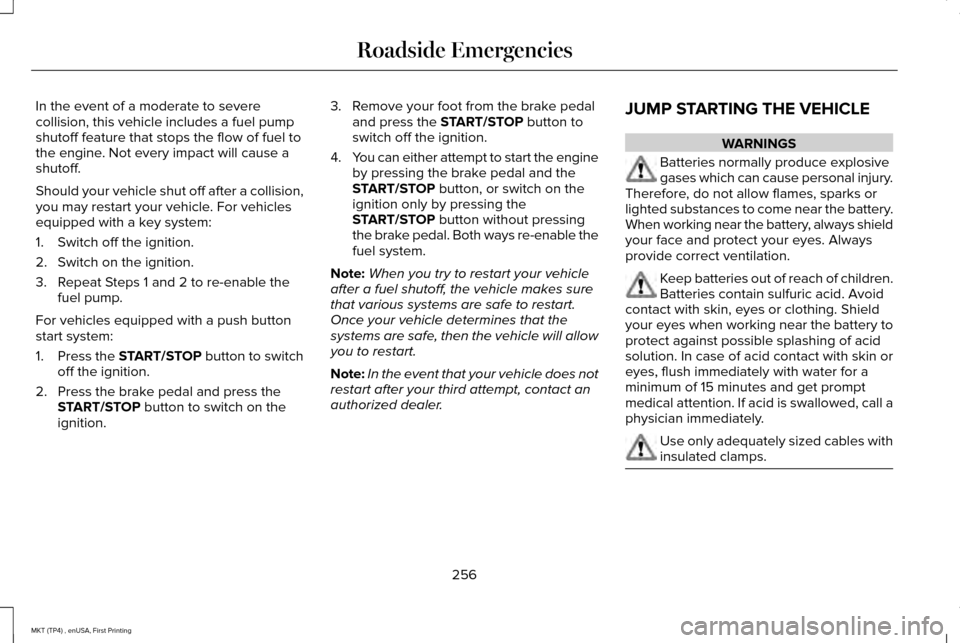
In the event of a moderate to severe
collision, this vehicle includes a fuel pump
shutoff feature that stops the flow of fuel to
the engine. Not every impact will cause a
shutoff.
Should your vehicle shut off after a collision,
you may restart your vehicle. For vehicles
equipped with a key system:
1. Switch off the ignition.
2. Switch on the ignition.
3. Repeat Steps 1 and 2 to re-enable the
fuel pump.
For vehicles equipped with a push button
start system:
1. Press the START/STOP button to switch
off the ignition.
2. Press the brake pedal and press the START/STOP button to switch on the
ignition. 3. Remove your foot from the brake pedal
and press the
START/STOP button to
switch off the ignition.
4. You can either attempt to start the engine
by pressing the brake pedal and the
START/STOP
button, or switch on the
ignition only by pressing the
START/STOP
button without pressing
the brake pedal. Both ways re-enable the
fuel system.
Note: When you try to restart your vehicle
after a fuel shutoff, the vehicle makes sure
that various systems are safe to restart.
Once your vehicle determines that the
systems are safe, then the vehicle will allow
you to restart.
Note: In the event that your vehicle does not
restart after your third attempt, contact an
authorized dealer. JUMP STARTING THE VEHICLE WARNINGS
Batteries normally produce explosive
gases which can cause personal injury.
Therefore, do not allow flames, sparks or
lighted substances to come near the battery.
When working near the battery, always shield
your face and protect your eyes. Always
provide correct ventilation. Keep batteries out of reach of children.
Batteries contain sulfuric acid. Avoid
contact with skin, eyes or clothing. Shield
your eyes when working near the battery to
protect against possible splashing of acid
solution. In case of acid contact with skin or
eyes, flush immediately with water for a
minimum of 15 minutes and get prompt
medical attention. If acid is swallowed, call a
physician immediately. Use only adequately sized cables with
insulated clamps.
256
MKT (TP4) , enUSA, First Printing Roadside Emergencies
Page 305 of 558
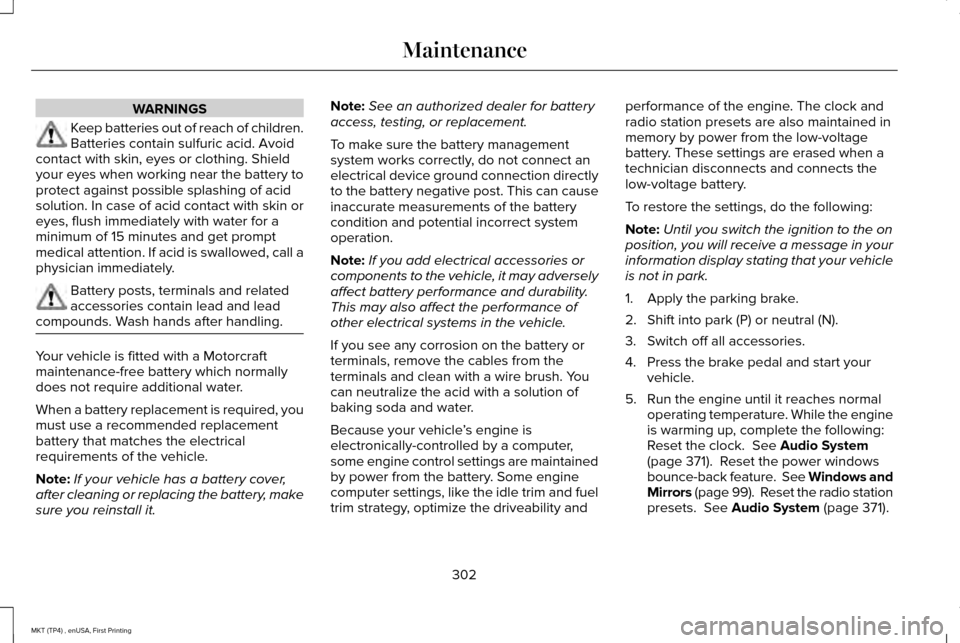
WARNINGS
Keep batteries out of reach of children.
Batteries contain sulfuric acid. Avoid
contact with skin, eyes or clothing. Shield
your eyes when working near the battery to
protect against possible splashing of acid
solution. In case of acid contact with skin or
eyes, flush immediately with water for a
minimum of 15 minutes and get prompt
medical attention. If acid is swallowed, call a
physician immediately. Battery posts, terminals and related
accessories contain lead and lead
compounds. Wash hands after handling. Your vehicle is fitted with a Motorcraft
maintenance-free battery which normally
does not require additional water.
When a battery replacement is required, you
must use a recommended replacement
battery that matches the electrical
requirements of the vehicle.
Note:
If your vehicle has a battery cover,
after cleaning or replacing the battery, make
sure you reinstall it. Note:
See an authorized dealer for battery
access, testing, or replacement.
To make sure the battery management
system works correctly, do not connect an
electrical device ground connection directly
to the battery negative post. This can cause
inaccurate measurements of the battery
condition and potential incorrect system
operation.
Note: If you add electrical accessories or
components to the vehicle, it may adversely
affect battery performance and durability.
This may also affect the performance of
other electrical systems in the vehicle.
If you see any corrosion on the battery or
terminals, remove the cables from the
terminals and clean with a wire brush. You
can neutralize the acid with a solution of
baking soda and water.
Because your vehicle ’s engine is
electronically-controlled by a computer,
some engine control settings are maintained
by power from the battery. Some engine
computer settings, like the idle trim and fuel
trim strategy, optimize the driveability and performance of the engine. The clock and
radio station presets are also maintained in
memory by power from the low-voltage
battery. These settings are erased when a
technician disconnects and connects the
low-voltage battery.
To restore the settings, do the following:
Note:
Until you switch the ignition to the on
position, you will receive a message in your
information display stating that your vehicle
is not in park.
1. Apply the parking brake.
2. Shift into park (P) or neutral (N).
3. Switch off all accessories.
4. Press the brake pedal and start your vehicle.
5. Run the engine until it reaches normal operating temperature. While the engine
is warming up, complete the following:
Reset the clock. See Audio System
(page 371). Reset the power windows
bounce-back feature. See Windows and
Mirrors
(page 99). Reset the radio station
presets. See Audio System (page 371).
302
MKT (TP4) , enUSA, First Printing Maintenance
Page 324 of 558
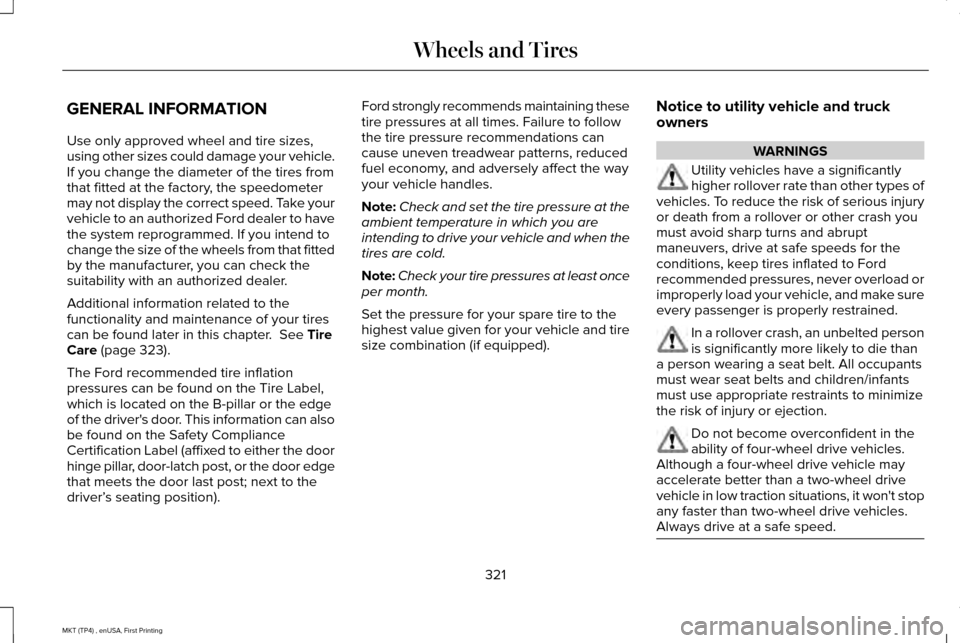
GENERAL INFORMATION
Use only approved wheel and tire sizes,
using other sizes could damage your vehicle.
If you change the diameter of the tires from
that fitted at the factory, the speedometer
may not display the correct speed. Take your
vehicle to an authorized Ford dealer to have
the system reprogrammed. If you intend to
change the size of the wheels from that fitted
by the manufacturer, you can check the
suitability with an authorized dealer.
Additional information related to the
functionality and maintenance of your tires
can be found later in this chapter. See Tire
Care (page 323).
The Ford recommended tire inflation
pressures can be found on the Tire Label,
which is located on the B-pillar or the edge
of the driver's door. This information can also
be found on the Safety Compliance
Certification Label (affixed to either the door
hinge pillar, door-latch post, or the door edge
that meets the door last post; next to the
driver’ s seating position). Ford strongly recommends maintaining these
tire pressures at all times. Failure to follow
the tire pressure recommendations can
cause uneven treadwear patterns, reduced
fuel economy, and adversely affect the way
your vehicle handles.
Note:
Check and set the tire pressure at the
ambient temperature in which you are
intending to drive your vehicle and when the
tires are cold.
Note: Check your tire pressures at least once
per month.
Set the pressure for your spare tire to the
highest value given for your vehicle and tire
size combination (if equipped). Notice to utility vehicle and truck
owners WARNINGS
Utility vehicles have a significantly
higher rollover rate than other types of
vehicles. To reduce the risk of serious injury
or death from a rollover or other crash you
must avoid sharp turns and abrupt
maneuvers, drive at safe speeds for the
conditions, keep tires inflated to Ford
recommended pressures, never overload or
improperly load your vehicle, and make sure
every passenger is properly restrained. In a rollover crash, an unbelted person
is significantly more likely to die than
a person wearing a seat belt. All occupants
must wear seat belts and children/infants
must use appropriate restraints to minimize
the risk of injury or ejection. Do not become overconfident in the
ability of four-wheel drive vehicles.
Although a four-wheel drive vehicle may
accelerate better than a two-wheel drive
vehicle in low traction situations, it won't stop
any faster than two-wheel drive vehicles.
Always drive at a safe speed. 321
MKT (TP4) , enUSA, First Printing Wheels and Tires
Page 528 of 558

(b) use your own personal judgment while
driving. If you feel that a route suggested by
the TeleNav Software instructs you to
perform an unsafe or illegal maneuver,
places you in an unsafe situation, or directs
you into an area that you consider to be
unsafe, do not follow such instructions;
(c) do not input destinations, or otherwise
manipulate the TeleNav Software, unless
your vehicle is stationary and parked;
(d) do not use the TeleNav Software for any
illegal, unauthorized, unintended, unsafe,
hazardous, or unlawful purposes, or in any
manner inconsistent with this Agreement;
(e) arrange all GPS and wireless devices and
cables necessary for use of the TeleNav
Software in a secure manner in your vehicle
so that they will not interfere with your
driving and will not prevent the operation of
any safety device (such as an airbag).
You agree to indemnify and hold TeleNav
harmless against all claims resulting from any
dangerous or otherwise inappropriate use
of the TeleNav Software in any moving
vehicle, including as a result of your failure
to comply with the directions above.
2. Account Information
You agree: (a) when registering the TeleNav
Software, to provide TeleNav with true,
accurate, current, and complete information
about yourself, and (b) to inform TeleNav
promptly of any changes to such information,
and to keep it true, accurate, current and
complete.
3. Software License
•
Subject to your compliance with the
terms of this Agreement, TeleNav hereby
grants to you a personal, non-exclusive,
non-transferable license (except as
expressly permitted below in connection
with your permanent transfer of the
TeleNav Software license), without the
right to sublicense, to use the TeleNav
Software (in object code form only) in
order to access and use the TeleNav
Software. This license shall terminate
upon any termination or expiration of this
Agreement. You agree that you will use
the TeleNav Software only for your
personal business or leisure purposes,
and not to provide commercial navigation
services to other parties. 3.1 License Limitations
•
(a) reverse engineer, decompile,
disassemble, translate, modify, alter or
otherwise change the TeleNav Software
or any part thereof; (b) attempt to derive
the source code, audio library or
structure of the TeleNav Software without
the prior express written consent of
TeleNav;
(c) remove from the TeleNav
Software, or alter, any of TeleNav's or its
suppliers' trademarks, trade names,
logos, patent or copyright notices, or
other notices or markings;
(d) distribute,
sublicense or otherwise transfer the
TeleNav Software to others, except as
part of your permanent transfer of the
TeleNav Software; or (e) use the TeleNav
Software in any manner that
I. infringes the intellectual property or
proprietary rights, rights of publicity or
privacy or other rights of any party,
ii. violates any law, statute, ordinance or
regulation, including but not limited to laws
and regulations related to spamming, privacy,
consumer and child protection, obscenity or
defamation, or
525
MKT (TP4) , enUSA, First Printing Appendices
Page 549 of 558
Auxiliary Power Points.................................160
110 Volt AC Power Point....................................160
12 Volt DC Power Point......................................160
Locations...............................................................160
AWD See: All-Wheel Drive...........................................184
B
Battery See: Changing the 12V Battery........................301
Blind Spot Information System.................224 Switching the System Off and On..................226
System Errors......................................................226
System Limitations.............................................226
Using the System...............................................225
Bonnet Lock See: Opening and Closing the Hood............287
Booster Seats..................................................32
Types of Booster Seats.......................................33
Brake Fluid Check.......................................300
Brakes..............................................................192 General Information............................................192
Breaking-In......................................................251
Bulb Specification Chart.............................307 C
Cabin Air Filter
...............................................134
California Proposition 65................................11
Capacities and Specifications - 3.5L Ecoboost™....................................................357
Alternative Engine Oil for Extremely Cold Climates...........................................................362
Specifications......................................................358
Capacities and Specifications - 3.7L........364 Alternative Engine Oil for Extremely Cold
Climates...........................................................369
Specifications......................................................365
Capacities and Specifications....................351
Cargo Nets
.....................................................236
Car Wash See: Cleaning the Exterior................................
312
Center Console.............................................162 Console Refrigerator and Freezer..................162
Second Row Center Console...........................162
Changing a Bulb...........................................305 Front Direction Indicator Lamp.......................
306
Front Fog Lamp..................................................306
High Intensity Discharge Headlamp.............
306
LED Lamps...........................................................306
License Plate Lamp............................................307
Changing a Fuse..........................................283 Fuses.....................................................................283 Changing a Road Wheel
..............................341
Dissimilar Spare Wheel and Tire Assembly
Information........................................................341
Tire Change Procedure....................................343
Changing the 12V Battery...........................301
Changing the Engine Air Filter
..................310
Changing the Wiper Blades......................303 Front Wiper Blades............................................303
Rear Window Wiper Blade...............................
304
Checking MyKey System Status.................69
Checking the Wiper Blades.......................303
Child Restraint and Seatbelt Maintenance..................................................47
Child Restraint Positioning...........................35
Child Safety.......................................................18 General Information..............................................18
Child Safety Locks..........................................36 Left-Hand Side.......................................................37
Right-Hand Side....................................................37
Cleaning Leather Seats................................317
Cleaning Products..........................................311 Materials.................................................................311
Cleaning the Engine
.....................................313
Cleaning the Exterior....................................312
Exterior Chrome Parts........................................312
Exterior Plastic Parts...........................................313
Stripes or Graphics..............................................313
Underbody............................................................313
546
MKT (TP4) , enUSA, First Printing Index
Page 550 of 558
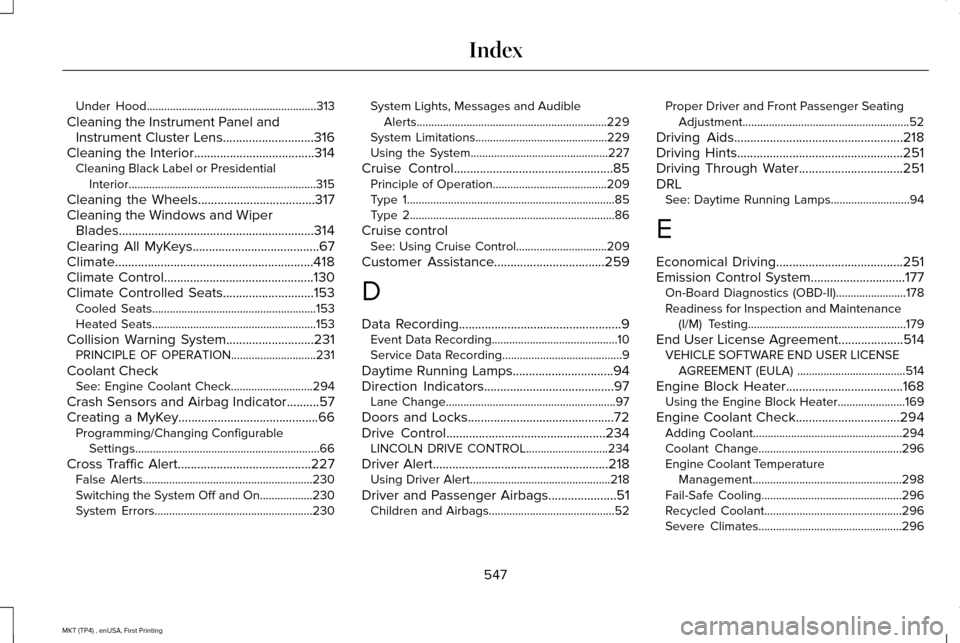
Under Hood..........................................................313
Cleaning the Instrument Panel and Instrument Cluster Lens............................316
Cleaning the Interior.....................................314 Cleaning Black Label or Presidential
Interior................................................................315
Cleaning the Wheels....................................317
Cleaning the Windows and Wiper Blades............................................................314
Clearing All MyKeys.......................................67
Climate.............................................................418
Climate Control
..............................................130
Climate Controlled Seats............................153 Cooled Seats........................................................153
Heated Seats........................................................153
Collision Warning System...........................231 PRINCIPLE OF OPERATION.............................
231
Coolant Check See: Engine Coolant Check............................
294
Crash Sensors and Airbag Indicator
..........57
Creating a MyKey...........................................66 Programming/Changing Configurable
Settings...............................................................66
Cross Traffic Alert.........................................227 False Alerts..........................................................230
Switching the System Off and On..................230
System Errors......................................................230 System Lights, Messages and Audible
Alerts.................................................................229
System Limitations.............................................229
Using the System...............................................227
Cruise Control
.................................................85
Principle of Operation.......................................209
Type 1.......................................................................85
Type 2......................................................................86
Cruise control See: Using Cruise Control...............................209
Customer Assistance
..................................259
D
Data Recording
..................................................9
Event Data Recording...........................................10
Service Data Recording.........................................9
Daytime Running Lamps
...............................94
Direction Indicators........................................97
Lane Change..........................................................97
Doors and Locks.............................................72
Drive Control
.................................................234
LINCOLN DRIVE CONTROL............................234
Driver Alert
......................................................218
Using Driver Alert................................................218
Driver and Passenger Airbags.....................51 Children and Airbags...........................................52 Proper Driver and Front Passenger Seating
Adjustment.........................................................52
Driving Aids....................................................218
Driving Hints...................................................251
Driving Through Water
................................251
DRL See: Daytime Running Lamps...........................94
E
Economical Driving
.......................................251
Emission Control System.............................177 On-Board Diagnostics (OBD-II)........................178
Readiness for Inspection and Maintenance
(I/M) Testing......................................................179
End User License Agreement
....................514
VEHICLE SOFTWARE END USER LICENSE
AGREEMENT (EULA) .....................................514
Engine Block Heater....................................168 Using the Engine Block Heater.......................169
Engine Coolant Check................................294 Adding Coolant...................................................294
Coolant Change.................................................296
Engine Coolant Temperature
Management...................................................298
Fail-Safe Cooling................................................296
Recycled Coolant...............................................296
Severe Climates.................................................296
547
MKT (TP4) , enUSA, First Printing Index
Page 553 of 558
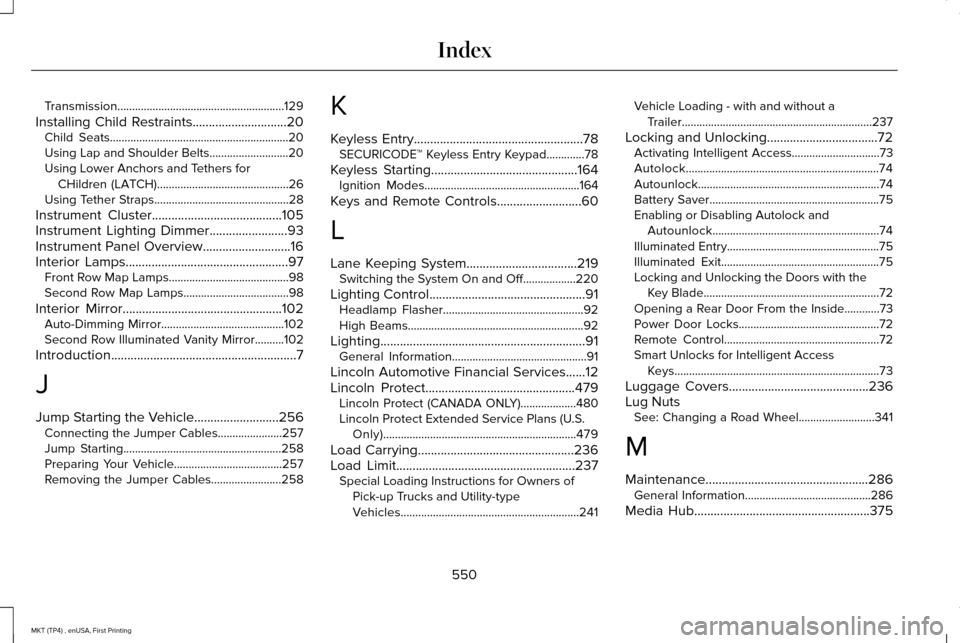
Transmission.........................................................129
Installing Child Restraints.............................20 Child Seats.............................................................20
Using Lap and Shoulder Belts...........................20
Using Lower Anchors and Tethers for
CHildren (LATCH).............................................26
Using Tether Straps..............................................28
Instrument Cluster........................................105
Instrument Lighting Dimmer........................93
Instrument Panel Overview...........................16
Interior Lamps..................................................97 Front Row Map Lamps.........................................98
Second Row Map Lamps....................................98
Interior Mirror.................................................102 Auto-Dimming Mirror..........................................102
Second Row Illuminated Vanity Mirror..........102
Introduction
.........................................................7
J
Jump Starting the Vehicle
..........................256
Connecting the Jumper Cables......................257
Jump Starting......................................................258
Preparing Your Vehicle.....................................257
Removing the Jumper Cables........................258 K
Keyless Entry....................................................78
SECURICODE™ Keyless Entry Keypad.............78
Keyless Starting
.............................................164
Ignition Modes.....................................................164
Keys and Remote Controls..........................60
L
Lane Keeping System..................................219 Switching the System On and Off..................220
Lighting Control
................................................91
Headlamp Flasher................................................92
High Beams............................................................92
Lighting...............................................................91 General Information..............................................91
Lincoln Automotive Financial Services......12
Lincoln Protect..............................................479 Lincoln Protect (CANADA ONLY)...................480
Lincoln Protect Extended Service Plans (U.S.
Only)..................................................................479
Load Carrying
................................................236
Load Limit.......................................................237
Special Loading Instructions for Owners of
Pick-up Trucks and Utility-type
Vehicles.............................................................241 Vehicle Loading - with and without a
Trailer.................................................................237
Locking and Unlocking..................................72 Activating Intelligent Access..............................
73
Autolock..................................................................74
Autounlock..............................................................74
Battery Saver..........................................................75
Enabling or Disabling Autolock and Autounlock.........................................................74
Illuminated Entry....................................................75
Illuminated Exit......................................................75
Locking and Unlocking the Doors with the Key Blade............................................................72
Opening a Rear Door From the Inside............73
Power Door Locks................................................72
Remote Control.....................................................72
Smart Unlocks for Intelligent Access Keys......................................................................73
Luggage Covers
...........................................236
Lug Nuts See: Changing a Road Wheel..........................341
M
Maintenance..................................................286 General Information...........................................286
Media Hub
......................................................375
550
MKT (TP4) , enUSA, First Printing Index