steering wheel LINCOLN MKT 2017 Workshop Manual
[x] Cancel search | Manufacturer: LINCOLN, Model Year: 2017, Model line: MKT, Model: LINCOLN MKT 2017Pages: 558, PDF Size: 4.59 MB
Page 430 of 558
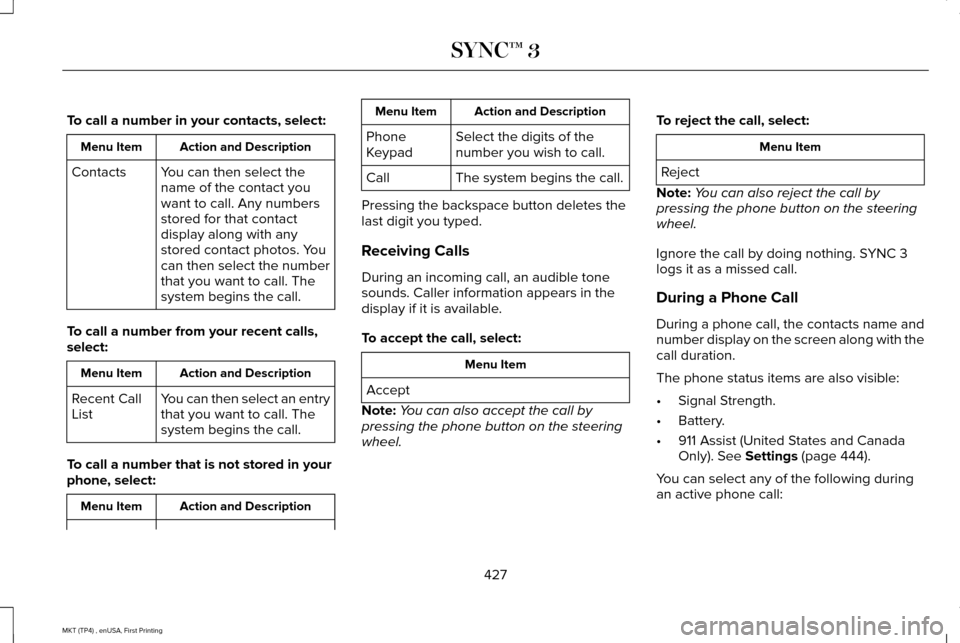
To call a number in your contacts, select:
Action and Description
Menu Item
You can then select the
name of the contact you
want to call. Any numbers
stored for that contact
display along with any
stored contact photos. You
can then select the number
that you want to call. The
system begins the call.
Contacts
To call a number from your recent calls,
select: Action and Description
Menu Item
You can then select an entry
that you want to call. The
system begins the call.
Recent Call
List
To call a number that is not stored in your
phone, select: Action and Description
Menu Item Action and Description
Menu Item
Select the digits of the
number you wish to call.
Phone
Keypad
The system begins the call.
Call
Pressing the backspace button deletes the
last digit you typed.
Receiving Calls
During an incoming call, an audible tone
sounds. Caller information appears in the
display if it is available.
To accept the call, select: Menu Item
Accept
Note: You can also accept the call by
pressing the phone button on the steering
wheel. To reject the call, select: Menu Item
Reject
Note: You can also reject the call by
pressing the phone button on the steering
wheel.
Ignore the call by doing nothing. SYNC 3
logs it as a missed call.
During a Phone Call
During a phone call, the contacts name and
number display on the screen along with the
call duration.
The phone status items are also visible:
• Signal Strength.
• Battery.
• 911 Assist (United States and Canada
Only). See Settings (page 444).
You can select any of the following during
an active phone call:
427
MKT (TP4) , enUSA, First Printing SYNC™ 3
Page 431 of 558
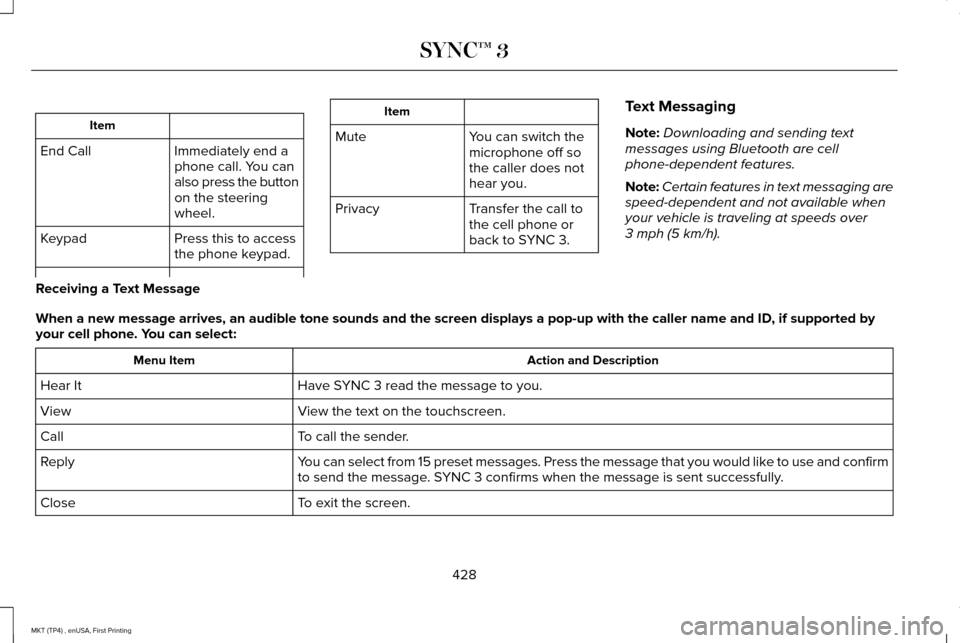
Item
Immediately end a
phone call. You can
also press the button
on the steering
wheel.
End Call
Press this to access
the phone keypad.
Keypad Item
Mute You can switch the
microphone off so
the caller does not
hear you.
Transfer the call to
the cell phone or
back to SYNC 3.
Privacy Text Messaging
Note:
Downloading and sending text
messages using Bluetooth are cell
phone-dependent features.
Note: Certain features in text messaging are
speed-dependent and not available when
your vehicle is traveling at speeds over
3 mph (5 km/h).
Receiving a Text Message
When a new message arrives, an audible tone sounds and the screen displa\
ys a pop-up with the caller name and ID, if supported by
your cell phone. You can select: Action and Description
Menu Item
Have SYNC 3 read the message to you.
Hear It
View the text on the touchscreen.
View
To call the sender.
Call
You can select from 15 preset messages. Press the message that you would \
like to use and confirm
to send the message. SYNC 3 confirms when the message is sent successfully.
Reply
To exit the screen.
Close
428
MKT (TP4) , enUSA, First Printing SYNC™ 3
Page 443 of 558
•
Pool
• Wi-Fi
Attractions include nearby landmarks,
amusement parks, historic buildings and
more. cityseeker can provide information
such as star rating, reviews, hour of operation
and admission price.
SiriusXM Traffic and Travel Link
SiriusXM Traffic and Travel Link is available
on vehicles equipped with navigation and
only in select markets. You must activate and
subscribe to receive SiriusXM Traffic and
Travel Link information. It helps you locate
the best gas prices, find movie listings, get
current traffic alerts, view the weather map,
get accurate ski conditions and see current
sports scores. See Apps (page 440).
The system calculates a reasonable efficient
route based on available speed limits, traffic,
and road conditions. You may know a local
short cut that is more efficient at a given time
than the route provided by SYNC 3, but you
should expect a slight difference in minutes
or miles with the SYNC 3 route. Navigation Map Updates
Annual navigation map updates are available
for purchase through your dealership, by
calling 1-866-462-8837 in the United States
and Canada or 01-800-557-5539 in Mexico.
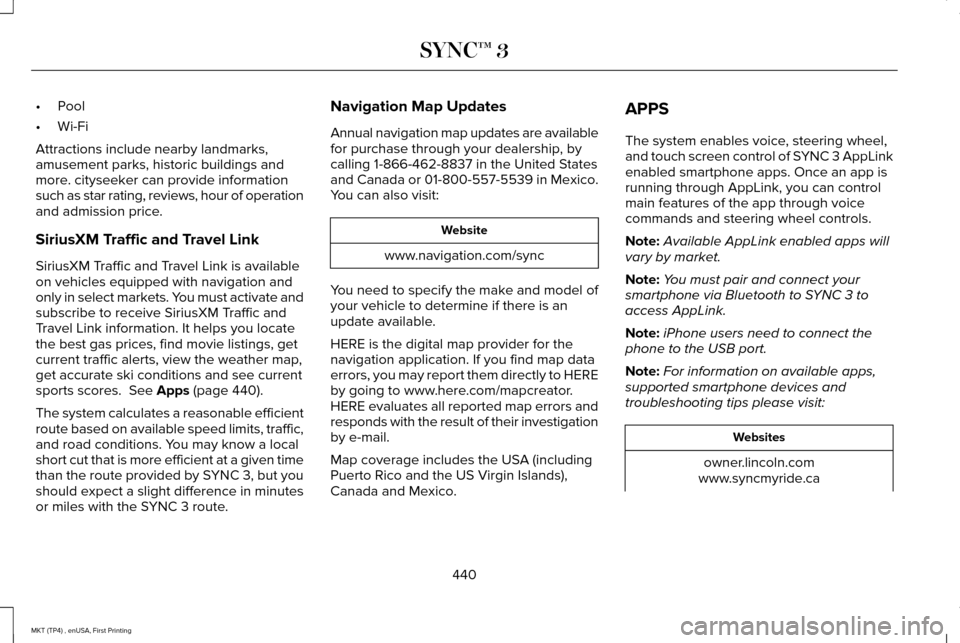
You can also visit:
Website
www.navigation.com/sync
You need to specify the make and model of
your vehicle to determine if there is an
update available.
HERE is the digital map provider for the
navigation application. If you find map data
errors, you may report them directly to HERE
by going to www.here.com/mapcreator.
HERE evaluates all reported map errors and
responds with the result of their investigation
by e-mail.
Map coverage includes the USA (including
Puerto Rico and the US Virgin Islands),
Canada and Mexico. APPS
The system enables voice, steering wheel,
and touch screen control of SYNC 3 AppLink
enabled smartphone apps. Once an app is
running through AppLink, you can control
main features of the app through voice
commands and steering wheel controls.
Note:
Available AppLink enabled apps will
vary by market.
Note: You must pair and connect your
smartphone via Bluetooth to SYNC 3 to
access AppLink.
Note: iPhone users need to connect the
phone to the USB port.
Note: For information on available apps,
supported smartphone devices and
troubleshooting tips please visit: Websites
owner.lincoln.com
www.syncmyride.ca
440
MKT (TP4) , enUSA, First Printing SYNC™ 3
Page 491 of 558
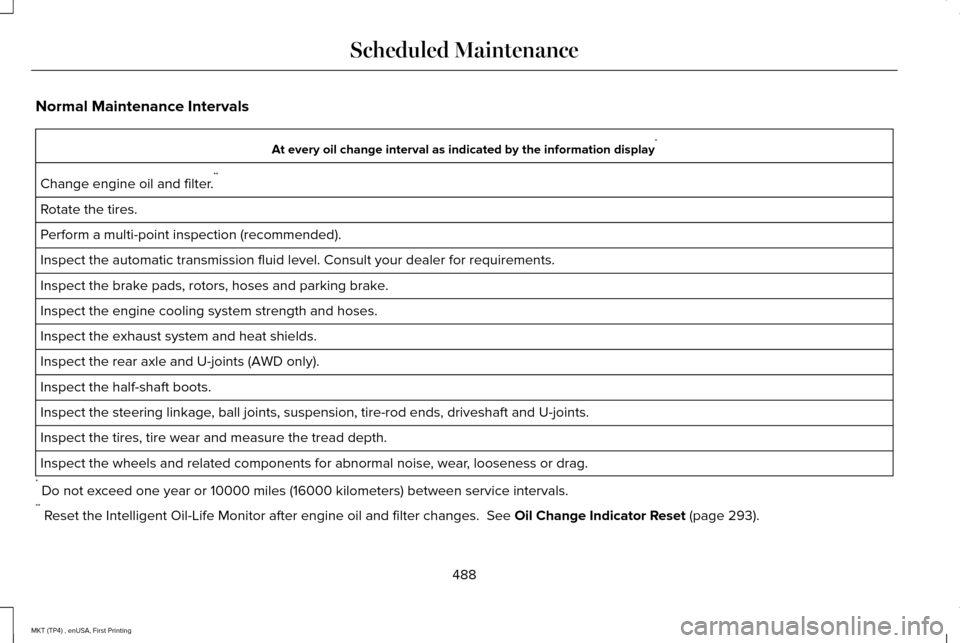
Normal Maintenance Intervals
At every oil change interval as indicated by the information display
*
Change engine oil and filter. **
Rotate the tires.
Perform a multi-point inspection (recommended).
Inspect the automatic transmission fluid level. Consult your dealer for \
requirements.
Inspect the brake pads, rotors, hoses and parking brake.
Inspect the engine cooling system strength and hoses.
Inspect the exhaust system and heat shields.
Inspect the rear axle and U-joints (AWD only).
Inspect the half-shaft boots.
Inspect the steering linkage, ball joints, suspension, tire-rod ends, driveshaft and U-joints.
Inspect the tires, tire wear and measure the tread depth.
Inspect the wheels and related components for abnormal noise, wear, looseness or drag.
* Do not exceed one year or 10000 miles (16000 kilometers) between service interv\
als.
** Reset the Intelligent Oil-Life Monitor after engine oil and filter change\
s. See Oil Change Indicator Reset (page 293).
488
MKT (TP4) , enUSA, First Printing Scheduled Maintenance
Page 548 of 558
A
A/C
See: Climate Control..........................................130
About This Manual............................................7
ABS See: Brakes...........................................................192
ABS driving hints See: Hints on Driving With Anti-Lock
Brakes................................................................192
Accessories....................................................477 Exterior Style........................................................477
Interior Style.........................................................477
Lifestyle.................................................................477
Peace of Mind......................................................477
Accessories See: Replacement Parts Recommendation.....12
ACC See: Using Adaptive Cruise Control..............210
Active Park Assist..........................................199 Automatic Steering into Parking Space........201
Deactivating the Park Assist Feature............202
Troubleshooting the System...........................
203
Using Active Park Assist..................................200
Adaptive Headlamps
.....................................96
Adjusting the Headlamps...........................304 Horizontal Aim Adjustment..............................305
Vertical Aim Adjustment...................................
304 Adjusting the Pedals......................................87
Adjusting the Steering Wheel......................84
Easy Entry and Exit Feature...............................84
End of Travel Position..........................................84
Memory Feature....................................................84
AFS See: Adaptive Headlamps..................................
96
Airbag Disposal
...............................................59
Air Conditioning See: Climate Control..........................................130
Air Filter See: Changing the Engine Air Filter...............310
Alarm See: Anti-Theft Alarm...........................................83
All-Wheel Drive
..............................................184
Ambient Lighting............................................98
Anti-Theft Alarm..............................................83
Arming the Alarm..................................................83
Disarming the Alarm............................................83
Appendices.....................................................514
Apps
.................................................................440
........................................................................\
.........440
SiriusXM Traffic and Travel Link......................
442
At a Glance
........................................................16
Audible Warnings and Indicators..............109
Headlamps On Warning Chime.......................109
Keyless Warning Alert........................................109
Parking Brake On Warning Chime..................
109 Audio Control
..................................................85
MEDIA......................................................................85
Seek, Next or Previous........................................85
Audio System
..................................................371
General Information............................................371
Audio Unit
.......................................................372
Rear Seat Audio Controls.................................374
Autolamps........................................................92 Windshield Wiper Activated Headlamps........93
Automatic Climate Control
.........................130
Automatic High Beam Control....................94
Activating the System..........................................95
Manually Overriding the System......................
95
Automatic Transmission..............................180 Automatic Transmission Adaptive
Learning............................................................183
Brake-Shift Interlock...........................................182
If Your Vehicle Gets Stuck In Mud or Snow..................................................................183
SelectShift Automatic ™ Transmission..............181
Understanding the Positions of Your Automatic Transmission................................180
Automatic Transmission Fluid Check - 3.5L Ecoboost™/3.7L...........................................298
Adding Transmission Fluid .............................
300
Checking the Transmission Fluid Level........299
Autowipers.......................................................88
545
MKT (TP4) , enUSA, First Printing Index
Page 552 of 558
General Information on Radio
Frequencies..................................................60
Intelligent Access.................................................60
General Maintenance Information...........482 Multi-Point Inspection........................................485
Owner Checks and Services...........................484
Protecting Your Investment.............................482
Why Maintain Your Vehicle?............................482
Why Maintain Your Vehicle at Your
Dealership?......................................................482
Getting Assistance Outside the U.S. and Canada.........................................................263
Getting the Services You Need................259 Away From Home..............................................259
Global Opening and Closing.....................100 Closing the Windows.........................................100
Opening the Windows.......................................100
H
Handbrake See: Parking Brake.............................................193
Hazard Warning Flashers...........................255
Headlamp Adjusting See: Adjusting the Headlamps.......................
304
Headlamp Exit Delay.....................................93
Headlamp Removal See: Removing a Headlamp............................
305 Head Restraints
.............................................136
Adjusting the Head Restraint............................137
Tilting Head Restraints ......................................138
Heated Seats..................................................152 Front Seats............................................................152
Second-Row Heated Seats...............................152
Heated Steering Wheel................................86
Heated Windows and Mirrors....................134 Heated Exterior Mirror.......................................134
Heated Rear Window.........................................134
Heating See: Climate Control..........................................130
Hints on Controlling the Interior Climate..........................................................132
Cooling the Interior Quickly..............................132
General Hints........................................................132
Heating the Interior Quickly.............................132
Recommended Settings for Cooling .............
132
Recommended Settings for Heating..............132
Side Window Defogging in Cold Weather.............................................................132
Hints on Driving With Anti-Lock Brakes...........................................................192
Home Screen
................................................393
Hood Lock See: Opening and Closing the Hood............287 I
In California (U.S. Only)...............................260
Information Display Control
.........................86
Information Displays......................................110 General Information.............................................110
Information Messages
...................................117
Adaptive Cruise Control.....................................118
AdvanceTrac ™........................................................118
Alarm.......................................................................119
Automatic Engine Shutdown.............................119
AWD........................................................................\
120
Battery and Charging System...........................121
Blind Spot Information and Cross Traffic Alert System...............................................................122
Brake System.......................................................122
Collision Warning System..................................123
Doors and Locks..................................................123
Fuel........................................................................\
.124
Keys and Intelligent Access..............................124
Lane Keeping System........................................125
Maintenance.........................................................125
MyKey.....................................................................126
Park Aid..................................................................127
Power Steering....................................................128
Seats.......................................................................128
Tire Pressure Monitoring System....................
129
Traction Control...................................................129
549
MKT (TP4) , enUSA, First Printing Index
Page 556 of 558
Settings...........................................................444
911 Assist...............................................................450
Ambient Lighting................................................458
Bluetooth..............................................................446
Clock......................................................................446
Display...................................................................459
General.................................................................456
Media Player........................................................445
Mobile Apps.........................................................454
Navigation............................................................452
Phone.....................................................................447
Radio.......................................................................451
Sound....................................................................444
Valet Mode...........................................................460
Vehicle...................................................................458
Voice Control.......................................................459
Wi-Fi.......................................................................457
Side Airbags.....................................................55
Sitting in the Correct Position....................136
Snow Chains See: Using Snow Chains..................................336
Special Notices.................................................13
New Vehicle Limited Warranty...........................13
On Board Diagnostics Data Link Connector............................................................13
Special Instructions...............................................13 Special Operating Conditions Scheduled
Maintenance...............................................490
Exceptions............................................................492
Speed Control See: Cruise Control...........................................209
Stability Control.............................................196 Principle of Operation........................................196
Starting a Gasoline Engine.........................165 Automatic Engine Shutdown............................167
Failure to Start......................................................166
Guarding Against Exhaust Fumes..................168
Important Ventilating Information...................168
Stopping the Engine When Your Vehicle is
Moving...............................................................167
Stopping the Engine When Your Vehicle is Stationary..........................................................167
Starting and Stopping the Engine.............164 General Information............................................164
Steering..........................................................230 Electric Power Steering....................................
230
Steering Wheel................................................84
Storage Compartments...............................162
Sunroof See: Moonroof.....................................................103
Sun Visors
.......................................................102
Illuminated Vanity Mirror...................................103
Supplementary Restraints System.............50 Principle of Operation.........................................50 Symbols Glossary
..............................................7
SYNC™ 3..........................................................376 General Information...........................................376
SYNC™ 3 Troubleshooting.........................460
T
Tailgate See: Power Liftgate..............................................75
Technical Specifications See: Capacities and Specifications................351
The Better Business Bureau (BBB) Auto Line Program (U.S. Only) ...........................
261
Tire Care.........................................................323
Glossary of Tire Terminology..........................325
Information About Uniform Tire Quality Grading.............................................................323
Information Contained on the Tire Sidewall............................................................326
Temperature A B C.............................................324
Traction AA A B C...............................................324
Treadwear............................................................324
Tire Pressure Monitoring System.............337 Changing Tires With a Tire Pressure
Monitoring System.........................................338
Understanding Your Tire Pressure Monitoring System .............................................................339
553
MKT (TP4) , enUSA, First Printing Index