warning light LINCOLN MKT 2017 Repair Manual
[x] Cancel search | Manufacturer: LINCOLN, Model Year: 2017, Model line: MKT, Model: LINCOLN MKT 2017Pages: 558, PDF Size: 4.59 MB
Page 343 of 558
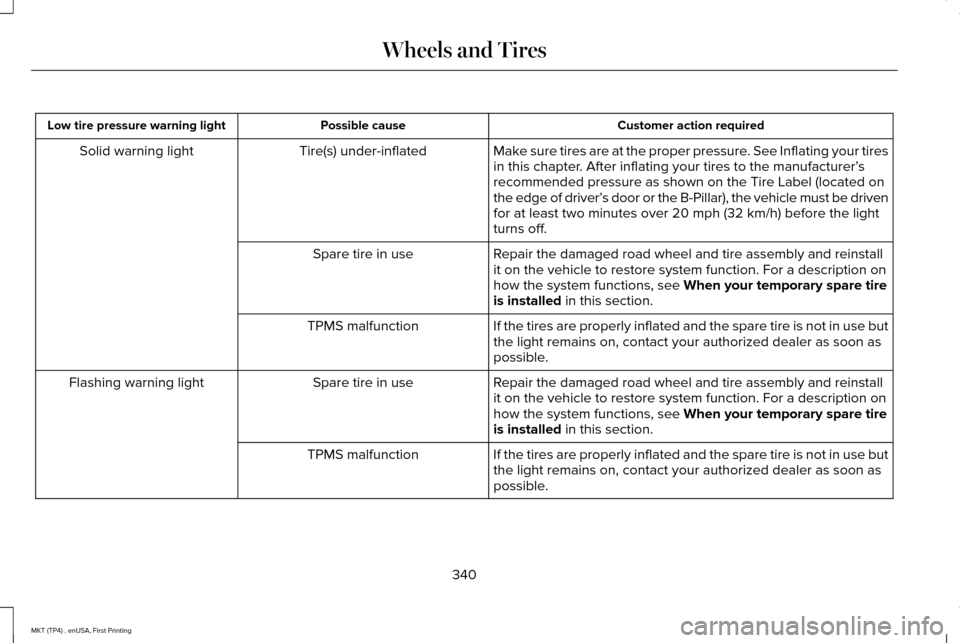
Customer action required
Possible cause
Low tire pressure warning light
Make sure tires are at the proper pressure. See Inflating your tires
in this chapter. After inflating your tires to the manufacturer’s
recommended pressure as shown on the Tire Label (located on
the edge of driver’ s door or the B-Pillar), the vehicle must be driven
for at least two minutes over 20 mph (32 km/h) before the light
turns off.
Tire(s) under-inflated
Solid warning light
Repair the damaged road wheel and tire assembly and reinstall
it on the vehicle to restore system function. For a description on
how the system functions, see
When your temporary spare tire
is installed in this section.
Spare tire in use
If the tires are properly inflated and the spare tire is not in use but
the light remains on, contact your authorized dealer as soon as
possible.
TPMS malfunction
Repair the damaged road wheel and tire assembly and reinstall
it on the vehicle to restore system function. For a description on
how the system functions, see
When your temporary spare tire
is installed in this section.
Spare tire in use
Flashing warning light
If the tires are properly inflated and the spare tire is not in use but
the light remains on, contact your authorized dealer as soon as
possible.
TPMS malfunction
340
MKT (TP4) , enUSA, First Printing Wheels and Tires
Page 344 of 558
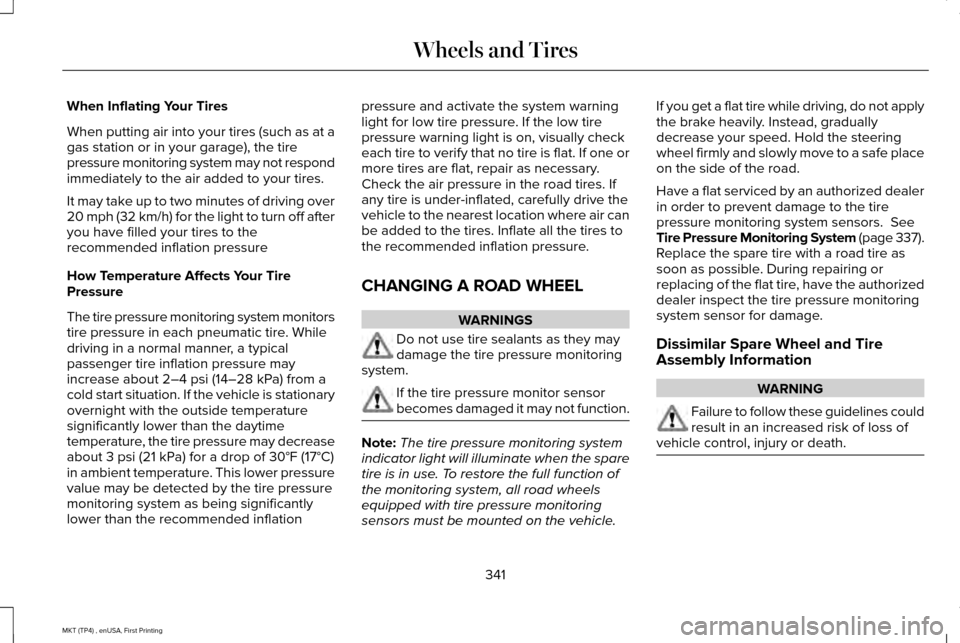
When Inflating Your Tires
When putting air into your tires (such as at a
gas station or in your garage), the tire
pressure monitoring system may not respond
immediately to the air added to your tires.
It may take up to two minutes of driving over
20 mph (32 km/h) for the light to turn off after
you have filled your tires to the
recommended inflation pressure
How Temperature Affects Your Tire
Pressure
The tire pressure monitoring system monitors
tire pressure in each pneumatic tire. While
driving in a normal manner, a typical
passenger tire inflation pressure may
increase about 2–4 psi (14–28 kPa) from a
cold start situation. If the vehicle is stationary
overnight with the outside temperature
significantly lower than the daytime
temperature, the tire pressure may decrease
about
3 psi (21 kPa) for a drop of 30°F (17°C)
in ambient temperature. This lower pressure
value may be detected by the tire pressure
monitoring system as being significantly
lower than the recommended inflation pressure and activate the system warning
light for low tire pressure. If the low tire
pressure warning light is on, visually check
each tire to verify that no tire is flat. If one or
more tires are flat, repair as necessary.
Check the air pressure in the road tires. If
any tire is under-inflated, carefully drive the
vehicle to the nearest location where air can
be added to the tires. Inflate all the tires to
the recommended inflation pressure.
CHANGING A ROAD WHEEL
WARNINGS
Do not use tire sealants as they may
damage the tire pressure monitoring
system. If the tire pressure monitor sensor
becomes damaged it may not function.
Note:
The tire pressure monitoring system
indicator light will illuminate when the spare
tire is in use. To restore the full function of
the monitoring system, all road wheels
equipped with tire pressure monitoring
sensors must be mounted on the vehicle. If you get a flat tire while driving, do not apply
the brake heavily. Instead, gradually
decrease your speed. Hold the steering
wheel firmly and slowly move to a safe place
on the side of the road.
Have a flat serviced by an authorized dealer
in order to prevent damage to the tire
pressure monitoring system sensors.
See
Tire Pressure Monitoring System (page 337).
Replace the spare tire with a road tire as
soon as possible. During repairing or
replacing of the flat tire, have the authorized
dealer inspect the tire pressure monitoring
system sensor for damage.
Dissimilar Spare Wheel and Tire
Assembly Information WARNING
Failure to follow these guidelines could
result in an increased risk of loss of
vehicle control, injury or death. 341
MKT (TP4) , enUSA, First Printing Wheels and Tires
Page 375 of 558
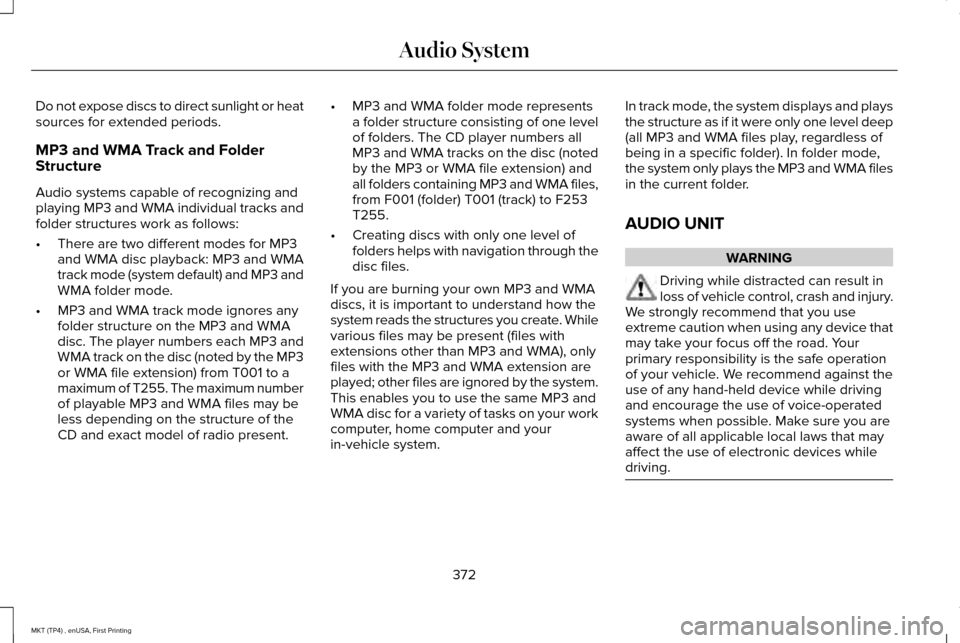
Do not expose discs to direct sunlight or heat
sources for extended periods.
MP3 and WMA Track and Folder
Structure
Audio systems capable of recognizing and
playing MP3 and WMA individual tracks and
folder structures work as follows:
•
There are two different modes for MP3
and WMA disc playback: MP3 and WMA
track mode (system default) and MP3 and
WMA folder mode.
• MP3 and WMA track mode ignores any
folder structure on the MP3 and WMA
disc. The player numbers each MP3 and
WMA track on the disc (noted by the MP3
or WMA file extension) from T001 to a
maximum of T255. The maximum number
of playable MP3 and WMA files may be
less depending on the structure of the
CD and exact model of radio present. •
MP3 and WMA folder mode represents
a folder structure consisting of one level
of folders. The CD player numbers all
MP3 and WMA tracks on the disc (noted
by the MP3 or WMA file extension) and
all folders containing MP3 and WMA files,
from F001 (folder) T001 (track) to F253
T255.
• Creating discs with only one level of
folders helps with navigation through the
disc files.
If you are burning your own MP3 and WMA
discs, it is important to understand how the
system reads the structures you create. While
various files may be present (files with
extensions other than MP3 and WMA), only
files with the MP3 and WMA extension are
played; other files are ignored by the system.
This enables you to use the same MP3 and
WMA disc for a variety of tasks on your work
computer, home computer and your
in-vehicle system. In track mode, the system displays and plays
the structure as if it were only one level deep
(all MP3 and WMA files play, regardless of
being in a specific folder). In folder mode,
the system only plays the MP3 and WMA files
in the current folder.
AUDIO UNIT WARNING
Driving while distracted can result in
loss of vehicle control, crash and injury.
We strongly recommend that you use
extreme caution when using any device that
may take your focus off the road. Your
primary responsibility is the safe operation
of your vehicle. We recommend against the
use of any hand-held device while driving
and encourage the use of voice-operated
systems when possible. Make sure you are
aware of all applicable local laws that may
affect the use of electronic devices while
driving. 372
MKT (TP4) , enUSA, First Printing Audio System
Page 548 of 558
A
A/C
See: Climate Control..........................................130
About This Manual............................................7
ABS See: Brakes...........................................................192
ABS driving hints See: Hints on Driving With Anti-Lock
Brakes................................................................192
Accessories....................................................477 Exterior Style........................................................477
Interior Style.........................................................477
Lifestyle.................................................................477
Peace of Mind......................................................477
Accessories See: Replacement Parts Recommendation.....12
ACC See: Using Adaptive Cruise Control..............210
Active Park Assist..........................................199 Automatic Steering into Parking Space........201
Deactivating the Park Assist Feature............202
Troubleshooting the System...........................
203
Using Active Park Assist..................................200
Adaptive Headlamps
.....................................96
Adjusting the Headlamps...........................304 Horizontal Aim Adjustment..............................305
Vertical Aim Adjustment...................................
304 Adjusting the Pedals......................................87
Adjusting the Steering Wheel......................84
Easy Entry and Exit Feature...............................84
End of Travel Position..........................................84
Memory Feature....................................................84
AFS See: Adaptive Headlamps..................................
96
Airbag Disposal
...............................................59
Air Conditioning See: Climate Control..........................................130
Air Filter See: Changing the Engine Air Filter...............310
Alarm See: Anti-Theft Alarm...........................................83
All-Wheel Drive
..............................................184
Ambient Lighting............................................98
Anti-Theft Alarm..............................................83
Arming the Alarm..................................................83
Disarming the Alarm............................................83
Appendices.....................................................514
Apps
.................................................................440
........................................................................\
.........440
SiriusXM Traffic and Travel Link......................
442
At a Glance
........................................................16
Audible Warnings and Indicators..............109
Headlamps On Warning Chime.......................109
Keyless Warning Alert........................................109
Parking Brake On Warning Chime..................
109 Audio Control
..................................................85
MEDIA......................................................................85
Seek, Next or Previous........................................85
Audio System
..................................................371
General Information............................................371
Audio Unit
.......................................................372
Rear Seat Audio Controls.................................374
Autolamps........................................................92 Windshield Wiper Activated Headlamps........93
Automatic Climate Control
.........................130
Automatic High Beam Control....................94
Activating the System..........................................95
Manually Overriding the System......................
95
Automatic Transmission..............................180 Automatic Transmission Adaptive
Learning............................................................183
Brake-Shift Interlock...........................................182
If Your Vehicle Gets Stuck In Mud or Snow..................................................................183
SelectShift Automatic ™ Transmission..............181
Understanding the Positions of Your Automatic Transmission................................180
Automatic Transmission Fluid Check - 3.5L Ecoboost™/3.7L...........................................298
Adding Transmission Fluid .............................
300
Checking the Transmission Fluid Level........299
Autowipers.......................................................88
545
MKT (TP4) , enUSA, First Printing Index
Page 550 of 558
Under Hood..........................................................313
Cleaning the Instrument Panel and Instrument Cluster Lens............................316
Cleaning the Interior.....................................314 Cleaning Black Label or Presidential
Interior................................................................315
Cleaning the Wheels....................................317
Cleaning the Windows and Wiper Blades............................................................314
Clearing All MyKeys.......................................67
Climate.............................................................418
Climate Control
..............................................130
Climate Controlled Seats............................153 Cooled Seats........................................................153
Heated Seats........................................................153
Collision Warning System...........................231 PRINCIPLE OF OPERATION.............................
231
Coolant Check See: Engine Coolant Check............................
294
Crash Sensors and Airbag Indicator
..........57
Creating a MyKey...........................................66 Programming/Changing Configurable
Settings...............................................................66
Cross Traffic Alert.........................................227 False Alerts..........................................................230
Switching the System Off and On..................230
System Errors......................................................230 System Lights, Messages and Audible
Alerts.................................................................229
System Limitations.............................................229
Using the System...............................................227
Cruise Control
.................................................85
Principle of Operation.......................................209
Type 1.......................................................................85
Type 2......................................................................86
Cruise control See: Using Cruise Control...............................209
Customer Assistance
..................................259
D
Data Recording
..................................................9
Event Data Recording...........................................10
Service Data Recording.........................................9
Daytime Running Lamps
...............................94
Direction Indicators........................................97
Lane Change..........................................................97
Doors and Locks.............................................72
Drive Control
.................................................234
LINCOLN DRIVE CONTROL............................234
Driver Alert
......................................................218
Using Driver Alert................................................218
Driver and Passenger Airbags.....................51 Children and Airbags...........................................52 Proper Driver and Front Passenger Seating
Adjustment.........................................................52
Driving Aids....................................................218
Driving Hints...................................................251
Driving Through Water
................................251
DRL See: Daytime Running Lamps...........................94
E
Economical Driving
.......................................251
Emission Control System.............................177 On-Board Diagnostics (OBD-II)........................178
Readiness for Inspection and Maintenance
(I/M) Testing......................................................179
End User License Agreement
....................514
VEHICLE SOFTWARE END USER LICENSE
AGREEMENT (EULA) .....................................514
Engine Block Heater....................................168 Using the Engine Block Heater.......................169
Engine Coolant Check................................294 Adding Coolant...................................................294
Coolant Change.................................................296
Engine Coolant Temperature
Management...................................................298
Fail-Safe Cooling................................................296
Recycled Coolant...............................................296
Severe Climates.................................................296
547
MKT (TP4) , enUSA, First Printing Index
Page 558 of 558
Engine....................................................................319
Fuel system...........................................................319
General...................................................................318
Miscellaneous......................................................319
Removing Vehicle From Storage....................319
Tires........................................................................\
319
Ventilation See: Climate Control..........................................130
VIN See: Vehicle Identification Number...............355
Voice Control
...................................................85
W
Warning Lamps and Indicators..................106 Adaptive Cruise Control....................................106
Airbag Readiness................................................106
Anti-Lock Braking System.................................106
Battery....................................................................106
Brake System Warning Light............................106
Charging System.................................................107
Cruise Control......................................................107
Direction Indicator...............................................107
Door Ajar................................................................107
Engine Coolant Temperature...........................107
Engine Oil..............................................................107
Fasten Seatbelt....................................................107
Front Fog Lamps.................................................108 Head Up Display.................................................108
High Beam............................................................108
Liftgate Ajar..........................................................108
Low Fuel Level.....................................................108
Low Tire Pressure Warning..............................108
Low Washer Fluid................................................108
Parking Lamps.....................................................108
Powertrain Malfunction/Reduced Power......108
Service Engine Soon..........................................108
Stability Control...................................................109
Stability Control Off............................................109
Washer Fluid Check.....................................301
Washers See: Cleaning the Exterior................................
312
See: Wipers and Washers..................................88
Waxing..............................................................313
Welcome Lighting
...........................................97
Wheel Nuts See: Changing a Road Wheel..........................341
Wheels and Tires...........................................321 General Information............................................321
Technical Specifications...................................349
Windows and Mirrors
.....................................99
Windshield Washers......................................89
Windshield Wipers.........................................88 Speed Dependent Wipers..................................88
Wiper Blades See: Checking the Wiper Blades...................
303 Wipers and Washers......................................88
555
MKT (TP4) , enUSA, First Printing Index