alarm LINCOLN MKT 2017 Owners Manual
[x] Cancel search | Manufacturer: LINCOLN, Model Year: 2017, Model line: MKT, Model: LINCOLN MKT 2017Pages: 558, PDF Size: 4.59 MB
Page 5 of 558
Security
Passive Anti-Theft System.............................81
Anti-Theft Alarm..............................................83
Steering Wheel
Adjusting the Steering Wheel......................84
Audio Control
..................................................85
Voice Control
...................................................85
Cruise Control
.................................................85
Information Display Control
.........................86
Heated Steering Wheel................................86
Pedals
Adjusting the Pedals......................................87
Wipers and Washers
Windshield Wipers.........................................88
Autowipers.......................................................88
Windshield Washers
......................................89
Rear Window Wiper and Washers..............89
Lighting
General Information........................................91 Lighting Control
................................................91
Autolamps........................................................92
Instrument Lighting Dimmer........................93
Headlamp Exit Delay.....................................93
Daytime Running Lamps
...............................94
Automatic High Beam Control
....................94
Front Fog Lamps.............................................96
Adaptive Headlamps
.....................................96
Direction Indicators
........................................97
Welcome Lighting
...........................................97
Interior Lamps..................................................97
Ambient Lighting
............................................98
Windows and Mirrors
Power Windows
..............................................99
Global Opening and Closing.....................100
Exterior Mirrors
..............................................100
Interior Mirror.................................................102
Sun Visors
.......................................................102
Moonroof.........................................................103
Instrument Cluster
Gauges............................................................105 Warning Lamps and Indicators..................106
Audible Warnings and Indicators
..............109
Information Displays
General Information
.......................................110
Information Messages
...................................117
Climate Control
Automatic Climate Control
.........................130
Hints on Controlling the Interior Climate.........................................................132
Rear Passenger Climate Controls.............133
Heated Windows and Mirrors....................134
Cabin Air Filter
...............................................134
Remote Start
...................................................135
Seats
Sitting in the Correct Position....................136
Head Restraints
.............................................136
Power Seats
....................................................139
Memory Function...........................................141
Rear Seats.......................................................143
Heated Seats..................................................152
2
MKT (TP4) , enUSA, First Printing Table of Contents
Page 12 of 558
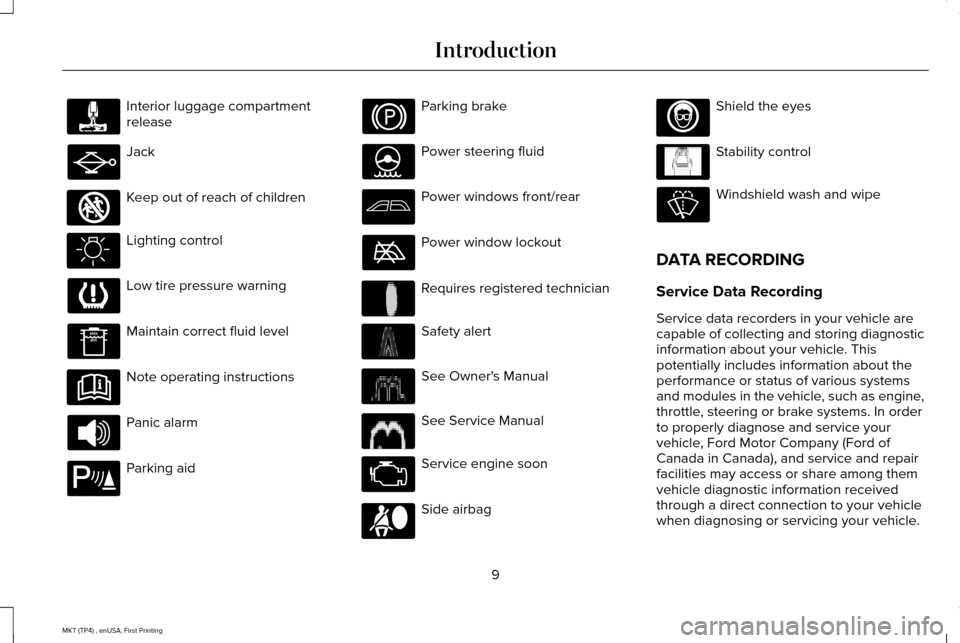
Interior luggage compartment
release
Jack
Keep out of reach of children
Lighting control
Low tire pressure warning
Maintain correct fluid level
Note operating instructions
Panic alarm
Parking aid Parking brake
Power steering fluid
Power windows front/rear
Power window lockout
Requires registered technician
Safety alert
See Owner's Manual
See Service Manual
Service engine soon
Side airbag Shield the eyes
Stability control
Windshield wash and wipe
DATA RECORDING
Service Data Recording
Service data recorders in your vehicle are
capable of collecting and storing diagnostic
information about your vehicle. This
potentially includes information about the
performance or status of various systems
and modules in the vehicle, such as engine,
throttle, steering or brake systems. In order
to properly diagnose and service your
vehicle, Ford Motor Company (Ford of
Canada in Canada), and service and repair
facilities may access or share among them
vehicle diagnostic information received
through a direct connection to your vehicle
when diagnosing or servicing your vehicle.
9
MKT (TP4) , enUSA, First Printing Introduction E161353 E139213 E231159 E231158 E167012 E138639
Page 63 of 558
GENERAL INFORMATION ON
RADIO FREQUENCIES
This device complies with Part 15 of the FCC
Rules and with Industry Canada
license-exempt RSS standard(s). Operation
is subject to the following two conditions: (1)
This device may not cause harmful
interference, and (2) This device must accept
any interference received, including
interference that may cause undesired
operation.
Note:
Changes or modifications not
expressively approved by the party
responsible for compliance could void the
user's authority to operate the equipment.
The term IC before the radio certification
number only signifies that Industry Canada
technical specifications were met. The typical operating range for your
transmitter is approximately 33 feet (10
meters). Vehicles with the remote start
feature will have a greater range. One of the
following could cause a decrease in
operating range:
•
weather conditions
• nearby radio towers
• structures around the vehicle
• other vehicles parked next to your
vehicle
Other short-distance radio transmitters, such
as amateur radios, medical equipment,
wireless headphones, remote controls and
alarm systems may operate on the same
frequency as your remote control. If other
transmitters are operating on those
frequencies, you may not be able to use your
remote control. Using your remote control
near some types of electronic equipment,
such as USB devices, computers or cell
phones can interfere with remote operation.
Operating your remote control near metal or
metallic-finished purses, bags or clothing can
interfere with remote operation. You can lock
and unlock the doors with the key. Note:
Make sure to lock your vehicle before
leaving it unattended.
Note: If you are in range, the remote control
will operate if you press any button
unintentionally.
Intelligent Access
The system uses a radio frequency signal to
communicate with your vehicle and authorize
your vehicle to unlock when one of the
following conditions are met:
• You touch the inside of any exterior door
handle within
3 ft (1 m) proximity of an
intelligent access key.
• You press the luggage compartment
button.
• You press a button on the transmitter.
If excessive radio frequency interference is
present in the area or if the transmitter
battery is low, you may need to mechanically
unlock your door. You can use the
mechanical key blade in your intelligent
access key to open the driver door in this
situation.
See Remote Control (page 61).
60
MKT (TP4) , enUSA, First Printing Keys and Remote Controls
Page 65 of 558
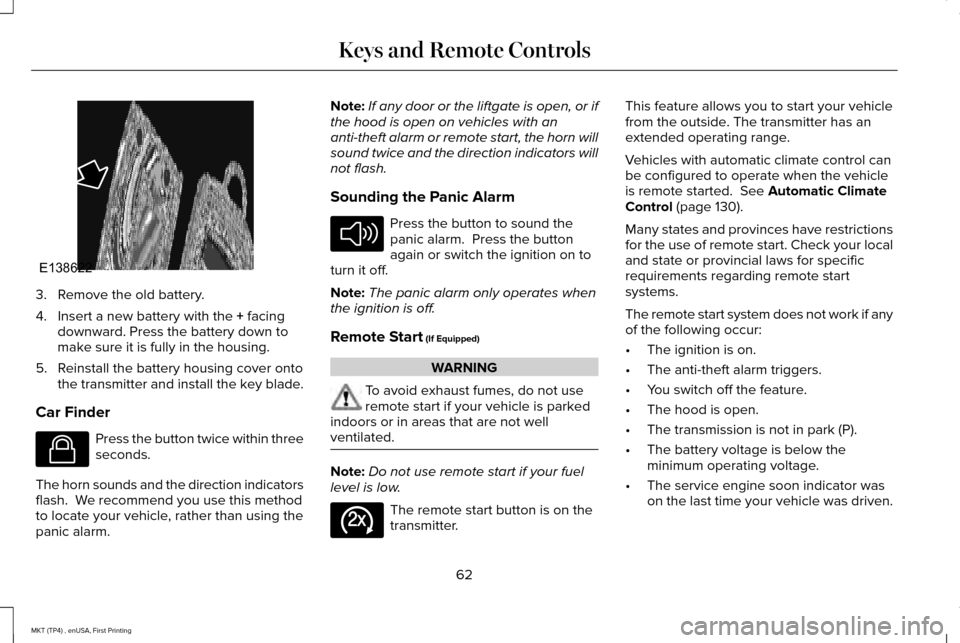
3. Remove the old battery.
4. Insert a new battery with the + facing
downward. Press the battery down to
make sure it is fully in the housing.
5. Reinstall the battery housing cover onto the transmitter and install the key blade.
Car Finder Press the button twice within three
seconds.
The horn sounds and the direction indicators
flash. We recommend you use this method
to locate your vehicle, rather than using the
panic alarm. Note:
If any door or the liftgate is open, or if
the hood is open on vehicles with an
anti-theft alarm or remote start, the horn will
sound twice and the direction indicators will
not flash.
Sounding the Panic Alarm Press the button to sound the
panic alarm. Press the button
again or switch the ignition on to
turn it off.
Note: The panic alarm only operates when
the ignition is off.
Remote Start
(If Equipped) WARNING
To avoid exhaust fumes, do not use
remote start if your vehicle is parked
indoors or in areas that are not well
ventilated. Note:
Do not use remote start if your fuel
level is low. The remote start button is on the
transmitter.This feature allows you to start your vehicle
from the outside. The transmitter has an
extended operating range.
Vehicles with automatic climate control can
be configured to operate when the vehicle
is remote started.
See Automatic Climate
Control (page 130).
Many states and provinces have restrictions
for the use of remote start. Check your local
and state or provincial laws for specific
requirements regarding remote start
systems.
The remote start system does not work if any
of the following occur:
• The ignition is on.
• The anti-theft alarm triggers.
• You switch off the feature.
• The hood is open.
• The transmission is not in park (P).
• The battery voltage is below the
minimum operating voltage.
• The service engine soon indicator was
on the last time your vehicle was driven.
62
MKT (TP4) , enUSA, First Printing Keys and Remote ControlsE138622 E138623 E138624 E138625
Page 75 of 558
LOCKING AND UNLOCKING
You can use the power door lock control or
the remote control to lock and unlock your
vehicle.
Power Door Locks
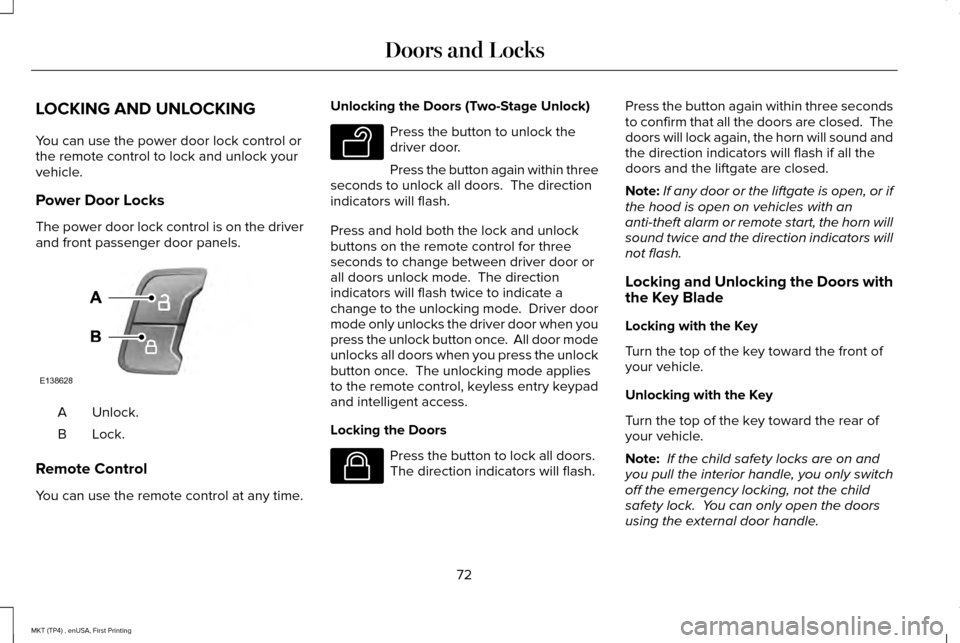
The power door lock control is on the driver
and front passenger door panels.
Unlock.
A
Lock.B
Remote Control
You can use the remote control at any time. Unlocking the Doors (Two-Stage Unlock) Press the button to unlock the
driver door.
Press the button again within three
seconds to unlock all doors. The direction
indicators will flash.
Press and hold both the lock and unlock
buttons on the remote control for three
seconds to change between driver door or
all doors unlock mode. The direction
indicators will flash twice to indicate a
change to the unlocking mode. Driver door
mode only unlocks the driver door when you
press the unlock button once. All door mode
unlocks all doors when you press the unlock
button once. The unlocking mode applies
to the remote control, keyless entry keypad
and intelligent access.
Locking the Doors Press the button to lock all doors.
The direction indicators will flash.Press the button again within three seconds
to confirm that all the doors are closed. The
doors will lock again, the horn will sound and
the direction indicators will flash if all the
doors and the liftgate are closed.
Note:
If any door or the liftgate is open, or if
the hood is open on vehicles with an
anti-theft alarm or remote start, the horn will
sound twice and the direction indicators will
not flash.
Locking and Unlocking the Doors with
the Key Blade
Locking with the Key
Turn the top of the key toward the front of
your vehicle.
Unlocking with the Key
Turn the top of the key toward the rear of
your vehicle.
Note: If the child safety locks are on and
you pull the interior handle, you only switch
off the emergency locking, not the child
safety lock. You can only open the doors
using the external door handle.
72
MKT (TP4) , enUSA, First Printing Doors and LocksE138628 E138629 E138623
Page 82 of 558
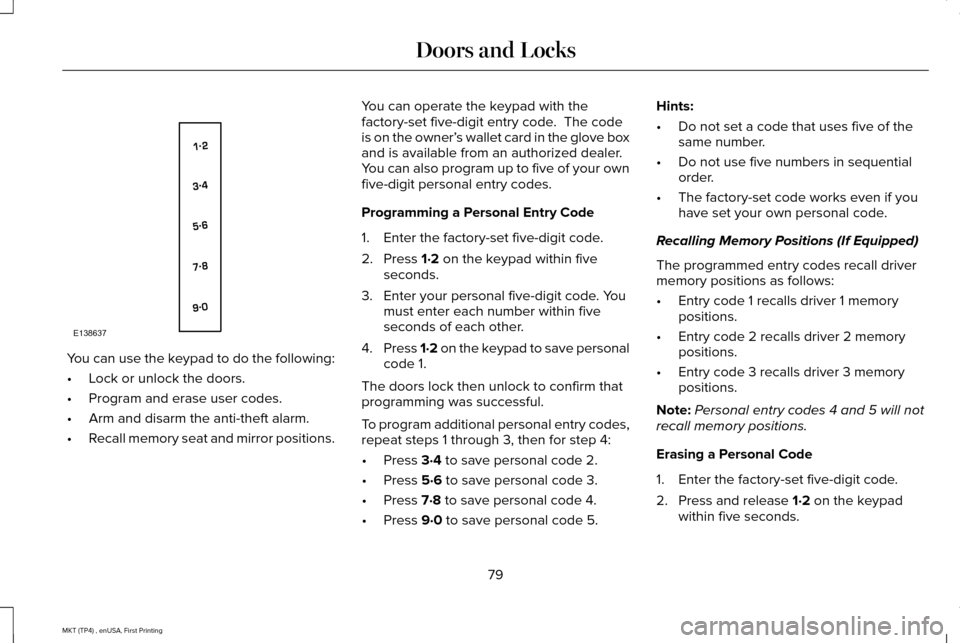
You can use the keypad to do the following:
•
Lock or unlock the doors.
• Program and erase user codes.
• Arm and disarm the anti-theft alarm.
• Recall memory seat and mirror positions. You can operate the keypad with the
factory-set five-digit entry code. The code
is on the owner’
s wallet card in the glove box
and is available from an authorized dealer.
You can also program up to five of your own
five-digit personal entry codes.
Programming a Personal Entry Code
1. Enter the factory-set five-digit code.
2. Press 1·2 on the keypad within five
seconds.
3. Enter your personal five-digit code. You must enter each number within five
seconds of each other.
4. Press 1·2 on the keypad to save personal
code 1.
The doors lock then unlock to confirm that
programming was successful.
To program additional personal entry codes,
repeat steps 1 through 3, then for step 4:
• Press
3·4 to save personal code 2.
• Press
5·6 to save personal code 3.
• Press
7·8 to save personal code 4.
• Press
9·0 to save personal code 5. Hints:
•
Do not set a code that uses five of the
same number.
• Do not use five numbers in sequential
order.
• The factory-set code works even if you
have set your own personal code.
Recalling Memory Positions (If Equipped)
The programmed entry codes recall driver
memory positions as follows:
• Entry code 1 recalls driver 1 memory
positions.
• Entry code 2 recalls driver 2 memory
positions.
• Entry code 3 recalls driver 3 memory
positions.
Note: Personal entry codes 4 and 5 will not
recall memory positions.
Erasing a Personal Code
1. Enter the factory-set five-digit code.
2. Press and release
1·2 on the keypad
within five seconds.
79
MKT (TP4) , enUSA, First Printing Doors and LocksE138637
Page 86 of 558
If programming was unsuccessful, wait 10
seconds and repeat Steps 1 through 7. If
programming remains unsuccessful, contact
an authorized dealer.
ANTI-THEFT ALARM
The system will warn you of an unauthorized
entry to your vehicle. It will be triggered if
any door, the luggage compartment or the
hood is opened without using the key,
remote control or keyless entry keypad.
The direction indicators will flash and the
horn will sound if unauthorized entry is
attempted while the alarm is armed.
Take all remote controls to an authorized
dealer if there is any potential alarm problem
with your vehicle.
Arming the Alarm
The alarm is ready to arm when there is not
a key in your vehicle. Electronically lock your
vehicle to arm the alarm.
Disarming the Alarm
Disarm the alarm by any of the following
actions:
•
Unlock the doors or luggage
compartment with the remote control or
keyless entry keypad.
• Switch your vehicle on or start your
vehicle.
• Use a key in the driver door to unlock
your vehicle, then switch your vehicle on
within 12 seconds.
Note: Pressing the panic button on the
remote control will stop the horn and signal
indicators, but will not disarm the system.
83
MKT (TP4) , enUSA, First Printing Security
Page 122 of 558

Alarm
Action
Message
Displayed when the perimeter alarm system is armed and the vehicle is en\
tered using the keyon the driver's side door. In order to prevent the perimeter alarm system from triggering, the
ignition must be turned to start or on before the 12 second chime expire\
s. See Anti-Theft Alarm (page 83).
Vehicle Alarm To Stop Alarm, Start Vehicle.
Automatic Engine Shutdown Action
Message
The engine is getting ready to shut off.
Engine Shuts Off In {seconds to shut off:#0}
Seconds
The engine has shut off to help increase fuel economy.
Engine Shut Off For Fuel Economy
The engine is getting ready to shut off. You can press OK on the left steering wheel button tooverride the shut down.
Engine Shuts Off in {seconds to shut off:#0}
Seconds Press Ok to Override
119
MKT (TP4) , enUSA, First Printing Information Displays
Page 201 of 558
PRINCIPLE OF OPERATION
WARNINGS
To help avoid personal injury, please
read and understand the limitations of
the system as contained in this section.
Sensing is only an aid for some (generally
large and fixed) objects when moving on a
flat surface at parking speeds. Certain
objects with surfaces that absorb ultrasonic
waves, surrounding vehicle's parking aid
systems, traffic control systems, fluorescent
lamps, inclement weather, air brakes, and
external motors and fans may also affect the
function of the sensing system; this may
include reduced performance or a false
activation. To help avoid personal injury, always
use caution when in reverse (R) and
when using the sensing system. WARNINGS
This system is not designed to prevent
contact with small or moving objects.
The system is designed to provide a warning
to assist the driver in detecting large
stationary objects to avoid damaging your
vehicle. The system may not detect smaller
objects, particularly those close to the
ground. Certain add-on devices such as large
trailer hitches, bike or surfboard racks
and any device that may block the normal
detection zone of the system, may create
false beeps. Note:
Keep the sensors, located on the
bumper or fascia, free from snow, ice and
large accumulations of dirt. If the sensors
are covered, the system’ s accuracy can be
affected. Do not clean the sensors with sharp
objects.
Note: If your vehicle sustains damage to the
bumper or fascia, leaving it misaligned or
bent, the sensing zone may be altered
causing inaccurate measurement of
obstacles or false alarms. Note:
The sensing system cannot be turned
off when a MyKey is present. See Principle
of Operation (page 65).
Note: If you attach certain add-on devices
such as a trailer or bike rack, the rear
sensing system may detect that add-on
device and therefore provide warnings. It is
suggested that you disable the rear sensing
system when you attach an add-on device
to your vehicle to prevent these warnings.
The sensing system warns the driver of
obstacles within a certain range of your
vehicle. The system turns on automatically
whenever you switch the ignition on.
The system can be switched off through the
information display menu or from the pop-up
message that appears once you shift the
transmission into reverse (R).
See General
Information (page 110).
If a fault is present in the system, a warning
message appears in the information display.
See
Information Messages (page 117).
198
MKT (TP4) , enUSA, First Printing Parking Aids
Page 481 of 558
For maximum vehicle performance, keep the
following information in mind when adding
accessories or equipment to your vehicle:
•
When adding accessories, equipment,
passengers and luggage to your vehicle,
do not exceed the total weight capacity
of the vehicle or of the front or rear axle
(GVWR or GAWR as indicated on the
Safety Compliance Certification label).
Ask an authorized dealer for specific
weight information.
• The Federal Communications
Commission (FCC) and Canadian Radio
Telecommunications Commission (CRTC)
regulate the use of mobile
communications systems that are
equipped with radio transmitters, for
example, two-way radios, telephones and
theft alarms. Any such equipment
installed in your vehicle should comply
with Federal Communications
Commission (FCC) and Canadian Radio
Telecommunications Commission (CRTC)
regulations and should be installed only
by an authorized dealer. •
An authorized dealer needs to install
mobile communications systems.
Improper installation may harm the
operation of your vehicle, particularly if
the manufacturer did not design the
mobile communication system
specifically for automotive use.
• If you or an authorized Lincoln dealer add
any non-Lincoln electrical or electronic
accessories or components to your
vehicle, you may adversely affect battery
performance and durability. In addition,
you may also adversely affect the
performance of other electrical systems
in the vehicle.
478
MKT (TP4) , enUSA, First Printing Accessories