warning LINCOLN MKT 2018 Owners Manual
[x] Cancel search | Manufacturer: LINCOLN, Model Year: 2018, Model line: MKT, Model: LINCOLN MKT 2018Pages: 564, PDF Size: 4.66 MB
Page 445 of 564
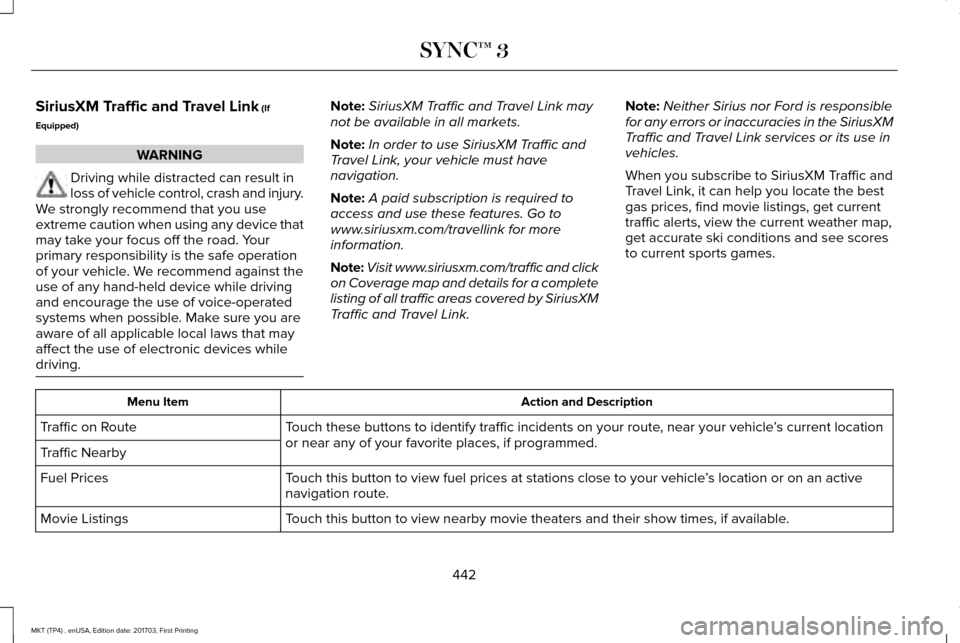
SiriusXM Traffic and Travel Link (If
Equipped) WARNING
Driving while distracted can result in
loss of vehicle control, crash and injury.
We strongly recommend that you use
extreme caution when using any device that
may take your focus off the road. Your
primary responsibility is the safe operation
of your vehicle. We recommend against the
use of any hand-held device while driving
and encourage the use of voice-operated
systems when possible. Make sure you are
aware of all applicable local laws that may
affect the use of electronic devices while
driving. Note:
SiriusXM Traffic and Travel Link may
not be available in all markets.
Note: In order to use SiriusXM Traffic and
Travel Link, your vehicle must have
navigation.
Note: A paid subscription is required to
access and use these features. Go to
www.siriusxm.com/travellink for more
information.
Note: Visit www.siriusxm.com/traffic and click
on Coverage map and details for a complete
listing of all traffic areas covered by SiriusXM
Traffic and Travel Link. Note:
Neither Sirius nor Ford is responsible
for any errors or inaccuracies in the SiriusXM
Traffic and Travel Link services or its use in
vehicles.
When you subscribe to SiriusXM Traffic and
Travel Link, it can help you locate the best
gas prices, find movie listings, get current
traffic alerts, view the current weather map,
get accurate ski conditions and see scores
to current sports games. Action and Description
Menu Item
Touch these buttons to identify traffic incidents on your route, near your vehicle ’s current location
or near any of your favorite places, if programmed.
Traffic on Route
Traffic Nearby
Touch this button to view fuel prices at stations close to your vehicle ’s location or on an active
navigation route.
Fuel Prices
Touch this button to view nearby movie theaters and their show times, if \
available.
Movie Listings
442
MKT (TP4) , enUSA, Edition date: 201703, First Printing SYNC™ 3
Page 454 of 564
 is muted for the d\
uration of the phone call even when
t")
You can enable and disable the following options as well:
Action and Description
Menu Item
When enabled, vehicle audio (such as radio or apps) is muted for the d\
uration of the phone call even when
the phone call is in privacy.
Mute Audio in Privacy
When enabled, an alert displays that your phone is roaming when you atte\
mpt to place a call.
Roaming Warning
When enabled, a message displays when the battery on your phone is runni\
ng low.
Low Battery Notification
911 Assist
Note: This service is only available in the
United States and Canada. Select this button to modify the on or off
setting for this feature. If the mobile phone
’s
contacts have been downloaded, you can
adjust the following option: Action and Description
Menu Item
You can select up to two numbers from your mobile device's phonebook as emergency contacts for quick
access at the end of the 911 Assist call process.
Set Emergency Contacts
Radio
This button is available if a Radio source such
as AM or FM is the active media source.
Pressing the button allows you to access the
following features: 451
MKT (TP4) , enUSA, Edition date: 201703, First Printing SYNC™ 3
Page 488 of 564
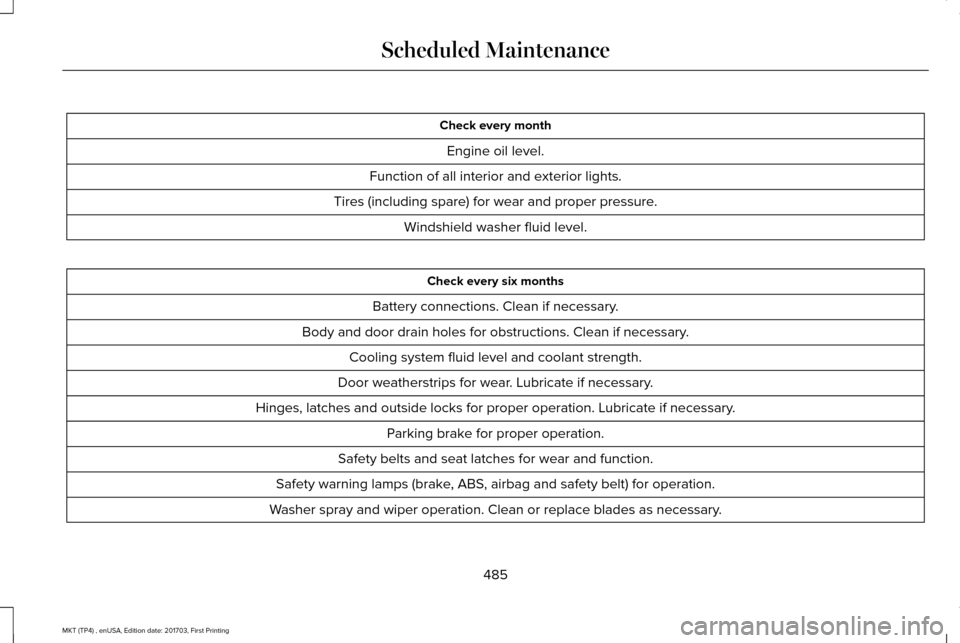
Check every month
Engine oil level.
Function of all interior and exterior lights.
Tires (including spare) for wear and proper pressure. Windshield washer fluid level. Check every six months
Battery connections. Clean if necessary.
Body and door drain holes for obstructions. Clean if necessary. Cooling system fluid level and coolant strength.
Door weatherstrips for wear. Lubricate if necessary.
Hinges, latches and outside locks for proper operation. Lubricate if necessary. Parking brake for proper operation.
Safety belts and seat latches for wear and function.
Safety warning lamps (brake, ABS, airbag and safety belt) for operation.
Washer spray and wiper operation. Clean or replace blades as necessary.
485
MKT (TP4) , enUSA, Edition date: 201703, First Printing Scheduled Maintenance
Page 489 of 564
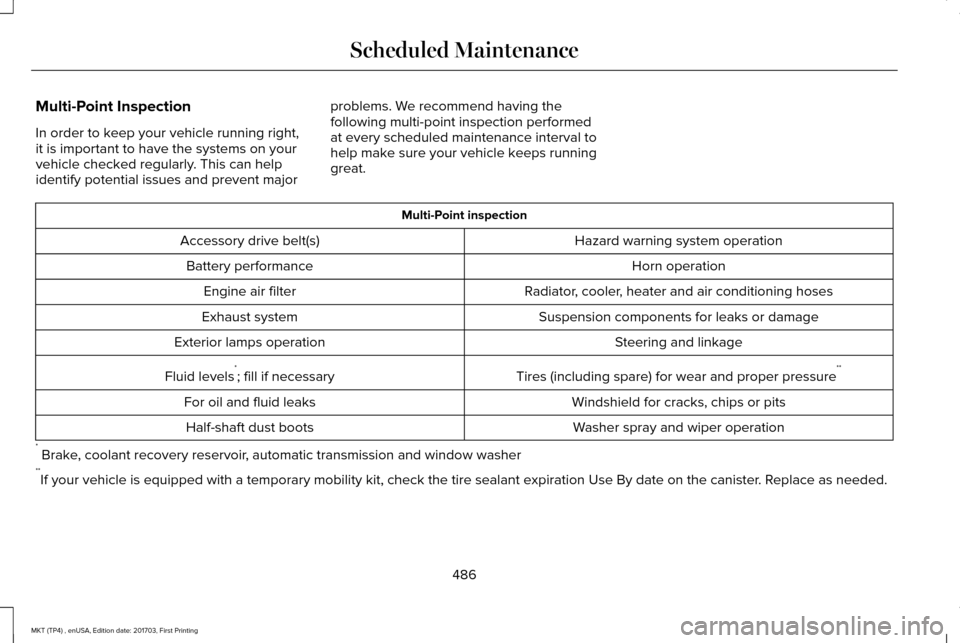
Multi-Point Inspection
In order to keep your vehicle running right,
it is important to have the systems on your
vehicle checked regularly. This can help
identify potential issues and prevent major
problems. We recommend having the
following multi-point inspection performed
at every scheduled maintenance interval to
help make sure your vehicle keeps running
great. Multi-Point inspection
Hazard warning system operation
Accessory drive belt(s)
Horn operation
Battery performance
Radiator, cooler, heater and air conditioning hoses
Engine air filter
Suspension components for leaks or damage
Exhaust system
Steering and linkage
Exterior lamps operation
Tires (including spare) for wear and proper pressure**
Fluid levels *
; fill if necessary
Windshield for cracks, chips or pits
For oil and fluid leaks
Washer spray and wiper operation
Half-shaft dust boots
* Brake, coolant recovery reservoir, automatic transmission and window washer
** If your vehicle is equipped with a temporary mobility kit, check the tir\
e sealant expiration Use By date on the canister. Replace as needed.
486
MKT (TP4) , enUSA, Edition date: 201703, First Printing Scheduled Maintenance
Page 518 of 564
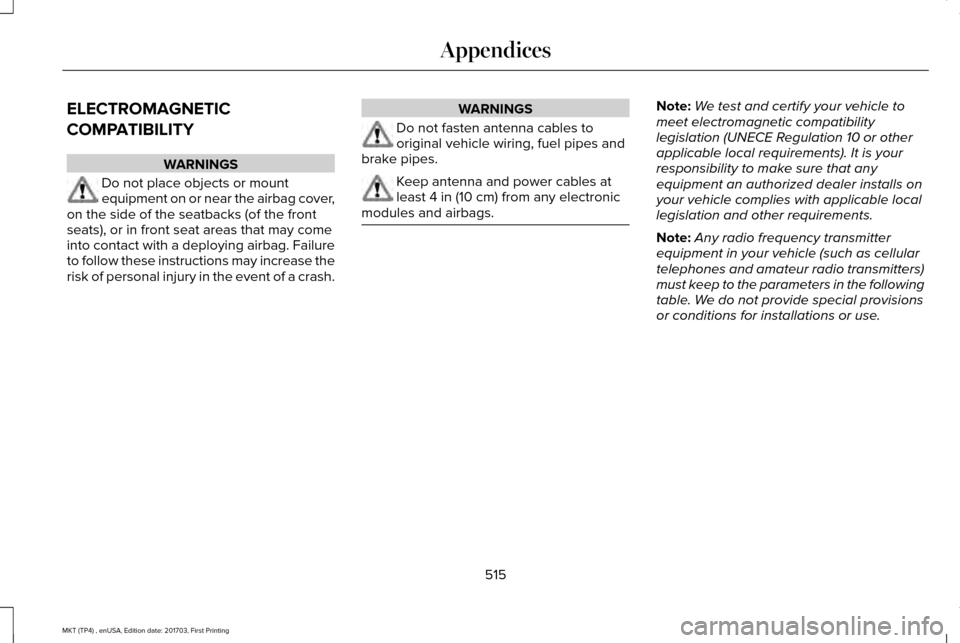
ELECTROMAGNETIC
COMPATIBILITY
WARNINGS
Do not place objects or mount
equipment on or near the airbag cover,
on the side of the seatbacks (of the front
seats), or in front seat areas that may come
into contact with a deploying airbag. Failure
to follow these instructions may increase the
risk of personal injury in the event of a crash. WARNINGS
Do not fasten antenna cables to
original vehicle wiring, fuel pipes and
brake pipes. Keep antenna and power cables at
least 4 in (10 cm) from any electronic
modules and airbags. Note:
We test and certify your vehicle to
meet electromagnetic compatibility
legislation (UNECE Regulation 10 or other
applicable local requirements). It is your
responsibility to make sure that any
equipment an authorized dealer installs on
your vehicle complies with applicable local
legislation and other requirements.
Note: Any radio frequency transmitter
equipment in your vehicle (such as cellular
telephones and amateur radio transmitters)
must keep to the parameters in the following
table. We do not provide special provisions
or conditions for installations or use.
515
MKT (TP4) , enUSA, Edition date: 201703, First Printing Appendices
Page 539 of 564
communication with any positioning devices
or any mobile or wireless-connected
electronic or computer devices, including
without limitation cellular phones, palmtop
and handheld computers, pagers, and
personal digital assistants or PDAs.
Warning. The Data may contain inaccurate
or incomplete information due to the
passage of time, changing circumstances,
sources used and the nature of collecting
comprehensive geographic data, any of
which may lead to incorrect results.
No Warranty.
This Data is provided to you
“as is, ” and you agree to use it at your own
risk. Telenav and its licensors (and their
licensors and suppliers) make no guarantees,
representations or warranties of any kind,
express or implied, arising by law or
otherwise, including but not limited to,
content, quality, accuracy, completeness,
effectiveness, reliability, fitness for a
particular purpose, usefulness, use or results
to be obtained from this Data, or that the
Data or server will be uninterrupted or
error-free. Disclaimer of Warranty: TELENAV AND ITS
LICENSORS (INCLUDING THEIR LICENSORS
AND SUPPLIERS) DISCLAIM ANY
WARRANTIES, EXPRESS OR IMPLIED, OF
QUALITY, PERFORMANCE,
MERCHANTABILITY, FITNESS FOR A
PARTICULAR PURPOSE OR
NON-INFRINGEMENT. Some States,
Territories and Countries do not allow certain
warranty exclusions, so to that extent the
above exclusion may not apply to you.
Disclaimer of Liability:
TELENAV AND ITS
LICENSORS (INCLUDING THEIR LICENSORS
AND SUPPLIERS) SHALL NOT BE LIABLE TO
YOU: IN RESPECT OF ANY CLAIM, DEMAND
OR ACTION, IRRESPECTIVE OF THE
NATURE OF THE CAUSE OF THE CLAIM,
DEMAND OR ACTION ALLEGING ANY LOSS,
INJURY OR DAMAGES, DIRECT OR
INDIRECT, WHICH MAY RESULT FROM THE
USE OR POSSESSION OF THE
INFORMATION; OR FOR ANY LOSS OF
PROFIT, REVENUE, CONTRACTS OR
SAVINGS, OR ANY OTHER DIRECT,
INDIRECT, INCIDENTAL, SPECIAL OR
CONSEQUENTIAL DAMAGES ARISING OUT
OF YOUR USE OF OR INABILITY TO USE THIS INFORMATION, ANY DEFECT IN THE
INFORMATION, OR THE BREACH OF THESE
TERMS OR CONDITIONS, WHETHER IN AN
ACTION IN CONTRACT OR TORT OR BASED
ON A WARRANTY, EVEN IF TELENAV OR
ITS LICENSORS HAVE BEEN ADVISED OF
THE POSSIBILITY OF SUCH DAMAGES.
Some States, Territories and Countries do
not allow certain liability exclusions or
damages limitations, so to that extent the
above may not apply to you.
Export Control. You shall not export from
anywhere any part of the Data or any direct
product thereof except in compliance with,
and with all licenses and approvals required
under, applicable export laws, rules and
regulations, including but not limited to the
laws, rules and regulations administered by
the Office of Foreign Assets Control of the
U.S. Department of Commerce and the
Bureau of Industry and Security of the U.S.
Department of Commerce. To the extent that
any such export laws, rules or regulations
prohibit HERE from complying with any of its
obligations hereunder to deliver or distribute
Data, such failure shall be excused and shall
not constitute a breach of this Agreement.
536
MKT (TP4) , enUSA, Edition date: 201703, First Printing Appendices
Page 553 of 564
SUNA Products and/or Services are intended
as an aid to personal motoring and travel
planning, and do not provide comprehensive
or accurate information on all occasions. On
occasions, you may experience additional
delay as a result of using SUNA Products
and/or Services. You acknowledge that it is
not intended, or suitable, for use in
applications where time of arrival or driving
directions may impact the safety of the public
or yourself.
4. Use of SUNA Products and Services
while driving
You, and other authorised drivers of the
vehicle in which SUNA Products and/or
Services are available or installed and active,
remain at all times responsible for observing
all relevant laws and codes of safe driving.
In particular, you agree to only actively
operate SUNA Products and/or Services
when the Vehicle is at a complete stop and
it is safe to do so.
5. Service Continuity and Reception of the
SUNA Traffic Channel
We will use reasonable endeavours to
provide the SUNA Traffic Channel 24 hours
a day, 365 days a year. The SUNA Traffic
Channel may occasionally be unavailable for
technical reasons or for planned
maintenance. We will try to perform
maintenance at times when congestion is
light. We reserve the right to withdraw SUNA
Products and/or Services at any time.
Also, we cannot assure the uninterrupted
reception of the SUNA Traffic Channel
RDS-TMC signal at any particular location.
6. Limitation of Liability
Neither Intelematics (nor its suppliers or the
manufacturer of your device (the
“Suppliers”)) shall be liable to you or to any
third party for any damages either direct,
indirect, incidental, consequential or
otherwise arising out of the use of or inability
to use SUNA Products and/or Services even
if Intelematics or a Supplier has been advised
of the possibility of such damages. You also
acknowledge that the neither Intelematics
nor any Supplier guarantees nor make any
warranties that relate to the availability,
accuracy or completeness of SUNA Products and/or Services, and to the extent which it
is lawful to do so, both Intelematics and each
Supplier excludes any warranties which
might otherwise be implied by any State or
Federal legislation in relation to SUNA
Products and/or Services.
7. Please Note
Great care has been taken in preparing this
manual. Constant product development may
mean that some information is not entirely
up-to-date. The information in this document
is subject to change without notice.
WARNING
Driving while distracted can result in
loss of vehicle control, crash and injury.
We strongly recommend that you use
extreme caution when using any device that
may take your focus off the road. Your
primary responsibility is the safe operation
of your vehicle. We recommend against the
use of any hand-held device while driving
and encourage the use of voice-operated
systems when possible. Make sure you are
aware of all applicable local laws that may
affect the use of electronic devices while
driving. 550
MKT (TP4) , enUSA, Edition date: 201703, First Printing Appendices
Page 554 of 564
A
A/C
See: Climate Control..........................................129
About This Manual............................................7
ABS See: Brakes............................................................191
ABS driving hints See: Hints on Driving With Anti-Lock
Brakes................................................................192
Accessories....................................................478 Exterior Style........................................................478
Interior Style.........................................................478
Lifestyle.................................................................478
Peace of Mind......................................................478
Accessories See: Replacement Parts Recommendation.....12
ACC See: Using Adaptive Cruise Control.............209
Active Park Assist..........................................198 Automatic Steering into Parking Space.......200
Deactivating the Park Assist Feature.............
201
Troubleshooting the System...........................202
Using Active Park Assist....................................199
Adaptive Headlamps
.....................................95
Adjusting the Headlamps...........................304 Horizontal Aim Adjustment..............................305
Vertical Aim Adjustment...................................
304 Adjusting the Pedals......................................87
Adjusting the Steering Wheel......................84
End of Travel Position..........................................84
AFS See: Adaptive Headlamps..................................95
Airbag Disposal
...............................................59
Air Conditioning See: Climate Control..........................................129
Air Filter See: Changing the Engine Air Filter..............309
Alarm See: Anti-Theft Alarm...........................................83
All-Wheel Drive..............................................183
Ambient Lighting
.............................................97
Anti-Theft Alarm..............................................83
Arming the Alarm..................................................83
Disarming the Alarm............................................83
Appendices.....................................................515
Apps
.................................................................440
........................................................................\
.........440
SiriusXM Traffic and Travel Link......................
442
At a Glance
........................................................16
Audible Warnings and Indicators..............108
Headlamps On Warning Chime.......................108
Keyless Warning Alert........................................108
Parking Brake On Warning Chime..................108
Audio Control
..................................................85
Seek, Next or Previous........................................85 Audio System
................................................370
General Information...........................................370
Audio Unit
........................................................371
Rear Seat Audio Controls.................................373
Autolamps ..........................................................
91
Windshield Wiper Activated Headlamps........92
Automatic Climate Control
.........................129
Automatic High Beam Control....................94
Switching the System On and Off....................94
Automatic Transmission...............................179 Automatic Transmission Adaptive
Learning............................................................182
Brake-Shift Interlock............................................181
If Your Vehicle Gets Stuck In Mud or Snow..................................................................182
SelectShift Automatic ™ Transmission.............180
Understanding the Positions of Your Automatic Transmission................................179
Automatic Transmission Fluid Check...........................................................298
Adding Transmission Fluid .............................299
Checking the Transmission Fluid Level........298
Autowipers.......................................................88
Auxiliary Power Points.................................158 110 Volt AC Power Point.....................................158
12 Volt DC Power Point......................................158
Locations...............................................................158
551
MKT (TP4) , enUSA, Edition date: 201703, First Printing Index
Page 556 of 564
Underbody............................................................312
Under Hood..........................................................312
Cleaning the Instrument Panel and Instrument Cluster Lens............................315
Cleaning the Interior.....................................313
Cleaning Black Label or Presidential
Interior................................................................314
Cleaning the Wheels
....................................316
Cleaning the Windows and Wiper Blades............................................................313
Clearing All MyKeys
.......................................67
Climate.............................................................417
Climate Control
..............................................129
Climate Controlled Seats............................152 Cooled Seats........................................................152
Heated Seats........................................................152
Collision Warning System..........................230 PRINCIPLE OF OPERATION............................230
Coolant Check See: Engine Coolant Check............................
293
Crash Sensors and Airbag Indicator
..........57
Creating a MyKey...........................................66 Programming/Changing Configurable
Settings...............................................................66
Cross Traffic Alert.........................................226 False Alerts..........................................................229
Switching the System Off and On..................229
System Errors......................................................229 System Lights, Messages and Audible
Alerts.................................................................228
System Limitations.............................................228
Using the System...............................................226
Cruise Control
.................................................85
Principle of Operation.......................................208
Type One................................................................85
Type Two.................................................................86
Cruise control See: Using Cruise Control...............................208
Customer Assistance
..................................259
D
Data Recording
..................................................9
Event Data Recording...........................................10
Service Data Recording.........................................9
Daytime Running Lamps...............................93
Direction Indicators
........................................96
Doors and Locks.............................................72
Drive Control
.................................................233
LINCOLN DRIVE CONTROL............................233
Driver Alert......................................................216 Using Driver Alert................................................217
Driver and Passenger Airbags.....................51 Children and Airbags...........................................52
Proper Driver and Front Passenger Seating
Adjustment.........................................................52 Driving Aids
....................................................216
Driving Hints..................................................250
Driving Through Water...............................250
DRL See: Daytime Running Lamps...........................93
E
Economical Driving
......................................250
Electromagnetic Compatibility...................515
Emission Law..................................................175
Noise Emissions Warranty, Prohibited
Tampering Acts and Maintenance..............176
Tampering With a Noise Control System......175
End User License Agreement..................520 VEHICLE SOFTWARE END USER LICENSE
AGREEMENT (EULA) ....................................
520
Engine Block Heater....................................166 Using the Engine Block Heater.......................167
Engine Coolant Check
................................293
Adding Coolant...................................................294
Coolant Change.................................................296
Engine Coolant Temperature
Management...................................................297
Fail-Safe Cooling................................................296
Recycled Coolant...............................................295
Severe Climates.................................................295
Engine Emission Control.............................175
553
MKT (TP4) , enUSA, Edition date: 201703, First Printing Index
Page 558 of 564
General Information on Radio
Frequencies..................................................60
Intelligent Access.................................................60
General Maintenance Information...........483 Multi-Point Inspection........................................486
Owner Checks and Services...........................484
Protecting Your Investment.............................483
Why Maintain Your Vehicle?............................483
Why Maintain Your Vehicle at Your
Dealership?......................................................483
Getting Assistance Outside the U.S. and Canada.........................................................263
Getting the Services You Need................259 Away From Home..............................................259
Global Opening and Closing.......................99 Closing the Windows...........................................99
Opening the Windows.........................................99
H
Handbrake See: Parking Brake.............................................192
Hazard Flashers............................................254
Headlamp Adjusting See: Adjusting the Headlamps.......................
304
Headlamp Exit Delay.....................................93
Headlamp Removal See: Removing a Headlamp............................
305 Head Restraints
.............................................135
Adjusting the Head Restraint...........................136
Tilting Head Restraints ......................................137
Heated Seats...................................................151 Front Seats.............................................................151
Second-Row Heated Seats................................151
Heated Steering Wheel................................86
Heated Windows and Mirrors
....................133
Heated Exterior Mirrors.....................................133
Heated Rear Window.........................................133
Heating See: Climate Control..........................................129
Hints on Controlling the Interior Climate...........................................................131
Defogging the Side Windows in Cold Weather..............................................................131
General Hints.........................................................131
Quickly Cooling the Interior...............................
131
Quickly Heating the Interior..............................131
Recommended Settings for Cooling...............131
Recommended Settings for Heating...............131
Hints on Driving With Anti-Lock Brakes...........................................................192
Home Screen
................................................392
Hood Lock See: Opening and Closing the Hood............287 I
In California (U.S. Only)...............................260
Information Display Control
.........................86
Information Displays.....................................109 General Information............................................109
Information Messages
..................................116
Adaptive Cruise Control.....................................117
AdvanceTrac ™.........................................................117
Alarm.......................................................................118
Automatic Engine Shutdown.............................
118
AWD........................................................................\
.119
Battery and Charging System..........................120
Blind Spot Information and Cross Traffic Alert System................................................................121
Brake System........................................................121
Collision Warning System.................................122
Doors and Locks..................................................122
Fuel........................................................................\
.123
Keys and Intelligent Access..............................123
Lane Keeping System........................................124
Maintenance.........................................................124
MyKey.....................................................................125
Park Aid..................................................................126
Power Steering.....................................................127
Seats.......................................................................127
Tire Pressure Monitoring System....................128
Traction Control...................................................128
555
MKT (TP4) , enUSA, Edition date: 201703, First Printing Index