ECO mode LINCOLN MKT 2018 User Guide
[x] Cancel search | Manufacturer: LINCOLN, Model Year: 2018, Model line: MKT, Model: LINCOLN MKT 2018Pages: 564, PDF Size: 4.66 MB
Page 78 of 564
6.
Press the power door unlock control and
within five seconds, press the power door
lock control. The horn sounds once if
disabled or twice if enabled.
7. Switch the ignition off. The horn sounds
indicating programming is complete.
To enable or disable autounlock, do the
following:
1. Switch the ignition on.
2. Press the power door unlock control three times.
3. Switch the ignition off.
4. Press the power door unlock control three times.
5. Switch the ignition on. The horn sounds
indicating your vehicle is in programming
mode.
6. Press the power door lock control and within five seconds, press the power door
unlock control. The horn sounds once if
disabled or twice if enabled.
7. Switch the ignition off. The horn sounds
indicating programming is complete. Illuminated Entry
The interior lamps and some exterior lamps
illuminate when you unlock the doors with
the remote control.
The lamps turn off if:
•
The ignition is on.
• You press the remote control lock button.
• 25 seconds have elapsed.
The lamps do not turn off if:
• You switch them on with the lighting
control.
• Any door is open.
Illuminated Exit
The interior lamps and some exterior lamps
illuminate when all doors are closed and you
switch the ignition off.
The lamps turn off if all the doors remain
closed and:
• 25 seconds have elapsed.
• You lock your vehicle from the outside. Battery Saver
If you leave the courtesy lamps, interior
lamps or headlamps on, the battery saver
shuts them off 10 minutes after you switch
the ignition off.
Battery Saver for Intelligent Access Keys
If you leave the ignition switched on and the
engine is not running, the battery saver will
turn the ignition off when it detects a certain
amount of battery drain, or after 45 minutes
have elapsed.
KEYLESS ENTRY
SECURICODE™ Keyless Entry Keypad
The keypad is near the driver window. It
illuminates when touched.
Note:
If you enter your entry code too fast
on the keypad, the unlock function may not
work. Enter your entry code again more
slowly.
75
MKT (TP4) , enUSA, Edition date: 201703, First Printing Doors and Locks
Page 80 of 564
3. Press and hold 1·2 for two seconds. You
must do this within five seconds of
completing step 2.
All personal codes erase and only the
factory-set five-digit code works.
Anti-Scan Feature
The keypad goes into an anti-scan mode if
you enter the wrong code seven times. This
mode turns off the keypad for one minute
and the keypad lamp flashes.
The anti-scan feature turns off after any of
the following occur:
• One minute of keypad inactivity.
• You press the unlock button on the
remote control.
• You switch your vehicle on.
• You unlock the vehicle using intelligent
access. Locking and Unlocking the Doors
Locking All Doors
Press and hold
7·8 and 9·0 on the keypad
simultaneously with the driver door closed.
You do not need to enter a code first.
Unlocking All Doors
Enter the factory-set code or your personal
code, then press
3·4 on the keypad within
five seconds.
Unlocking Only the Driver Door
Enter the factory-set or your personal
five-digit code. You must press each number
within five seconds of each other. The
interior lamps illuminate.
Note: All doors unlock if the two-stage
unlocking feature is turned off. See Locking
and Unlocking
(page 72).
77
MKT (TP4) , enUSA, Edition date: 201703, First Printing Doors and Locks
Page 88 of 564
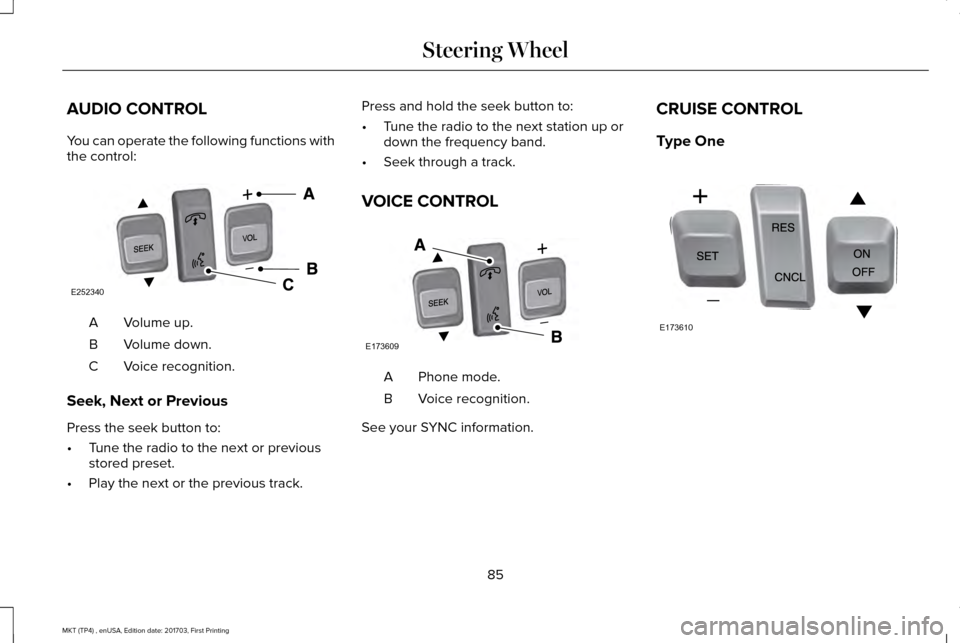
AUDIO CONTROL
You can operate the following functions with
the control:
Volume up.
A
Volume down.
B
Voice recognition.
C
Seek, Next or Previous
Press the seek button to:
• Tune the radio to the next or previous
stored preset.
• Play the next or the previous track. Press and hold the seek button to:
•
Tune the radio to the next station up or
down the frequency band.
• Seek through a track.
VOICE CONTROL Phone mode.
A
Voice recognition.
B
See your SYNC information. CRUISE CONTROL
Type One
85
MKT (TP4) , enUSA, Edition date: 201703, First Printing Steering WheelE252340
V E173609
V E173610
Page 105 of 564
Rotate the sun visor toward the side window
and extend it rearward for extra shade.
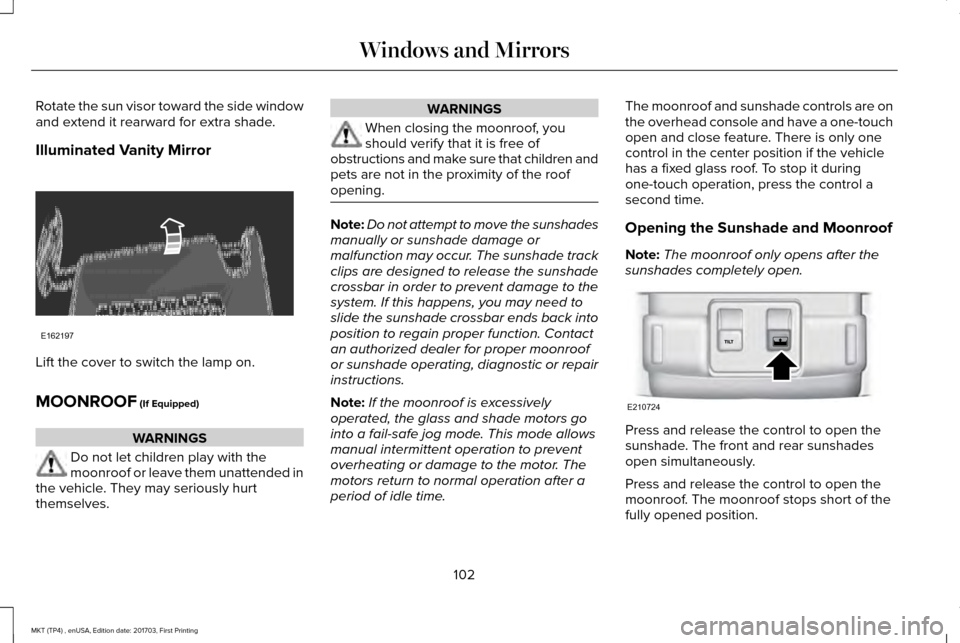
Illuminated Vanity Mirror
Lift the cover to switch the lamp on.
MOONROOF (If Equipped)
WARNINGS
Do not let children play with the
moonroof or leave them unattended in
the vehicle. They may seriously hurt
themselves. WARNINGS
When closing the moonroof, you
should verify that it is free of
obstructions and make sure that children and
pets are not in the proximity of the roof
opening. Note:
Do not attempt to move the sunshades
manually or sunshade damage or
malfunction may occur. The sunshade track
clips are designed to release the sunshade
crossbar in order to prevent damage to the
system. If this happens, you may need to
slide the sunshade crossbar ends back into
position to regain proper function. Contact
an authorized dealer for proper moonroof
or sunshade operating, diagnostic or repair
instructions.
Note: If the moonroof is excessively
operated, the glass and shade motors go
into a fail-safe jog mode. This mode allows
manual intermittent operation to prevent
overheating or damage to the motor. The
motors return to normal operation after a
period of idle time. The moonroof and sunshade controls are on
the overhead console and have a one-touch
open and close feature. There is only one
control in the center position if the vehicle
has a fixed glass roof. To stop it during
one-touch operation, press the control a
second time.
Opening the Sunshade and Moonroof
Note:
The moonroof only opens after the
sunshades completely open. Press and release the control to open the
sunshade. The front and rear sunshades
open simultaneously.
Press and release the control to open the
moonroof. The moonroof stops short of the
fully opened position.
102
MKT (TP4) , enUSA, Edition date: 201703, First Printing Windows and MirrorsE162197 E210724
Page 108 of 564
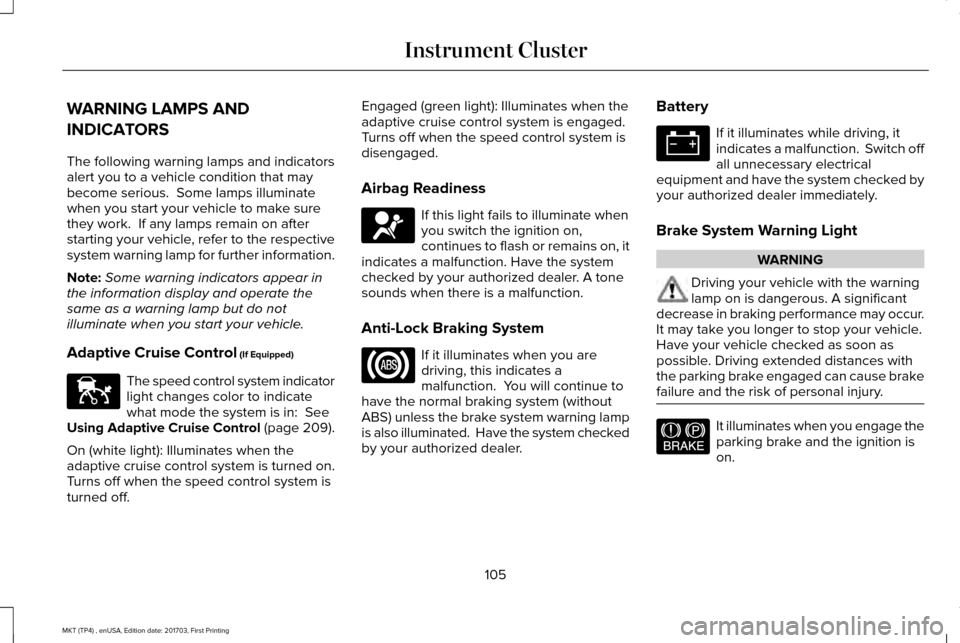
WARNING LAMPS AND
INDICATORS
The following warning lamps and indicators
alert you to a vehicle condition that may
become serious. Some lamps illuminate
when you start your vehicle to make sure
they work. If any lamps remain on after
starting your vehicle, refer to the respective
system warning lamp for further information.
Note:
Some warning indicators appear in
the information display and operate the
same as a warning lamp but do not
illuminate when you start your vehicle.
Adaptive Cruise Control (If Equipped) The speed control system indicator
light changes color to indicate
what mode the system is in:
See
Using Adaptive Cruise Control (page 209).
On (white light): Illuminates when the
adaptive cruise control system is turned on.
Turns off when the speed control system is
turned off. Engaged (green light): Illuminates when the
adaptive cruise control system is engaged.
Turns off when the speed control system is
disengaged.
Airbag Readiness
If this light fails to illuminate when
you switch the ignition on,
continues to flash or remains on, it
indicates a malfunction. Have the system
checked by your authorized dealer. A tone
sounds when there is a malfunction.
Anti-Lock Braking System If it illuminates when you are
driving, this indicates a
malfunction. You will continue to
have the normal braking system (without
ABS) unless the brake system warning lamp
is also illuminated. Have the system checked
by your authorized dealer. Battery If it illuminates while driving, it
indicates a malfunction. Switch off
all unnecessary electrical
equipment and have the system checked by
your authorized dealer immediately.
Brake System Warning Light WARNING
Driving your vehicle with the warning
lamp on is dangerous. A significant
decrease in braking performance may occur.
It may take you longer to stop your vehicle.
Have your vehicle checked as soon as
possible. Driving extended distances with
the parking brake engaged can cause brake
failure and the risk of personal injury. It illuminates when you engage the
parking brake and the ignition is
on.
105
MKT (TP4) , enUSA, Edition date: 201703, First Printing Instrument ClusterE144524 E67017 E144522
Page 113 of 564
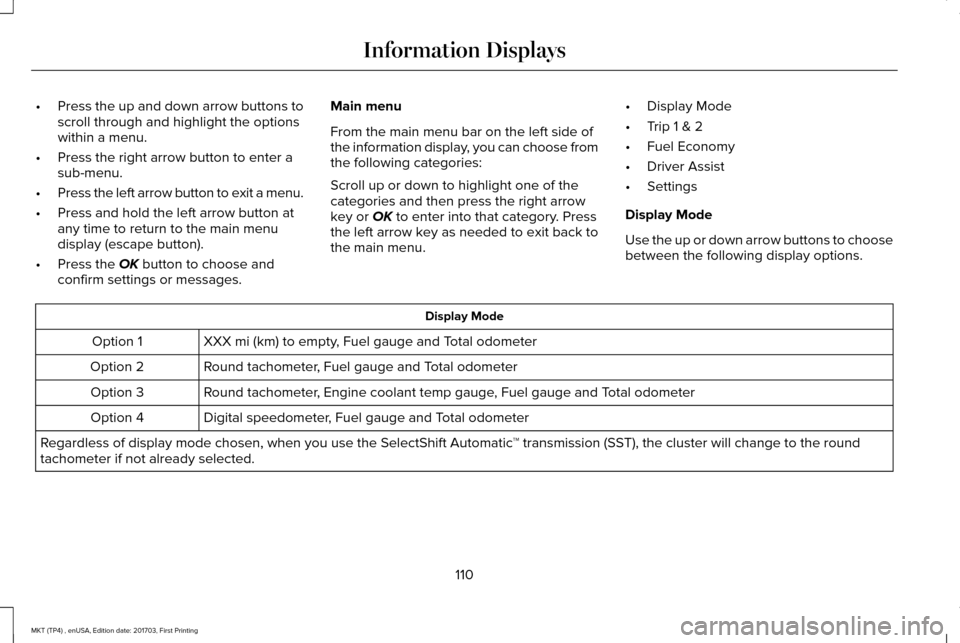
•
Press the up and down arrow buttons to
scroll through and highlight the options
within a menu.
• Press the right arrow button to enter a
sub-menu.
• Press the left arrow button to exit a menu.
• Press and hold the left arrow button at
any time to return to the main menu
display (escape button).
• Press the OK button to choose and
confirm settings or messages. Main menu
From the main menu bar on the left side of
the information display, you can choose from
the following categories:
Scroll up or down to highlight one of the
categories and then press the right arrow
key or
OK to enter into that category. Press
the left arrow key as needed to exit back to
the main menu. •
Display Mode
• Trip 1 & 2
• Fuel Economy
• Driver Assist
• Settings
Display Mode
Use the up or down arrow buttons to choose
between the following display options. Display Mode
XXX mi (km) to empty, Fuel gauge and Total odometer
Option 1
Round tachometer, Fuel gauge and Total odometer
Option 2
Round tachometer, Engine coolant temp gauge, Fuel gauge and Total odometer
Option 3
Digital speedometer, Fuel gauge and Total odometer
Option 4
Regardless of display mode chosen, when you use the SelectShift Automatic\
™ transmission (SST), the cluster will change to the round
tachometer if not already selected.
110
MKT (TP4) , enUSA, Edition date: 201703, First Printing Information Displays
Page 123 of 564

Battery and Charging System
Action
Message
The charging system needs servicing. If the warning stays on or continue\
s to come on, contactan authorized dealer as soon as possible.
Check Charging System
The battery management system determines that the battery is at a low st\
ate of charge. Turn
the ignition off as soon as possible to protect the battery. This message will clear once the vehicle
has been started and the battery state of charge has recovered. Turning off unnecessary electrical loads will allow faster battery state-of-charge recovery.
Turn Power Off To Save Battery
Contact your authorized dealer as soon as possible.
Transport Mode Contact Dealer
Contact your authorized dealer as soon as possible.
Factory Mode Contact Dealer
120
MKT (TP4) , enUSA, Edition date: 201703, First Printing Information Displays
Page 133 of 564
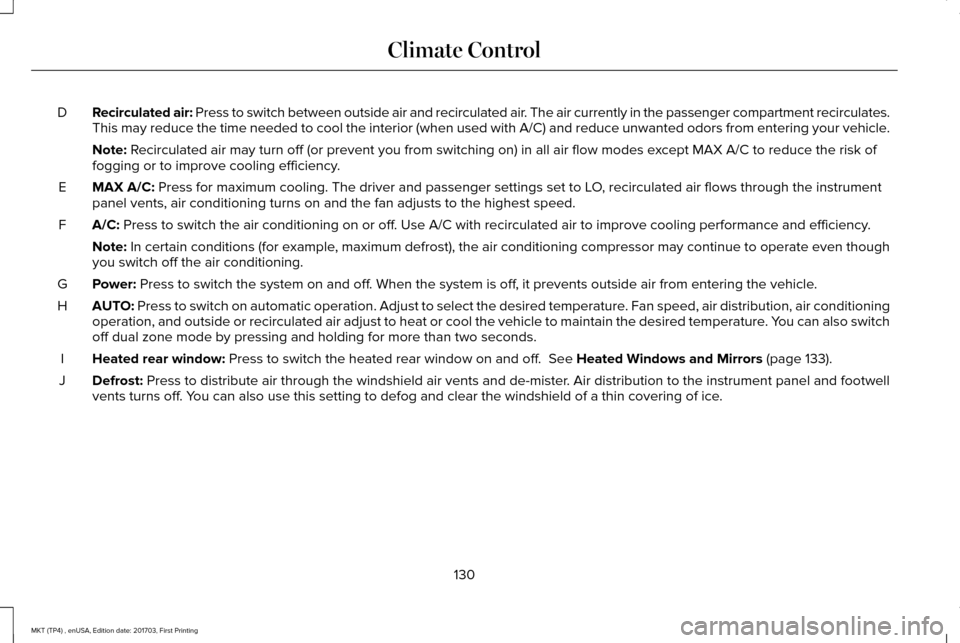
Recirculated air: Press to switch between outside air and recirculated air. The air currently in the passenger compartment recirculates.
This may reduce the time needed to cool the interior (when used with A/\
C) and reduce unwanted odors from entering your vehicle.
D
Note: Recirculated air may turn off (or prevent you from switching on) in all\
air flow modes except MAX A/C to reduce the risk of
fogging or to improve cooling efficiency.
MAX A/C:
Press for maximum cooling. The driver and passenger settings set to LO, recirculated air flows through the instrument
panel vents, air conditioning turns on and the fan adjusts to the highes\
t speed.
E
A/C:
Press to switch the air conditioning on or off. Use A/C with recirculated air to improve cooling performance and effic\
iency.
F
Note:
In certain conditions (for example, maximum defrost), the air conditioning compressor may continue to ope\
rate even though
you switch off the air conditioning.
Power:
Press to switch the system on and off. When the system is off, it prevents outside air from entering the vehicle.
G
AUTO:
Press to switch on automatic operation. Adjust to select the desired te\
mperature. Fan speed, air distribution, air conditioning
operation, and outside or recirculated air adjust to heat or cool the ve\
hicle to maintain the desired temperature. You can also switch
off dual zone mode by pressing and holding for more than two seconds.
H
Heated rear window:
Press to switch the heated rear window on and off. See Heated Windows and Mirrors (page 133).
I
Defrost:
Press to distribute air through the windshield air vents and de-mister. Air distribution to the instrument panel and footwell
vents turns off. You can also use this setting to defog and clear the windshield of a thin\
covering of ice.
J
130
MKT (TP4) , enUSA, Edition date: 201703, First Printing Climate Control
Page 163 of 564
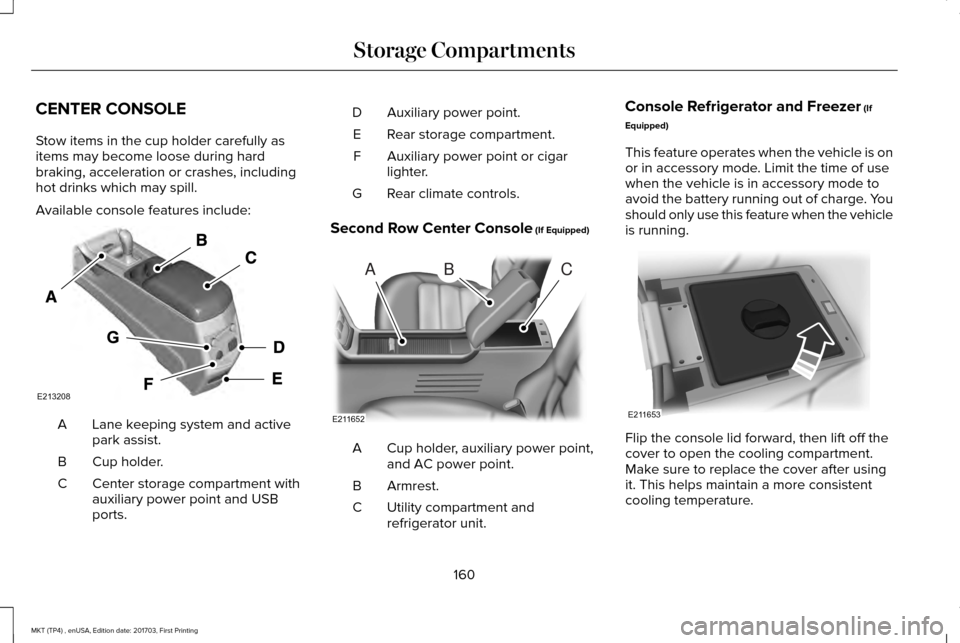
CENTER CONSOLE
Stow items in the cup holder carefully as
items may become loose during hard
braking, acceleration or crashes, including
hot drinks which may spill.
Available console features include:
Lane keeping system and active
park assist.
A
Cup holder.
B
Center storage compartment with
auxiliary power point and USB
ports.
C Auxiliary power point.
D
Rear storage compartment.
E
Auxiliary power point or cigar
lighter.
F
Rear climate controls.
G
Second Row Center Console (If Equipped) Cup holder, auxiliary power point,
and AC power point.
A
Armrest.
B
Utility compartment and
refrigerator unit.
C Console Refrigerator and Freezer
(If
Equipped)
This feature operates when the vehicle is on
or in accessory mode. Limit the time of use
when the vehicle is in accessory mode to
avoid the battery running out of charge. You
should only use this feature when the vehicle
is running. Flip the console lid forward, then lift off the
cover to open the cooling compartment.
Make sure to replace the cover after using
it. This helps maintain a more consistent
cooling temperature.
160
MKT (TP4) , enUSA, Edition date: 201703, First Printing Storage CompartmentsE213208 ABC
E211652 E211653
Page 165 of 564
GENERAL INFORMATION
WARNINGS
Extended idling at high engine speeds
can produce very high temperatures
in the engine and exhaust system, creating
the risk of fire or other damage. Do not park, idle or drive your vehicle
on dry grass or other dry ground cover.
The emission system heats up the engine
compartment and exhaust system, creating
the risk of fire. Do not start the engine in a closed
garage or in other enclosed areas.
Exhaust fumes can be toxic. Always open
the garage door before you start the engine. Exhaust leaks may result in entry of
harmful and potentially lethal fumes
into the passenger compartment. If you smell
exhaust fumes inside your vehicle, have your
vehicle inspected immediately. Do not drive
if you smell exhaust fumes. If you disconnect the battery, your vehicle
may exhibit some unusual driving
characteristics for approximately 5 mi (8 km)
after you reconnect it. This is because the
engine management system must realign
itself with the engine. You can disregard any
unusual driving characteristics during this
period.
The powertrain control system meets all
Canadian interference-causing equipment
standard requirements regulating the
impulse electrical field or radio noise.
When you start the engine, avoid pressing
the accelerator pedal before and during
operation. Only use the accelerator pedal
when you have difficulty starting the engine.
KEYLESS STARTING
Note:
The keyless starting system may not
function if the key is close to metal objects
or electronic devices such as cellular
phones.
Note: A valid key must be located inside
your vehicle to switch the ignition on and
start the engine. Ignition Modes
The keyless starting system has three
modes:
Off: Turns the ignition off.
• Without applying the brake pedal, press
and release the button once when the
ignition is in the on mode, or when the
engine is running but the vehicle is not
moving.
On:
All electrical circuits are operational and
the warning lamps and indicators illuminate.
• Without applying the brake pedal, press
and release the button once.
162
MKT (TP4) , enUSA, Edition date: 201703, First Printing Starting and Stopping the EngineE191075