navigation system LINCOLN MKT 2018 Owner's Manual
[x] Cancel search | Manufacturer: LINCOLN, Model Year: 2018, Model line: MKT, Model: LINCOLN MKT 2018Pages: 564, PDF Size: 4.66 MB
Page 449 of 564
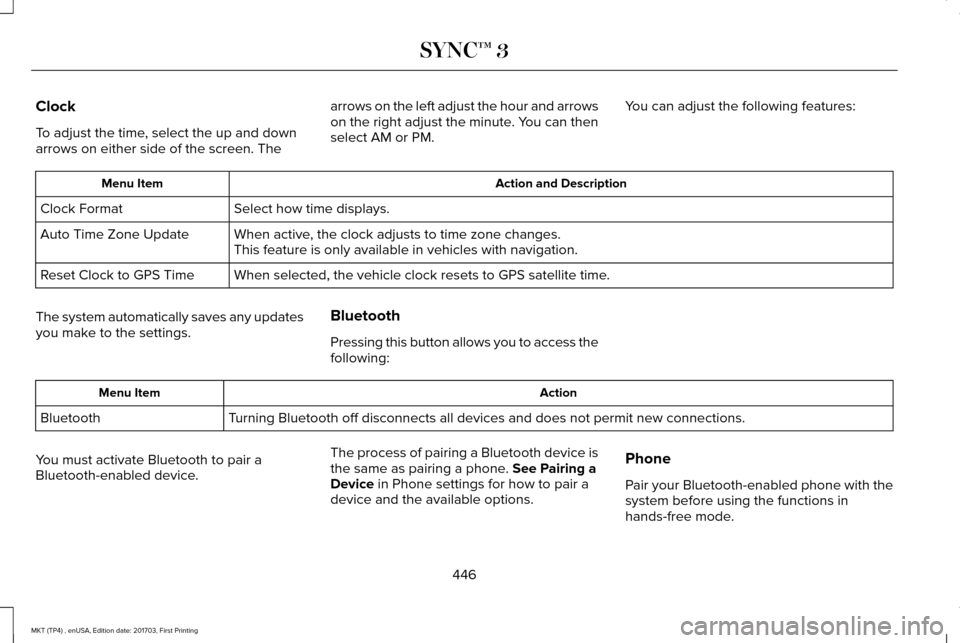
Clock
To adjust the time, select the up and down
arrows on either side of the screen. The
arrows on the left adjust the hour and arrows
on the right adjust the minute. You can then
select AM or PM.
You can adjust the following features: Action and Description
Menu Item
Select how time displays.
Clock Format
When active, the clock adjusts to time zone changes.
Auto Time Zone Update
This feature is only available in vehicles with navigation.
When selected, the vehicle clock resets to GPS satellite time.
Reset Clock to GPS Time
The system automatically saves any updates
you make to the settings. Bluetooth
Pressing this button allows you to access the
following: Action
Menu Item
Turning Bluetooth off disconnects all devices and does not permit new con\
nections.
Bluetooth
You must activate Bluetooth to pair a
Bluetooth-enabled device. The process of pairing a Bluetooth device is
the same as pairing a phone. See Pairing a
Device in Phone settings for how to pair a
device and the available options. Phone
Pair your Bluetooth-enabled phone with the
system before using the functions in
hands-free mode.
446
MKT (TP4) , enUSA, Edition date: 201703, First Printing SYNC™ 3
Page 455 of 564
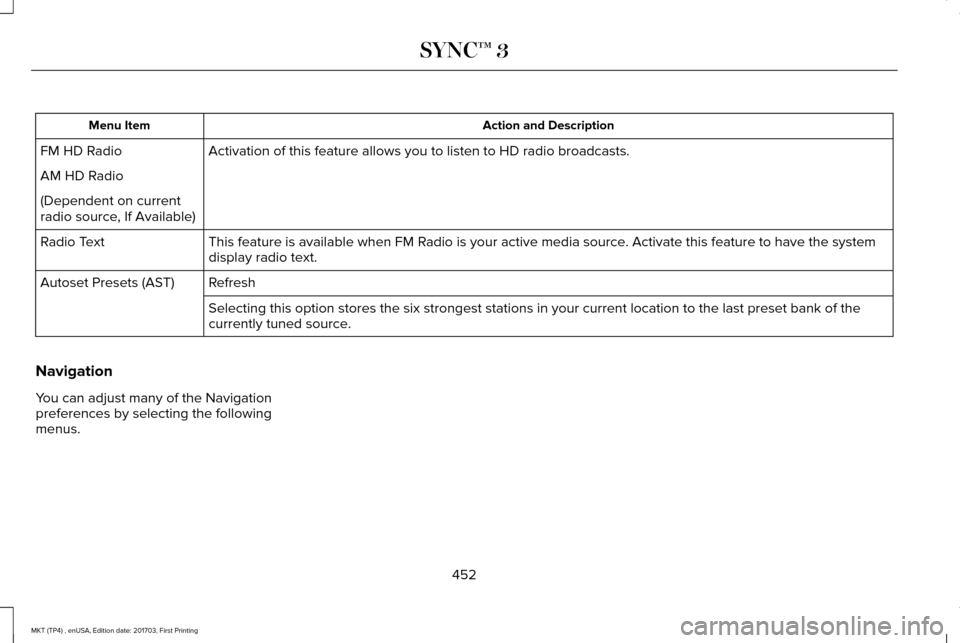
Action and Description
Menu Item
Activation of this feature allows you to listen to HD radio broadcasts.
FM HD Radio
AM HD Radio
(Dependent on current
radio source, If Available)
This feature is available when FM Radio is your active media source. Activate this feature to have the system
display radio text.
Radio Text
Refresh
Autoset Presets (AST)
Selecting this option stores the six strongest stations in your current \
location to the last preset bank of the
currently tuned source.
Navigation
You can adjust many of the Navigation
preferences by selecting the following
menus.
452
MKT (TP4) , enUSA, Edition date: 201703, First Printing SYNC™ 3
Page 456 of 564
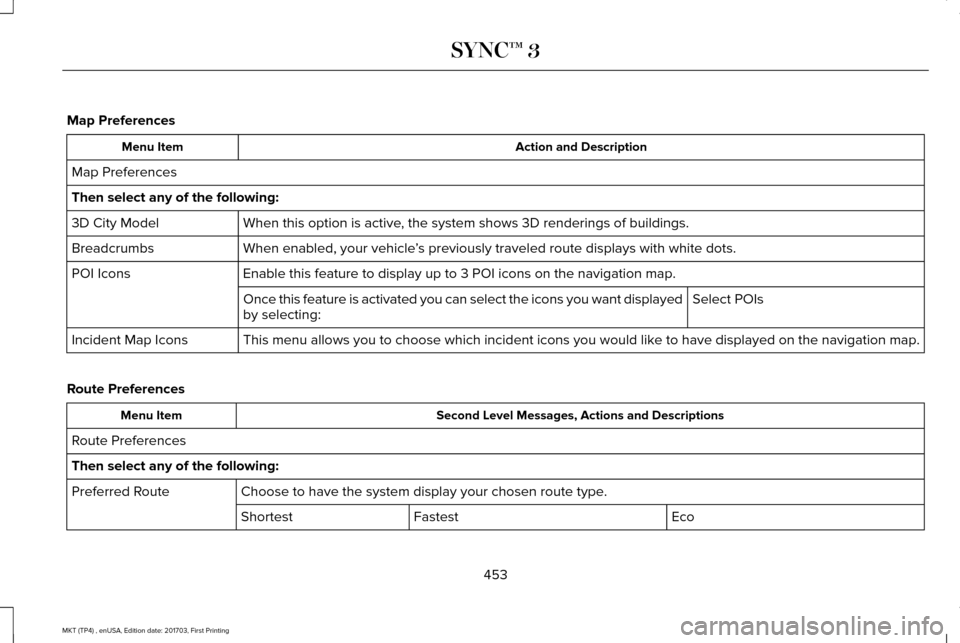
Map Preferences
Action and Description
Menu Item
Map Preferences
Then select any of the following: When this option is active, the system shows 3D renderings of buildings.
3D City Model
When enabled, your vehicle ’s previously traveled route displays with white dots.
Breadcrumbs
Enable this feature to display up to 3 POI icons on the navigation map.
POI Icons
Select POIs
Once this feature is activated you can select the icons you want display\
ed
by selecting:
This menu allows you to choose which incident icons you would like to have displayed on the navigation map.
Incident Map Icons
Route Preferences Second Level Messages, Actions and Descriptions
Menu Item
Route Preferences
Then select any of the following: Choose to have the system display your chosen route type.
Preferred Route
Eco
Fastest
Shortest
453
MKT (TP4) , enUSA, Edition date: 201703, First Printing SYNC™ 3
Page 457 of 564

Second Level Messages, Actions and Descriptions
Menu Item
Bypass route selection in destination programming. The system only calcu\
lates one route based on your preferred
route setting.
Always Use ___ Route
When activated, the system uses your selected route type to calculate on\
ly one route to the desired destination.
The system selects High Occupancy Vehicle or car pool lanes when providing route guidance.
Use HOV Lanes
The system searches for and displays available parking locations as you \
approach your destination.
Automatically Find Parking
Select a level of cost for the calculated Eco Route. The higher the setting, the longer the time allotment is for
the route.
Eco Time Penalty
Enable or disable considering traffic information when planning a route. The system can find a faster route based
on heavy traffic flow information or detect a Road Closed incident and find a detour route if possible.
Dynamic Route Guidance
If selected, SYNC 3 avoids freeways when computing a navigation route.
Avoid Freeways
If selected, SYNC 3 avoids Toll Roads when computing a navigation route.
Avoid Toll Roads
If selected, SYNC 3 avoids the use of Ferries or Trains when computing a navigation route.
Avoid Ferries/Car Trains
454
MKT (TP4) , enUSA, Edition date: 201703, First Printing SYNC™ 3
Page 458 of 564
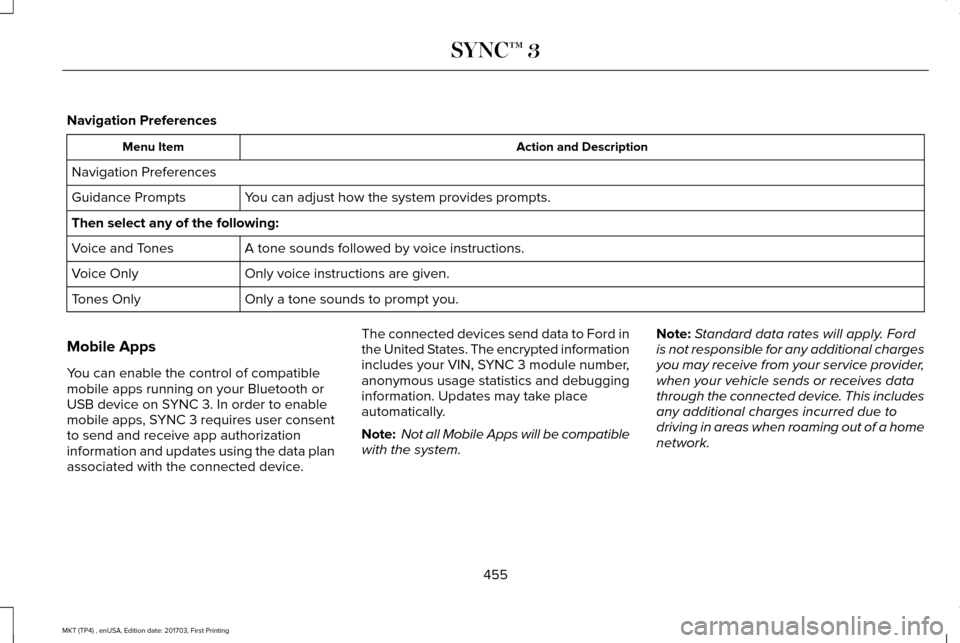
Navigation Preferences
Action and Description
Menu Item
Navigation Preferences You can adjust how the system provides prompts.
Guidance Prompts
Then select any of the following:
A tone sounds followed by voice instructions.
Voice and Tones
Only voice instructions are given.
Voice Only
Only a tone sounds to prompt you.
Tones Only
Mobile Apps
You can enable the control of compatible
mobile apps running on your Bluetooth or
USB device on SYNC 3. In order to enable
mobile apps, SYNC 3 requires user consent
to send and receive app authorization
information and updates using the data plan
associated with the connected device. The connected devices send data to Ford in
the United States. The encrypted information
includes your VIN, SYNC 3 module number,
anonymous usage statistics and debugging
information. Updates may take place
automatically.
Note:
Not all Mobile Apps will be compatible
with the system. Note:
Standard data rates will apply. Ford
is not responsible for any additional charges
you may receive from your service provider,
when your vehicle sends or receives data
through the connected device. This includes
any additional charges incurred due to
driving in areas when roaming out of a home
network.
455
MKT (TP4) , enUSA, Edition date: 201703, First Printing SYNC™ 3
Page 460 of 564

Action and Description
Menu Item
Request Update
Grant or deny permissions to all apps at once.
All Apps
Grant or deny an individual app particular permissions. App permissions \
are organized into groups. By pressing
the info book icon, you can see which signals are included in each group\
.
There may also be SYNC 3
enabled apps listed under
these options.
Note: Ford is not responsible or liable for
any damages or loss of privacy relating to
usage of an app, or dissemination of any
vehicle data that you approve Ford to
provide to an app. General
Access and adjust the system settings, voice
features, as well as phone, navigation and
wireless settings. Menu Item
Select to have the touchscreen display in English, Spanish or French.
Language
Select to display units in kilometers or miles.
Distance
Select to display units in Celsius or Fahrenheit.
Temperature
Select to have the system beep to confirm choices made through the touch\
screen.
Touch Screen Beep
When you activate this option, the system automatically updates when you\
have an available Internet
connection through a Wi-Fi network or mobile connection.
Automatic System Updates
457
MKT (TP4) , enUSA, Edition date: 201703, First Printing SYNC™ 3
Page 528 of 564
•
Navigation Features: Any navigation
features included in the system are
intended to provide turn by turn
instructions to get you to a desired
destination. Please make certain all
persons using this system carefully read
and follow instructions and safety
information fully.
• Distraction Hazard:
Any navigation
features may require manual (non-verbal)
setup. Attempting to perform such set-up
or insert data while driving can distract
your attention and could cause an
accident or other serious injury. Stop the
vehicle in a safe and legal manner before
attempting these operations.
• Let Your Judgment Prevail:
Any
navigation features are provided only as
an aid. Make your driving decisions
based on your observations of local
conditions and existing traffic regulations.
Any such feature is not a substitute for
your personal judgment. Any route
suggestions made by this system should
never replace any local traffic regulations
or your personal judgment or knowledge
of safe driving practices. •
Route Safety:
Do not follow the route
suggestions if doing so would result in
an unsafe or illegal maneuver, if you
would be placed in an unsafe situation,
or if you would be directed into an area
that you consider unsafe. The driver is
ultimately responsible for the safe
operation of the vehicle and therefore,
must evaluate whether it is safe to follow
the suggested directions.
• Potential Map Inaccuracy:
Maps used
by this system may be inaccurate
because of changes in roads, traffic
controls or driving conditions. Always use
good judgment and common sense when
following the suggested routes.
• Emergency Services:
Do not rely on any
navigation features included in the
system to route you to emergency
services. Ask local authorities or an
emergency services operator for these
locations. Not all emergency services
such as police, fire stations, hospitals and
clinics are likely to be contained in the
map database for such navigation
features.
525
MKT (TP4) , enUSA, Edition date: 201703, First Printing Appendices
Page 538 of 564
9.1 End User Terms Required by HERE
North America, LLC
The data (“Data
”) is provided for your
personal, internal use only and not for resale.
It is protected by copyright, and is subject to
the following terms and conditions which are
agreed to by you, on the one hand, and
Telenav (“Telenav”) and its licensors
(including their licensors and suppliers) on
the other hand.
© 2013 HERE. All rights reserved.
The Data for areas of Canada includes
information taken with permission from
Canadian authorities, including: © Her
Majesty the Queen in Right of Canada, ©
Queen's Printer for Ontario, © Canada Post
Corporation, GeoBase®, © Department of
Natural Resources Canada.
HERE holds a non-exclusive license from the
United States Postal Service® to publish and
sell ZIP+4® information. ©United States Postal Service® 2014. Prices
are not established, controlled or approved
by the United States Postal Service®. The
following trademarks and registrations are
owned by the USPS: United States Postal
Service, USPS, and ZIP+4
The Data for Mexico includes certain data
from Instituto Nacional de Estadística y
Geografía.
9.2 End User Terms Required by NAV2
(Shanghai) Co., Ltd
The data (“Data
”) is provided for your
personal, internal use only and not for resale.
It is protected by copyright, and is subject to
the following terms and conditions which are
agreed to by you, on the one hand, and
NAV2 (Shanghai) Co., Ltd (“NAV2”) and its
licensors (including their licensors and
suppliers) on the other hand. 20xx. All rights
reserved Terms and Conditions
Permitted Use. You agree to use this Data
together with the Telenav Software solely
for the internal business and personal
purposes for which you were licensed, and
not for service bureau, time-sharing or other
similar purposes. Accordingly, but subject to
the restrictions set forth in the following
paragraphs, you agree not to otherwise
reproduce, copy, modify, decompile,
disassemble, create any derivative works of,
or reverse engineer any portion of this Data,
and may not transfer or distribute it in any
form, for any purpose, except to the extent
permitted by mandatory laws.
Restrictions.
Except where you have been
specifically licensed to do so by Telenav, and
without limiting the preceding paragraph,
you may not use this Data (a) with any
products, systems, or applications installed
or otherwise connected to or in
communication with vehicles, capable of
vehicle navigation, positioning, dispatch, real
time route guidance, fleet management or
similar applications; or (b) with or in
535
MKT (TP4) , enUSA, Edition date: 201703, First Printing Appendices
Page 548 of 564
it, and (ii) save it, provided that you do not
remove any copyright notices that appear
and do not modify the Data in any way. You
agree not to otherwise reproduce, copy,
modify, decompile, disassemble or reverse
engineer any portion of this Data, and may
not transfer or distribute it in any form, for
any purpose, except to the extent permitted
by mandatory laws.
Restrictions
Except where you have been specifically
licensed to do so by NAV2 , and without
limiting the preceding paragraph, you may
not (a) use this Data with any products,
systems, or applications installed or
otherwise connected to or in communication
with vehicles, capable of vehicle navigation,
positioning, dispatch, real time route
guidance, fleet management or similar
applications; or (b) with or in communication
with any positioning devices or any mobile
or wireless-connected electronic or computer
devices, including without limitation cellular
phones, palmtop and handheld computers,
pagers, and personal digital assistants or
PDAs. You agree to cease using this Data if
you fail to comply with these terms and
conditions.
Limited Warranty
NAV2 warrants that (a) the Data will perform
substantially in accordance with the
accompanying written materials for a period
of ninety (90) days from the date of receipt,
and (b) any support services provided by
NAV2 shall be substantially as described in
applicable written materials provided to you
by NAV2, and NAV2’
s support engineers will
make commercially reasonable efforts to
solve any problem issues.
rigCustomer Remedies
NAV2 and its suppliers ’ entire liability and
your exclusive remedy shall be, at NAV2’ s
sole discretion, either (a) return of the price
paid, if any, or (b) repair or replacement of
the Data that do not meet NAV2’ s Limited
Warranty and that are returned to NAV2 with
a copy of your receipt. This Limited Warranty is void if failure of the Data has resulted from
accident, abuse, or misapplication. Any
replacement Data will be warranted for the
remainder of the original warranty period or
thirty (30) days, whichever is longer. Neither
these remedies nor any product support
services offered by NAV2 are available
without proof of purchase from an authorized
international source.
No Other Warranty:
EXCEPT FOR THE LMITED WARRANTY SET
FORTH ABOVE AND TO THE EXTENT
PERMITTED BY APPLICABLE LAW, NAV2
AND ITS LICENSORS (INCLUDING THEIR
LICENSORS AND SUPPLIERS) DISCLAIM
ANY WARRANTIES, EXPRESS OR IMPLIED,
OF QUALITY, PERFORMANCE,
MERCHANTABILITY, FITNESS FOR A
PARTICULAR PURPOSE, OWNERSHIP OR
NON-INFRINGEMENT. Certain warranty
exclusions may not be permitted under
applicable law, so to that extent the above
exclusion may not apply to you.
545
MKT (TP4) , enUSA, Edition date: 201703, First Printing Appendices
Page 560 of 564
Linking a PreSet Position to your Remote
Control or Intelligent Access Key Fob .......141
Saving a PreSet Position....................................141
Message Center See: Information Displays.................................109
Mirrors See: Heated Windows and Mirrors.................133
See: Windows and Mirrors.................................98
Mobile Communications Equipment
...........14
Moonroof.........................................................102 Closing the Moonroof and Sunshades..........103
Opening the Sunshade and Moonroof.........102
Venting the Moonroof........................................103
Motorcraft Parts - 3.5L Ecoboost™...........352
Motorcraft Parts - 3.7L
.................................353
MyKey Troubleshooting................................70
MyKey™..............................................................65 Principle of Operation.........................................65
N
Navigation......................................................429 cityseeker.............................................................438
Destination Mode...............................................430
Map Mode............................................................429
Navigation Map Updates..................................439
Navigation Menu................................................435
SiriusXM Traffic and Travel Link......................439 SYNC AppLink.....................................................438
Waypoints.............................................................437
Normal Scheduled Maintenance..............487 Intelligent Oil-Life Monitor™..............................
487
Normal Maintenance Intervals........................488
O
Oil Change Indicator Reset
.......................292
Oil Check See: Engine Oil Check.......................................291
Opening and Closing the Hood...............287 Closing the Hood...............................................287
Opening the Hood.............................................287
Ordering Additional Owner's Literature.....................................................265
Obtaining a French Owner’ s Manual............265
Overhead Console
.........................................161
P
Parking Aids....................................................197 Principle of Operation........................................197
Parking Brake
.................................................192
Passive Anti-Theft System.............................81 SecuriLock®.............................................................81
PATS See: Passive Anti-Theft System.........................
81 Pedals................................................................87
Perchlorate........................................................12
Personal Safety System
™
..............................49
How Does the Personal Safety System
Work?...................................................................49
Phone...............................................................421 During a Phone Call...........................................426
Making Calls........................................................425
Pairing Your Cell Phone for the First
Time....................................................................421
Phone Menu........................................................422
Receiving Calls....................................................426
Smartphone Connectivity.................................428
Text Messaging...................................................427
Post-Crash Alert System.............................257
Power Door Locks See: Locking and Unlocking..............................
72
Power Liftgate..................................................78 Obstacle Detection..............................................80
Opening and Closing the Liftgate....................78
Setting the Liftgate Open Height.....................80
Stopping the Liftgate Movement......................
80
Power Seats....................................................138 Four Way Power Lumbar...................................
140
Power Lumbar (Limo/Livery).............................140
Power Steering Fluid Check.....................300
Power Windows
..............................................98
Accessory Delay...................................................99
557
MKT (TP4) , enUSA, Edition date: 201703, First Printing Index