power steering LINCOLN MKT 2018 Owner's Manual
[x] Cancel search | Manufacturer: LINCOLN, Model Year: 2018, Model line: MKT, Model: LINCOLN MKT 2018Pages: 564, PDF Size: 4.66 MB
Page 283 of 564
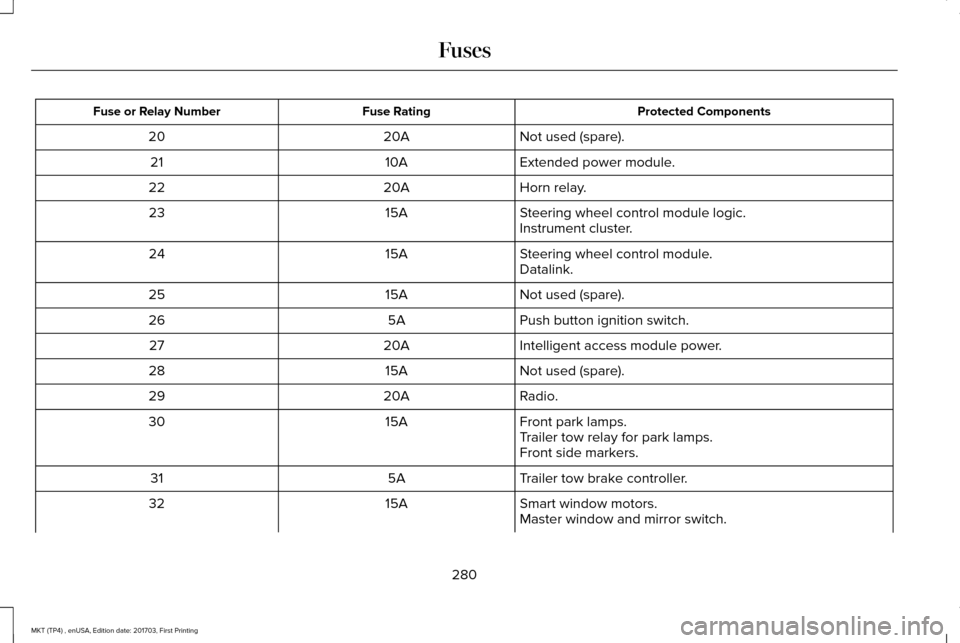
Protected Components
Fuse Rating
Fuse or Relay Number
Not used (spare).
20A
20
Extended power module.
10A
21
Horn relay.
20A
22
Steering wheel control module logic.
15A
23
Instrument cluster.
Steering wheel control module.
15A
24
Datalink.
Not used (spare).
15A
25
Push button ignition switch.
5A
26
Intelligent access module power.
20A
27
Not used (spare).
15A
28
Radio.
20A
29
Front park lamps.
15A
30
Trailer tow relay for park lamps.
Front side markers.
Trailer tow brake controller.
5A
31
Smart window motors.
15A
32
Master window and mirror switch.
280
MKT (TP4) , enUSA, Edition date: 201703, First Printing Fuses
Page 284 of 564
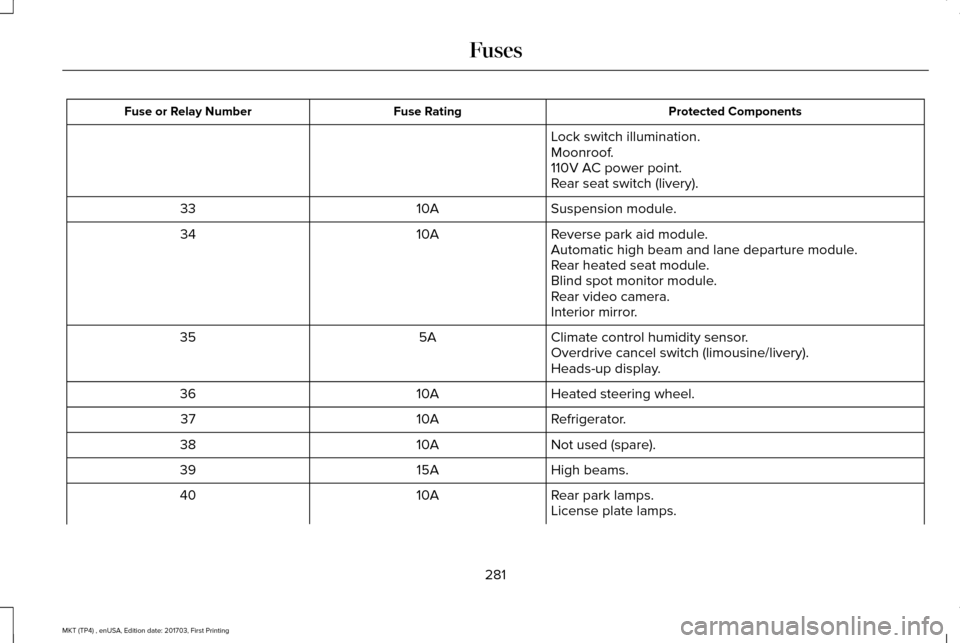
Protected Components
Fuse Rating
Fuse or Relay Number
Lock switch illumination.
Moonroof.
110V AC power point.
Rear seat switch (livery).
Suspension module.
10A
33
Reverse park aid module.
10A
34
Automatic high beam and lane departure module.
Rear heated seat module.
Blind spot monitor module.
Rear video camera.
Interior mirror.
Climate control humidity sensor.
5A
35
Overdrive cancel switch (limousine/livery).
Heads-up display.
Heated steering wheel.
10A
36
Refrigerator.
10A
37
Not used (spare).
10A
38
High beams.
15A
39
Rear park lamps.
10A
40
License plate lamps.
281
MKT (TP4) , enUSA, Edition date: 201703, First Printing Fuses
Page 299 of 564
Coolant Change
At specific mileage intervals, as listed in the
scheduled maintenance information, the
coolant should be changed. Add prediluted
coolant approved to the correct specification.
See Capacities and Specifications (page
350).
Fail-Safe Cooling
Fail-safe cooling allows you to temporarily
drive your vehicle before any incremental
component damage occurs. The fail-safe
distance depends on ambient temperature,
vehicle load and terrain.
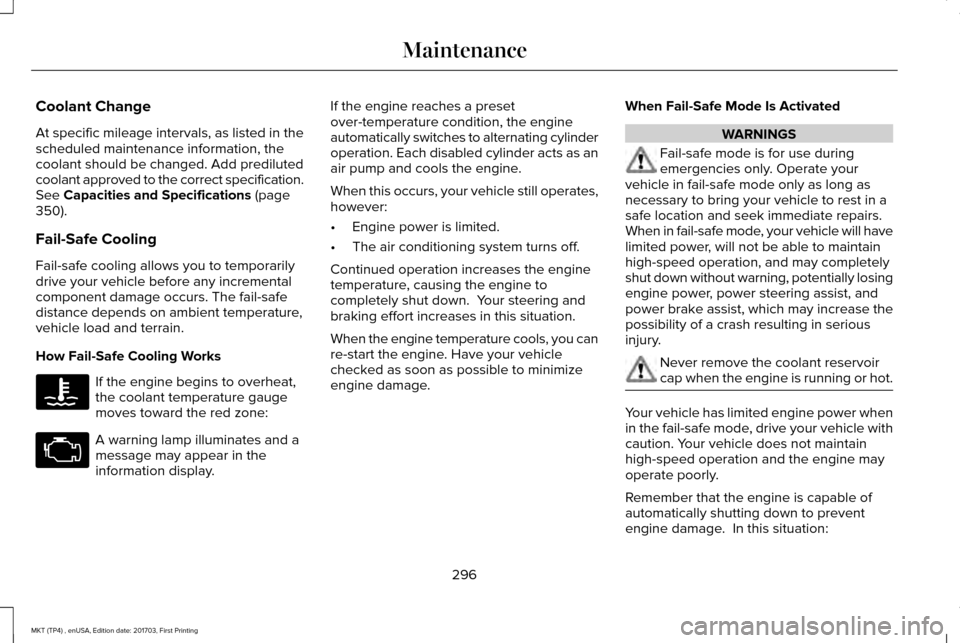
How Fail-Safe Cooling Works If the engine begins to overheat,
the coolant temperature gauge
moves toward the red zone:
A warning lamp illuminates and a
message may appear in the
information display. If the engine reaches a preset
over-temperature condition, the engine
automatically switches to alternating cylinder
operation. Each disabled cylinder acts as an
air pump and cools the engine.
When this occurs, your vehicle still operates,
however:
•
Engine power is limited.
• The air conditioning system turns off.
Continued operation increases the engine
temperature, causing the engine to
completely shut down. Your steering and
braking effort increases in this situation.
When the engine temperature cools, you can
re-start the engine. Have your vehicle
checked as soon as possible to minimize
engine damage. When Fail-Safe Mode Is Activated WARNINGS
Fail-safe mode is for use during
emergencies only. Operate your
vehicle in fail-safe mode only as long as
necessary to bring your vehicle to rest in a
safe location and seek immediate repairs.
When in fail-safe mode, your vehicle will have
limited power, will not be able to maintain
high-speed operation, and may completely
shut down without warning, potentially losing
engine power, power steering assist, and
power brake assist, which may increase the
possibility of a crash resulting in serious
injury. Never remove the coolant reservoir
cap when the engine is running or hot.
Your vehicle has limited engine power when
in the fail-safe mode, drive your vehicle with
caution. Your vehicle does not maintain
high-speed operation and the engine may
operate poorly.
Remember that the engine is capable of
automatically shutting down to prevent
engine damage. In this situation:
296
MKT (TP4) , enUSA, Edition date: 201703, First Printing Maintenance
Page 303 of 564
BRAKE FLUID CHECK
WARNINGS
Do not use any fluid other than the
recommended brake fluid as this will
reduce brake efficiency. Use of incorrect fluid
could result in the loss of vehicle control,
serious personal injury or death. Only use brake fluid from a sealed
container. Contamination with dirt,
water, petroleum products or other materials
may result in brake system damage or failure.
Failure to adhere to this warning could result
in the loss of vehicle control, serious
personal injury or death. Do not allow the fluid to touch your
skin or eyes. If this happens, rinse the
affected areas immediately with plenty of
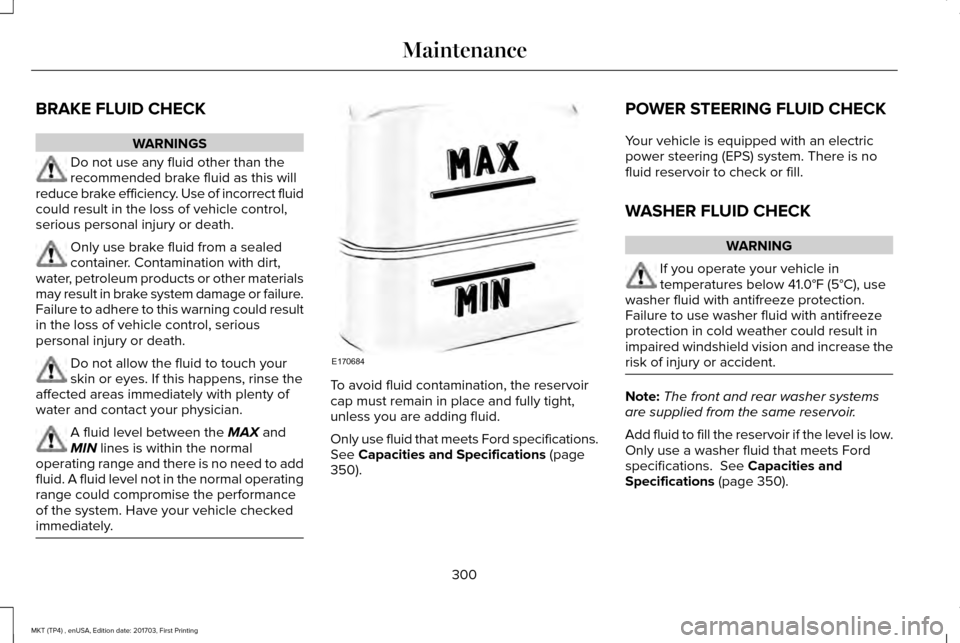
water and contact your physician. A fluid level between the MAX and
MIN lines is within the normal
operating range and there is no need to add
fluid. A fluid level not in the normal operating
range could compromise the performance
of the system. Have your vehicle checked
immediately. To avoid fluid contamination, the reservoir
cap must remain in place and fully tight,
unless you are adding fluid.
Only use fluid that meets Ford specifications.
See Capacities and Specifications (page
350). POWER STEERING FLUID CHECK
Your vehicle is equipped with an electric
power steering (EPS) system. There is no
fluid reservoir to check or fill.
WASHER FLUID CHECK
WARNING
If you operate your vehicle in
temperatures below
41.0°F (5°C), use
washer fluid with antifreeze protection.
Failure to use washer fluid with antifreeze
protection in cold weather could result in
impaired windshield vision and increase the
risk of injury or accident. Note:
The front and rear washer systems
are supplied from the same reservoir.
Add fluid to fill the reservoir if the level is low.
Only use a washer fluid that meets Ford
specifications.
See Capacities and
Specifications (page 350).
300
MKT (TP4) , enUSA, Edition date: 201703, First Printing MaintenanceE170684
Page 338 of 564
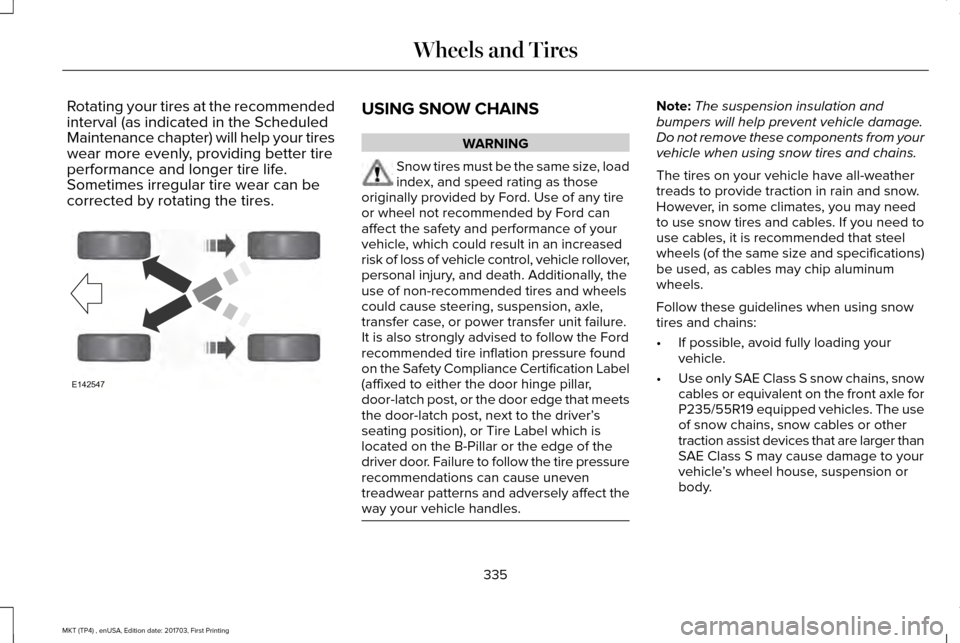
Rotating your tires at the recommended
interval (as indicated in the Scheduled
Maintenance chapter) will help your tires
wear more evenly, providing better tire
performance and longer tire life.
Sometimes irregular tire wear can be
corrected by rotating the tires.
USING SNOW CHAINS
WARNING
Snow tires must be the same size, load
index, and speed rating as those
originally provided by Ford. Use of any tire
or wheel not recommended by Ford can
affect the safety and performance of your
vehicle, which could result in an increased
risk of loss of vehicle control, vehicle rollover,
personal injury, and death. Additionally, the
use of non-recommended tires and wheels
could cause steering, suspension, axle,
transfer case, or power transfer unit failure.
It is also strongly advised to follow the Ford
recommended tire inflation pressure found
on the Safety Compliance Certification Label
(affixed to either the door hinge pillar,
door-latch post, or the door edge that meets
the door-latch post, next to the driver’ s
seating position), or Tire Label which is
located on the B-Pillar or the edge of the
driver door. Failure to follow the tire pressure
recommendations can cause uneven
treadwear patterns and adversely affect the
way your vehicle handles. Note:
The suspension insulation and
bumpers will help prevent vehicle damage.
Do not remove these components from your
vehicle when using snow tires and chains.
The tires on your vehicle have all-weather
treads to provide traction in rain and snow.
However, in some climates, you may need
to use snow tires and cables. If you need to
use cables, it is recommended that steel
wheels (of the same size and specifications)
be used, as cables may chip aluminum
wheels.
Follow these guidelines when using snow
tires and chains:
• If possible, avoid fully loading your
vehicle.
• Use only SAE Class S snow chains, snow
cables or equivalent on the front axle for
P235/55R19 equipped vehicles. The use
of snow chains, snow cables or other
traction assist devices that are larger than
SAE Class S may cause damage to your
vehicle ’s wheel house, suspension or
body.
335
MKT (TP4) , enUSA, Edition date: 201703, First Printing Wheels and TiresE142547
Page 387 of 564
Note:
If your vehicle is not equipped with
navigation, compass appears in the display
instead of navigation. If you press the right
arrow to go into the compass menu, you can
see the compass graphic. The compass
displays the direction in which the vehicle is
traveling, not true direction (for example, if
the vehicle is traveling west, the middle of
the compass graphic displays west; north
displays to the left of west though its true
direction is to the right of west).
Using the Steering Wheel Controls
Depending on your vehicle and option
package, you can use different controls on
your steering wheel to interact with the
touchscreen system in different ways.
VOL: Control the volume of audio output.
Mute:
Mute the audio output.
Voice:
Press to start a voice session. Press
again to stop the voice prompt and
immediately begin speaking. Press and hold
to end a voice session. SEEK NEXT:
•
While in radio mode, press to seek
between memory presets.
• While in USB, Bluetooth Audio or CD
mode, press to seek between songs or
press and hold to fast seek.
SEEK PREVIOUS:
• While in radio mode, press to seek
between memory presets.
• While in USB, Bluetooth Audio or CD
mode, press to seek between songs or
press and hold to fast seek.
PHONE ACCEPT:
Press to answer a call or
switch between calls.
PHONE REJECT: Press to end a call or reject
an incoming call.
Note: On some models, SEEK NEXT may be
combined with
PHONE REJECT and SEEK
PREVIOUS may be combined with PHONE
ACCEPT.
M:
Touch the control repeatedly to switch
between media sources (modes).
See
Steering Wheel (page 84). Using Your Bezel Controls
Depending on your vehicle and option
package, you may also have these controls
on your instrument panel:
•
Power:
Switch the audio system on and
off.
• VOL:
Control the volume of playing
audio.
• Seek
and Tune: Use as you normally
would in audio modes.
• Eject:
Eject a CD from the audio system.
• SOURCE
or MEDIA: Press repeatedly to
advance through available media modes.
• SOUND:
Press to access the Sound
menu where you can adjust sound and
other audio settings.
• 1-6:
Press and hold to store or press and
release to select an AM, FM or SIRIUS
memory preset.
See Audio System
(page 370).
384
MKT (TP4) , enUSA, Edition date: 201703, First Printing SYNC™ 3
Page 389 of 564
To make sure that 911 Assist works correctly:
•
SYNC must be powered and working
properly at the time of the incident and
throughout feature activation and use.
• The 911 Assist feature must be set on
before the incident.
• You must pair and connect a
Bluetooth-enabled and compatible cell
phone to SYNC.
• A connected Bluetooth-enabled phone
must have the ability to make and
maintain an outgoing call at the time of
the incident.
• A connected Bluetooth-enabled phone
must have adequate network coverage,
battery power and signal strength.
• The vehicle must have battery power and
be located in the U.S., Canada or in a
territory in which 911 is the emergency
number. In the Event of a Crash
Not all crashes will deploy an airbag or
activate the fuel pump shut-off (the triggers
for 911 Assist). If a connected cell phone
sustains damage or loses its connection to
SYNC during a crash, SYNC will search for
and try to connect to a previously paired cell
phone; SYNC will then attempt to call the
emergency services.
Before making the call:
•
SYNC provides a short window of time
(about 10 seconds) to cancel the call. If
you fail to cancel the call, SYNC attempts
to dial 911.
• SYNC says the following, or a similar
message: "SYNC will attempt to call 911,
to cancel the call, press Cancel on your
screen or press and hold the phone
button on your steering wheel." If you do not cancel the call, and SYNC
makes a successful call, a pre-recorded
message plays for the 911 operator, and then
the occupant(s) in your vehicle is able to talk
with the operator. Be prepared to provide
your name, phone number and location
immediately, because not all 911 systems are
capable of receiving this information
electronically.
911 Assist May Not Work If
•
Your cellular phone or 911 Assist
hardware sustains damage in a crash.
• The vehicle's battery or the SYNC system
has no power.
• The phone(s) thrown from your vehicle
are the ones paired and connected to
the system.
911 Assist Privacy Notice
When you switch on 911 Assist, it may
disclose to emergency services that your
vehicle has been in a crash involving the
deployment of an airbag or activation of the
fuel pump shut-off. Certain versions or
updates to 911 Assist may also be capable
386
MKT (TP4) , enUSA, Edition date: 201703, First Printing SYNC™ 3
Page 554 of 564
A
A/C
See: Climate Control..........................................129
About This Manual............................................7
ABS See: Brakes............................................................191
ABS driving hints See: Hints on Driving With Anti-Lock
Brakes................................................................192
Accessories....................................................478 Exterior Style........................................................478
Interior Style.........................................................478
Lifestyle.................................................................478
Peace of Mind......................................................478
Accessories See: Replacement Parts Recommendation.....12
ACC See: Using Adaptive Cruise Control.............209
Active Park Assist..........................................198 Automatic Steering into Parking Space.......200
Deactivating the Park Assist Feature.............
201
Troubleshooting the System...........................202
Using Active Park Assist....................................199
Adaptive Headlamps
.....................................95
Adjusting the Headlamps...........................304 Horizontal Aim Adjustment..............................305
Vertical Aim Adjustment...................................
304 Adjusting the Pedals......................................87
Adjusting the Steering Wheel......................84
End of Travel Position..........................................84
AFS See: Adaptive Headlamps..................................95
Airbag Disposal
...............................................59
Air Conditioning See: Climate Control..........................................129
Air Filter See: Changing the Engine Air Filter..............309
Alarm See: Anti-Theft Alarm...........................................83
All-Wheel Drive..............................................183
Ambient Lighting
.............................................97
Anti-Theft Alarm..............................................83
Arming the Alarm..................................................83
Disarming the Alarm............................................83
Appendices.....................................................515
Apps
.................................................................440
........................................................................\
.........440
SiriusXM Traffic and Travel Link......................
442
At a Glance
........................................................16
Audible Warnings and Indicators..............108
Headlamps On Warning Chime.......................108
Keyless Warning Alert........................................108
Parking Brake On Warning Chime..................108
Audio Control
..................................................85
Seek, Next or Previous........................................85 Audio System
................................................370
General Information...........................................370
Audio Unit
........................................................371
Rear Seat Audio Controls.................................373
Autolamps ..........................................................
91
Windshield Wiper Activated Headlamps........92
Automatic Climate Control
.........................129
Automatic High Beam Control....................94
Switching the System On and Off....................94
Automatic Transmission...............................179 Automatic Transmission Adaptive
Learning............................................................182
Brake-Shift Interlock............................................181
If Your Vehicle Gets Stuck In Mud or Snow..................................................................182
SelectShift Automatic ™ Transmission.............180
Understanding the Positions of Your Automatic Transmission................................179
Automatic Transmission Fluid Check...........................................................298
Adding Transmission Fluid .............................299
Checking the Transmission Fluid Level........298
Autowipers.......................................................88
Auxiliary Power Points.................................158 110 Volt AC Power Point.....................................158
12 Volt DC Power Point......................................158
Locations...............................................................158
551
MKT (TP4) , enUSA, Edition date: 201703, First Printing Index
Page 558 of 564
General Information on Radio
Frequencies..................................................60
Intelligent Access.................................................60
General Maintenance Information...........483 Multi-Point Inspection........................................486
Owner Checks and Services...........................484
Protecting Your Investment.............................483
Why Maintain Your Vehicle?............................483
Why Maintain Your Vehicle at Your
Dealership?......................................................483
Getting Assistance Outside the U.S. and Canada.........................................................263
Getting the Services You Need................259 Away From Home..............................................259
Global Opening and Closing.......................99 Closing the Windows...........................................99
Opening the Windows.........................................99
H
Handbrake See: Parking Brake.............................................192
Hazard Flashers............................................254
Headlamp Adjusting See: Adjusting the Headlamps.......................
304
Headlamp Exit Delay.....................................93
Headlamp Removal See: Removing a Headlamp............................
305 Head Restraints
.............................................135
Adjusting the Head Restraint...........................136
Tilting Head Restraints ......................................137
Heated Seats...................................................151 Front Seats.............................................................151
Second-Row Heated Seats................................151
Heated Steering Wheel................................86
Heated Windows and Mirrors
....................133
Heated Exterior Mirrors.....................................133
Heated Rear Window.........................................133
Heating See: Climate Control..........................................129
Hints on Controlling the Interior Climate...........................................................131
Defogging the Side Windows in Cold Weather..............................................................131
General Hints.........................................................131
Quickly Cooling the Interior...............................
131
Quickly Heating the Interior..............................131
Recommended Settings for Cooling...............131
Recommended Settings for Heating...............131
Hints on Driving With Anti-Lock Brakes...........................................................192
Home Screen
................................................392
Hood Lock See: Opening and Closing the Hood............287 I
In California (U.S. Only)...............................260
Information Display Control
.........................86
Information Displays.....................................109 General Information............................................109
Information Messages
..................................116
Adaptive Cruise Control.....................................117
AdvanceTrac ™.........................................................117
Alarm.......................................................................118
Automatic Engine Shutdown.............................
118
AWD........................................................................\
.119
Battery and Charging System..........................120
Blind Spot Information and Cross Traffic Alert System................................................................121
Brake System........................................................121
Collision Warning System.................................122
Doors and Locks..................................................122
Fuel........................................................................\
.123
Keys and Intelligent Access..............................123
Lane Keeping System........................................124
Maintenance.........................................................124
MyKey.....................................................................125
Park Aid..................................................................126
Power Steering.....................................................127
Seats.......................................................................127
Tire Pressure Monitoring System....................128
Traction Control...................................................128
555
MKT (TP4) , enUSA, Edition date: 201703, First Printing Index
Page 560 of 564
Linking a PreSet Position to your Remote
Control or Intelligent Access Key Fob .......141
Saving a PreSet Position....................................141
Message Center See: Information Displays.................................109
Mirrors See: Heated Windows and Mirrors.................133
See: Windows and Mirrors.................................98
Mobile Communications Equipment
...........14
Moonroof.........................................................102 Closing the Moonroof and Sunshades..........103
Opening the Sunshade and Moonroof.........102
Venting the Moonroof........................................103
Motorcraft Parts - 3.5L Ecoboost™...........352
Motorcraft Parts - 3.7L
.................................353
MyKey Troubleshooting................................70
MyKey™..............................................................65 Principle of Operation.........................................65
N
Navigation......................................................429 cityseeker.............................................................438
Destination Mode...............................................430
Map Mode............................................................429
Navigation Map Updates..................................439
Navigation Menu................................................435
SiriusXM Traffic and Travel Link......................439 SYNC AppLink.....................................................438
Waypoints.............................................................437
Normal Scheduled Maintenance..............487 Intelligent Oil-Life Monitor™..............................
487
Normal Maintenance Intervals........................488
O
Oil Change Indicator Reset
.......................292
Oil Check See: Engine Oil Check.......................................291
Opening and Closing the Hood...............287 Closing the Hood...............................................287
Opening the Hood.............................................287
Ordering Additional Owner's Literature.....................................................265
Obtaining a French Owner’ s Manual............265
Overhead Console
.........................................161
P
Parking Aids....................................................197 Principle of Operation........................................197
Parking Brake
.................................................192
Passive Anti-Theft System.............................81 SecuriLock®.............................................................81
PATS See: Passive Anti-Theft System.........................
81 Pedals................................................................87
Perchlorate........................................................12
Personal Safety System
™
..............................49
How Does the Personal Safety System
Work?...................................................................49
Phone...............................................................421 During a Phone Call...........................................426
Making Calls........................................................425
Pairing Your Cell Phone for the First
Time....................................................................421
Phone Menu........................................................422
Receiving Calls....................................................426
Smartphone Connectivity.................................428
Text Messaging...................................................427
Post-Crash Alert System.............................257
Power Door Locks See: Locking and Unlocking..............................
72
Power Liftgate..................................................78 Obstacle Detection..............................................80
Opening and Closing the Liftgate....................78
Setting the Liftgate Open Height.....................80
Stopping the Liftgate Movement......................
80
Power Seats....................................................138 Four Way Power Lumbar...................................
140
Power Lumbar (Limo/Livery).............................140
Power Steering Fluid Check.....................300
Power Windows
..............................................98
Accessory Delay...................................................99
557
MKT (TP4) , enUSA, Edition date: 201703, First Printing Index