remote control LINCOLN MKT 2018 Owner's Manual
[x] Cancel search | Manufacturer: LINCOLN, Model Year: 2018, Model line: MKT, Model: LINCOLN MKT 2018Pages: 564, PDF Size: 4.66 MB
Page 117 of 564
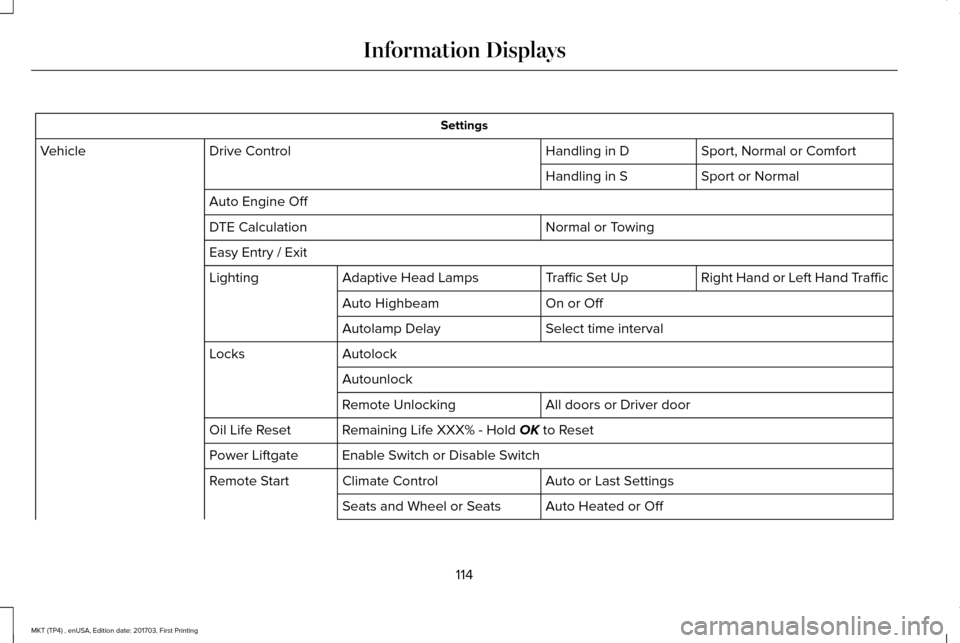
Settings
Sport, Normal or Comfort
Handling in D
Drive Control
Vehicle
Sport or Normal
Handling in S
Auto Engine Off Normal or Towing
DTE Calculation
Easy Entry / Exit
Right Hand or Left Hand Traffic
Traffic Set Up
Adaptive Head Lamps
Lighting
On or Off
Auto Highbeam
Select time interval
Autolamp Delay
Autolock
Locks
Autounlock All doors or Driver door
Remote Unlocking
Remaining Life XXX% - Hold OK to Reset
Oil Life Reset
Enable Switch or Disable Switch
Power Liftgate
Auto or Last Settings
Climate Control
Remote Start
Auto Heated or Off
Seats and Wheel or Seats
114
MKT (TP4) , enUSA, Edition date: 201703, First Printing Information Displays
Page 118 of 564
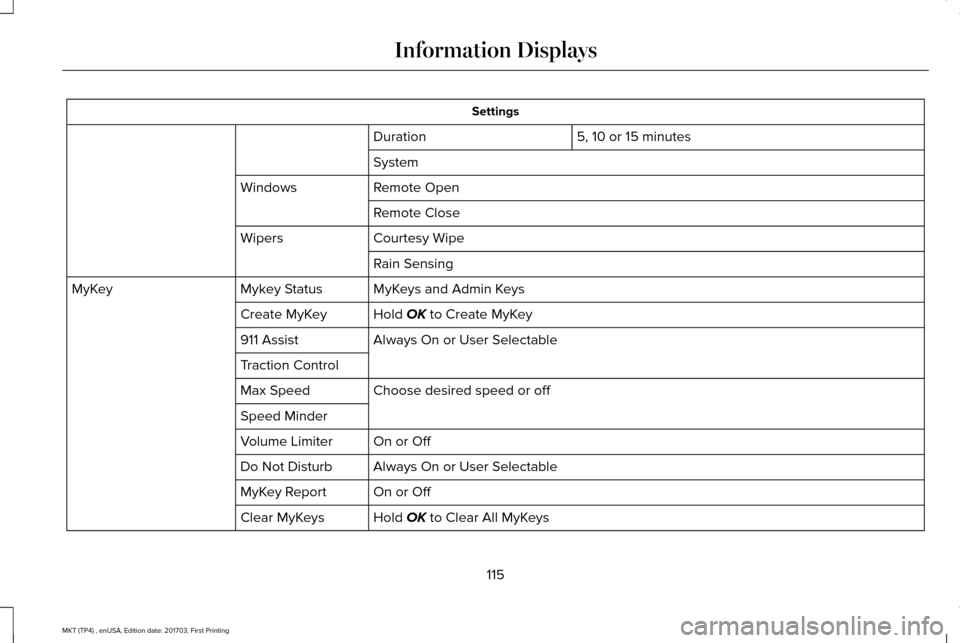
Settings
5, 10 or 15 minutes
Duration
System
Remote Open
Windows
Remote Close
Courtesy Wipe
Wipers
Rain Sensing
MyKeys and Admin Keys
Mykey Status
MyKey
Hold OK to Create MyKey
Create MyKey
Always On or User Selectable
911 Assist
Traction Control
Choose desired speed or off
Max Speed
Speed Minder
On or Off
Volume Limiter
Always On or User Selectable
Do Not Disturb
On or Off
MyKey Report
Hold
OK to Clear All MyKeys
Clear MyKeys
115
MKT (TP4) , enUSA, Edition date: 201703, First Printing Information Displays
Page 137 of 564
Note:
Make sure you have a cabin air filter
installed at all times. This prevents foreign
objects from entering the system. Running
the system without a filter in place could
result in degradation or damage to the
system.
Replace the filter at regular intervals. See
Scheduled Maintenance (page 483).
For additional cabin air filter information, or
to replace the filter, see an authorized dealer.
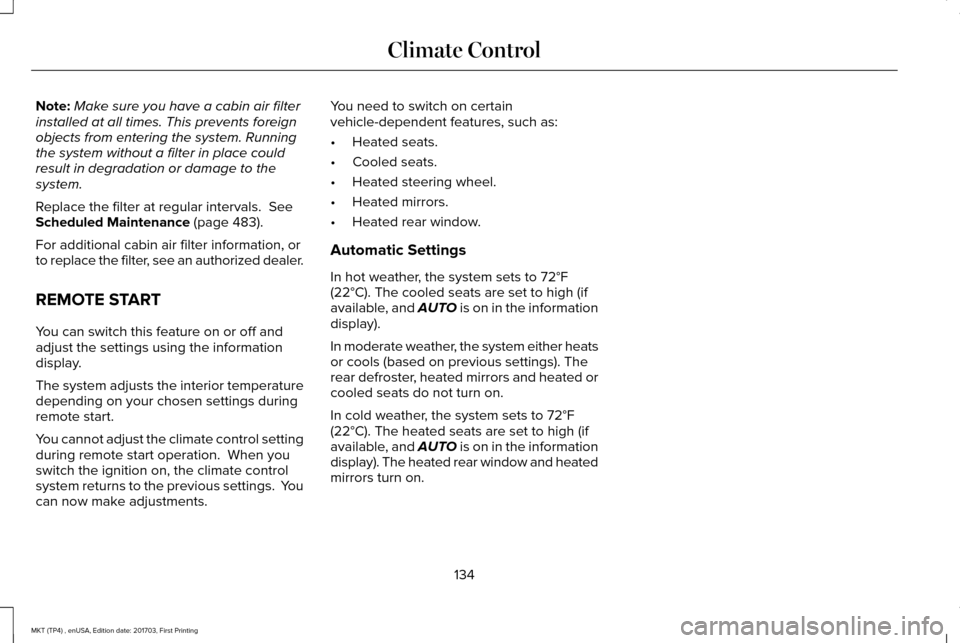
REMOTE START
You can switch this feature on or off and
adjust the settings using the information
display.
The system adjusts the interior temperature
depending on your chosen settings during
remote start.
You cannot adjust the climate control setting
during remote start operation. When you
switch the ignition on, the climate control
system returns to the previous settings. You
can now make adjustments. You need to switch on certain
vehicle-dependent features, such as:
•
Heated seats.
• Cooled seats.
• Heated steering wheel.
• Heated mirrors.
• Heated rear window.
Automatic Settings
In hot weather, the system sets to
72°F
(22°C). The cooled seats are set to high (if
available, and AUTO is on in the information
display).
In moderate weather, the system either heats
or cools (based on previous settings). The
rear defroster, heated mirrors and heated or
cooled seats do not turn on.
In cold weather, the system sets to
72°F
(22°C). The heated seats are set to high (if
available, and AUTO is on in the information
display). The heated rear window and heated
mirrors turn on.
134
MKT (TP4) , enUSA, Edition date: 201703, First Printing Climate Control
Page 144 of 564
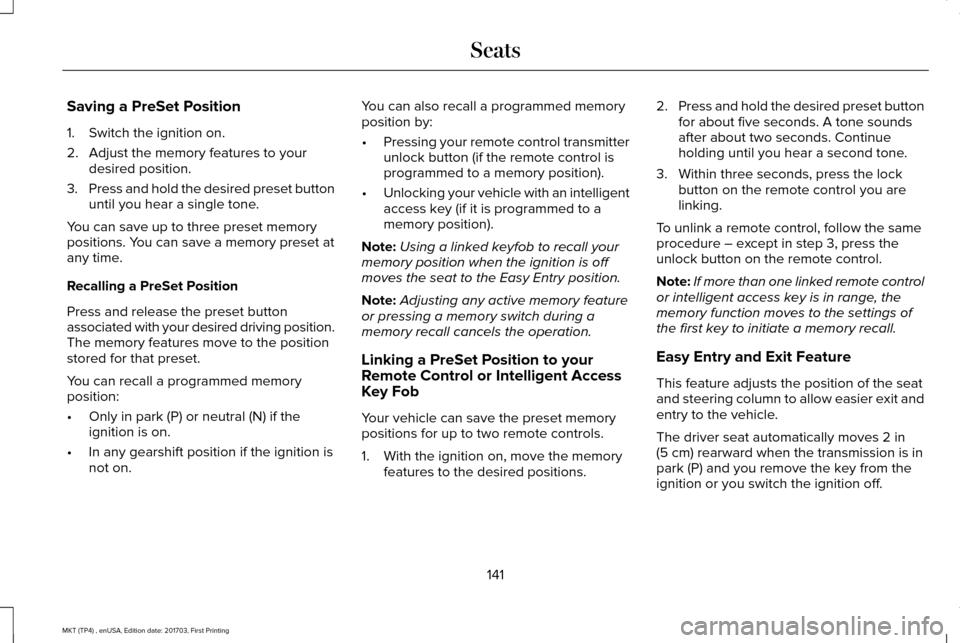
Saving a PreSet Position
1. Switch the ignition on.
2. Adjust the memory features to your
desired position.
3. Press and hold the desired preset button
until you hear a single tone.
You can save up to three preset memory
positions. You can save a memory preset at
any time.
Recalling a PreSet Position
Press and release the preset button
associated with your desired driving position.
The memory features move to the position
stored for that preset.
You can recall a programmed memory
position:
• Only in park (P) or neutral (N) if the
ignition is on.
• In any gearshift position if the ignition is
not on. You can also recall a programmed memory
position by:
•
Pressing your remote control transmitter
unlock button (if the remote control is
programmed to a memory position).
• Unlocking your vehicle with an intelligent
access key (if it is programmed to a
memory position).
Note: Using a linked keyfob to recall your
memory position when the ignition is off
moves the seat to the Easy Entry position.
Note: Adjusting any active memory feature
or pressing a memory switch during a
memory recall cancels the operation.
Linking a PreSet Position to your
Remote Control or Intelligent Access
Key Fob
Your vehicle can save the preset memory
positions for up to two remote controls.
1. With the ignition on, move the memory features to the desired positions. 2.
Press and hold the desired preset button
for about five seconds. A tone sounds
after about two seconds. Continue
holding until you hear a second tone.
3. Within three seconds, press the lock button on the remote control you are
linking.
To unlink a remote control, follow the same
procedure – except in step 3, press the
unlock button on the remote control.
Note: If more than one linked remote control
or intelligent access key is in range, the
memory function moves to the settings of
the first key to initiate a memory recall.
Easy Entry and Exit Feature
This feature adjusts the position of the seat
and steering column to allow easier exit and
entry to the vehicle.
The driver seat automatically moves 2 in
(5 cm) rearward when the transmission is in
park (P) and you remove the key from the
ignition or you switch the ignition off.
141
MKT (TP4) , enUSA, Edition date: 201703, First Printing Seats
Page 157 of 564
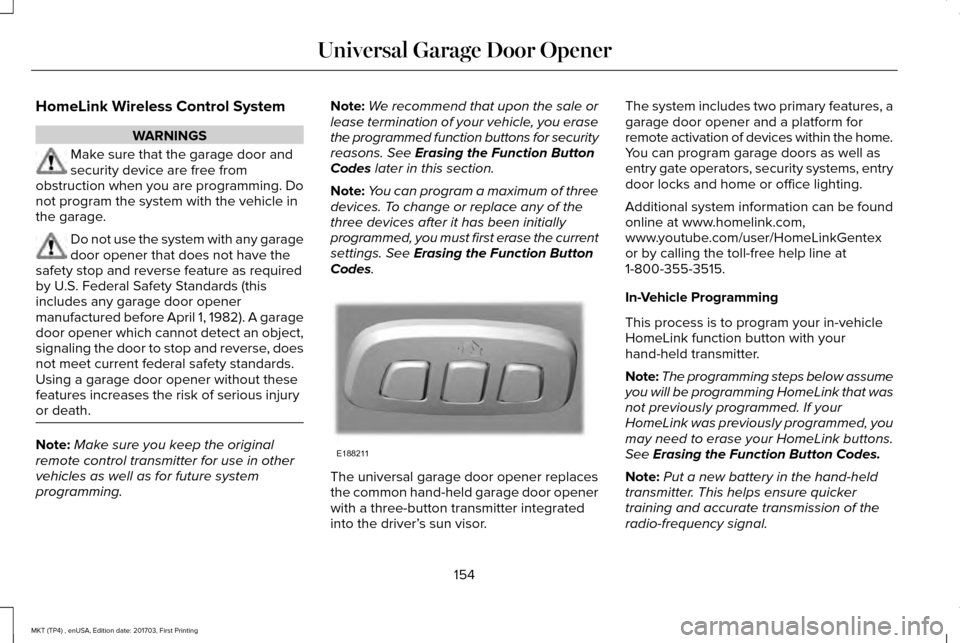
HomeLink Wireless Control System
WARNINGS
Make sure that the garage door and
security device are free from
obstruction when you are programming. Do
not program the system with the vehicle in
the garage. Do not use the system with any garage
door opener that does not have the
safety stop and reverse feature as required
by U.S. Federal Safety Standards (this
includes any garage door opener
manufactured before April 1, 1982). A garage
door opener which cannot detect an object,
signaling the door to stop and reverse, does
not meet current federal safety standards.
Using a garage door opener without these
features increases the risk of serious injury
or death. Note:
Make sure you keep the original
remote control transmitter for use in other
vehicles as well as for future system
programming. Note:
We recommend that upon the sale or
lease termination of your vehicle, you erase
the programmed function buttons for security
reasons. See Erasing the Function Button
Codes later in this section.
Note: You can program a maximum of three
devices. To change or replace any of the
three devices after it has been initially
programmed, you must first erase the current
settings. See
Erasing the Function Button
Codes. The universal garage door opener replaces
the common hand-held garage door opener
with a three-button transmitter integrated
into the driver’
s sun visor. The system includes two primary features, a
garage door opener and a platform for
remote activation of devices within the home.
You can program garage doors as well as
entry gate operators, security systems, entry
door locks and home or office lighting.
Additional system information can be found
online at www.homelink.com,
www.youtube.com/user/HomeLinkGentex
or by calling the toll-free help line at
1-800-355-3515.
In-Vehicle Programming
This process is to program your in-vehicle
HomeLink function button with your
hand-held transmitter.
Note:
The programming steps below assume
you will be programming HomeLink that was
not previously programmed. If your
HomeLink was previously programmed, you
may need to erase your HomeLink buttons.
See
Erasing the Function Button Codes.
Note: Put a new battery in the hand-held
transmitter. This helps ensure quicker
training and accurate transmission of the
radio-frequency signal.
154
MKT (TP4) , enUSA, Edition date: 201703, First Printing Universal Garage Door OpenerE188211
Page 218 of 564
Action
Cause
Do not use the system in these conditions because it may not detect
any vehicles ahead.
Water, snow or ice on the surface of the road may interfere with the
radar signals.
Wait a short time or switch to normal cruise control.
You are in a desert or remote area with no other vehicles and no
roadside objects.
Due to the nature of radar technology, it is possible to get a blockage warning with no actual block. This ha\
ppens, for example, when driving
in sparse rural or desert environments. A false blocked condition either self clears, or clears after you restart your vehicl\
e.
Switching to Normal Cruise Control WARNING
Normal cruise control will not brake
when your vehicle is approaching
slower vehicles. Always be aware of which
mode you have selected and apply the
brakes when necessary. You can change from adaptive cruise control
to normal cruise control through the
information display. The cruise control indicator light
replaces the adaptive cruise
control indicator light if you select
normal cruise control. The gap setting does
not display, and the system does not respond
to lead vehicles. Automatic braking remains
active to maintain set speed.
215
MKT (TP4) , enUSA, Edition date: 201703, First Printing Cruise ControlE71340
Page 260 of 564
3. Once the disabled vehicle has been
started, run both vehicle engines for an
additional three minutes before
disconnecting the jumper cables.
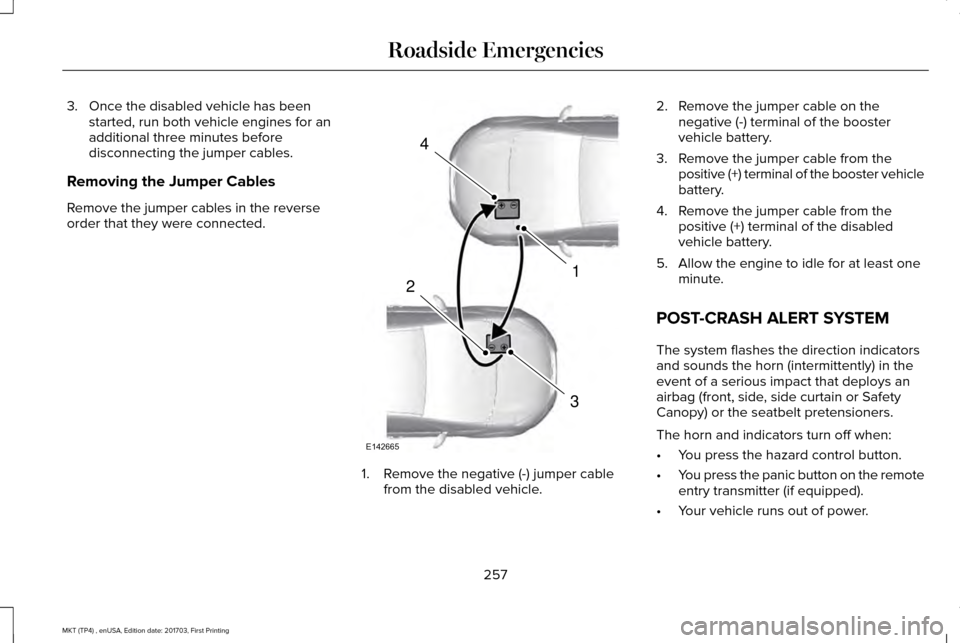
Removing the Jumper Cables
Remove the jumper cables in the reverse
order that they were connected. 1. Remove the negative (-) jumper cable
from the disabled vehicle. 2. Remove the jumper cable on the
negative (-) terminal of the booster
vehicle battery.
3. Remove the jumper cable from the positive (+) terminal of the booster vehicle
battery.
4. Remove the jumper cable from the positive (+) terminal of the disabled
vehicle battery.
5. Allow the engine to idle for at least one minute.
POST-CRASH ALERT SYSTEM
The system flashes the direction indicators
and sounds the horn (intermittently) in the
event of a serious impact that deploys an
airbag (front, side, side curtain or Safety
Canopy) or the seatbelt pretensioners.
The horn and indicators turn off when:
• You press the hazard control button.
• You press the panic button on the remote
entry transmitter (if equipped).
• Your vehicle runs out of power.
257
MKT (TP4) , enUSA, Edition date: 201703, First Printing Roadside Emergencies4
1
3
2
E142665
Page 559 of 564
Transmission.........................................................128
Installing Child Restraints.............................20 Child Seats.............................................................20
Using Lap and Shoulder Belts...........................20
Using Lower Anchors and Tethers for
CHildren (LATCH).............................................26
Using Tether Straps..............................................28
Instrument Cluster.........................................104
Instrument Lighting Dimmer........................92
Instrument Panel Overview...........................16
Interior Lamps
..................................................96
Third Row Dome Lamps......................................96
Interior Mirror
..................................................101
Auto-Dimming Mirror...........................................101
Second Row Illuminated Vanity Mirror...........
101
Introduction
.........................................................7
J
Jump Starting the Vehicle..........................255 Connecting the Jumper Cables.....................256
Jump Starting......................................................256
Preparing Your Vehicle.....................................255
Removing the Jumper Cables.........................
257 K
Keyless Entry
....................................................75
SECURICODE™ Keyless Entry Keypad.............75
Keyless Starting
.............................................162
Ignition Modes.....................................................162
Keys and Remote Controls..........................60
L
Lane Keeping System..................................218 Switching the System On and Off...................218
Liftgate...............................................................78
Lighting Control..............................................90 Headlamp Flasher.................................................91
High Beams.............................................................91
Lighting.............................................................90 General Information.............................................90
Lincoln Automotive Financial Services......12
Lincoln Protect..............................................480 Lincoln Protect (CANADA ONLY).....................481
Lincoln Protect Extended Service Plans (U.S.
Only)..................................................................480
Load Carrying
................................................235
Load Limit.......................................................236 Special Loading Instructions for Owners of
Pick-up Trucks and Utility-type
Vehicles............................................................240 Vehicle Loading - with and without a
Trailer................................................................236
Locking and Unlocking..................................72 Activating Intelligent Access..............................
73
Autolock..................................................................74
Autounlock..............................................................74
Battery Saver..........................................................75
Enabling or Disabling Autolock and Autounlock.........................................................74
Illuminated Entry....................................................75
Illuminated Exit......................................................75
Locking and Unlocking the Doors with the Key Blade............................................................72
Opening a Rear Door From the Inside............73
Power Door Locks................................................72
Remote Control.....................................................72
Smart Unlocks for Intelligent Access Keys......................................................................73
Luggage Covers
...........................................235
Lug Nuts See: Changing a Road Wheel.........................340
M
Maintenance..................................................286 General Information...........................................286
Memory Function
..........................................140
Easy Entry and Exit Feature...............................141
556
MKT (TP4) , enUSA, Edition date: 201703, First Printing Index
Page 560 of 564
Linking a PreSet Position to your Remote
Control or Intelligent Access Key Fob .......141
Saving a PreSet Position....................................141
Message Center See: Information Displays.................................109
Mirrors See: Heated Windows and Mirrors.................133
See: Windows and Mirrors.................................98
Mobile Communications Equipment
...........14
Moonroof.........................................................102 Closing the Moonroof and Sunshades..........103
Opening the Sunshade and Moonroof.........102
Venting the Moonroof........................................103
Motorcraft Parts - 3.5L Ecoboost™...........352
Motorcraft Parts - 3.7L
.................................353
MyKey Troubleshooting................................70
MyKey™..............................................................65 Principle of Operation.........................................65
N
Navigation......................................................429 cityseeker.............................................................438
Destination Mode...............................................430
Map Mode............................................................429
Navigation Map Updates..................................439
Navigation Menu................................................435
SiriusXM Traffic and Travel Link......................439 SYNC AppLink.....................................................438
Waypoints.............................................................437
Normal Scheduled Maintenance..............487 Intelligent Oil-Life Monitor™..............................
487
Normal Maintenance Intervals........................488
O
Oil Change Indicator Reset
.......................292
Oil Check See: Engine Oil Check.......................................291
Opening and Closing the Hood...............287 Closing the Hood...............................................287
Opening the Hood.............................................287
Ordering Additional Owner's Literature.....................................................265
Obtaining a French Owner’ s Manual............265
Overhead Console
.........................................161
P
Parking Aids....................................................197 Principle of Operation........................................197
Parking Brake
.................................................192
Passive Anti-Theft System.............................81 SecuriLock®.............................................................81
PATS See: Passive Anti-Theft System.........................
81 Pedals................................................................87
Perchlorate........................................................12
Personal Safety System
™
..............................49
How Does the Personal Safety System
Work?...................................................................49
Phone...............................................................421 During a Phone Call...........................................426
Making Calls........................................................425
Pairing Your Cell Phone for the First
Time....................................................................421
Phone Menu........................................................422
Receiving Calls....................................................426
Smartphone Connectivity.................................428
Text Messaging...................................................427
Post-Crash Alert System.............................257
Power Door Locks See: Locking and Unlocking..............................
72
Power Liftgate..................................................78 Obstacle Detection..............................................80
Opening and Closing the Liftgate....................78
Setting the Liftgate Open Height.....................80
Stopping the Liftgate Movement......................
80
Power Seats....................................................138 Four Way Power Lumbar...................................
140
Power Lumbar (Limo/Livery).............................140
Power Steering Fluid Check.....................300
Power Windows
..............................................98
Accessory Delay...................................................99
557
MKT (TP4) , enUSA, Edition date: 201703, First Printing Index
Page 561 of 564
Bounce-Back..........................................................98
One-Touch Down..................................................98
One-Touch Up.......................................................98
Window Lock.........................................................98
Protecting the Environment..........................15
R
Rear Parking Aid
............................................197
Rear Passenger Climate Controls.............132
Rear Seats.......................................................142
Adjusting the Rear Seats...................................142
Rear Under Floor Storage..........................235
Rear View Camera.......................................204 Using the Rear View Camera System...........204
Rear View Camera See: Rear View Camera...................................204
Rear Window Wiper and Washers..............89 Rear Camera Washer...........................................89
Rear Window Washer..........................................89
Rear Window Wiper Blade.................................89
Recommended Towing Weights
..............242
Refueling...........................................................171 System Warnings.................................................173
Remote Control
................................................61
Car Finder...............................................................62
Intelligent Access Key..........................................61
Memory Feature....................................................64 Remote Start..........................................................62
Replacing the Battery...........................................61
Sounding the Panic Alarm..................................
62
Remote Start
...................................................134
Automatic Settings..............................................134
Removing a Headlamp
...............................305
Repairing Minor Paint Damage..................316
Replacement Parts Recommendation........12 Collision Repairs.....................................................13
Scheduled Maintenance and Mechanical
Repairs.................................................................12
Warranty on Replacement Parts.........................
13
Replacing a Lost Key or Remote Control............................................................64
Reporting Safety Defects (Canada Only)..............................................................266
Reporting Safety Defects (U.S. Only)......265
Roadside Assistance
...................................253
Vehicles Sold in Canada: Getting Roadside
Assistance.......................................................254
Vehicles Sold in Canada: Roadside Assistance Program Coverage........................................254
Vehicles Sold in Canada: Using Roadside Assistance.......................................................254
Vehicles Sold in the United States: Getting Roadside Assistance.....................................253
Vehicles Sold in the United States: Using Roadside Assistance.....................................253 Roadside Emergencies...............................253
Running-In
See: Breaking-In.................................................250
Running Out of Fuel
.....................................169
Adding Fuel From a Portable Fuel
Container..........................................................170
Filling a Portable Fuel Container.....................
170
S
Safety Canopy™
...............................................56
Safety Precautions........................................168
Scheduled Maintenance Record..............495
Scheduled Maintenance
............................483
Seatbelt Extension.........................................48
Seatbelt Height Adjustment.........................44
Seatbelt Reminder..........................................45 Belt-Minder™...........................................................45
Seatbelts...........................................................38 Principle of Operation..........................................38
Seatbelt Warning Lamp and Indicator Chime..............................................................44
Conditions of operation......................................45
Seats.................................................................135
Security ...............................................................
81
Settings...........................................................443 911 Assist................................................................451
Ambient Lighting................................................459
558
MKT (TP4) , enUSA, Edition date: 201703, First Printing Index