change time LINCOLN MKT 2018 Owner's Guide
[x] Cancel search | Manufacturer: LINCOLN, Model Year: 2018, Model line: MKT, Model: LINCOLN MKT 2018Pages: 564, PDF Size: 4.66 MB
Page 449 of 564
Clock
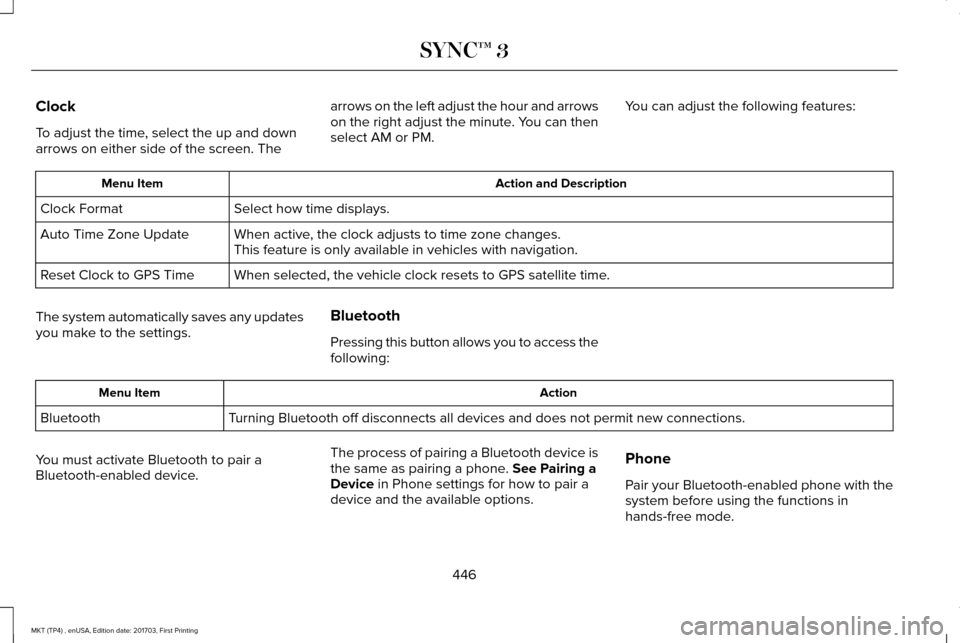
To adjust the time, select the up and down
arrows on either side of the screen. The
arrows on the left adjust the hour and arrows
on the right adjust the minute. You can then
select AM or PM.
You can adjust the following features: Action and Description
Menu Item
Select how time displays.
Clock Format
When active, the clock adjusts to time zone changes.
Auto Time Zone Update
This feature is only available in vehicles with navigation.
When selected, the vehicle clock resets to GPS satellite time.
Reset Clock to GPS Time
The system automatically saves any updates
you make to the settings. Bluetooth
Pressing this button allows you to access the
following: Action
Menu Item
Turning Bluetooth off disconnects all devices and does not permit new con\
nections.
Bluetooth
You must activate Bluetooth to pair a
Bluetooth-enabled device. The process of pairing a Bluetooth device is
the same as pairing a phone. See Pairing a
Device in Phone settings for how to pair a
device and the available options. Phone
Pair your Bluetooth-enabled phone with the
system before using the functions in
hands-free mode.
446
MKT (TP4) , enUSA, Edition date: 201703, First Printing SYNC™ 3
Page 487 of 564
Your vehicle is equipped with the Intelligent
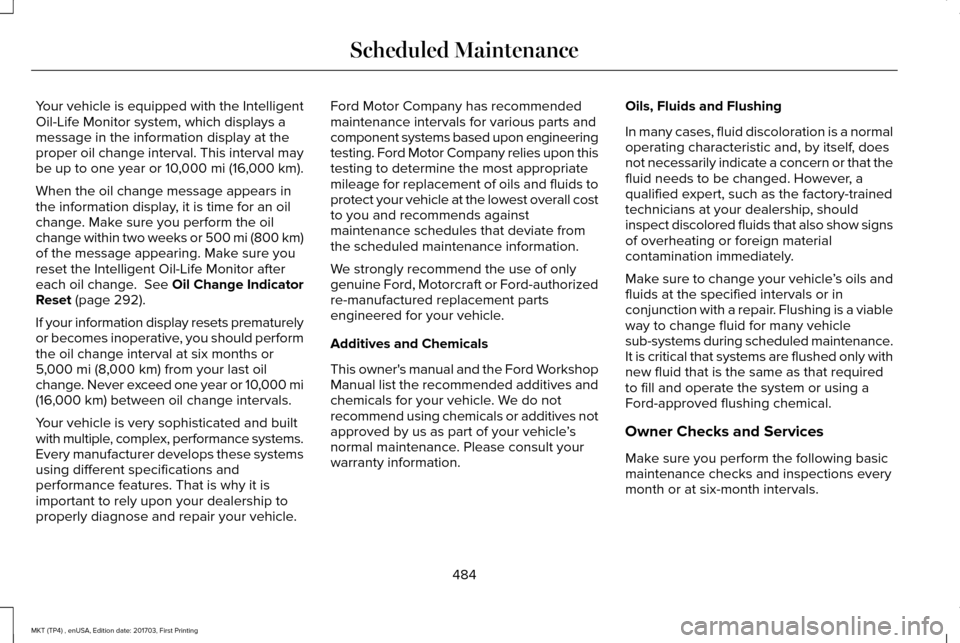
Oil-Life Monitor system, which displays a
message in the information display at the
proper oil change interval. This interval may
be up to one year or 10,000 mi (16,000 km).
When the oil change message appears in
the information display, it is time for an oil
change. Make sure you perform the oil
change within two weeks or 500 mi (800 km)
of the message appearing. Make sure you
reset the Intelligent Oil-Life Monitor after
each oil change. See Oil Change Indicator
Reset
(page 292).
If your information display resets prematurely
or becomes inoperative, you should perform
the oil change interval at six months or
5,000 mi (8,000 km)
from your last oil
change. Never exceed one year or 10,000 mi
(16,000 km)
between oil change intervals.
Your vehicle is very sophisticated and built
with multiple, complex, performance systems.
Every manufacturer develops these systems
using different specifications and
performance features. That is why it is
important to rely upon your dealership to
properly diagnose and repair your vehicle. Ford Motor Company has recommended
maintenance intervals for various parts and
component systems based upon engineering
testing. Ford Motor Company relies upon this
testing to determine the most appropriate
mileage for replacement of oils and fluids to
protect your vehicle at the lowest overall cost
to you and recommends against
maintenance schedules that deviate from
the scheduled maintenance information.
We strongly recommend the use of only
genuine Ford, Motorcraft or Ford-authorized
re-manufactured replacement parts
engineered for your vehicle.
Additives and Chemicals
This owner's manual and the Ford Workshop
Manual list the recommended additives and
chemicals for your vehicle. We do not
recommend using chemicals or additives not
approved by us as part of your vehicle
’s
normal maintenance. Please consult your
warranty information. Oils, Fluids and Flushing
In many cases, fluid discoloration is a normal
operating characteristic and, by itself, does
not necessarily indicate a concern or that the
fluid needs to be changed. However, a
qualified expert, such as the factory-trained
technicians at your dealership, should
inspect discolored fluids that also show signs
of overheating or foreign material
contamination immediately.
Make sure to change your vehicle
’s oils and
fluids at the specified intervals or in
conjunction with a repair. Flushing is a viable
way to change fluid for many vehicle
sub-systems during scheduled maintenance.
It is critical that systems are flushed only with
new fluid that is the same as that required
to fill and operate the system or using a
Ford-approved flushing chemical.
Owner Checks and Services
Make sure you perform the following basic
maintenance checks and inspections every
month or at six-month intervals.
484
MKT (TP4) , enUSA, Edition date: 201703, First Printing Scheduled Maintenance
Page 490 of 564
Be sure to ask your dealership service
advisor or technician about the multi-point
vehicle inspection. It is a comprehensive way
to perform a thorough inspection of your
vehicle. Your checklist gives you immediate
feedback on the overall condition of your
vehicle.
NORMAL SCHEDULED
MAINTENANCE
Intelligent Oil-Life Monitor™
Your vehicle is equipped with an Intelligent
Oil-Life Monitor that determines when you
should change the engine oil based on how
your vehicle is used. By using several
important factors in its calculations, the
monitor helps reduce the cost of owning your
vehicle and reduces environmental waste at
the same time.This means you do not have to remember to
change the oil on a mileage-based schedule.
Your vehicle lets you know when an oil
change is due by displaying a message in
the information display.
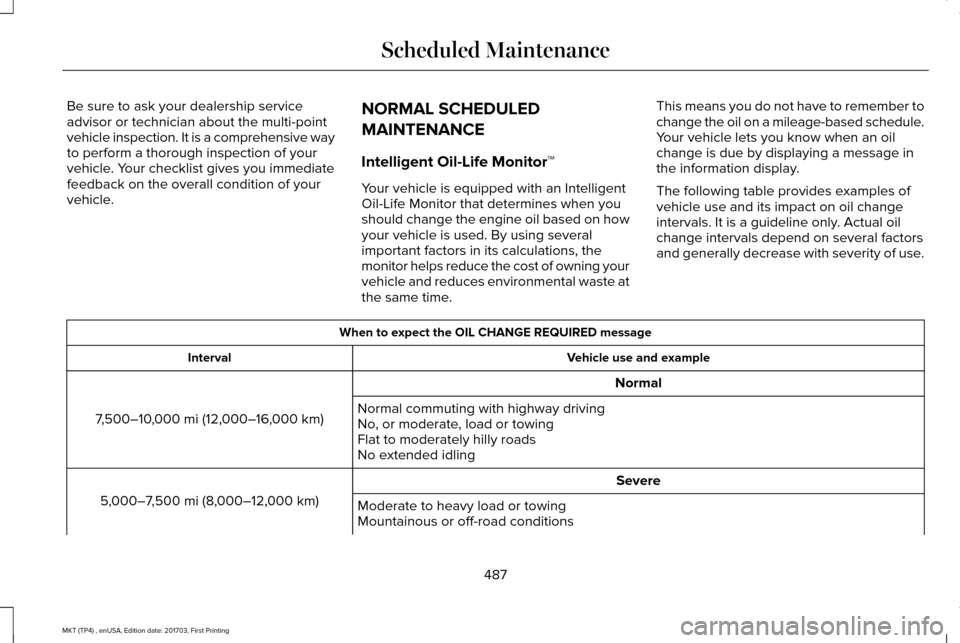
The following table provides examples of
vehicle use and its impact on oil change
intervals. It is a guideline only. Actual oil
change intervals depend on several factors
and generally decrease with severity of use. When to expect the OIL CHANGE REQUIRED message
Vehicle use and example
Interval
Normal
7,500–10,000 mi (12,000–16,000 km) Normal commuting with highway driving
No, or moderate, load or towing
Flat to moderately hilly roads
No extended idling
Severe
5,000–7,500 mi (8,000–12,000 km) Moderate to heavy load or towing
Mountainous or off-road conditions
487
MKT (TP4) , enUSA, Edition date: 201703, First Printing Scheduled Maintenance
Page 551 of 564
Gracenote uses a unique identifier to track
queries for statistical purposes. The purpose
of a randomly assigned numeric identifier is
to allow Gracenote to count queries without
knowing anything about who you are. For
more information, see the web page at
www.gracenote.com for the Gracenote
Privacy Policy.
THE GRACENOTE SOFTWARE, EACH ITEM
OF GRACENOTE DATA AND THE
GRACENOTE CONTENT ARE LICENSED TO
YOU "AS IS". NEITHER GRACENOTE MAKES
ANY REPRESENTATIONS OR WARRANTIES,
EXPRESS OR IMPLIED, REGARDING THE
ACCURACY OF ANY GRACENOTE DATA
FROM THE GRACENOTE SERVERS OR
GRACENOTE CONTENT. GRACENOTE
COLLECTIVELY AND SEPARATELY RESERVE
THE RIGHT TO DELETE DATA AND/OR
CONTENT FROM THE COMPANIES'
RESPECTIVE SERVERS OR, IN THE CASE OF
GRACENOTE, CHANGE DATA CATEGORIES
FOR ANY CAUSE THAT GRACENOTE
DEEMS SUFFICIENT. NO WARRANTY IS
MADE THAT EITHER GRACENOTE
CONTENT OR THE GRACENOTE SOFTWARE
OR GRACENOTE SERVERS ARE
ERROR-FREE OR THAT THE FUNCTIONING
OF THE GRACENOTE SOFTWARE OR
GRACENOTE SERVERS WILL BE
UNINTERRUPTED. GRACENOTE IS NOT
OBLIGATED TO PROVIDE YOU WITH ANY
ENHANCED OR ADDITIONAL DATA TYPES
THAT GRACENOTE MAY CHOOSE TO
PROVIDE IN THE FUTURE AND IS FREE TO
DISCONTINUE ITS ONLINE SERVICES AT
ANY TIME. GRACENOTE DISCLAIM ALL
WARRANTIES EXPRESS OR IMPLIED,
INCLUDING, BUT NOT LIMITED TO, IMPLIED
WARRANTIES OF MERCHANTABILITY,
FITNESS FOR A PARTICULAR PURPOSE,
TITLE, AND NON-INFRINGEMENT. NEITHER
GRACENOTE WARRANTS THE RESULTS
THAT WILL BE OBTAINED BY YOUR USE
OF THE GRACENOTE SOFTWARE OR ANY
GRACENOTE SERVER. IN NO CASE WILL
GRACENOTE BE LIABLE FOR ANY
CONSEQUENTIAL OR INCIDENTAL
DAMAGES OR FOR ANY LOST PROFITS OR
LOST REVENUES FOR ANY REASON
WHATSOEVER. © Gracenote 2007.
Radio Frequency Statement
FCC ID: ACJ-SYNCG3-L
IC: 216B-SYNCG3-L
This device complies with Part 15 of the FCC
Rules and with RSS-210 of Industry Canada.
Operation is subject to the following two
conditions:
(1) This device may not cause harmful
interference, and
(2)
this device must accept any interference
received, including interference that may
cause undesired operation.
Note: Changes or modifications not
expressly approved by the party responsible
for compliance could void the user's
authority to operate the equipment. The term
"IC" before the radio certification number
only signifies that Industry Canada technical
specifications were met.
The antenna used for this transmitter must
not be co-located or operating in conjunction
with any other antenna or transmitter.
Taiwan Territory
Note: In accordance with the management
approach of low-power radio wave radiation
motors:
548
MKT (TP4) , enUSA, Edition date: 201703, First Printing Appendices
Page 553 of 564
SUNA Products and/or Services are intended
as an aid to personal motoring and travel
planning, and do not provide comprehensive
or accurate information on all occasions. On
occasions, you may experience additional
delay as a result of using SUNA Products
and/or Services. You acknowledge that it is
not intended, or suitable, for use in
applications where time of arrival or driving
directions may impact the safety of the public
or yourself.
4. Use of SUNA Products and Services
while driving
You, and other authorised drivers of the
vehicle in which SUNA Products and/or
Services are available or installed and active,
remain at all times responsible for observing
all relevant laws and codes of safe driving.
In particular, you agree to only actively
operate SUNA Products and/or Services
when the Vehicle is at a complete stop and
it is safe to do so.
5. Service Continuity and Reception of the
SUNA Traffic Channel
We will use reasonable endeavours to
provide the SUNA Traffic Channel 24 hours
a day, 365 days a year. The SUNA Traffic
Channel may occasionally be unavailable for
technical reasons or for planned
maintenance. We will try to perform
maintenance at times when congestion is
light. We reserve the right to withdraw SUNA
Products and/or Services at any time.
Also, we cannot assure the uninterrupted
reception of the SUNA Traffic Channel
RDS-TMC signal at any particular location.
6. Limitation of Liability
Neither Intelematics (nor its suppliers or the
manufacturer of your device (the
“Suppliers”)) shall be liable to you or to any
third party for any damages either direct,
indirect, incidental, consequential or
otherwise arising out of the use of or inability
to use SUNA Products and/or Services even
if Intelematics or a Supplier has been advised
of the possibility of such damages. You also
acknowledge that the neither Intelematics
nor any Supplier guarantees nor make any
warranties that relate to the availability,
accuracy or completeness of SUNA Products and/or Services, and to the extent which it
is lawful to do so, both Intelematics and each
Supplier excludes any warranties which
might otherwise be implied by any State or
Federal legislation in relation to SUNA
Products and/or Services.
7. Please Note
Great care has been taken in preparing this
manual. Constant product development may
mean that some information is not entirely
up-to-date. The information in this document
is subject to change without notice.
WARNING
Driving while distracted can result in
loss of vehicle control, crash and injury.
We strongly recommend that you use
extreme caution when using any device that
may take your focus off the road. Your
primary responsibility is the safe operation
of your vehicle. We recommend against the
use of any hand-held device while driving
and encourage the use of voice-operated
systems when possible. Make sure you are
aware of all applicable local laws that may
affect the use of electronic devices while
driving. 550
MKT (TP4) , enUSA, Edition date: 201703, First Printing Appendices
Page 556 of 564
Underbody............................................................312
Under Hood..........................................................312
Cleaning the Instrument Panel and Instrument Cluster Lens............................315
Cleaning the Interior.....................................313
Cleaning Black Label or Presidential
Interior................................................................314
Cleaning the Wheels
....................................316
Cleaning the Windows and Wiper Blades............................................................313
Clearing All MyKeys
.......................................67
Climate.............................................................417
Climate Control
..............................................129
Climate Controlled Seats............................152 Cooled Seats........................................................152
Heated Seats........................................................152
Collision Warning System..........................230 PRINCIPLE OF OPERATION............................230
Coolant Check See: Engine Coolant Check............................
293
Crash Sensors and Airbag Indicator
..........57
Creating a MyKey...........................................66 Programming/Changing Configurable
Settings...............................................................66
Cross Traffic Alert.........................................226 False Alerts..........................................................229
Switching the System Off and On..................229
System Errors......................................................229 System Lights, Messages and Audible
Alerts.................................................................228
System Limitations.............................................228
Using the System...............................................226
Cruise Control
.................................................85
Principle of Operation.......................................208
Type One................................................................85
Type Two.................................................................86
Cruise control See: Using Cruise Control...............................208
Customer Assistance
..................................259
D
Data Recording
..................................................9
Event Data Recording...........................................10
Service Data Recording.........................................9
Daytime Running Lamps...............................93
Direction Indicators
........................................96
Doors and Locks.............................................72
Drive Control
.................................................233
LINCOLN DRIVE CONTROL............................233
Driver Alert......................................................216 Using Driver Alert................................................217
Driver and Passenger Airbags.....................51 Children and Airbags...........................................52
Proper Driver and Front Passenger Seating
Adjustment.........................................................52 Driving Aids
....................................................216
Driving Hints..................................................250
Driving Through Water...............................250
DRL See: Daytime Running Lamps...........................93
E
Economical Driving
......................................250
Electromagnetic Compatibility...................515
Emission Law..................................................175
Noise Emissions Warranty, Prohibited
Tampering Acts and Maintenance..............176
Tampering With a Noise Control System......175
End User License Agreement..................520 VEHICLE SOFTWARE END USER LICENSE
AGREEMENT (EULA) ....................................
520
Engine Block Heater....................................166 Using the Engine Block Heater.......................167
Engine Coolant Check
................................293
Adding Coolant...................................................294
Coolant Change.................................................296
Engine Coolant Temperature
Management...................................................297
Fail-Safe Cooling................................................296
Recycled Coolant...............................................295
Severe Climates.................................................295
Engine Emission Control.............................175
553
MKT (TP4) , enUSA, Edition date: 201703, First Printing Index
Page 560 of 564
Linking a PreSet Position to your Remote
Control or Intelligent Access Key Fob .......141
Saving a PreSet Position....................................141
Message Center See: Information Displays.................................109
Mirrors See: Heated Windows and Mirrors.................133
See: Windows and Mirrors.................................98
Mobile Communications Equipment
...........14
Moonroof.........................................................102 Closing the Moonroof and Sunshades..........103
Opening the Sunshade and Moonroof.........102
Venting the Moonroof........................................103
Motorcraft Parts - 3.5L Ecoboost™...........352
Motorcraft Parts - 3.7L
.................................353
MyKey Troubleshooting................................70
MyKey™..............................................................65 Principle of Operation.........................................65
N
Navigation......................................................429 cityseeker.............................................................438
Destination Mode...............................................430
Map Mode............................................................429
Navigation Map Updates..................................439
Navigation Menu................................................435
SiriusXM Traffic and Travel Link......................439 SYNC AppLink.....................................................438
Waypoints.............................................................437
Normal Scheduled Maintenance..............487 Intelligent Oil-Life Monitor™..............................
487
Normal Maintenance Intervals........................488
O
Oil Change Indicator Reset
.......................292
Oil Check See: Engine Oil Check.......................................291
Opening and Closing the Hood...............287 Closing the Hood...............................................287
Opening the Hood.............................................287
Ordering Additional Owner's Literature.....................................................265
Obtaining a French Owner’ s Manual............265
Overhead Console
.........................................161
P
Parking Aids....................................................197 Principle of Operation........................................197
Parking Brake
.................................................192
Passive Anti-Theft System.............................81 SecuriLock®.............................................................81
PATS See: Passive Anti-Theft System.........................
81 Pedals................................................................87
Perchlorate........................................................12
Personal Safety System
™
..............................49
How Does the Personal Safety System
Work?...................................................................49
Phone...............................................................421 During a Phone Call...........................................426
Making Calls........................................................425
Pairing Your Cell Phone for the First
Time....................................................................421
Phone Menu........................................................422
Receiving Calls....................................................426
Smartphone Connectivity.................................428
Text Messaging...................................................427
Post-Crash Alert System.............................257
Power Door Locks See: Locking and Unlocking..............................
72
Power Liftgate..................................................78 Obstacle Detection..............................................80
Opening and Closing the Liftgate....................78
Setting the Liftgate Open Height.....................80
Stopping the Liftgate Movement......................
80
Power Seats....................................................138 Four Way Power Lumbar...................................
140
Power Lumbar (Limo/Livery).............................140
Power Steering Fluid Check.....................300
Power Windows
..............................................98
Accessory Delay...................................................99
557
MKT (TP4) , enUSA, Edition date: 201703, First Printing Index