climate control LINCOLN MKT 2018 Owner's Guide
[x] Cancel search | Manufacturer: LINCOLN, Model Year: 2018, Model line: MKT, Model: LINCOLN MKT 2018Pages: 564, PDF Size: 4.66 MB
Page 406 of 564
Description
Voice command
The system does not confirm before placing a call.
Phone Confirmation Off
The system displays a short list of available commands.
Voice Command Lists On
The system does not display the list of commands.
Voice Command Lists Off
You can use the volume control to adjust the
volume of the system voice prompts. While
prompt is active, adjust the volume control
up or down to your desired setting. Note:
Depending on the current climate
control settings, the fan speed may
automatically go down while issuing voice
commands or while making and receiving
phone calls via SYNC to reduce the amount
of background noise in the vehicle. The fan
speed will automatically return to normal
operation once the voice session ends. Fan
speed can also be adjusted normally during
a voice session, simply press fan buttons (or
turn fan knob) to increase or decrease fan
speed to desired setting. To disable this automatic fan speed
reduction feature during voice sessions,
press and hold the climate control AC and
Recirculated air buttons simultaneously,
release and then increase fan speed within
2 seconds. To re-enable this feature, repeat
the above sequence.
403
MKT (TP4) , enUSA, Edition date: 201703, First Printing SYNC™ 3
Page 420 of 564
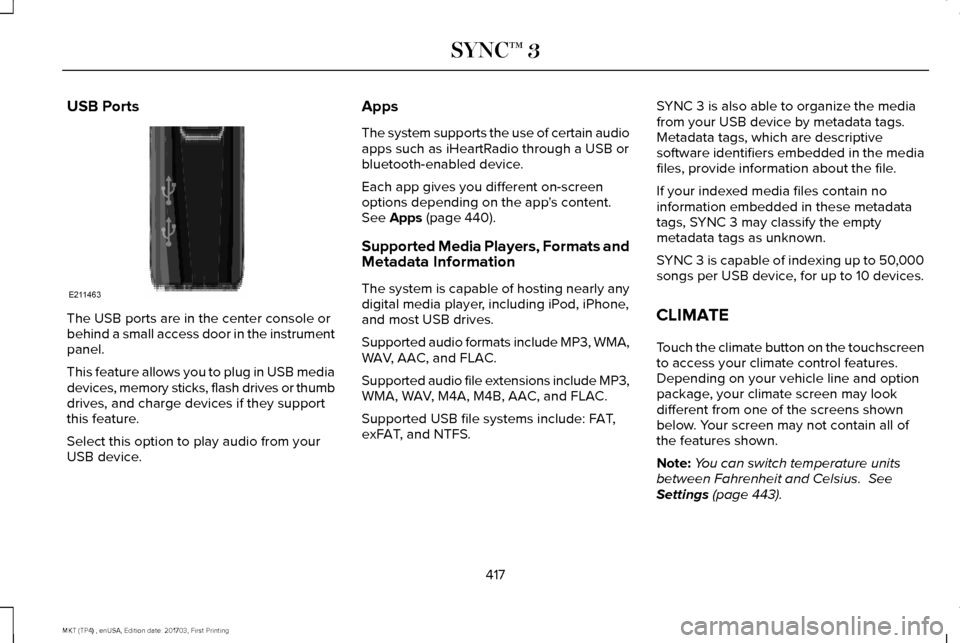
USB Ports
The USB ports are in the center console or
behind a small access door in the instrument
panel.
This feature allows you to plug in USB media
devices, memory sticks, flash drives or thumb
drives, and charge devices if they support
this feature.
Select this option to play audio from your
USB device. Apps
The system supports the use of certain audio
apps such as iHeartRadio through a USB or
bluetooth-enabled device.
Each app gives you different on-screen
options depending on the app's content.
See Apps (page 440).
Supported Media Players, Formats and
Metadata Information
The system is capable of hosting nearly any
digital media player, including iPod, iPhone,
and most USB drives.
Supported audio formats include MP3, WMA,
WAV, AAC, and FLAC.
Supported audio file extensions include MP3,
WMA, WAV, M4A, M4B, AAC, and FLAC.
Supported USB file systems include: FAT,
exFAT, and NTFS. SYNC 3 is also able to organize the media
from your USB device by metadata tags.
Metadata tags, which are descriptive
software identifiers embedded in the media
files, provide information about the file.
If your indexed media files contain no
information embedded in these metadata
tags, SYNC 3 may classify the empty
metadata tags as unknown.
SYNC 3 is capable of indexing up to 50,000
songs per USB device, for up to 10 devices.
CLIMATE
Touch the climate button on the touchscreen
to access your climate control features.
Depending on your vehicle line and option
package, your climate screen may look
different from one of the screens shown
below. Your screen may not contain all of
the features shown.
Note:
You can switch temperature units
between Fahrenheit and Celsius.
See
Settings (page 443).
417
MKT (TP4) , enUSA, Edition date: 201703, First Printing SYNC™ 3E211463
Page 422 of 564

Defrost: A pop up appears on the screen to display the defrost options.
C
MAX Defrost:
Touch the button to maximize defrosting. Outside air flows through the wi\
ndshield vents, the fan automatically adjusts
to the highest speed and the temperature dial returns to the full heat p\
osition. You can use this setting to defog or clear a thin
covering of ice from the windshield. The heated rear window also automat\
ically turns on when you select MAX Defrost.
Defrost:
Touch to clear the windshield of fog and thin ice. Touch again to return to the previous airflow selection. When on, defrost\
provides outside air to reduce window fogging and distributes air throug\
h the windshield defroster vents and demister vents.
Note:
To prevent window fogging, you cannot select recirculated air when Defros\
t is on.
Heated rear window: Turns the heated rear window on and off. See the Heated Windows and Mirrors chapter in your owner manual.
AUTO:
Touch the button to switch on automatic operation. Select the desired tem\
perature using the temperature control. The
system adjusts fan speed, air distribution, air conditioning operation, \
and selects outside air or recirculated air to heat or cool the
vehicle in order to maintain the desired temperature.
D
Power:
Touch the button to switch the system on and off. Switching off the climate control system prevents outside air from enteri\
ng
the vehicle.
E
DUAL:
This button lights up when the passenger controls are active. To switch the dual zone operation off and link the passenger
temperature to the driver temperature, touch the DUAL button to switch it off.
F
Passenger temperature:
Touch up or down to adjust the temperature.
G
Passenger heated and climate controlled seats:
H
Touch the heated seat icon to adjust the heated seat off and on (if equi\
pped).
Touch the climate-controlled seat icon to adjust the climate-controlled s\
eat off and on (if equipped).
Fan speed:
Touch up or down to increase or decrease the volume of air circulated in \
your vehicle.
I
Rear:
A pop up appears on the screen to display the rear control options.
J
419
MKT (TP4) , enUSA, Edition date: 201703, First Printing SYNC™ 3
Page 423 of 564

Touch the power icon to switch the rear climate control functions off and\
on.
Touch Rear Control to allow the rear seat passengers to adjust the rear climate settings. \
Touch it again to prevent the rear seat
passengers from adjusting the settings. Rear Control automatically turns off when you use the touchscreen to adjust the rear\
climate
settings.
If your vehicle has automatic climate controls, select
Auto to connect the rear climate settings to the Auto settings of the driver\
.
Touch the up and down arrows to adjust the temperature.
Manual airflow distribution controls:
Select these controls individually or together to direct the air flow t\
o the desired area.
K
Panel:
Distributes air through the instrument panel vents.
Floor:
Distributes air through the demister vents, floor vents and rear seat f\
loor vents.
A/C:
A pop-up appears on the screen to display the air conditioning options.\
L
MAX A/C:
Touch to cool your vehicle with recirculated air. Touch again for normal A/C operation. MAX A/C distributes air through
instrument panel vents and may help reduce odors from entering your vehi\
cle. MAX A/C is more economical and efficient than
normal A/C mode.
A/C:
Touch to switch the air conditioning on or off. Use A/C with recirculated air to improve cooling performance and effic\
iency.
A/C engages automatically in MAX A/C, defrost and footwell/defrost.
Recirculated air:
Touch to switch the recirculated air on or off which may reduce the amoun\
t of time needed to cool down the
interior and help reduce odors from reaching the interior. Recirculated air also engages automatically when you select MAX A/C.
You can engage this manually in any airflow mode except defrost. It may also turn off in all airflow modes except MAX A/C to reduce
fog potential.
Driver heated and climate controlled seats:
M
Touch the heated seat icon to adjust the heated seat off and on (if equi\
pped).
Touch the climate-controlled seat icon to adjust the climate-controlled s\
eat off and on (if equipped).
420
MKT (TP4) , enUSA, Edition date: 201703, First Printing SYNC™ 3
Page 554 of 564
A
A/C
See: Climate Control..........................................129
About This Manual............................................7
ABS See: Brakes............................................................191
ABS driving hints See: Hints on Driving With Anti-Lock
Brakes................................................................192
Accessories....................................................478 Exterior Style........................................................478
Interior Style.........................................................478
Lifestyle.................................................................478
Peace of Mind......................................................478
Accessories See: Replacement Parts Recommendation.....12
ACC See: Using Adaptive Cruise Control.............209
Active Park Assist..........................................198 Automatic Steering into Parking Space.......200
Deactivating the Park Assist Feature.............
201
Troubleshooting the System...........................202
Using Active Park Assist....................................199
Adaptive Headlamps
.....................................95
Adjusting the Headlamps...........................304 Horizontal Aim Adjustment..............................305
Vertical Aim Adjustment...................................
304 Adjusting the Pedals......................................87
Adjusting the Steering Wheel......................84
End of Travel Position..........................................84
AFS See: Adaptive Headlamps..................................95
Airbag Disposal
...............................................59
Air Conditioning See: Climate Control..........................................129
Air Filter See: Changing the Engine Air Filter..............309
Alarm See: Anti-Theft Alarm...........................................83
All-Wheel Drive..............................................183
Ambient Lighting
.............................................97
Anti-Theft Alarm..............................................83
Arming the Alarm..................................................83
Disarming the Alarm............................................83
Appendices.....................................................515
Apps
.................................................................440
........................................................................\
.........440
SiriusXM Traffic and Travel Link......................
442
At a Glance
........................................................16
Audible Warnings and Indicators..............108
Headlamps On Warning Chime.......................108
Keyless Warning Alert........................................108
Parking Brake On Warning Chime..................108
Audio Control
..................................................85
Seek, Next or Previous........................................85 Audio System
................................................370
General Information...........................................370
Audio Unit
........................................................371
Rear Seat Audio Controls.................................373
Autolamps ..........................................................
91
Windshield Wiper Activated Headlamps........92
Automatic Climate Control
.........................129
Automatic High Beam Control....................94
Switching the System On and Off....................94
Automatic Transmission...............................179 Automatic Transmission Adaptive
Learning............................................................182
Brake-Shift Interlock............................................181
If Your Vehicle Gets Stuck In Mud or Snow..................................................................182
SelectShift Automatic ™ Transmission.............180
Understanding the Positions of Your Automatic Transmission................................179
Automatic Transmission Fluid Check...........................................................298
Adding Transmission Fluid .............................299
Checking the Transmission Fluid Level........298
Autowipers.......................................................88
Auxiliary Power Points.................................158 110 Volt AC Power Point.....................................158
12 Volt DC Power Point......................................158
Locations...............................................................158
551
MKT (TP4) , enUSA, Edition date: 201703, First Printing Index
Page 556 of 564
Underbody............................................................312
Under Hood..........................................................312
Cleaning the Instrument Panel and Instrument Cluster Lens............................315
Cleaning the Interior.....................................313
Cleaning Black Label or Presidential
Interior................................................................314
Cleaning the Wheels
....................................316
Cleaning the Windows and Wiper Blades............................................................313
Clearing All MyKeys
.......................................67
Climate.............................................................417
Climate Control
..............................................129
Climate Controlled Seats............................152 Cooled Seats........................................................152
Heated Seats........................................................152
Collision Warning System..........................230 PRINCIPLE OF OPERATION............................230
Coolant Check See: Engine Coolant Check............................
293
Crash Sensors and Airbag Indicator
..........57
Creating a MyKey...........................................66 Programming/Changing Configurable
Settings...............................................................66
Cross Traffic Alert.........................................226 False Alerts..........................................................229
Switching the System Off and On..................229
System Errors......................................................229 System Lights, Messages and Audible
Alerts.................................................................228
System Limitations.............................................228
Using the System...............................................226
Cruise Control
.................................................85
Principle of Operation.......................................208
Type One................................................................85
Type Two.................................................................86
Cruise control See: Using Cruise Control...............................208
Customer Assistance
..................................259
D
Data Recording
..................................................9
Event Data Recording...........................................10
Service Data Recording.........................................9
Daytime Running Lamps...............................93
Direction Indicators
........................................96
Doors and Locks.............................................72
Drive Control
.................................................233
LINCOLN DRIVE CONTROL............................233
Driver Alert......................................................216 Using Driver Alert................................................217
Driver and Passenger Airbags.....................51 Children and Airbags...........................................52
Proper Driver and Front Passenger Seating
Adjustment.........................................................52 Driving Aids
....................................................216
Driving Hints..................................................250
Driving Through Water...............................250
DRL See: Daytime Running Lamps...........................93
E
Economical Driving
......................................250
Electromagnetic Compatibility...................515
Emission Law..................................................175
Noise Emissions Warranty, Prohibited
Tampering Acts and Maintenance..............176
Tampering With a Noise Control System......175
End User License Agreement..................520 VEHICLE SOFTWARE END USER LICENSE
AGREEMENT (EULA) ....................................
520
Engine Block Heater....................................166 Using the Engine Block Heater.......................167
Engine Coolant Check
................................293
Adding Coolant...................................................294
Coolant Change.................................................296
Engine Coolant Temperature
Management...................................................297
Fail-Safe Cooling................................................296
Recycled Coolant...............................................295
Severe Climates.................................................295
Engine Emission Control.............................175
553
MKT (TP4) , enUSA, Edition date: 201703, First Printing Index
Page 558 of 564
General Information on Radio
Frequencies..................................................60
Intelligent Access.................................................60
General Maintenance Information...........483 Multi-Point Inspection........................................486
Owner Checks and Services...........................484
Protecting Your Investment.............................483
Why Maintain Your Vehicle?............................483
Why Maintain Your Vehicle at Your
Dealership?......................................................483
Getting Assistance Outside the U.S. and Canada.........................................................263
Getting the Services You Need................259 Away From Home..............................................259
Global Opening and Closing.......................99 Closing the Windows...........................................99
Opening the Windows.........................................99
H
Handbrake See: Parking Brake.............................................192
Hazard Flashers............................................254
Headlamp Adjusting See: Adjusting the Headlamps.......................
304
Headlamp Exit Delay.....................................93
Headlamp Removal See: Removing a Headlamp............................
305 Head Restraints
.............................................135
Adjusting the Head Restraint...........................136
Tilting Head Restraints ......................................137
Heated Seats...................................................151 Front Seats.............................................................151
Second-Row Heated Seats................................151
Heated Steering Wheel................................86
Heated Windows and Mirrors
....................133
Heated Exterior Mirrors.....................................133
Heated Rear Window.........................................133
Heating See: Climate Control..........................................129
Hints on Controlling the Interior Climate...........................................................131
Defogging the Side Windows in Cold Weather..............................................................131
General Hints.........................................................131
Quickly Cooling the Interior...............................
131
Quickly Heating the Interior..............................131
Recommended Settings for Cooling...............131
Recommended Settings for Heating...............131
Hints on Driving With Anti-Lock Brakes...........................................................192
Home Screen
................................................392
Hood Lock See: Opening and Closing the Hood............287 I
In California (U.S. Only)...............................260
Information Display Control
.........................86
Information Displays.....................................109 General Information............................................109
Information Messages
..................................116
Adaptive Cruise Control.....................................117
AdvanceTrac ™.........................................................117
Alarm.......................................................................118
Automatic Engine Shutdown.............................
118
AWD........................................................................\
.119
Battery and Charging System..........................120
Blind Spot Information and Cross Traffic Alert System................................................................121
Brake System........................................................121
Collision Warning System.................................122
Doors and Locks..................................................122
Fuel........................................................................\
.123
Keys and Intelligent Access..............................123
Lane Keeping System........................................124
Maintenance.........................................................124
MyKey.....................................................................125
Park Aid..................................................................126
Power Steering.....................................................127
Seats.......................................................................127
Tire Pressure Monitoring System....................128
Traction Control...................................................128
555
MKT (TP4) , enUSA, Edition date: 201703, First Printing Index
Page 561 of 564
Bounce-Back..........................................................98
One-Touch Down..................................................98
One-Touch Up.......................................................98
Window Lock.........................................................98
Protecting the Environment..........................15
R
Rear Parking Aid
............................................197
Rear Passenger Climate Controls.............132
Rear Seats.......................................................142
Adjusting the Rear Seats...................................142
Rear Under Floor Storage..........................235
Rear View Camera.......................................204 Using the Rear View Camera System...........204
Rear View Camera See: Rear View Camera...................................204
Rear Window Wiper and Washers..............89 Rear Camera Washer...........................................89
Rear Window Washer..........................................89
Rear Window Wiper Blade.................................89
Recommended Towing Weights
..............242
Refueling...........................................................171 System Warnings.................................................173
Remote Control
................................................61
Car Finder...............................................................62
Intelligent Access Key..........................................61
Memory Feature....................................................64 Remote Start..........................................................62
Replacing the Battery...........................................61
Sounding the Panic Alarm..................................
62
Remote Start
...................................................134
Automatic Settings..............................................134
Removing a Headlamp
...............................305
Repairing Minor Paint Damage..................316
Replacement Parts Recommendation........12 Collision Repairs.....................................................13
Scheduled Maintenance and Mechanical
Repairs.................................................................12
Warranty on Replacement Parts.........................
13
Replacing a Lost Key or Remote Control............................................................64
Reporting Safety Defects (Canada Only)..............................................................266
Reporting Safety Defects (U.S. Only)......265
Roadside Assistance
...................................253
Vehicles Sold in Canada: Getting Roadside
Assistance.......................................................254
Vehicles Sold in Canada: Roadside Assistance Program Coverage........................................254
Vehicles Sold in Canada: Using Roadside Assistance.......................................................254
Vehicles Sold in the United States: Getting Roadside Assistance.....................................253
Vehicles Sold in the United States: Using Roadside Assistance.....................................253 Roadside Emergencies...............................253
Running-In
See: Breaking-In.................................................250
Running Out of Fuel
.....................................169
Adding Fuel From a Portable Fuel
Container..........................................................170
Filling a Portable Fuel Container.....................
170
S
Safety Canopy™
...............................................56
Safety Precautions........................................168
Scheduled Maintenance Record..............495
Scheduled Maintenance
............................483
Seatbelt Extension.........................................48
Seatbelt Height Adjustment.........................44
Seatbelt Reminder..........................................45 Belt-Minder™...........................................................45
Seatbelts...........................................................38 Principle of Operation..........................................38
Seatbelt Warning Lamp and Indicator Chime..............................................................44
Conditions of operation......................................45
Seats.................................................................135
Security ...............................................................
81
Settings...........................................................443 911 Assist................................................................451
Ambient Lighting................................................459
558
MKT (TP4) , enUSA, Edition date: 201703, First Printing Index
Page 563 of 564
Traction Control.............................................193
Principle of Operation........................................193
Trailer Sway Control....................................242
Transmission Code Designation..............355
Transmission...................................................179
Transporting the Vehicle............................258
U
Under Hood Overview - 3.5L Ecoboost™....................................................288
Under Hood Overview - 3.7L....................290
Universal Garage Door Opener................154 HomeLink Wireless Control System...............154
USB Port
..........................................................374
Using Adaptive Cruise Control.................209 Automatic Cancellation.....................................212
Blocked Sensor....................................................214
Canceling the Set Speed..................................212
Changing the Set Speed...................................212
Detection Issues..................................................213
Following a Vehicle............................................210
Hilly Condition Usage........................................212
Overriding the Set Speed..................................211
Resuming the Set Speed..................................212
Setting the Adaptive Cruise Speed................210
Setting the Gap Distance...................................
211
Switching Adaptive Cruise Control Off..........212 Switching Adaptive Cruise Control On........209
Switching to Normal Cruise Control...............215
System Not Available.........................................214
Using All-Wheel Drive..................................183 Driving In Special Conditions With All-Wheel
Drive (AWD)......................................................185
Operating AWD Vehicles With Mismatched Tires....................................................................185
Operating AWD Vehicles With Spare Tires....................................................................184
Using Cruise Control...................................208 Switching Cruise Control Off...........................
208
Switching Cruise Control On...........................208
Using MyKey With Remote Start Systems..........................................................70
Using Snow Chains......................................335
Using Stability Control.................................196
Using Traction Control.................................193 Switching the System Off..................................193
System Indicator Lights and Messages.........193
Using a Switch......................................................193
Using the Information Display Controls.........193
Using Voice Recognition............................394 Audio Voice Commands...................................395
Climate Voice Commands................................397
Mobile App Voice Commands.........................
401
Navigation Voice Commands.........................399
Phone Voice Commands..................................397 SiriusXM Traffic and Travel Link Voice
Commands......................................................402
Voice Settings Commands..............................402
Utilizing the Mediation/Arbitration Program (Canada Only)
.............................................262
V
Vehicle Care...................................................310 General Information............................................310
Vehicle Certification Label
.........................354
Vehicle Identification Number..................354
Vehicle Storage..............................................317
Battery....................................................................318
Body........................................................................\
317
Brakes....................................................................318
Cooling system....................................................318
Engine....................................................................318
Fuel system...........................................................318
General...................................................................317
Miscellaneous......................................................318
Removing Vehicle From Storage.....................
318
Tires........................................................................\
318
Ventilation See: Climate Control..........................................129
VIN See: Vehicle Identification Number...............354
Voice Control
...................................................85
560
MKT (TP4) , enUSA, Edition date: 201703, First Printing Index