radio LINCOLN MKT 2018 Owner's Guide
[x] Cancel search | Manufacturer: LINCOLN, Model Year: 2018, Model line: MKT, Model: LINCOLN MKT 2018Pages: 564, PDF Size: 4.66 MB
Page 455 of 564
Action and Description
Menu Item
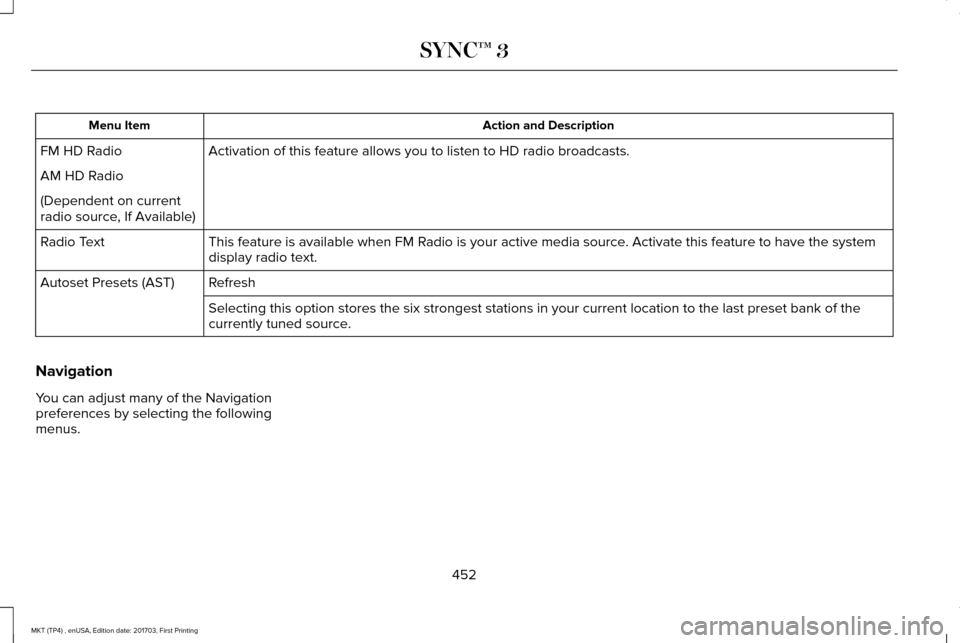
Activation of this feature allows you to listen to HD radio broadcasts.
FM HD Radio
AM HD Radio
(Dependent on current
radio source, If Available)
This feature is available when FM Radio is your active media source. Activate this feature to have the system
display radio text.
Radio Text
Refresh
Autoset Presets (AST)
Selecting this option stores the six strongest stations in your current \
location to the last preset bank of the
currently tuned source.
Navigation
You can adjust many of the Navigation
preferences by selecting the following
menus.
452
MKT (TP4) , enUSA, Edition date: 201703, First Printing SYNC™ 3
Page 463 of 564
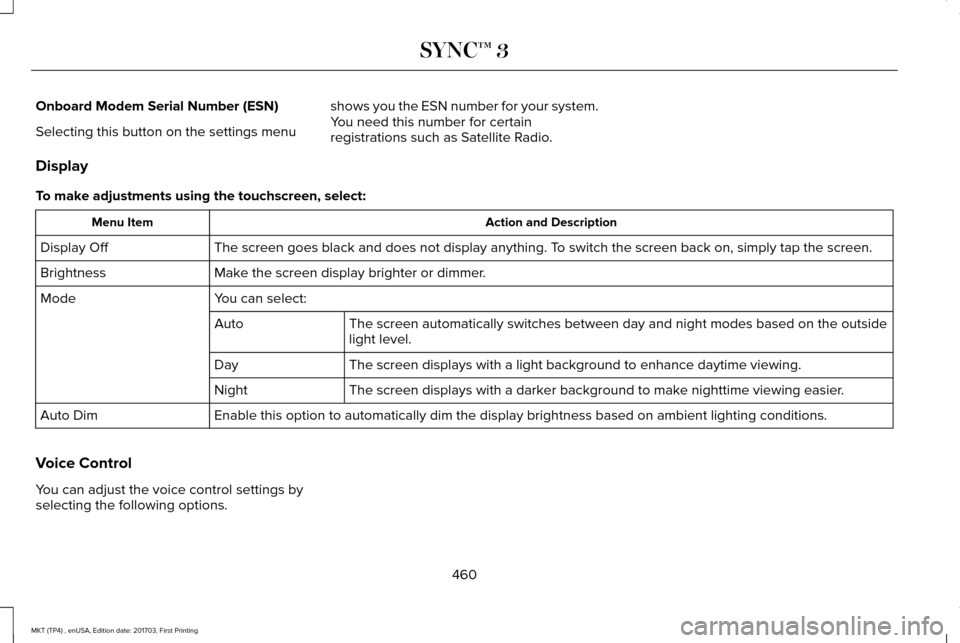
Onboard Modem Serial Number (ESN)
Selecting this button on the settings menu
shows you the ESN number for your system.
You need this number for certain
registrations such as Satellite Radio.
Display
To make adjustments using the touchscreen, select: Action and Description
Menu Item
The screen goes black and does not display anything. To switch the screen back on, simply tap the screen.
Display Off
Make the screen display brighter or dimmer.
Brightness
You can select:
Mode
The screen automatically switches between day and night modes based on t\
he outside
light level.
Auto
The screen displays with a light background to enhance daytime viewing.
Day
The screen displays with a darker background to make nighttime viewing easier.
Night
Enable this option to automatically dim the display brightness based on \
ambient lighting conditions.
Auto Dim
Voice Control
You can adjust the voice control settings by
selecting the following options.
460
MKT (TP4) , enUSA, Edition date: 201703, First Printing SYNC™ 3
Page 479 of 564
General
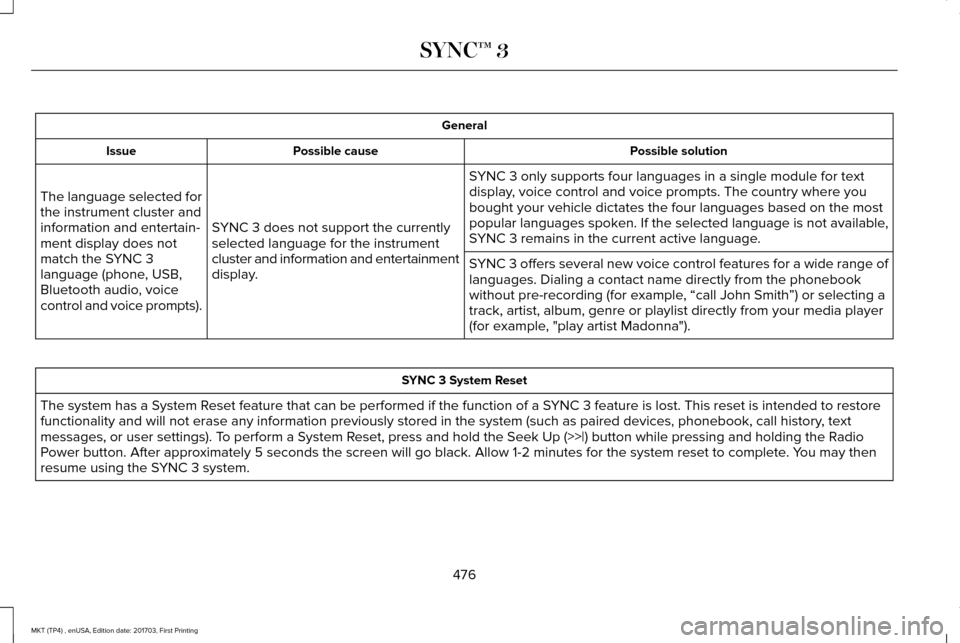
Possible solution
Possible cause
Issue
SYNC 3 only supports four languages in a single module for text
display, voice control and voice prompts. The country where you
bought your vehicle dictates the four languages based on the most
popular languages spoken. If the selected language is not available,
SYNC 3 remains in the current active language.
SYNC 3 does not support the currently
selected language for the instrument
cluster and information and entertainment
display.
The language selected for
the instrument cluster and
information and entertain-
ment display does not
match the SYNC 3
language (phone, USB,
Bluetooth audio, voice
control and voice prompts).
SYNC 3 offers several new voice control features for a wide range of
languages. Dialing a contact name directly from the phonebook
without pre-recording (for example, “call John Smith
”) or selecting a
track, artist, album, genre or playlist directly from your media player
(for example, "play artist Madonna"). SYNC 3 System Reset
The system has a System Reset feature that can be performed if the function of a SYNC 3 feature is lost. This reset is intended to restore
functionality and will not erase any information previously stored in th\
e system (such as paired devices, phonebook, call history , text
messages, or user settings). To perform a System Reset, press and hold the Seek Up (>>|) button while pressing and holdi\
ng the Radio
Power button. After approximately 5 seconds the screen will go black. Allow 1-2 minutes for the s\
ystem reset to complete. You may then
resume using the SYNC 3 system.
476
MKT (TP4) , enUSA, Edition date: 201703, First Printing SYNC™ 3
Page 482 of 564
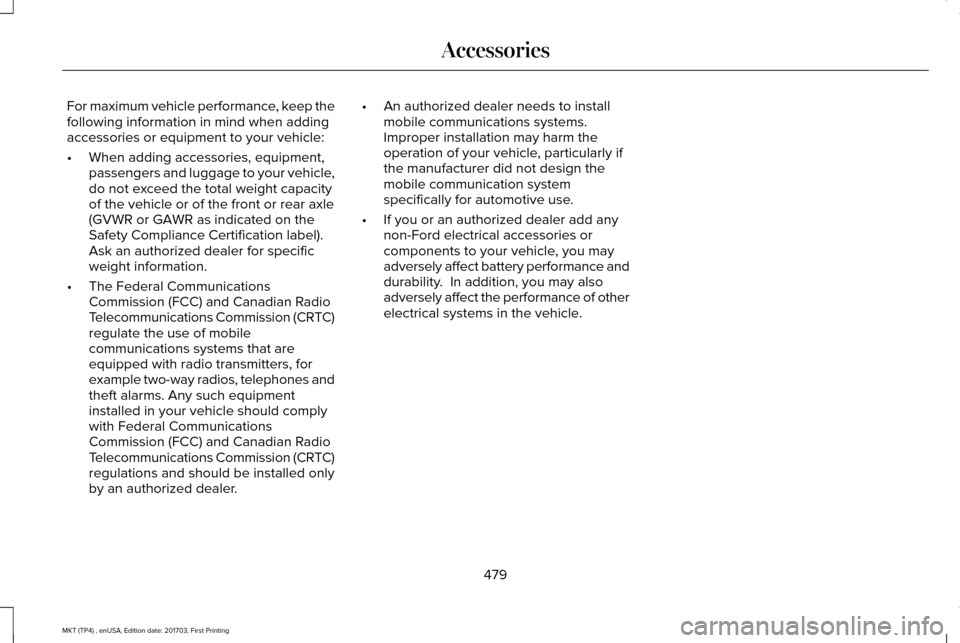
For maximum vehicle performance, keep the
following information in mind when adding
accessories or equipment to your vehicle:
•
When adding accessories, equipment,
passengers and luggage to your vehicle,
do not exceed the total weight capacity
of the vehicle or of the front or rear axle
(GVWR or GAWR as indicated on the
Safety Compliance Certification label).
Ask an authorized dealer for specific
weight information.
• The Federal Communications
Commission (FCC) and Canadian Radio
Telecommunications Commission (CRTC)
regulate the use of mobile
communications systems that are
equipped with radio transmitters, for
example two-way radios, telephones and
theft alarms. Any such equipment
installed in your vehicle should comply
with Federal Communications
Commission (FCC) and Canadian Radio
Telecommunications Commission (CRTC)
regulations and should be installed only
by an authorized dealer. •
An authorized dealer needs to install
mobile communications systems.
Improper installation may harm the
operation of your vehicle, particularly if
the manufacturer did not design the
mobile communication system
specifically for automotive use.
• If you or an authorized dealer add any
non-Ford electrical accessories or
components to your vehicle, you may
adversely affect battery performance and
durability. In addition, you may also
adversely affect the performance of other
electrical systems in the vehicle.
479
MKT (TP4) , enUSA, Edition date: 201703, First Printing Accessories
Page 518 of 564
ELECTROMAGNETIC
COMPATIBILITY
WARNINGS
Do not place objects or mount
equipment on or near the airbag cover,
on the side of the seatbacks (of the front
seats), or in front seat areas that may come
into contact with a deploying airbag. Failure
to follow these instructions may increase the
risk of personal injury in the event of a crash. WARNINGS
Do not fasten antenna cables to
original vehicle wiring, fuel pipes and
brake pipes. Keep antenna and power cables at
least 4 in (10 cm) from any electronic
modules and airbags. Note:
We test and certify your vehicle to
meet electromagnetic compatibility
legislation (UNECE Regulation 10 or other
applicable local requirements). It is your
responsibility to make sure that any
equipment an authorized dealer installs on
your vehicle complies with applicable local
legislation and other requirements.
Note: Any radio frequency transmitter
equipment in your vehicle (such as cellular
telephones and amateur radio transmitters)
must keep to the parameters in the following
table. We do not provide special provisions
or conditions for installations or use.
515
MKT (TP4) , enUSA, Edition date: 201703, First Printing Appendices
Page 522 of 564
Antenna Positions
Maximum output power Watt (Peak RMS)
Frequency Band MHz
2, 3
50
142-176
2, 3
50
380-512
2, 3
10
806-870
Note: After the installation of radio frequency
transmitters, check for disturbances from
and to all electrical equipment in your
vehicle, both in the standby and transmit
modes.
Check all electrical equipment:
• With the ignition ON.
• With the engine running.
• During a road test at various speeds.
Check that electromagnetic fields generated
inside your vehicle cabin by the transmitter
installed do not exceed applicable human
exposure requirements.
519
MKT (TP4) , enUSA, Edition date: 201703, First Printing Appendices
Page 551 of 564
Gracenote uses a unique identifier to track
queries for statistical purposes. The purpose
of a randomly assigned numeric identifier is
to allow Gracenote to count queries without
knowing anything about who you are. For
more information, see the web page at
www.gracenote.com for the Gracenote
Privacy Policy.
THE GRACENOTE SOFTWARE, EACH ITEM
OF GRACENOTE DATA AND THE
GRACENOTE CONTENT ARE LICENSED TO
YOU "AS IS". NEITHER GRACENOTE MAKES
ANY REPRESENTATIONS OR WARRANTIES,
EXPRESS OR IMPLIED, REGARDING THE
ACCURACY OF ANY GRACENOTE DATA
FROM THE GRACENOTE SERVERS OR
GRACENOTE CONTENT. GRACENOTE
COLLECTIVELY AND SEPARATELY RESERVE
THE RIGHT TO DELETE DATA AND/OR
CONTENT FROM THE COMPANIES'
RESPECTIVE SERVERS OR, IN THE CASE OF
GRACENOTE, CHANGE DATA CATEGORIES
FOR ANY CAUSE THAT GRACENOTE
DEEMS SUFFICIENT. NO WARRANTY IS
MADE THAT EITHER GRACENOTE
CONTENT OR THE GRACENOTE SOFTWARE
OR GRACENOTE SERVERS ARE
ERROR-FREE OR THAT THE FUNCTIONING
OF THE GRACENOTE SOFTWARE OR
GRACENOTE SERVERS WILL BE
UNINTERRUPTED. GRACENOTE IS NOT
OBLIGATED TO PROVIDE YOU WITH ANY
ENHANCED OR ADDITIONAL DATA TYPES
THAT GRACENOTE MAY CHOOSE TO
PROVIDE IN THE FUTURE AND IS FREE TO
DISCONTINUE ITS ONLINE SERVICES AT
ANY TIME. GRACENOTE DISCLAIM ALL
WARRANTIES EXPRESS OR IMPLIED,
INCLUDING, BUT NOT LIMITED TO, IMPLIED
WARRANTIES OF MERCHANTABILITY,
FITNESS FOR A PARTICULAR PURPOSE,
TITLE, AND NON-INFRINGEMENT. NEITHER
GRACENOTE WARRANTS THE RESULTS
THAT WILL BE OBTAINED BY YOUR USE
OF THE GRACENOTE SOFTWARE OR ANY
GRACENOTE SERVER. IN NO CASE WILL
GRACENOTE BE LIABLE FOR ANY
CONSEQUENTIAL OR INCIDENTAL
DAMAGES OR FOR ANY LOST PROFITS OR
LOST REVENUES FOR ANY REASON
WHATSOEVER. © Gracenote 2007.
Radio Frequency Statement
FCC ID: ACJ-SYNCG3-L
IC: 216B-SYNCG3-L
This device complies with Part 15 of the FCC
Rules and with RSS-210 of Industry Canada.
Operation is subject to the following two
conditions:
(1) This device may not cause harmful
interference, and
(2)
this device must accept any interference
received, including interference that may
cause undesired operation.
Note: Changes or modifications not
expressly approved by the party responsible
for compliance could void the user's
authority to operate the equipment. The term
"IC" before the radio certification number
only signifies that Industry Canada technical
specifications were met.
The antenna used for this transmitter must
not be co-located or operating in conjunction
with any other antenna or transmitter.
Taiwan Territory
Note: In accordance with the management
approach of low-power radio wave radiation
motors:
548
MKT (TP4) , enUSA, Edition date: 201703, First Printing Appendices
Page 552 of 564
Article 12: For approved and certified
low-power radiation motor models,
companies, firms or users must not alter the
frequency, increase the power or change the
characteristics and functions of the original
design without authorization.
Article 14: The usage of low-power
radio-frequency motors must not affect
aviation safety and interfere with legal
telecommunications. Should interference be
detected, immediately stop using the device
and only resume usage after ensuring that
there is no longer any interference. For the
legal telecommunication and wireless
telecommunication of the telco, the
low-power radio frequency motor must be
able to tolerate legal limits of interference
from telecommunication, industrial, scientific
and radio wave equipment.
SUNA TRAFFIC CHANNEL – TERMS AND
CONDITIONS
By activating, using and/or accessing the
SUNA Traffic Channel, SUNA Predictive or
other content or material provided by
Intelematics (together, SUNA Products
and/or Services), you must accept certain
terms and conditions. The following is a brief
summary of the terms and conditions that
apply to you. To view the full terms and
conditions relevant to your use of the SUNA
Products and/or Services, please consult: Website
www.sunatraffic.com.au/termsandcondi- tions/
1. Acceptance
By using SUNA Products and/or Services,
you will be deemed to have accepted and
agreed to be bound by the terms and
conditions fully detailed at: Website
www.sunatraffic.com.au/termsandcondi- tions/
2. Intellectual Property
SUNA Products and/or Services are for your
personal use. You may not record, or
retransmit the content, nor use the content
in association with any other traffic
information or route guidance service or
device not approved by Intelematics. You
obtain no right of ownership in any
Intellectual Property Rights (including
copyright) in the data that is used to provide
SUNA Products and/or Services.
3. Appropriate Use
549
MKT (TP4) , enUSA, Edition date: 201703, First Printing Appendices
Page 557 of 564
Engine Immobilizer
See: Passive Anti-Theft System.........................81
Engine Oil Check..........................................291 Adding Engine Oil..............................................292
Engine Oil Dipstick.......................................291
Engine Specifications - 3.5L Ecoboost™
....................................................350
Drivebelt Routing...............................................350
Engine Specifications - 3.7L........................351 Drivebelt Routing.................................................351
Entertainment................................................404 AM/FM Radio.......................................................406
Apps........................................................................\
417
Bluetooth Stereo or USB...................................415
CD (If equipped)...................................................414
HD Radio ™ Information (If Available)...............410
SiriusXM® Satellite Radio (If Activated).........406
Sources.................................................................405
Supported Media Players, Formats and Metadata Information.....................................417
USB Ports...............................................................417
Environment......................................................15
Essential Towing Checks............................244 Before Towing a Trailer.....................................246
Hitches..................................................................244
Launching or Retrieving a Boat or Personal
Watercraft (PWC)............................................247
Safety Chains......................................................245 Trailer Brake Controller Connector...............246
Trailer Brakes.......................................................245
Trailer Lamps.......................................................246
Trailer Towing Connector (Vehicles with a
Trailer Towing Package and 7–Pin
Connector).......................................................244
When Towing a Trailer.......................................246
Event Data Recording See: Data Recording..............................................9
Export Unique Options...................................14
Exterior Mirrors
................................................99
Auto-dimming Feature.......................................100
Blind Spot Information System.........................101
Direction Indicator Mirrors ...............................100
Fold-Away Exterior Mirrors...............................100
Heated Exterior Mirrors ....................................100
Integrated Blind Spot Mirror.............................100
Memory Mirrors ..................................................100
Power Exterior Mirrors.........................................99
Puddle Lamps......................................................100
F
Fastening the Seatbelts
................................39
Rear Inflatable Seatbelt.......................................42
Seatbelt Locking Modes......................................41
Third Row Seatbelt Stowage.............................40
Using Seatbelts During Pregnancy..................
40 Floor Mats
.......................................................251
Fog Lamps - Front See: Front Fog Lamps.........................................95
Foot Pedals See: Adjusting the Pedals...................................87
Front Fog Lamps.............................................95
Front Passenger Sensing System..............53
Fuel and Refueling
........................................168
Fuel Consumption.........................................173
Calculating Fuel Economy.................................173
Filling the Fuel Tank............................................173
Fuel Filler Funnel Location.........................169
Fuel Quality.....................................................168 Choosing the Right Fuel....................................168
Fuel Shutoff
...................................................254
Fuses...............................................................267
Fuse Specification Chart............................267 Passenger Compartment Fuse Panel...........276
Power Distribution Box.....................................267
G
Garage Door Opener See: Universal Garage Door Opener.............154
Gauges.............................................................104
Gearbox See: Transmission................................................179
554
MKT (TP4) , enUSA, Edition date: 201703, First Printing Index
Page 558 of 564
General Information on Radio
Frequencies..................................................60
Intelligent Access.................................................60
General Maintenance Information...........483 Multi-Point Inspection........................................486
Owner Checks and Services...........................484
Protecting Your Investment.............................483
Why Maintain Your Vehicle?............................483
Why Maintain Your Vehicle at Your
Dealership?......................................................483
Getting Assistance Outside the U.S. and Canada.........................................................263
Getting the Services You Need................259 Away From Home..............................................259
Global Opening and Closing.......................99 Closing the Windows...........................................99
Opening the Windows.........................................99
H
Handbrake See: Parking Brake.............................................192
Hazard Flashers............................................254
Headlamp Adjusting See: Adjusting the Headlamps.......................
304
Headlamp Exit Delay.....................................93
Headlamp Removal See: Removing a Headlamp............................
305 Head Restraints
.............................................135
Adjusting the Head Restraint...........................136
Tilting Head Restraints ......................................137
Heated Seats...................................................151 Front Seats.............................................................151
Second-Row Heated Seats................................151
Heated Steering Wheel................................86
Heated Windows and Mirrors
....................133
Heated Exterior Mirrors.....................................133
Heated Rear Window.........................................133
Heating See: Climate Control..........................................129
Hints on Controlling the Interior Climate...........................................................131
Defogging the Side Windows in Cold Weather..............................................................131
General Hints.........................................................131
Quickly Cooling the Interior...............................
131
Quickly Heating the Interior..............................131
Recommended Settings for Cooling...............131
Recommended Settings for Heating...............131
Hints on Driving With Anti-Lock Brakes...........................................................192
Home Screen
................................................392
Hood Lock See: Opening and Closing the Hood............287 I
In California (U.S. Only)...............................260
Information Display Control
.........................86
Information Displays.....................................109 General Information............................................109
Information Messages
..................................116
Adaptive Cruise Control.....................................117
AdvanceTrac ™.........................................................117
Alarm.......................................................................118
Automatic Engine Shutdown.............................
118
AWD........................................................................\
.119
Battery and Charging System..........................120
Blind Spot Information and Cross Traffic Alert System................................................................121
Brake System........................................................121
Collision Warning System.................................122
Doors and Locks..................................................122
Fuel........................................................................\
.123
Keys and Intelligent Access..............................123
Lane Keeping System........................................124
Maintenance.........................................................124
MyKey.....................................................................125
Park Aid..................................................................126
Power Steering.....................................................127
Seats.......................................................................127
Tire Pressure Monitoring System....................128
Traction Control...................................................128
555
MKT (TP4) , enUSA, Edition date: 201703, First Printing Index