stop start LINCOLN MKT 2018 Owner's Guide
[x] Cancel search | Manufacturer: LINCOLN, Model Year: 2018, Model line: MKT, Model: LINCOLN MKT 2018Pages: 564, PDF Size: 4.66 MB
Page 282 of 564
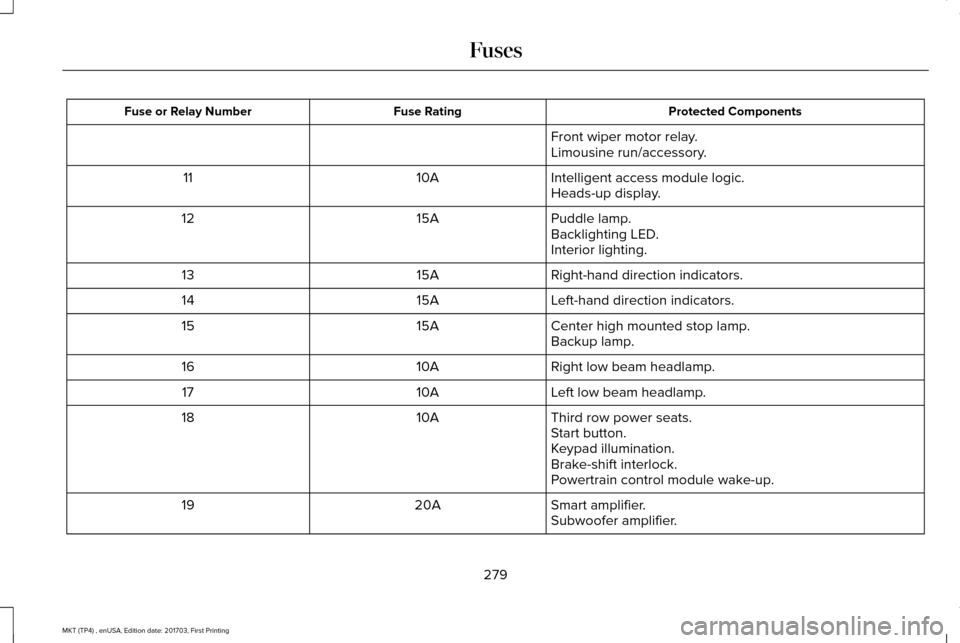
Protected Components
Fuse Rating
Fuse or Relay Number
Front wiper motor relay.
Limousine run/accessory.
Intelligent access module logic.
10A
11
Heads-up display.
Puddle lamp.
15A
12
Backlighting LED.
Interior lighting.
Right-hand direction indicators.
15A
13
Left-hand direction indicators.
15A
14
Center high mounted stop lamp.
15A
15
Backup lamp.
Right low beam headlamp.
10A
16
Left low beam headlamp.
10A
17
Third row power seats.
10A
18
Start button.
Keypad illumination.
Brake-shift interlock.
Powertrain control module wake-up.
Smart amplifier.
20A
19
Subwoofer amplifier.
279
MKT (TP4) , enUSA, Edition date: 201703, First Printing Fuses
Page 304 of 564
State or local regulations on volatile organic
compounds may restrict the use of methanol,
a common windshield washer antifreeze
additive. Washer fluids containing
non-methanol antifreeze agents should be
used only if they provide cold weather
protection without damaging the vehicle
’s
paint finish, wiper blades or washer system.
CHANGING THE 12V BATTERY WARNINGS
Batteries normally produce explosive
gases which can cause personal injury.
Therefore, do not allow flames, sparks or
lighted substances to come near the battery.
When working near the battery, always shield
your face and protect your eyes. Always
provide correct ventilation. When lifting a plastic-cased battery,
excessive pressure on the end walls
could cause acid to flow through the vent
caps, resulting in personal injury and damage
to the vehicle or battery. Lift the battery with
a battery carrier or with your hands on
opposite corners. WARNINGS
Keep batteries out of reach of children.
Batteries contain sulfuric acid. Avoid
contact with skin, eyes or clothing. Shield
your eyes when working near the battery to
protect against possible splashing of acid
solution. In case of acid contact with skin or
eyes, flush immediately with water for a
minimum of 15 minutes and get prompt
medical attention. If acid is swallowed, call a
physician immediately. Battery posts, terminals and related
accessories contain lead and lead
compounds. Wash hands after handling. For vehicles with Auto-Start-Stop the
battery requirement is different. You
must replace the battery with one of exactly
the same specification. Your vehicle is fitted with a Motorcraft
maintenance-free battery which normally
does not require additional water.
When a battery replacement is required, you
must use a recommended replacement
battery that matches the electrical
requirements of the vehicle.Note:
If your vehicle has a battery cover,
after cleaning or replacing the battery, make
sure you reinstall it.
Note: See an authorized dealer for battery
access, testing, or replacement.
To make sure the battery management
system works correctly, do not connect an
electrical device ground connection directly
to the battery negative post. This can cause
inaccurate measurements of the battery
condition and potential incorrect system
operation.
Note: If you add electrical accessories or
components to the vehicle, it may adversely
affect battery performance and durability.
This may also affect the performance of
other electrical systems in the vehicle.
If you see any corrosion on the battery or
terminals, remove the cables from the
terminals and clean with a wire brush. You
can neutralize the acid with a solution of
baking soda and water.
301
MKT (TP4) , enUSA, Edition date: 201703, First Printing Maintenance
Page 336 of 564
WARNINGS
2. Lubricate the tire bead and wheel
bead seat area again.
3. Stand at a minimum of 12 ft (3.66 m)
away from the wheel and tire assembly.
4. Use both eye and ear protection.
For a mounting pressure more than
20 psi (1.38 bar)
greater than the
maximum pressure, a Ford dealer or
other tire service professional should do
the mounting.
Always inflate steel carcass tires with a
remote air fill with the person inflating
standing at a minimum of
12 ft (3.66 m)
away from the wheel and tire assembly. Important:
Remember to replace the
wheel valve stems when the road tires
are replaced on your vehicle. It is recommended that the two front
tires or two rear tires generally be
replaced as a pair.
The tire pressure sensors mounted in
the wheels (originally installed on your
vehicle) are not designed to be used in
aftermarket wheels.
The use of wheels or tires not
recommended by Ford Motor Company
may affect the operation of your tire
pressure monitoring system.
If the tire pressure monitoring system
indicator is flashing, your system is
malfunctioning. Your replacement tire
might be incompatible with your tire
pressure monitoring system, or some
component of the system may be
damaged.
Safety Practices WARNINGS
If your vehicle is stuck in snow,
mud or sand, do not rapidly spin
the tires; spinning the tires can tear the
tire and cause an explosion. A tire can
explode in as little as three to five
seconds. Do not spin the wheels at over
34 mph (55 km/h)
. The tires may
fail and injure a passenger or bystander. Driving habits have a great deal to do
with your tire mileage and safety.
*Observe posted speed limits
*Avoid fast starts, stops and turns
*Avoid potholes and objects on the road
*Do not run over curbs or hit the tire
against a curb when parking
333
MKT (TP4) , enUSA, Edition date: 201703, First Printing Wheels and Tires
Page 387 of 564
Note:
If your vehicle is not equipped with
navigation, compass appears in the display
instead of navigation. If you press the right
arrow to go into the compass menu, you can
see the compass graphic. The compass
displays the direction in which the vehicle is
traveling, not true direction (for example, if
the vehicle is traveling west, the middle of
the compass graphic displays west; north
displays to the left of west though its true
direction is to the right of west).
Using the Steering Wheel Controls
Depending on your vehicle and option
package, you can use different controls on
your steering wheel to interact with the
touchscreen system in different ways.
VOL: Control the volume of audio output.
Mute:
Mute the audio output.
Voice:
Press to start a voice session. Press
again to stop the voice prompt and
immediately begin speaking. Press and hold
to end a voice session. SEEK NEXT:
•
While in radio mode, press to seek
between memory presets.
• While in USB, Bluetooth Audio or CD
mode, press to seek between songs or
press and hold to fast seek.
SEEK PREVIOUS:
• While in radio mode, press to seek
between memory presets.
• While in USB, Bluetooth Audio or CD
mode, press to seek between songs or
press and hold to fast seek.
PHONE ACCEPT:
Press to answer a call or
switch between calls.
PHONE REJECT: Press to end a call or reject
an incoming call.
Note: On some models, SEEK NEXT may be
combined with
PHONE REJECT and SEEK
PREVIOUS may be combined with PHONE
ACCEPT.
M:
Touch the control repeatedly to switch
between media sources (modes).
See
Steering Wheel (page 84). Using Your Bezel Controls
Depending on your vehicle and option
package, you may also have these controls
on your instrument panel:
•
Power:
Switch the audio system on and
off.
• VOL:
Control the volume of playing
audio.
• Seek
and Tune: Use as you normally
would in audio modes.
• Eject:
Eject a CD from the audio system.
• SOURCE
or MEDIA: Press repeatedly to
advance through available media modes.
• SOUND:
Press to access the Sound
menu where you can adjust sound and
other audio settings.
• 1-6:
Press and hold to store or press and
release to select an AM, FM or SIRIUS
memory preset.
See Audio System
(page 370).
384
MKT (TP4) , enUSA, Edition date: 201703, First Printing SYNC™ 3
Page 433 of 564
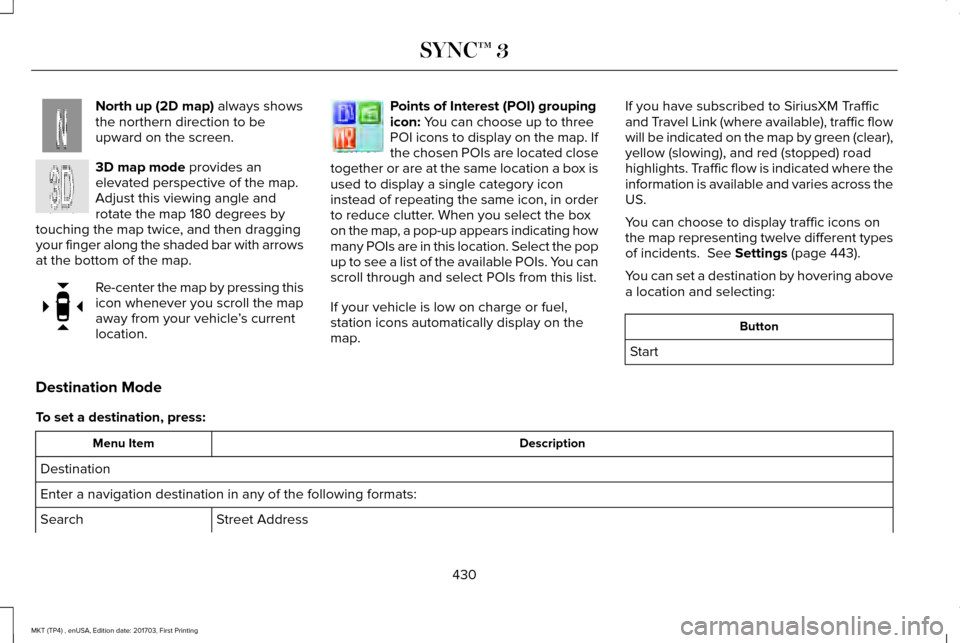
North up (2D map) always shows
the northern direction to be
upward on the screen. 3D map mode
provides an
elevated perspective of the map.
Adjust this viewing angle and
rotate the map 180 degrees by
touching the map twice, and then dragging
your finger along the shaded bar with arrows
at the bottom of the map. Re-center the map by pressing this
icon whenever you scroll the map
away from your vehicle
’s current
location. Points of Interest (POI) grouping
icon:
You can choose up to three
POI icons to display on the map. If
the chosen POIs are located close
together or are at the same location a box is
used to display a single category icon
instead of repeating the same icon, in order
to reduce clutter. When you select the box
on the map, a pop-up appears indicating how
many POIs are in this location. Select the pop
up to see a list of the available POIs. You can
scroll through and select POIs from this list.
If your vehicle is low on charge or fuel,
station icons automatically display on the
map. If you have subscribed to SiriusXM Traffic
and Travel Link (where available), traffic flow
will be indicated on the map by green (clear),
yellow (slowing), and red (stopped) road
highlights. Traffic flow is indicated where the
information is available and varies across the
US.
You can choose to display traffic icons on
the map representing twelve different types
of incidents.
See Settings (page 443).
You can set a destination by hovering above
a location and selecting: Button
Start
Destination Mode
To set a destination, press: Description
Menu Item
Destination
Enter a navigation destination in any of the following formats: Street Address
Search
430
MKT (TP4) , enUSA, Edition date: 201703, First Printing SYNC™ 3E207749 E207748 E207751 E207754
Page 474 of 564
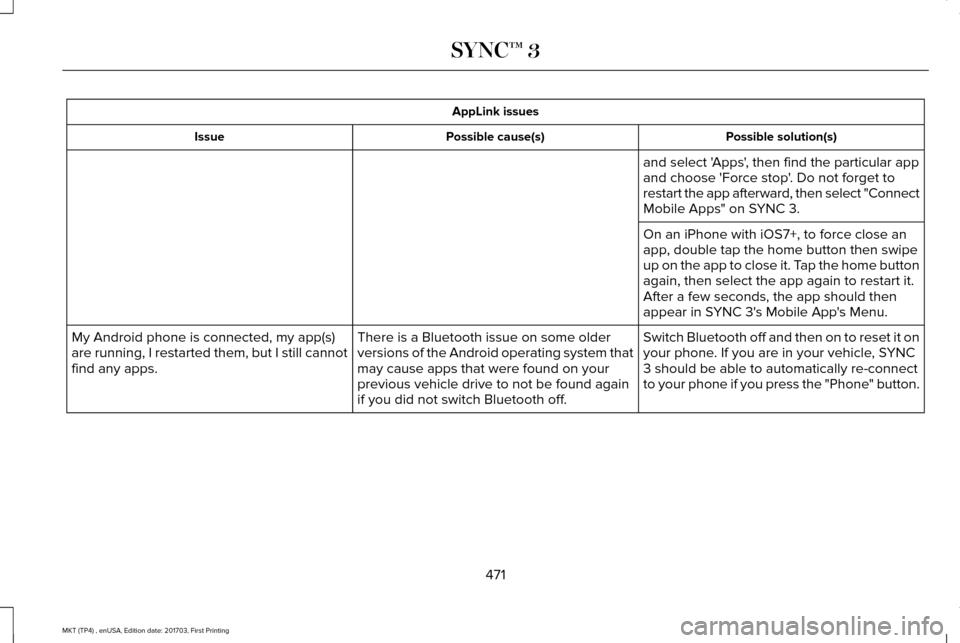
AppLink issues
Possible solution(s)
Possible cause(s)
Issue
and select 'Apps', then find the particular app
and choose 'Force stop'. Do not forget to
restart the app afterward, then select "Connect
Mobile Apps" on SYNC 3.
On an iPhone with iOS7+, to force close an
app, double tap the home button then swipe
up on the app to close it. Tap the home button
again, then select the app again to restart it.
After a few seconds, the app should then
appear in SYNC 3's Mobile App's Menu.
Switch Bluetooth off and then on to reset it on
your phone. If you are in your vehicle, SYNC
3 should be able to automatically re-connect
to your phone if you press the "Phone" button.
There is a Bluetooth issue on some older
versions of the Android operating system that
may cause apps that were found on your
previous vehicle drive to not be found again
if you did not switch Bluetooth off.
My Android phone is connected, my app(s)
are running, I restarted them, but I still cannot
find any apps.
471
MKT (TP4) , enUSA, Edition date: 201703, First Printing SYNC™ 3
Page 562 of 564
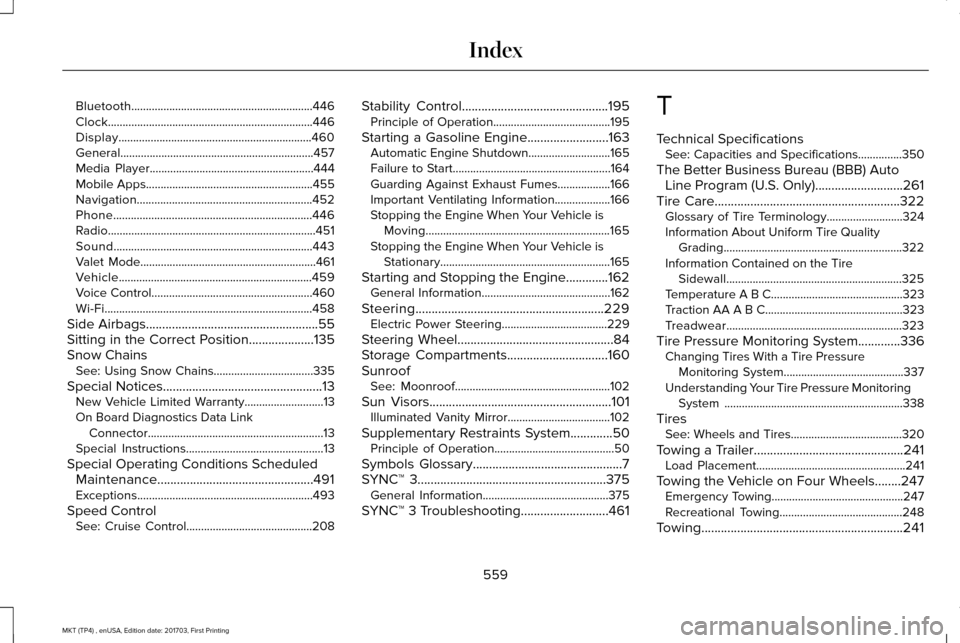
Bluetooth..............................................................446
Clock......................................................................446
Display..................................................................460
General..................................................................457
Media Player........................................................444
Mobile Apps.........................................................455
Navigation............................................................452
Phone....................................................................446
Radio.......................................................................451
Sound....................................................................443
Valet Mode............................................................461
Vehicle..................................................................459
Voice Control.......................................................460
Wi-Fi.......................................................................458
Side Airbags.....................................................55
Sitting in the Correct Position....................135
Snow Chains See: Using Snow Chains..................................335
Special Notices.................................................13
New Vehicle Limited Warranty...........................13
On Board Diagnostics Data Link Connector............................................................13
Special Instructions...............................................13
Special Operating Conditions Scheduled Maintenance................................................491
Exceptions............................................................493
Speed Control See: Cruise Control...........................................208 Stability Control.............................................195
Principle of Operation........................................195
Starting a Gasoline Engine.........................163 Automatic Engine Shutdown............................
165
Failure to Start......................................................164
Guarding Against Exhaust Fumes..................166
Important Ventilating Information...................166
Stopping the Engine When Your Vehicle is Moving...............................................................165
Stopping the Engine When Your Vehicle is Stationary..........................................................165
Starting and Stopping the Engine.............162 General Information............................................162
Steering..........................................................229 Electric Power Steering....................................229
Steering Wheel................................................84
Storage Compartments...............................160
Sunroof See: Moonroof.....................................................102
Sun Visors
........................................................101
Illuminated Vanity Mirror...................................102
Supplementary Restraints System.............50 Principle of Operation.........................................50
Symbols Glossary
..............................................7
SYNC™ 3..........................................................375 General Information...........................................375
SYNC™ 3 Troubleshooting...........................461 T
Technical Specifications
See: Capacities and Specifications...............
350
The Better Business Bureau (BBB) Auto Line Program (U.S. Only) ...........................
261
Tire Care.........................................................322
Glossary of Tire Terminology..........................324
Information About Uniform Tire Quality
Grading.............................................................322
Information Contained on the Tire Sidewall............................................................325
Temperature A B C.............................................323
Traction AA A B C...............................................323
Treadwear............................................................323
Tire Pressure Monitoring System.............336 Changing Tires With a Tire Pressure
Monitoring System.........................................337
Understanding Your Tire Pressure Monitoring System .............................................................338
Tires See: Wheels and Tires......................................320
Towing a Trailer..............................................241 Load Placement...................................................241
Towing the Vehicle on Four Wheels........247 Emergency Towing.............................................247
Recreational Towing..........................................248
Towing..............................................................241
559
MKT (TP4) , enUSA, Edition date: 201703, First Printing Index