instrument cluster LINCOLN MKT 2018 Owners Manual
[x] Cancel search | Manufacturer: LINCOLN, Model Year: 2018, Model line: MKT, Model: LINCOLN MKT 2018Pages: 564, PDF Size: 4.66 MB
Page 5 of 564
Liftgate
Power Liftgate..................................................78
Security
Passive Anti-Theft System.............................81
Anti-Theft Alarm..............................................83
Steering Wheel
Adjusting the Steering Wheel......................84
Audio Control
..................................................85
Voice Control
...................................................85
Cruise Control
.................................................85
Information Display Control
.........................86
Heated Steering Wheel................................86
Pedals
Adjusting the Pedals......................................87
Wipers and Washers
Windshield Wipers.........................................88
Autowipers.......................................................88
Windshield Washers
......................................89
Rear Window Wiper and Washers..............89 Lighting
General Information
.......................................90
Lighting Control..............................................90
Autolamps ..........................................................
91
Instrument Lighting Dimmer........................92
Headlamp Exit Delay.....................................93
Daytime Running Lamps...............................93
Automatic High Beam Control
....................94
Front Fog Lamps.............................................95
Adaptive Headlamps
.....................................95
Direction Indicators
........................................96
Interior Lamps
..................................................96
Ambient Lighting
.............................................97
Windows and Mirrors
Power Windows
..............................................98
Global Opening and Closing.......................99
Exterior Mirrors
................................................99
Interior Mirror
..................................................101
Sun Visors
........................................................101
Moonroof.........................................................102 Instrument Cluster
Gauges.............................................................104
Warning Lamps and Indicators..................105
Audible Warnings and Indicators
..............108
Information Displays
General Information
.....................................109
Information Messages
..................................116
Climate Control
Automatic Climate Control
.........................129
Hints on Controlling the Interior Climate
..........................................................131
Rear Passenger Climate Controls
.............132
Heated Windows and Mirrors
....................133
Cabin Air Filter
...............................................133
Remote Start
...................................................134
Seats
Sitting in the Correct Position....................135
Head Restraints
.............................................135
Power Seats....................................................138
Memory Function
..........................................140
2
MKT (TP4) , enUSA, Edition date: 201703, First Printing Table of Contents
Page 8 of 564
Changing a Bulb...........................................305
Bulb Specification Chart.............................307
Changing the Engine Air Filter.................309
Vehicle Care
General Information......................................310
Cleaning Products........................................310
Cleaning the Exterior.....................................311
Waxing..............................................................312
Cleaning the Engine.....................................312
Cleaning the Windows and Wiper Blades..........................................................313
Cleaning the Interior
.....................................313
Cleaning the Instrument Panel and Instrument Cluster Lens..........................315
Cleaning Leather Seats...............................316
Repairing Minor Paint Damage..................316
Cleaning the Wheels
....................................316
Vehicle Storage
..............................................317
Body Styling Kits............................................319
Wheels and Tires
General Information.....................................320 Tire Care
.........................................................322
Using Snow Chains......................................335
Tire Pressure Monitoring System.............336
Changing a Road Wheel............................340
Technical Specifications.............................348
Capacities and Specifications
Engine Specifications - 3.5L Ecoboost™..................................................350
Engine Specifications - 3.7L........................351
Motorcraft Parts - 3.5L Ecoboost™...........352
Motorcraft Parts - 3.7L
.................................353
Vehicle Identification Number
..................354
Vehicle Certification Label
.........................354
Transmission Code Designation..............355
Capacities and Specifications - 3.5L Ecoboost™
..................................................356
Capacities and Specifications - 3.7L........362
Audio System
General Information
.....................................370
Audio Unit
........................................................371
USB Port
..........................................................374 SYNC™ 3
General Information
.....................................375
Home Screen
................................................392
Using Voice Recognition............................394
Entertainment................................................404
Climate.............................................................417
Phone...............................................................421
Navigation......................................................429
Apps
.................................................................440
Settings...........................................................443
SYNC™ 3 Troubleshooting...........................461
Accessories
Accessories....................................................478
Lincoln Protect
Lincoln Protect..............................................480
Scheduled Maintenance
General Maintenance Information...........483
Normal Scheduled Maintenance..............487
Special Operating Conditions Scheduled Maintenance
...............................................491
5
MKT (TP4) , enUSA, Edition date: 201703, First Printing Table of Contents
Page 20 of 564
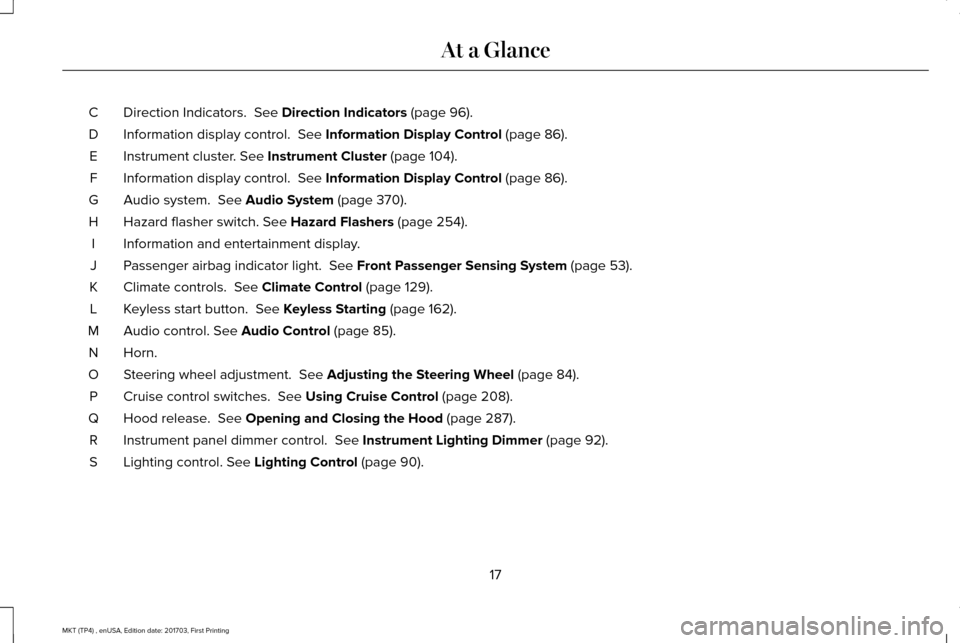
Direction Indicators. See Direction Indicators (page 96).
C
Information display control.
See Information Display Control (page 86).
D
Instrument cluster.
See Instrument Cluster (page 104).
E
Information display control.
See Information Display Control (page 86).
F
Audio system.
See Audio System (page 370).
G
Hazard flasher switch.
See Hazard Flashers (page 254).
H
Information and entertainment display.
I
Passenger airbag indicator light.
See Front Passenger Sensing System (page 53).
J
Climate controls.
See Climate Control (page 129).
K
Keyless start button.
See Keyless Starting (page 162).
L
Audio control.
See Audio Control (page 85).
M
Horn.N
Steering wheel adjustment.
See Adjusting the Steering Wheel (page 84).
O
Cruise control switches.
See Using Cruise Control (page 208).
P
Hood release.
See Opening and Closing the Hood (page 287).
Q
Instrument panel dimmer control.
See Instrument Lighting Dimmer (page 92).
R
Lighting control.
See Lighting Control (page 90).
S
17
MKT (TP4) , enUSA, Edition date: 201703, First Printing At a Glance
Page 61 of 564
Your vehicle has a collection of crash and
occupant sensors which provide information
to the restraints control module. The
restraints control module deploys (activates)
the front safety belt pretensioners, driver
airbag, passenger airbag, seat mounted side
airbags, the Safety Canopy and rear
inflatable safety belts. Based on the type of
crash, the restraints control module will
deploy the appropriate safety devices.
The restraints control module also monitors
the readiness of the above safety devices
plus the crash and occupant sensors. The
readiness of the safety system is indicated
by a warning indicator light in the instrument
cluster or by a backup tone if the warning
light is not working. Routine maintenance of
the airbag is not required.
A difficulty with the system is indicated by
one or more of the following:
The readiness light will not
illuminate immediately after the
ignition is turned on. •
The readiness light will either flash or
stay lit.
• A series of five beeps will be heard. The
tone pattern will repeat periodically until
the problem, the light or both are
repaired.
If any of these things happen, even
intermittently, have the supplemental
restraint system serviced at an authorized
dealer immediately. Unless serviced, the
system may not function properly in the
event of a crash. The fact that the safety belt pretensioners or
front airbags did not activate for both front
seat occupants in a crash does not mean
that something is wrong with the system.
Rather, it means the restraints control module
determined the accident conditions (crash
severity, belt usage) were not appropriate to
activate these safety devices.
•
The design of the front airbags is to
activate only in frontal and near-frontal
crashes (not rollovers, side impacts or
rear impacts) unless the crash causes
sufficient frontal deceleration.
• The safety belt pretensioners and rear
inflatable safety belts are designed to
activate in frontal, near-frontal, side and
rollover crashes.
58
MKT (TP4) , enUSA, Edition date: 201703, First Printing Supplementary Restraints SystemE67017
Page 70 of 564
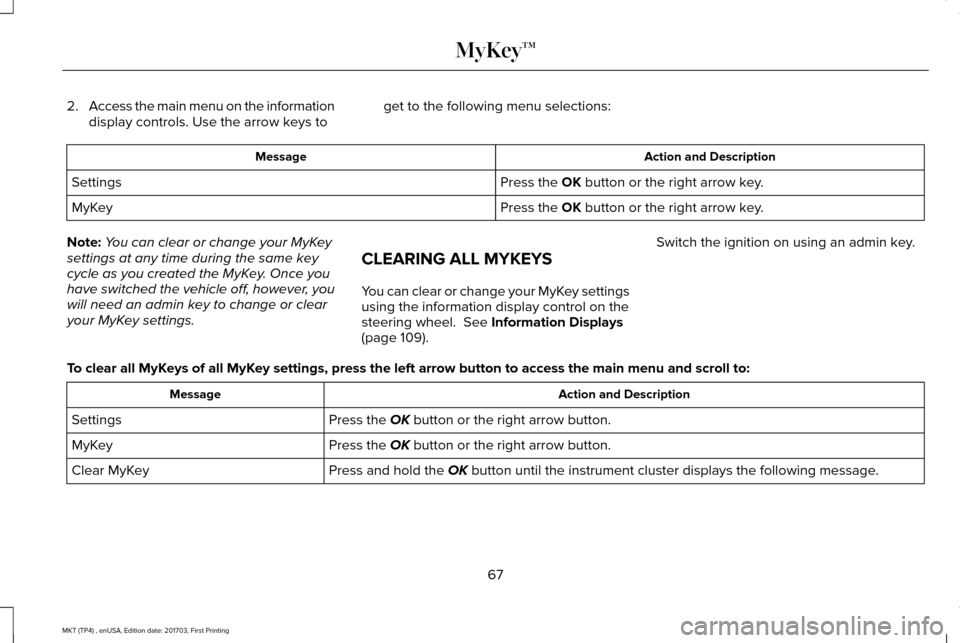
2.
Access the main menu on the information
display controls. Use the arrow keys to get to the following menu selections: Action and Description
Message
Press the OK button or the right arrow key.
Settings
Press the
OK button or the right arrow key.
MyKey
Note: You can clear or change your MyKey
settings at any time during the same key
cycle as you created the MyKey. Once you
have switched the vehicle off, however, you
will need an admin key to change or clear
your MyKey settings. CLEARING ALL MYKEYS
You can clear or change your MyKey settings
using the information display control on the
steering wheel.
See Information Displays
(page 109). Switch the ignition on using an admin key.
To clear all MyKeys of all MyKey settings, press the left arrow button to access the main menu and scr\
oll to: Action and Description
Message
Press the
OK button or the right arrow button.
Settings
Press the
OK button or the right arrow button.
MyKey
Press and hold the
OK button until the instrument cluster displays the following message.
Clear MyKey
67
MKT (TP4) , enUSA, Edition date: 201703, First Printing MyKey™
Page 83 of 564
Stopping the Liftgate Movement
You can stop the liftgate movement by doing
any of the following:
•
Pressing the liftgate control button.
• Pressing the liftgate button on the remote
control twice.
• Pressing the liftgate button on the
instrument panel.
• Activating the obstacle detection feature.
Setting the Liftgate Open Height
1. Open the liftgate.
2. Stop the liftgate by pressing the control button on the liftgate when it reaches the
desired height.
Note: When the liftgate has stopped moving,
you can also manually move it to the desired
height.
3. Press and hold the liftgate control button
on the liftgate until a tone sounds,
indicating programming is complete.
Note: You can only use the liftgate control
button to program the height. Note:
You cannot program the height if the
liftgate position is too low.
The new open liftgate height is recalled
when the power liftgate is opened. To
change the programmed height, repeat the
above procedure. Once you open the power
liftgate, you can manually move it to a
different height.
Note: The system recalls the new
programmed height, even if you disconnect
the battery.
When operating the power liftgate after you
have programmed a lower height than fully
open, you can fully open the liftgate by
manually pushing it upward to the maximum
open position.
Obstacle Detection
Closing
The system stops when it detects an
obstacle. Three tones sound and the system
reverses to open. When you remove the
obstacle, you can power close the liftgate. Note:
Entering your vehicle when the liftgate
is closing can activate obstacle detection.
To prevent this, allow the power liftgate to
fully close before you enter your vehicle.
Before driving off, check the instrument
cluster for a liftgate or door ajar message or
warning indicator. Failure to do this could
result in unintentionally leaving the liftgate
open while driving.
Opening
The system stops when it detects an
obstacle and two short tones sound. When
you remove the obstacle, you can continue
to operate the liftgate.
80
MKT (TP4) , enUSA, Edition date: 201703, First Printing Liftgate
Page 107 of 564
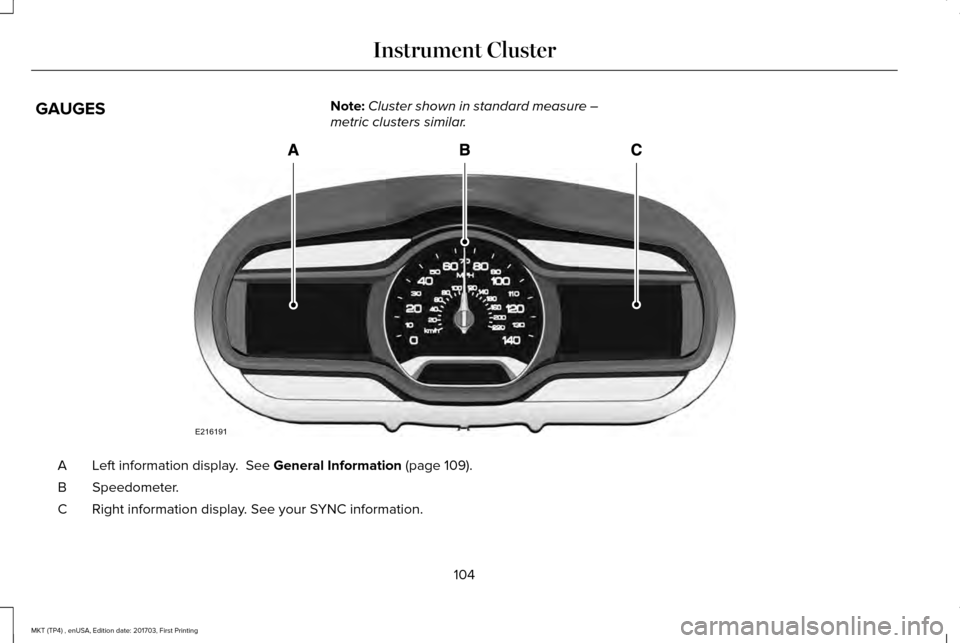
GAUGES
Note:
Cluster shown in standard measure –
metric clusters similar. Left information display. See General Information (page 109).
A
Speedometer.
B
Right information display. See your SYNC information.
C
104
MKT (TP4) , enUSA, Edition date: 201703, First Printing Instrument ClusterE216191
Page 108 of 564
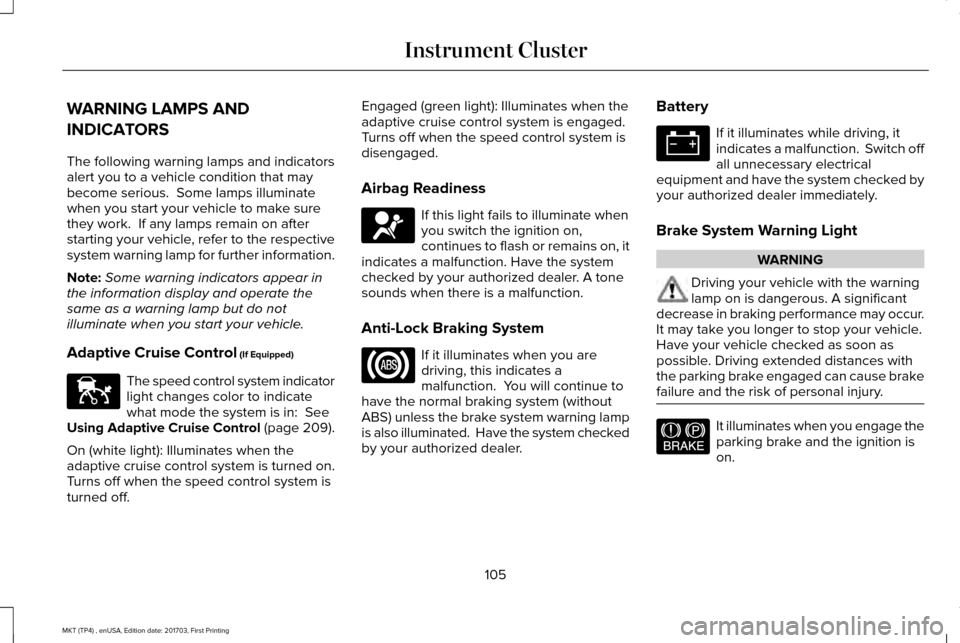
WARNING LAMPS AND
INDICATORS
The following warning lamps and indicators
alert you to a vehicle condition that may
become serious. Some lamps illuminate
when you start your vehicle to make sure
they work. If any lamps remain on after
starting your vehicle, refer to the respective
system warning lamp for further information.
Note:
Some warning indicators appear in
the information display and operate the
same as a warning lamp but do not
illuminate when you start your vehicle.
Adaptive Cruise Control (If Equipped) The speed control system indicator
light changes color to indicate
what mode the system is in:
See
Using Adaptive Cruise Control (page 209).
On (white light): Illuminates when the
adaptive cruise control system is turned on.
Turns off when the speed control system is
turned off. Engaged (green light): Illuminates when the
adaptive cruise control system is engaged.
Turns off when the speed control system is
disengaged.
Airbag Readiness
If this light fails to illuminate when
you switch the ignition on,
continues to flash or remains on, it
indicates a malfunction. Have the system
checked by your authorized dealer. A tone
sounds when there is a malfunction.
Anti-Lock Braking System If it illuminates when you are
driving, this indicates a
malfunction. You will continue to
have the normal braking system (without
ABS) unless the brake system warning lamp
is also illuminated. Have the system checked
by your authorized dealer. Battery If it illuminates while driving, it
indicates a malfunction. Switch off
all unnecessary electrical
equipment and have the system checked by
your authorized dealer immediately.
Brake System Warning Light WARNING
Driving your vehicle with the warning
lamp on is dangerous. A significant
decrease in braking performance may occur.
It may take you longer to stop your vehicle.
Have your vehicle checked as soon as
possible. Driving extended distances with
the parking brake engaged can cause brake
failure and the risk of personal injury. It illuminates when you engage the
parking brake and the ignition is
on.
105
MKT (TP4) , enUSA, Edition date: 201703, First Printing Instrument ClusterE144524 E67017 E144522
Page 109 of 564
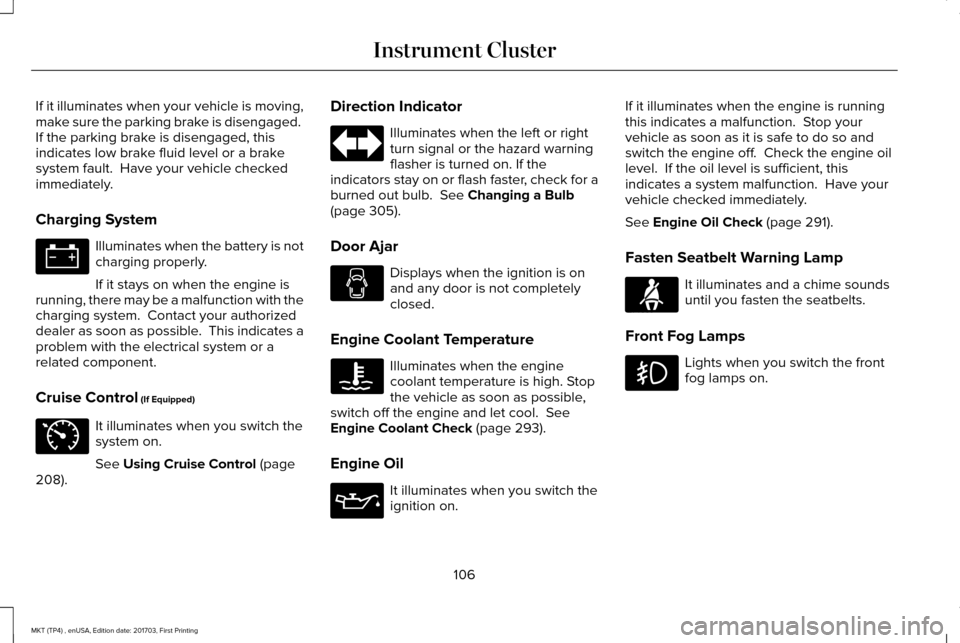
If it illuminates when your vehicle is moving,
make sure the parking brake is disengaged.
If the parking brake is disengaged, this
indicates low brake fluid level or a brake
system fault. Have your vehicle checked
immediately.
Charging System
Illuminates when the battery is not
charging properly.
If it stays on when the engine is
running, there may be a malfunction with the
charging system. Contact your authorized
dealer as soon as possible. This indicates a
problem with the electrical system or a
related component.
Cruise Control (If Equipped) It illuminates when you switch the
system on.
See
Using Cruise Control (page
208). Direction Indicator Illuminates when the left or right
turn signal or the hazard warning
flasher is turned on. If the
indicators stay on or flash faster, check for a
burned out bulb.
See Changing a Bulb
(page 305).
Door Ajar Displays when the ignition is on
and any door is not completely
closed.
Engine Coolant Temperature Illuminates when the engine
coolant temperature is high. Stop
the vehicle as soon as possible,
switch off the engine and let cool.
See
Engine Coolant Check (page 293).
Engine Oil It illuminates when you switch the
ignition on.If it illuminates when the engine is running
this indicates a malfunction. Stop your
vehicle as soon as it is safe to do so and
switch the engine off. Check the engine oil
level. If the oil level is sufficient, this
indicates a system malfunction. Have your
vehicle checked immediately.
See
Engine Oil Check (page 291).
Fasten Seatbelt Warning Lamp It illuminates and a chime sounds
until you fasten the seatbelts.
Front Fog Lamps Lights when you switch the front
fog lamps on.
106
MKT (TP4) , enUSA, Edition date: 201703, First Printing Instrument Cluster E71340 E71880
Page 110 of 564
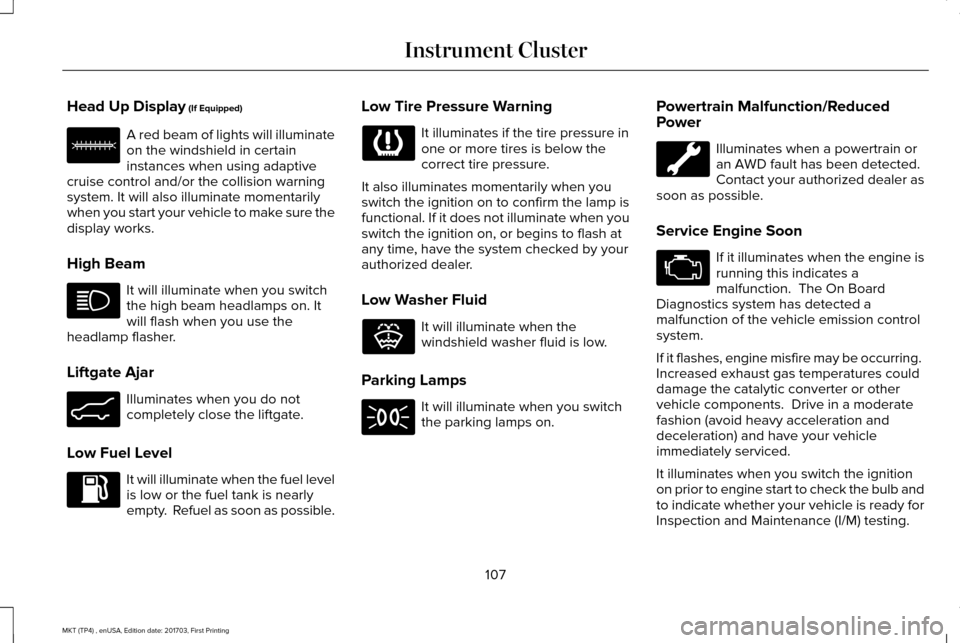
Head Up Display (If Equipped)
A red beam of lights will illuminate
on the windshield in certain
instances when using adaptive
cruise control and/or the collision warning
system. It will also illuminate momentarily
when you start your vehicle to make sure the
display works.
High Beam It will illuminate when you switch
the high beam headlamps on. It
will flash when you use the
headlamp flasher.
Liftgate Ajar Illuminates when you do not
completely close the liftgate.
Low Fuel Level It will illuminate when the fuel level
is low or the fuel tank is nearly
empty. Refuel as soon as possible. Low Tire Pressure Warning It illuminates if the tire pressure in
one or more tires is below the
correct tire pressure.
It also illuminates momentarily when you
switch the ignition on to confirm the lamp is
functional. If it does not illuminate when you
switch the ignition on, or begins to flash at
any time, have the system checked by your
authorized dealer.
Low Washer Fluid It will illuminate when the
windshield washer fluid is low.
Parking Lamps It will illuminate when you switch
the parking lamps on.Powertrain Malfunction/Reduced
Power Illuminates when a powertrain or
an AWD fault has been detected.
Contact your authorized dealer as
soon as possible.
Service Engine Soon If it illuminates when the engine is
running this indicates a
malfunction. The On Board
Diagnostics system has detected a
malfunction of the vehicle emission control
system.
If it flashes, engine misfire may be occurring.
Increased exhaust gas temperatures could
damage the catalytic converter or other
vehicle components. Drive in a moderate
fashion (avoid heavy acceleration and
deceleration) and have your vehicle
immediately serviced.
It illuminates when you switch the ignition
on prior to engine start to check the bulb and
to indicate whether your vehicle is ready for
Inspection and Maintenance (I/M) testing.
107
MKT (TP4) , enUSA, Edition date: 201703, First Printing Instrument ClusterE156133 E162453 E132353