lane assist LINCOLN MKT 2018 Owners Manual
[x] Cancel search | Manufacturer: LINCOLN, Model Year: 2018, Model line: MKT, Model: LINCOLN MKT 2018Pages: 564, PDF Size: 4.66 MB
Page 6 of 564
Rear Seats.......................................................142
Heated Seats...................................................151
Climate Controlled Seats............................152
Universal Garage Door Opener
Universal Garage Door Opener................154
Auxiliary Power Points
Auxiliary Power Points.................................158
Storage Compartments
Center Console
.............................................160
Overhead Console
.........................................161
Starting and Stopping the Engine
General Information
......................................162
Keyless Starting
.............................................162
Starting a Gasoline Engine.........................163
Engine Block Heater....................................166
Fuel and Refueling
Safety Precautions
........................................168 Fuel Quality.....................................................168
Fuel Filler Funnel Location.........................169
Running Out of Fuel
.....................................169
Refueling...........................................................171
Fuel Consumption
.........................................173
Engine Emission Control
Emission Law
..................................................175
Catalytic Converter.......................................176
Transmission
Automatic Transmission...............................179
All-Wheel Drive
Using All-Wheel Drive..................................183
Brakes
General Information.......................................191
Hints on Driving With Anti-Lock Brakes..........................................................192
Parking Brake
.................................................192 Traction Control
Principle of Operation
..................................193
Using Traction Control.................................193
Stability Control
Principle of Operation..................................195
Using Stability Control.................................196
Parking Aids
Principle of Operation..................................197
Rear Parking Aid
............................................197
Active Park Assist..........................................198
Rear View Camera.......................................204
Cruise Control
Principle of Operation.................................208
Using Cruise Control...................................208
Using Adaptive Cruise Control.................209
Driving Aids
Driver Alert......................................................216
Lane Keeping System..................................218
Blind Spot Information System
.................223
3
MKT (TP4) , enUSA, Edition date: 201703, First Printing Table of Contents
Page 68 of 564
PRINCIPLE OF OPERATION
MyKey allows you to program keys with
restricted driving modes to promote good
driving habits. All but one of the keys
programmed to the vehicle can be activated
with these restricted modes.
Any keys that have not been programmed
are referred to as administrator keys or
admin keys. They can be used to:
•
Create a MyKey.
• Program configurable MyKey settings.
• Clear all MyKey features.
When you have programmed a MyKey, you
can access the following information using
the information display:
• How many admin keys and MyKeys are
programmed to your vehicle.
• The total distance your vehicle has
traveled using a MyKey.
Note: All MyKeys are programmed to the
same settings. You cannot program them
individually. Note:
For vehicles equipped with a
push-button start switch: When both a MyKey
and an admin key are present when you
start your vehicle, the system recognizes the
admin key only.
Non-configurable Settings
The following settings cannot be changed
by an admin key user:
• Belt-Minder or safety belt reminder. You
cannot disable this feature. The audio
system will mute when the front seat
occupants ’ safety belts are not fastened.
• Early low fuel. The low fuel warning is
activated earlier, giving the MyKey user
more time to refuel.
• Driver assist features, if equipped on your
vehicle, are forced on: parking aid, blind
spot information system (BLIS), cross
traffic alert, lane departure warning and
forward collision warning system.
• Satellite radio adult content restrictions
(available only in some markets). Configurable Settings
With an admin key, you can configure certain
MyKey settings when you first create a
MyKey and before you recycle the key or
restart the vehicle. You can also change the
settings afterward with an admin key:
•
A vehicle speed limit can be set.
Warnings will be shown in the display,
followed by an audible tone when your
vehicle reaches the set speed. You
cannot override the set speed by fully
depressing the accelerator pedal or by
setting cruise control. WARNING
Do not set MyKey maximum speed limit
to a limit that will prevent the driver
from maintaining a safe speed considering
posted speed limits and prevailing road
conditions. The driver is always responsible
to drive in accordance with local laws and
prevailing conditions. Failure to do so could
result in accident or injury. 65
MKT (TP4) , enUSA, Edition date: 201703, First Printing MyKey™
Page 103 of 564
Fold-Away Exterior Mirrors
Push the mirror toward the door window
glass. Make sure that you fully engage the
mirror in its support when returning it to its
original position.
Heated Exterior Mirrors
See Heated Windows and Mirrors (page
133).
Memory Mirrors
You can save and recall the mirror positions
through the memory function. See Memory
Function
(page 140).
Auto-dimming Feature
The driver exterior mirror automatically dims
with the auto-dimming interior mirror.
Direction Indicator Mirrors
While the vehicle is running, the
forward-facing portion of the appropriate
mirror housing blinks when you switch on
the direction indicator. Puddle Lamps
The lamps on the bottom part of the mirror
housing light when you use your transmitter
to unlock the doors or when you open a
door.
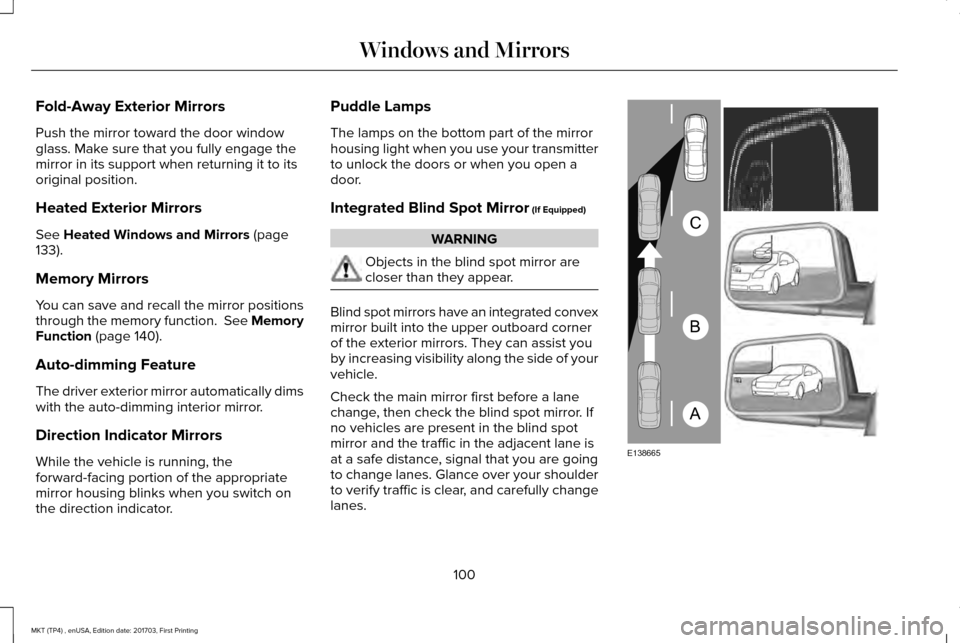
Integrated Blind Spot Mirror
(If Equipped)
WARNING
Objects in the blind spot mirror are
closer than they appear.
Blind spot mirrors have an integrated convex
mirror built into the upper outboard corner
of the exterior mirrors. They can assist you
by increasing visibility along the side of your
vehicle.
Check the main mirror first before a lane
change, then check the blind spot mirror. If
no vehicles are present in the blind spot
mirror and the traffic in the adjacent lane is
at a safe distance, signal that you are going
to change lanes. Glance over your shoulder
to verify traffic is clear, and carefully change
lanes.
100
MKT (TP4) , enUSA, Edition date: 201703, First Printing Windows and MirrorsA
B
C
E138665
Page 116 of 564
Driver Assist
Traction Control
Blindspot High, Normal or Low
Sensitivity
Collision Warn
Cross Traffic
Adaptive or Normal
Cruise Control
Driver Alert
Driver Alert
Driver Alert Disp.
Front Park Aid Alert, Aid or Both
Mode
Lane Keeping Sys
High, Normal or Low
Intensity
Rear Park Aid
Trailer Sway
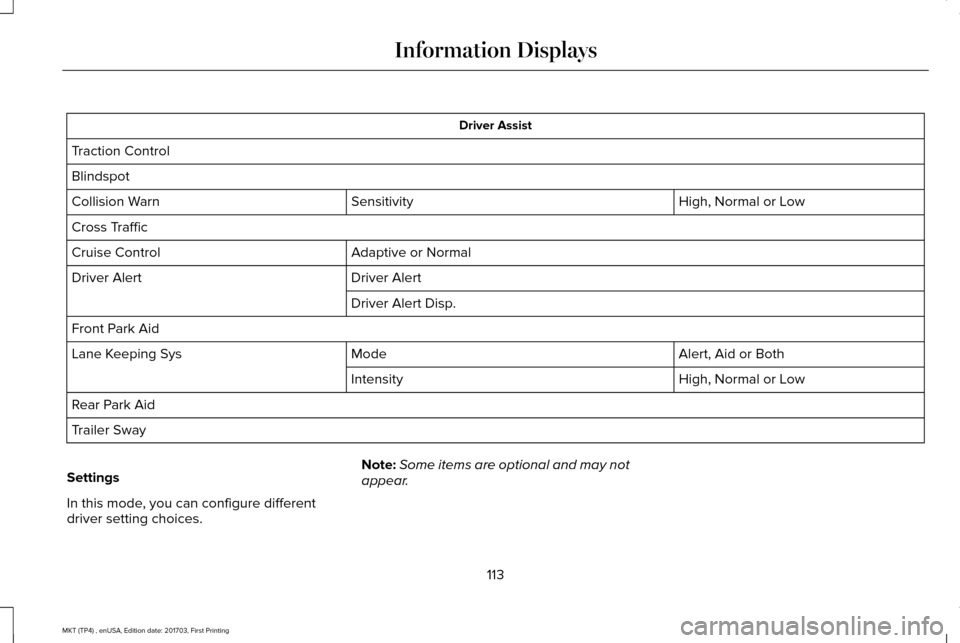
Settings
In this mode, you can configure different
driver setting choices. Note:
Some items are optional and may not
appear.
113
MKT (TP4) , enUSA, Edition date: 201703, First Printing Information Displays
Page 163 of 564
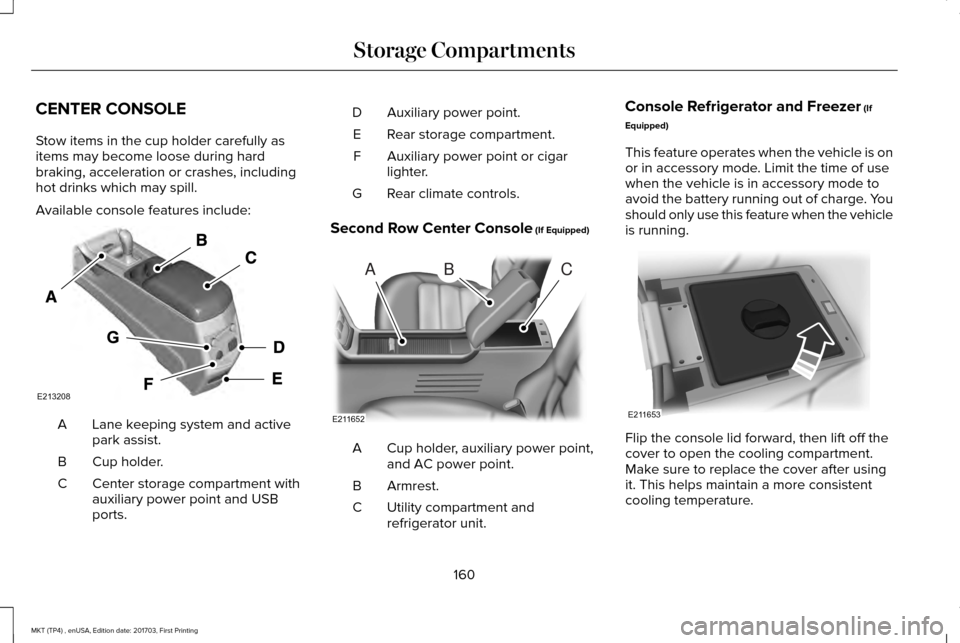
CENTER CONSOLE
Stow items in the cup holder carefully as
items may become loose during hard
braking, acceleration or crashes, including
hot drinks which may spill.
Available console features include:
Lane keeping system and active
park assist.
A
Cup holder.
B
Center storage compartment with
auxiliary power point and USB
ports.
C Auxiliary power point.
D
Rear storage compartment.
E
Auxiliary power point or cigar
lighter.
F
Rear climate controls.
G
Second Row Center Console (If Equipped) Cup holder, auxiliary power point,
and AC power point.
A
Armrest.
B
Utility compartment and
refrigerator unit.
C Console Refrigerator and Freezer
(If
Equipped)
This feature operates when the vehicle is on
or in accessory mode. Limit the time of use
when the vehicle is in accessory mode to
avoid the battery running out of charge. You
should only use this feature when the vehicle
is running. Flip the console lid forward, then lift off the
cover to open the cooling compartment.
Make sure to replace the cover after using
it. This helps maintain a more consistent
cooling temperature.
160
MKT (TP4) , enUSA, Edition date: 201703, First Printing Storage CompartmentsE213208 ABC
E211652 E211653
Page 222 of 564
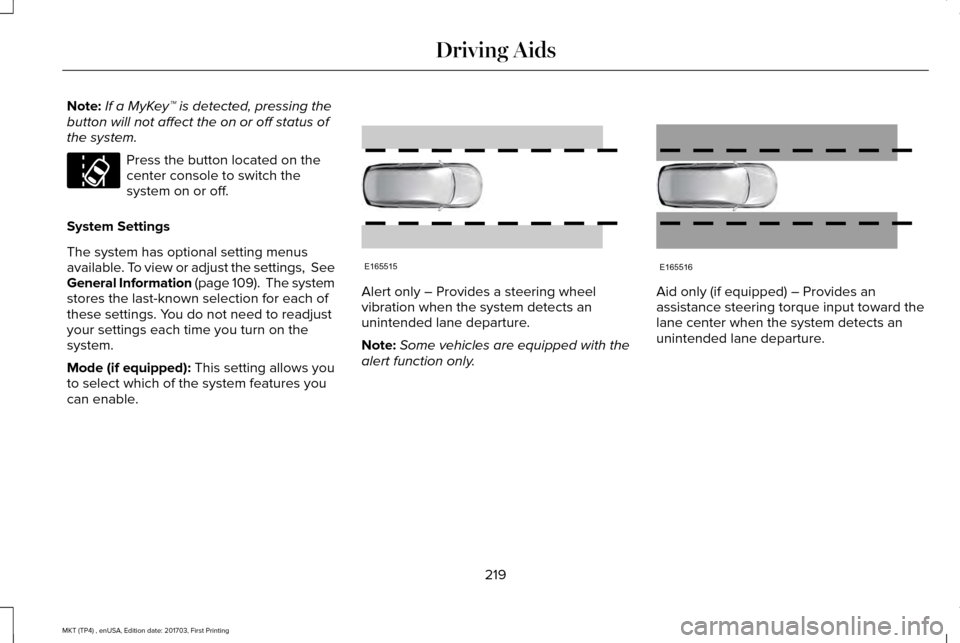
Note:
If a MyKey™ is detected, pressing the
button will not affect the on or off status of
the system. Press the button located on the
center console to switch the
system on or off.
System Settings
The system has optional setting menus
available. To view or adjust the settings, See
General Information (page 109). The system
stores the last-known selection for each of
these settings. You do not need to readjust
your settings each time you turn on the
system.
Mode (if equipped): This setting allows you
to select which of the system features you
can enable. Alert only – Provides a steering wheel
vibration when the system detects an
unintended lane departure.
Note:
Some vehicles are equipped with the
alert function only. Aid only (if equipped) – Provides an
assistance steering torque input toward the
lane center when the system detects an
unintended lane departure.
219
MKT (TP4) , enUSA, Edition date: 201703, First Printing Driving AidsE173233 E165515 E165516
Page 223 of 564
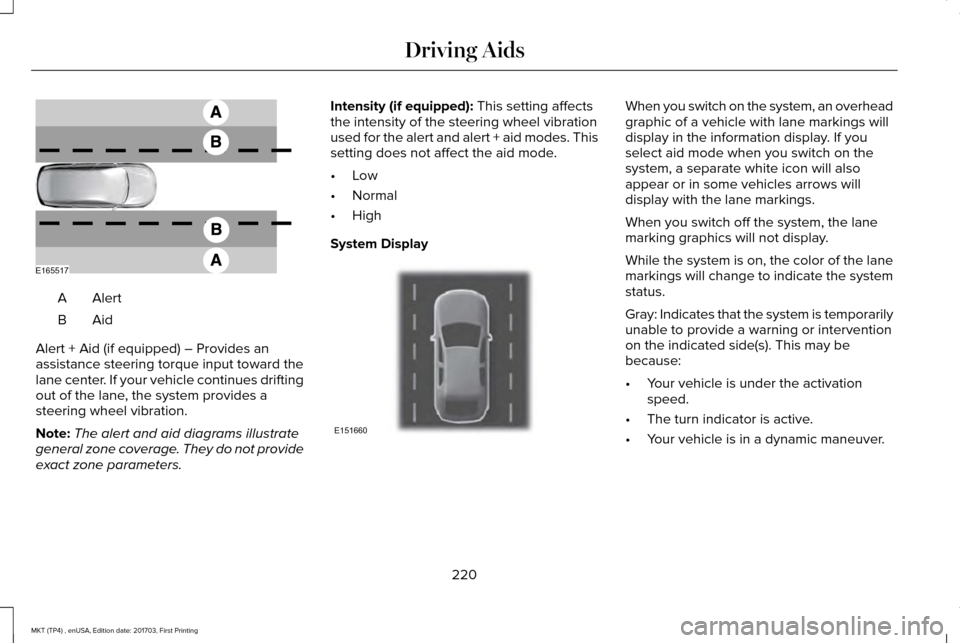
AlertA
AidB
Alert + Aid (if equipped) – Provides an
assistance steering torque input toward the
lane center. If your vehicle continues drifting
out of the lane, the system provides a
steering wheel vibration.
Note: The alert and aid diagrams illustrate
general zone coverage. They do not provide
exact zone parameters. Intensity (if equipped): This setting affects
the intensity of the steering wheel vibration
used for the alert and alert + aid modes. This
setting does not affect the aid mode.
• Low
• Normal
• High
System Display When you switch on the system, an overhead
graphic of a vehicle with lane markings will
display in the information display. If you
select aid mode when you switch on the
system, a separate white icon will also
appear or in some vehicles arrows will
display with the lane markings.
When you switch off the system, the lane
marking graphics will not display.
While the system is on, the color of the lane
markings will change to indicate the system
status.
Gray: Indicates that the system is temporarily
unable to provide a warning or intervention
on the indicated side(s). This may be
because:
•
Your vehicle is under the activation
speed.
• The turn indicator is active.
• Your vehicle is in a dynamic maneuver.
220
MKT (TP4) , enUSA, Edition date: 201703, First Printing Driving AidsE165517 E151660
Page 236 of 564
System Limitations
WARNING
The collision warning system
’s brake
support can only help reduce the
speed at which a collision occurs if the driver
applies the vehicle ’s brakes. The brake pedal
must be pressed just like any typical braking
situation. Due to the nature of radar technology, there
may be certain instances where vehicles do
not provide a collision warning. These
include:
•
Stationary vehicles or vehicles moving
below 6 mph (10 km/h).
• Pedestrians or objects in the roadway.
• Oncoming vehicles in the same lane.
• Severe weather conditions (see blocked
sensor section).
• Debris build-up on the grille near the
headlamps (see blocked sensor section).
• Small distance to vehicle ahead.
• Steering wheel and pedal movements
are large (very active driving style). If the front end of the vehicle is hit or
damaged, the radar sensing zone may be
altered causing missed or false collision
warnings. See your authorized dealer to have
your collision warning radar checked for
proper coverage and operation.
DRIVE CONTROL (If Equipped)
LINCOLN DRIVE CONTROL
Lincoln Drive Control delivers the Lincoln
driving experience through a suite of
sophisticated electronic vehicle systems.
These systems continuously monitor your
driving inputs and the road conditions to
optimize ride comfort, steering, handling,
powertrain response and sound. You can
preset your preferences for these systems
within the information display. Lincoln Drive
Control will respond to your preferences
based on what gear position you select. This
provides a single location to control multiple
systems performance settings. Lincoln Drive Control consists of the
following systems:
•
Continuously controlled damping
dynamically adjusts the shock absorbers
stiffness in real time to match the road
surface and driver inputs. This system
continuously monitors your vehicle ’s
motion (roll, pitch, bounce), suspension
position, load, speed, road conditions,
and steering to adjust the suspension
damping for optimal vehicle control.
• Electronically power-assisted steering
adjusts steering effort and feel based on
your vehicle speed and your inputs.
• Active noise control utilizes your vehicle
electronics to enhance the acoustic
experience.
• Electronic stability control and traction
control maintain your vehicle control in
adverse conditions or high performance
driving.
• Electronic throttle control enhances the
powertrain response to your inputs.
233
MKT (TP4) , enUSA, Edition date: 201703, First Printing Driving Aids
Page 558 of 564
General Information on Radio
Frequencies..................................................60
Intelligent Access.................................................60
General Maintenance Information...........483 Multi-Point Inspection........................................486
Owner Checks and Services...........................484
Protecting Your Investment.............................483
Why Maintain Your Vehicle?............................483
Why Maintain Your Vehicle at Your
Dealership?......................................................483
Getting Assistance Outside the U.S. and Canada.........................................................263
Getting the Services You Need................259 Away From Home..............................................259
Global Opening and Closing.......................99 Closing the Windows...........................................99
Opening the Windows.........................................99
H
Handbrake See: Parking Brake.............................................192
Hazard Flashers............................................254
Headlamp Adjusting See: Adjusting the Headlamps.......................
304
Headlamp Exit Delay.....................................93
Headlamp Removal See: Removing a Headlamp............................
305 Head Restraints
.............................................135
Adjusting the Head Restraint...........................136
Tilting Head Restraints ......................................137
Heated Seats...................................................151 Front Seats.............................................................151
Second-Row Heated Seats................................151
Heated Steering Wheel................................86
Heated Windows and Mirrors
....................133
Heated Exterior Mirrors.....................................133
Heated Rear Window.........................................133
Heating See: Climate Control..........................................129
Hints on Controlling the Interior Climate...........................................................131
Defogging the Side Windows in Cold Weather..............................................................131
General Hints.........................................................131
Quickly Cooling the Interior...............................
131
Quickly Heating the Interior..............................131
Recommended Settings for Cooling...............131
Recommended Settings for Heating...............131
Hints on Driving With Anti-Lock Brakes...........................................................192
Home Screen
................................................392
Hood Lock See: Opening and Closing the Hood............287 I
In California (U.S. Only)...............................260
Information Display Control
.........................86
Information Displays.....................................109 General Information............................................109
Information Messages
..................................116
Adaptive Cruise Control.....................................117
AdvanceTrac ™.........................................................117
Alarm.......................................................................118
Automatic Engine Shutdown.............................
118
AWD........................................................................\
.119
Battery and Charging System..........................120
Blind Spot Information and Cross Traffic Alert System................................................................121
Brake System........................................................121
Collision Warning System.................................122
Doors and Locks..................................................122
Fuel........................................................................\
.123
Keys and Intelligent Access..............................123
Lane Keeping System........................................124
Maintenance.........................................................124
MyKey.....................................................................125
Park Aid..................................................................126
Power Steering.....................................................127
Seats.......................................................................127
Tire Pressure Monitoring System....................128
Traction Control...................................................128
555
MKT (TP4) , enUSA, Edition date: 201703, First Printing Index