brake LINCOLN MKT 2019 Owners Manual
[x] Cancel search | Manufacturer: LINCOLN, Model Year: 2019, Model line: MKT, Model: LINCOLN MKT 2019Pages: 575, PDF Size: 4.66 MB
Page 365 of 575
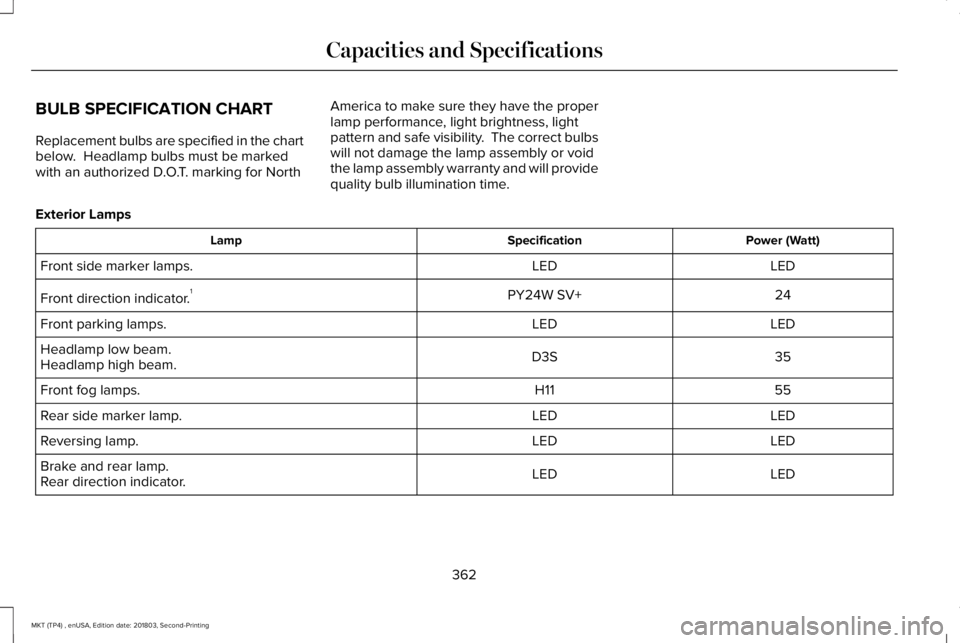
BULB SPECIFICATION CHART
Replacement bulbs are specified in the chartbelow. Headlamp bulbs must be markedwith an authorized D.O.T. marking for North
America to make sure they have the properlamp performance, light brightness, lightpattern and safe visibility. The correct bulbswill not damage the lamp assembly or voidthe lamp assembly warranty and will providequality bulb illumination time.
Exterior Lamps
Power (Watt)SpecificationLamp
LEDLEDFront side marker lamps.
24PY24W SV+Front direction indicator.1
LEDLEDFront parking lamps.
35D3SHeadlamp low beam.Headlamp high beam.
55H11Front fog lamps.
LEDLEDRear side marker lamp.
LEDLEDReversing lamp.
LEDLEDBrake and rear lamp.Rear direction indicator.
362
MKT (TP4) , enUSA, Edition date: 201803, Second-Printing
Capacities and Specifications
Page 366 of 575
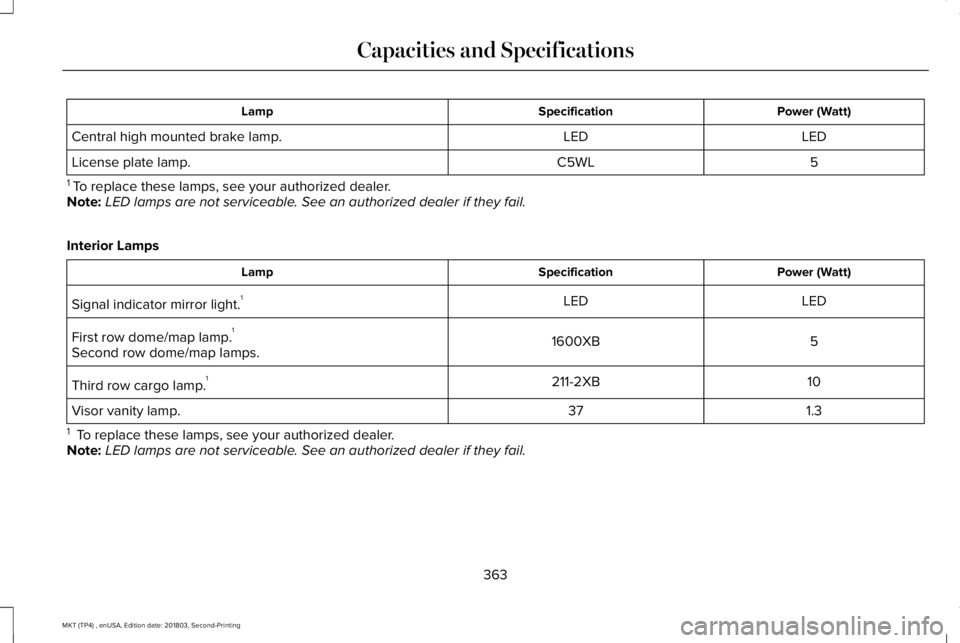
Power (Watt)SpecificationLamp
LEDLEDCentral high mounted brake lamp.
5C5WLLicense plate lamp.
1 To replace these lamps, see your authorized dealer.Note:LED lamps are not serviceable. See an authorized dealer if they fail.
Interior Lamps
Power (Watt)SpecificationLamp
LEDLEDSignal indicator mirror light.1
51600XBFirst row dome/map lamp.1
Second row dome/map lamps.
10211-2XBThird row cargo lamp.1
1.337Visor vanity lamp.
1 To replace these lamps, see your authorized dealer.Note:LED lamps are not serviceable. See an authorized dealer if they fail.
363
MKT (TP4) , enUSA, Edition date: 201803, Second-Printing
Capacities and Specifications
Page 480 of 575
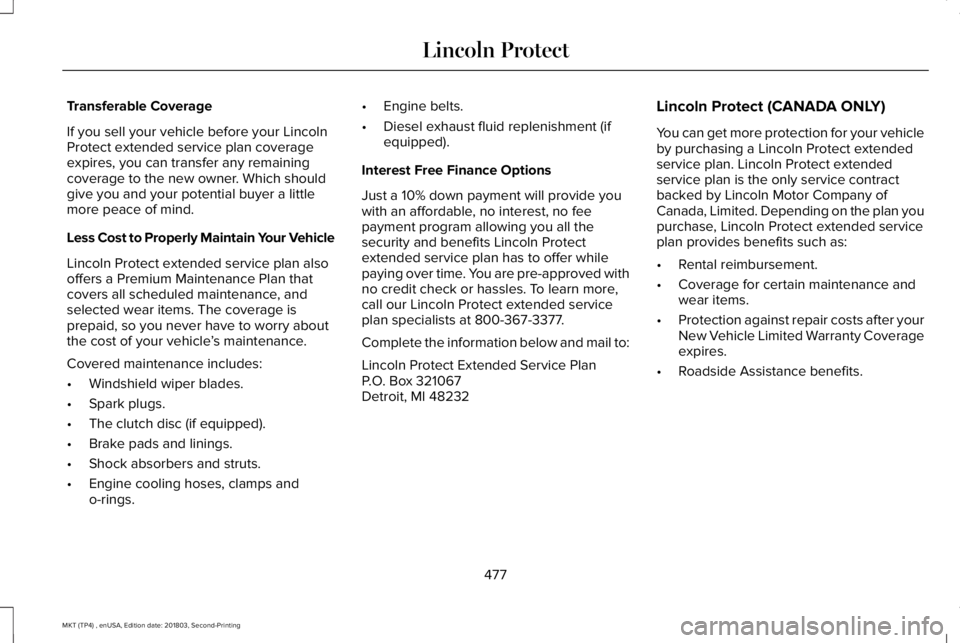
Transferable Coverage
If you sell your vehicle before your LincolnProtect extended service plan coverageexpires, you can transfer any remainingcoverage to the new owner. Which shouldgive you and your potential buyer a littlemore peace of mind.
Less Cost to Properly Maintain Your Vehicle
Lincoln Protect extended service plan alsooffers a Premium Maintenance Plan thatcovers all scheduled maintenance, andselected wear items. The coverage isprepaid, so you never have to worry aboutthe cost of your vehicle’s maintenance.
Covered maintenance includes:
•Windshield wiper blades.
•Spark plugs.
•The clutch disc (if equipped).
•Brake pads and linings.
•Shock absorbers and struts.
•Engine cooling hoses, clamps ando-rings.
•Engine belts.
•Diesel exhaust fluid replenishment (ifequipped).
Interest Free Finance Options
Just a 10% down payment will provide youwith an affordable, no interest, no feepayment program allowing you all thesecurity and benefits Lincoln Protectextended service plan has to offer whilepaying over time. You are pre-approved withno credit check or hassles. To learn more,call our Lincoln Protect extended serviceplan specialists at 800-367-3377.
Complete the information below and mail to:
Lincoln Protect Extended Service PlanP.O. Box 321067Detroit, MI 48232
Lincoln Protect (CANADA ONLY)
You can get more protection for your vehicleby purchasing a Lincoln Protect extendedservice plan. Lincoln Protect extendedservice plan is the only service contractbacked by Lincoln Motor Company ofCanada, Limited. Depending on the plan youpurchase, Lincoln Protect extended serviceplan provides benefits such as:
•Rental reimbursement.
•Coverage for certain maintenance andwear items.
•Protection against repair costs after yourNew Vehicle Limited Warranty Coverageexpires.
•Roadside Assistance benefits.
477
MKT (TP4) , enUSA, Edition date: 201803, Second-Printing
Lincoln Protect
Page 484 of 575
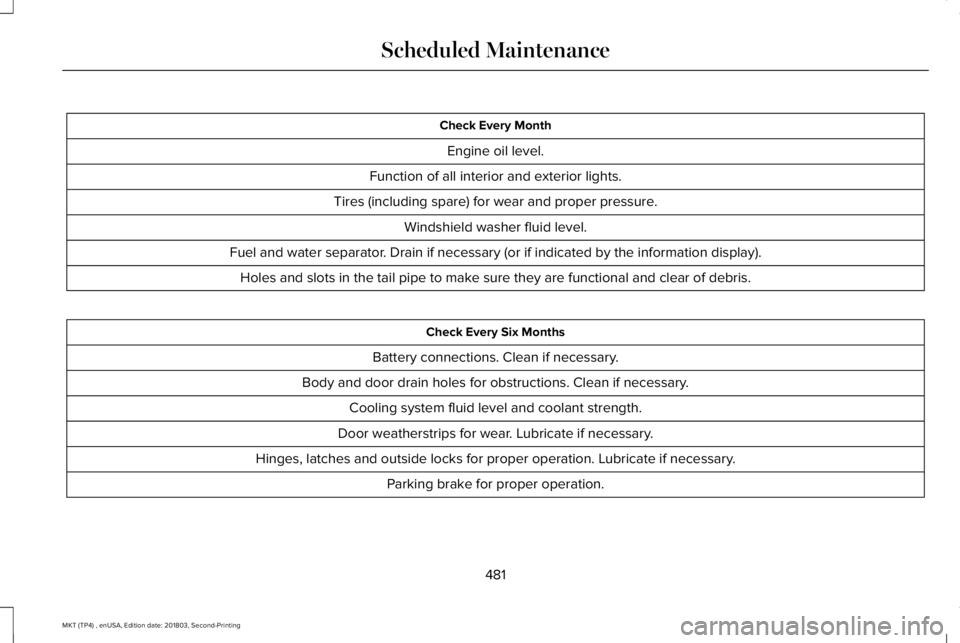
Check Every Month
Engine oil level.
Function of all interior and exterior lights.
Tires (including spare) for wear and proper pressure.
Windshield washer fluid level.
Fuel and water separator. Drain if necessary (or if indicated by the information display).
Holes and slots in the tail pipe to make sure they are functional and clear of debris.
Check Every Six Months
Battery connections. Clean if necessary.
Body and door drain holes for obstructions. Clean if necessary.
Cooling system fluid level and coolant strength.
Door weatherstrips for wear. Lubricate if necessary.
Hinges, latches and outside locks for proper operation. Lubricate if necessary.
Parking brake for proper operation.
481
MKT (TP4) , enUSA, Edition date: 201803, Second-Printing
Scheduled Maintenance
Page 485 of 575
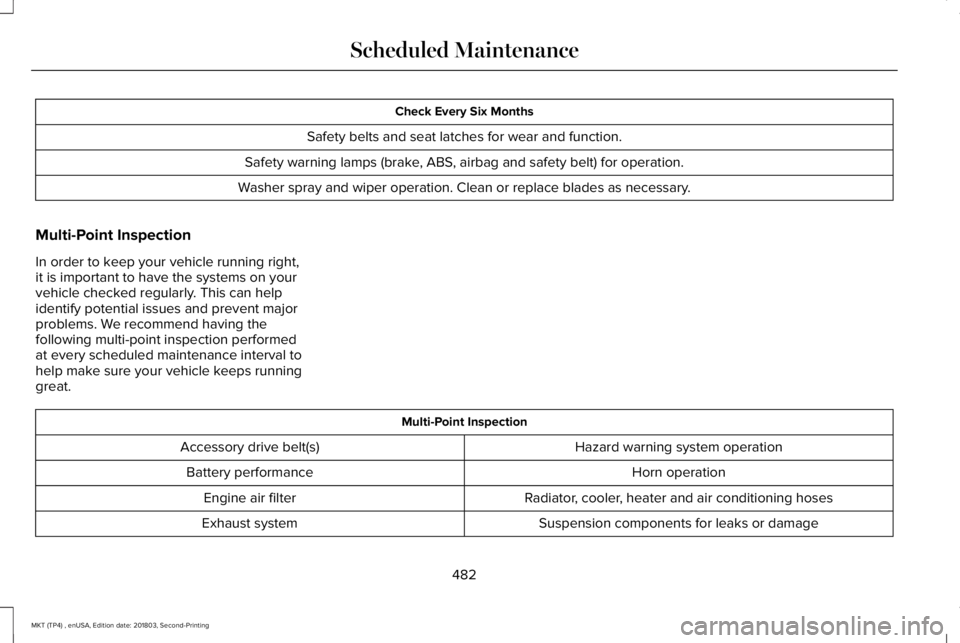
Check Every Six Months
Safety belts and seat latches for wear and function.
Safety warning lamps (brake, ABS, airbag and safety belt) for operation.
Washer spray and wiper operation. Clean or replace blades as necessary.
Multi-Point Inspection
In order to keep your vehicle running right,it is important to have the systems on yourvehicle checked regularly. This can helpidentify potential issues and prevent majorproblems. We recommend having thefollowing multi-point inspection performedat every scheduled maintenance interval tohelp make sure your vehicle keeps runninggreat.
Multi-Point Inspection
Hazard warning system operationAccessory drive belt(s)
Horn operationBattery performance
Radiator, cooler, heater and air conditioning hosesEngine air filter
Suspension components for leaks or damageExhaust system
482
MKT (TP4) , enUSA, Edition date: 201803, Second-Printing
Scheduled Maintenance
Page 486 of 575
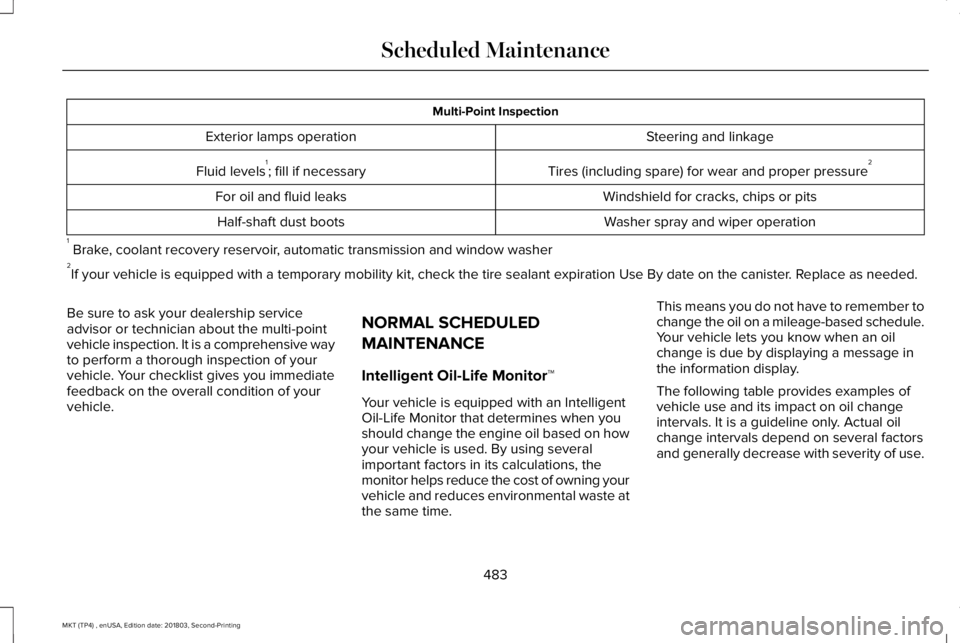
Multi-Point Inspection
Steering and linkageExterior lamps operation
Tires (including spare) for wear and proper pressure2Fluid levels1; fill if necessary
Windshield for cracks, chips or pitsFor oil and fluid leaks
Washer spray and wiper operationHalf-shaft dust boots
1 Brake, coolant recovery reservoir, automatic transmission and window washer2If your vehicle is equipped with a temporary mobility kit, check the tire sealant expiration Use By date on the canister. Replace as needed.
Be sure to ask your dealership serviceadvisor or technician about the multi-pointvehicle inspection. It is a comprehensive wayto perform a thorough inspection of yourvehicle. Your checklist gives you immediatefeedback on the overall condition of yourvehicle.
NORMAL SCHEDULED
MAINTENANCE
Intelligent Oil-Life Monitor™
Your vehicle is equipped with an IntelligentOil-Life Monitor that determines when youshould change the engine oil based on howyour vehicle is used. By using severalimportant factors in its calculations, themonitor helps reduce the cost of owning yourvehicle and reduces environmental waste atthe same time.
This means you do not have to remember tochange the oil on a mileage-based schedule.Your vehicle lets you know when an oilchange is due by displaying a message inthe information display.
The following table provides examples ofvehicle use and its impact on oil changeintervals. It is a guideline only. Actual oilchange intervals depend on several factorsand generally decrease with severity of use.
483
MKT (TP4) , enUSA, Edition date: 201803, Second-Printing
Scheduled Maintenance
Page 488 of 575
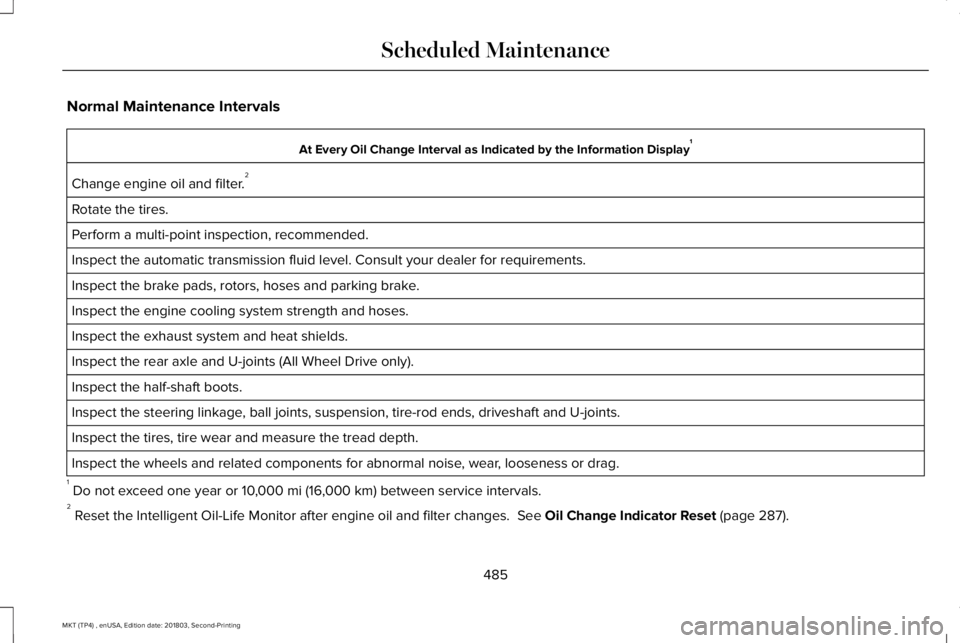
Normal Maintenance Intervals
At Every Oil Change Interval as Indicated by the Information Display1
Change engine oil and filter.2
Rotate the tires.
Perform a multi-point inspection, recommended.
Inspect the automatic transmission fluid level. Consult your dealer for requirements.
Inspect the brake pads, rotors, hoses and parking brake.
Inspect the engine cooling system strength and hoses.
Inspect the exhaust system and heat shields.
Inspect the rear axle and U-joints (All Wheel Drive only).
Inspect the half-shaft boots.
Inspect the steering linkage, ball joints, suspension, tire-rod ends, driveshaft and U-joints.
Inspect the tires, tire wear and measure the tread depth.
Inspect the wheels and related components for abnormal noise, wear, looseness or drag.
1 Do not exceed one year or 10,000 mi (16,000 km) between service intervals.2 Reset the Intelligent Oil-Life Monitor after engine oil and filter changes. See Oil Change Indicator Reset (page 287).
485
MKT (TP4) , enUSA, Edition date: 201803, Second-Printing
Scheduled Maintenance
Page 514 of 575
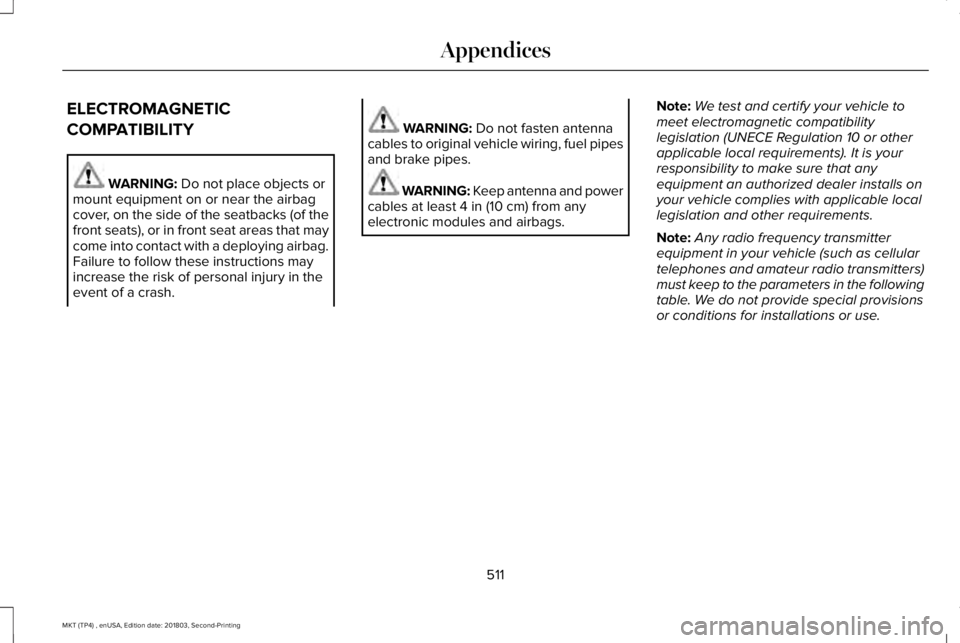
ELECTROMAGNETIC
COMPATIBILITY
WARNING: Do not place objects ormount equipment on or near the airbagcover, on the side of the seatbacks (of thefront seats), or in front seat areas that maycome into contact with a deploying airbag.Failure to follow these instructions mayincrease the risk of personal injury in theevent of a crash.
WARNING: Do not fasten antennacables to original vehicle wiring, fuel pipesand brake pipes.
WARNING: Keep antenna and powercables at least 4 in (10 cm) from anyelectronic modules and airbags.
Note:We test and certify your vehicle tomeet electromagnetic compatibilitylegislation (UNECE Regulation 10 or otherapplicable local requirements). It is yourresponsibility to make sure that anyequipment an authorized dealer installs onyour vehicle complies with applicable locallegislation and other requirements.
Note:Any radio frequency transmitterequipment in your vehicle (such as cellulartelephones and amateur radio transmitters)must keep to the parameters in the followingtable. We do not provide special provisionsor conditions for installations or use.
511
MKT (TP4) , enUSA, Edition date: 201803, Second-Printing
Appendices
Page 564 of 575
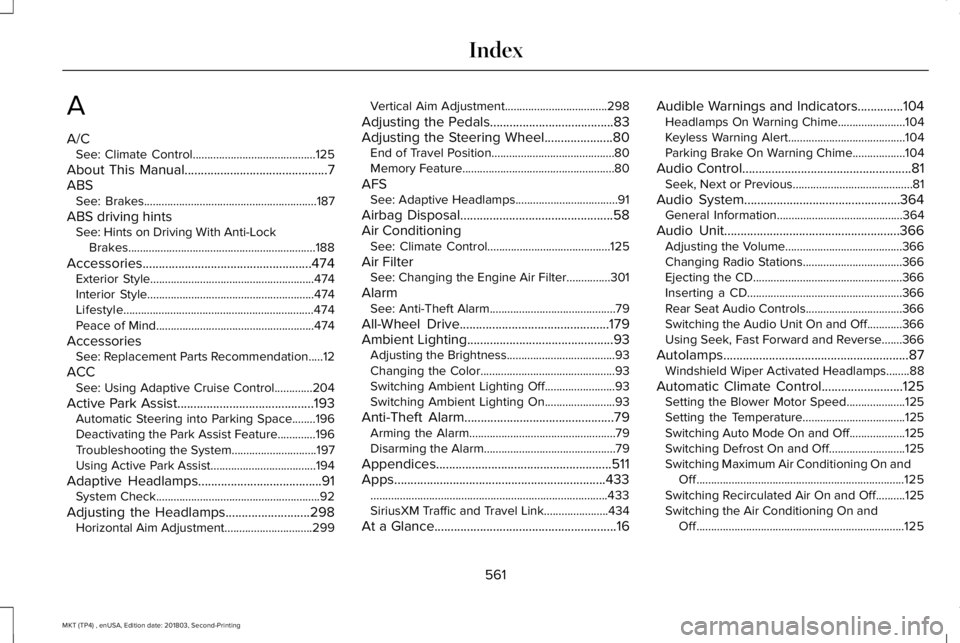
A
A/CSee: Climate Control..........................................125
About This Manual............................................7ABSSee: Brakes...........................................................187
ABS driving hintsSee: Hints on Driving With Anti-LockBrakes................................................................188
Accessories....................................................474Exterior Style........................................................474Interior Style.........................................................474Lifestyle.................................................................474Peace of Mind......................................................474
AccessoriesSee: Replacement Parts Recommendation.....12
ACCSee: Using Adaptive Cruise Control.............204
Active Park Assist..........................................193Automatic Steering into Parking Space........196Deactivating the Park Assist Feature.............196Troubleshooting the System.............................197Using Active Park Assist....................................194
Adaptive Headlamps......................................91System Check........................................................92
Adjusting the Headlamps..........................298Horizontal Aim Adjustment..............................299
Vertical Aim Adjustment...................................298
Adjusting the Pedals......................................83Adjusting the Steering Wheel.....................80End of Travel Position..........................................80Memory Feature....................................................80
AFSSee: Adaptive Headlamps...................................91
Airbag Disposal...............................................58Air ConditioningSee: Climate Control..........................................125
Air FilterSee: Changing the Engine Air Filter...............301
AlarmSee: Anti-Theft Alarm...........................................79
All-Wheel Drive..............................................179Ambient Lighting.............................................93Adjusting the Brightness.....................................93Changing the Color..............................................93Switching Ambient Lighting Off........................93Switching Ambient Lighting On........................93
Anti-Theft Alarm..............................................79Arming the Alarm..................................................79Disarming the Alarm.............................................79
Appendices......................................................511Apps.................................................................433.................................................................................433SiriusXM Traffic and Travel Link......................434
At a Glance........................................................16
Audible Warnings and Indicators..............104Headlamps On Warning Chime.......................104Keyless Warning Alert........................................104Parking Brake On Warning Chime..................104
Audio Control....................................................81Seek, Next or Previous.........................................81
Audio System................................................364General Information...........................................364
Audio Unit......................................................366Adjusting the Volume........................................366Changing Radio Stations..................................366Ejecting the CD...................................................366Inserting a CD.....................................................366Rear Seat Audio Controls.................................366Switching the Audio Unit On and Off............366Using Seek, Fast Forward and Reverse.......366
Autolamps.........................................................87Windshield Wiper Activated Headlamps........88
Automatic Climate Control.........................125Setting the Blower Motor Speed....................125Setting the Temperature...................................125Switching Auto Mode On and Off...................125Switching Defrost On and Off..........................125Switching Maximum Air Conditioning On andOff.......................................................................125Switching Recirculated Air On and Off..........125Switching the Air Conditioning On andOff.......................................................................125
561
MKT (TP4) , enUSA, Edition date: 201803, Second-Printing
Index
Page 565 of 575
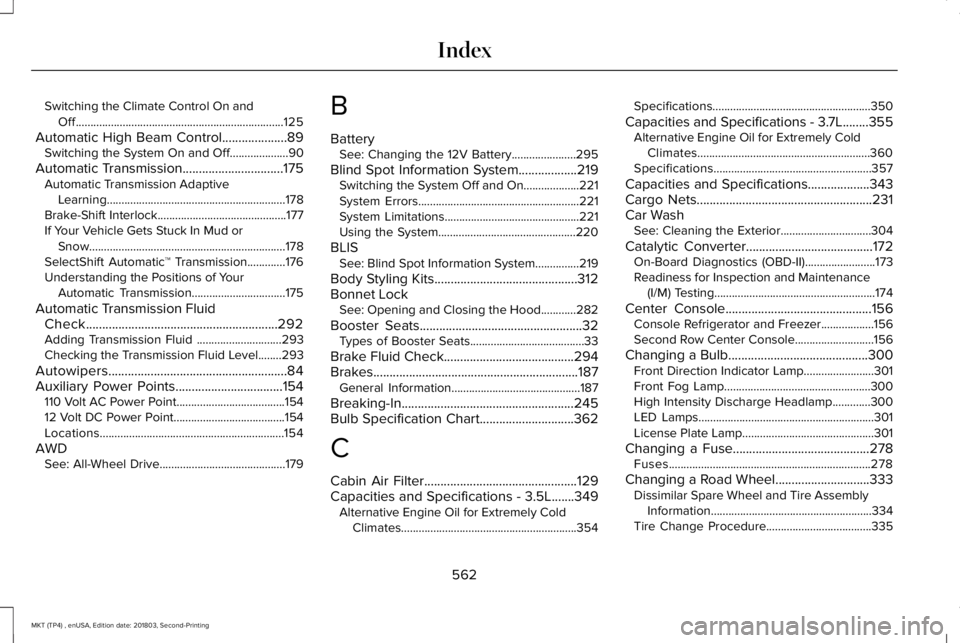
Switching the Climate Control On andOff.......................................................................125
Automatic High Beam Control....................89Switching the System On and Off....................90
Automatic Transmission...............................175Automatic Transmission AdaptiveLearning.............................................................178Brake-Shift Interlock............................................177If Your Vehicle Gets Stuck In Mud orSnow...................................................................178SelectShift Automatic™ Transmission.............176Understanding the Positions of YourAutomatic Transmission................................175
Automatic Transmission FluidCheck...........................................................292Adding Transmission Fluid .............................293Checking the Transmission Fluid Level........293
Autowipers.......................................................84Auxiliary Power Points.................................154110 Volt AC Power Point.....................................15412 Volt DC Power Point......................................154Locations...............................................................154
AWDSee: All-Wheel Drive...........................................179
B
BatterySee: Changing the 12V Battery......................295
Blind Spot Information System..................219Switching the System Off and On...................221System Errors.......................................................221System Limitations..............................................221Using the System...............................................220
BLISSee: Blind Spot Information System...............219
Body Styling Kits............................................312Bonnet LockSee: Opening and Closing the Hood............282
Booster Seats..................................................32Types of Booster Seats.......................................33
Brake Fluid Check........................................294Brakes...............................................................187General Information............................................187
Breaking-In.....................................................245Bulb Specification Chart.............................362
C
Cabin Air Filter...............................................129Capacities and Specifications - 3.5L.......349Alternative Engine Oil for Extremely ColdClimates............................................................354
Specifications......................................................350
Capacities and Specifications - 3.7L........355Alternative Engine Oil for Extremely ColdClimates...........................................................360Specifications......................................................357
Capacities and Specifications...................343Cargo Nets......................................................231Car WashSee: Cleaning the Exterior...............................304
Catalytic Converter.......................................172On-Board Diagnostics (OBD-II)........................173Readiness for Inspection and Maintenance(I/M) Testing.......................................................174
Center Console.............................................156Console Refrigerator and Freezer..................156Second Row Center Console...........................156
Changing a Bulb...........................................300Front Direction Indicator Lamp........................301Front Fog Lamp..................................................300High Intensity Discharge Headlamp.............300LED Lamps............................................................301License Plate Lamp.............................................301
Changing a Fuse..........................................278Fuses.....................................................................278
Changing a Road Wheel.............................333Dissimilar Spare Wheel and Tire AssemblyInformation.......................................................334Tire Change Procedure....................................335
562
MKT (TP4) , enUSA, Edition date: 201803, Second-Printing
Index