USB port LINCOLN MKT 2019 User Guide
[x] Cancel search | Manufacturer: LINCOLN, Model Year: 2019, Model line: MKT, Model: LINCOLN MKT 2019Pages: 575, PDF Size: 4.66 MB
Page 464 of 575
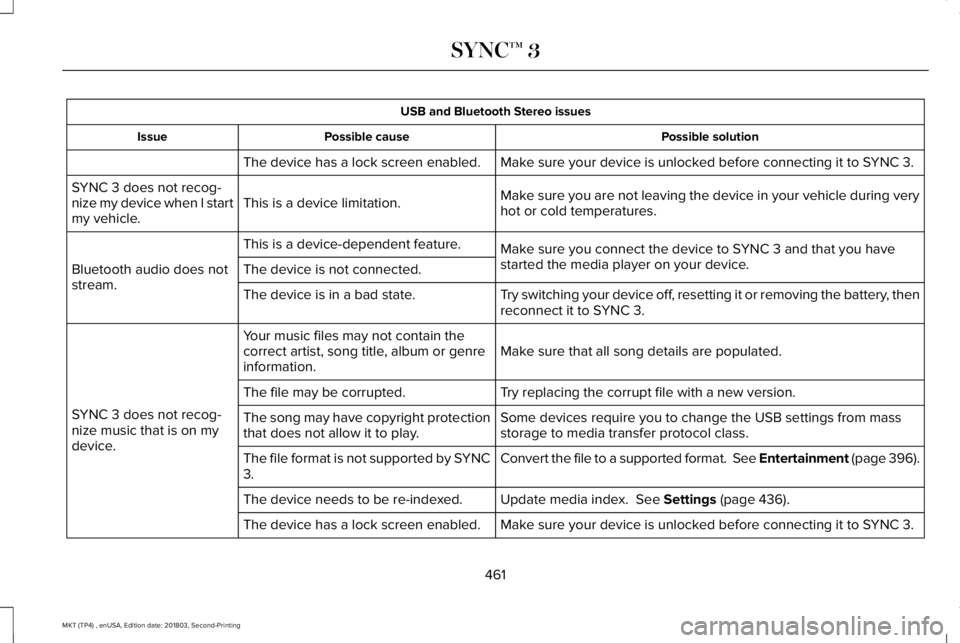
USB and Bluetooth Stereo issues
Possible solutionPossible causeIssue
Make sure your device is unlocked before connecting it to SYNC 3.The device has a lock screen enabled.
Make sure you are not leaving the device in your vehicle during veryhot or cold temperatures.This is a device limitation.SYNC 3 does not recog-nize my device when I startmy vehicle.
Make sure you connect the device to SYNC 3 and that you havestarted the media player on your device.
This is a device-dependent feature.
Bluetooth audio does notstream.The device is not connected.
Try switching your device off, resetting it or removing the battery, thenreconnect it to SYNC 3.The device is in a bad state.
Make sure that all song details are populated.Your music files may not contain thecorrect artist, song title, album or genreinformation.
SYNC 3 does not recog-nize music that is on mydevice.
Try replacing the corrupt file with a new version.The file may be corrupted.
Some devices require you to change the USB settings from massstorage to media transfer protocol class.The song may have copyright protectionthat does not allow it to play.
Convert the file to a supported format. See Entertainment (page 396).The file format is not supported by SYNC3.
Update media index. See Settings (page 436).The device needs to be re-indexed.
Make sure your device is unlocked before connecting it to SYNC 3.The device has a lock screen enabled.
461
MKT (TP4) , enUSA, Edition date: 201803, Second-Printing
SYNC™ 3
Page 468 of 575
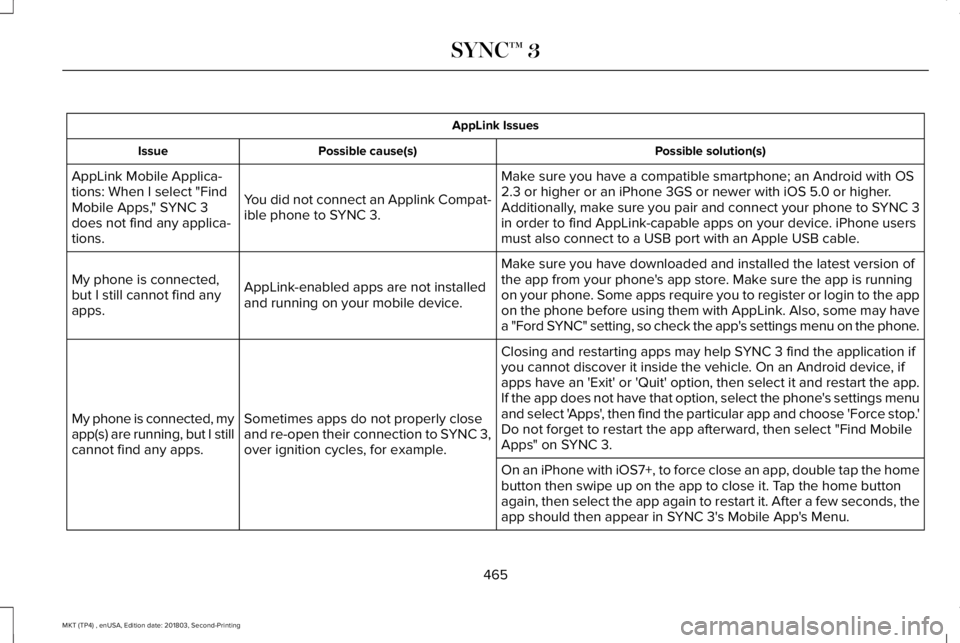
AppLink Issues
Possible solution(s)Possible cause(s)Issue
Make sure you have a compatible smartphone; an Android with OS2.3 or higher or an iPhone 3GS or newer with iOS 5.0 or higher.Additionally, make sure you pair and connect your phone to SYNC 3in order to find AppLink-capable apps on your device. iPhone usersmust also connect to a USB port with an Apple USB cable.
You did not connect an Applink Compat-ible phone to SYNC 3.
AppLink Mobile Applica-tions: When I select "FindMobile Apps," SYNC 3does not find any applica-tions.
Make sure you have downloaded and installed the latest version ofthe app from your phone's app store. Make sure the app is runningon your phone. Some apps require you to register or login to the appon the phone before using them with AppLink. Also, some may havea "Ford SYNC" setting, so check the app's settings menu on the phone.
AppLink-enabled apps are not installedand running on your mobile device.
My phone is connected,but I still cannot find anyapps.
Closing and restarting apps may help SYNC 3 find the application ifyou cannot discover it inside the vehicle. On an Android device, ifapps have an 'Exit' or 'Quit' option, then select it and restart the app.If the app does not have that option, select the phone's settings menuand select 'Apps', then find the particular app and choose 'Force stop.'Do not forget to restart the app afterward, then select "Find MobileApps" on SYNC 3.
Sometimes apps do not properly closeand re-open their connection to SYNC 3,over ignition cycles, for example.
My phone is connected, myapp(s) are running, but I stillcannot find any apps.
On an iPhone with iOS7+, to force close an app, double tap the homebutton then swipe up on the app to close it. Tap the home buttonagain, then select the app again to restart it. After a few seconds, theapp should then appear in SYNC 3's Mobile App's Menu.
465
MKT (TP4) , enUSA, Edition date: 201803, Second-Printing
SYNC™ 3
Page 469 of 575
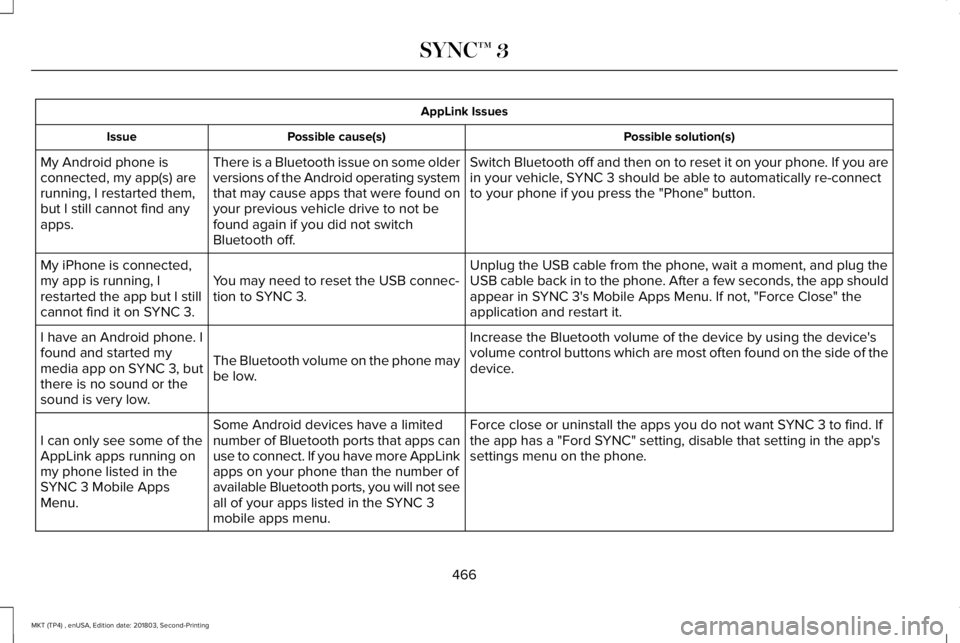
AppLink Issues
Possible solution(s)Possible cause(s)Issue
Switch Bluetooth off and then on to reset it on your phone. If you arein your vehicle, SYNC 3 should be able to automatically re-connectto your phone if you press the "Phone" button.
There is a Bluetooth issue on some olderversions of the Android operating systemthat may cause apps that were found onyour previous vehicle drive to not befound again if you did not switchBluetooth off.
My Android phone isconnected, my app(s) arerunning, I restarted them,but I still cannot find anyapps.
Unplug the USB cable from the phone, wait a moment, and plug theUSB cable back in to the phone. After a few seconds, the app shouldappear in SYNC 3's Mobile Apps Menu. If not, "Force Close" theapplication and restart it.
You may need to reset the USB connec-tion to SYNC 3.
My iPhone is connected,my app is running, Irestarted the app but I stillcannot find it on SYNC 3.
Increase the Bluetooth volume of the device by using the device'svolume control buttons which are most often found on the side of thedevice.The Bluetooth volume on the phone maybe low.
I have an Android phone. Ifound and started mymedia app on SYNC 3, butthere is no sound or thesound is very low.
Force close or uninstall the apps you do not want SYNC 3 to find. Ifthe app has a "Ford SYNC" setting, disable that setting in the app'ssettings menu on the phone.
Some Android devices have a limitednumber of Bluetooth ports that apps canuse to connect. If you have more AppLinkapps on your phone than the number ofavailable Bluetooth ports, you will not seeall of your apps listed in the SYNC 3mobile apps menu.
I can only see some of theAppLink apps running onmy phone listed in theSYNC 3 Mobile AppsMenu.
466
MKT (TP4) , enUSA, Edition date: 201803, Second-Printing
SYNC™ 3
Page 475 of 575
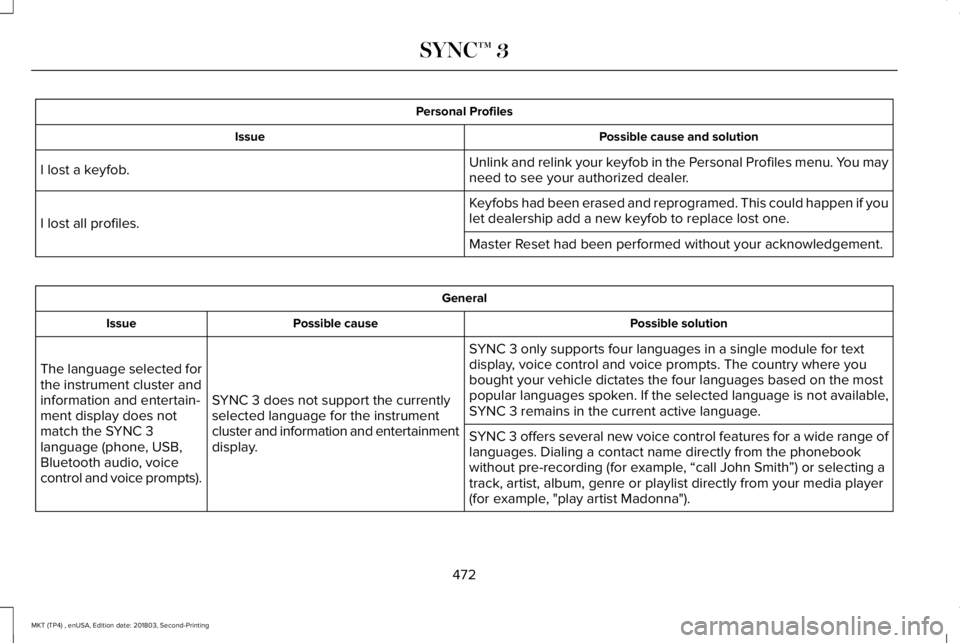
Personal Profiles
Possible cause and solutionIssue
Unlink and relink your keyfob in the Personal Profiles menu. You mayneed to see your authorized dealer.I lost a keyfob.
Keyfobs had been erased and reprogramed. This could happen if youlet dealership add a new keyfob to replace lost one.I lost all profiles.
Master Reset had been performed without your acknowledgement.
General
Possible solutionPossible causeIssue
SYNC 3 only supports four languages in a single module for textdisplay, voice control and voice prompts. The country where youbought your vehicle dictates the four languages based on the mostpopular languages spoken. If the selected language is not available,SYNC 3 remains in the current active language.SYNC 3 does not support the currentlyselected language for the instrumentcluster and information and entertainmentdisplay.
The language selected forthe instrument cluster andinformation and entertain-ment display does notmatch the SYNC 3language (phone, USB,Bluetooth audio, voicecontrol and voice prompts).
SYNC 3 offers several new voice control features for a wide range oflanguages. Dialing a contact name directly from the phonebookwithout pre-recording (for example, “call John Smith”) or selecting atrack, artist, album, genre or playlist directly from your media player(for example, "play artist Madonna").
472
MKT (TP4) , enUSA, Edition date: 201803, Second-Printing
SYNC™ 3
Page 567 of 575
Driving Through Water...............................245DRLSee: Daytime Running Lamps...........................89
E
Economical Driving......................................245Electromagnetic Compatibility....................511Emission Law...................................................171Noise Emissions Warranty, ProhibitedTampering Acts and Maintenance..............172Tampering With a Noise Control System.......171
End User License Agreement....................516VEHICLE SOFTWARE END USER LICENSEAGREEMENT (EULA) .....................................516
Engine Block Heater....................................162Using the Engine Block Heater.......................163
Engine Coolant Check................................288Adding Coolant...................................................288Coolant Change.................................................290Engine Coolant TemperatureManagement...................................................292Fail-Safe Cooling................................................290Recycled Coolant...............................................290Severe Climates.................................................290
Engine Emission Control..............................171Engine ImmobilizerSee: Passive Anti-Theft System.........................77
Engine Oil Check.........................................286Adding Engine Oil..............................................286
Engine Oil Dipstick......................................286Engine Specifications - 3.5L......................343Drivebelt Routing................................................343
Engine Specifications - 3.7L.......................344Drivebelt Routing................................................344
Entertainment................................................396AM/FM Radio.......................................................399Apps........................................................................410Bluetooth Stereo or USB..................................408CD (If equipped)..................................................407HD Radio™ Information (If Available)..............403SiriusXM® Satellite Radio (If Activated).........399Sources.................................................................398Supported Media Players, Formats andMetadata Information....................................410USB Ports..............................................................410
Environment......................................................15Essential Towing Checks...........................240Before Towing a Trailer.....................................242Hitches..................................................................240Launching or Retrieving a Boat or PersonalWatercraft (PWC)............................................243Safety Chains.......................................................241Trailer Brake Controller Connector...............242Trailer Brakes........................................................241Trailer Lamps.......................................................242
Trailer Towing Connector (Vehicles with aTrailer Towing Package and 7–PinConnector).......................................................240When Towing a Trailer.......................................242
Event Data RecordingSee: Data Recording.............................................10
Export Unique Options...................................14Exterior Mirrors................................................95Auto-dimming Feature........................................96Blind Spot Information System..........................97Direction Indicator Mirrors ................................96Fold-Away Exterior Mirrors.................................96Heated Exterior Mirrors ......................................96Integrated Blind Spot Mirror..............................96Memory Mirrors ....................................................96Power Exterior Mirrors.........................................95Puddle Lamps........................................................96
F
Fastening the Seatbelts................................39Rear Inflatable Seatbelt.......................................42Seatbelt Locking Modes.....................................40Third Row Seatbelt Stowage.............................40Using Seatbelts During Pregnancy..................39
Flat TireSee: Changing a Road Wheel.........................333
Floor Mats......................................................246
564
MKT (TP4) , enUSA, Edition date: 201803, Second-Printing
Index
Page 573 of 575
Steering..........................................................225Electric Power Steering....................................225
Steering Wheel................................................80Storage Compartments...............................156SunroofSee: Moonroof.......................................................98
Sun Visors.........................................................97Illuminated Vanity Mirror.....................................98
Supplementary Restraints System.............49Principle of Operation..........................................49
Symbols Glossary..............................................7SYNC™ 3..........................................................369General Information...........................................369
SYNC™ 3 Troubleshooting..........................456
T
Technical SpecificationsSee: Capacities and Specifications...............343
The Better Business Bureau (BBB) AutoLine Program (U.S. Only).........................256Tire Care..........................................................315Glossary of Tire Terminology............................317Information About Uniform Tire QualityGrading..............................................................315Information Contained on the TireSidewall.............................................................318Temperature A B C..............................................316
Traction AA A B C................................................316Treadwear.............................................................316
Tire Pressure Monitoring System.............329Changing Tires With a Tire PressureMonitoring System........................................330Understanding Your Tire Pressure MonitoringSystem .............................................................330
TiresSee: Wheels and Tires.......................................313
Towing a Trailer.............................................237Load Placement..................................................237
Towing the Vehicle on Four Wheels........243Emergency Towing............................................243Recreational Towing..........................................244
Towing.............................................................237Traction Control.............................................189Principle of Operation........................................189
Trailer Sway Control....................................238Transmission Code Designation..............348Transmission...................................................175Transporting the Vehicle............................253Type Approvals.............................................547Radio Frequency Certification for Keys andRemote Controls............................................559Radio Frequency Certifications for Blind SpotInformation System.......................................556Radio Frequency Certifications for BodyControl Module..............................................559
Radio Frequency Certifications for CruiseControl Module..............................................558Radio Frequency Certifications for Mid RangeRadar.................................................................550Radio Frequency Certifications for PassiveAnti-Theft System...........................................551Radio Frequency Certifications for RadioTransceiver Module.......................................554Radio Frequency Certifications for SYNC3.........................................................................558Radio Frequency Certifications for TirePressure Monitoring Sensor(s)...................547Radio Frequency Certifications for WirelessCharging..........................................................558Radio Frequency Statement for AudioUnit....................................................................559
U
Under Hood Overview - 3.5L....................283Under Hood Overview - 3.7L.....................284Universal Garage Door Opener................149HomeLink Wireless Control System...............149
USB Port..........................................................367Using Adaptive Cruise Control.................204Automatic Cancellation.....................................207Blocked Sensor..................................................209Canceling the Set Speed.................................207
570
MKT (TP4) , enUSA, Edition date: 201803, Second-Printing
Index