change wheel LINCOLN MKT 2019 User Guide
[x] Cancel search | Manufacturer: LINCOLN, Model Year: 2019, Model line: MKT, Model: LINCOLN MKT 2019Pages: 575, PDF Size: 4.66 MB
Page 203 of 575
Note:When towing, the camera only seeswhat you are towing. This might not provideadequate coverage as it usually providesduring normal operation and some objectsmay not be seen. In some vehicles, theguidelines disappear when you connect thetrailer tow connector.
The camera may not operate correctly underthe following conditions:
•Nighttime or dark areas if one or bothreverse lamps are not operating.
•Mud, water or debris obstructs thecamera's view. Clean the lens with a soft,lint-free cloth and non-abrasive cleaner.
•The rear of your vehicle is hit ordamaged, causing the camera to becomemisaligned.
Active Guidelines (If Equipped)
Note:Active guidelines are only shown withfixed guidelines while your vehicle is inreverse (R).
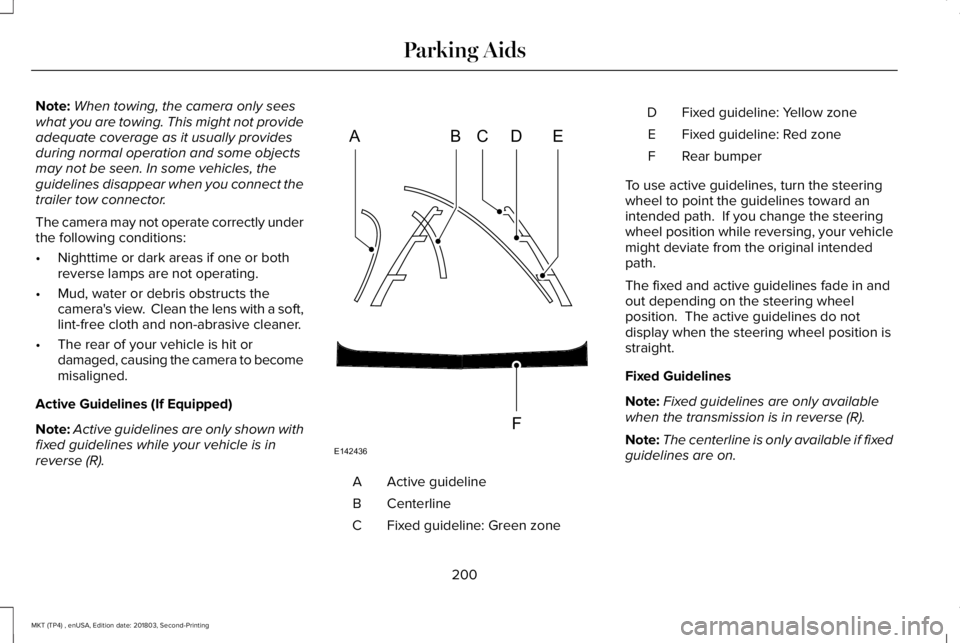
Active guidelineA
CenterlineB
Fixed guideline: Green zoneC
Fixed guideline: Yellow zoneD
Fixed guideline: Red zoneE
Rear bumperF
To use active guidelines, turn the steeringwheel to point the guidelines toward anintended path. If you change the steeringwheel position while reversing, your vehiclemight deviate from the original intendedpath.
The fixed and active guidelines fade in andout depending on the steering wheelposition. The active guidelines do notdisplay when the steering wheel position isstraight.
Fixed Guidelines
Note:Fixed guidelines are only availablewhen the transmission is in reverse (R).
Note:The centerline is only available if fixedguidelines are on.
200
MKT (TP4) , enUSA, Edition date: 201803, Second-Printing
Parking AidsABCD
F
E
E142436
Page 206 of 575
PRINCIPLE OF OPERATION
Cruise control lets you maintain a set speedwithout keeping your foot on the acceleratorpedal. You can use cruise control when yourvehicle speed is greater than 20 mph(30 km/h).
USING CRUISE CONTROL
WARNING: Do not use cruise controlon winding roads, in heavy traffic or whenthe road surface is slippery. This couldresult in loss of vehicle control, seriousinjury or death.
WARNING: When you are goingdownhill, your vehicle speed couldincrease above the set speed. The systemdoes not apply the brakes.
To help the system to maintain the set speedwhen going downhill, downshift to a lowergear.
Your vehicle speed could decrease belowthe set speed when driving uphill.
Note:The system cancels if your vehiclespeed drops below 10 mph (16 km/h) underthe set speed when driving uphill.
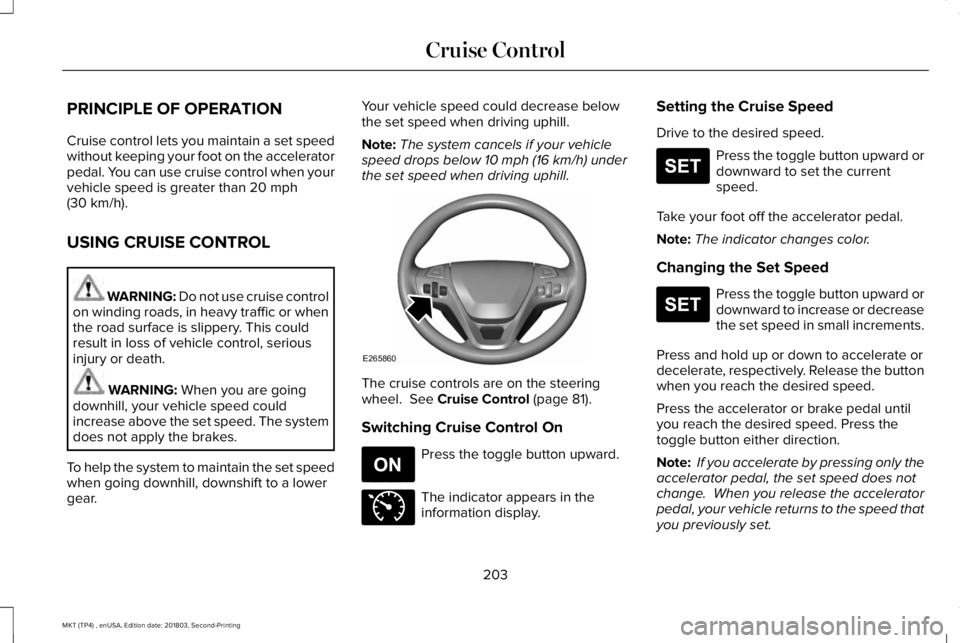
The cruise controls are on the steeringwheel. See Cruise Control (page 81).
Switching Cruise Control On
Press the toggle button upward.
The indicator appears in theinformation display.
Setting the Cruise Speed
Drive to the desired speed.
Press the toggle button upward ordownward to set the currentspeed.
Take your foot off the accelerator pedal.
Note:The indicator changes color.
Changing the Set Speed
Press the toggle button upward ordownward to increase or decreasethe set speed in small increments.
Press and hold up or down to accelerate ordecelerate, respectively. Release the buttonwhen you reach the desired speed.
Press the accelerator or brake pedal untilyou reach the desired speed. Press thetoggle button either direction.
Note: If you accelerate by pressing only theaccelerator pedal, the set speed does notchange. When you release the acceleratorpedal, your vehicle returns to the speed thatyou previously set.
203
MKT (TP4) , enUSA, Edition date: 201803, Second-Printing
Cruise ControlE265860 E265296 E71340 E265306 E265306
Page 217 of 575
Note:If the camera sensor cannot track theroad lane markings or if your vehicle speeddrops below approximately 40 mph(64 km/h), the alertness level will change togrey for a short time and the informationdisplay will inform you that the system isunavailable.
Resetting the System
You can reset the system by either:
•Switching the ignition off and on.
•Stopping the vehicle and then openingand closing the driver’s door.
LANE KEEPING SYSTEM (If Equipped)
WARNING: You are responsible forcontrolling your vehicle at all times. Thesystem is designed to be an aid and doesnot relieve you of your responsibility todrive with due care and attention. Failureto follow this instruction could result in theloss of control of your vehicle, personalinjury or death.
WARNING: Always drive with duecare and attention when using andoperating the controls and features on yourvehicle.
WARNING: In cold and severeweather conditions the system may notfunction. Rain, snow and spray can all limitsensor performance.
WARNING: The system will notoperate if the sensor cannot track the roadlane markings.
WARNING: The sensor mayincorrectly track lane markings as otherstructures or objects. This can result in afalse or missed warning.
WARNING: Large contrasts in outsidelighting can limit sensor performance.
WARNING: The system may notoperate properly if the sensor is blocked.Keep the windshield free from obstruction.
WARNING: If damage occurs in theimmediate area surrounding the sensor,have your vehicle checked as soon aspossible.
WARNING: The system may notcorrectly operate if your vehicle is fittedwith a suspension kit not approved by us.
Note:The system works above 40 mph(64 km/h).
Note:The system works as long as thecamera can detect one lane marking.
Note:When aid or alert and aid modes areselected and the system detects no steeringactivity for a short period, the system alertsyou to put your hands on the steering wheel.The system may detect a light grip or touchon the steering wheel as hands off driving.
Note:The system may not function with ablocked camera, or a damaged or dirtywindshield.
214
MKT (TP4) , enUSA, Edition date: 201803, Second-Printing
Driving Aids
Page 218 of 575
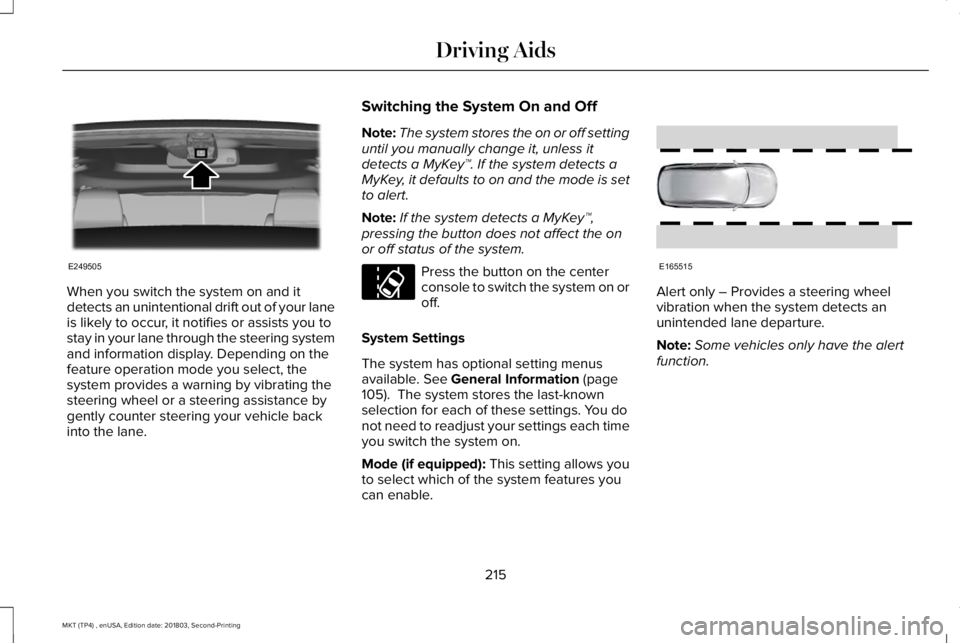
When you switch the system on and itdetects an unintentional drift out of your laneis likely to occur, it notifies or assists you tostay in your lane through the steering systemand information display. Depending on thefeature operation mode you select, thesystem provides a warning by vibrating thesteering wheel or a steering assistance bygently counter steering your vehicle backinto the lane.
Switching the System On and Off
Note:The system stores the on or off settinguntil you manually change it, unless itdetects a MyKey™. If the system detects aMyKey, it defaults to on and the mode is setto alert.
Note:If the system detects a MyKey™,pressing the button does not affect the onor off status of the system.
Press the button on the centerconsole to switch the system on oroff.
System Settings
The system has optional setting menusavailable. See General Information (page105). The system stores the last-knownselection for each of these settings. You donot need to readjust your settings each timeyou switch the system on.
Mode (if equipped): This setting allows youto select which of the system features youcan enable.
Alert only – Provides a steering wheelvibration when the system detects anunintended lane departure.
Note:Some vehicles only have the alertfunction.
215
MKT (TP4) , enUSA, Edition date: 201803, Second-Printing
Driving AidsE249505 E173233 E165515
Page 248 of 575
BREAKING-IN
You need to break in new tires forapproximately 300 mi (480 km). During thistime, your vehicle may exhibit some unusualdriving characteristics.
Avoid driving too fast during the first 1,000 mi(1,600 km). Vary your speed frequently andchange up through the gears early. Do notlabor the engine.
Do not tow during the first 1,000 mi(1,600 km).
ECONOMICAL DRIVING
Fuel economy is affected by several thingssuch as how you drive, the conditions youdrive under and how you maintain yourvehicle.
There are some things to keep in mind thatmay improve your fuel economy:
•Accelerate and slow down in a smooth,moderate fashion.
•Drive at steady speeds.
•Anticipate stops; slowing down mayeliminate the need to stop.
•Combine errands and minimizestop-and-go driving (When runningerrands, go to the furthest destinationfirst and then work your way back home).
•Close the windows for high-speeddriving.
•Drive at reasonable speeds.
•Keep the tires properly inflated and useonly the recommended size.
•Use the recommended engine oil.
•Perform all regularly scheduledmaintenance.
There are also some things you may want toavoid doing because they reduce your fueleconomy:
•Avoid sudden or hard accelerations.
•Avoid revving the engine before turningoff the car.
•Avoid long idle periods.
•Do not warm up your vehicle on coldmornings.
•Reduce the use of air conditioning andheat.
•Avoid using speed control in hilly terrain.
•Do not rest your foot on the brake pedalwhile driving.
•Avoid carrying unnecessary weight.
•Avoid adding particular accessories toyour vehicle (e.g. bug deflectors,rollbars/light bars, running boards, skiracks).
•Avoid driving with the wheels out ofalignment.
DRIVING THROUGH WATER
WARNING: Do not drive throughflowing or deep water as you may losecontrol of your vehicle.
Note:Driving through standing water cancause vehicle damage.
Note:Engine damage can occur if waterenters the air filter.
245
MKT (TP4) , enUSA, Edition date: 201803, Second-Printing
Driving Hints
Page 290 of 575
Only use oils certified for gasoline enginesby the American Petroleum Institute (API). An oil with this trademark symbol conformsto the current engine and emission systemprotection standards and fuel economyrequirements of the International LubricantsSpecification Advisory Committee (ILSAC).
To top up the engine oil level do thefollowing:
1. Clean the area surrounding the engineoil filler cap before you remove it.
2. Remove the engine oil filler cap. SeeUnder Hood Overview (page 284). Turnit counterclockwise and remove it.
3. Add engine oil that meets ourspecifications. See Capacities andSpecifications (page 355). You may haveto use a funnel to pour the engine oil intothe opening.
4. Recheck the oil level.
5. If the oil level is correct, replace thedipstick and make sure it is fully seated.
6. Replace the engine oil filler cap. Turn itclockwise until you feel a strongresistance.
Note: Do not add oil further than themaximum mark. Oil levels above themaximum mark may cause engine damage.
Note:Make sure you install the oil filler capcorrectly.
Note:Soak up any spillage with anabsorbent cloth immediately.
OIL CHANGE INDICATOR RESET
Use the information display controls on thesteering wheel to reset the oil changeindicator.
From the main menu scroll to:
Action and descriptionMessage
Press the right arrow button,then from this menu scroll tothe following message.
Settings
Press the right arrow button,then from this menu scroll tothe following message.
Vehicle
Press the right arrow button,then from this menu scroll tothe following message.
Oil Life
Press and hold the OK buttonuntil the instrument clusterdisplays the followingmessage.
Hold OK toReset
Reset Successful
When the oil change indicatorresets the instrument clusterdisplays 100%.
Remaining Life
{00}%
287
MKT (TP4) , enUSA, Edition date: 201803, Second-Printing
MaintenanceE142732
Page 314 of 575
VEHICLE STORAGE
If you plan on storing your vehicle for 30days or more, read the followingmaintenance recommendations to make sureyour vehicle stays in good operatingcondition.
We engineer and test all motor vehicles andtheir components for reliable, regular driving.Under various conditions, long-term storagemay lead to degraded engine performanceor failure unless you use specific precautionsto preserve engine components.
General
•Store all vehicles in a dry, ventilatedplace.
•Protect from sunlight, if possible.
•If vehicles are stored outside, theyrequire regular maintenance to protectagainst rust and damage.
Body
•Wash your vehicle thoroughly to removedirt, grease, oil, tar or mud from exteriorsurfaces, rear-wheel housing and theunderside of front fenders.
•Periodically wash your vehicle if it isstored in exposed locations.
•Touch-up exposed or primed metal toprevent rust.
•Cover chrome and stainless steel partswith a thick coat of auto wax to preventdiscoloration. Re-wax as necessary whenyou wash your vehicle.
•Lubricate all hood, door and luggagecompartment hinges and latches with alight grade oil.
•Cover interior trim to prevent fading.
•Keep all rubber parts free from oil andsolvents.
Engine
•Change the engine oil and filter prior tostorage because used engine oil containscontaminates which may cause enginedamage.
•Start the engine every 15 days for aminimum of 15 minutes. Run at fast idlewith the climate controls set to defrostuntil the engine reaches normaloperating temperature.
•With your foot on the brake, shift throughall the gears while the engine is running.
•We recommend that you change theengine oil before you use your vehicleagain.
Fuel system
•Fill the fuel tank with high-quality fueluntil the first automatic shutoff of the fuelpump nozzle.
311
MKT (TP4) , enUSA, Edition date: 201803, Second-Printing
Vehicle Care
Page 316 of 575
GENERAL INFORMATION
Use only approved wheel and tire sizes,using other sizes could damage your vehicle.If you change the diameter of the tires fromthat fitted at the factory, the speedometermay not display the correct speed. Take yourvehicle to an authorized Ford dealer to havethe system reprogrammed. If you intend tochange the size of the wheels from that fittedby the manufacturer, you can check thesuitability with an authorized dealer.
Additional information related to thefunctionality and maintenance of your tirescan be found later in this chapter. See TireCare (page 315).
The Ford recommended tire inflationpressures can be found on the Tire Label,which is located on the B-pillar or the edgeof the driver's door. This information can alsobe found on the Safety ComplianceCertification Label, affixed to either the doorhinge pillar, door-latch post, or the door edgethat meets the door latch post; next to thedriver’s seating position.
Ford strongly recommends maintaining thesetire pressures at all times. Failure to followthe tire pressure recommendations cancause uneven treadwear patterns, reducedfuel economy, and adversely affect the wayyour vehicle handles.
Note:Check and set the tire pressure at theambient temperature in which you areintending to drive your vehicle and when thetires are cold.
Note:Check your tire pressures at least onceper month.
Set the pressure for your spare tire to thehighest value given for your vehicle and tiresize combination, if equipped.
Notice to utility vehicle and truckowners
WARNING: Utility vehicles have asignificantly higher rollover rate than othertypes of vehicles.
WARNING: Vehicles with a highercenter of gravity (utility and four-wheeldrive vehicles) handle differently thanvehicles with a lower center of gravity(passenger cars). Avoid sharp turns,excessive speed and abrupt steering inthese vehicles. Failure to drive cautiouslyincreases the risk of losing control of yourvehicle, vehicle rollover, personal injuryand death.
WARNING: In a rollover crash, anunbelted person is significantly more likelyto die than a person wearing a seatbelt.
WARNING: Do not becomeoverconfident in the ability of four-wheeldrive vehicles. Although a four-wheel drivevehicle may accelerate better than atwo-wheel drive vehicle in low tractionsituations, it won't stop any faster thantwo-wheel drive vehicles. Always drive ata safe speed.
313
MKT (TP4) , enUSA, Edition date: 201803, Second-Printing
Wheels and Tires
Page 321 of 575
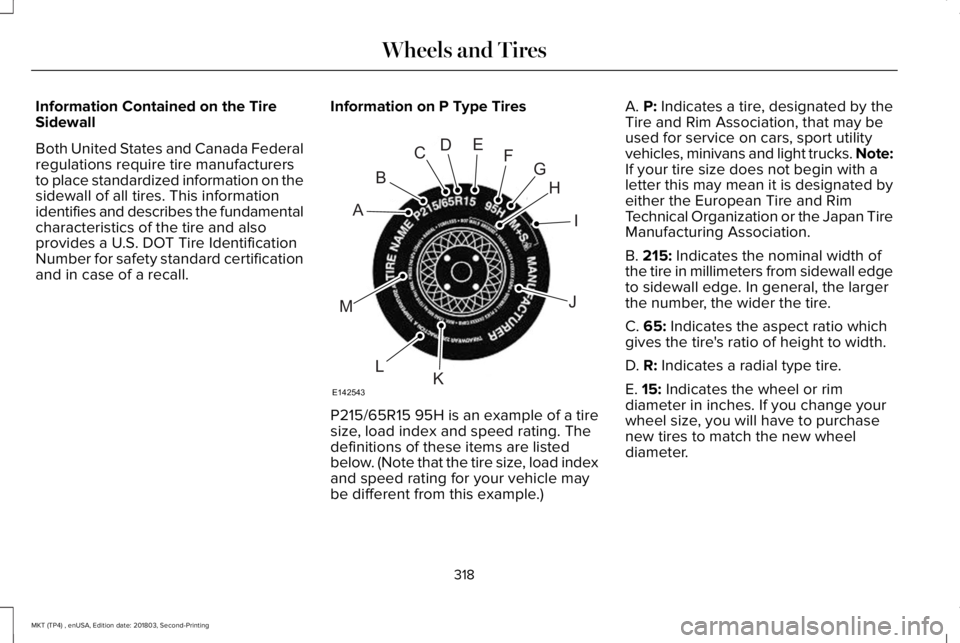
Information Contained on the TireSidewall
Both United States and Canada Federalregulations require tire manufacturersto place standardized information on thesidewall of all tires. This informationidentifies and describes the fundamentalcharacteristics of the tire and alsoprovides a U.S. DOT Tire IdentificationNumber for safety standard certificationand in case of a recall.
Information on P Type Tires
P215/65R15 95H is an example of a tiresize, load index and speed rating. Thedefinitions of these items are listedbelow. (Note that the tire size, load indexand speed rating for your vehicle maybe different from this example.)
A. P: Indicates a tire, designated by theTire and Rim Association, that may beused for service on cars, sport utilityvehicles, minivans and light trucks. Note:If your tire size does not begin with aletter this may mean it is designated byeither the European Tire and RimTechnical Organization or the Japan TireManufacturing Association.
B. 215: Indicates the nominal width ofthe tire in millimeters from sidewall edgeto sidewall edge. In general, the largerthe number, the wider the tire.
C. 65: Indicates the aspect ratio whichgives the tire's ratio of height to width.
D. R: Indicates a radial type tire.
E. 15: Indicates the wheel or rim
diameter in inches. If you change yourwheel size, you will have to purchasenew tires to match the new wheeldiameter.
318
MKT (TP4) , enUSA, Edition date: 201803, Second-Printing
Wheels and TiresH
I
J
KL
M
A
B
CDEFG
E142543
Page 325 of 575
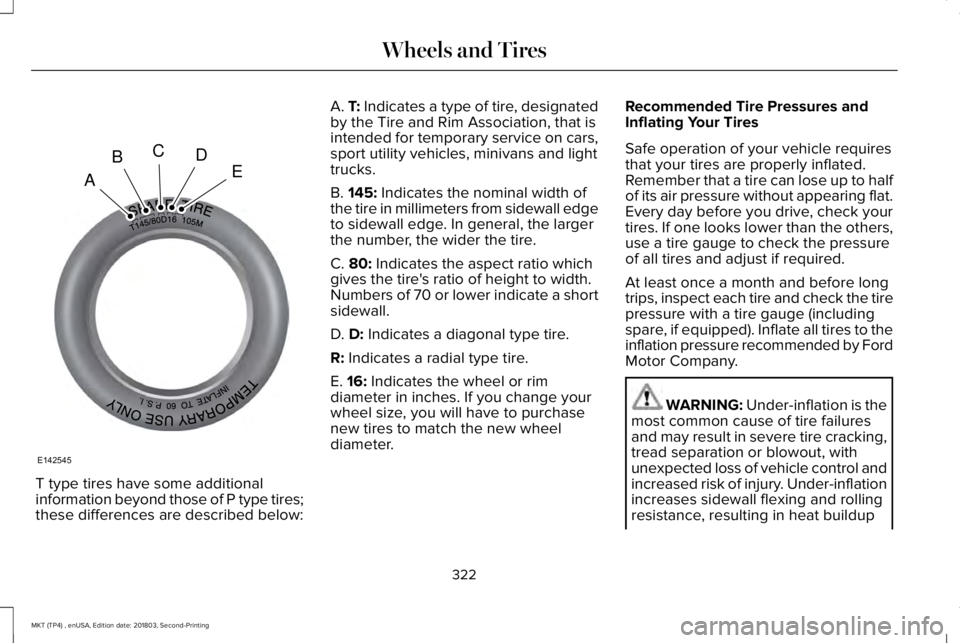
T type tires have some additionalinformation beyond those of P type tires;these differences are described below:
A. T: Indicates a type of tire, designatedby the Tire and Rim Association, that isintended for temporary service on cars,sport utility vehicles, minivans and lighttrucks.
B. 145: Indicates the nominal width ofthe tire in millimeters from sidewall edgeto sidewall edge. In general, the largerthe number, the wider the tire.
C. 80: Indicates the aspect ratio whichgives the tire's ratio of height to width.Numbers of 70 or lower indicate a shortsidewall.
D. D: Indicates a diagonal type tire.
R: Indicates a radial type tire.
E. 16: Indicates the wheel or rimdiameter in inches. If you change your
wheel size, you will have to purchasenew tires to match the new wheeldiameter.
Recommended Tire Pressures andInflating Your Tires
Safe operation of your vehicle requiresthat your tires are properly inflated.Remember that a tire can lose up to halfof its air pressure without appearing flat.Every day before you drive, check yourtires. If one looks lower than the others,use a tire gauge to check the pressureof all tires and adjust if required.
At least once a month and before longtrips, inspect each tire and check the tirepressure with a tire gauge (includingspare, if equipped). Inflate all tires to theinflation pressure recommended by FordMotor Company.
WARNING: Under-inflation is themost common cause of tire failuresand may result in severe tire cracking,tread separation or blowout, withunexpected loss of vehicle control andincreased risk of injury. Under-inflationincreases sidewall flexing and rolling
resistance, resulting in heat buildup
322
MKT (TP4) , enUSA, Edition date: 201803, Second-Printing
Wheels and TiresA
BCDE
E142545