headlamp LINCOLN MKT 2019 User Guide
[x] Cancel search | Manufacturer: LINCOLN, Model Year: 2019, Model line: MKT, Model: LINCOLN MKT 2019Pages: 575, PDF Size: 4.66 MB
Page 106 of 575
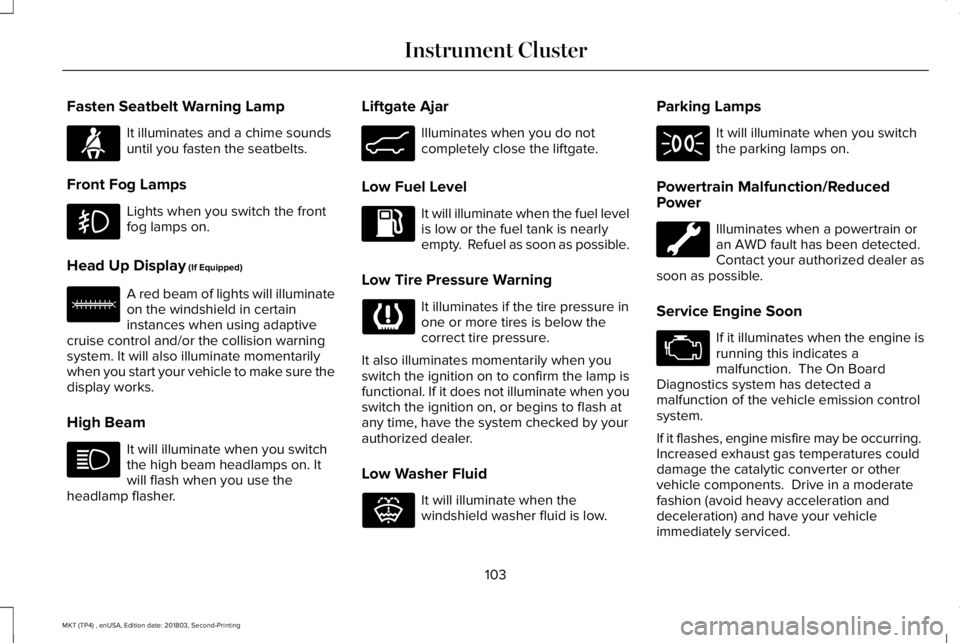
Fasten Seatbelt Warning Lamp
It illuminates and a chime soundsuntil you fasten the seatbelts.
Front Fog Lamps
Lights when you switch the frontfog lamps on.
Head Up Display (If Equipped)
A red beam of lights will illuminateon the windshield in certaininstances when using adaptivecruise control and/or the collision warningsystem. It will also illuminate momentarilywhen you start your vehicle to make sure thedisplay works.
High Beam
It will illuminate when you switchthe high beam headlamps on. Itwill flash when you use theheadlamp flasher.
Liftgate Ajar
Illuminates when you do notcompletely close the liftgate.
Low Fuel Level
It will illuminate when the fuel levelis low or the fuel tank is nearlyempty. Refuel as soon as possible.
Low Tire Pressure Warning
It illuminates if the tire pressure inone or more tires is below thecorrect tire pressure.
It also illuminates momentarily when youswitch the ignition on to confirm the lamp isfunctional. If it does not illuminate when youswitch the ignition on, or begins to flash atany time, have the system checked by yourauthorized dealer.
Low Washer Fluid
It will illuminate when thewindshield washer fluid is low.
Parking Lamps
It will illuminate when you switchthe parking lamps on.
Powertrain Malfunction/ReducedPower
Illuminates when a powertrain oran AWD fault has been detected. Contact your authorized dealer assoon as possible.
Service Engine Soon
If it illuminates when the engine isrunning this indicates amalfunction. The On BoardDiagnostics system has detected amalfunction of the vehicle emission controlsystem.
If it flashes, engine misfire may be occurring. Increased exhaust gas temperatures coulddamage the catalytic converter or othervehicle components. Drive in a moderatefashion (avoid heavy acceleration anddeceleration) and have your vehicleimmediately serviced.
103
MKT (TP4) , enUSA, Edition date: 201803, Second-Printing
Instrument ClusterE71880 E156133 E162453 E132353
Page 107 of 575
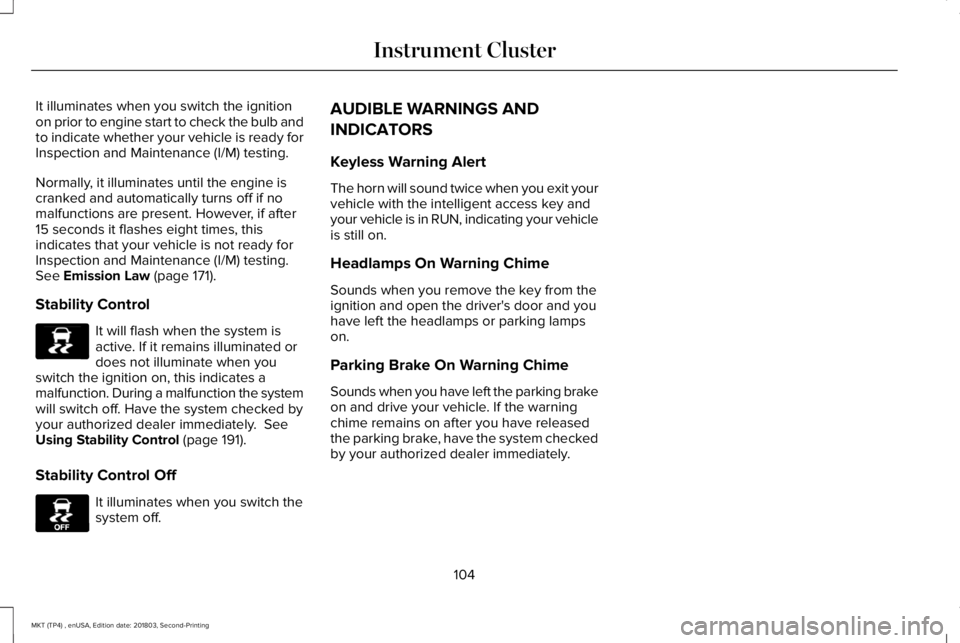
It illuminates when you switch the ignitionon prior to engine start to check the bulb andto indicate whether your vehicle is ready forInspection and Maintenance (I/M) testing.
Normally, it illuminates until the engine iscranked and automatically turns off if nomalfunctions are present. However, if after15 seconds it flashes eight times, thisindicates that your vehicle is not ready forInspection and Maintenance (I/M) testing.See Emission Law (page 171).
Stability Control
It will flash when the system isactive. If it remains illuminated ordoes not illuminate when youswitch the ignition on, this indicates amalfunction. During a malfunction the systemwill switch off. Have the system checked byyour authorized dealer immediately. SeeUsing Stability Control (page 191).
Stability Control Off
It illuminates when you switch thesystem off.
AUDIBLE WARNINGS AND
INDICATORS
Keyless Warning Alert
The horn will sound twice when you exit yourvehicle with the intelligent access key andyour vehicle is in RUN, indicating your vehicleis still on.
Headlamps On Warning Chime
Sounds when you remove the key from theignition and open the driver's door and youhave left the headlamps or parking lampson.
Parking Brake On Warning Chime
Sounds when you have left the parking brakeon and drive your vehicle. If the warningchime remains on after you have releasedthe parking brake, have the system checkedby your authorized dealer immediately.
104
MKT (TP4) , enUSA, Edition date: 201803, Second-Printing
Instrument ClusterE138639 E130458
Page 162 of 575
•Without applying the brake pedal, pressand release the button once when theignition is in the on mode, or when theengine is running but the vehicle is notmoving.
On: All electrical circuits are operational andthe warning lamps and indicators illuminate.
•Without applying the brake pedal, pressand release the button once.
Note:You may have to press the pushbutton ignition switch twice to switch theignition on.
Start: Starts the engine.
•Press the brake pedal, and then pressthe button for any length of time. Anindicator light on the button illuminateswhen then ignition is on and when theengine starts.
STARTING A GASOLINE ENGINE
When you start the engine, the idle speedincreases. This helps to warm up the engine.If the engine idle speed does not slow downautomatically, have your vehicle checked byan authorized dealer.
Note: You can crank the engine for a totalof 60 seconds without the engine startingbefore the starting system temporarilydisables. The 60 seconds does not have tobe all at once. For example, if you crank theengine three times for 20 seconds each time,without the engine starting, you reached the60-second time limit. A message appearsin the information display alerting you thatyou exceeded the cranking time. Youcannot attempt to start the engine for atleast 15 minutes. After 15 minutes, you arelimited to a 15-second engine cranking time. You need to wait 60 minutes before you cancrank the engine for 60 seconds again.
Before starting your vehicle, check thefollowing:
•Make sure all occupants have fastenedtheir safety belts.
•Make sure the headlamps and electricalaccessories are off.
•Make sure the parking brake is on.
•Make sure the transmission is in park (P).
Note:Do not touch the accelerator pedal.
Note:You must have your intelligent accesskey in your vehicle to shift the transmissionout of park (P).
1. Fully depress the brake pedal.
2. Press the push button ignition switch.
The system does not function if:
•The passive key frequencies are jammed.
•The key battery has no charge.
If you are unable to start your vehicle, do thefollowing:
159
MKT (TP4) , enUSA, Edition date: 201803, Second-Printing
Starting and Stopping the Engine
Page 220 of 575
If you switch the system on in aid or alert andaid mode, a separate white icon alsoappears, or in some vehicles, arrows displaywith the lane markings.
When you switch the system off, the lanemarking graphics do not display.
When the system is on, the color of the lanemarkings change to indicate the systemstatus.
Gray: Indicates that the system is temporarilyunable to provide a warning or interventionon the indicated side. This may be because:
•Your vehicle is under the activationspeed.
•The direction indicator is active.
•Your vehicle is in a dynamic maneuver.
•The road has no or poor lane markingsin the camera field of view.
•The camera is obscured or unable todetect the lane markings due toenvironmental, traffic or vehicleconditions. For example, significant sunangles, shadows, snow, heavy rain or fog,following a large vehicle that is blockingor shadowing the lane or poor headlampillumination.
See Troubleshooting for additionalinformation.
Green: Indicates that the system is availableor ready to provide a warning or interventionon the indicated side.
Yellow: Indicates that the system is providingor has just provided a lane keeping aidintervention.
Red: Indicates that the system is providingor has just provided a lane keeping alertwarning.
The system can be temporarily suppressedat any time by the following:
•Quick braking.
•Fast acceleration.
•Using the turn signal indicator.
•Evasive steering maneuver.
•Driving too close to the lane marking.
Troubleshooting
Why is the feature not available (line markings are gray) when I can see the lane markings on the road?
Your vehicle speed is outside the operational range of the feature.
The sun is shining directly into the camera lens.
A quick intentional lane change has occurred.
217
MKT (TP4) , enUSA, Edition date: 201803, Second-Printing
Driving Aids
Page 232 of 575
System Limitations
WARNING: The collision warningsystem’s brake support can only helpreduce the speed at which a collisionoccurs if the driver applies the vehicle’sbrakes. The brake pedal must be pressedjust like any typical braking situation.
Due to the nature of radar technology, theremay be certain instances where vehicles donot provide a collision warning. Theseinclude:
•Stationary vehicles or vehicles movingbelow 6 mph (10 km/h).
•Pedestrians or objects in the roadway.
•Oncoming vehicles in the same lane.
•Severe weather conditions (see blockedsensor section).
•Debris build-up on the grille near theheadlamps (see blocked sensor section).
•Small distance to vehicle ahead.
•Steering wheel and pedal movementsare large (very active driving style).
If the front end of the vehicle is hit ordamaged, the radar sensing zone may bealtered causing missed or false collisionwarnings. See your authorized dealer to haveyour collision warning radar checked forproper coverage and operation.
DRIVE CONTROL (If Equipped)
Lincoln Drive Control
Lincoln Drive Control delivers the Lincolndriving experience through a suite ofsophisticated electronic vehicle systems.These systems continuously monitor yourdriving inputs and the road conditions tooptimize ride comfort, steering, handling,powertrain response and sound. You canpreset your preferences for these systemswithin the information display. Lincoln DriveControl will respond to your preferencesbased on what gear position you select. Thisprovides a single location to control multiplesystems performance settings.
Lincoln Drive Control consists of thefollowing systems:
•Adaptive suspension dynamically adjuststhe shock absorbers stiffness in real timeto match the road surface and driverinputs. This system continuously monitorsyour vehicle’s motion, suspensionposition, load, speed, road conditionsand steering to adjust the suspensiondamping for optimal vehicle control.
•Electronically power-assisted steeringadjusts steering effort and feel based onyour vehicle speed and your inputs.
•Active noise control utilizes your vehicleelectronics to enhance the acousticexperience.
•Electronic stability control and tractioncontrol maintain your vehicle control inadverse conditions or high performancedriving.
•Electronic throttle control enhances thepowertrain response to your inputs.
229
MKT (TP4) , enUSA, Edition date: 201803, Second-Printing
Driving Aids
Page 270 of 575
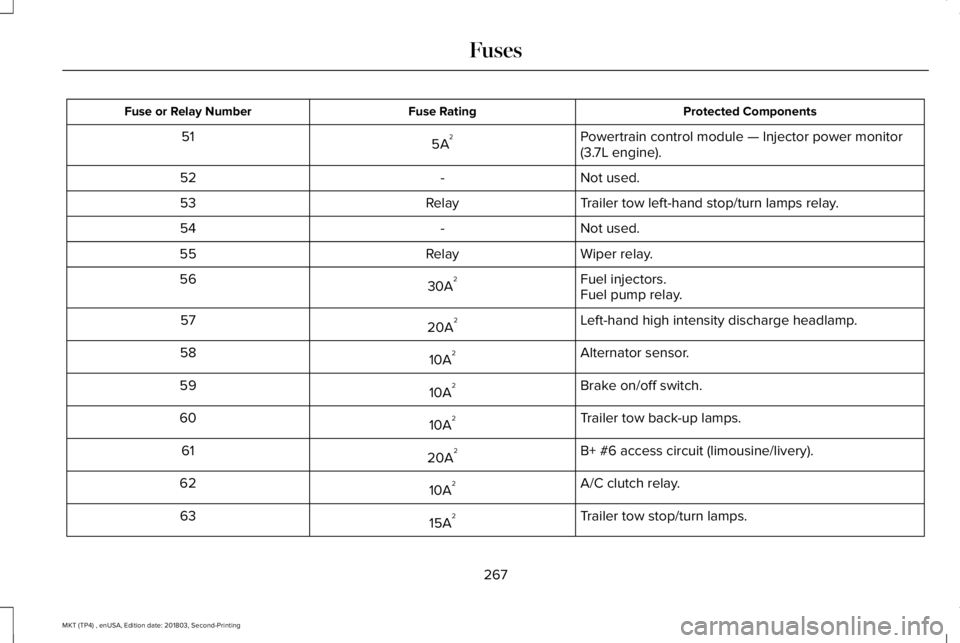
Protected ComponentsFuse RatingFuse or Relay Number
Powertrain control module — Injector power monitor(3.7L engine).5A251
Not used.-52
Trailer tow left-hand stop/turn lamps relay.Relay53
Not used.-54
Wiper relay.Relay55
Fuel injectors.30A256Fuel pump relay.
Left-hand high intensity discharge headlamp.20A257
Alternator sensor.10A258
Brake on/off switch.10A259
Trailer tow back-up lamps.10A260
B+ #6 access circuit (limousine/livery).20A261
A/C clutch relay.10A262
Trailer tow stop/turn lamps.15A263
267
MKT (TP4) , enUSA, Edition date: 201803, Second-Printing
Fuses
Page 272 of 575
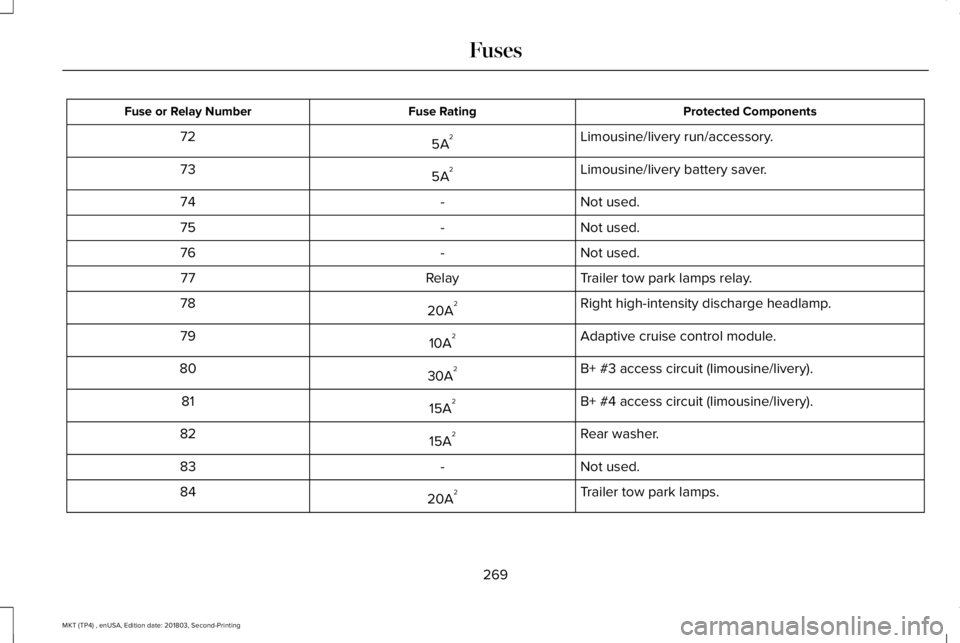
Protected ComponentsFuse RatingFuse or Relay Number
Limousine/livery run/accessory.5A272
Limousine/livery battery saver.5A273
Not used.-74
Not used.-75
Not used.-76
Trailer tow park lamps relay.Relay77
Right high-intensity discharge headlamp.20A278
Adaptive cruise control module.10A279
B+ #3 access circuit (limousine/livery).30A280
B+ #4 access circuit (limousine/livery).15A281
Rear washer.15A282
Not used.-83
Trailer tow park lamps.20A284
269
MKT (TP4) , enUSA, Edition date: 201803, Second-Printing
Fuses
Page 273 of 575
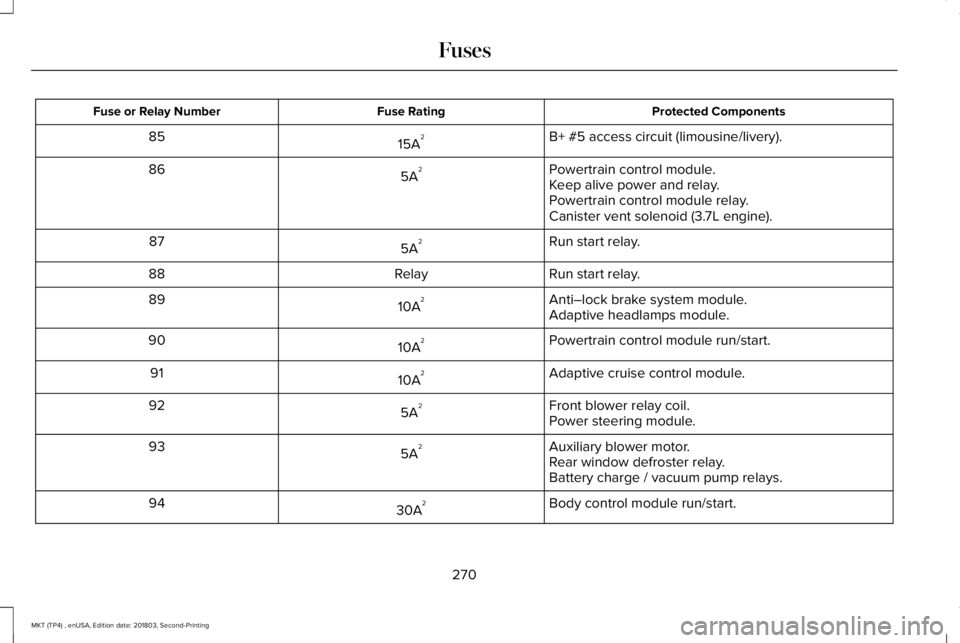
Protected ComponentsFuse RatingFuse or Relay Number
B+ #5 access circuit (limousine/livery).15A285
Powertrain control module.5A286Keep alive power and relay.Powertrain control module relay.Canister vent solenoid (3.7L engine).
Run start relay.5A287
Run start relay.Relay88
Anti–lock brake system module.10A289Adaptive headlamps module.
Powertrain control module run/start.10A290
Adaptive cruise control module.10A291
Front blower relay coil.5A292Power steering module.
Auxiliary blower motor.5A293Rear window defroster relay.Battery charge / vacuum pump relays.
Body control module run/start.30A294
270
MKT (TP4) , enUSA, Edition date: 201803, Second-Printing
Fuses
Page 277 of 575
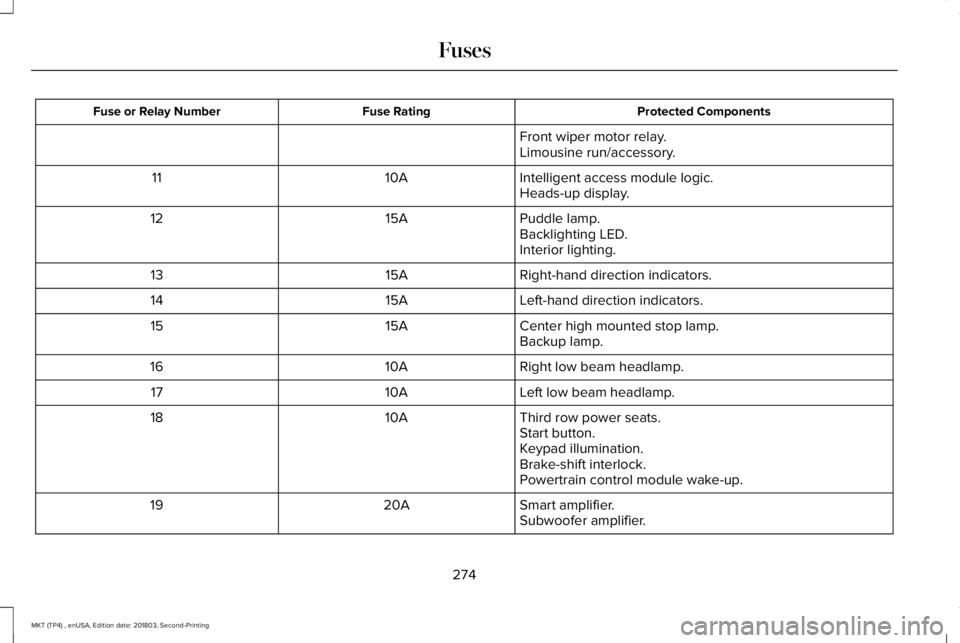
Protected ComponentsFuse RatingFuse or Relay Number
Front wiper motor relay.Limousine run/accessory.
Intelligent access module logic.10A11Heads-up display.
Puddle lamp.15A12Backlighting LED.Interior lighting.
Right-hand direction indicators.15A13
Left-hand direction indicators.15A14
Center high mounted stop lamp.15A15Backup lamp.
Right low beam headlamp.10A16
Left low beam headlamp.10A17
Third row power seats.10A18Start button.Keypad illumination.Brake-shift interlock.Powertrain control module wake-up.
Smart amplifier.20A19Subwoofer amplifier.
274
MKT (TP4) , enUSA, Edition date: 201803, Second-Printing
Fuses
Page 301 of 575
Front Wiper Blades
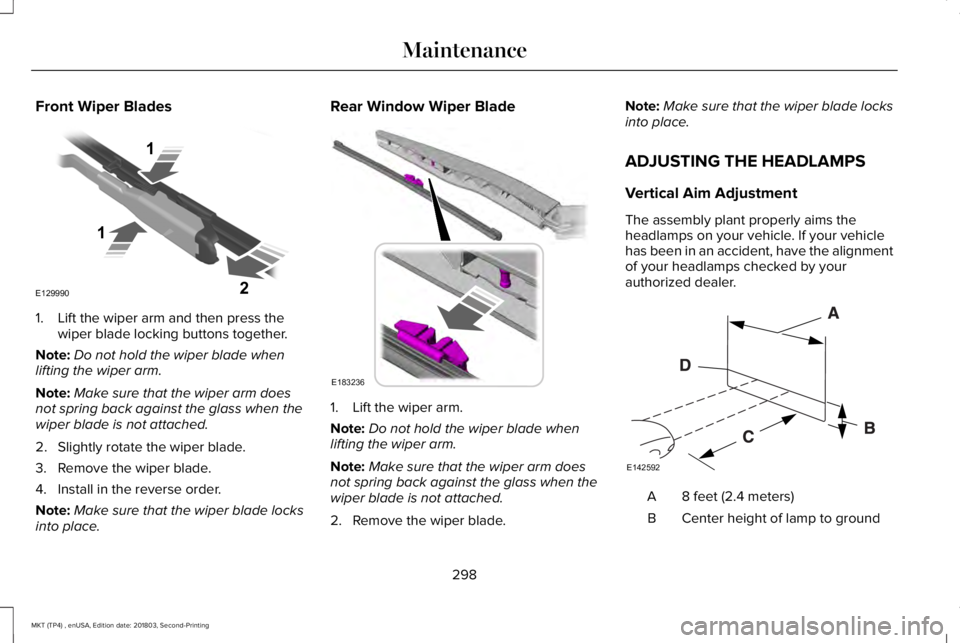
1. Lift the wiper arm and then press thewiper blade locking buttons together.
Note:Do not hold the wiper blade whenlifting the wiper arm.
Note:Make sure that the wiper arm doesnot spring back against the glass when thewiper blade is not attached.
2. Slightly rotate the wiper blade.
3. Remove the wiper blade.
4. Install in the reverse order.
Note:Make sure that the wiper blade locksinto place.
Rear Window Wiper Blade
1. Lift the wiper arm.
Note:Do not hold the wiper blade whenlifting the wiper arm.
Note:Make sure that the wiper arm doesnot spring back against the glass when thewiper blade is not attached.
2. Remove the wiper blade.
Note:Make sure that the wiper blade locksinto place.
ADJUSTING THE HEADLAMPS
Vertical Aim Adjustment
The assembly plant properly aims theheadlamps on your vehicle. If your vehiclehas been in an accident, have the alignmentof your headlamps checked by yourauthorized dealer.
8 feet (2.4 meters)A
Center height of lamp to groundB
298
MKT (TP4) , enUSA, Edition date: 201803, Second-Printing
MaintenanceE129990
1
1 2 E183236 E142592