climate control LINCOLN MKT 2019 Owner's Manual
[x] Cancel search | Manufacturer: LINCOLN, Model Year: 2019, Model line: MKT, Model: LINCOLN MKT 2019Pages: 575, PDF Size: 4.66 MB
Page 319 of 575
Tire Quality Grades apply to newpneumatic passenger car tires. TheQuality grades can be found whereapplicable on the tire sidewall betweentread shoulder and maximum sectionwidth. For example: Treadwear 200Traction AA Temperature A.
These Tire Quality Grades aredetermined by standards that the UnitedStates Department of Transportation hasset.
Tire Quality Grades apply to newpneumatic passenger car tires. They donot apply to deep tread, winter-typesnow tires, space-saver or temporaryuse spare tires, light truck or LT typetires, tires with nominal rim diameters of10 to 12 inches or limited production tires
as defined in Title 49 Code of FederalRegulations Part 575.104 (c)(2).
U.S. Department of Transportation Tirequality grades: The U.S. Department ofTransportation requires Ford MotorCompany to give you the followinginformation about tire grades exactly asthe government has written it.
Treadwear
The treadwear grade is a comparativerating based on the wear rate of the tirewhen tested under controlled conditionson a specified government test course.For example, a tire graded 150 wouldwear 1½ times as well on thegovernment course as a tire graded 100.The relative performance of tiresdepends upon the actual conditions oftheir use, however, and may departsignificantly from the norm due tovariations in driving habits, servicepractices, and differences in roadcharacteristics and climate.
Traction AA A B C
WARNING: The traction gradeassigned to this tire is based onstraight-ahead braking traction tests,and does not include acceleration,cornering, hydroplaning or peaktraction characteristics.
The traction grades, from highest tolowest are AA, A, B, and C. The gradesrepresent the tire’s ability to stop on wetpavement as measured under controlledconditions on specified government testsurfaces of asphalt and concrete. A tiremarked C may have poor tractionperformance.
Temperature A B C
WARNING: The temperaturegrade for this tire is established for atire that is properly inflated and notoverloaded. Excessive speed,underinflation, or excessive loading,either separately or in combination,can cause heat buildup and possibletire failure.
The temperature grades are A (thehighest), B and C, representing the tire’sresistance to the generation of heat andits ability to dissipate heat when testedunder controlled conditions on aspecified indoor laboratory test wheel.Sustained high temperature can cause
316
MKT (TP4) , enUSA, Edition date: 201803, Second-Printing
Wheels and Tires
Page 331 of 575
USING SNOW CHAINS
WARNING: Snow tires must be thesame size, load index, and speed rating asthose originally provided by Ford. Use ofany tire or wheel not recommended byFord can affect the safety and performanceof your vehicle, which could result in anincreased risk of loss of vehicle control,vehicle rollover, personal injury, and death.Additionally, the use of non-recommendedtires and wheels could cause steering,suspension, axle, transfer case, or powertransfer unit failure. It is also stronglyadvised to follow the Ford recommendedtire inflation pressure found on the SafetyCompliance Certification Label (affixed toeither the door hinge pillar, door-latch post,or the door edge that meets the door-latchpost, next to the driver’s seating position),or Tire Label which is located on theB-Pillar or the edge of the driver door.Failure to follow the tire pressurerecommendations can cause uneventreadwear patterns and adversely affectthe way your vehicle handles.
Note:The suspension insulation andbumpers will help prevent vehicle damage.Do not remove these components from yourvehicle when using snow tires and chains.
The tires on your vehicle have all-weathertreads to provide traction in rain and snow.However, in some climates, you may needto use snow tires and cables. If you need touse cables, it is recommended that steelwheels (of the same size and specifications)be used, as cables may chip aluminumwheels.
Follow these guidelines when using snowtires and chains:
•If possible, avoid fully loading yourvehicle.
•Use only SAE Class S snow chains, snowcables or equivalent on the front axle forP235/55R19 equipped vehicles. The useof snow chains, snow cables or othertraction assist devices that are larger thanSAE Class S may cause damage to yourvehicle’s wheel house, suspension orbody.
•Do not install tire chains, cables, oroptional traction devices on the rear tires.This could cause damage to the vehicle’swheel house or body.
•Do not use tire chains, cables or optionaltraction devices with optional 255/45R20tires.
•Install cable chains securely, verifyingthat the cables do not touch any wiring,brake lines or fuel lines.
•Do not exceed 30 mph (48 km/h) withtire cables on your vehicle.
•Drive cautiously. If you hear the cablesrub or bang against your vehicle, stopand retighten the cables. If this does notwork, remove the cables to preventdamage to your vehicle.
•Remove the tire cables when they are nolonger needed. Do not use tire cables ondry roads.
328
MKT (TP4) , enUSA, Edition date: 201803, Second-Printing
Wheels and Tires
Page 372 of 575
GENERAL INFORMATION
WARNING: Driving while distractedcan result in loss of vehicle control, crashand injury. We strongly recommend thatyou use extreme caution when using anydevice that may take your focus off theroad. Your primary responsibility is the safeoperation of your vehicle. We recommendagainst the use of any hand-held devicewhile driving and encourage the use ofvoice-operated systems when possible.Make sure you are aware of all applicablelocal laws that may affect the use ofelectronic devices while driving.
Getting to Know Your System
The SYNC 3 system allows you to interactwith a variety of features using thetouchscreen and voice commands. Byintegrating with your Bluetooth enabledphone, the touchscreen provides easyinteraction with audio, multimedia, climatecontrol, navigation, and your phone's SYNC3 compatible apps.
Using the Touchscreen
To operate the touchscreen, you can simplytouch the item or option that you want toselect. The button changes color when youselect it.
The SYNC 3 layout allows you to quicklyselect the feature you wish to use.
369
MKT (TP4) , enUSA, Edition date: 201803, Second-Printing
SYNC™ 3
Page 374 of 575
Action and DescriptionMenu ItemItem
This bar displays icons and messages pertaining to current system activities including climatesettings, voice commands and phone functions such as text messages.Status BarA
This button is available on the main screens. Pressing it takes you to the home screen view.HomeB
This shows the current time. You can set the clock manually or have it controlled by the vehicle'sGPS location. See Settings (page 436).ClockC
This displays the current outside temperature.Outside TemperatureD
You can touch any of the buttons on this bar to select a feature.Feature BarE
The touchscreen allows you quick access toall of your comfort, navigation,communication and entertainment options.Using the status and feature bar you canquickly select the feature you want to use.
Note:Your system is equipped with a featurethat allows you to access and control audiofeatures for 10 minutes after you switch theignition off (and no doors open).
The Status Bar
Additional icons also display in the status bardepending on market, vehicle options andcurrent operation. If a feature is not active,the icon does not display. Certain icons maymove to the left or right depending on whatoptions are active.
371
MKT (TP4) , enUSA, Edition date: 201803, Second-Printing
SYNC™ 3
Page 376 of 575
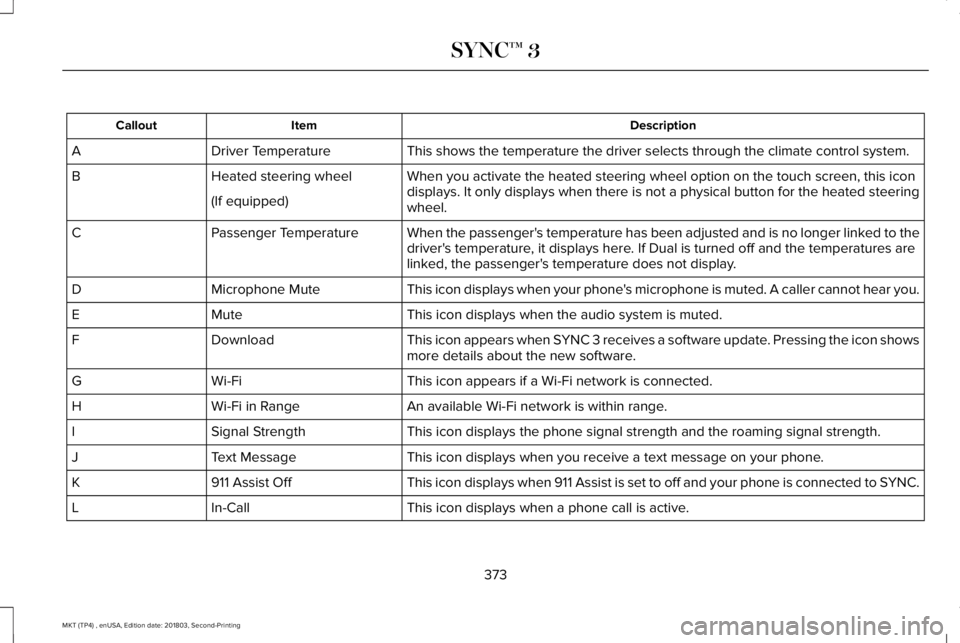
DescriptionItemCallout
This shows the temperature the driver selects through the climate control system.Driver TemperatureA
When you activate the heated steering wheel option on the touch screen, this icondisplays. It only displays when there is not a physical button for the heated steeringwheel.
Heated steering wheelB
(If equipped)
When the passenger's temperature has been adjusted and is no longer linked to thedriver's temperature, it displays here. If Dual is turned off and the temperatures arelinked, the passenger's temperature does not display.
Passenger TemperatureC
This icon displays when your phone's microphone is muted. A caller cannot hear you.Microphone MuteD
This icon displays when the audio system is muted.MuteE
This icon appears when SYNC 3 receives a software update. Pressing the icon showsmore details about the new software.DownloadF
This icon appears if a Wi-Fi network is connected.Wi-FiG
An available Wi-Fi network is within range.Wi-Fi in RangeH
This icon displays the phone signal strength and the roaming signal strength.Signal StrengthI
This icon displays when you receive a text message on your phone.Text MessageJ
This icon displays when 911 Assist is set to off and your phone is connected to SYNC.911 Assist OffK
This icon displays when a phone call is active.In-CallL
373
MKT (TP4) , enUSA, Edition date: 201803, Second-Printing
SYNC™ 3
Page 377 of 575
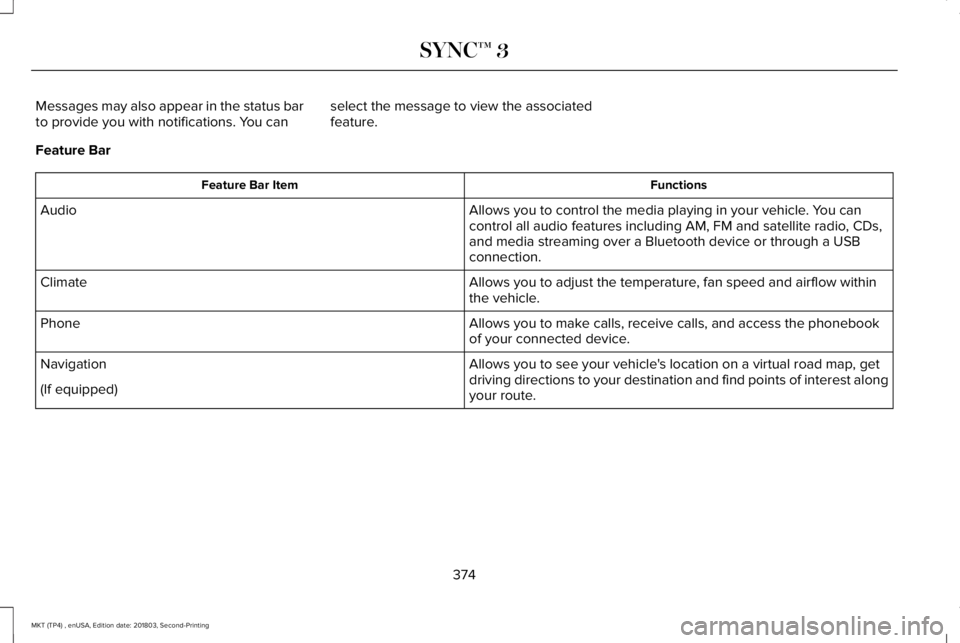
Messages may also appear in the status barto provide you with notifications. You canselect the message to view the associatedfeature.
Feature Bar
FunctionsFeature Bar Item
Allows you to control the media playing in your vehicle. You cancontrol all audio features including AM, FM and satellite radio, CDs,and media streaming over a Bluetooth device or through a USBconnection.
Audio
Allows you to adjust the temperature, fan speed and airflow withinthe vehicle.Climate
Allows you to make calls, receive calls, and access the phonebookof your connected device.Phone
Allows you to see your vehicle's location on a virtual road map, getdriving directions to your destination and find points of interest alongyour route.
Navigation
(If equipped)
374
MKT (TP4) , enUSA, Edition date: 201803, Second-Printing
SYNC™ 3
Page 381 of 575
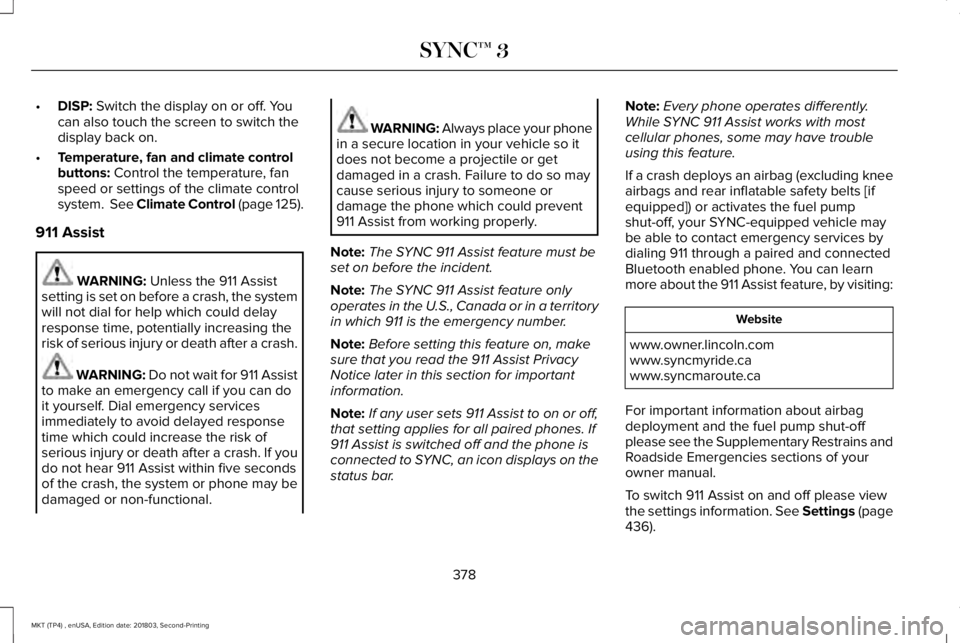
•DISP: Switch the display on or off. Youcan also touch the screen to switch thedisplay back on.
•Temperature, fan and climate controlbuttons: Control the temperature, fanspeed or settings of the climate controlsystem. See Climate Control (page 125).
911 Assist
WARNING: Unless the 911 Assistsetting is set on before a crash, the systemwill not dial for help which could delayresponse time, potentially increasing therisk of serious injury or death after a crash.
WARNING: Do not wait for 911 Assistto make an emergency call if you can doit yourself. Dial emergency servicesimmediately to avoid delayed responsetime which could increase the risk ofserious injury or death after a crash. If youdo not hear 911 Assist within five secondsof the crash, the system or phone may bedamaged or non-functional.
WARNING: Always place your phonein a secure location in your vehicle so itdoes not become a projectile or getdamaged in a crash. Failure to do so maycause serious injury to someone ordamage the phone which could prevent911 Assist from working properly.
Note:The SYNC 911 Assist feature must beset on before the incident.
Note:The SYNC 911 Assist feature onlyoperates in the U.S., Canada or in a territoryin which 911 is the emergency number.
Note:Before setting this feature on, makesure that you read the 911 Assist PrivacyNotice later in this section for importantinformation.
Note:If any user sets 911 Assist to on or off,that setting applies for all paired phones. If911 Assist is switched off and the phone isconnected to SYNC, an icon displays on thestatus bar.
Note:Every phone operates differently.While SYNC 911 Assist works with mostcellular phones, some may have troubleusing this feature.
If a crash deploys an airbag (excluding kneeairbags and rear inflatable safety belts [ifequipped]) or activates the fuel pumpshut-off, your SYNC-equipped vehicle maybe able to contact emergency services bydialing 911 through a paired and connectedBluetooth enabled phone. You can learnmore about the 911 Assist feature, by visiting:
Website
www.owner.lincoln.comwww.syncmyride.cawww.syncmaroute.ca
For important information about airbagdeployment and the fuel pump shut-offplease see the Supplementary Restrains andRoadside Emergencies sections of yourowner manual.
To switch 911 Assist on and off please viewthe settings information. See Settings (page436).
378
MKT (TP4) , enUSA, Edition date: 201803, Second-Printing
SYNC™ 3
Page 389 of 575
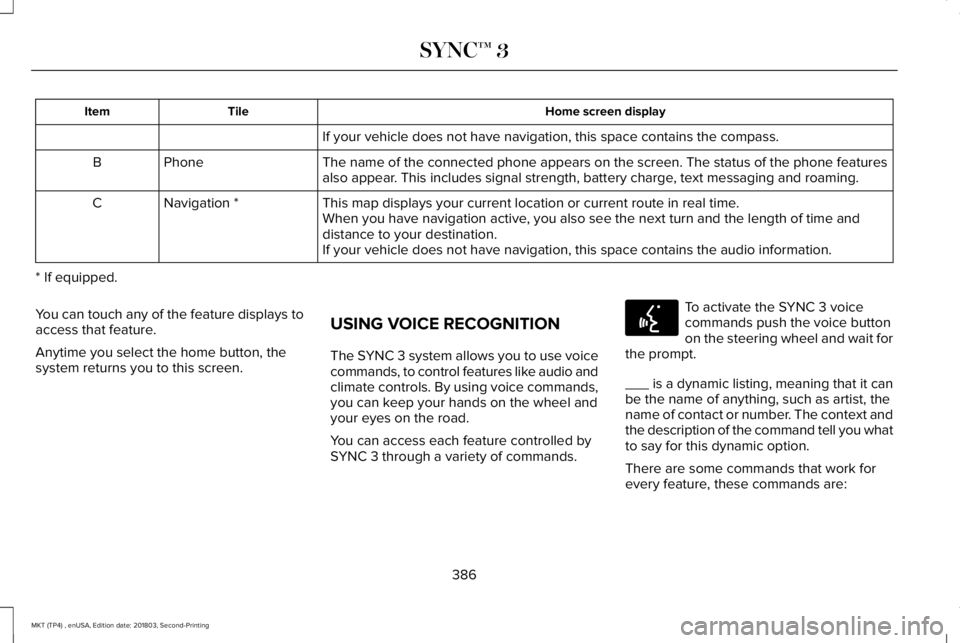
Home screen displayTileItem
If your vehicle does not have navigation, this space contains the compass.
The name of the connected phone appears on the screen. The status of the phone featuresalso appear. This includes signal strength, battery charge, text messaging and roaming.PhoneB
This map displays your current location or current route in real time.Navigation *CWhen you have navigation active, you also see the next turn and the length of time anddistance to your destination.If your vehicle does not have navigation, this space contains the audio information.
* If equipped.
You can touch any of the feature displays toaccess that feature.
Anytime you select the home button, thesystem returns you to this screen.
USING VOICE RECOGNITION
The SYNC 3 system allows you to use voicecommands, to control features like audio andclimate controls. By using voice commands,you can keep your hands on the wheel andyour eyes on the road.
You can access each feature controlled bySYNC 3 through a variety of commands.
To activate the SYNC 3 voicecommands push the voice buttonon the steering wheel and wait forthe prompt.
___ is a dynamic listing, meaning that it canbe the name of anything, such as artist, thename of contact or number. The context andthe description of the command tell you whatto say for this dynamic option.
There are some commands that work forevery feature, these commands are:
386
MKT (TP4) , enUSA, Edition date: 201803, Second-Printing
SYNC™ 3E142599
Page 392 of 575
DescriptionVoice command
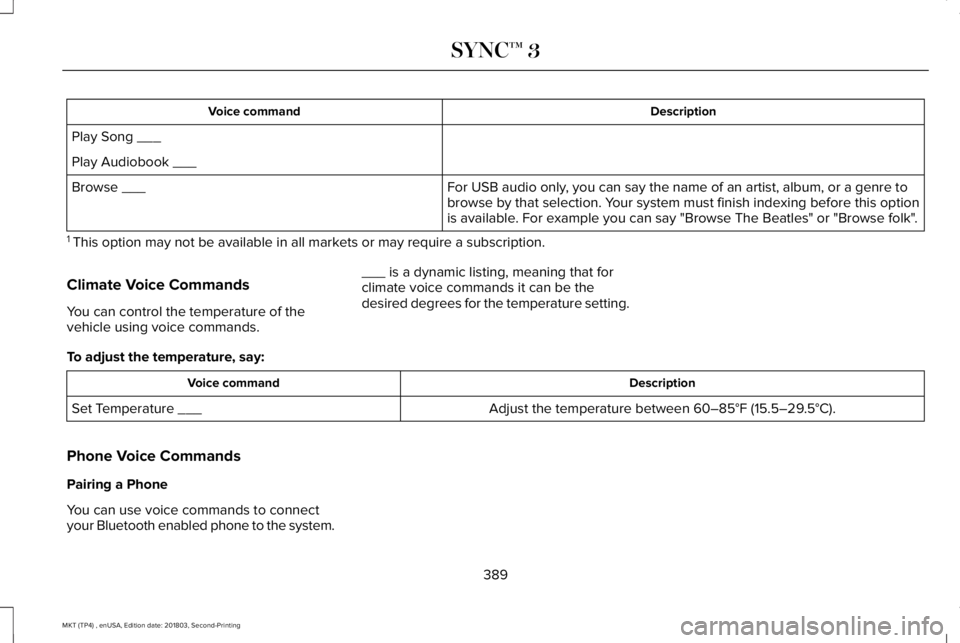
Play Song ___
Play Audiobook ___
For USB audio only, you can say the name of an artist, album, or a genre tobrowse by that selection. Your system must finish indexing before this optionis available. For example you can say "Browse The Beatles" or "Browse folk".
Browse ___
1 This option may not be available in all markets or may require a subscription.
Climate Voice Commands
You can control the temperature of thevehicle using voice commands.
___ is a dynamic listing, meaning that forclimate voice commands it can be thedesired degrees for the temperature setting.
To adjust the temperature, say:
DescriptionVoice command
Adjust the temperature between 60–85°F (15.5–29.5°C).Set Temperature ___
Phone Voice Commands
Pairing a Phone
You can use voice commands to connectyour Bluetooth enabled phone to the system.
389
MKT (TP4) , enUSA, Edition date: 201803, Second-Printing
SYNC™ 3
Page 399 of 575
DescriptionVoice command
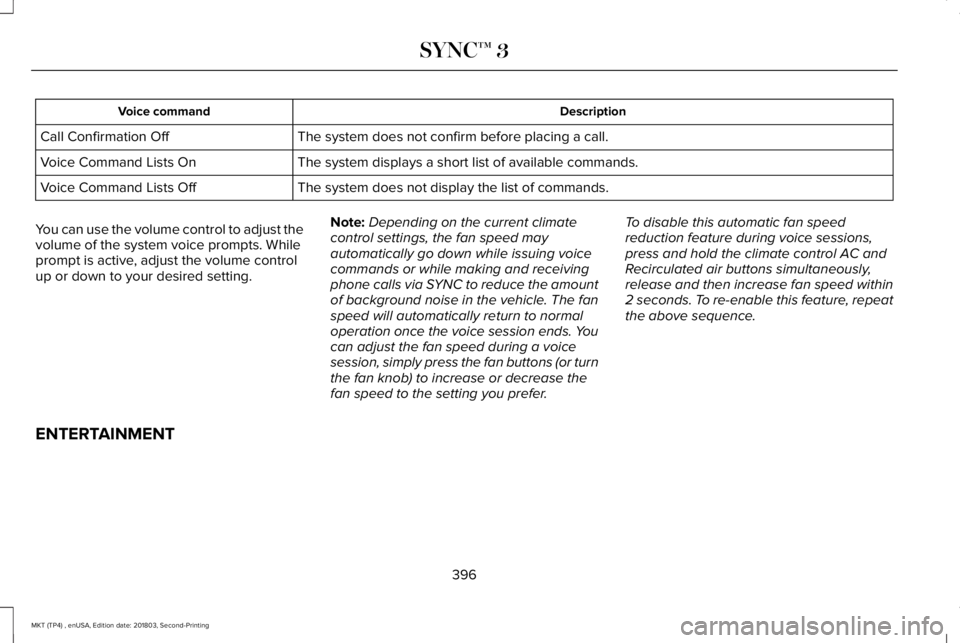
The system does not confirm before placing a call.Call Confirmation Off
The system displays a short list of available commands.Voice Command Lists On
The system does not display the list of commands.Voice Command Lists Off
You can use the volume control to adjust thevolume of the system voice prompts. Whileprompt is active, adjust the volume controlup or down to your desired setting.
Note:Depending on the current climatecontrol settings, the fan speed mayautomatically go down while issuing voicecommands or while making and receivingphone calls via SYNC to reduce the amountof background noise in the vehicle. The fanspeed will automatically return to normaloperation once the voice session ends. Youcan adjust the fan speed during a voicesession, simply press the fan buttons (or turnthe fan knob) to increase or decrease thefan speed to the setting you prefer.
To disable this automatic fan speedreduction feature during voice sessions,press and hold the climate control AC andRecirculated air buttons simultaneously,release and then increase fan speed within2 seconds. To re-enable this feature, repeatthe above sequence.
ENTERTAINMENT
396
MKT (TP4) , enUSA, Edition date: 201803, Second-Printing
SYNC™ 3