steering wheel LINCOLN MKT 2019 Owner's Manual
[x] Cancel search | Manufacturer: LINCOLN, Model Year: 2019, Model line: MKT, Model: LINCOLN MKT 2019Pages: 575, PDF Size: 4.66 MB
Page 188 of 575
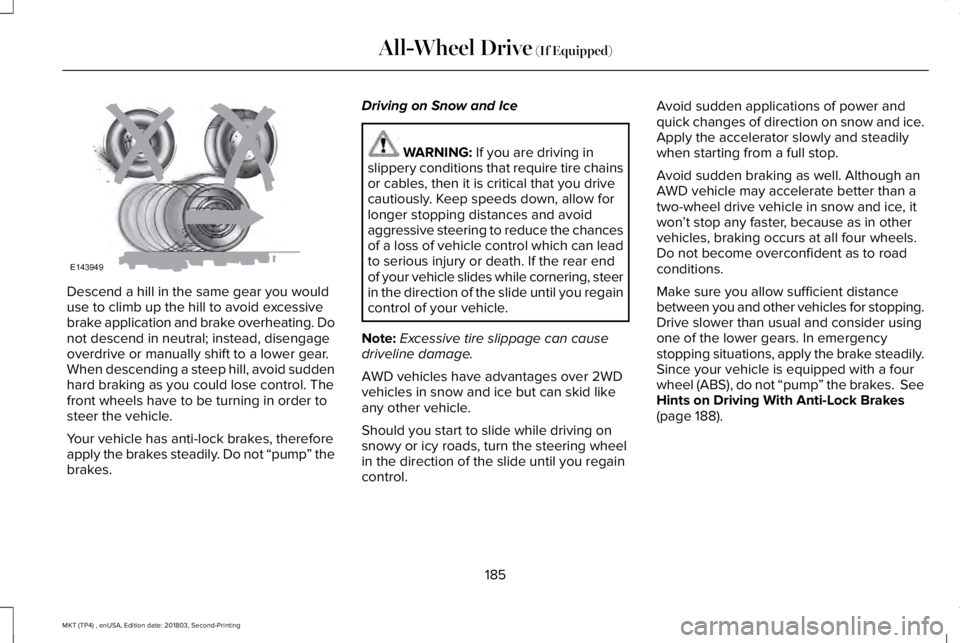
Descend a hill in the same gear you woulduse to climb up the hill to avoid excessivebrake application and brake overheating. Donot descend in neutral; instead, disengageoverdrive or manually shift to a lower gear.When descending a steep hill, avoid suddenhard braking as you could lose control. Thefront wheels have to be turning in order tosteer the vehicle.
Your vehicle has anti-lock brakes, thereforeapply the brakes steadily. Do not “pump” thebrakes.
Driving on Snow and Ice
WARNING: If you are driving inslippery conditions that require tire chainsor cables, then it is critical that you drivecautiously. Keep speeds down, allow forlonger stopping distances and avoidaggressive steering to reduce the chancesof a loss of vehicle control which can leadto serious injury or death. If the rear endof your vehicle slides while cornering, steerin the direction of the slide until you regaincontrol of your vehicle.
Note:Excessive tire slippage can causedriveline damage.
AWD vehicles have advantages over 2WDvehicles in snow and ice but can skid likeany other vehicle.
Should you start to slide while driving onsnowy or icy roads, turn the steering wheelin the direction of the slide until you regaincontrol.
Avoid sudden applications of power andquick changes of direction on snow and ice.Apply the accelerator slowly and steadilywhen starting from a full stop.
Avoid sudden braking as well. Although anAWD vehicle may accelerate better than atwo-wheel drive vehicle in snow and ice, itwon’t stop any faster, because as in othervehicles, braking occurs at all four wheels.Do not become overconfident as to roadconditions.
Make sure you allow sufficient distancebetween you and other vehicles for stopping.Drive slower than usual and consider usingone of the lower gears. In emergencystopping situations, apply the brake steadily.Since your vehicle is equipped with a fourwheel (ABS), do not “pump” the brakes. SeeHints on Driving With Anti-Lock Brakes(page 188).
185
MKT (TP4) , enUSA, Edition date: 201803, Second-Printing
All-Wheel Drive (If Equipped)E143949
Page 189 of 575
Maintenance and Modifications
The suspension and steering systems onyour vehicle have been designed and testedto provide predictable performance whetherloaded or empty and durable load carryingcapability. For this reason, Ford MotorCompany strongly recommends that you donot make modifications such as adding orremoving parts (such as lowering kits orstabilizer bars) or by using replacement partsnot equivalent to the original factoryequipment.
Any modifications to a vehicle that raise thecenter of gravity can make it more likely thevehicle will rollover as a result of a loss ofcontrol. Ford Motor Company recommendsthat caution be used with any vehicleequipped with a high load or device (suchas ladder or luggage racks).
Failure to maintain your vehicle properly mayvoid the warranty, increase your repair cost,reduce vehicle performance and operationalcapabilities and adversely affect driver andpassenger safety. Frequent inspection ofvehicle chassis components is recommendedif the vehicle is subjected to off-highwayusage.
186
MKT (TP4) , enUSA, Edition date: 201803, Second-Printing
All-Wheel Drive (If Equipped)
Page 190 of 575
GENERAL INFORMATION
Note: Occasional brake noise is normal. Ifa metal-to-metal, continuous grinding orcontinuous squeal sound is present, thebrake linings may be worn-out. Have thesystem checked by an authorized dealer. Ifyour vehicle has continuous vibration orshudder in the steering wheel while braking,have it checked by an authorized dealer.
Note:Brake dust may accumulate on thewheels, even under normal drivingconditions. Some dust is inevitable as thebrakes wear and does not contribute tobrake noise. See Cleaning the Wheels(page 310).
Note:Depending on applicable laws andregulations in the country for which yourvehicle was originally built, your brake lampsmay flash during heavy braking. Followingthis, your hazard lights may also flash whenyour vehicle comes to a stop.
See Warning Lamps andIndicators (page 101).
Wet brakes result in reduced brakingefficiency. Gently press the brake pedal afew times when driving from a car wash orstanding water to dry the brakes.
Brake Over Accelerator
In the event the accelerator pedal becomesstuck or entrapped, apply steady and firmpressure to the brake pedal to slow thevehicle and reduce engine power. If youexperience this condition, apply the brakesand bring your vehicle to a safe stop. Movethe transmission to park (P), switch theengine off and apply the parking brake.Inspect the accelerator pedal for anyinterference. If none are found and thecondition persists, have your vehicle towedto the nearest authorized dealer.
Brake Assist
Brake assist detects when you rapidly brakeby measuring the rate at which you press thebrake pedal. It provides maximum brakingefficiency as long as you press the pedal. Itcan also reduce stopping distances in criticalsituations.
Anti-lock Brake System
This system helps you maintain steeringcontrol during emergency stops by keepingthe brakes from locking.
If it illuminates when you aredriving, this indicates amalfunction. Your vehiclecontinues to have normal braking withoutthe anti-lock brake system function. Haveyour vehicle checked as soon as possible.
It also momentarily illuminates when youswitch the ignition on to confirm the lamp isfunctional. If it does not illuminate when youswitch the ignition on, or begins to flash atany time, have the system checked by anauthorized dealer.
187
MKT (TP4) , enUSA, Edition date: 201803, Second-Printing
BrakesE270480
Page 193 of 575
PRINCIPLE OF OPERATION
WARNING: Vehicle modificationsinvolving braking system, aftermarket roofracks, suspension, steering system, tireconstruction and wheel and tire size maychange the handling characteristics of yourvehicle and may adversely affect theperformance of the electronic stabilitycontrol system. In addition, installing anystereo loudspeakers may interfere withand adversely affect the electronic stabilitycontrol system. Install any aftermarketstereo loudspeaker as far as possible fromthe front center console, the tunnel, andthe front seats in order to minimize the riskof interfering with the electronic stabilitycontrol sensors. Reducing theeffectiveness of the electronic stabilitycontrol system could lead to an increasedrisk of loss of vehicle control, vehiclerollover, personal injury and death.
WARNING: Remember that evenadvanced technology cannot defy the lawsof physics. It’s always possible to losecontrol of a vehicle due to inappropriatedriver input for the conditions. Aggressivedriving on any road condition can causeyou to lose control of your vehicleincreasing the risk of personal injury orproperty damage. Activation of theelectronic stability control system is anindication that at least some of the tireshave exceeded their ability to grip theroad; this could reduce the operator’sability to control the vehicle potentiallyresulting in a loss of vehicle control, vehiclerollover, personal injury and death. If yourelectronic stability control system activates,SLOW DOWN.
The system automatically turns on each timeyou switch the ignition on.
If a fault occurs in either the stability controlor the traction control system, you mayexperience the following conditions:
•The stability and traction control lightilluminates steadily.
•The stability control and traction controlsystems do not enhance your vehicle'sability to maintain traction of the wheels.
If a driving condition activates either thestability control or the traction control systemyou may experience the following conditions:
•The stability and traction control lightflashes.
•Your vehicle slows down.
•Reduced engine power.
•A vibration in the brake pedal.
•The brake pedal is stiffer than usual.
•If the driving condition is severe and yourfoot is not on the brake, the brake pedalmay move as the system applies higherbrake force.
The stability control system has severalfeatures built into it to help you maintaincontrol of your vehicle:
190
MKT (TP4) , enUSA, Edition date: 201803, Second-Printing
Stability Control
Page 197 of 575
The system detects an available parallelparking space and automatically steers yourvehicle (hands-free) while you control theaccelerator, transmission and brakes. Thesystem visually and audibly guides you topark your vehicle.
If you are uncomfortable with the proximityto any vehicle or object, you may choose tooverride the system by grabbing the steeringwheel or pushing the active park assistbutton.
The system may not operate correctly in anyof the following conditions:
•You use a spare tire or a tire significantlyworn more than the other tires.
•One or more tires are improperly inflated.
•You try to park on a tight curve.
•Something passes between the frontbumper and the parking space. Forexample, a pedestrian or cyclist.
•The edge of the neighboring parkingvehicle is high off the ground. Forexample, a bus, tow truck or flatbedtruck.
•The weather conditions are poor. Forexample, during heavy rain, snow or fog.
Note: Keep the sensors, located on thefascia, free from now, ice and largeaccumulations of dirt. Covered sensors canaffect the systems accuracy. Do not cleanthe sensors with sharp objects.
Note:The sensors may not detect objectswith surfaces that absorb ultrasonic wavesor cause ultrasonic interference. Forexample, motorcycle exhaust, truck airbrakes or horns.
Note:Following a change in tire size, thesystem must recalibrate and operation maybe impaired for a short time.
Do not use the system if:
•You have attached a bike rack, trailer orother object near the sensors on the frontor rear of your vehicle.
•You have attached an overhangingobject to the roof. For example, asurfboard.
•A foreign object damages or obstructsthe sensors.
•The correct tire size is not in use. Forexample, when using a mini-spare tire.
Using Active Park Assist
Press the button to turn the systemon or off.
194
MKT (TP4) , enUSA, Edition date: 201803, Second-Printing
Parking AidsE146186
Page 199 of 575
Note:If driven above approximately 22 mph(35 km/h), the display screen shows amessage to alert you to reduce your vehiclespeed.
Automatic Steering into Parking Space
Note:If vehicle speed exceeds 6 mph(9 km/h) or the maneuver is interrupted, forexample driver input is detected, the systemswitches off and you need to take full controlof your vehicle.
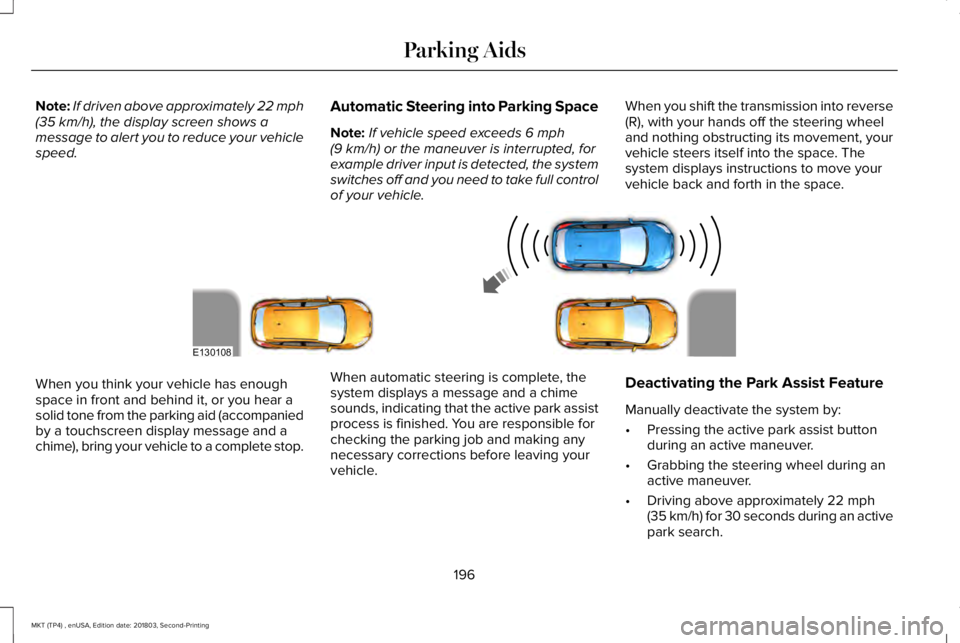
When you shift the transmission into reverse(R), with your hands off the steering wheeland nothing obstructing its movement, yourvehicle steers itself into the space. Thesystem displays instructions to move yourvehicle back and forth in the space.
When you think your vehicle has enoughspace in front and behind it, or you hear asolid tone from the parking aid (accompaniedby a touchscreen display message and achime), bring your vehicle to a complete stop.
When automatic steering is complete, thesystem displays a message and a chimesounds, indicating that the active park assistprocess is finished. You are responsible forchecking the parking job and making anynecessary corrections before leaving yourvehicle.
Deactivating the Park Assist Feature
Manually deactivate the system by:
•Pressing the active park assist buttonduring an active maneuver.
•Grabbing the steering wheel during anactive maneuver.
•Driving above approximately 22 mph(35 km/h) for 30 seconds during an activepark search.
196
MKT (TP4) , enUSA, Edition date: 201803, Second-Printing
Parking AidsE130108
Page 203 of 575
Note:When towing, the camera only seeswhat you are towing. This might not provideadequate coverage as it usually providesduring normal operation and some objectsmay not be seen. In some vehicles, theguidelines disappear when you connect thetrailer tow connector.
The camera may not operate correctly underthe following conditions:
•Nighttime or dark areas if one or bothreverse lamps are not operating.
•Mud, water or debris obstructs thecamera's view. Clean the lens with a soft,lint-free cloth and non-abrasive cleaner.
•The rear of your vehicle is hit ordamaged, causing the camera to becomemisaligned.
Active Guidelines (If Equipped)
Note:Active guidelines are only shown withfixed guidelines while your vehicle is inreverse (R).
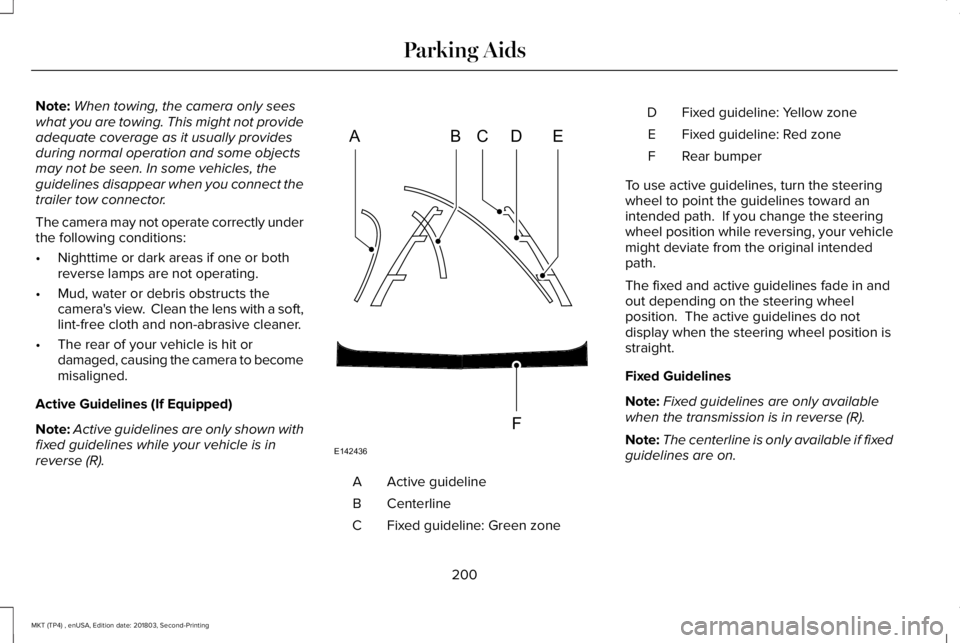
Active guidelineA
CenterlineB
Fixed guideline: Green zoneC
Fixed guideline: Yellow zoneD
Fixed guideline: Red zoneE
Rear bumperF
To use active guidelines, turn the steeringwheel to point the guidelines toward anintended path. If you change the steeringwheel position while reversing, your vehiclemight deviate from the original intendedpath.
The fixed and active guidelines fade in andout depending on the steering wheelposition. The active guidelines do notdisplay when the steering wheel position isstraight.
Fixed Guidelines
Note:Fixed guidelines are only availablewhen the transmission is in reverse (R).
Note:The centerline is only available if fixedguidelines are on.
200
MKT (TP4) , enUSA, Edition date: 201803, Second-Printing
Parking AidsABCD
F
E
E142436
Page 206 of 575
PRINCIPLE OF OPERATION
Cruise control lets you maintain a set speedwithout keeping your foot on the acceleratorpedal. You can use cruise control when yourvehicle speed is greater than 20 mph(30 km/h).
USING CRUISE CONTROL
WARNING: Do not use cruise controlon winding roads, in heavy traffic or whenthe road surface is slippery. This couldresult in loss of vehicle control, seriousinjury or death.
WARNING: When you are goingdownhill, your vehicle speed couldincrease above the set speed. The systemdoes not apply the brakes.
To help the system to maintain the set speedwhen going downhill, downshift to a lowergear.
Your vehicle speed could decrease belowthe set speed when driving uphill.
Note:The system cancels if your vehiclespeed drops below 10 mph (16 km/h) underthe set speed when driving uphill.
The cruise controls are on the steeringwheel. See Cruise Control (page 81).
Switching Cruise Control On
Press the toggle button upward.
The indicator appears in theinformation display.
Setting the Cruise Speed
Drive to the desired speed.
Press the toggle button upward ordownward to set the currentspeed.
Take your foot off the accelerator pedal.
Note:The indicator changes color.
Changing the Set Speed
Press the toggle button upward ordownward to increase or decreasethe set speed in small increments.
Press and hold up or down to accelerate ordecelerate, respectively. Release the buttonwhen you reach the desired speed.
Press the accelerator or brake pedal untilyou reach the desired speed. Press thetoggle button either direction.
Note: If you accelerate by pressing only theaccelerator pedal, the set speed does notchange. When you release the acceleratorpedal, your vehicle returns to the speed thatyou previously set.
203
MKT (TP4) , enUSA, Edition date: 201803, Second-Printing
Cruise ControlE265860 E265296 E71340 E265306 E265306
Page 208 of 575
WARNING: Adaptive cruise controlis not a crash warning or avoidancesystem.
Note:It is your responsibility to stay alert,drive safely and be in control of the vehicleat all times.
The system adjusts your vehicle speed tomaintain the set gap between you and thevehicle in front of you in the same lane. Youcan select four gap settings.
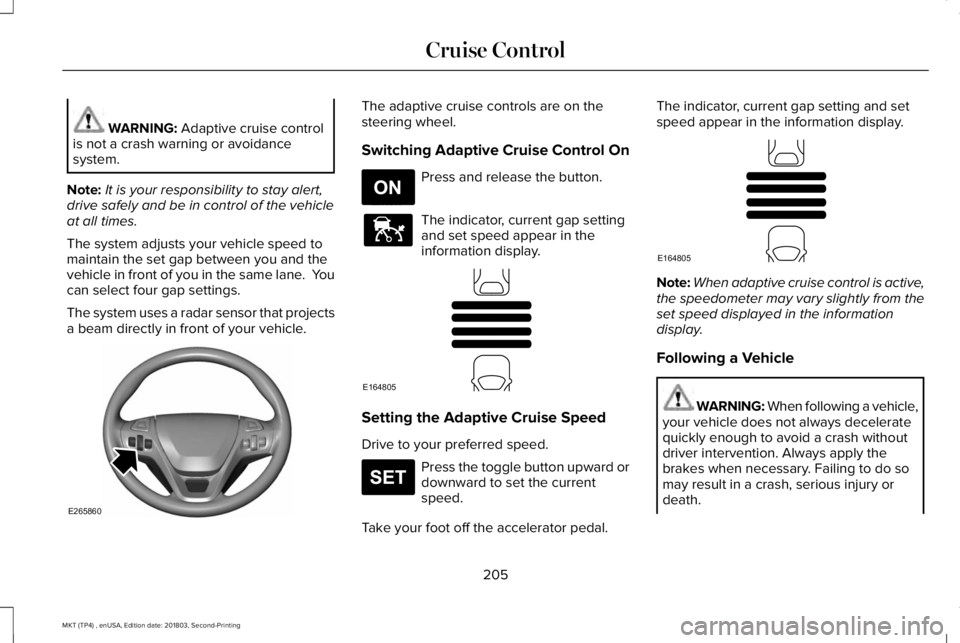
The system uses a radar sensor that projectsa beam directly in front of your vehicle.
The adaptive cruise controls are on thesteering wheel.
Switching Adaptive Cruise Control On
Press and release the button.
The indicator, current gap settingand set speed appear in theinformation display.
Setting the Adaptive Cruise Speed
Drive to your preferred speed.
Press the toggle button upward ordownward to set the currentspeed.
Take your foot off the accelerator pedal.
The indicator, current gap setting and setspeed appear in the information display.
Note:When adaptive cruise control is active,the speedometer may vary slightly from theset speed displayed in the informationdisplay.
Following a Vehicle
WARNING: When following a vehicle,your vehicle does not always deceleratequickly enough to avoid a crash withoutdriver intervention. Always apply thebrakes when necessary. Failing to do somay result in a crash, serious injury ordeath.
205
MKT (TP4) , enUSA, Edition date: 201803, Second-Printing
Cruise ControlE265860 E265296 E144529 E164805 E265306 E164805
Page 216 of 575
If the system detects that your drivingalertness is reduced below a certainthreshold, the system will alert you using achime and a message in the informationdisplay.
Using Driver Alert
Switching the system on and off
You may switch the system on or off throughthe information display. See GeneralInformation (page 105). When activated, thesystem will monitor your alertness levelbased upon your driving behavior in relationto the lane markings, and other factors.
System Warnings
Note:The system will not issue warningsbelow approximately 40 mph (64 km/h).
The warning system is in two stages. At firstthe system issues a temporary warning thatyou need to take a rest. This message willonly appear for a short time. If the systemdetects further reduction in driving alertness,another warning may be issued which willremain in the information display for a longertime. Press OK on the steering wheel controlto clear the warning.
System Display
When active the system will run automaticallyin the background and only issue a warningif required. You can view the status at anytime using the information display. SeeGeneral Information (page 105).
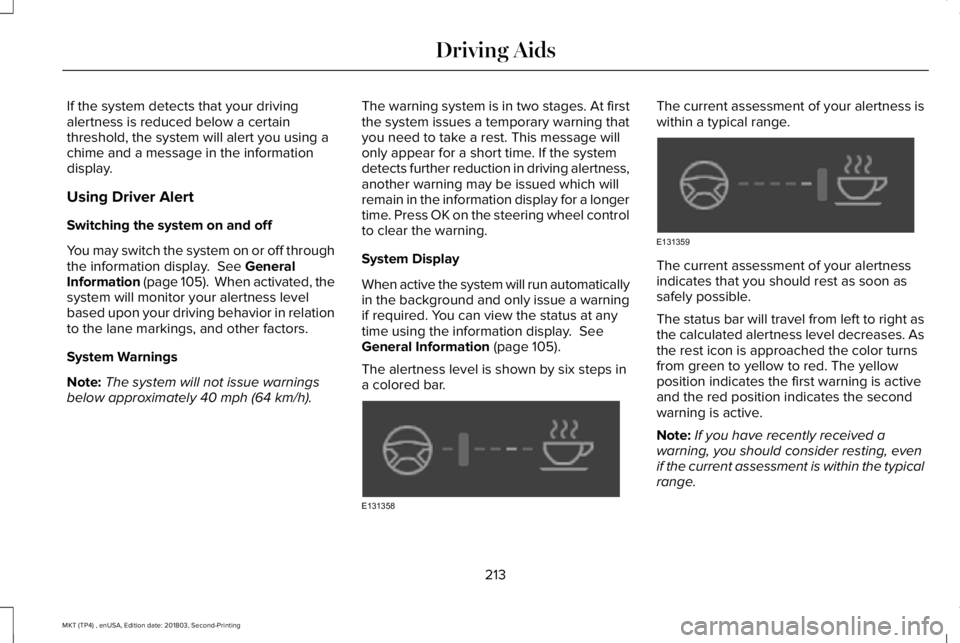
The alertness level is shown by six steps ina colored bar.
The current assessment of your alertness iswithin a typical range.
The current assessment of your alertnessindicates that you should rest as soon assafely possible.
The status bar will travel from left to right asthe calculated alertness level decreases. Asthe rest icon is approached the color turnsfrom green to yellow to red. The yellowposition indicates the first warning is activeand the red position indicates the secondwarning is active.
Note:If you have recently received awarning, you should consider resting, evenif the current assessment is within the typicalrange.
213
MKT (TP4) , enUSA, Edition date: 201803, Second-Printing
Driving AidsE131358 E131359